
You are using an out of date browser. It may not display this or other websites correctly.
You should upgrade or use an alternative browser.
You should upgrade or use an alternative browser.
Issues logging into Windows.
- Thread starter GilV37
- Start date

cottonball
Retired ol' hound...
GilV37,
Need the result from the MiniRegTool64. It has info regarding Registry entries.
Got a double dosage of the MiniToolBox report!!
Need the result from the MiniRegTool64. It has info regarding Registry entries.
Got a double dosage of the MiniToolBox report!!
My Computer
- Computer type
- PC/Desktop
- Computer Manufacturer/Model Number
- An ol' eMachines
- OS
- Windows 7 Home Premium
- Internet Speed
- Fine for me...I'm retired!
cottonball
Retired ol' hound...
GilV37,
We are still hoping to get to the root cause of your problem, and Windows Defender may be playing a part.
Try to run Windows Defender:
Go to Start > Control Panel > double-click: Windows Defender
Q #1. Can you open the program, or do you get an access or any kind of error? Please specify.
Next, please remove any copy of FRST64 or fixlist from your Desktop.
FRST64 was updated again. Please obtain the updated version: Farbar Recovery Scan Tool Download
Save to the Desktop.
Copy/paste the text inside the quote box to Notepad (Do not copy the word 'Quote')
In Notepad, click File (at the top), and select: Save As...
In the Save As... prompt, name the file fixlist.txt, and save it to the: Desktop
Run FRST64 and press the Fix button, just once, and wait.
When done, the tool makes a log on the Desktop: Fixlog.txt
Please save Fixlog.txt, and post it in your reply.
Once again, go to Start > Control Panel > double-click: Windows Defender
Q #2. Can you open the program?
After opening, please start and update WD. When done, close the program.
Restart the computer. <<---
Now, once again run Farbar Service Scanner with all options checked, and also post a new FSS log in you reply.
In your reply, please answer both questions, and post both reports (Fixlog and FSS).
Thanks for your patience.
We are still hoping to get to the root cause of your problem, and Windows Defender may be playing a part.
Try to run Windows Defender:
Go to Start > Control Panel > double-click: Windows Defender
Q #1. Can you open the program, or do you get an access or any kind of error? Please specify.
Next, please remove any copy of FRST64 or fixlist from your Desktop.
FRST64 was updated again. Please obtain the updated version: Farbar Recovery Scan Tool Download
Save to the Desktop.
Copy/paste the text inside the quote box to Notepad (Do not copy the word 'Quote')
Quote
start
deletejunctionsindirectory: c:\Program Files\Windows Defender
cmd: sc config SharedAccess start= disabled
end
In Notepad, click File (at the top), and select: Save As...
In the Save As... prompt, name the file fixlist.txt, and save it to the: Desktop
Run FRST64 and press the Fix button, just once, and wait.
When done, the tool makes a log on the Desktop: Fixlog.txt
Please save Fixlog.txt, and post it in your reply.
Once again, go to Start > Control Panel > double-click: Windows Defender
Q #2. Can you open the program?
After opening, please start and update WD. When done, close the program.
Restart the computer. <<---
Now, once again run Farbar Service Scanner with all options checked, and also post a new FSS log in you reply.
In your reply, please answer both questions, and post both reports (Fixlog and FSS).
Thanks for your patience.
My Computer
- Computer type
- PC/Desktop
- Computer Manufacturer/Model Number
- An ol' eMachines
- OS
- Windows 7 Home Premium
- Internet Speed
- Fine for me...I'm retired!
I tried opening up windows defender and got a message saying that i have no administrator access. After running FRST64 I was able to open windows defender. But tried to press the start button, i got an "access violation" error message. Attached are the two files requested. I thank you again for your help!!!
Attachments
My Computer
- Computer type
- PC/Desktop
- Computer Manufacturer/Model Number
- HP
- OS
- Windows 7 Home

cottonball
Retired ol' hound...
Did you restart the computer and try to Start WD once again? If not, please do so.
My Computer
- Computer type
- PC/Desktop
- Computer Manufacturer/Model Number
- An ol' eMachines
- OS
- Windows 7 Home Premium
- Internet Speed
- Fine for me...I'm retired!
cottonball
Retired ol' hound...
OK.
Need to go out for a while. Will be back o/a 8:00PM CST.
Need to go out for a while. Will be back o/a 8:00PM CST.
My Computer
- Computer type
- PC/Desktop
- Computer Manufacturer/Model Number
- An ol' eMachines
- OS
- Windows 7 Home Premium
- Internet Speed
- Fine for me...I'm retired!
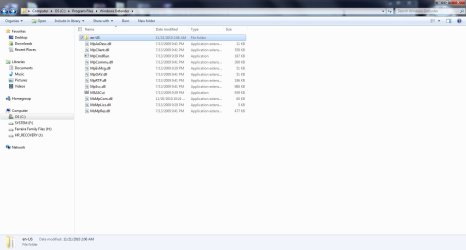
here's something... The message in windows defender reads "A Problem caused this program's service to stop..." I went into services and WD was set to disabled. Tried to start it and got an error The system cannot find the file specified. I Have attached a couple of snapshots to see if it will help you better.
Attachments

My Computer
- Computer type
- PC/Desktop
- Computer Manufacturer/Model Number
- HP
- OS
- Windows 7 Home

VistaKing
New member
GilV37
Do you have MSE installed ?
Do you have MSE installed ?
My Computer
- Computer Manufacturer/Model Number
- Custom Built
- OS
- Windows 7 Ultimate 32-Bit & Windows 7 Ultimate 64-Bit
- CPU
- Intel Core i7 CPU 950 @ 3.07GHz
- Motherboard
- ASUS P6T DELUXE V2
- Memory
- OCZ 6GB (3 x 2GB) 240-Pin DDR3 SDRAM DDR3 1600 OCZ3X1600R2
- Graphics Card(s)
- ATI Radeon HD 5700 Series
- Sound Card
- OnBoard
- Hard Drives
- WD6400AACS-00M3B0 (640GB SATA )
- PSU
- CORSAIR 850w
- Case
- NZXT LEXA
- Cooling
- Intel Stock Heatsink Fan
- Keyboard
- Microsoft Wireless Laser Keyboard 7000
- Mouse
- Microsoft Wireless Laser Mouse 7000
cottonball
Retired ol' hound...
Just does not make sense. All the files are there, as the capture shows.
Access is denied. (Error Code 0x80070005) normally occurs when an application or executable does not have the necessary elevation to invoke a specific action.
If you go to C:\Program Files\Windows Defender MSASCui.exe is there.
Please right-click MSASCui.exe and select: Run as Administrator
Does it start, or still get: Access is denied. (Error Code 0x80070005)?
If you get the error, try the following:
How to manually download the latest definition updates for Windows Defender
Go to: 64-bit versions of Windows
To download the Windows Defender definition update file for x64-based versions of Windows, click the following link:
http://go.microsoft.com/fwlink/?linkid=70632
Right-click mpas-feX64.exe, select Run as administrator, and then click: Run
If you can manually install the update definitions, the problem may be caused elsewhere.
Access is denied. (Error Code 0x80070005) normally occurs when an application or executable does not have the necessary elevation to invoke a specific action.
If you go to C:\Program Files\Windows Defender MSASCui.exe is there.
Please right-click MSASCui.exe and select: Run as Administrator
Does it start, or still get: Access is denied. (Error Code 0x80070005)?
If you get the error, try the following:
How to manually download the latest definition updates for Windows Defender
Go to: 64-bit versions of Windows
To download the Windows Defender definition update file for x64-based versions of Windows, click the following link:
http://go.microsoft.com/fwlink/?linkid=70632
Right-click mpas-feX64.exe, select Run as administrator, and then click: Run
If you can manually install the update definitions, the problem may be caused elsewhere.
My Computer
- Computer type
- PC/Desktop
- Computer Manufacturer/Model Number
- An ol' eMachines
- OS
- Windows 7 Home Premium
- Internet Speed
- Fine for me...I'm retired!
VistaKing
New member
GilV37
Did you get the Downloading issue fixed ?
Did you get the Downloading issue fixed ?
My Computer
- Computer Manufacturer/Model Number
- Custom Built
- OS
- Windows 7 Ultimate 32-Bit & Windows 7 Ultimate 64-Bit
- CPU
- Intel Core i7 CPU 950 @ 3.07GHz
- Motherboard
- ASUS P6T DELUXE V2
- Memory
- OCZ 6GB (3 x 2GB) 240-Pin DDR3 SDRAM DDR3 1600 OCZ3X1600R2
- Graphics Card(s)
- ATI Radeon HD 5700 Series
- Sound Card
- OnBoard
- Hard Drives
- WD6400AACS-00M3B0 (640GB SATA )
- PSU
- CORSAIR 850w
- Case
- NZXT LEXA
- Cooling
- Intel Stock Heatsink Fan
- Keyboard
- Microsoft Wireless Laser Keyboard 7000
- Mouse
- Microsoft Wireless Laser Mouse 7000
cottonball
Retired ol' hound...
GilV37,
When done, try starting WD using MSASCui.exe, or through services.msc
Post back on what happens.
Consulting with Security Tool Developer farbar, and providing him the captures.
Please hold off on any actions related to this matter for the time being, other than the ones already posted.
He is in The Netherlands, so right now he is probably getting some sleep.
When done, try starting WD using MSASCui.exe, or through services.msc
Post back on what happens.
Consulting with Security Tool Developer farbar, and providing him the captures.
Please hold off on any actions related to this matter for the time being, other than the ones already posted.
He is in The Netherlands, so right now he is probably getting some sleep.
My Computer
- Computer type
- PC/Desktop
- Computer Manufacturer/Model Number
- An ol' eMachines
- OS
- Windows 7 Home Premium
- Internet Speed
- Fine for me...I'm retired!
VistaKing
New member
cottonball
Can I have him use the MSE removal tool just to see if there are any left over files ?
MSE Removal Tool :ar:
Download
Can I have him use the MSE removal tool just to see if there are any left over files ?
MSE Removal Tool :ar:
Download
My Computer
- Computer Manufacturer/Model Number
- Custom Built
- OS
- Windows 7 Ultimate 32-Bit & Windows 7 Ultimate 64-Bit
- CPU
- Intel Core i7 CPU 950 @ 3.07GHz
- Motherboard
- ASUS P6T DELUXE V2
- Memory
- OCZ 6GB (3 x 2GB) 240-Pin DDR3 SDRAM DDR3 1600 OCZ3X1600R2
- Graphics Card(s)
- ATI Radeon HD 5700 Series
- Sound Card
- OnBoard
- Hard Drives
- WD6400AACS-00M3B0 (640GB SATA )
- PSU
- CORSAIR 850w
- Case
- NZXT LEXA
- Cooling
- Intel Stock Heatsink Fan
- Keyboard
- Microsoft Wireless Laser Keyboard 7000
- Mouse
- Microsoft Wireless Laser Mouse 7000
cottonball
Retired ol' hound...
@VistaKing:
Since GilV37 uninstalled it, go ahead.
Also, wasn't McAfee installed at some point also?
Wondering if there is anything lingering from it...
Since GilV37 uninstalled it, go ahead.
Also, wasn't McAfee installed at some point also?
Wondering if there is anything lingering from it...
My Computer
- Computer type
- PC/Desktop
- Computer Manufacturer/Model Number
- An ol' eMachines
- OS
- Windows 7 Home Premium
- Internet Speed
- Fine for me...I'm retired!