Issues when creating or copying large files in Win 7 Pro x64

cway

New member
Local time
10:42 PM
Messages
5
Hello Everyone,

First post here. I assembled a new pc back in September and decided to go with Windows 7 Professional 64-bit. I do my best to research problems before asking for help but this one has totally got me. I installed the free version of Macrium for imaging and I noticed early on that it could not successfully verify the images that I created. Everything else seemed to be working normally so I set the issue aside thinking it was just a software quirk. The system has experienced some bsod's but the vast majority of these went away after updating the driver for the onboard graphics.

I finally got around to reading the Macrium documentation about how the verification works and how to confirm the results and now I'm concerned about data integrity on this machine. Copying large files from the cmd line with the /v option throws an error, copying at the cmd line and running FC /B to compare the files yields inconsistent results, a comparison of the same two files will pass FC one time and fail the next. Memory passes the Windows memory test, I'm going to run memtest86 overnight to see if it finds anything. I have read where there are some Win 7 64 issues copying large files to external usb drives but my drives are internal sata drives.

The system includes the following, nothing has ever been overclocked. The only tweaks were ssd optimizations such as turning off restore. Any suggestions or ideas would be greatly appreciated, i'm just about ready to start swapping hardware.

ASUS P8Z77-V LK (Bios Revision 0908)
Intel I7 3770K
Onboard GPU
Windows 7 Professional 64-bit SP1
8GB (2 x 4) Corsair XMS3 DDR3 (CMX8GX3M2B1600C9)
Samsung 830 SSD
WD Caviar Black 2TB
Plextor PX-L890SA
Corsair HX750
 

My Computer My Computer

At a glance

Windows 7 Professional x64
OS
Windows 7 Professional x64
Hello cway and welcome to Seven Forums.

Apparently the copying of large files has been an ongoing problem. A quick Google search showed numerous issues ranging from slowdowns to complete freezes. Two possible solutions involve TCP auto-tuning or using a third party tool like TeraCopy.

Problem copying large files

I'm not sure how, or if, this relates to Macrium.
 

My Computer My Computer

At a glance

Win 7 Pro 64-bitIntel i5 2.4 Ghz8GB DDR3Intel HD 3000
Computer type
Laptop
Computer Manufacturer/Model Number
Sony Vaio VPCEB47GM Laptop
OS
Win 7 Pro 64-bit
CPU
Intel i5 2.4 Ghz
Memory
8GB DDR3
Graphics Card(s)
Intel HD 3000
Sound Card
IDT High Definition
Monitor(s) Displays
15.6 WGXA Anti-Glare LED
Screen Resolution
1280x800
Hard Drives
640Gb 7200rpm
Antivirus
MSE
Browser
Opera (primary) with IE9 backup
Thank you for your reply,

I have followed the forum for some time and have really learned a lot from everyone here, it's a great place to learn. This is an odd issue though, most things that I find online concern copying large files to or from external usb drives or over a network. My testing is primarily on internal sata drives, a Samsung 830 ssd and a wd caviar black 2tb. Most of my large files (over 1gb) are mpg's from my pvr, funny thing is they all still seem to work properly. I'm beginning to wonder if the problem isn't with the create or copy but with generating the hash that I believe is used to verify the files. It's almost like, if the machine has a problem this serious why isn't it crashing or why am I not finding files that no longer work? I am going to let memtest86 run overnight and see if that provides any clues. I may just replace the memory and see if that helps. I will post what I find. Thank you again for taking the time to reply.

Curtis
 

My Computer My Computer

At a glance

Windows 7 Professional x64
OS
Windows 7 Professional x64
You may be on to something. Be interesting to learn what you find out.
 

My Computer My Computer

At a glance

Win 7 Pro 64-bitIntel i5 2.4 Ghz8GB DDR3Intel HD 3000
Computer type
Laptop
Computer Manufacturer/Model Number
Sony Vaio VPCEB47GM Laptop
OS
Win 7 Pro 64-bit
CPU
Intel i5 2.4 Ghz
Memory
8GB DDR3
Graphics Card(s)
Intel HD 3000
Sound Card
IDT High Definition
Monitor(s) Displays
15.6 WGXA Anti-Glare LED
Screen Resolution
1280x800
Hard Drives
640Gb 7200rpm
Antivirus
MSE
Browser
Opera (primary) with IE9 backup
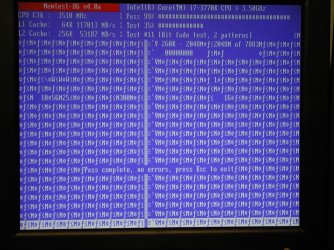
Allowed Memtest86 to run overnight. I checked on it after a little over seven hours and it was running fine and showing zero errors. When I checked it again four hours later something had happened but I'm not sure how to interpret it. Please see the attachment and let me know thoughts on it. Thank you.

Curtis
 

Attachments

  • DSCN3271.jpg
    DSCN3271.jpg
    437.1 KB · Views: 14

My Computer My Computer

At a glance

Windows 7 Professional x64
OS
Windows 7 Professional x64
Is memory even involved when copying a file directly from a drive to a drive or partition to partition ?

A have copied large movie files, 50 gigs, and never had an issue.
 

My Computer My Computer

At a glance

Windows 10 Pro x64Intel Core i7 6700KGSkill TridentZ RGB 16GB 3600 16-16-16-36EVGA GTX 980 Ti SC x2
Computer type
PC/Desktop
Computer Manufacturer/Model Number
Skylake Special #666
OS
Windows 10 Pro x64
CPU
Intel Core i7 6700K
Motherboard
Asus Sabertooth Z170 Mark 1
Memory
GSkill TridentZ RGB 16GB 3600 16-16-16-36
Graphics Card(s)
EVGA GTX 980 Ti SC x2
Sound Card
Realtek High Definition
Monitor(s) Displays
AOC G2460PG
Screen Resolution
1920 x 1080 144Hz
Hard Drives
Samsung 860 Pro 256GB, Seagate Barracuda 4TB x2
PSU
EVGA 1000 P2, EVGA White Custom Braided Cables
Case
Corsair Vengeance C70 Gunmetal Black
Cooling
Corsair H100i v2, Corsair ML120 x2, Thermal Grizzly Kryonaut
Keyboard
Logitech G910 Orion Spectrum
Mouse
Logitech G700s
Internet Speed
Verizon Fios Quantum Gateway 75/75
Antivirus
Windows Defender, Malwarebytes Free 3.8.3
Browser
Chrome
Other Info
Corsair SP120 x4, LG Blu-ray Drive, Durabrand HT-395 100 Watt Dolby Digital Amp, Corsair H2100 Wireless 7.1 Headset
Is memory even involved when copying a file directly from a drive to a drive or partition to partition ?

A have copied large movie files, 50 gigs, and never had an issue.
Likewise, I have zipped up a bunch of virtual machines 46 gb and had no problem on 64 bit Windows 7. All my images are from Macrium and end up on an images drive on this machine copied across the network from the other machines 32 and 64 bit Windows 7.
1 of the images from my other PC is 92 gb (ouch) and that was copied with no apparent problems?
 

My Computer My Computer

At a glance

Windows 7 x64 Ultimate and numerous virtual m...AMD FX-8350 Vishera 32nm Technology @ 4.2 GHz...G Skill 32.0GB Dual-Channel DDR3 @ 1204MHz (1...EVGA GeForce GTX 960 4GB Super SC ACX 2.0+ wi...
Computer type
PC/Desktop
Computer Manufacturer/Model Number
Bluethunder II
OS
Windows 7 x64 Ultimate and numerous virtual machines
CPU
AMD FX-8350 Vishera 32nm Technology @ 4.2 GHz default
Motherboard
ASUSTeK COMPUTER INC. SABERTOOTH 990FX R2.0 (Socket 942)
Memory
G Skill 32.0GB Dual-Channel DDR3 @ 1204MHz (11-13-13-31)
Graphics Card(s)
EVGA GeForce GTX 960 4GB Super SC ACX 2.0+ with Back Plate
Sound Card
Creative X-Fi Titanium HD Audiophile PCIe
Monitor(s) Displays
LG L227WTG x 3
Screen Resolution
1680 x 1050 16:10
Hard Drives
238GB Samsung850 PRO SATA Disk Device (SSD)
1863GB Seagate ST2000DM 001-1CH164 (SATA)
1397GB Seagate ST1500DL 003-9VT16L(SATA)
466GB Western Digital WDC WD50 03AZEX-00K1GA0 (SATA) x 2
932GB Seagate ST310005 28AS SATA Disk Device (SATA)
PSU
Enermax Revolution87+ 1000 Watts Gold Certified Power Supply
Case
Rocketfish Full Tower
Cooling
Cooler Master Hyper 212 EVO Push Pull 120mm Fans
Keyboard
Logitech K740
Mouse
Logitech G100S Laser LED + Logitech Gamepad F310
Internet Speed
500 mbs down and 30mbs up
Antivirus
Malwarebytes Pro & Avast and MSE on certain Virtual Machines
Browser
Firefox (Main) Chrome, Internet Explorer (Back Up)
Other Info
Logitech X 230 2.1 Stereo System and 5.1 Yamaha RX V2090
B&W DM6 Monitor Speakers + Center and Surround Speakers
Using Mouse Without Borders (Google it)
Allowed Memtest86 to run overnight. I checked on it after a little over seven hours and it was running fine and showing zero errors. When I checked it again four hours later something had happened but I'm not sure how to interpret it. Please see the attachment and let me know thoughts on it. Thank you.

Curtis
Are the SATA cables off good quality and if the SSD supports 6GBs do the cables? If you had cables rated at 3GB max that MAY cause a weird issue like this due to the cable not having a high enough frequency response to the higher data rate. Sounds hogwash but why would they rate cables otherwise?? I know they are supposed to downshift to the lower rate but what if it did not.
 
Last edited:

My Computer My Computer

At a glance

Windows 7 x64 Ultimate and numerous virtual m...AMD FX-8350 Vishera 32nm Technology @ 4.2 GHz...G Skill 32.0GB Dual-Channel DDR3 @ 1204MHz (1...EVGA GeForce GTX 960 4GB Super SC ACX 2.0+ wi...
Computer type
PC/Desktop
Computer Manufacturer/Model Number
Bluethunder II
OS
Windows 7 x64 Ultimate and numerous virtual machines
CPU
AMD FX-8350 Vishera 32nm Technology @ 4.2 GHz default
Motherboard
ASUSTeK COMPUTER INC. SABERTOOTH 990FX R2.0 (Socket 942)
Memory
G Skill 32.0GB Dual-Channel DDR3 @ 1204MHz (11-13-13-31)
Graphics Card(s)
EVGA GeForce GTX 960 4GB Super SC ACX 2.0+ with Back Plate
Sound Card
Creative X-Fi Titanium HD Audiophile PCIe
Monitor(s) Displays
LG L227WTG x 3
Screen Resolution
1680 x 1050 16:10
Hard Drives
238GB Samsung850 PRO SATA Disk Device (SSD)
1863GB Seagate ST2000DM 001-1CH164 (SATA)
1397GB Seagate ST1500DL 003-9VT16L(SATA)
466GB Western Digital WDC WD50 03AZEX-00K1GA0 (SATA) x 2
932GB Seagate ST310005 28AS SATA Disk Device (SATA)
PSU
Enermax Revolution87+ 1000 Watts Gold Certified Power Supply
Case
Rocketfish Full Tower
Cooling
Cooler Master Hyper 212 EVO Push Pull 120mm Fans
Keyboard
Logitech K740
Mouse
Logitech G100S Laser LED + Logitech Gamepad F310
Internet Speed
500 mbs down and 30mbs up
Antivirus
Malwarebytes Pro & Avast and MSE on certain Virtual Machines
Browser
Firefox (Main) Chrome, Internet Explorer (Back Up)
Other Info
Logitech X 230 2.1 Stereo System and 5.1 Yamaha RX V2090
B&W DM6 Monitor Speakers + Center and Surround Speakers
Using Mouse Without Borders (Google it)
Thanks, that is a good point, this is my first experience with sata drives. The sata cables are the ones included with the motherboard (Asus P8Z77-V LK) and are advertised as 6Gbs.
 

My Computer My Computer

At a glance

Windows 7 Professional x64
OS
Windows 7 Professional x64
Another test...

This morning I used Macrium to create an image of the C: drive (Samsung 830) onto an external usb hard drive. I then moved the external hard drive to an older pc (Dell GX240 running XP Pro). The copy of Macrium installed on the Dell had no issue verifying my image, I ran verification twice and it passed both times. I am beginning to wonder if this is an issue with Macrium or with Windows 7 64 itself. Here's an excerpt from the Macrium Knowledge base (Understanding Image Verification Failures (Verification))...

"When an image is created each block of data (generally 64K but may be larger depending on the partition size) has an MD5 hash created after it is read from the disk and before it is written to the image file. This hash value is saved in the index of the image file. When the file is read back the hash value is recalculated and compared with the original hash in the index. Any discrepancy between the two values indicates that the image file is corrupt or cannot be read back reliably."

If I am understanding this correctly, the verification process reads each individual block within the image file, calculates the MD5 hash and compares it with the original MD5 hash that is stored within the index section of the image file. So if this is how it works it makes it look like Win 7 64 was able to calculate the MD5 from the original file correctly during the imaging process but for some reason cannot create a corresponding MD5 during the verification.

I'm not ruling hardware out yet but am keeping an open mind and looking for clues. My thanks to those who have replied and thanks in advance to anyone who can shed further light on this issue!
 

My Computer My Computer

At a glance

Windows 7 Professional x64
OS
Windows 7 Professional x64
Back
Top