Issues with desktop background slideshow

eft890

New member
Local time
5:04 PM
Messages
17
So far, I've tried creating a desktop background slideshow on this laptop to no avail. After selecting all the photos and clicking "save changes" the desktop changes to a random image from the list and acts as if I only selected 1 image for the desktop background.

So, I tried creating a .themepack on another windows 7 system with the same images, etc. I copied it onto a flash drive and copied it back onto this system and applied the theme pack. Same thing happens, themepack remains saved, but the effect's are transferred to the "Unsaved Theme" and only have 1 image for desktop background.

Slideshow is on under power settings so I don't know where to go from here.

Help?
 

My Computer

OS
Windows 7 Ultimate
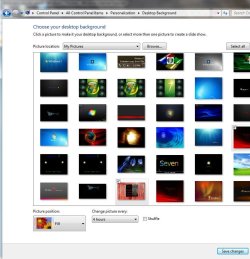
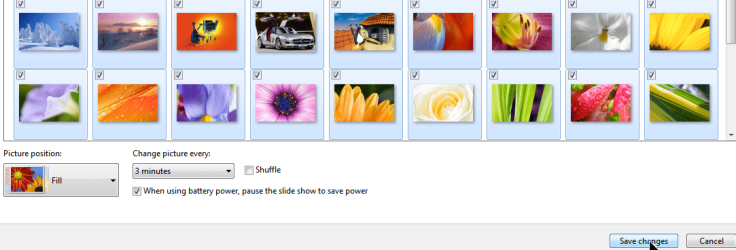
Do you have Shuffle unchecked ? & what time have you selected to change the intervals of the slideshow?
 

Attachments

  • desktop_Background.JPG
    desktop_Background.JPG
    97.2 KB · Views: 76

My Computer

Computer type
PC/Desktop
Computer Manufacturer/Model Number
Built them myself, Science Experiments !
OS
Win7 Enterprise, Win7 x86 (Ult 7600), Win7 x64 Ult 7600, TechNet RTM on AMD x64 (2.8Ghz)
CPU
AMD fx8350 4ghz, AMD-32 2400mhz, AMD-64 3200mhz, AMDx64 2.8G
Motherboard
SIS 755, ECS-K8M890M-M (Ult 7600), GigaByte & others
Memory
2gb, 4gb on the Ult 7600, 4gb on Technet RTM, 32gb on FX8350
Graphics Card(s)
Draw my own Graphics, several nVidia cards
Sound Card
on motherboard
Monitor(s) Displays
19" flat scr, 28" I-Inc widescr,22" Emprex Widescr, 23" Acer
Screen Resolution
1280 x 1024, 1440 x 900, 1920 x 1080
Hard Drives
6 pata Ide HD's & 2 Sata HD's
added 80gb external on Ult 7600 computer,
numerous extra 1tb, 2TB, 3Tb SATA HD's
A collection of ext HD Docks w/ HDs
PSU
430w, 550w, 600w, 700, 800, etc
Case
All Generic Full Towers
Cooling
Open Air & a few fans, some w/ colored LEDs
Keyboard
Compaq & Dell recycled from GoodWill
Mouse
Made in China Optical Wired Mouse
Internet Speed
Fast Cable InterNet
Antivirus
AVG Free on 24 different Desktops, NO Problems!
Browser
IE 8 is preferred, but use FireFox sometimes
Other Info
Linksys Routers, switches, & Hubs
Too Many USB Flash Drives to count, Biggest is 64GB !
Eight computers in my home network.
Sixteen computers at my business network.
Linked via TeamViewer !
Lots of old used spare computer parts everywhere!

My Computer

Computer type
PC/Desktop
Computer Manufacturer/Model Number
Self Built
OS
Win 10 Pro x64
CPU
Intel I5-2500K @3.3GHz
Motherboard
Asrock P67 Extreme4
Memory
16GB G.Skill Ripjaws X (4x4GB)
Graphics Card(s)
EVGA GeForce 750 Ti SC 2GB
Sound Card
ASUS Xonar DG 5.1 Channels 24-bit 96KHz PCI Interface Sound
Monitor(s) Displays
auria eq2367
Screen Resolution
1920 x 1080
Hard Drives
250GB Samsung 850 EVO SSD
1TB WD Blue
1TB Hitachi
PSU
SeaSonic X 650W 80 Plus Gold
Case
Corsair Obsidian 750D
Cooling
Corsair H60, Three 140mm case fans
Keyboard
Logitech Wireless Keyboard K520
Mouse
Logitech Wireless Mouse M310
Internet Speed
Wave Broadband ~ 100 dn 5 up
Antivirus
Windows Defender, Malwarebytes Premium
Browser
Edge, IE11, Chrome
Other Info
Laptop specs: HP g7-1365dx /
CPU: AMD A6-3420M APU with Radeon(tm) HD Graphics /
RAM: Crucial 8Gb (2x4Gb) /
SSD: Crucial M4-CT128M4SSD2 ATA Device/ FW 000F /
GFX: AMD Radeon HD 6520G /
OS: Windows 10 Pro x64
Yeah, I have all the pictures I wanted to use selected (with the checkboxes marked). Currently, I have the time interval set at 30 minutes and shuffle was on. I tried turning shuffle off and the same thing happens.
 

My Computer

OS
Windows 7 Ultimate
Be sure to click on "Save changes"
 

Attachments

  • savethemechanges.png
    savethemechanges.png
    183.8 KB · Views: 39

My Computer

Computer Manufacturer/Model Number
Toshiba Satellite S875D-S7239 laptop
OS
MS Windows 7 Ultimate SP1 64-bit
CPU
AMD A10-4600M
Motherboard
AMD Pumori (Socket FT1)
Memory
6.00 GB Dual-Channel DDR3 @ 798MHz (11-11-12-28)
Graphics Card(s)
AMD Radeon HD 7660G
Sound Card
High Definition Audio Device
Monitor(s) Displays
Generic PnP Monitor (1600x900@60Hz)
Screen Resolution
1600x900@60Hz
Hard Drives
SSD 119GB Corsair CSSD-V128GB2 ATA Device
Keyboard
Standard PS/2 Keyboard
Mouse
HP Wireless Optical Mobile Mouse Model FHA-3410
Internet Speed
What the local pub, local coffee shop offers.
Other Info
Optical Drive:MATSHITA BD-CMB UJ160B ATA Device


Also have an Asus ha1002xp netbook with Win 7 Ultimate installed.
Do you have an Aero theme enabled ?
 

My Computer

Computer type
PC/Desktop
Computer Manufacturer/Model Number
Built them myself, Science Experiments !
OS
Win7 Enterprise, Win7 x86 (Ult 7600), Win7 x64 Ult 7600, TechNet RTM on AMD x64 (2.8Ghz)
CPU
AMD fx8350 4ghz, AMD-32 2400mhz, AMD-64 3200mhz, AMDx64 2.8G
Motherboard
SIS 755, ECS-K8M890M-M (Ult 7600), GigaByte & others
Memory
2gb, 4gb on the Ult 7600, 4gb on Technet RTM, 32gb on FX8350
Graphics Card(s)
Draw my own Graphics, several nVidia cards
Sound Card
on motherboard
Monitor(s) Displays
19" flat scr, 28" I-Inc widescr,22" Emprex Widescr, 23" Acer
Screen Resolution
1280 x 1024, 1440 x 900, 1920 x 1080
Hard Drives
6 pata Ide HD's & 2 Sata HD's
added 80gb external on Ult 7600 computer,
numerous extra 1tb, 2TB, 3Tb SATA HD's
A collection of ext HD Docks w/ HDs
PSU
430w, 550w, 600w, 700, 800, etc
Case
All Generic Full Towers
Cooling
Open Air & a few fans, some w/ colored LEDs
Keyboard
Compaq & Dell recycled from GoodWill
Mouse
Made in China Optical Wired Mouse
Internet Speed
Fast Cable InterNet
Antivirus
AVG Free on 24 different Desktops, NO Problems!
Browser
IE 8 is preferred, but use FireFox sometimes
Other Info
Linksys Routers, switches, & Hubs
Too Many USB Flash Drives to count, Biggest is 64GB !
Eight computers in my home network.
Sixteen computers at my business network.
Linked via TeamViewer !
Lots of old used spare computer parts everywhere!
So far, I've tried creating a desktop background slideshow on this laptop to no avail. After selecting all the photos and clicking "save changes" the desktop changes to a random image from the list and acts as if I only selected 1 image for the desktop background.

So, I tried creating a .themepack on another windows 7 system with the same images, etc. I copied it onto a flash drive and copied it back onto this system and applied the theme pack. Same thing happens, themepack remains saved, but the effect's are transferred to the "Unsaved Theme" and only have 1 image for desktop background.

Slideshow is on under power settings so I don't know where to go from here.

Help?
Make sure each of the photos is checked, and you click save changes. Make sure the slideshow is selected as well
 

My Computer

Computer Manufacturer/Model Number
HP dv7
OS
Windows 7 Home Premium x64
Memory
4GB RAM
Graphics Card(s)
ATI
Hard Drives
500 GB
So far, I've tried creating a desktop background slideshow on this laptop to no avail. After selecting all the photos and clicking "save changes" the desktop changes to a random image from the list and acts as if I only selected 1 image for the desktop background.

So, I tried creating a .themepack on another windows 7 system with the same images, etc. I copied it onto a flash drive and copied it back onto this system and applied the theme pack. Same thing happens, themepack remains saved, but the effect's are transferred to the "Unsaved Theme" and only have 1 image for desktop background.

Slideshow is on under power settings so I don't know where to go from here.

Help?
Make sure each of the photos is checked, and you click save changes. Make sure the slideshow is selected as well

yeah, that's what i've been doing, except right after I save the changes, it picks one picture from there and names it ACTIVE~1 under desktop background.
 

My Computer

OS
Windows 7 Ultimate
hmm... Thats odd, haven't seen that before.
 

My Computer

Computer Manufacturer/Model Number
HP dv7
OS
Windows 7 Home Premium x64
Memory
4GB RAM
Graphics Card(s)
ATI
Hard Drives
500 GB
yeah, I've got no ideas on how to fix this one
 

My Computer

OS
Windows 7 Ultimate

Attachments

  • Desktop_slideshow_setup.JPG
    Desktop_slideshow_setup.JPG
    96.5 KB · Views: 42

My Computer

Computer type
PC/Desktop
Computer Manufacturer/Model Number
Built them myself, Science Experiments !
OS
Win7 Enterprise, Win7 x86 (Ult 7600), Win7 x64 Ult 7600, TechNet RTM on AMD x64 (2.8Ghz)
CPU
AMD fx8350 4ghz, AMD-32 2400mhz, AMD-64 3200mhz, AMDx64 2.8G
Motherboard
SIS 755, ECS-K8M890M-M (Ult 7600), GigaByte & others
Memory
2gb, 4gb on the Ult 7600, 4gb on Technet RTM, 32gb on FX8350
Graphics Card(s)
Draw my own Graphics, several nVidia cards
Sound Card
on motherboard
Monitor(s) Displays
19" flat scr, 28" I-Inc widescr,22" Emprex Widescr, 23" Acer
Screen Resolution
1280 x 1024, 1440 x 900, 1920 x 1080
Hard Drives
6 pata Ide HD's & 2 Sata HD's
added 80gb external on Ult 7600 computer,
numerous extra 1tb, 2TB, 3Tb SATA HD's
A collection of ext HD Docks w/ HDs
PSU
430w, 550w, 600w, 700, 800, etc
Case
All Generic Full Towers
Cooling
Open Air & a few fans, some w/ colored LEDs
Keyboard
Compaq & Dell recycled from GoodWill
Mouse
Made in China Optical Wired Mouse
Internet Speed
Fast Cable InterNet
Antivirus
AVG Free on 24 different Desktops, NO Problems!
Browser
IE 8 is preferred, but use FireFox sometimes
Other Info
Linksys Routers, switches, & Hubs
Too Many USB Flash Drives to count, Biggest is 64GB !
Eight computers in my home network.
Sixteen computers at my business network.
Linked via TeamViewer !
Lots of old used spare computer parts everywhere!
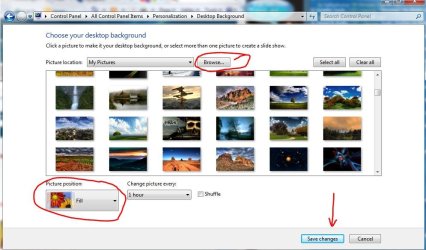
Here is an explanation I did for somebody else earlier today, but they have not posted again.

http://www.sevenforums.com/customization/49253-windows-7-wallpaper.html#post628270

We are missing some little detail :confused:

Have you Browsed other folders on your computer to test if it may work in another folder ?

Can you give us any screen snips with the Snipping Tool ?

selection.png

this is the personalization window, where I'm selecting images from a different folder than I was using before. All settings are correct and I hit save changes.

postselect.png

Slideshow stays for about 5 seconds and then it reverts to ACTIVE~1 and when I go to edit the same theme, the current background image is listed in the "Desktop" folder as if it had made a copy to the desktop.
 

My Computer

OS
Windows 7 Ultimate
WIN! Apparently, Active Desktop Calendar for some reason messes with you desktop background, and it kept setting the random picture from the slideshow to the "active" background. I have uninstalled the program, and the slideshow stays.

Could someone mark this as solved?
 

My Computer

OS
Windows 7 Ultimate
Congrats eft890 :thumbsup:

Just click on the red triangle in the upper right corner to report solved ;)
 

My Computer

Computer type
PC/Desktop
Computer Manufacturer/Model Number
Built them myself, Science Experiments !
OS
Win7 Enterprise, Win7 x86 (Ult 7600), Win7 x64 Ult 7600, TechNet RTM on AMD x64 (2.8Ghz)
CPU
AMD fx8350 4ghz, AMD-32 2400mhz, AMD-64 3200mhz, AMDx64 2.8G
Motherboard
SIS 755, ECS-K8M890M-M (Ult 7600), GigaByte & others
Memory
2gb, 4gb on the Ult 7600, 4gb on Technet RTM, 32gb on FX8350
Graphics Card(s)
Draw my own Graphics, several nVidia cards
Sound Card
on motherboard
Monitor(s) Displays
19" flat scr, 28" I-Inc widescr,22" Emprex Widescr, 23" Acer
Screen Resolution
1280 x 1024, 1440 x 900, 1920 x 1080
Hard Drives
6 pata Ide HD's & 2 Sata HD's
added 80gb external on Ult 7600 computer,
numerous extra 1tb, 2TB, 3Tb SATA HD's
A collection of ext HD Docks w/ HDs
PSU
430w, 550w, 600w, 700, 800, etc
Case
All Generic Full Towers
Cooling
Open Air & a few fans, some w/ colored LEDs
Keyboard
Compaq & Dell recycled from GoodWill
Mouse
Made in China Optical Wired Mouse
Internet Speed
Fast Cable InterNet
Antivirus
AVG Free on 24 different Desktops, NO Problems!
Browser
IE 8 is preferred, but use FireFox sometimes
Other Info
Linksys Routers, switches, & Hubs
Too Many USB Flash Drives to count, Biggest is 64GB !
Eight computers in my home network.
Sixteen computers at my business network.
Linked via TeamViewer !
Lots of old used spare computer parts everywhere!
active desktop calendar

Hi guys i am also using ADC and i have this issue witht the desktop slideshow defaulting to just one picture everytime i select a slideshow of pics.I really like ADC but i also like the slideshow funtion has anyone worked out how to get them both to work at all yet.I have looked at ADC settings etc but i cant figure anything out any help would be appreciated thanks.
 

My Computer

OS
win 7
I think I've found the solution after a few years experiencing this problem. It keeps reverting back to Unsaved Theme(WITHOUT WALLPAPER SLIDESHOW). Usually occurs after:
1. I plug out the battery, or
2. reboot, or
3. hibernate, or
4. opening Aero incompatible software(such as Digi Broadband), or
5. sometimes let the laptop opened for too long (>12 hours non stop)
6. no reason, suddenly slideshow is disabled(sometimes while I'm watching movies)

I tried creating a theme named "Unsaved Theme" to prevent windows to make its own theme. No success.
I don't want to uninstall any of my favorite programs. The main reason we buy a laptop is to install programs, right?
I've tried deleting slideshow.ini & TranscodedWallpaper.jpg. No success.
I tried enable slideshow on battery and on plugged in (power plan). No success.
I don't want to create new account every time this thing happens. I prefer my OWN Account for eternity.
I also don't want to upgrade Windows every times it happens...
I don't want to compare registry files, windows can change these registry whenever it likes, thus not very practical.

Windows keeps creating its own theme file named Custom.theme and emptying the file slideshow.ini.
The trick is to lock these 2 files but allow windows to access it.

1. Create your theme(setting up all appearances, images, screensaver, font, color, slideshow setting, whatever..),
then name it (e.g.: MyTheme)
Make sure it works on the background before proceed. (use 10 seconds delay to ensure that it works)

2. Go to %localAppData%\Microsoft\Windows\Themes

We only concern about these 2 files:
1. MyTheme.theme
2. Custom.theme

If there is no Custom.theme, duplicate MyTheme.theme then rename it to Custom.theme.
(In my case, I let Windows do her things in creating the unwanted "Unsaved Theme", so annoying)

use Beyond Compare(or other comparing softwares) between these 2 files:
copy all content from MyTheme.theme --> Custom.theme
except:
MyTheme.theme | Custom.theme
------------------------------------------------------------------------
DisplayName=MyTheme | DisplayName=Unsaved Theme

Make sure both of the themes contain something similar to these:
[Slideshow]
ImagesRootPIDL=8TAFA8BUg/E0gouOpBhoYjAArADMdm

Then, save both files.

THEN THE IMPORTANT PART, change Custom.theme ---> Read only (in properties menu)

3. Go to %USERPROFILE%\AppData\Roaming\Microsoft\Windows\Themes

You will find these 2 files:

slideshow.ini-I think where the slideshow data is stored, who knows
TranscodedWallpaper.jpg-current image being displayed on the background

try open the slideshow.ini, it should contain some gibberish characters e.g:
[Slideshow]
ImagesRootPIDL=8TAFA8BUg/E0gouOpBhoYjAArADMdm.........................

If it's empty, then your slideshow may already been disabled.

THEN THE IMPORTANT PART, change ONLY slideshow.ini ---> read only (in properties menu)
[don't touch the TranscodedWallpaper.jpg. Just let it be]

4. Then you're ready to enjoy wallpaper slideshow without having to worry about it.

Hope this helps.

 

My Computer

Computer Manufacturer/Model Number
Acer
OS
Windows 7 Ultimate x32
CPU
Intel® Core™ i3-370M processor
Motherboard
Acer Aspire 4741
Memory
1781 MB
Graphics Card(s)
Intel® HD Graphics with 128 MB of dedicated system memory
Sound Card
Realtek High Definition
Monitor(s) Displays
Raster Display
Hard Drives
500 GB
PSU
ACPI 3.0 CPU power management standard 3-pin 65 W AC adapter
Case
Plastic
Cooling
External fan
Back
Top