It detects a nonexistent second monitor - the cursor goes out of view

Ah, I'm not using DVI, I'm using VGA. But plugged in the GPU of course.
What manufacturer produced your card?

I have a Sapphire HD5770 Viper-X, and it does not have a VGA output. It has two DVI connectors, one HDMI, and one DisplayPort.

So how is your monitor connected using VGA??

I'm still not clear on the symptom. You're saying that the program window opens properly on your visible monitor but at the same time the cursors moves to a strange location offscreen??

Do you have the mouse Pointer Options "Snap to" box checked, to automatically move pointer to the default button in a dialog box? This should only apply to dialog boxes of course, not to program windows opening, but I can't imagine why the cursor is moving anywhere when a program window opens?
 

My Computer My Computer

At a glance

Windows 7 Pro x64 (1), Win7 Pro X64 (2)i5-3350p 3.1Ghz/6MB-cache (1); E8400 3.0Ghz/6...8GB PC3-12800 DDR3 (1); 4GB PC3-10600 DDR3 (2)ATI HD7750 (1), (see TV cards); ATI R7 250 (2)
Computer type
PC/Desktop
Computer Manufacturer/Model Number
Home-built, two systems (1) and (2)
OS
Windows 7 Pro x64 (1), Win7 Pro X64 (2)
CPU
i5-3350p 3.1Ghz/6MB-cache (1); E8400 3.0Ghz/6MB-cache (2)
Motherboard
ASUS P8Z77-V Pro (1); ASUS P5Q3 (2)
Memory
8GB PC3-12800 DDR3 (1); 4GB PC3-10600 DDR3 (2)
Graphics Card(s)
ATI HD7750 (1), (see TV cards); ATI R7 250 (2)
Sound Card
Realtek ALC892 HD Audio (1); Realtek ALC1200 HD Audio (2)
Monitor(s) Displays
Eizo HD2441W LCD, Eizo S2433W (1); Eizo 24" S2433W (2)
Screen Resolution
1920x1200, 1920x1200 (1); 1920x1200 (2)
Hard Drives
(1) 1TB SATA-II (7200RPM), 2x2TB SATA-III (7200RPM), 250GB SATA-III (10000RPM) for OS; 2x2TB external USB 3.0

(2) 320GB SATA-II (7200RPM), 750GB SATA-II (7200RPM), 150GB SATA-II (10000RPM) for OS; 2TB external USB 3.0
PSU
Nesteq ECS-6001 600W (1); Nesteq ECS-5001 500W (2)
Case
Acousti-Case 360 (1) and (2)
Cooling
Noctua NH-U12P SE2 for CPU, 2x120mm case fans (1) and (2)
Keyboard
IBM PS/2 (1) and (2)
Mouse
Logitech MX Revolution wireless (1); Microsoft wired (2)
Internet Speed
100mbps down / 10mbps up
Antivirus
Microsoft Security Essentials; Malwarebyte Anti-Malware Pro
Browser
Firefox
Other Info
Ceton InfiniTV 4-tuner cablecard-enabled TV card as well as Hauppauge HVR-2250 OTA/ATSC 2-tuner TV card in (1), running under Win7 WMC
... the mouse is not moving by its own, but if I move it, it doesn't stop in the edge limit but it goes far off the screen because Windows thinks that on the right there is another monitor...

This is especially annoying when closing a max-sized window quickly because the mouse doesn't hit the X and so you have to slowly carefully point it on the X otherwise it goes on the second ghost screen.

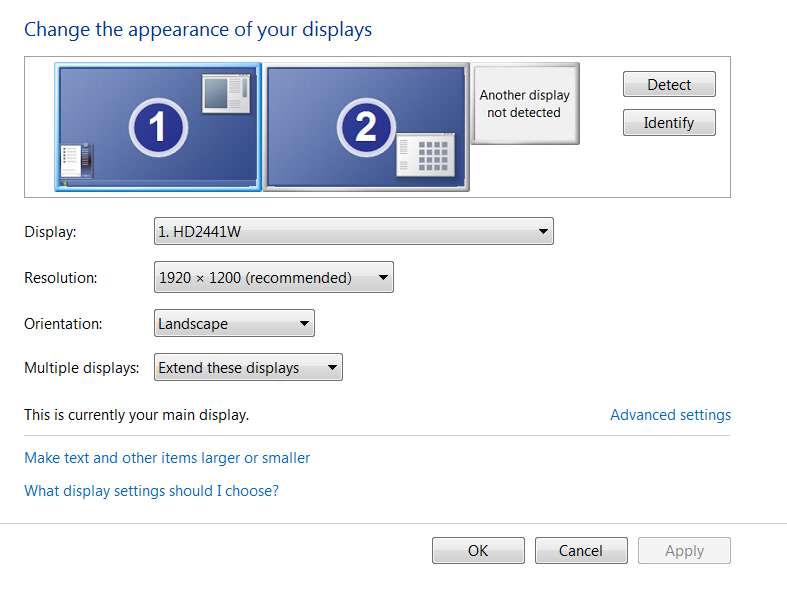
Another "proof" of this second unexistend monitor is going in desktop => right click => screen resolution => clicking "detect": another monitor appears on the right, a bit smaller then the "real" one and it's called: "another non detected monitor".

I have a Sapphire HD5770 Viper-X, and it does not have a VGA output
Mine is ASUS EAH5770 CUcore and as you can see on Google it has a VGA output and a DVI output. I do not have a DVI cable though so I connected it to the VGA output.
 

My Computer My Computer

At a glance

Windows 7 Ultimate 64bitHD 5770
Computer type
PC/Desktop
OS
Windows 7 Ultimate 64bit
Graphics Card(s)
HD 5770
Monitor(s) Displays
Philips 246EL2SBH
... the mouse is not moving by its own, but if I move it, it doesn't stop in the edge limit but it goes far off the screen because Windows thinks that on the right there is another monitor...

This is especially annoying when closing a max-sized window quickly because the mouse doesn't hit the X and so you have to slowly carefully point it on the X otherwise it goes on the second ghost screen.

Another "proof" of this second unexistend monitor is going in desktop => right click => screen resolution => clicking "detect": another monitor appears on the right, a bit smaller then the "real" one and it's called: "another non detected monitor".
Strangely, the second and third paragraphs of your post did not show up on the screen! All I originally saw was the first paragraph. It was only when I pushed "quote" to reply that amazingly the second and third paragraphs magically appeared.

And yet now all three paragraphs are visible! Very strange.


Anyway,

(1) On my 2-monitor setup (1 on the left, 2 on the right), if I move the mouse to the left edge of monitor 1 it will stop at the edge and not go any further. It remains fully visible on that left edge of monitor 1.

But if I move the mouse to the right edge of monitor 2 it actually will go "somewhere" offscreen, because the cursor disappears. I don't think it's too far away (definitely not miles) because when I then move the mouse back to the left the cursor reappears almost immediately. So it clearly was not off there some unlimited distance into nowhere.

Nevertheless, the mouse/cursor behavior is different for me on the left edge of monitor 1 vs the right edge of monitor 2, though I would hardly call this a serious defect. If anyone is to blame it's probably the ATI drivers (I'm using 12.3).

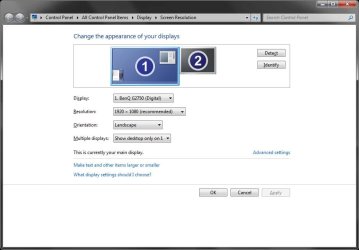
(2) Even in my own 2-monitor setup, if I right-click on the desktop and select "screen resolution" and then click "detect", I too show my two monitors as well as a "third" non-detected monitor. It's shown as smaller than my actual monitors, but I really don't know what it means or represents.

monitors2b.jpg


I suppose its location to the right of my monitor 2 is why the cursor can go off the right edge of monitor 2. It's probably over there on the "non-detected monitor", whatever that means.
 

My Computer My Computer

At a glance

Windows 7 Pro x64 (1), Win7 Pro X64 (2)i5-3350p 3.1Ghz/6MB-cache (1); E8400 3.0Ghz/6...8GB PC3-12800 DDR3 (1); 4GB PC3-10600 DDR3 (2)ATI HD7750 (1), (see TV cards); ATI R7 250 (2)
Computer type
PC/Desktop
Computer Manufacturer/Model Number
Home-built, two systems (1) and (2)
OS
Windows 7 Pro x64 (1), Win7 Pro X64 (2)
CPU
i5-3350p 3.1Ghz/6MB-cache (1); E8400 3.0Ghz/6MB-cache (2)
Motherboard
ASUS P8Z77-V Pro (1); ASUS P5Q3 (2)
Memory
8GB PC3-12800 DDR3 (1); 4GB PC3-10600 DDR3 (2)
Graphics Card(s)
ATI HD7750 (1), (see TV cards); ATI R7 250 (2)
Sound Card
Realtek ALC892 HD Audio (1); Realtek ALC1200 HD Audio (2)
Monitor(s) Displays
Eizo HD2441W LCD, Eizo S2433W (1); Eizo 24" S2433W (2)
Screen Resolution
1920x1200, 1920x1200 (1); 1920x1200 (2)
Hard Drives
(1) 1TB SATA-II (7200RPM), 2x2TB SATA-III (7200RPM), 250GB SATA-III (10000RPM) for OS; 2x2TB external USB 3.0

(2) 320GB SATA-II (7200RPM), 750GB SATA-II (7200RPM), 150GB SATA-II (10000RPM) for OS; 2TB external USB 3.0
PSU
Nesteq ECS-6001 600W (1); Nesteq ECS-5001 500W (2)
Case
Acousti-Case 360 (1) and (2)
Cooling
Noctua NH-U12P SE2 for CPU, 2x120mm case fans (1) and (2)
Keyboard
IBM PS/2 (1) and (2)
Mouse
Logitech MX Revolution wireless (1); Microsoft wired (2)
Internet Speed
100mbps down / 10mbps up
Antivirus
Microsoft Security Essentials; Malwarebyte Anti-Malware Pro
Browser
Firefox
Other Info
Ceton InfiniTV 4-tuner cablecard-enabled TV card as well as Hauppauge HVR-2250 OTA/ATSC 2-tuner TV card in (1), running under Win7 WMC
hrmmm.... so you have the same problem. Something about the drivers... I have the latest driver installed, I don't know...

though I would hardly call this a serious defect.
Closing a fully maxed window with the X is annoying because the cursor goes too far and don't hit the X. You have to slowly point at it, you can do fast moves.
 
Last edited:

My Computer My Computer

At a glance

Windows 7 Ultimate 64bitHD 5770
Computer type
PC/Desktop
OS
Windows 7 Ultimate 64bit
Graphics Card(s)
HD 5770
Monitor(s) Displays
Philips 246EL2SBH
Since the problem is not solved I do a recapitulation here.


Sometimes my cursor goes out of view (to the right). I know that the cursor is almost invisible when it hits the right, but it's not that, it's actually going far off the screen and I have to move the mouse a lot back before seeing the cursor again.
This happens because windows detects a second nonexistent monitor.

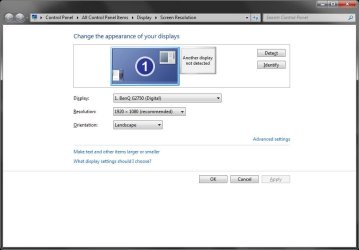
If I go to "Screen resolution" and I click "Detect", another monitor appears on the right, near the first one; and it says: "another display not detected".
Clicking on it it says:
Screen: disponible output screen for: ATI Radeon HD 5700 Series.

When I first log in, the mouse stops where it's supposed to stop. I discovered that the "bug" happens when I logoff and log in with another user. When logging off and returning to my account, if I move the mouse at the right edge, it goes off the screen, on the ghost monitor to the right.
So I have to go to screen resolution, clicking "Detect" and "OK" and then everything gets ok.

This problem is annoying because sometimes you just happen to lose your pointer.
Also, closing a fully maximized window with the "X" is annoying because the cursor goes too far and don't hit the "X" button. You have to slowly point at it, you can't do fast moves.

On the Monitors category of Device Manager there's only one monitor:
generic monitor plug and play. ID hardware PHLC074, which seems correct since its Philips.
I'm using VGA (connected on the VGA input of my ASUS EAH5770 CUcore).

I played on the "Screen resolution" window a lot, but whatever thing I do the problem re-appears the next time I load the OS and I log in with multiple accounts.
My monitor is 246EL2SBH Philips, my GPU the ASUS EAH5770 CUcore and my motherboard it's PC-AM3RS890G (Sapphire).
Monitor's and GPU's latest drivers are installed.

What I tried
Formatting Windows. So it's not about old monitors/old GPUs.
Using "Screen resolution" to disable the ghost monitor.
Using AMD Catalyst control center to disable the ghost monitor.

dsperber seems to have that problem too. Please see its post so you can also see an image with the problem (he has two monitors and the third nonexistent one appears on the right; I have one monitor and the ghost as the second one): http://www.sevenforums.com/graphic-...nitor-cursor-goes-out-view-3.html#post1892557

Is this a bug of Windows 7?
 
Last edited:

My Computer My Computer

At a glance

Windows 7 Ultimate 64bitHD 5770
Computer type
PC/Desktop
OS
Windows 7 Ultimate 64bit
Graphics Card(s)
HD 5770
Monitor(s) Displays
Philips 246EL2SBH
Had an interesting new observation to add to the mix here...

My original dual-monitor configuration had #1 (primary) on the left and #2 (extended) on the right. Total desktop width is 1920+1920=3840.

But pixel location 0 is the left edge of the primary monitor, #1. At least one of my applications (Free Commander) has an INI file with its window location expressed in pixels. So with #1 on the left and #2 on the right, and the Free Commander window located on the right (#2) monitor, the window location pixel value in its INI file is something like 2020.

Ok. I had occasion to reverse my two monitors, because of my wanting to use one (on the left) in either DVI or HDMI connection, while the other one (on the right) can only be used in DVI mode. To make the "toggle" for the DVI/HDMI monitor as painless as possible, I moved all of the desktop objects I used to have on that monitor (when it was primary #1) to the other monitor (on the right). I also then set that monitor on the right to now be primary (#1), and set the monitor on the left to now be extended (#2).

Well, the first time I opened Free Commander after this reversing of monitors to Windows the program window was off the screen... to the RIGHT of monitor #1. And that's because its INI window location value was 2020 (which used to be on my right monitor when it was #2), which is TO THE RIGHT of the right edge of what now was monitor #1, since it is the left edge of monitor #1 which defines pixel location value 0 (with its screen width of 1920). In other words, the Free Commander window was off-screen and invisible, and had to be moved back to the left (onto monitor #1) using the technique described earlier in this thread in order to become visible again. And if it is pulled to the left edge of that right monitor (which is now #1), its INI window location pixel value is 0.

And, if the program window is then dragged onto the left monitor (which is now #2), its INI window pixel location value is NEGATIVE... e.g. -1890.

In other words, all desktop locations are left or right relative to 0 which is defined as the left edge of whatever your primary monitor #1 is. Locations to the right of the left edge of #1 are positive, and locations to the left of the left edge of #1 are negative.

And if you rearrange monitors (e.g. using Catalyst and desktop configuration), program windows whose previous location somewhere on the 2-monitor desktop width as it used to be configured may have been visible, will now be off-screen and invisible, as it was for me with Free Commander.

Again, with monitor #1 on the left and #2 on the right, the left monitor is pixels 0-1919, and the right monitor is pixels 1920-3839. And Windows saves window locations for programs on the basis of that desktop width running from 0-3819.

But if you swap the monitors, and #1 is now on the right with #2 on the left, the desktop width now runs from -1920 to -1 on the left monitor #2, and from 0 to 1919 on the right monitor #1. Any window previously opened onto right monitor #2 when the monitors had their original arrangement of #1-#2 will be off-screen to the right and invisible unless you pull their windows back to the left, onto new monitor #1.


I'm just saying, that rearranging monitors like this is seemingly the only plausible reason for why a program window could ever suddenly become off-screen and invisible.

Also, if you have an HDMI monitor which may not be connected and/or visible at some time, Windows may then move all of its desktop objects over to the other monitor and force that monitor to be primary #1, even if it wasn't primary #1 to begin with. This could effectively force the reversing of monitor arrangements when the HDMI monitor comes back.

If your monitor arrangement has never changed from when Windows was first installed, I can't imagine how either cursor or program windows could ever be off-screen. But if you rearrange your monitors, or have an HDMI monitor connected, I think there is exposure.
 

My Computer My Computer

At a glance

Windows 7 Pro x64 (1), Win7 Pro X64 (2)i5-3350p 3.1Ghz/6MB-cache (1); E8400 3.0Ghz/6...8GB PC3-12800 DDR3 (1); 4GB PC3-10600 DDR3 (2)ATI HD7750 (1), (see TV cards); ATI R7 250 (2)
Computer type
PC/Desktop
Computer Manufacturer/Model Number
Home-built, two systems (1) and (2)
OS
Windows 7 Pro x64 (1), Win7 Pro X64 (2)
CPU
i5-3350p 3.1Ghz/6MB-cache (1); E8400 3.0Ghz/6MB-cache (2)
Motherboard
ASUS P8Z77-V Pro (1); ASUS P5Q3 (2)
Memory
8GB PC3-12800 DDR3 (1); 4GB PC3-10600 DDR3 (2)
Graphics Card(s)
ATI HD7750 (1), (see TV cards); ATI R7 250 (2)
Sound Card
Realtek ALC892 HD Audio (1); Realtek ALC1200 HD Audio (2)
Monitor(s) Displays
Eizo HD2441W LCD, Eizo S2433W (1); Eizo 24" S2433W (2)
Screen Resolution
1920x1200, 1920x1200 (1); 1920x1200 (2)
Hard Drives
(1) 1TB SATA-II (7200RPM), 2x2TB SATA-III (7200RPM), 250GB SATA-III (10000RPM) for OS; 2x2TB external USB 3.0

(2) 320GB SATA-II (7200RPM), 750GB SATA-II (7200RPM), 150GB SATA-II (10000RPM) for OS; 2TB external USB 3.0
PSU
Nesteq ECS-6001 600W (1); Nesteq ECS-5001 500W (2)
Case
Acousti-Case 360 (1) and (2)
Cooling
Noctua NH-U12P SE2 for CPU, 2x120mm case fans (1) and (2)
Keyboard
IBM PS/2 (1) and (2)
Mouse
Logitech MX Revolution wireless (1); Microsoft wired (2)
Internet Speed
100mbps down / 10mbps up
Antivirus
Microsoft Security Essentials; Malwarebyte Anti-Malware Pro
Browser
Firefox
Other Info
Ceton InfiniTV 4-tuner cablecard-enabled TV card as well as Hauppauge HVR-2250 OTA/ATSC 2-tuner TV card in (1), running under Win7 WMC
If your monitor arrangement has never changed from when Windows was first installed
Never changed. Especially because I have only one monitor, and in my last Windows installation there were no other monitors not even in my room.
or have an HDMI monitor connected
Nope.
 

My Computer My Computer

At a glance

Windows 7 Ultimate 64bitHD 5770
Computer type
PC/Desktop
OS
Windows 7 Ultimate 64bit
Graphics Card(s)
HD 5770
Monitor(s) Displays
Philips 246EL2SBH
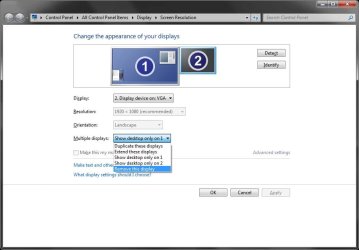
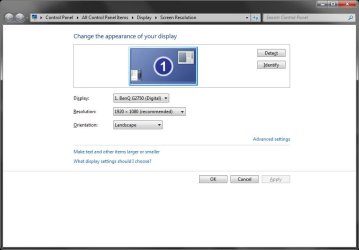
Is it just me that thinks this is an imaginary problem ? Anyhow, here's how to get that much sought after 2nd phantom monitor effect.

my single display system

01.jpg

click detect and a white box appears

02.jpg

highlight that box and select 'try to connect anyway'

03.jpg

hey presto ! a 2nd imaginary monitor

04.jpg

highlight the 2nd monitor and select 'remove this display'

05.jpg

and you go back to square one.

BTW my mouse cursor also goes off the edge of the screen, but I don't lose any sleep over it.
 

My Computer My Computer

At a glance

Windows 7 pro x64 SP1Intel i7-2600k o/c to 4.6GHz8GB Mushkin 1866MHzNvidia GTX 750 Ti 2GB
Computer type
PC/Desktop
Computer Manufacturer/Model Number
self build
OS
Windows 7 pro x64 SP1
CPU
Intel i7-2600k o/c to 4.6GHz
Motherboard
MSI Z68-GD80
Memory
8GB Mushkin 1866MHz
Graphics Card(s)
Nvidia GTX 750 Ti 2GB
Sound Card
integrated
Monitor(s) Displays
Liyama ProLite 27"
Screen Resolution
1920*1080 px
Hard Drives
Seagate 2TB
PSU
Coolermaster GX 750W
Case
Antec 300 case + 5 fans
Cooling
Dark Rock Pro
Internet Speed
62Mbit down 18Mbit up
Antivirus
MSE
Browser
Firefox
Other Info
Blackgold BGT3650 Quad HD TV card. Also have various 3770 + 4770K render boxes.
Interesting.

Of course your HD5770 supports two monitors, even if you don't have a second one physically present and physically connected. I'm sure this dual-monitor card is relevant.
 

My Computer My Computer

At a glance

Windows 7 Pro x64 (1), Win7 Pro X64 (2)i5-3350p 3.1Ghz/6MB-cache (1); E8400 3.0Ghz/6...8GB PC3-12800 DDR3 (1); 4GB PC3-10600 DDR3 (2)ATI HD7750 (1), (see TV cards); ATI R7 250 (2)
Computer type
PC/Desktop
Computer Manufacturer/Model Number
Home-built, two systems (1) and (2)
OS
Windows 7 Pro x64 (1), Win7 Pro X64 (2)
CPU
i5-3350p 3.1Ghz/6MB-cache (1); E8400 3.0Ghz/6MB-cache (2)
Motherboard
ASUS P8Z77-V Pro (1); ASUS P5Q3 (2)
Memory
8GB PC3-12800 DDR3 (1); 4GB PC3-10600 DDR3 (2)
Graphics Card(s)
ATI HD7750 (1), (see TV cards); ATI R7 250 (2)
Sound Card
Realtek ALC892 HD Audio (1); Realtek ALC1200 HD Audio (2)
Monitor(s) Displays
Eizo HD2441W LCD, Eizo S2433W (1); Eizo 24" S2433W (2)
Screen Resolution
1920x1200, 1920x1200 (1); 1920x1200 (2)
Hard Drives
(1) 1TB SATA-II (7200RPM), 2x2TB SATA-III (7200RPM), 250GB SATA-III (10000RPM) for OS; 2x2TB external USB 3.0

(2) 320GB SATA-II (7200RPM), 750GB SATA-II (7200RPM), 150GB SATA-II (10000RPM) for OS; 2TB external USB 3.0
PSU
Nesteq ECS-6001 600W (1); Nesteq ECS-5001 500W (2)
Case
Acousti-Case 360 (1) and (2)
Cooling
Noctua NH-U12P SE2 for CPU, 2x120mm case fans (1) and (2)
Keyboard
IBM PS/2 (1) and (2)
Mouse
Logitech MX Revolution wireless (1); Microsoft wired (2)
Internet Speed
100mbps down / 10mbps up
Antivirus
Microsoft Security Essentials; Malwarebyte Anti-Malware Pro
Browser
Firefox
Other Info
Ceton InfiniTV 4-tuner cablecard-enabled TV card as well as Hauppauge HVR-2250 OTA/ATSC 2-tuner TV card in (1), running under Win7 WMC
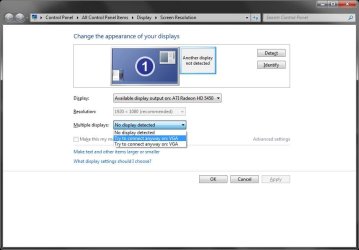
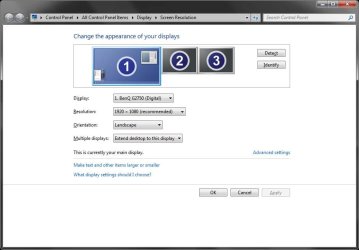
dsperber - the above screens were taken on my 2nd system that has a HD5450 card - DVI, VGA and something else . . and supports 3 monitors. See pic with 2 phantom displays - now that would confuse the OP.

3_monitors.jpg

On my main box with the HD5770, I actually have got dual display, and a 2nd monitor is the best upgrade I ever made. The HD5770 has 2 * DVI, but there seems to be many variants.

When I'm working with Cinema 4D, I have the main app on one screen and the XPresso program code on the 2nd.
 

My Computer My Computer

At a glance

Windows 7 pro x64 SP1Intel i7-2600k o/c to 4.6GHz8GB Mushkin 1866MHzNvidia GTX 750 Ti 2GB
Computer type
PC/Desktop
Computer Manufacturer/Model Number
self build
OS
Windows 7 pro x64 SP1
CPU
Intel i7-2600k o/c to 4.6GHz
Motherboard
MSI Z68-GD80
Memory
8GB Mushkin 1866MHz
Graphics Card(s)
Nvidia GTX 750 Ti 2GB
Sound Card
integrated
Monitor(s) Displays
Liyama ProLite 27"
Screen Resolution
1920*1080 px
Hard Drives
Seagate 2TB
PSU
Coolermaster GX 750W
Case
Antec 300 case + 5 fans
Cooling
Dark Rock Pro
Internet Speed
62Mbit down 18Mbit up
Antivirus
MSE
Browser
Firefox
Other Info
Blackgold BGT3650 Quad HD TV card. Also have various 3770 + 4770K render boxes.
So if I've correctly understood, this problem could be caused by having a GPU which supports two (or more) monitor, right?
 

My Computer My Computer

At a glance

Windows 7 Ultimate 64bitHD 5770
Computer type
PC/Desktop
OS
Windows 7 Ultimate 64bit
Graphics Card(s)
HD 5770
Monitor(s) Displays
Philips 246EL2SBH
I don't think you have a problem. My mouse goes to the edge at top and left. On the other 2 sides the mouse can go past the edge. If you don't like your mouse going off the screen, stop when you get to the edge.

We have a saying in the UK - 'you're pulling my leg'. Google it.
 

My Computer My Computer

At a glance

Windows 7 pro x64 SP1Intel i7-2600k o/c to 4.6GHz8GB Mushkin 1866MHzNvidia GTX 750 Ti 2GB
Computer type
PC/Desktop
Computer Manufacturer/Model Number
self build
OS
Windows 7 pro x64 SP1
CPU
Intel i7-2600k o/c to 4.6GHz
Motherboard
MSI Z68-GD80
Memory
8GB Mushkin 1866MHz
Graphics Card(s)
Nvidia GTX 750 Ti 2GB
Sound Card
integrated
Monitor(s) Displays
Liyama ProLite 27"
Screen Resolution
1920*1080 px
Hard Drives
Seagate 2TB
PSU
Coolermaster GX 750W
Case
Antec 300 case + 5 fans
Cooling
Dark Rock Pro
Internet Speed
62Mbit down 18Mbit up
Antivirus
MSE
Browser
Firefox
Other Info
Blackgold BGT3650 Quad HD TV card. Also have various 3770 + 4770K render boxes.
Ah, I see, you didn't carefully read my recapitulation post.
I'll paste here this for you:
I know that the cursor is almost invisible when it hits the right, but it's not that, it's actually going far off the screen and I have to move the mouse a lot back before seeing the cursor again.
This of course is not the normal behavior, and it's annoying because:
1) quickly closing a maximized windows with the "X" becomes difficult;
2) sometimes you simply lost your mouse because it goes into the second ghost monitor.

I'll try to make that sentence in bold or something.
 

My Computer My Computer

At a glance

Windows 7 Ultimate 64bitHD 5770
Computer type
PC/Desktop
OS
Windows 7 Ultimate 64bit
Graphics Card(s)
HD 5770
Monitor(s) Displays
Philips 246EL2SBH
So if I've correctly understood, this problem could be caused by having a GPU which supports two (or more) monitor, right?
I would say yes.

I note that you have an HD5770 in your specs, which potentially can support 2 monitors. On one of my machines I also have an HD5770 but I also do have 2 monitors, which just the other day I reversed so that what was previously primary/#1 (on my left) became extended/#2 (and still on my left) and what was previously extended/#2 (in front of me) now because primary/#1 (and still in front of me).

So it used to be #1 - #2 and is now #2 - #1. And previously the desktop extended from pixel 0 -> 1919 on #1 (on my left), and 1920 -> 3839 on #2 (in front of me). Now it goes from -1920 -> -1 on #2 (on my left) and 0 -> 1919 on #1 (in front of me). Moving the mouse horizontally allows the cursor to cross from the left-edge of #1 (i.e. pixel 0) onto the negative pixel real estate of #2, but it cannot go further left than the left edge of #2 (i.e. pixel -1920). However moving the mouse to the right of #1 (i.e. pixel 1919) does not fail, and the mouse moves off into invisible pixel territory of 1920 and higher. So the left desktop edge of the monitor on the left is that absolute limit of leftward mouse movement. But there does not seem to be such a limit of the right edge of the monitor on the right, at least not when there once used to be a monitor to the right of desktop pixel 1919.

I can also perform a similar experiment on my other machine, which is single-monitor but has a dual-output HD4850 video card. In fact, this Win7 machine used to exist in a 2-monitor environment (also with #1 on the left and #2 in front of me, so desktop pixels ran from 0 - 3840) until I changed it to be 1-monitor. So while there is currently no monitor connected to the second output on the video card, there used to be one.

Anyway, I have the same issue in this second machine... where I can't move the mouse further left than desktop pixel 0 (i.e. the left edge of my one and only #1), but I can move it to invisible territory to the right of the right edge of my one and only #1), i.e. to desktop pixels 1920 and higher. Don't know if this is because I used to have a second monitor out there to the right, or simply because I have a dual-output video card (even though only one display currently shows in Catalyst Control Center and Windows "screen resolution").

And for sure, it's not clear whether this is actually an ATI driver issue, or a Windows issue.

I don't consider any of this "problematic". Sure, it's "curious" and "interesting", but not a problem. Sure, we have to live with it because that's the way it seems to work (and we can't really figure out why it's allowed), but what can I say?

And as long as I know how to MOVE an off-screen invisible program window back onto the visible desktop (which happens for some apps when you reverse monitors in a 2-monitor setup, based on where the program window last opened) that's all I really care about to overcome "invisible program windows".
 

My Computer My Computer

At a glance

Windows 7 Pro x64 (1), Win7 Pro X64 (2)i5-3350p 3.1Ghz/6MB-cache (1); E8400 3.0Ghz/6...8GB PC3-12800 DDR3 (1); 4GB PC3-10600 DDR3 (2)ATI HD7750 (1), (see TV cards); ATI R7 250 (2)
Computer type
PC/Desktop
Computer Manufacturer/Model Number
Home-built, two systems (1) and (2)
OS
Windows 7 Pro x64 (1), Win7 Pro X64 (2)
CPU
i5-3350p 3.1Ghz/6MB-cache (1); E8400 3.0Ghz/6MB-cache (2)
Motherboard
ASUS P8Z77-V Pro (1); ASUS P5Q3 (2)
Memory
8GB PC3-12800 DDR3 (1); 4GB PC3-10600 DDR3 (2)
Graphics Card(s)
ATI HD7750 (1), (see TV cards); ATI R7 250 (2)
Sound Card
Realtek ALC892 HD Audio (1); Realtek ALC1200 HD Audio (2)
Monitor(s) Displays
Eizo HD2441W LCD, Eizo S2433W (1); Eizo 24" S2433W (2)
Screen Resolution
1920x1200, 1920x1200 (1); 1920x1200 (2)
Hard Drives
(1) 1TB SATA-II (7200RPM), 2x2TB SATA-III (7200RPM), 250GB SATA-III (10000RPM) for OS; 2x2TB external USB 3.0

(2) 320GB SATA-II (7200RPM), 750GB SATA-II (7200RPM), 150GB SATA-II (10000RPM) for OS; 2TB external USB 3.0
PSU
Nesteq ECS-6001 600W (1); Nesteq ECS-5001 500W (2)
Case
Acousti-Case 360 (1) and (2)
Cooling
Noctua NH-U12P SE2 for CPU, 2x120mm case fans (1) and (2)
Keyboard
IBM PS/2 (1) and (2)
Mouse
Logitech MX Revolution wireless (1); Microsoft wired (2)
Internet Speed
100mbps down / 10mbps up
Antivirus
Microsoft Security Essentials; Malwarebyte Anti-Malware Pro
Browser
Firefox
Other Info
Ceton InfiniTV 4-tuner cablecard-enabled TV card as well as Hauppauge HVR-2250 OTA/ATSC 2-tuner TV card in (1), running under Win7 WMC
I too have this problem, and it is a real problem.

Here's my story.

Tonight at work, I plugged my secondary monitor into my laptop, via VGA as I do every night. After I logged into windows, I noticed that my Laptop's built-in display was off. Not just black, but actually off.

I tried to open the Screen Resolution window by right clicking on the desktop, but the window appeared off screen somewhere. After "fishing" for it with my mouse, I was finally able to click-and-drag it back onto my main display. Apparently my computer thought that my laptops built in display was disconnected, and instead a phantom display was connected.

Windows continued to appear on the off-screen phantom monitor, and my laptop was still off. After a several reboots nothing was improving. Finally, after tweaking and balancing the windows resolution settings, I was able to get my monitors to look like normal, but now the third monitor is still present.

I set the third monitor to be "detached," but it doesn't disappear. It never used to be there before.

Now I permanently have a 3rd monitor that I can't make go away. I haven't tried restarted yet again because I'm at work and I don't want to spend the next hour re-hacking it to get it to display properly again.

What was really bad, was for the longest time I had both the lap-top, the desktop monitor, and the phantom monitor all running at once, with the phantom BETWEEN the desktop and the laptop, so when I would move my mouse from one to the other it would disappear for a few seconds while traversing the phantom one.
 

My Computer My Computer

At a glance

Windows 8 64 Bit BasicIntel i5 3210M 2.5Ghz4GB DDR3Intel HD Graphics 4000
Computer type
Laptop
Computer Manufacturer/Model Number
Acer
OS
Windows 8 64 Bit Basic
CPU
Intel i5 3210M 2.5Ghz
Memory
4GB DDR3
Graphics Card(s)
Intel HD Graphics 4000
Hard Drives
1 500GB 7200
1 120GB SSD
Browser
Chrome
Hi Guybrush2.
I've never solved this problem. In the meanwhile I've switched to Seven 64 bit.
My current workaround is using Autohotkey to quickly delete the phantom monitor with a hotkey.
Everytime I start Windows I use that hotkey and then the PC is ok for the rest of the day, as long as I don't login with other accounts.

I can even shutdown the PC, wait e.g. an hour and then start it again and it's still ok.
But the next day the phantom monitor would be there again, very weird. I guess ghosts revive at night. :D
 

My Computer My Computer

At a glance

Windows 7 Ultimate 64bitHD 5770
Computer type
PC/Desktop
OS
Windows 7 Ultimate 64bit
Graphics Card(s)
HD 5770
Monitor(s) Displays
Philips 246EL2SBH
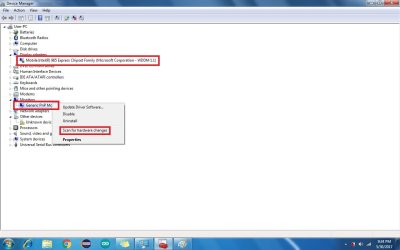
Solution is Simple:
In Win7, Go to Device manager
1. Right Click on Available Display Adapters and Select "Scan for hardware changes"
2. Right Click on Available Monitors and Select "Scan for hardware changes"

Got Fixed
 

Attachments

  • It detects a nonexistent second monitor - the cursor goes out of view.jpg
    It detects a nonexistent second monitor - the cursor goes out of view.jpg
    58 KB · Views: 1

My Computer My Computer

At a glance

32Intel Core2 Duo3N/A
Computer type
Laptop
Computer Manufacturer/Model Number
HP
OS
32
CPU
Intel Core2 Duo
Memory
3
Graphics Card(s)
N/A
Antivirus
N/A
Browser
Chrome
Back
Top