iTunes 64 is not working on Win 7 64

Sorry I'm mobile right now but I'm pretty sure QuickTime was there.

I'm running retail version of pro 64 and MSE.
 

My Computer My Computer

At a glance

Windows 7 64 & Ubuntu 64Intel Quad Core Q6600 2.40GHz8gNvidia 9600 GT & 9800 GT
Computer Manufacturer/Model Number
Built it myself
OS
Windows 7 64 & Ubuntu 64
CPU
Intel Quad Core Q6600 2.40GHz
Motherboard
Asus
Memory
8g
Graphics Card(s)
Nvidia 9600 GT & 9800 GT
Sound Card
Turtle Beach 5.1
Monitor(s) Displays
Three 19" Dell's & one 46" Samsung 750
I'm running retail version of pro 64 and MSE.

Hmmm...shouldn't be a problem there as I too am running MSE. Sounds like something in the registry may be at fault. Can you do a system restore to before you use "CC Cleaner"? Then do a regular uninstall and start over from scratch.

Personal opinion, but I think CC Cleaner does more harm than good. I also don't think it's "fully" optimized for Windows 7, but whatever.
 

My Computer My Computer

At a glance

Windows 10 ProIntel Core i7-4770K (3.5Ghz)32 gig Corsair Dominator Platinum (4x8Gig)Sapphire Tri-X R9 Fury
Computer type
PC/Desktop
Computer Manufacturer/Model Number
Custom built by me.
OS
Windows 10 Pro
CPU
Intel Core i7-4770K (3.5Ghz)
Motherboard
Gigabyte G1 Sniper 5 (F10 Bios)
Memory
32 gig Corsair Dominator Platinum (4x8Gig)
Graphics Card(s)
Sapphire Tri-X R9 Fury
Sound Card
Soundblaster ZXR
Monitor(s) Displays
NEC PA242W 24" LCD Monitor
Screen Resolution
1920 x 1200
Hard Drives
Primary - Samsung 850 Pro (512gig), Samsung 840 Pro (256gig), 2TB WD Caviar Black.
PSU
EVGA Supernova 1000 G2
Case
Cooler Master HAF X
Cooling
Corsair H100i with Corsair Air Series SP120 Quiet Fans
Keyboard
Logitech Wireless Wave
Mouse
Logitech Performance MX
Internet Speed
High Speed Cable
Antivirus
Norton Security
Browser
IE11
Other Info
Memory Timings - 1866MHz @ 9-9-9-27-1T @ 1.5 volts
I'm running retail version of pro 64 and MSE.

Hmmm...shouldn't be a problem there as I too am running MSE. Sounds like something in the registry may be at fault. Can you do a system restore to before you use "CC Cleaner"? Then do a regular uninstall and start over from scratch.

Personal opinion, but I think CC Cleaner does more harm than good. I also don't think it's "fully" optimized for Windows 7, but whatever.

Id really prefer to not have to do a system restore to get rid of CCleaner.

It was not the issue, iTunes wasnt working WELL before I tried CCleaner.

Anyone have any ideas on this at all any more? Or anyone I should try to contact?

The people on the apple forums are stumped too.
 

My Computer My Computer

At a glance

Windows 7 64 & Ubuntu 64Intel Quad Core Q6600 2.40GHz8gNvidia 9600 GT & 9800 GT
Computer Manufacturer/Model Number
Built it myself
OS
Windows 7 64 & Ubuntu 64
CPU
Intel Quad Core Q6600 2.40GHz
Motherboard
Asus
Memory
8g
Graphics Card(s)
Nvidia 9600 GT & 9800 GT
Sound Card
Turtle Beach 5.1
Monitor(s) Displays
Three 19" Dell's & one 46" Samsung 750
I'm running retail version of pro 64 and MSE.


Id really prefer to not have to do a system restore to get rid of CCleaner.

It was not the issue, iTunes wasnt working WELL before I tried CCleaner.

Anyone have any ideas on this at all any more? Or anyone I should try to contact?

The people on the apple forums are stumped too.
I need to be clear on this, you had Itunes working for a few days. Somthing changed after you installed a program called CCLEANER (Registrycleaner?)
You ran this program and somehow it touched your register?
So the registry was changed. Itunes started to fail? Is this correct?
As Syngnus has said and many other members will explain touching the registry no matter how benign or good a registry cleaner may appear there is always a danger to the stability of a system.
I suggest you do the following:
  1. Investigate if ccleaner made a backup of your register B4 it modified the registry, if you can locate it rename the file back to the original.
  2. If you cant find the backup, use system restore to a previous date B4 ccleaner was installed and mucked your registry.
  3. If either this does not work I suggest backing up all your important files and export your itunes library to an external drive and do a full windows 7 installation and install the latest (9.02 Itunes) not 9.0 or some previous version.
The registry cleaner has damaged the functionality of your system.
I give this suggestion because I to am an Itunes/Iphone user and have performed many installations from back when I used XP64 Bit Pro and was modifying Itunes when there was no more support for XP.

 

My Computer My Computer

At a glance

Windows 7 7600 1 X64AMD PHENOM II X 550 PROCESSOR 3.1 ghzCorsair 4 gig ddr 3ati radeon 3300
Computer Manufacturer/Model Number
Custom Build
OS
Windows 7 7600 1 X64
CPU
AMD PHENOM II X 550 PROCESSOR 3.1 ghz
Motherboard
ASUS M4A78-TE
Memory
Corsair 4 gig ddr 3
Graphics Card(s)
ati radeon 3300
Sound Card
ati hd
Monitor(s) Displays
syncmaster 2033sw
Screen Resolution
1600X900 60 hz refresh
Hard Drives
twin_seagates SATA's 1 TB & 500 Gig, hitachi_slimline 160 gig
PSU
antec_550 watt
Case
cooler master GLite
Cooling
stock_heat sink
Internet Speed
20mbs up/ 1.5mbs down
Other Info
favorite child "stewie"
favorite dog "brian"
No iTunes was giving me issues 2 weeks before I even installed CCleaner, so its not that.
 

My Computer My Computer

At a glance

Windows 7 64 & Ubuntu 64Intel Quad Core Q6600 2.40GHz8gNvidia 9600 GT & 9800 GT
Computer Manufacturer/Model Number
Built it myself
OS
Windows 7 64 & Ubuntu 64
CPU
Intel Quad Core Q6600 2.40GHz
Motherboard
Asus
Memory
8g
Graphics Card(s)
Nvidia 9600 GT & 9800 GT
Sound Card
Turtle Beach 5.1
Monitor(s) Displays
Three 19" Dell's & one 46" Samsung 750
No iTunes was giving me issues 2 weeks before I even installed CCleaner, so its not that.
Johnny, my last suggestion is to remove all Apple Software including quicktime. Re-boot and install Itunes 9.02. If that fails wipe the hard drive clean and re-install windows 7 and then install itunes.
 

My Computer My Computer

At a glance

Windows 7 7600 1 X64AMD PHENOM II X 550 PROCESSOR 3.1 ghzCorsair 4 gig ddr 3ati radeon 3300
Computer Manufacturer/Model Number
Custom Build
OS
Windows 7 7600 1 X64
CPU
AMD PHENOM II X 550 PROCESSOR 3.1 ghz
Motherboard
ASUS M4A78-TE
Memory
Corsair 4 gig ddr 3
Graphics Card(s)
ati radeon 3300
Sound Card
ati hd
Monitor(s) Displays
syncmaster 2033sw
Screen Resolution
1600X900 60 hz refresh
Hard Drives
twin_seagates SATA's 1 TB & 500 Gig, hitachi_slimline 160 gig
PSU
antec_550 watt
Case
cooler master GLite
Cooling
stock_heat sink
Internet Speed
20mbs up/ 1.5mbs down
Other Info
favorite child "stewie"
favorite dog "brian"
No iTunes was giving me issues 2 weeks before I even installed CCleaner, so its not that.
Johnny, my last suggestion is to remove all Apple Software including quicktime. Re-boot and install Itunes 9.02. If that fails wipe the hard drive clean and re-install windows 7 and then install itunes.

apparently per the apple forums there was a quicktime update yesterday added into the 9.0.2 version, but I'm not sure if that is the issue or it will fix things, but I will try.

I was getting this error both when I was trying to install iTunes 8.0.2 last night & also trying to reinstall acrobat, any idea what it is?:

IMGhttp://i578.photobucket.com/albums/ss224/JohnnyScience/ituneserror-1.png[/IMG]
 

My Computer My Computer

At a glance

Windows 7 64 & Ubuntu 64Intel Quad Core Q6600 2.40GHz8gNvidia 9600 GT & 9800 GT
Computer Manufacturer/Model Number
Built it myself
OS
Windows 7 64 & Ubuntu 64
CPU
Intel Quad Core Q6600 2.40GHz
Motherboard
Asus
Memory
8g
Graphics Card(s)
Nvidia 9600 GT & 9800 GT
Sound Card
Turtle Beach 5.1
Monitor(s) Displays
Three 19" Dell's & one 46" Samsung 750
I have problem with itunes too. My problem is whenever I connect my iphone or itouch it says "This iPod cannot be used because the required software is not installed…”
I search all over forums and yes I tried uninstalled and install itune more than 10 times with any uninstall order with no luck.
I noticed that apple mobile device support is not installed for some reason. I tried install it manually but always encounter error.
I have another windows 7 ultimate installation on other hard drive and itunes works perfectly. This is drive me nuts.
If anyone can make mobile device support install that will fix our problem.
 

My Computer My Computer

At a glance

Windows 7 Home Premium
OS
Windows 7 Home Premium
SPECS

Good morning Denox, welcome to the Windows 7 support forum.
We need you to fill out your system specs so that we may further be able to assist you.
Also state your issue clearly: What version of Itunes and what actions occur when you connect your mobile device to your pc.

Thanks,
Adrian
 

My Computer My Computer

At a glance

Windows 7 7600 1 X64AMD PHENOM II X 550 PROCESSOR 3.1 ghzCorsair 4 gig ddr 3ati radeon 3300
Computer Manufacturer/Model Number
Custom Build
OS
Windows 7 7600 1 X64
CPU
AMD PHENOM II X 550 PROCESSOR 3.1 ghz
Motherboard
ASUS M4A78-TE
Memory
Corsair 4 gig ddr 3
Graphics Card(s)
ati radeon 3300
Sound Card
ati hd
Monitor(s) Displays
syncmaster 2033sw
Screen Resolution
1600X900 60 hz refresh
Hard Drives
twin_seagates SATA's 1 TB & 500 Gig, hitachi_slimline 160 gig
PSU
antec_550 watt
Case
cooler master GLite
Cooling
stock_heat sink
Internet Speed
20mbs up/ 1.5mbs down
Other Info
favorite child "stewie"
favorite dog "brian"
My comp specs:
CPU intel e8500
memory gskill 4 GB
ATI 4850
mobo ECS p45 chipset
OS windows 7 Home premium
iTunes version 9.0.2

iTunes couldnt recognized iPhone or iPod when attach. " This iPod cannot be used because the required software is not installed…” error message displayed.
On iTunes installation process, computer fail to install apple mobile device support. When installation complete, I couldnt find apple mobile devices support service or file on the system.
Thanks in Advance
 

My Computer My Computer

At a glance

Windows 7 Home Premium
OS
Windows 7 Home Premium
My comp specs:
CPU intel e8500
memory gskill 4 GB
ATI 4850
mobo ECS p45 chipset
OS windows 7 Home premium
iTunes version 9.0.2

iTunes couldnt recognized iPhone or iPod when attach. " This iPod cannot be used because the required software is not installed…” error message displayed.
On iTunes installation process, computer fail to install apple mobile device support. When installation complete, I couldnt find apple mobile devices support service or file on the system.
Thanks in Advance
Is this a x64 bit machine?
 

My Computer My Computer

At a glance

Windows 7 7600 1 X64AMD PHENOM II X 550 PROCESSOR 3.1 ghzCorsair 4 gig ddr 3ati radeon 3300
Computer Manufacturer/Model Number
Custom Build
OS
Windows 7 7600 1 X64
CPU
AMD PHENOM II X 550 PROCESSOR 3.1 ghz
Motherboard
ASUS M4A78-TE
Memory
Corsair 4 gig ddr 3
Graphics Card(s)
ati radeon 3300
Sound Card
ati hd
Monitor(s) Displays
syncmaster 2033sw
Screen Resolution
1600X900 60 hz refresh
Hard Drives
twin_seagates SATA's 1 TB & 500 Gig, hitachi_slimline 160 gig
PSU
antec_550 watt
Case
cooler master GLite
Cooling
stock_heat sink
Internet Speed
20mbs up/ 1.5mbs down
Other Info
favorite child "stewie"
favorite dog "brian"
OS windows 7 32 bit
 

My Computer My Computer

At a glance

Windows 7 Home Premium
OS
Windows 7 Home Premium
OS windows 7 32 bit
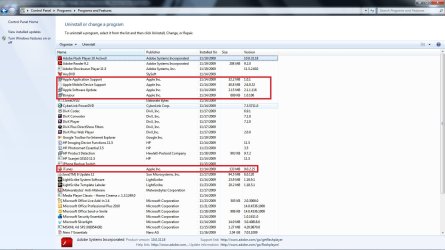
Ok, next step: Look in the Control Panel and see what programs are installed?
See if you have the same as I do.
 

Attachments

  • programs.jpg
    programs.jpg
    148.3 KB · Views: 77

My Computer My Computer

At a glance

Windows 7 7600 1 X64AMD PHENOM II X 550 PROCESSOR 3.1 ghzCorsair 4 gig ddr 3ati radeon 3300
Computer Manufacturer/Model Number
Custom Build
OS
Windows 7 7600 1 X64
CPU
AMD PHENOM II X 550 PROCESSOR 3.1 ghz
Motherboard
ASUS M4A78-TE
Memory
Corsair 4 gig ddr 3
Graphics Card(s)
ati radeon 3300
Sound Card
ati hd
Monitor(s) Displays
syncmaster 2033sw
Screen Resolution
1600X900 60 hz refresh
Hard Drives
twin_seagates SATA's 1 TB & 500 Gig, hitachi_slimline 160 gig
PSU
antec_550 watt
Case
cooler master GLite
Cooling
stock_heat sink
Internet Speed
20mbs up/ 1.5mbs down
Other Info
favorite child "stewie"
favorite dog "brian"
I have exactly like yours except there is no apple mobile device support on my system.
When I tried to install mobile device separately, I saw it installing then rolled back then error message saying error while configuring system.
 

My Computer My Computer

At a glance

Windows 7 Home Premium
OS
Windows 7 Home Premium
I have exactly like yours except there is no apple mobile device support on my system.
When I tried to install mobile device separately, I saw it installing then rolled back then error message saying error while configuring system.
Delet/remove everything Itunes, that includes bonjour and quicktime. Install Itunes 9.02 as administrator.
 

My Computer My Computer

At a glance

Windows 7 7600 1 X64AMD PHENOM II X 550 PROCESSOR 3.1 ghzCorsair 4 gig ddr 3ati radeon 3300
Computer Manufacturer/Model Number
Custom Build
OS
Windows 7 7600 1 X64
CPU
AMD PHENOM II X 550 PROCESSOR 3.1 ghz
Motherboard
ASUS M4A78-TE
Memory
Corsair 4 gig ddr 3
Graphics Card(s)
ati radeon 3300
Sound Card
ati hd
Monitor(s) Displays
syncmaster 2033sw
Screen Resolution
1600X900 60 hz refresh
Hard Drives
twin_seagates SATA's 1 TB & 500 Gig, hitachi_slimline 160 gig
PSU
antec_550 watt
Case
cooler master GLite
Cooling
stock_heat sink
Internet Speed
20mbs up/ 1.5mbs down
Other Info
favorite child "stewie"
favorite dog "brian"
No iTunes was giving me issues 2 weeks before I even installed CCleaner, so its not that.
Johnny, my last suggestion is to remove all Apple Software including quicktime. Re-boot and install Itunes 9.02. If that fails wipe the hard drive clean and re-install windows 7 and then install itunes.
I tried that, but it didn't work. :cry::(
 

My Computer My Computer

At a glance

Windows 7 Professional 64-bitIntel Core i7 Q720 @ 1.60 GHz8 GB DDR3Nvidia Geforce
Computer Manufacturer/Model Number
HP Pavillion dv7t-3000 Notebook
OS
Windows 7 Professional 64-bit
CPU
Intel Core i7 Q720 @ 1.60 GHz
Memory
8 GB DDR3
Graphics Card(s)
Nvidia Geforce
Monitor(s) Displays
HP 2159m HD
Screen Resolution
1920 x 1080
Hard Drives
1 TB 7200 RPM (2 x 500GB)
Keyboard
Logitech Illuminated Keyboard
Mouse
Logitech
This absolutely BLOWS !!!!!!!!!!!!!!!!!!!!!!!!!!!!!!!!!!!!
 

My Computer My Computer

At a glance

Windows 7 Professional 64-bitIntel Core i7 Q720 @ 1.60 GHz8 GB DDR3Nvidia Geforce
Computer Manufacturer/Model Number
HP Pavillion dv7t-3000 Notebook
OS
Windows 7 Professional 64-bit
CPU
Intel Core i7 Q720 @ 1.60 GHz
Memory
8 GB DDR3
Graphics Card(s)
Nvidia Geforce
Monitor(s) Displays
HP 2159m HD
Screen Resolution
1920 x 1080
Hard Drives
1 TB 7200 RPM (2 x 500GB)
Keyboard
Logitech Illuminated Keyboard
Mouse
Logitech
Just to give you update,
I reinstall windows 7 with only drivers installed (thanks for acronis image) and reinstall itunes and it works like a champ.
I see mobile device support on add/remove program now, so apple mobile device is the root of the problem.
 

My Computer My Computer

At a glance

Windows 7 Home Premium
OS
Windows 7 Home Premium
Just to give you update,
I reinstall windows 7 with only drivers installed (thanks for acronis image) and reinstall itunes and it works like a champ.
I see mobile device support on add/remove program now, so apple mobile device is the root of the problem.
Yep, without the service the driver won't work or install. All you get is a drive showing on "My Computer".
Congrats.
 

My Computer My Computer

At a glance

Windows 7 7600 1 X64AMD PHENOM II X 550 PROCESSOR 3.1 ghzCorsair 4 gig ddr 3ati radeon 3300
Computer Manufacturer/Model Number
Custom Build
OS
Windows 7 7600 1 X64
CPU
AMD PHENOM II X 550 PROCESSOR 3.1 ghz
Motherboard
ASUS M4A78-TE
Memory
Corsair 4 gig ddr 3
Graphics Card(s)
ati radeon 3300
Sound Card
ati hd
Monitor(s) Displays
syncmaster 2033sw
Screen Resolution
1600X900 60 hz refresh
Hard Drives
twin_seagates SATA's 1 TB & 500 Gig, hitachi_slimline 160 gig
PSU
antec_550 watt
Case
cooler master GLite
Cooling
stock_heat sink
Internet Speed
20mbs up/ 1.5mbs down
Other Info
favorite child "stewie"
favorite dog "brian"
Thanks.
It is fixed for now but I did not know the reason apple mobile device support would not installed on old OS.
 

My Computer My Computer

At a glance

Windows 7 Home Premium
OS
Windows 7 Home Premium
Back
Top