iTunes 9.0.1.8 freezes on iPod Nano g3 connect

Greggor

New member
Local time
3:13 AM
Messages
9
This problem started with 9.0.x when sync was interupted during process. now iTunes will run find until iPod is connected to any port. Have tried complete removal and clean install of all iTunes (just what was in Control Panel view) and did a SFC scan - all good.
Bummed - I can't sync. :(
 

My Computer My Computer

At a glance

Windows 7 Home PremiumPentium 4 2.6GHz2.50 GBNVidia GeForce FX5200
Computer Manufacturer/Model Number
Dell Dimension 8300
OS
Windows 7 Home Premium
CPU
Pentium 4 2.6GHz
Motherboard
Dell
Memory
2.50 GB
Graphics Card(s)
NVidia GeForce FX5200
Sound Card
integrated
Monitor(s) Displays
Dell 17 inch Ultra (2)
Hard Drives
Maxtor ATA
Seagate ST3160815A ATA
Seagate ST31005 USB
PSU
Dell
Case
Dell
Cooling
Dell
Keyboard
MS Wireless 3000
Mouse
MS Optical 2.0
Internet Speed
10 Mps
This problem started with 9.0.x when sync was interupted during process. now iTunes will run find until iPod is connected to any port. Have tried complete removal and clean install of all iTunes (just what was in Control Panel view) and did a SFC scan - all good.
Bummed - I can't sync. :(
Welcome to Windows 7.
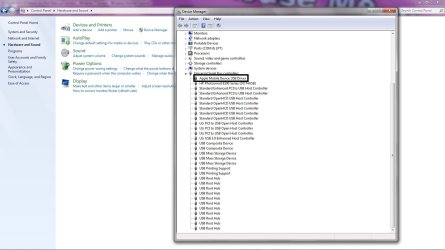
Please make a screen shot of your USB drivers in "Device Manager"
I'm looking for Apple Mobile Device.
Perform the following operation:
  1. Connect your Apple device to a USB port
  2. Listen for the connection, it usually occurs twice in succession.
  3. Go to device manager,
  4. Go to the end of the device list and expand the usb list.
  5. "APPLE MOBILE DEVICE" should be visible.
  6. View the screen shot I supplied.
If its not visible you will need to remove all Apple Software, ITunes, Bonjour Apple Mobile Service, everything apple including Quick time must be removed.
Then you must re-install.

regards,
Adrian
 

Attachments

  • apple.jpg
    apple.jpg
    112.5 KB · Views: 260

My Computer My Computer

At a glance

Windows 7 7600 1 X64AMD PHENOM II X 550 PROCESSOR 3.1 ghzCorsair 4 gig ddr 3ati radeon 3300
Computer Manufacturer/Model Number
Custom Build
OS
Windows 7 7600 1 X64
CPU
AMD PHENOM II X 550 PROCESSOR 3.1 ghz
Motherboard
ASUS M4A78-TE
Memory
Corsair 4 gig ddr 3
Graphics Card(s)
ati radeon 3300
Sound Card
ati hd
Monitor(s) Displays
syncmaster 2033sw
Screen Resolution
1600X900 60 hz refresh
Hard Drives
twin_seagates SATA's 1 TB & 500 Gig, hitachi_slimline 160 gig
PSU
antec_550 watt
Case
cooler master GLite
Cooling
stock_heat sink
Internet Speed
20mbs up/ 1.5mbs down
Other Info
favorite child "stewie"
favorite dog "brian"
Thanks for the help..

The Device Manager changes to show the Apple Mobile Device USB Driver after connecting. This time I also observed iTunes actually trying to open - but froze before connecting to the Store. If iTunes is opened while the iPod is connected, other services cannot run, or are very slow in response.

I have re-loaded iTunes twice prior to this message. I have used the Windows Uninstall program and removed all Apple software. Am I missing something that is not listed in the Control Panel/Programs list?

Greg
 

Attachments

My Computer My Computer

At a glance

Windows 7 Home PremiumPentium 4 2.6GHz2.50 GBNVidia GeForce FX5200
Computer Manufacturer/Model Number
Dell Dimension 8300
OS
Windows 7 Home Premium
CPU
Pentium 4 2.6GHz
Motherboard
Dell
Memory
2.50 GB
Graphics Card(s)
NVidia GeForce FX5200
Sound Card
integrated
Monitor(s) Displays
Dell 17 inch Ultra (2)
Hard Drives
Maxtor ATA
Seagate ST3160815A ATA
Seagate ST31005 USB
PSU
Dell
Case
Dell
Cooling
Dell
Keyboard
MS Wireless 3000
Mouse
MS Optical 2.0
Internet Speed
10 Mps
Thanks for the help..

The Device Manager changes to show the Apple Mobile Device USB Driver after connecting. This time I also observed iTunes actually trying to open - but froze before connecting to the Store. If iTunes is opened while the iPod is connected, other services cannot run, or are very slow in response.

I have re-loaded iTunes twice prior to this message. I have used the Windows Uninstall program and removed all Apple software. Am I missing something that is not listed in the Control Panel/Programs list?

Greg
Greg were you able to successfully re-install ITunes?
 

My Computer My Computer

At a glance

Windows 7 7600 1 X64AMD PHENOM II X 550 PROCESSOR 3.1 ghzCorsair 4 gig ddr 3ati radeon 3300
Computer Manufacturer/Model Number
Custom Build
OS
Windows 7 7600 1 X64
CPU
AMD PHENOM II X 550 PROCESSOR 3.1 ghz
Motherboard
ASUS M4A78-TE
Memory
Corsair 4 gig ddr 3
Graphics Card(s)
ati radeon 3300
Sound Card
ati hd
Monitor(s) Displays
syncmaster 2033sw
Screen Resolution
1600X900 60 hz refresh
Hard Drives
twin_seagates SATA's 1 TB & 500 Gig, hitachi_slimline 160 gig
PSU
antec_550 watt
Case
cooler master GLite
Cooling
stock_heat sink
Internet Speed
20mbs up/ 1.5mbs down
Other Info
favorite child "stewie"
favorite dog "brian"
Hi Adrian:
I did remove all Apple software, including; Bonjour, Apple Application Support, Apple Software Update, Quicktime, Apple Mobile Device Support and iTunes.

I had one dialog box pop up when removing Application Support: "The setup was unable to automatically close all requested applications. Please ensure that the applications holding files in use are closed before continuing with the installation." Upon clicking OK, the removal proceeded "successfully?"

There were no other programms running at the time (at least any that run in the foreground, Norton is in the background).

I have not re-installed iTunes. I wanted to get your feedback on this message first.

Thanks,
Greg
 

My Computer My Computer

At a glance

Windows 7 Home PremiumPentium 4 2.6GHz2.50 GBNVidia GeForce FX5200
Computer Manufacturer/Model Number
Dell Dimension 8300
OS
Windows 7 Home Premium
CPU
Pentium 4 2.6GHz
Motherboard
Dell
Memory
2.50 GB
Graphics Card(s)
NVidia GeForce FX5200
Sound Card
integrated
Monitor(s) Displays
Dell 17 inch Ultra (2)
Hard Drives
Maxtor ATA
Seagate ST3160815A ATA
Seagate ST31005 USB
PSU
Dell
Case
Dell
Cooling
Dell
Keyboard
MS Wireless 3000
Mouse
MS Optical 2.0
Internet Speed
10 Mps
Hi Adrian:
I did remove all Apple software, including; Bonjour, Apple Application Support, Apple Software Update, Quicktime, Apple Mobile Device Support and iTunes.

I had one dialog box pop up when removing Application Support: "The setup was unable to automatically close all requested applications. Please ensure that the applications holding files in use are closed before continuing with the installation." Upon clicking OK, the removal proceeded "successfully?"

There were no other programms running at the time (at least any that run in the foreground, Norton is in the background).

I have not re-installed iTunes. I wanted to get your feedback on this message first.

Thanks,
Greg
Greg, it looks like everything was successfully removed,
Attached is where you will see where my itunes installer is located.
Mind you I'm running x64 and this was the latest version of Itunes.
I put my mouse over the Itunes installer, then I right click and a drop down menu appears, I put my mouse over "Run as Administrator" and launch the installer.
It is compatable with Windows 7
Try this out and let us know how it goes.

Adrian
 

Attachments

  • tunes_admin.jpg
    tunes_admin.jpg
    106.4 KB · Views: 140

My Computer My Computer

At a glance

Windows 7 7600 1 X64AMD PHENOM II X 550 PROCESSOR 3.1 ghzCorsair 4 gig ddr 3ati radeon 3300
Computer Manufacturer/Model Number
Custom Build
OS
Windows 7 7600 1 X64
CPU
AMD PHENOM II X 550 PROCESSOR 3.1 ghz
Motherboard
ASUS M4A78-TE
Memory
Corsair 4 gig ddr 3
Graphics Card(s)
ati radeon 3300
Sound Card
ati hd
Monitor(s) Displays
syncmaster 2033sw
Screen Resolution
1600X900 60 hz refresh
Hard Drives
twin_seagates SATA's 1 TB & 500 Gig, hitachi_slimline 160 gig
PSU
antec_550 watt
Case
cooler master GLite
Cooling
stock_heat sink
Internet Speed
20mbs up/ 1.5mbs down
Other Info
favorite child "stewie"
favorite dog "brian"
Bump?
 

My Computer My Computer

At a glance

Windows 7 7600 1 X64AMD PHENOM II X 550 PROCESSOR 3.1 ghzCorsair 4 gig ddr 3ati radeon 3300
Computer Manufacturer/Model Number
Custom Build
OS
Windows 7 7600 1 X64
CPU
AMD PHENOM II X 550 PROCESSOR 3.1 ghz
Motherboard
ASUS M4A78-TE
Memory
Corsair 4 gig ddr 3
Graphics Card(s)
ati radeon 3300
Sound Card
ati hd
Monitor(s) Displays
syncmaster 2033sw
Screen Resolution
1600X900 60 hz refresh
Hard Drives
twin_seagates SATA's 1 TB & 500 Gig, hitachi_slimline 160 gig
PSU
antec_550 watt
Case
cooler master GLite
Cooling
stock_heat sink
Internet Speed
20mbs up/ 1.5mbs down
Other Info
favorite child "stewie"
favorite dog "brian"
I did remove all Apple software, including; Bonjour, Apple Application Support, Apple Software Update, Quicktime, Apple Mobile Device Support and iTunes.

Correct me if I am wrong, but isn't a good chunk of those programs required to use iTunes? :S

Plus, iTunes 9.0.2 is out, maybe it will fix any problems anyone was having. :)

Apple - iTunes - Download iTunes Now
 

My Computer My Computer

At a glance

Windows 7 Ultimate, OS X 10.7, Ubuntu 11.04Intel E6750 @ 3.80GHz2x2GB & 2x1GB (6GB) OCZ Reaper 1066MHz @ 1080MHzEVGA nVidia GTX 260 896mb (216 Core) FTW Edition
Computer Manufacturer/Model Number
Custom | Whitebox
OS
Windows 7 Ultimate, OS X 10.7, Ubuntu 11.04
CPU
Intel E6750 @ 3.80GHz
Motherboard
Gigabyte GA-EP45-UD3L (Revision 1.1)
Memory
2x2GB & 2x1GB (6GB) OCZ Reaper 1066MHz @ 1080MHz
Graphics Card(s)
EVGA nVidia GTX 260 896mb (216 Core) FTW Edition
Sound Card
Realtek ALC888
Monitor(s) Displays
21" VIZIO TV
Screen Resolution
1680x1050 @ 60Hz
Hard Drives
Western Digital WD6401AALS - 640GB
Hitachi HDP725016GLA380 - 160GB
PSU
Corsair 750W
Case
NZXT Nemesis Elite
Cooling
Thermaltake SpinQ
Keyboard
Logitech Wireless S520
Mouse
Logitech Wireless S520 - Microsoft Wireless Arc Mouse
Internet Speed
Download: 20mbps, Upload: 3mbps
I did remove all Apple software, including; Bonjour, Apple Application Support, Apple Software Update, Quicktime, Apple Mobile Device Support and iTunes.

Correct me if I am wrong, but isn't a good chunk of those programs required to use iTunes? :S

Plus, iTunes 9.0.2 is out, maybe it will fix any problems anyone was having. :)

Apple - iTunes - Download iTunes Now
You are correct!
Whats your question?
 

My Computer My Computer

At a glance

Windows 7 7600 1 X64AMD PHENOM II X 550 PROCESSOR 3.1 ghzCorsair 4 gig ddr 3ati radeon 3300
Computer Manufacturer/Model Number
Custom Build
OS
Windows 7 7600 1 X64
CPU
AMD PHENOM II X 550 PROCESSOR 3.1 ghz
Motherboard
ASUS M4A78-TE
Memory
Corsair 4 gig ddr 3
Graphics Card(s)
ati radeon 3300
Sound Card
ati hd
Monitor(s) Displays
syncmaster 2033sw
Screen Resolution
1600X900 60 hz refresh
Hard Drives
twin_seagates SATA's 1 TB & 500 Gig, hitachi_slimline 160 gig
PSU
antec_550 watt
Case
cooler master GLite
Cooling
stock_heat sink
Internet Speed
20mbs up/ 1.5mbs down
Other Info
favorite child "stewie"
favorite dog "brian"
Hi Adrian:

Sorry for the delay in getting back with you.. In the past days, I have installed Windows 7 Home and also just re-installed iTunes 9.0.2.25. Same problem. I did a "clean install" of Windows in the hopes that some errant programm was causing conflicts with USB or other problem.

my iPod continies to connect with the Device Manager showing it connected. However, once I connect it freezes iTunes. Could this be an iPod problem?

Greggor.
 

My Computer My Computer

At a glance

Windows 7 Home PremiumPentium 4 2.6GHz2.50 GBNVidia GeForce FX5200
Computer Manufacturer/Model Number
Dell Dimension 8300
OS
Windows 7 Home Premium
CPU
Pentium 4 2.6GHz
Motherboard
Dell
Memory
2.50 GB
Graphics Card(s)
NVidia GeForce FX5200
Sound Card
integrated
Monitor(s) Displays
Dell 17 inch Ultra (2)
Hard Drives
Maxtor ATA
Seagate ST3160815A ATA
Seagate ST31005 USB
PSU
Dell
Case
Dell
Cooling
Dell
Keyboard
MS Wireless 3000
Mouse
MS Optical 2.0
Internet Speed
10 Mps
Also...

Spoke too soon.. Just as I sent the last reply, I closed a window and noticed that iTunes did recognized the iPod. Then it froze. I will try closing and re-opening..

Started to sync. Dialog box said it was sync with another computer, etc. but it stopped reponding agin, twice. and I could not get it to eject until physically unplugging.

G
 

My Computer My Computer

At a glance

Windows 7 Home PremiumPentium 4 2.6GHz2.50 GBNVidia GeForce FX5200
Computer Manufacturer/Model Number
Dell Dimension 8300
OS
Windows 7 Home Premium
CPU
Pentium 4 2.6GHz
Motherboard
Dell
Memory
2.50 GB
Graphics Card(s)
NVidia GeForce FX5200
Sound Card
integrated
Monitor(s) Displays
Dell 17 inch Ultra (2)
Hard Drives
Maxtor ATA
Seagate ST3160815A ATA
Seagate ST31005 USB
PSU
Dell
Case
Dell
Cooling
Dell
Keyboard
MS Wireless 3000
Mouse
MS Optical 2.0
Internet Speed
10 Mps
Spoke too soon.. Just as I sent the last reply, I closed a window and noticed that iTunes did recognized the iPod. Then it froze. I will try closing and re-opening..

Started to sync. Dialog box said it was sync with another computer, etc. but it stopped reponding agin, twice. and I could not get it to eject until physically unplugging.

G
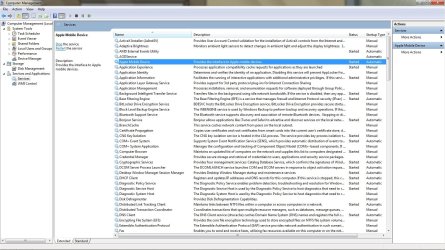
Hi Greg, I'm wondering if the ipod mobile device srvice has stopped.
Would you mind going to "MY COMPUTER" and running Management?
Next go to "Services" and see if the IPOD MOBILE DEVICE SERVICE has stopped.
Check out this screen shot.


Adrian
 

Attachments

  • ipod_service.jpg
    ipod_service.jpg
    234.6 KB · Views: 164

My Computer My Computer

At a glance

Windows 7 7600 1 X64AMD PHENOM II X 550 PROCESSOR 3.1 ghzCorsair 4 gig ddr 3ati radeon 3300
Computer Manufacturer/Model Number
Custom Build
OS
Windows 7 7600 1 X64
CPU
AMD PHENOM II X 550 PROCESSOR 3.1 ghz
Motherboard
ASUS M4A78-TE
Memory
Corsair 4 gig ddr 3
Graphics Card(s)
ati radeon 3300
Sound Card
ati hd
Monitor(s) Displays
syncmaster 2033sw
Screen Resolution
1600X900 60 hz refresh
Hard Drives
twin_seagates SATA's 1 TB & 500 Gig, hitachi_slimline 160 gig
PSU
antec_550 watt
Case
cooler master GLite
Cooling
stock_heat sink
Internet Speed
20mbs up/ 1.5mbs down
Other Info
favorite child "stewie"
favorite dog "brian"
Apple Mobile Device

Hi Adrian:

I did confirm that it is in fact running. I also did this when iTunes was frozen via Task Manager. Would it be helpful to cycle this while running iTunes and having the iPod connected (freezing iTunes)?
G
 

My Computer My Computer

At a glance

Windows 7 Home PremiumPentium 4 2.6GHz2.50 GBNVidia GeForce FX5200
Computer Manufacturer/Model Number
Dell Dimension 8300
OS
Windows 7 Home Premium
CPU
Pentium 4 2.6GHz
Motherboard
Dell
Memory
2.50 GB
Graphics Card(s)
NVidia GeForce FX5200
Sound Card
integrated
Monitor(s) Displays
Dell 17 inch Ultra (2)
Hard Drives
Maxtor ATA
Seagate ST3160815A ATA
Seagate ST31005 USB
PSU
Dell
Case
Dell
Cooling
Dell
Keyboard
MS Wireless 3000
Mouse
MS Optical 2.0
Internet Speed
10 Mps
Hi Adrian:

I did confirm that it is in fact running. I also did this when iTunes was frozen via Task Manager. Would it be helpful to cycle this while running iTunes and having the iPod connected (freezing iTunes)?
G
Greg, 1 more thing for you to check on, go to "My Computer" go to management and check services again. Look for Apple Mobile device services and make sure that service is running.
 

Attachments

  • Mobil.jpg
    Mobil.jpg
    232.2 KB · Views: 57

My Computer My Computer

At a glance

Windows 7 7600 1 X64AMD PHENOM II X 550 PROCESSOR 3.1 ghzCorsair 4 gig ddr 3ati radeon 3300
Computer Manufacturer/Model Number
Custom Build
OS
Windows 7 7600 1 X64
CPU
AMD PHENOM II X 550 PROCESSOR 3.1 ghz
Motherboard
ASUS M4A78-TE
Memory
Corsair 4 gig ddr 3
Graphics Card(s)
ati radeon 3300
Sound Card
ati hd
Monitor(s) Displays
syncmaster 2033sw
Screen Resolution
1600X900 60 hz refresh
Hard Drives
twin_seagates SATA's 1 TB & 500 Gig, hitachi_slimline 160 gig
PSU
antec_550 watt
Case
cooler master GLite
Cooling
stock_heat sink
Internet Speed
20mbs up/ 1.5mbs down
Other Info
favorite child "stewie"
favorite dog "brian"
Services status

Hi Adrian:

Both iPod Service and Apple Mobile Device Services are running while Itunes is open. After connecting the iPod, iTunes stopped responding.

In the Event Viewer, I have a Critical Error reported:

"The device G:\ (location (unknown)) is offline due to a user-mode driver crash. Windows will attempt to restart the device 5 more times. Please contact the device manufacturer for more information about this problem."

Source is: DriverFrameworks-UserMode
Task Category is: User-Mode Driver Problems

This report is registered in the viewer three time at the same time stamp. I assume that the system attempted three times before stopping.

It also report the previous connection on Monday.

Confused?
Greg
 

My Computer My Computer

At a glance

Windows 7 Home PremiumPentium 4 2.6GHz2.50 GBNVidia GeForce FX5200
Computer Manufacturer/Model Number
Dell Dimension 8300
OS
Windows 7 Home Premium
CPU
Pentium 4 2.6GHz
Motherboard
Dell
Memory
2.50 GB
Graphics Card(s)
NVidia GeForce FX5200
Sound Card
integrated
Monitor(s) Displays
Dell 17 inch Ultra (2)
Hard Drives
Maxtor ATA
Seagate ST3160815A ATA
Seagate ST31005 USB
PSU
Dell
Case
Dell
Cooling
Dell
Keyboard
MS Wireless 3000
Mouse
MS Optical 2.0
Internet Speed
10 Mps
Is ITunes set to "Auto sync" when ever the ipod is connected?
 

My Computer My Computer

At a glance

Windows 7 7600 1 X64AMD PHENOM II X 550 PROCESSOR 3.1 ghzCorsair 4 gig ddr 3ati radeon 3300
Computer Manufacturer/Model Number
Custom Build
OS
Windows 7 7600 1 X64
CPU
AMD PHENOM II X 550 PROCESSOR 3.1 ghz
Motherboard
ASUS M4A78-TE
Memory
Corsair 4 gig ddr 3
Graphics Card(s)
ati radeon 3300
Sound Card
ati hd
Monitor(s) Displays
syncmaster 2033sw
Screen Resolution
1600X900 60 hz refresh
Hard Drives
twin_seagates SATA's 1 TB & 500 Gig, hitachi_slimline 160 gig
PSU
antec_550 watt
Case
cooler master GLite
Cooling
stock_heat sink
Internet Speed
20mbs up/ 1.5mbs down
Other Info
favorite child "stewie"
favorite dog "brian"
This problem started with 9.0.x when sync was interupted during process.
Bummed - I can't sync. :(
Greg, how was the sync process interrupted?
I'm wondering if the usb driver was corrupted.
Windows does not use a generic USB driver for the Iphone so we may need to remove the driver and re-install the driver.
 

My Computer My Computer

At a glance

Windows 7 7600 1 X64AMD PHENOM II X 550 PROCESSOR 3.1 ghzCorsair 4 gig ddr 3ati radeon 3300
Computer Manufacturer/Model Number
Custom Build
OS
Windows 7 7600 1 X64
CPU
AMD PHENOM II X 550 PROCESSOR 3.1 ghz
Motherboard
ASUS M4A78-TE
Memory
Corsair 4 gig ddr 3
Graphics Card(s)
ati radeon 3300
Sound Card
ati hd
Monitor(s) Displays
syncmaster 2033sw
Screen Resolution
1600X900 60 hz refresh
Hard Drives
twin_seagates SATA's 1 TB & 500 Gig, hitachi_slimline 160 gig
PSU
antec_550 watt
Case
cooler master GLite
Cooling
stock_heat sink
Internet Speed
20mbs up/ 1.5mbs down
Other Info
favorite child "stewie"
favorite dog "brian"
Try going into your bios and turn on C state on your cpu. This is under CPU config on a asus motherboard. I did this and now itunes works fine when I connect my iphone. :D
 

My Computer My Computer

At a glance

Win7i7 8608 gig OCZ DDR3 cas 7Evga GTX 260 Core 216 sli
Computer Manufacturer/Model Number
Custom Build
OS
Win7
CPU
i7 860
Motherboard
Asus P7P55D Pro
Memory
8 gig OCZ DDR3 cas 7
Graphics Card(s)
Evga GTX 260 Core 216 sli
Sound Card
onboard
Monitor(s) Displays
Viewsonic
Hard Drives
OCZ Vertex 120 gb ssd
Seagate 7200 500 gb
PSU
Corsair 850 watt
Case
Antec 300
Cooling
Zalman CNPS 10X
Keyboard
Logitech
Mouse
Logitech
Adrian:
Auto sync was active. I de-selected. closed iTunes. Re-opened itunes, then connected the iPod.. the iPod was detected, but Windows displayed an error dialog box asking if I wanted to Scan and Fix file system errors on the iPod. iTines displayed a sync problem with the iPod. This is after i de-selected!
I cancelled the check disk as Windows was asking to dimount the drive ( the iPod is treated as an external disk drive).
Rechecking the check box in iTunes confirms that sync is still de-selected. I'm looking in Edit/Preferences/Devices.

Where is the iPod driver found? Apple Mobile devices? If it is an Appple Driver to I remove iTunes and reload again? Remember that I did this after doing a Clean install of Windows 7 Home.

G
 

My Computer My Computer

At a glance

Windows 7 Home PremiumPentium 4 2.6GHz2.50 GBNVidia GeForce FX5200
Computer Manufacturer/Model Number
Dell Dimension 8300
OS
Windows 7 Home Premium
CPU
Pentium 4 2.6GHz
Motherboard
Dell
Memory
2.50 GB
Graphics Card(s)
NVidia GeForce FX5200
Sound Card
integrated
Monitor(s) Displays
Dell 17 inch Ultra (2)
Hard Drives
Maxtor ATA
Seagate ST3160815A ATA
Seagate ST31005 USB
PSU
Dell
Case
Dell
Cooling
Dell
Keyboard
MS Wireless 3000
Mouse
MS Optical 2.0
Internet Speed
10 Mps
Adrian:

Once i realised that iTunes was running with the iPod connected, I attempted to restore the iPod. I had to work through a couple of error messages, removing and re-connecting the iPod solved this. After Restore, the iPod completed a full sync!!!!

What I am confused about is what action prompted iTunes to stay running? Stopping the Auto Sync?

Thanks for your Help. I could not have done this without you.

Greg
 

My Computer My Computer

At a glance

Windows 7 Home PremiumPentium 4 2.6GHz2.50 GBNVidia GeForce FX5200
Computer Manufacturer/Model Number
Dell Dimension 8300
OS
Windows 7 Home Premium
CPU
Pentium 4 2.6GHz
Motherboard
Dell
Memory
2.50 GB
Graphics Card(s)
NVidia GeForce FX5200
Sound Card
integrated
Monitor(s) Displays
Dell 17 inch Ultra (2)
Hard Drives
Maxtor ATA
Seagate ST3160815A ATA
Seagate ST31005 USB
PSU
Dell
Case
Dell
Cooling
Dell
Keyboard
MS Wireless 3000
Mouse
MS Optical 2.0
Internet Speed
10 Mps
Back
Top