
Solved iTunes' AppleMobileDeviceHelper.exe

EvilOzzmess

Banned
Local time
9:43 AM
Messages
301
Location
California, US
I am getting VERY frustrated with this issue, more so than any others before it. This thing has added several other processes which are literally devouring my system resources. It is slowing everything else down, even hanging Firefox on occasion and I want it gone. My iPod worked just lovely without it before, I don't use a 'smart-phone' or any of that other crud, so it is wholly unnecessary.

Thing is, it just keeps popping up every time I end the process tree! I cannot run iTunes without incurring the wrath of this POS process (and all several of its buddies) and having it hang everything else. And yes, it is all up to date. I feel I have to say right now that I am getting tremendously fed up with Apple and all of these little stunts they are pulling... foisting resource hogging crap on us without even asking... the nerve!

Anyway, somebody please tell me how I can banish this POS process into oblivon!
 

My Computer

Computer Manufacturer/Model Number
Acer Aspire 5738PG-6306
OS
7 Ultimate x64 SP1
CPU
Core 2 Duo T6600 @ 2.20GHz
Motherboard
Acer JV50 | Intel PM45 Chipset | BIOS Phoenix v1.21
Memory
4GB SDRAM DDR2 667
Graphics Card(s)
ATI Mobility Radeon 4570HD 512MB VDDR3 (2.25GB HyperMemory)
Sound Card
Integrated Dolby Home Theater HD Audio Support
Monitor(s) Displays
15.6" LED backlight HD/WS CineCrystal w/ Multi-Touch
Screen Resolution
Notebook: 1366x768 | Syncmaster P2370HD: 1920x1080
Hard Drives
Primary internal: 320GB WD3200BEVT-22ZCT0 @ 5400 RPM | Secondary external 1: 2TB Cavalry CAXB3702T0 @7200 RPM (USB 2.0) | Secondary external 2: 500GB Calvary CAUM @7200 RPM (USB 2.0).
PSU
AC Adapter
Case
Blue Clam shell
Cooling
OEM Bult-in.
Keyboard
Microsoft Wireless 3000 (USB)
Mouse
Logitech V220 (USB)
Internet Speed
31Mbps DL/25Mbps UL - Verizon fiOs/Netgear WNDR37AV
Other Info
EXTERNAL DISPLAY: 23" Samsung Syncmaster P2370HD | EXTERNAL SOUND: 300 Watt MX-KB30 JVC Stereo (AUX) | ROUTER: Netgear WNDR37AV 802.11a/b/g/n Dual-Band Gigabit | Satechi 12-Port USB 2.0 Hub | GAME PAD: SteelSeries 3GC USB 2.0 (JoyToKey Mapping) | DETAILED SYSTEM SPECIFICATIONS: http://www.tigerdirect.com/applications/SearchTools/item-details.asp?EdpNo=5265887&CatId=4938
I have it disabled in Services. I don't see the .exe in processes so it must have worked.
 

Attachments

  • amd.JPG
    amd.JPG
    38.9 KB · Views: 308

My Computer

Computer Manufacturer/Model Number
HP p6608f
OS
Win 7 Home Premium x64
CPU
Intel Core i3-540 3.07 GHz
Motherboard
MS-7613 (Iona-GL8E)
Memory
4 GB (2 X 2) Dual-Channel PC-10600 DDR3 @ 665MHz (9-9-9-24)
Graphics Card(s)
Integrated Intel H57
Sound Card
Integrated Realtek ALC888S Audio
Monitor(s) Displays
17" SDM-HS73 (a vestige from my old computer)
Screen Resolution
1280 X 1024
Hard Drives
750GB SATA 7200 RPM
PSU
250W
Keyboard
HP USB keyboard
Mouse
HP USB optical mouse
Internet Speed
15Mbps/1Mbps
I just tried doing that... it appeared to work for about two seconds and then it just popped right back up in Task Manager again (and keeps doing it). Don't know what the heck to do now. Do I have to restart or something? Seems to me disabling it and then closing the process tree should have done it... any other ideas?
 

My Computer

Computer Manufacturer/Model Number
Acer Aspire 5738PG-6306
OS
7 Ultimate x64 SP1
CPU
Core 2 Duo T6600 @ 2.20GHz
Motherboard
Acer JV50 | Intel PM45 Chipset | BIOS Phoenix v1.21
Memory
4GB SDRAM DDR2 667
Graphics Card(s)
ATI Mobility Radeon 4570HD 512MB VDDR3 (2.25GB HyperMemory)
Sound Card
Integrated Dolby Home Theater HD Audio Support
Monitor(s) Displays
15.6" LED backlight HD/WS CineCrystal w/ Multi-Touch
Screen Resolution
Notebook: 1366x768 | Syncmaster P2370HD: 1920x1080
Hard Drives
Primary internal: 320GB WD3200BEVT-22ZCT0 @ 5400 RPM | Secondary external 1: 2TB Cavalry CAXB3702T0 @7200 RPM (USB 2.0) | Secondary external 2: 500GB Calvary CAUM @7200 RPM (USB 2.0).
PSU
AC Adapter
Case
Blue Clam shell
Cooling
OEM Bult-in.
Keyboard
Microsoft Wireless 3000 (USB)
Mouse
Logitech V220 (USB)
Internet Speed
31Mbps DL/25Mbps UL - Verizon fiOs/Netgear WNDR37AV
Other Info
EXTERNAL DISPLAY: 23" Samsung Syncmaster P2370HD | EXTERNAL SOUND: 300 Watt MX-KB30 JVC Stereo (AUX) | ROUTER: Netgear WNDR37AV 802.11a/b/g/n Dual-Band Gigabit | Satechi 12-Port USB 2.0 Hub | GAME PAD: SteelSeries 3GC USB 2.0 (JoyToKey Mapping) | DETAILED SYSTEM SPECIFICATIONS: http://www.tigerdirect.com/applications/SearchTools/item-details.asp?EdpNo=5265887&CatId=4938
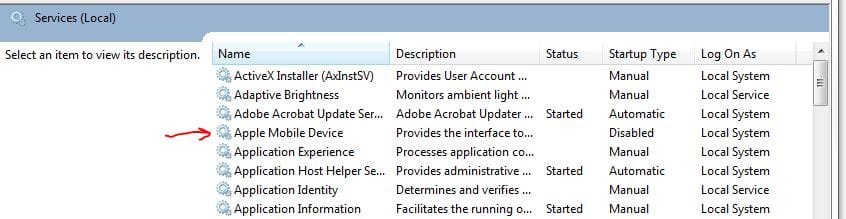
OK, had a hunch and figured it out. It is removed in the Control Panel under Add/Remove Programs. Only way to fully get rid of it, nothing else will do it other than an uninstall.

Problem solved. And Apple: I hate you. STOP FORCING CRAP ON US. :mad:
 

My Computer

Computer Manufacturer/Model Number
Acer Aspire 5738PG-6306
OS
7 Ultimate x64 SP1
CPU
Core 2 Duo T6600 @ 2.20GHz
Motherboard
Acer JV50 | Intel PM45 Chipset | BIOS Phoenix v1.21
Memory
4GB SDRAM DDR2 667
Graphics Card(s)
ATI Mobility Radeon 4570HD 512MB VDDR3 (2.25GB HyperMemory)
Sound Card
Integrated Dolby Home Theater HD Audio Support
Monitor(s) Displays
15.6" LED backlight HD/WS CineCrystal w/ Multi-Touch
Screen Resolution
Notebook: 1366x768 | Syncmaster P2370HD: 1920x1080
Hard Drives
Primary internal: 320GB WD3200BEVT-22ZCT0 @ 5400 RPM | Secondary external 1: 2TB Cavalry CAXB3702T0 @7200 RPM (USB 2.0) | Secondary external 2: 500GB Calvary CAUM @7200 RPM (USB 2.0).
PSU
AC Adapter
Case
Blue Clam shell
Cooling
OEM Bult-in.
Keyboard
Microsoft Wireless 3000 (USB)
Mouse
Logitech V220 (USB)
Internet Speed
31Mbps DL/25Mbps UL - Verizon fiOs/Netgear WNDR37AV
Other Info
EXTERNAL DISPLAY: 23" Samsung Syncmaster P2370HD | EXTERNAL SOUND: 300 Watt MX-KB30 JVC Stereo (AUX) | ROUTER: Netgear WNDR37AV 802.11a/b/g/n Dual-Band Gigabit | Satechi 12-Port USB 2.0 Hub | GAME PAD: SteelSeries 3GC USB 2.0 (JoyToKey Mapping) | DETAILED SYSTEM SPECIFICATIONS: http://www.tigerdirect.com/applications/SearchTools/item-details.asp?EdpNo=5265887&CatId=4938
Just checked and it's there for me when I start iTunes. But gone when iTunes is closed. Doesn't seem to use alot of resources for me. I do wonder why it is *32 as I have 64bit. But I aint gonna worry.

edit: Saw your resolution. I will look into removing it.
 

Attachments

  • amd.JPG
    amd.JPG
    18.2 KB · Views: 109

My Computer

Computer Manufacturer/Model Number
HP p6608f
OS
Win 7 Home Premium x64
CPU
Intel Core i3-540 3.07 GHz
Motherboard
MS-7613 (Iona-GL8E)
Memory
4 GB (2 X 2) Dual-Channel PC-10600 DDR3 @ 665MHz (9-9-9-24)
Graphics Card(s)
Integrated Intel H57
Sound Card
Integrated Realtek ALC888S Audio
Monitor(s) Displays
17" SDM-HS73 (a vestige from my old computer)
Screen Resolution
1280 X 1024
Hard Drives
750GB SATA 7200 RPM
PSU
250W
Keyboard
HP USB keyboard
Mouse
HP USB optical mouse
Internet Speed
15Mbps/1Mbps
Thought I'd come back in to report that the latest iTunes will NOT recognize your iPod WITHOUT this stupid thing running and hogging a bunch of your system memory and CPU power, completely unnecessarily. So for anyone who did this, and who has the latest iTunes version, you need to uninstall and reinstall iTunes and leave this POS alone. Freaking ridiculous that you can't even stop it from automatically starting up and staying on ALL of the time (go ahead and try, it will just pop right back on no matter how you try to kill it when it isn't needed).

On that note, if anyone from Apple happens to read this, you all need to get on the ball and make this only run when people are actually connecting an iPod or whatever to iTunes, and NOT have this crap running 24/7. I don't know why in the hell this dominates SO much system power, but you REALLY need to trim it down! I have limited system resources being that this IS a Notebook PC and I barely squeak by on gaming with this system as it is... just saying. If something isn't broke, don't try to fix it. The older iTunes without this monstrosity worked just fine with my iPod, until today... guess we all can thank the damned iPad for this? :mad:
 

My Computer

Computer Manufacturer/Model Number
Acer Aspire 5738PG-6306
OS
7 Ultimate x64 SP1
CPU
Core 2 Duo T6600 @ 2.20GHz
Motherboard
Acer JV50 | Intel PM45 Chipset | BIOS Phoenix v1.21
Memory
4GB SDRAM DDR2 667
Graphics Card(s)
ATI Mobility Radeon 4570HD 512MB VDDR3 (2.25GB HyperMemory)
Sound Card
Integrated Dolby Home Theater HD Audio Support
Monitor(s) Displays
15.6" LED backlight HD/WS CineCrystal w/ Multi-Touch
Screen Resolution
Notebook: 1366x768 | Syncmaster P2370HD: 1920x1080
Hard Drives
Primary internal: 320GB WD3200BEVT-22ZCT0 @ 5400 RPM | Secondary external 1: 2TB Cavalry CAXB3702T0 @7200 RPM (USB 2.0) | Secondary external 2: 500GB Calvary CAUM @7200 RPM (USB 2.0).
PSU
AC Adapter
Case
Blue Clam shell
Cooling
OEM Bult-in.
Keyboard
Microsoft Wireless 3000 (USB)
Mouse
Logitech V220 (USB)
Internet Speed
31Mbps DL/25Mbps UL - Verizon fiOs/Netgear WNDR37AV
Other Info
EXTERNAL DISPLAY: 23" Samsung Syncmaster P2370HD | EXTERNAL SOUND: 300 Watt MX-KB30 JVC Stereo (AUX) | ROUTER: Netgear WNDR37AV 802.11a/b/g/n Dual-Band Gigabit | Satechi 12-Port USB 2.0 Hub | GAME PAD: SteelSeries 3GC USB 2.0 (JoyToKey Mapping) | DETAILED SYSTEM SPECIFICATIONS: http://www.tigerdirect.com/applications/SearchTools/item-details.asp?EdpNo=5265887&CatId=4938

Another update. My system usually runs on 1.09GB system Memory... and now, thanks to this... 1.62GB! Do you all see my gripe now? I'm not complaining over a few little memory bits here... that's a huge increase in consumption IMHO and Apple needs to address it ASAP!
 

My Computer

Computer Manufacturer/Model Number
Acer Aspire 5738PG-6306
OS
7 Ultimate x64 SP1
CPU
Core 2 Duo T6600 @ 2.20GHz
Motherboard
Acer JV50 | Intel PM45 Chipset | BIOS Phoenix v1.21
Memory
4GB SDRAM DDR2 667
Graphics Card(s)
ATI Mobility Radeon 4570HD 512MB VDDR3 (2.25GB HyperMemory)
Sound Card
Integrated Dolby Home Theater HD Audio Support
Monitor(s) Displays
15.6" LED backlight HD/WS CineCrystal w/ Multi-Touch
Screen Resolution
Notebook: 1366x768 | Syncmaster P2370HD: 1920x1080
Hard Drives
Primary internal: 320GB WD3200BEVT-22ZCT0 @ 5400 RPM | Secondary external 1: 2TB Cavalry CAXB3702T0 @7200 RPM (USB 2.0) | Secondary external 2: 500GB Calvary CAUM @7200 RPM (USB 2.0).
PSU
AC Adapter
Case
Blue Clam shell
Cooling
OEM Bult-in.
Keyboard
Microsoft Wireless 3000 (USB)
Mouse
Logitech V220 (USB)
Internet Speed
31Mbps DL/25Mbps UL - Verizon fiOs/Netgear WNDR37AV
Other Info
EXTERNAL DISPLAY: 23" Samsung Syncmaster P2370HD | EXTERNAL SOUND: 300 Watt MX-KB30 JVC Stereo (AUX) | ROUTER: Netgear WNDR37AV 802.11a/b/g/n Dual-Band Gigabit | Satechi 12-Port USB 2.0 Hub | GAME PAD: SteelSeries 3GC USB 2.0 (JoyToKey Mapping) | DETAILED SYSTEM SPECIFICATIONS: http://www.tigerdirect.com/applications/SearchTools/item-details.asp?EdpNo=5265887&CatId=4938
Do a search on iTunes Switchless, and just do a minimal install.

Apple needs to address it ASAP!

Trust me about something--they don't care what you post here. ;)
 

My Computer

Computer type
Laptop
Computer Manufacturer/Model Number
Dell Latitude E6540 Laptop
OS
Windows 7 Professional 64bit
CPU
Intel Core i7 4600M @ 2.90GHz
Motherboard
Dell Inc. 0CYT5F (SOCKET 0)
Memory
16.0GB Dual-Channel DDR3 @ 797MHz (11-11-11-28)
Graphics Card(s)
Intel HD Graphics 4600 (Dell) 2048MB ATI AMD Radeon HD 8790M
Sound Card
Realtek High Definition Audio
Monitor(s) Displays
HP ZR30w (2560x1600@60Hz)
Hard Drives
256GB LITEONIT LMT-256M6M-41 mm SATA (SSD)
1TB Samsung SSD 860 EVO mSATA SATA (SSD)
2TB USB 3.0 USB Device
115GB SanDisk Ultra Fit USB
Other Info
Multiple Dell E-Port Plus II Port Replicator/Docking Stations 0Y72NH USB 3.0 + 130W AC Adapters
Since you aren't dealing with an iPhone, why use iTunes at all? MediaMonkey and Spotify will both let you sync music up to the device, without all the annoying iTunes BS.
 

My Computer

OS
Windows 7 Ultimate x64 SP1
CPU
Intel Core i7-2600
Motherboard
Gigabyte GA-P67A-UD3P-B3
Memory
12 GB Patriot Extreme DDR3-1333
Graphics Card(s)
Nvidia GTX 470
Monitor(s) Displays
Dell UltraSharp 2209WA
Hard Drives
OCZ Agility3 240 GB, WD5001AALS, WD7501AALS
PSU
OCZ ModStream 700W
Case
CoolerMaster HAF 912 Advanced
Cooling
CoolerMaster Hyper 212 Plus
The only reason is that I need to use iTunes to get Infowars through the podcasts or whatever they're called, through the 'store'. If I could figure out how to do that without having to open iTunes then everything would be great. Otherwise, I still have to use it. And that sucks, because now that's when this thing pops up... whenever iTunes is opened but it still DOESN'T stop when iTunes is closed. So I guess in the meantime I just have to restart my system whenever I'm done with iTunes to get it off of there.

I'd love to just be able to use Winamp or something similar to listen to my music because it's a tiny footprint and easier on the system resources... but as far as I'm aware (and the last time I used it a couple of years ago, because I used to broadcast off of another website I used to frequent) Winamp just can't do everything I need it to do, at least as far as these podcasts are concerned. I don't sync my iPod very often, so that's not an issue. Restarts are quick and simple...
 

My Computer

Computer Manufacturer/Model Number
Acer Aspire 5738PG-6306
OS
7 Ultimate x64 SP1
CPU
Core 2 Duo T6600 @ 2.20GHz
Motherboard
Acer JV50 | Intel PM45 Chipset | BIOS Phoenix v1.21
Memory
4GB SDRAM DDR2 667
Graphics Card(s)
ATI Mobility Radeon 4570HD 512MB VDDR3 (2.25GB HyperMemory)
Sound Card
Integrated Dolby Home Theater HD Audio Support
Monitor(s) Displays
15.6" LED backlight HD/WS CineCrystal w/ Multi-Touch
Screen Resolution
Notebook: 1366x768 | Syncmaster P2370HD: 1920x1080
Hard Drives
Primary internal: 320GB WD3200BEVT-22ZCT0 @ 5400 RPM | Secondary external 1: 2TB Cavalry CAXB3702T0 @7200 RPM (USB 2.0) | Secondary external 2: 500GB Calvary CAUM @7200 RPM (USB 2.0).
PSU
AC Adapter
Case
Blue Clam shell
Cooling
OEM Bult-in.
Keyboard
Microsoft Wireless 3000 (USB)
Mouse
Logitech V220 (USB)
Internet Speed
31Mbps DL/25Mbps UL - Verizon fiOs/Netgear WNDR37AV
Other Info
EXTERNAL DISPLAY: 23" Samsung Syncmaster P2370HD | EXTERNAL SOUND: 300 Watt MX-KB30 JVC Stereo (AUX) | ROUTER: Netgear WNDR37AV 802.11a/b/g/n Dual-Band Gigabit | Satechi 12-Port USB 2.0 Hub | GAME PAD: SteelSeries 3GC USB 2.0 (JoyToKey Mapping) | DETAILED SYSTEM SPECIFICATIONS: http://www.tigerdirect.com/applications/SearchTools/item-details.asp?EdpNo=5265887&CatId=4938
Back
Top