itunes/iPhone update killing OS?

2horses

New member
Local time
10:58 PM
Messages
11
Hi all, hoping someone here can validate a suspicion I have..... I have so far fixed three machines, specifically HP laptops (different models) that have had W7 crash after installing something from iTunes (users don't remember what, just an anonymous itunes update). The OS goes into a perpetual loop, won't boot fully, can't even go into Safe Mode and the only recourse I have found so far is a system restore from HP. Has anyone else experienced a similar issue? I'm asking on the HP forums as well, I suspect a driver issue but so far I seem to be alone in this.
 

My Computer

OS
W7 Pro 64, W7 pro 32,
Has anyone else experienced a similar issue? I'm asking on the HP forums as well, I suspect a driver issue but so far I seem to be alone in this.

Well my system is custom built by me but to answer your question: No problems with iTunes and Window 7 here.

BTW I've been using iTunes on both Windows 7 and Vista and haven't had any major issues under either OS.

Can you point to the specific item on the iTunes software that's caused the problems on the affected systems? Might help.
 

My Computer

Computer type
PC/Desktop
Computer Manufacturer/Model Number
Custom built by me.
OS
Windows 10 Pro
CPU
Intel Core i7-4770K (3.5Ghz)
Motherboard
Gigabyte G1 Sniper 5 (F10 Bios)
Memory
32 gig Corsair Dominator Platinum (4x8Gig)
Graphics Card(s)
Sapphire Tri-X R9 Fury
Sound Card
Soundblaster ZXR
Monitor(s) Displays
NEC PA242W 24" LCD Monitor
Screen Resolution
1920 x 1200
Hard Drives
Primary - Samsung 850 Pro (512gig), Samsung 840 Pro (256gig), 2TB WD Caviar Black.
PSU
EVGA Supernova 1000 G2
Case
Cooler Master HAF X
Cooling
Corsair H100i with Corsair Air Series SP120 Quiet Fans
Keyboard
Logitech Wireless Wave
Mouse
Logitech Performance MX
Internet Speed
High Speed Cable
Antivirus
Norton Security
Browser
IE11
Other Info
Memory Timings - 1866MHz @ 9-9-9-27-1T @ 1.5 volts
I wish I could, but I'm seeing it after the fact, and no one is taking notes. Do you sync to an iPhone as well?
 

My Computer

OS
W7 Pro 64, W7 pro 32,
No, I just use it to sync my iPod classic. Don't have or use an iPhone.
 

My Computer

Computer type
PC/Desktop
Computer Manufacturer/Model Number
Custom built by me.
OS
Windows 10 Pro
CPU
Intel Core i7-4770K (3.5Ghz)
Motherboard
Gigabyte G1 Sniper 5 (F10 Bios)
Memory
32 gig Corsair Dominator Platinum (4x8Gig)
Graphics Card(s)
Sapphire Tri-X R9 Fury
Sound Card
Soundblaster ZXR
Monitor(s) Displays
NEC PA242W 24" LCD Monitor
Screen Resolution
1920 x 1200
Hard Drives
Primary - Samsung 850 Pro (512gig), Samsung 840 Pro (256gig), 2TB WD Caviar Black.
PSU
EVGA Supernova 1000 G2
Case
Cooler Master HAF X
Cooling
Corsair H100i with Corsair Air Series SP120 Quiet Fans
Keyboard
Logitech Wireless Wave
Mouse
Logitech Performance MX
Internet Speed
High Speed Cable
Antivirus
Norton Security
Browser
IE11
Other Info
Memory Timings - 1866MHz @ 9-9-9-27-1T @ 1.5 volts
I sync with an iPhone 4, not the latest firmware on it, as I don't a reason to update. I'm running the latest iTunes and experience no problems at all.

What do you mean by "an anonymous iTunes update", is the update from a different website?
 

My Computer

Computer Manufacturer/Model Number
Custom
OS
Windows 8 Professional 64-bit
CPU
Intel Core i3-2100
Motherboard
ASRock Intel Z68M/USB3
Memory
4GB
Graphics Card(s)
GeForece GTX 550 Ti
Screen Resolution
1680 x 1050
PSU
750w
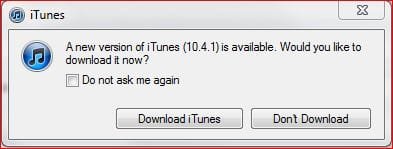
No, it's from apple's website, but it's one of those "an update is available, click here to install it" kind of pushes. So they do, and then W7 goes kablooey. So I don't know (yet) exactly what update gets installed.
 

My Computer

OS
W7 Pro 64, W7 pro 32,
but it's one of those "an update is available, click here to install it" kind of pushes. So they do, and then W7 goes kablooey. So I don't know (yet) exactly what update gets installed.

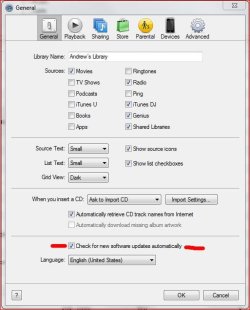
You can actually choose not to install if you don't want. You can also turn off the auto update notifications as well.

iTunes update notification.JPG

iTunes preferences.JPG

But I'm sure you knew this :)

And the default install software will be iTunes and QuickTime at the top, some optional programs at the bottom. I just install iTunes and QuickTime (quickTime is part of iTunes so...)
 

My Computer

Computer type
PC/Desktop
Computer Manufacturer/Model Number
Custom built by me.
OS
Windows 10 Pro
CPU
Intel Core i7-4770K (3.5Ghz)
Motherboard
Gigabyte G1 Sniper 5 (F10 Bios)
Memory
32 gig Corsair Dominator Platinum (4x8Gig)
Graphics Card(s)
Sapphire Tri-X R9 Fury
Sound Card
Soundblaster ZXR
Monitor(s) Displays
NEC PA242W 24" LCD Monitor
Screen Resolution
1920 x 1200
Hard Drives
Primary - Samsung 850 Pro (512gig), Samsung 840 Pro (256gig), 2TB WD Caviar Black.
PSU
EVGA Supernova 1000 G2
Case
Cooler Master HAF X
Cooling
Corsair H100i with Corsair Air Series SP120 Quiet Fans
Keyboard
Logitech Wireless Wave
Mouse
Logitech Performance MX
Internet Speed
High Speed Cable
Antivirus
Norton Security
Browser
IE11
Other Info
Memory Timings - 1866MHz @ 9-9-9-27-1T @ 1.5 volts
Yes, I know, but my BF lives and dies by his iPhone and installs every update the minute it comes out. This is the second time he bricked his laptop doing so - I think we're going to have to have a little talk....

That being said, it would be nice if he could install the updates without fear. I need to figure this one out.
 

My Computer

OS
W7 Pro 64, W7 pro 32,
LOL, I'm like you BF in that I too have to have every uptate that comes out for my PC as well :o

Anyway "iHope" you get it sorted (sorry I couln't help myself :D)

BTW it could be a conflict with some other software. What do the HP forums have to say?
 

My Computer

Computer type
PC/Desktop
Computer Manufacturer/Model Number
Custom built by me.
OS
Windows 10 Pro
CPU
Intel Core i7-4770K (3.5Ghz)
Motherboard
Gigabyte G1 Sniper 5 (F10 Bios)
Memory
32 gig Corsair Dominator Platinum (4x8Gig)
Graphics Card(s)
Sapphire Tri-X R9 Fury
Sound Card
Soundblaster ZXR
Monitor(s) Displays
NEC PA242W 24" LCD Monitor
Screen Resolution
1920 x 1200
Hard Drives
Primary - Samsung 850 Pro (512gig), Samsung 840 Pro (256gig), 2TB WD Caviar Black.
PSU
EVGA Supernova 1000 G2
Case
Cooler Master HAF X
Cooling
Corsair H100i with Corsair Air Series SP120 Quiet Fans
Keyboard
Logitech Wireless Wave
Mouse
Logitech Performance MX
Internet Speed
High Speed Cable
Antivirus
Norton Security
Browser
IE11
Other Info
Memory Timings - 1866MHz @ 9-9-9-27-1T @ 1.5 volts
So far nothing from the HP forum.
 

My Computer

OS
W7 Pro 64, W7 pro 32,
Well, this one is throwing every curve in the book at me - can't get anything to run, incuding a reinstall of os, so have resorted to DBAN. But even that gave me an error, had to research that and download an older version (1.0.7 as opposed to 2.2.6) just to get THAT to run. Here's hoping that will at least get me back to a point where I can install from scratch. I'm glad I have the HP recovery disks, although they are currently rendered useless by whatever is going on with this laptop....
 

My Computer

OS
W7 Pro 64, W7 pro 32,
Corrupt hard drive, bad sectors. I can't believe it.
 

My Computer

OS
W7 Pro 64, W7 pro 32,
I've used itunes and 7 along with many other of my users and installs. No problems here.

But I wouldn't doubt your suspicions, it's apple and them trying to kill Windows seems down their alley...
 

My Computer

Computer Manufacturer/Model Number
ASUS
OS
Windows 7 Ultimate x64
CPU
AMD Athlon 240 II @ 2.8-4.004 ghz
Motherboard
M4A78LT-M LE
Memory
SuperTalent 4gb DDR3
Graphics Card(s)
ATI Radeon 3000HD
Screen Resolution
1440*900
Case
Re-modded Dell Dimension 4550
Cooling
Vantec 92mm Tornado x2
Other Info
It looks pretty.

My Computer

Computer type
PC/Desktop
Computer Manufacturer/Model Number
Custom built by me.
OS
Windows 10 Pro
CPU
Intel Core i7-4770K (3.5Ghz)
Motherboard
Gigabyte G1 Sniper 5 (F10 Bios)
Memory
32 gig Corsair Dominator Platinum (4x8Gig)
Graphics Card(s)
Sapphire Tri-X R9 Fury
Sound Card
Soundblaster ZXR
Monitor(s) Displays
NEC PA242W 24" LCD Monitor
Screen Resolution
1920 x 1200
Hard Drives
Primary - Samsung 850 Pro (512gig), Samsung 840 Pro (256gig), 2TB WD Caviar Black.
PSU
EVGA Supernova 1000 G2
Case
Cooler Master HAF X
Cooling
Corsair H100i with Corsair Air Series SP120 Quiet Fans
Keyboard
Logitech Wireless Wave
Mouse
Logitech Performance MX
Internet Speed
High Speed Cable
Antivirus
Norton Security
Browser
IE11
Other Info
Memory Timings - 1866MHz @ 9-9-9-27-1T @ 1.5 volts
HP has a BIOS level hard drive test - both came back bad and even DBAN reported bad sectors and failed. I just bought this hard drive, to replace the original that also went bad - hard to believe it was bad out of the box. Hope Fry's will replace it.
 

My Computer

OS
W7 Pro 64, W7 pro 32,
Hope Fry's will replace it.

I can't understand why they wouldn't. Don't let them charge you for their broken hardware.
 

My Computer

Computer type
PC/Desktop
Computer Manufacturer/Model Number
Custom built by me.
OS
Windows 10 Pro
CPU
Intel Core i7-4770K (3.5Ghz)
Motherboard
Gigabyte G1 Sniper 5 (F10 Bios)
Memory
32 gig Corsair Dominator Platinum (4x8Gig)
Graphics Card(s)
Sapphire Tri-X R9 Fury
Sound Card
Soundblaster ZXR
Monitor(s) Displays
NEC PA242W 24" LCD Monitor
Screen Resolution
1920 x 1200
Hard Drives
Primary - Samsung 850 Pro (512gig), Samsung 840 Pro (256gig), 2TB WD Caviar Black.
PSU
EVGA Supernova 1000 G2
Case
Cooler Master HAF X
Cooling
Corsair H100i with Corsair Air Series SP120 Quiet Fans
Keyboard
Logitech Wireless Wave
Mouse
Logitech Performance MX
Internet Speed
High Speed Cable
Antivirus
Norton Security
Browser
IE11
Other Info
Memory Timings - 1866MHz @ 9-9-9-27-1T @ 1.5 volts
Latest iTunes & Windows 7 & HP Laptop

I have the exact same problem. Windows 7 is trying to restart but cannot.
Not sure I even have a restore point.
iTunes installed the latest version and asked to restart the laptop. I did and it never came back up. This is a home laptop so I willl need to look at it further later this evening.

May have to reinstall the OS.
 

My Computer

OS
Windows 7 32bit
If this is a HP you guys may need to bring this their tech support.
 

My Computer

Computer type
PC/Desktop
Computer Manufacturer/Model Number
Custom built by me.
OS
Windows 10 Pro
CPU
Intel Core i7-4770K (3.5Ghz)
Motherboard
Gigabyte G1 Sniper 5 (F10 Bios)
Memory
32 gig Corsair Dominator Platinum (4x8Gig)
Graphics Card(s)
Sapphire Tri-X R9 Fury
Sound Card
Soundblaster ZXR
Monitor(s) Displays
NEC PA242W 24" LCD Monitor
Screen Resolution
1920 x 1200
Hard Drives
Primary - Samsung 850 Pro (512gig), Samsung 840 Pro (256gig), 2TB WD Caviar Black.
PSU
EVGA Supernova 1000 G2
Case
Cooler Master HAF X
Cooling
Corsair H100i with Corsair Air Series SP120 Quiet Fans
Keyboard
Logitech Wireless Wave
Mouse
Logitech Performance MX
Internet Speed
High Speed Cable
Antivirus
Norton Security
Browser
IE11
Other Info
Memory Timings - 1866MHz @ 9-9-9-27-1T @ 1.5 volts
I'm convinced it's a driver conflict, but since you can't ever get back into the machine, hard to diagnose. Tina, what model laptop if you don't mind me asking?
 

My Computer

OS
W7 Pro 64, W7 pro 32,
Oh, and I have posted this issue on the HP forums, but from a different angle this time. We'll see if anyone replies.
 

My Computer

OS
W7 Pro 64, W7 pro 32,
Back
Top