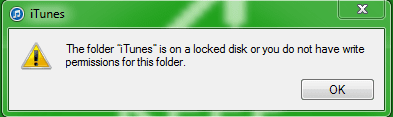
iTunes won't start, on a locked disk... list goes on.

Thanks, Celery

I also took the time to register to say thank you, Celery. I had accidentally deleted all the owners, but followed your suggestion and added my name back as owner of all the iTunes files, and now it even recognizes my iPod again! Problem solved!!!
 

My Computer My Computer

At a glance

Vista 64
Computer Manufacturer/Model Number
DELL studio XPS
OS
Vista 64
Thanks arc, took the time to register just to give you a thumbs up ^^ For anyone worried about downloading a strange file, I promise, it's fine, it won't melt your hardrive or anything but it WILL make your iTunes work again if you follow the instructions
 

My Computer My Computer

At a glance

Windows 7 home 32bit
OS
Windows 7 home 32bit
You are welcome !
 

My Computer My Computer

At a glance

Microsoft Windows 10 Pro Insider Preview 64-bitIntel(R) Core(TM) i3-4130 CPU @ 3.40GHzCorsair Vengence 4GB x2 (8.00GB Dual-Channel ...2047MB GeForce GTS 450 (ZOTAC International)
Computer type
PC/Desktop
Computer Manufacturer/Model Number
Self Assembled
OS
Microsoft Windows 10 Pro Insider Preview 64-bit
CPU
Intel(R) Core(TM) i3-4130 CPU @ 3.40GHz
Motherboard
Gigabyte Technology Co., Ltd. B85M-D3H
Memory
Corsair Vengence 4GB x2 (8.00GB Dual-Channel DDR3 @ 798MHz)
Graphics Card(s)
2047MB GeForce GTS 450 (ZOTAC International)
Sound Card
Onboard (Realtek High Definition Audio)
Monitor(s) Displays
LG Flatron E2040T
Screen Resolution
1600x900
Hard Drives
Western Digital 1 TB
Seagate 500 GB
PSU
Corsair VS550
Case
Cooler Master K380
Cooling
Cooler Master Seidon 120V Plus
Keyboard
Logitech MK260r
Mouse
Logitech MK260r
Internet Speed
PMPL Broadband
Antivirus
Windows Defender + MBAM
Browser
Firefox
Other Info
Dell Studio 15" Laptop
You may let it have a try. In the zip, there is a reg entry "installTakeOwnership". Run it. Now right click "my music", and select take ownership (it is in your right click context menu now). If any permission is not availed form the current owner, it will manage that .

Arc,

Thank you very much, your zip file solved my iTunes issue as well. My problem however seems to be more involved. Ever since setting up media center none of my applications at all will load without right clicking and running as administrator. I tried "take ownership" on every folder in my user account but it didn't work. Is there anything anybody can recommend I try?

Thank you
Andy
 

My Computer My Computer

At a glance

Windows 7 home premium
OS
Windows 7 home premium
Hello Andy :)
It's nice to know that you have solved your iTunes related issues.

For the media center related issue, better you start a new thread in Media Center - Windows 7 Forums . I hope you will get an early solution. :)
 

My Computer My Computer

At a glance

Microsoft Windows 10 Pro Insider Preview 64-bitIntel(R) Core(TM) i3-4130 CPU @ 3.40GHzCorsair Vengence 4GB x2 (8.00GB Dual-Channel ...2047MB GeForce GTS 450 (ZOTAC International)
Computer type
PC/Desktop
Computer Manufacturer/Model Number
Self Assembled
OS
Microsoft Windows 10 Pro Insider Preview 64-bit
CPU
Intel(R) Core(TM) i3-4130 CPU @ 3.40GHz
Motherboard
Gigabyte Technology Co., Ltd. B85M-D3H
Memory
Corsair Vengence 4GB x2 (8.00GB Dual-Channel DDR3 @ 798MHz)
Graphics Card(s)
2047MB GeForce GTS 450 (ZOTAC International)
Sound Card
Onboard (Realtek High Definition Audio)
Monitor(s) Displays
LG Flatron E2040T
Screen Resolution
1600x900
Hard Drives
Western Digital 1 TB
Seagate 500 GB
PSU
Corsair VS550
Case
Cooler Master K380
Cooling
Cooler Master Seidon 120V Plus
Keyboard
Logitech MK260r
Mouse
Logitech MK260r
Internet Speed
PMPL Broadband
Antivirus
Windows Defender + MBAM
Browser
Firefox
Other Info
Dell Studio 15" Laptop
Disk not installed

I followed the instructions to take ownership of the iTunes folder. I rightclicked on take ownership of the folder but nothing happened. No message that ownership had been taken, or something like that, and I still Could not open iTunes. So i rebooted the computer. As it Was opening up, the message "Non-System disk or disk error, replace and strike key when Ready" came up, and I can not start the computer anymore. When I run system diagnostics, I get the answer that the disk is not installed.

I am worried that my hard disk is dead and that all My information is lost. I need guidance, thankfull For all your help!

Best,

Mastorna
 

My Computer My Computer

At a glance

Windows 7
OS
Windows 7
If you have a duel-core processor, are running Windows 7, have music stored on a drive other than C:, and are having this iTunes problem try this:

  1. Go to Start Menu
  2. Right click "Music"
  3. Click "Properties"
  4. Click "Restore Defaults"
  5. Click "Include a folder"
  6. Find and include folder(s) from other drive (e.g. "D:") that have music you want included
  7. Click "Apply"
  8. Click "OK"
 

My Computer My Computer

At a glance

Windows 7 Home Premium 64bit
OS
Windows 7 Home Premium 64bit
I had this error today.
I fixed it by:
1)right clicking on iTunes icon
2)select properties
3)shortcut tab, click advance
4) check box, run as administrator
 

My Computer My Computer

At a glance

windows 7
Computer type
PC/Desktop
OS
windows 7
I just downloaded itunes today and i got dis (look at file) I have done everything possible from command prompt to power shell to regedit to your .zip file up ther... NOTHING WORKS!!!!!!!!! help! :mad:

EDIT: oh and i am admin on my com and it is a laptop running windows 7 home premium... (64 bit)
 

Attachments

  • wow.PNG
    wow.PNG
    6 KB · Views: 52

My Computer My Computer

At a glance

Windows 7 Ultimate x?
Computer type
Laptop
Computer Manufacturer/Model Number
Lenovo
OS
Windows 7 Ultimate x?
Antivirus
none
Browser
Chrome
Just tried this solution to the itl file locked and indeed it worked like a charm for me too! problem solved!!! Thanks!!!
 

My Computer My Computer

At a glance

Windows 7 ultimate 64-bitIntel I7 2600K 3.4ghzCorsair 16gb ddr3 1600mhzNvidia Geforce gt 430
Computer type
PC/Desktop
Computer Manufacturer/Model Number
custom built
OS
Windows 7 ultimate 64-bit
CPU
Intel I7 2600K 3.4ghz
Motherboard
Asus Evo P8P67
Memory
Corsair 16gb ddr3 1600mhz
Graphics Card(s)
Nvidia Geforce gt 430
Sound Card
Sound Blaster Titanium x-fi pci express
Monitor(s) Displays
Dell E198WFP
Hard Drives
1 western digital 2TB drive.
PSU
Antec 1200 watt
Case
Inwin Dragon Rider
Cooling
6 case supplied cooling fans
Keyboard
logitech mk700
Mouse
logitech m705
Internet Speed
25-50mbps download; 10mbps upload(i think)
Antivirus
avg free 2014
Browser
mozilla firefox
Other Info
Also have a pretty bad speaker setup which is a klipsch promedia 5.1 surround speaker setup with huge subwoofer and lg blu ray player/writer. Also a hp officejet pro 8600 plus wireless all in one and a logitech s7500 webcam.
This worked, thank you for the post. Note that for me connecting to Xbox 360 with media center broke this.
 

My Computer My Computer

At a glance

Windows 7
Computer type
PC/Desktop
OS
Windows 7
After I had added my 360 as an extender, itunes was locked out for me too... I looked all around and tried everything, but nothing seemed to work so this is what I did:

1.) Open Windows Media Center
2.) Click on Tasks and then Settings
3.) Click on Start Menu and Extras
4.) Click on Extras Library Options
5.) Make sure that the option "Control the media experience in Windows Media Center" is UNCHECKED
6.) Click Save and try opening iTunes it worked for me

Thanks for this advice. I too have been struggling with the iTunes locked disc problem off and on for a few months. Permissions were set as suggested & I've used Takeownership zip file as described above; but still had same problem.
Just configured Windows Media Centre as you've described & hey presto! iTunes has just opened for me. Hooray!
I have also previously found that deleting the iTunes Library Genius file within iTunes folder has worked too.

Just hope the things I've done will last for more than a few weeks this time!

Thanks for advice to all on this great forum. :)
 

My Computer My Computer

At a glance

Windows 7 Home Premium 64 bit4GB
Computer type
PC/Desktop
Computer Manufacturer/Model Number
custom build
OS
Windows 7 Home Premium 64 bit
Motherboard
Gigabyte
Memory
4GB
Hard Drives
1.5TB
Antivirus
BitDefender
Browser
Chrome
I just had this problem, and after giving permissions to God and everyone (recommended iTunes/Apple fix), nothing happened... iTunes Communities second Google post directed me here to the zip file fix, but before I got logged on to you I happened to see the post AFTER iTunes Communities (3rd Google Post) from an app provider called CopyTrans ... they help you manage & clean up you iTunes/iPod settings and transfer them to other devices like Android Phones .. and it said "this message will come up as soon as you open CopyTrans ... this is done deliberately to prevent ...[yada,yada]... simply close the app and iTunes will run again normally. Which it did. I'm guessing this probably happens with quite a few apps/devices/programs that allow transfer of music back and forth; so might want to try making sure your new app is closed and if that doesn't work checking with their support or FAQs to see if THEY have any permissions etc. that need to be opened or closed before your programs will run normally again...
 

My Computer My Computer

At a glance

Windows 8.1
Computer type
PC/Desktop
OS
Windows 8.1
This may be really obvious but... I was had just gone thru the whole check ownership rigamarole; saw the recommendation to this forum on iTunes communities so went here and when I went back to close that window I saw the NEXT Google post ... it was from an iTunes/Android (and general iTunes cleanup, manage and fill in missing data program) called CopyTrans and the Google info tag said "when you first install CopyTrans you will get a iTunes is a locked disc" error. This is intentional to prevent ... [yada, yada]... simply close CopyTrans and iTunes will open again." Which worked. I suspect this problem is occurring a lot with a lot of apps/programs/installations/devices that permit or facilitate transfer of files ... so anyway before you give ownership (my husband and I were only users/ administrators too ...) to god and everyone check if you've installed or opened any new cross-data devices or programs, see if you need to close them, or if you need to authorize any permissions wiht them (or turn any off, I suppose) ... but I'm downloading the takeownership.zip just in case anyway, seeing how prevalent this problem is with how many different things, I suspect I'll run into it again...
 

My Computer My Computer

At a glance

Windows 8.1
Computer type
PC/Desktop
OS
Windows 8.1
Back
Top