
MooseTreeMan
New member
I have had numerous software problems with Windows 7 since I upgraded several months back. The problem that has been the most persistent though is iTunes.
Fortunately, I found the Windows Seven Forums and finally (after months of trying) succeeded (at least technically) in installing iTunes.
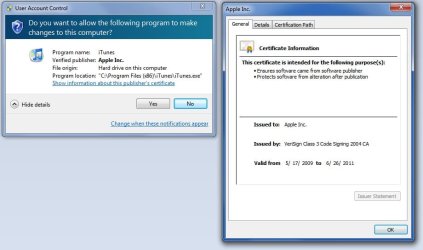
The problem I have now is that I click the iTunes icon and what comes up are the windows in the .jpg attachment - the "User Account Control" window that asks "Do you want to allow the following program to make changes to this computer?" (to which I respond "yes") and the window "Apple Inc." which comes up if you click the link titled "show information about this publisher's certificate" on the "User Account Control" window (this window just confirms that I have the right to use iTunes).
When I click "yes" on the "User Account Control" window, the computer has a huge spike in the CPU usage (from about 10% to about 50%) for a few seconds, and then nothing happens. The Windows Task Manager shows no new processes and no new applications on its lists.
This same process is repeated over and over again every time I try to open iTunes. Restarting the computer does nothing. Running iTunes as administrator does nothing. Changing the compatibility mode does nothing (I have tried every permutation). Condemning the software with colorful language does nothing.
I have been trying this over and over again from iTunes 9.0 through iTunes 9.2. And the thing that irritates me most about this problem is that my friends that have Windows 7 64-bit are having no trouble at all! Please, if there is someone out there who can help me with this - please help me!
Fortunately, I found the Windows Seven Forums and finally (after months of trying) succeeded (at least technically) in installing iTunes.
The problem I have now is that I click the iTunes icon and what comes up are the windows in the .jpg attachment - the "User Account Control" window that asks "Do you want to allow the following program to make changes to this computer?" (to which I respond "yes") and the window "Apple Inc." which comes up if you click the link titled "show information about this publisher's certificate" on the "User Account Control" window (this window just confirms that I have the right to use iTunes).
When I click "yes" on the "User Account Control" window, the computer has a huge spike in the CPU usage (from about 10% to about 50%) for a few seconds, and then nothing happens. The Windows Task Manager shows no new processes and no new applications on its lists.
This same process is repeated over and over again every time I try to open iTunes. Restarting the computer does nothing. Running iTunes as administrator does nothing. Changing the compatibility mode does nothing (I have tried every permutation). Condemning the software with colorful language does nothing.
I have been trying this over and over again from iTunes 9.0 through iTunes 9.2. And the thing that irritates me most about this problem is that my friends that have Windows 7 64-bit are having no trouble at all! Please, if there is someone out there who can help me with this - please help me!
Attachments
My Computer
- Computer Manufacturer/Model Number
- HP HDX18 Premium Series
- OS
- Windows 7 Home Premium 64-bit
- CPU
- Intel(R) Core(TM)2 Duo CPU P8700 @ 2.53GHz
- Memory
- 4.00 GB


