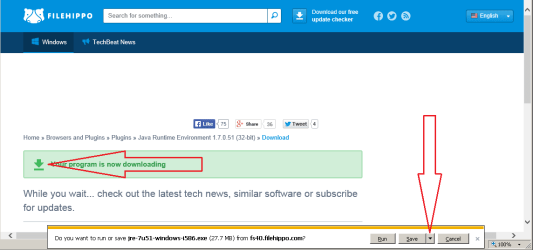
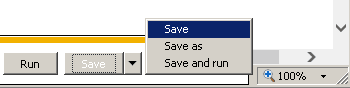
New to this forum - so hopefully I did right to tag on to this most recent Java thread. Thanks in advance for any help.
When I try to install latest Java 7—51 the “run” option will not work (in explorer downloads – it just puts another version visible in download window or does not run). I have windows 7 32 bit. I had not had problems until last Java update (See note A below). This is for both online and offline versions. Even when I placed the offline version in C: drive and right clicked to “open”; it jumps to the download explorer page (Java exe file is shown as internet explorer type file).
Given below I am now thinking of forgetting about Java entirely but even after uninstall I still get that darn error boot message [A]. Also have that same message on my other computer (I think after install of 7-45 version). Bad enough I now cannot get flash player to work - but also issues with new install of IE 11 (which block a lot of utility online). So I am not really sure what the heck Java does or it related to EI 11 issue
Things I have tried to no avail:
1. Turn off firewall
2. Turn off firewall and MS security essentials
3. Download offline JAVA installer and try
4. Gone in to control panel and uninstalled prior version shown (one was there after my first try to install). It is now uninstalled and gone.
5. (note that I found reference to JRE control panel option somewhere and turned on to see about any actions but no activity (See below about error message - assume because error message says I have no JRM installed)
6. Used default security in Win 7
7. I have 32 bit and therefore appears to be 32 bit installer
8. Tried 2 Microsoft fixit type programs, run form MS web pages
9. Did find Java folder in C: programs after uninstall – It had some files and I deleted the folder
Two notes:
A. prior to trying install JAVA 7 I had been getting error message at boot saying “No JRM could be found. Please define exe4J_Java_home to point to Java control center installed..”
B. I also have been having problems to get adobe flash player to run since I installed Internet Explorer 11 even though I have it enabled in managing add-ons (shockwave is enabled)
When I try to install latest Java 7—51 the “run” option will not work (in explorer downloads – it just puts another version visible in download window or does not run). I have windows 7 32 bit. I had not had problems until last Java update (See note A below). This is for both online and offline versions. Even when I placed the offline version in C: drive and right clicked to “open”; it jumps to the download explorer page (Java exe file is shown as internet explorer type file).
Given below I am now thinking of forgetting about Java entirely but even after uninstall I still get that darn error boot message [A]. Also have that same message on my other computer (I think after install of 7-45 version). Bad enough I now cannot get flash player to work - but also issues with new install of IE 11 (which block a lot of utility online). So I am not really sure what the heck Java does or it related to EI 11 issue
Things I have tried to no avail:
1. Turn off firewall
2. Turn off firewall and MS security essentials
3. Download offline JAVA installer and try
4. Gone in to control panel and uninstalled prior version shown (one was there after my first try to install). It is now uninstalled and gone.
5. (note that I found reference to JRE control panel option somewhere and turned on to see about any actions but no activity (See below about error message - assume because error message says I have no JRM installed)
6. Used default security in Win 7
7. I have 32 bit and therefore appears to be 32 bit installer
8. Tried 2 Microsoft fixit type programs, run form MS web pages
9. Did find Java folder in C: programs after uninstall – It had some files and I deleted the folder
Two notes:
A. prior to trying install JAVA 7 I had been getting error message at boot saying “No JRM could be found. Please define exe4J_Java_home to point to Java control center installed..”
B. I also have been having problems to get adobe flash player to run since I installed Internet Explorer 11 even though I have it enabled in managing add-ons (shockwave is enabled)
My Computer
At a glance
Windows 7 ultimate 32 bit4GB
- Computer type
- PC/Desktop
- Computer Manufacturer/Model Number
- HP
- OS
- Windows 7 ultimate 32 bit
- Memory
- 4GB
- Hard Drives
- 200GB
- Antivirus
- MS security essenitials
- Browser
- IE 11.0.9600