java.exe process eating bandwidth

paw1

New member
Local time
3:55 PM
Messages
2
Hi,
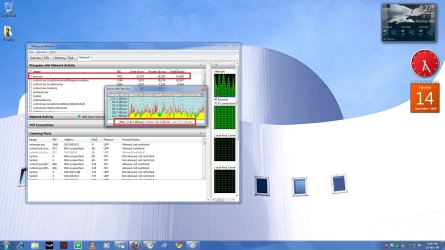
Of late, the java.exe process has been eating a lot of bandwidth even when i'm doing nothing. Its been doing this for quite a few days now, so it cant just be routine updates. Snapshot's been attached.

What the hell is this? how do i get rid of it? Unable to end process, it gets started as soon as i try to end it.

Help :cry:
moz-screenshot.png
 

Attachments

  • java.jpg
    java.jpg
    219.8 KB · Views: 183

My Computer

OS
7
Hi,
Of late, the java.exe process has been eating a lot of bandwidth even when i'm doing nothing. Its been doing this for quite a few days now, so it cant just be routine updates. Snapshot's been attached.

What the hell is this? how do i get rid of it? Unable to end process, it gets started as soon as i try to end it.

Help :cry:
moz-screenshot.png

Hi Paw1! Welcome to SevenForums! Have you got the BitTorrent Client Vuze (which was previously called Azureus) installed? If you have, then that may be your answer. Vuze/Azureus is based on Java and as it is a BitTorrent Client it has and EXTREMELY high Bandwidth Usage. You should either Uninstall Vuze/Azureus if you don't need it or just leave it if you require it.

ZeshanA
 
Java update

The first thing I do when I install java on a new build is to turn off automatic updates. It does eat up the bandwidth and eats up hd space after a few months you can end up with 500+ meg of usage. To turn off the updates you'll find a java icon in the Controll Panel. Just choose your option for updating there.
The update is never needed on a daily or weekly schedule. I prefer to choose when to manually. That, for me, means when I go to a website or install a program that says I need to update is when I update.

As far as the Azureus/Vuze BitTorrent client. It's really cool and very pretty but it's a hog and slows everyting down. I used it for a while then changed to BitTorrent, light weight, features I like, and unobtrusive.
 

My Computer

Computer Manufacturer/Model Number
IceMicro
OS
6@Win XP 1@Vista (1@Win 7 (Mine))
CPU
AMD Phenom XII 550 Black 3.1Ghz Unlocked to 4cores at 3.1Ghz
Motherboard
Gigabyte GA-M790X-UD4P
Memory
4 (2 X 2) Gig OCZ Reaper DDR2 800
Graphics Card(s)
Gigabyte HD4670 1Gig DDR3
Sound Card
On Board
Monitor(s) Displays
Gateway 22" LCD
Screen Resolution
1650 X 1080
Hard Drives
WD SATA 3Gbs 500Gig
Hitichi SATA 3Gbs 500Gig
PSU
Coolmaster 560W
Case
NZXT
Cooling
Stock plus added case fans
Keyboard
Microsoft Egronomic
Mouse
Microsoft Wireless Laser 5000
Internet Speed
768K DSL
Thanks guys,

I use utorrent so dont have a java-based torrent client, so thats not the cause of the problem.

For now, i've got rid of it( did end process tree, and before it could restart, deleted the java.exe file itself) though i'm expecting errors to pop up while using java.

And yes, i did change the auto-update settings after i read the reply, i guess it should do the trick. Thanks Xzaviar
 

My Computer

OS
7
If I helped

Please tip my scales.:)
 

My Computer

Computer Manufacturer/Model Number
IceMicro
OS
6@Win XP 1@Vista (1@Win 7 (Mine))
CPU
AMD Phenom XII 550 Black 3.1Ghz Unlocked to 4cores at 3.1Ghz
Motherboard
Gigabyte GA-M790X-UD4P
Memory
4 (2 X 2) Gig OCZ Reaper DDR2 800
Graphics Card(s)
Gigabyte HD4670 1Gig DDR3
Sound Card
On Board
Monitor(s) Displays
Gateway 22" LCD
Screen Resolution
1650 X 1080
Hard Drives
WD SATA 3Gbs 500Gig
Hitichi SATA 3Gbs 500Gig
PSU
Coolmaster 560W
Case
NZXT
Cooling
Stock plus added case fans
Keyboard
Microsoft Egronomic
Mouse
Microsoft Wireless Laser 5000
Internet Speed
768K DSL
Back
Top