java install does not complete or ?

Wadeingin

New member
Local time
9:43 AM
Messages
13
jre-8u60-windows-x64

after trying to install, and nothing appears to happen, clickd again and
java install window in progress.
Another java installation is in progress.
You must complete that installation before you can run this installer.

Under program and features: no jre programs present.

Window Task Manager:

Appilications:
Java Intall in progress Status = running.
Processes: jre-8u60-windows-x64.exe

I need java to run a program,

win7pro 64 bit, am up to date with win7

Thank you!
 

My Computer My Computer

Computer Manufacturer/Model Number
unknown, craigslist
OS
Win 7pro 64 bit
CPU
AMD Phenom II X6 1055T Processor
Motherboard
MSI 870U-G55
Memory
Corsair Venegence, 2, 4GB 1600
Graphics Card(s)
Nvidia Gforce 8400 GS DDR3
Sound Card
On board sound
Monitor(s) Displays
ASUS 23 HDMI/VGA
Hard Drives
Kingston 64 GB SSD V-100

Hitachi 1Tb 7200RPM
PSU
Coolmax V600
Case
Elite 430
Cooling
Standard Cooling Fan
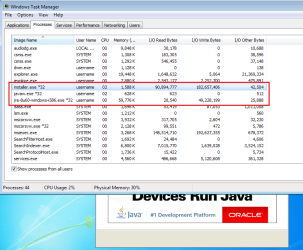
Does Task Manager show any IO reads/writes/other?
(Use View > Select Columns... to add that info.)

java.png

A better tool would be to watch Process Explorer. See this post.
 

My Computer My Computer

Computer type
Laptop
Computer Manufacturer/Model Number
Employer provided Dell Latitude
OS
W7 Pro SP1 64bit
CPU
i7
Memory
8GB
Graphics Card(s)
Intel HD Graphics
Hard Drives
crappy SSD
Antivirus
Employer mandated Symantec Endpoint Protection
Browser
Pale Moon 64bit, IE11 64bit & Chrome 64bit
1.
jre-8u60-windows-i586
cpu=0, mem= 56,064k, i/o Read bytes= 75,429, i/o write= 49,058,269, i/o other= 19,258


2. if attempt for my 64bit; jre-8u60-windows-x64.exe

cpu=0, mem= 6,808k, i/o Read bytes= 64,747, i/o write= 54,075,977, i/o other= 18,440

thank you for rersponding
 

My Computer My Computer

Computer Manufacturer/Model Number
unknown, craigslist
OS
Win 7pro 64 bit
CPU
AMD Phenom II X6 1055T Processor
Motherboard
MSI 870U-G55
Memory
Corsair Venegence, 2, 4GB 1600
Graphics Card(s)
Nvidia Gforce 8400 GS DDR3
Sound Card
On board sound
Monitor(s) Displays
ASUS 23 HDMI/VGA
Hard Drives
Kingston 64 GB SSD V-100

Hitachi 1Tb 7200RPM
PSU
Coolmax V600
Case
Elite 430
Cooling
Standard Cooling Fan
The main installer starts other processes. Did you see them? If not, then maybe your antivirus or other security app stopped them from being created.

There are two log files created during the normal installation process:
C:\Users\username\AppData\Local\Temp\JavaDeployReg.log
C:\Users\username\AppData\Local\Temp\jusched.log

You might need to follow these steps to see them:
http://www.sevenforums.com/tutorials/394-hidden-files-folders-show-hide.html
http://www.sevenforums.com/tutorials/10570-file-extensions-hide-show.html

Delete both of those log files and try installing the 32bit version again.

Check Task Manager to see that the IO activity has stopped for the main installer and any processes that it spawned. Once you are sure that the IO activity has stopped, restart the computer to end the problematic install.

Attach those two files to your next post via these steps:
http://www.sevenforums.com/tutorials/9733-screenshots-files-upload-post-seven-forums.html
 

My Computer My Computer

Computer type
Laptop
Computer Manufacturer/Model Number
Employer provided Dell Latitude
OS
W7 Pro SP1 64bit
CPU
i7
Memory
8GB
Graphics Card(s)
Intel HD Graphics
Hard Drives
crappy SSD
Antivirus
Employer mandated Symantec Endpoint Protection
Browser
Pale Moon 64bit, IE11 64bit & Chrome 64bit
Back
Top