Java Version 6 Update 24 Update Problem. Please help!

kdar

New member
I am using Google Chrome, running on Windows 7 Home Premium, and have tried to update my Java to the latest version (V6.24), but no matter how many times I download the file, it does not update!
The file will download, but when trying to run and install the setup, I get the error message:

Error - Java (TM) Installer
Download failed from=http://javadl.sun.com/webapps/download/GetFile/1.6.0_24-b71/windows-i586/jre1.6.0_24-c-l.msi, to= C:\Users\XX\AppData\LocalLow\Sun\Java\jre1.6.0_24\jre1.6.0_24-c-l.msi

So then I tried downloading the offline installation of Java, but the same thing happens, or it will load and the installation freezes.

Have tried to completely remove Java with Windows Installer Cleanup Utility and JavaRa, but same problem keeps happening.

I don't understand what is wrong and why it is not updating properly. It's causing me problems like not loading application programs that require Java!
If anyone has any answers please help!
Thank you.
 

My Computer

OS
Windows 7 Home Premium
Hi kdar and welcome to SF! :)
Why not try to download the offline installer using Internet Explorer? Downloaded file, close all browsers and run the installer. Let us know the result.
 

My Computer

Computer Manufacturer/Model Number
WALLONN7 / LIN BLACK SERIES II
OS
Windows 7 Ultimate x64 SP1
CPU
AMD PHENOM II X6 1090T 3.2GHz
Motherboard
GIGABYTE GA-890FXA-UD7
Memory
8GB G.SKILL RIPJAWS - F3-10666CL7D
Graphics Card(s)
SAPPHIRE ATI RADEON HD 5870 VAPOR X OC
Sound Card
REALTEK DOLBY HOME THEATER
Monitor(s) Displays
LED LG W2486L
Screen Resolution
1080p
Hard Drives
SEAGATE 1TB -ST31000528AS - AHCI MODE - AS SATA
PSU
ZALMAN ZM1000-HP 1000W
Case
THERMALTAKE XASER VI VG4000SWA
Cooling
140MM x3 / 120MM x1 AIR COOLING - THERMALTAKE
Keyboard
MICROSOFT DIGITAL MEDIA KEYBOARD 3000 - USB
Mouse
MICROSOFT BASIC OPTICAL MOUSE 2.0 - USB
Internet Speed
600KBPS
Other Info
MICROSOFT XBOX 360 CONTROLLER
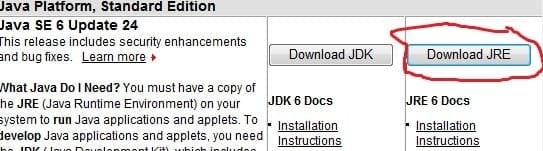
This is the way to download and install offline

  • Download the latest version of Java Runtime Environment (JRE) 6.
  • Scroll down to where it says "Java Runtime Environment (JRE) 6u24 allows end-users to run Java applications".
  • Click the "Download" button to the right.
  • Check the box that says: "Accept License Agreement".
  • The page will refresh.
  • Click on the link to download Windows Offline Installation with or without Multi-language and save to your desktop.
  • Close any programs you may have running - especially your web browser.
  • Go to Start > Control Panel double-click on Add/Remove programs and remove all older versions of Java.
  • Check any item with Java Runtime Environment (JRE or J2SE) in the name.
  • Click the Remove or Change/Remove button.
  • Repeat as many times as necessary to remove each Java versions.
  • Reboot your computer once all Java components are removed.
  • Then from your desktop double-click on jre-6u24-windows-i586-p.exe to install the newest version.
 

Attachments

  • JRE.jpg
    JRE.jpg
    48.6 KB · Views: 64

My Computer

Computer type
PC/Desktop
Computer Manufacturer/Model Number
Bruce ... somewhere in his 40's
OS
Windows 7 Ultimate 32bit SP1
CPU
Intel(R) Core(TM)2 Quad CPU @ 2.40GHz, 2400 MHz
Motherboard
INTEL/D975XBX2
Memory
4 GB
Graphics Card(s)
ATI Radeon HD 2600 Pro
Monitor(s) Displays
Samsung SyncMaster 914v
Screen Resolution
1280 x 1024
Hard Drives
2/500GB each ... ST3500630AS ATA Device.
One is not connected
PSU
Rocketfish 700 W
Case
G.Skill Gigabyte Chassis
Keyboard
Standard PS/2 Keyboard
Mouse
Microsoft PS/2 Mouse
Internet Speed
DSL
Antivirus
Avira Internet Security
Browser
IE 11
Other Info
ATI HDMI Audio
This is the way to download and install offline

  • Download the latest version of Java Runtime Environment (JRE) 6.
  • Scroll down to where it says "Java Runtime Environment (JRE) 6u24 allows end-users to run Java applications".
  • Click the "Download" button to the right.
  • Check the box that says: "Accept License Agreement".
  • The page will refresh.
  • Click on the link to download Windows Offline Installation with or without Multi-language and save to your desktop.
  • Close any programs you may have running - especially your web browser.
  • Go to Start > Control Panel double-click on Add/Remove programs and remove all older versions of Java.
  • Check any item with Java Runtime Environment (JRE or J2SE) in the name.
  • Click the Remove or Change/Remove button.
  • Repeat as many times as necessary to remove each Java versions.
  • Reboot your computer once all Java components are removed.
  • Then from your desktop double-click on jre-6u24-windows-i586-p.exe to install the newest version.


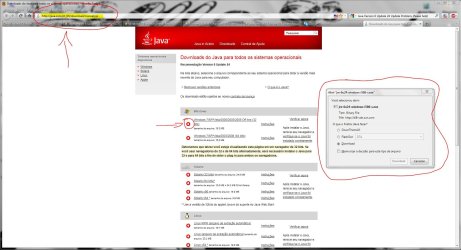
Well, I always do the following and never goes wrong. :) But it's good that everyone knows an alternative way! ;)
 

Attachments

  • Capturar.JPG
    Capturar.JPG
    224 KB · Views: 452

My Computer

Computer Manufacturer/Model Number
WALLONN7 / LIN BLACK SERIES II
OS
Windows 7 Ultimate x64 SP1
CPU
AMD PHENOM II X6 1090T 3.2GHz
Motherboard
GIGABYTE GA-890FXA-UD7
Memory
8GB G.SKILL RIPJAWS - F3-10666CL7D
Graphics Card(s)
SAPPHIRE ATI RADEON HD 5870 VAPOR X OC
Sound Card
REALTEK DOLBY HOME THEATER
Monitor(s) Displays
LED LG W2486L
Screen Resolution
1080p
Hard Drives
SEAGATE 1TB -ST31000528AS - AHCI MODE - AS SATA
PSU
ZALMAN ZM1000-HP 1000W
Case
THERMALTAKE XASER VI VG4000SWA
Cooling
140MM x3 / 120MM x1 AIR COOLING - THERMALTAKE
Keyboard
MICROSOFT DIGITAL MEDIA KEYBOARD 3000 - USB
Mouse
MICROSOFT BASIC OPTICAL MOUSE 2.0 - USB
Internet Speed
600KBPS
Other Info
MICROSOFT XBOX 360 CONTROLLER
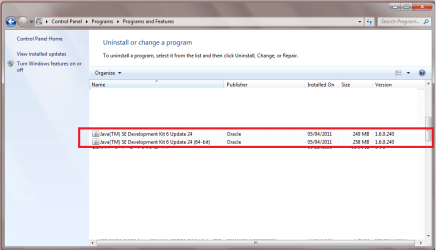
Yes! Thank you! I have finally managed to successfully download Java Version 6 Update 24.

However, although it is installed successfully, there still appears to be problems!
It doesn't appear to be having an effect when I load anything Java related on the web browser on Google Chrome or Internet Explorer.

It is STILL telling me I need to update Java, even know my computer shows it has been successfully installed and is a program in my system.
 

Attachments

  • proof.png
    proof.png
    110.2 KB · Views: 168

My Computer

OS
Windows 7 Home Premium
I'm seeing SE Development Kit ... not JRE
 

My Computer

Computer type
PC/Desktop
Computer Manufacturer/Model Number
Bruce ... somewhere in his 40's
OS
Windows 7 Ultimate 32bit SP1
CPU
Intel(R) Core(TM)2 Quad CPU @ 2.40GHz, 2400 MHz
Motherboard
INTEL/D975XBX2
Memory
4 GB
Graphics Card(s)
ATI Radeon HD 2600 Pro
Monitor(s) Displays
Samsung SyncMaster 914v
Screen Resolution
1280 x 1024
Hard Drives
2/500GB each ... ST3500630AS ATA Device.
One is not connected
PSU
Rocketfish 700 W
Case
G.Skill Gigabyte Chassis
Keyboard
Standard PS/2 Keyboard
Mouse
Microsoft PS/2 Mouse
Internet Speed
DSL
Antivirus
Avira Internet Security
Browser
IE 11
Other Info
ATI HDMI Audio

My Computer

Computer type
PC/Desktop
Computer Manufacturer/Model Number
Custom Built
OS
Windows 10 Pro x64, Windows 8.1 Pro x64, Windows 7 Ultimate x64 SP1,
CPU
INTEL i9-7920X LGA 2066
Motherboard
Gigabyte X299-WU8 F3
Memory
64 GB (4 X 16 GB) G-Skill V Series DDR4 3200 Quad Channel
Graphics Card(s)
EVGA GTX 1060 SC 3 GB
Sound Card
Realtek Onboard ALC1220
Monitor(s) Displays
2 x Samsung S27E310
Screen Resolution
1920x1080
Hard Drives
Samsung 2 x 970 EVO Plus 500 GB NVMe
1 x 6TB WD 6003FZBX SATA
1 x 6TB WD 60EFRX SATA
12 x 3TB WD 30EFRX SATA
PSU
Seasonic X-1050
Case
Thermaltake Armor+
Cooling
Corsair H80i V2 Liquid AOI Cooler
Keyboard
Logitech G510s
Mouse
Logitech MX Master 2S
Internet Speed
200 Mb/s
Antivirus
ESET NOD32 13.1
Browser
EDGE (Dev, Canary, Beta), Chrome
Other Info
ASUS RT-AC68U router
Malwarebytes 4.0.4
Oops. My bad.
Ok, I've done the instructions and I'm happy to say it's installed successfully and is working perfectly! Yay! :)
Thank you everyone!


Unfortunately, some other application programs, ie. Samsung Kies, I have are still not launching ... Thought it was a Java problem, but it seems like this is not the case. :confused:
 

My Computer

OS
Windows 7 Home Premium
What is happening when you try to launch Samsug Kies?
 

My Computer

Computer type
PC/Desktop
Computer Manufacturer/Model Number
Custom Built
OS
Windows 10 Pro x64, Windows 8.1 Pro x64, Windows 7 Ultimate x64 SP1,
CPU
INTEL i9-7920X LGA 2066
Motherboard
Gigabyte X299-WU8 F3
Memory
64 GB (4 X 16 GB) G-Skill V Series DDR4 3200 Quad Channel
Graphics Card(s)
EVGA GTX 1060 SC 3 GB
Sound Card
Realtek Onboard ALC1220
Monitor(s) Displays
2 x Samsung S27E310
Screen Resolution
1920x1080
Hard Drives
Samsung 2 x 970 EVO Plus 500 GB NVMe
1 x 6TB WD 6003FZBX SATA
1 x 6TB WD 60EFRX SATA
12 x 3TB WD 30EFRX SATA
PSU
Seasonic X-1050
Case
Thermaltake Armor+
Cooling
Corsair H80i V2 Liquid AOI Cooler
Keyboard
Logitech G510s
Mouse
Logitech MX Master 2S
Internet Speed
200 Mb/s
Antivirus
ESET NOD32 13.1
Browser
EDGE (Dev, Canary, Beta), Chrome
Other Info
ASUS RT-AC68U router
Malwarebytes 4.0.4
I download the file, but it never fully installs.
During the installation process, it stops responding for a bit, but then disappears.
Then a "Samsung Kies installation wizard" comes up at the taskbar, but I can't open it to see what's happening. Nothing opens up when I click on it, but it's running.
 

My Computer

OS
Windows 7 Home Premium
Similar thing also happens when I try and open other software, such as IBM SPSS Statistics. However, for this one, the installation is successful, but when I open it, the startup for the software opens...And it just stays that way, until I click it ...and it goes away :huh:

These software are incorporated with Java, hence why I thought this was a Java problem.

Does anyone have any ideas with what is wrong?
 

My Computer

OS
Windows 7 Home Premium
Right click and choose to run as Administrator.
 

My Computer

Computer type
PC/Desktop
Computer Manufacturer/Model Number
Bruce ... somewhere in his 40's
OS
Windows 7 Ultimate 32bit SP1
CPU
Intel(R) Core(TM)2 Quad CPU @ 2.40GHz, 2400 MHz
Motherboard
INTEL/D975XBX2
Memory
4 GB
Graphics Card(s)
ATI Radeon HD 2600 Pro
Monitor(s) Displays
Samsung SyncMaster 914v
Screen Resolution
1280 x 1024
Hard Drives
2/500GB each ... ST3500630AS ATA Device.
One is not connected
PSU
Rocketfish 700 W
Case
G.Skill Gigabyte Chassis
Keyboard
Standard PS/2 Keyboard
Mouse
Microsoft PS/2 Mouse
Internet Speed
DSL
Antivirus
Avira Internet Security
Browser
IE 11
Other Info
ATI HDMI Audio
It doesn't make a difference. The same thing just happens.
 

My Computer

OS
Windows 7 Home Premium
Back
Top