Solved Java Web Start Launcher multiple starts

Bassmike

New member
Local time
12:43 AM
Messages
9
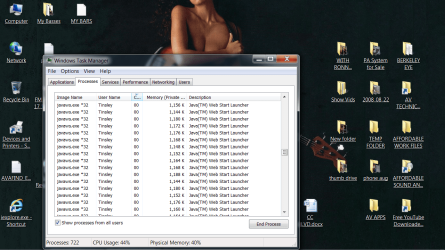
Issues w Java Web Start Launcher continued multiple starts slowing/ freezing processer.
Simple fix? Java not listed in Control Panel >Programs. Thanks. M.
 

Attachments

  • Untitled.png
    Untitled.png
    281.8 KB · Views: 2

My Computer

Computer type
PC/Desktop
Computer Manufacturer/Model Number
custom build
OS
Windows 7 professional
CPU
AMD A8-3850 APUw Radeon(tm) HD Graphics 2.9Ghz
Motherboard
Gigabyte Tehnology Co., LTD. GA-A75M-S2V
Memory
8192MB RAM
Graphics Card(s)
AMD Radeon HD6500 Series
Hard Drives
WD10 03FBYZ-010F80 SATA
ST 3000DM 001-1ER166
Antivirus
AVG business
Browser
Explorer11

My Computer

Computer type
PC/Desktop
Computer Manufacturer/Model Number
Custom Built By Me.
OS
Windows 10 Pro 64 bit
CPU
AMD FX 9590 8 Core Black Edition
Motherboard
MSI 990FXA GAMING (MS-7893)
Memory
Corsair Vengeance 16GB DDR3
Graphics Card(s)
AMD Radeon (TM) R9 380 Gaming Series
Sound Card
AMD High Definition
Monitor(s) Displays
Samsung 32" 60Hz 4ms Curved PLS LED
Screen Resolution
1920 X 1080
Hard Drives
C: 223 GB SSD = E: 465 GB HDD = F: 931 GB HDD = G: 149 GB HDD = H: 931 GB HDD
PSU
EVGA Supernova NEX750B 750W ATX EPS12V 80PLUS Bronze
Case
Cool Master
Cooling
Noctua NH-D15 Premium Cooler with 2x NF-A15 PWM 140mm Fan
Internet Speed
Fiber Optic: Download 332.7 Mbps / Upload 331.5 Mbps
Antivirus
Windows Defender
Browser
Slimjet (64bit)
Hi:

Go here javaws.exe*32 infection - thousands running in task manager The OP in the post was able to fix the issue. Hope this helps.

Yes, the OP in that thread at another malware removal forum did have a similar problem.

However, malware removal needs to be customized and tailored for the specific machine being cleaned.
It would be inadvisable -- even dangerous -- for the OP here to follow the steps used by the OP in the other thread at the other forum.
In particular, the scripts used to clean that machine could damage @Bassmike's system.
IOW a "fix" designed to clean one machine may not work on another system and *could* damage another system.

It would be much safer for @Bassmike either to create a new post in Security section here at this forum and await help from one of our members trained and experienced in malware removal, OR to head over to one of the many reputable outside fora specializing in computer disinfection.

Cheers,
MM
 

My Computer

Computer type
PC/Desktop
Computer Manufacturer/Model Number
Dell Studio XPS 8500
OS
OEM Windows 7 Ult (x64) SP1
CPU
Intel Core-i7 3770 @ 3.4 GHz
Motherboard
"Dell" branded
Memory
16 GB DDR3 SDRAM @ 1333 MHz
Graphics Card(s)
NVidia GeForce GT620 1 GB
Sound Card
THX TruStudio PC
Monitor(s) Displays
Dell U2410 Full HD
Hard Drives
2.0 TB SATA2 @ 7200 RPM
PSU
350W
Keyboard
MS 4000 Ergon - Wired
Mouse
Logitech Anywhere MX
Internet Speed
Cable HSI w/Turbo (router)
Antivirus
KIS-MBAM Premium-MBAE Premium
Browser
Fx (current version); IE
Other Info
And a Win7/64 Pro laptop; And a Win10/64 Pro desktop.
Much thanks to both Lance and Moxie. Fortunately, I may have accidentally found resolution.
Initial search in Control Panel> Programs saw no sign of anything Java- related. After posting
here and fruitless resetting IE advanced settings/ system restores, a "Java Update 91"
mysteriously appeared in the pgms. list. I uninstall it. After 45+ min. into reboot the
javaws.exe*32 infection multiple CPU- freezing Java Web Start Launcher instances
has ceased it's onslaught. Running like a greased pig. Time will tell.
I'll end with typical newbie inquiry: Is there a "recommended 'System maintenance'
registry cleaner" for Win7 Professional? Aside from staying off unsecured "sites".
My 2015 AVG business software just expired which may explain recent posted mishap.
Also running Malwarebytes, Spybot, Startpage Guard. Suggestions? Or redirect to
another related post. Aside from "Your problem is obvious".
Again much thanks to aforementioned kind pros. M.
 

My Computer

Computer type
PC/Desktop
Computer Manufacturer/Model Number
custom build
OS
Windows 7 professional
CPU
AMD A8-3850 APUw Radeon(tm) HD Graphics 2.9Ghz
Motherboard
Gigabyte Tehnology Co., LTD. GA-A75M-S2V
Memory
8192MB RAM
Graphics Card(s)
AMD Radeon HD6500 Series
Hard Drives
WD10 03FBYZ-010F80 SATA
ST 3000DM 001-1ER166
Antivirus
AVG business
Browser
Explorer11
Hi:

Registry cleaners = snake oil. Even MS does not recommend them:
https://support.microsoft.com/en-us/kb/2563254
Numerous other, reputable articles advise against the use of such "tweakers" and "optimizers" and "cleaners".
More likely to cause harm than good.

Aside from that, if you do not need Java (a.k.a. JRE, Java Runtime Environment), it would be best to fully and completely remove all traces from your system. Few programs or websites "require" it these days. And it is a significant security risk.
There are two removal tools:

JavaRa
-- no longer being developed, but works fine for Win7; version 1.16 may be better than version 2
Oracle's own removal tool

As for the choice of AV, either free or paid, it's a common question with no "best" answer.
You'll need to find the one that best suits your personal taste, computing habits, system specs, budget, etc.
But most average users need ONE robust, up-to-date AV -- so you need to replace or update your expired AV.
Many users will supplement their AV with complementary protection from ONE real-time anti-malware (such as MBAM Premium or another product), and perhaps real-time anti-exploit protection (MBAE or HitmanPro Alert).
Spybot S&D is no longer held in high regard by most computer security experts. There are other, better, online and offline "second opinion" malware scanners.
I've never heard of "Startpage Gard" (or "Startpage Guard"), so I cannot comment. But there are well-established programs, such as WinPatrol that might provide the same feature.

NO software or combination of software can protect 100% of computers from 100% of malware 100% of the time. The most critical component is the part between the chair and the keyboard, through the practice of "safe hex". There are many authoritative resources at reputable computer help sites explaining home computer "best practices".

Cheers,
MM

 

My Computer

Computer type
PC/Desktop
Computer Manufacturer/Model Number
Dell Studio XPS 8500
OS
OEM Windows 7 Ult (x64) SP1
CPU
Intel Core-i7 3770 @ 3.4 GHz
Motherboard
"Dell" branded
Memory
16 GB DDR3 SDRAM @ 1333 MHz
Graphics Card(s)
NVidia GeForce GT620 1 GB
Sound Card
THX TruStudio PC
Monitor(s) Displays
Dell U2410 Full HD
Hard Drives
2.0 TB SATA2 @ 7200 RPM
PSU
350W
Keyboard
MS 4000 Ergon - Wired
Mouse
Logitech Anywhere MX
Internet Speed
Cable HSI w/Turbo (router)
Antivirus
KIS-MBAM Premium-MBAE Premium
Browser
Fx (current version); IE
Other Info
And a Win7/64 Pro laptop; And a Win10/64 Pro desktop.
Back
Top