java

murphy25

New member
Power User
Local time
3:53 PM
Messages
179
i installed 7100 x86 on my mrs laptop all is well running sweet but i cant get java working,she uses it when playing silly games on the net,i have installed java and checked if there was any updates but when she clicks on the game it just stalls it says loading but stays like that is there something i should change in the internet settings to get it working????

thanks in advance and im sorry if i posted this in the wrong place again:roflmao:
 

My Computer

OS
windows7 7100 x64
CPU
amd athlon 64 3500+
Motherboard
asus a8n sli deluxe
Memory
2gb
Graphics Card(s)
nvidia 7800gt
Screen Resolution
1280x1024
Are the games played directly off of the internet? If so she may need to change IE to compatability view as some games might not recognize the new IE8. To do this just access the site 'home page' then click the compatability icon. See highlighted part of image.

Just a thought, hope it helps :)
 

Attachments

  • Capture.PNG
    Capture.PNG
    3.6 KB · Views: 18

My Computer

Computer Manufacturer/Model Number
Compaq Desktop
OS
Windows 7 Ultimate x64
CPU
AMD Sempron Dual Core
Memory
3GB
Graphics Card(s)
NVIDIA GeForce 6150SE nForce 430
Screen Resolution
1024x768
Hard Drives
150GB Sata
also how did you install java, as an addon to the browser or from Java Technology ?
 

My Computer

Computer Manufacturer/Model Number
self built
OS
Windows 7 Professional 64-bit
CPU
Intel E8400 3GHz
Motherboard
Intel DX48BT2
Memory
Kingston PC3-10700H 4Gb
Graphics Card(s)
XFX Radeon HD 5850 BlackEd.
Sound Card
Asus Xonar DG
Monitor(s) Displays
2x Samsung SM-T220HD 22"
Screen Resolution
1680x1050 on two monitors
Hard Drives
OCZ Vertex 2 120gb 3.5" (OS)
Seagate Momentus XT 500gb
Samsung F3 1Tb (games)
2x Samsung F1 1Tb
PSU
Thermaltake ToughPower 850w
Case
Thermaltake Armor
Cooling
Scythe Mugen II
Keyboard
Microsoft Comfort Curve USB
Mouse
Razer Diamondback 3G
Internet Speed
8128/443
Why do you think it is a Java problem?
Usually, when you are on a site which requires Java, it will inform you that it is needed.
 

My Computer

Computer Manufacturer/Model Number
Three desktops and one laptop with good specs..
OS
Vista and now 7 in 32 and 64 bit.
i installed it directly from java as the link from the site wouldnt work i have finally got it working but only as orbital said compatability mode so now she clicks what game she wants game opens in new window and then she has to hit the compatability mode,that option wasnt there earlier only on the main site not on the pop up window.
is there a way to automatically use compatabillity mode when she goes on the site or does she have to hit the button everytime?
 

My Computer

OS
windows7 7100 x64
CPU
amd athlon 64 3500+
Motherboard
asus a8n sli deluxe
Memory
2gb
Graphics Card(s)
nvidia 7800gt
Screen Resolution
1280x1024
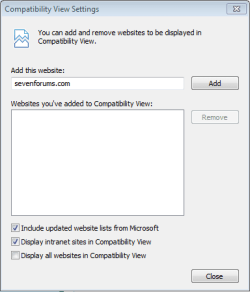
Once you enable compatibility mode for a site it will continue to use it every time - until it is turned off (or IE is reset) IIRC.
 

My Computers

System One System Two

  • Computer type
    PC/Desktop
    Computer Manufacturer/Model Number
    The Beast Model A (homebrew)
    OS
    Windows 11 21H2 Current build
    CPU
    AMD Ryzen 9 3950X
    Motherboard
    MSI MEG X570 GODLIKE
    Memory
    4 * 32 GB - Corsair Vengeance 3600 MHz
    Graphics Card(s)
    EVGA GeForce RTX 3080 Ti XC3 ULTRA GAMING (12G-P5-3955-KR)
    Sound Card
    Realtek® ALC1220 Codec
    Monitor(s) Displays
    2x Eve Spectrum ES07D03 4K Gaming Monitor (Matte) | Eve Spec
    Screen Resolution
    3x 3840 x 2160
    Hard Drives
    3x Samsung 980 Pro NVMe PCIe 4 M.2 2 TB SSD (MZ-V8P2T0B/AM) } 3x Sabrent Rocket NVMe 4.0 1 TB SSD
    PSU
    PC Power & Cooling’s Silencer Series 1050 Watt, 80 Plus Plat
    Case
    Fractal Design Define 7 XL Dark ATX Full Tower Case
    Cooling
    SteelSeries Apex Pro Wired Gaming Keyboard
    Keyboard
    SteelSeries Apex Pro
    Mouse
    Logitech MX Master 3S | MX Master 3 for business
    Internet Speed
    AT&T LightSpeed Gigabit Duplex Ftth
    Antivirus
    Windows Defender + MB 3
    Browser
    Nightly (default) + Firefox (stable),Chrome, Edge
  • Computer type
    PC/Desktop
    System Manufacturer/Model Number
    Dell Latitude E5470
    OS
    ChromeOS Flex Dev Channel (current)
    CPU
    Intel(R) Core(TM) i5-6300U CPU @ 2.40GHz, 2501 Mhz, 2 Core(s), 4 Logical Processor(s)
    Motherboard
    Dell
    Memory
    16 GB
    Graphics Card(s)
    Intel(R) HD Graphics 520
    Sound Card
    Intel(R) HD Graphics 520 + RealTek Audio
    Monitor(s) Displays
    Dell laptop display 15"
    Screen Resolution
    1920 * 1080
    Hard Drives
    Toshiba 128GB M.2 22300 drive
    INTEL Cherryville 520 Series SSDSC2CW180A 180 GB SATA III SSD
    PSU
    Dell
    Case
    Dell
    Cooling
    Dell
    Keyboard
    Dell
    Mouse
    Logitech MX Master 3S (shared w. Sys 1) | Dell TouchPad
    Internet Speed
    AT&T LightSpeed Gigabit Duplex Ftth
You can view the Compatability Setings from the Tools option within IE. This will list all sites you've selected to view in compatability mode.
 

Attachments

  • Capture.PNG
    Capture.PNG
    16.7 KB · Views: 10

My Computer

Computer Manufacturer/Model Number
Compaq Desktop
OS
Windows 7 Ultimate x64
CPU
AMD Sempron Dual Core
Memory
3GB
Graphics Card(s)
NVIDIA GeForce 6150SE nForce 430
Screen Resolution
1024x768
Hard Drives
150GB Sata
Back
Top