Solved Javascript + Flash Issues - Windows 7 Professional x64 (Fresh Install)

SLeePYG72786

New member
Member
Local time
11:14 PM
Messages
20
My problems are with Javascript and Flash (kind of).

I have just finished a completely fresh install of Windows 7 Professional x64. I have installed every Windows update available, main hardware drivers (motherboard/chipset/storage (nForce), graphics driver (nVidia), sound driver (Creative), latest Java version, latest Flash versions (including IE), and my browser of choice (Comodo Dragon). I have also tried using vanilla Firefox, IE9 (32 & 64-bit) + changing various settings, Comodo IceDragon, and Google Chrome. I have also tried running a 'regsvr32' command for jscript.dll & vbscript.dll (with elevation) to no avail. This is completely mind-blowing and sickeningly frustrating at the same time - especially because it's a fresh install.

Flash
YouTube video playback works fine, however:
-- Video thumbnails don't show (maybe a Javascript problem)

When I go to the page to check if Flash is installed, the video won't play unless I go to Control Panel > Flash > Advanced > Delete Cache. Then it only works intermittently (if at all).
Also tried disabling hardware acceleration (even though my hardware has never had a problem with it before) and increasing storage space for sites.

Javascript
Anything to do with this just doesn't work at all.
-- YouTube > Can't click "Show More", expand video player, etc.
-- ANGEL > Can't do just about anything
-- Logitech site > Can't download drivers because the download link is Javascript

ANGEL (my colleges' online course access website; absolute necessity)
ANGEL Learning

Logitech Drivers (SetPoint)
Support + Downloads: Wireless Wave Combo MK550 - Logitech


EDIT > If you're having issues similar to this, please take a look in your routers' configuration page and check your security settings. Look for something like "Security > Web Filter" (as it was in mine), and make sure that "Java" isn't set to be filtered/blocked.
 
Last edited:

My Computer

Computer Manufacturer/Model Number
Custom
OS
Windows 7 Professional x64
CPU
Intel Core 2 Duo E7200, 2.53GHz @ 3.3GHz
Motherboard
EVGA 750i SLi FTW
Memory
4GB Corsair XMS2 DDR2-800 @ 933MHz
Graphics Card(s)
MSI GeForce GTX 460 v2 OC
Sound Card
Creative Labs Sound Blaster X-Fi Titanium PCI-E
Monitor(s) Displays
ASUS VH202T-P, 20"
Screen Resolution
1600x900
Hard Drives
500GB Seagate Barracuda SATA-II
120GB Seagate Barracuda ATA/133
PSU
Antec EA-750
Case
NZXT Tempest
Cooling
All stock air-cooling
Keyboard
Logitech K350
Mouse
Logitech M510
Internet Speed
20Mb/s / 4Mb/s
No problems with any of that , ( not the course work ) where did you get your install dvd from ?

What problems are you having with the Angel Learning site ?
 

My Computer

Computer type
PC/Desktop
Computer Manufacturer/Model Number
Skylake Special #666
OS
Windows 10 Pro x64
CPU
Intel Core i7 6700K
Motherboard
Asus Sabertooth Z170 Mark 1
Memory
GSkill TridentZ RGB 16GB 3600 16-16-16-36
Graphics Card(s)
EVGA GTX 980 Ti SC x2
Sound Card
Realtek High Definition
Monitor(s) Displays
AOC G2460PG
Screen Resolution
1920 x 1080 144Hz
Hard Drives
Samsung 860 Pro 256GB, Seagate Barracuda 4TB x2
PSU
EVGA 1000 P2, EVGA White Custom Braided Cables
Case
Corsair Vengeance C70 Gunmetal Black
Cooling
Corsair H100i v2, Corsair ML120 x2, Thermal Grizzly Kryonaut
Keyboard
Logitech G910 Orion Spectrum
Mouse
Logitech G700s
Internet Speed
Verizon Fios Quantum Gateway 75/75
Antivirus
Windows Defender, Malwarebytes Free 3.8.3
Browser
Chrome
Other Info
Corsair SP120 x4, LG Blu-ray Drive, Durabrand HT-395 100 Watt Dolby Digital Amp, Corsair H2100 Wireless 7.1 Headset
I got the DVD from DreamSpark, which is a Microsoft site for college students. The school is partnered with Microsoft and it allows us to get free Microsoft software. I have had this DVD for quite for some time now, and this isn't the first time I've used it. (it has worked just fine without issue before)
 
Last edited:

My Computer

Computer Manufacturer/Model Number
Custom
OS
Windows 7 Professional x64
CPU
Intel Core 2 Duo E7200, 2.53GHz @ 3.3GHz
Motherboard
EVGA 750i SLi FTW
Memory
4GB Corsair XMS2 DDR2-800 @ 933MHz
Graphics Card(s)
MSI GeForce GTX 460 v2 OC
Sound Card
Creative Labs Sound Blaster X-Fi Titanium PCI-E
Monitor(s) Displays
ASUS VH202T-P, 20"
Screen Resolution
1600x900
Hard Drives
500GB Seagate Barracuda SATA-II
120GB Seagate Barracuda ATA/133
PSU
Antec EA-750
Case
NZXT Tempest
Cooling
All stock air-cooling
Keyboard
Logitech K350
Mouse
Logitech M510
Internet Speed
20Mb/s / 4Mb/s
Sorry for double-post, but forgot to answer the question about the ANGEL site and had already uploaded attachments in this reply. :huh:

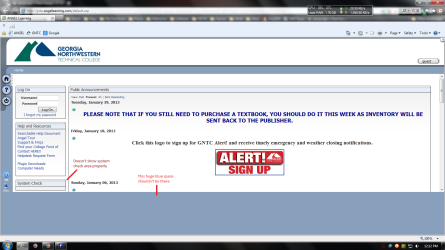
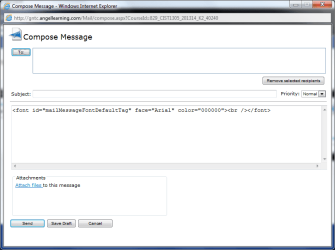
I can login, get into classes, etc., but there are several problems. When I go to compose a message to an instructor I have to click a 'To:' button, which opens a pop-up with a list of names I can select from. This pop-up doesn't show (before I updated, IE8 would show errors relating to Javascript about the button click).

IMG_00001.png

IMG_00002.png


EDIT > Just wanna let it be known that I have just finished an 'sfc /scannow' command without error.
 

My Computer

Computer Manufacturer/Model Number
Custom
OS
Windows 7 Professional x64
CPU
Intel Core 2 Duo E7200, 2.53GHz @ 3.3GHz
Motherboard
EVGA 750i SLi FTW
Memory
4GB Corsair XMS2 DDR2-800 @ 933MHz
Graphics Card(s)
MSI GeForce GTX 460 v2 OC
Sound Card
Creative Labs Sound Blaster X-Fi Titanium PCI-E
Monitor(s) Displays
ASUS VH202T-P, 20"
Screen Resolution
1600x900
Hard Drives
500GB Seagate Barracuda SATA-II
120GB Seagate Barracuda ATA/133
PSU
Antec EA-750
Case
NZXT Tempest
Cooling
All stock air-cooling
Keyboard
Logitech K350
Mouse
Logitech M510
Internet Speed
20Mb/s / 4Mb/s
What prompted you to re-install Windows?

I visited Angel and the blue area appeared as shown in your screen shot. However, when I maximized the window everything was presented. One caveat, the system req section shows my browser as version IE 8, about IE shows it as IE 9. Try maximizing the window next time you go to Angel.

You might try clearing your browser cache (all browsers), other than a bad script, there's nothing to update.

Since the issue presents itself across browsers, I would review my firewall settings, Internet options (lan settings, proxy) and my network adapter settings (dns).

Java has nothing to do with Javascript - I uninstalled Java last year due to security concerns (too many releases to address holes). I haven't had any issues without it (some sites do require it, but I can usually find what I'm looking for without Java). Things might have settled down by now, but if you don't need it, uninstall Java. If you do need it, match the Java bit level to your browser bit level (i.e. 32 bit Browser, 32 bit Java - regardless of the bit level of your OS)

I would stick with IE 32bit to test, once things work for it you can try to resolve the issues on Comodo Dragon

Note: your system specs list Win7 ultimate, your post states Win7 premium.

edit: a quick review on the Comodo forum suggest an uninstall, cCleaner, and reinstall of Comodo dragon. That seemed to resolve some issues related to Javascript. I didn't go to deep into the problem, just searched for Javascript and picked the low hanging fruit.
 

My Computer

Computer type
Laptop
Computer Manufacturer/Model Number
HP Pavilion dv6-6c10us
OS
x64 (6.3.9600) Win8.1 Pro & soon dual boot x64 (6.1.7601) Win7_SP1 HomePrem
CPU
AMD A6-3420M APU with Radeon(tm) HD Graphics
Motherboard
Hewlett-Packard 1805
Memory
6.00 GB
Graphics Card(s)
AMD Radeon(TM) HD 6520G
Sound Card
(1) AMD High Definition Audio Device (2) IDT High Definiti
Monitor(s) Displays
HP W2072a 20" LCD (1600 x 900) @ 60 Hz
Screen Resolution
1366 x 768 x 32 bits (4294967296 colors) @ 60 Hz
Hard Drives
ST640LM0 00 HM641JI SATA Disk Device
Keyboard
Logitech k520 wireless KB
Mouse
Logitech m320 wireless mouse (bundled with KB)
Internet Speed
15/5 | 54 MB Wireless 'n'
Antivirus
Realtime: Defender or Avast | On-demand: Malwarebytes, ESET
Browser
IE 11 on Win8, IE 10 on win 7
Other Info
Media: [Gimp, Audacity, VLC] || Comm: [WEmail 2012, Skype] || Productivity: [OpenOffice,| Textpad] || Utils: [Sysinternals, cCleaner, Speccy, Defraggler]
I reinstalled Windows because I had the ZeroAccess rootkit about a week ago, and spent about 5 days cleaning it. Even though I was able to get it cleaned from my OS drive, Windows was so broken I decided to just reinstall. I also formatted all USB drives that were plugged in at the time as well as all other hard drives.

> My window was maximized in the 1st screenshot (the 2nd one is a fixed size window).
> I've tried cleaning all browser history, cache, cookies, etc. Everything, all browsers. No fix.
> The problem was there before I installed anything (minus the specific listed in the OP).
> I'm aware that Java and Javascript are different.
> I'm using Comodo DNS, however I've been using those servers for about 2 years now.
> I'm aware of the security issues with Java, and plan to remove it today (I just installed it b/c it's part of my routine fresh install plan).
> I've tried both IE9 x86 & x64.
> I've tried CCleaner (cleaned everything on Disk and Registry). No fix.
> I am using Windows 7 Professional x64 as the title states. Just need to update System Specs.


EDIT > I just tried testing some Javascript programs I was working on for school, and they work fine in Dragon & IE9. So it's not Javascript itself, but the browsers (even though it isn't because the programs work?). My mind is so blown right now. *frustration*

EDIT 2 > Just uninstalled and reinstalled IE9 & Comodo Dragon. No fix.
 
Last edited:

My Computer

Computer Manufacturer/Model Number
Custom
OS
Windows 7 Professional x64
CPU
Intel Core 2 Duo E7200, 2.53GHz @ 3.3GHz
Motherboard
EVGA 750i SLi FTW
Memory
4GB Corsair XMS2 DDR2-800 @ 933MHz
Graphics Card(s)
MSI GeForce GTX 460 v2 OC
Sound Card
Creative Labs Sound Blaster X-Fi Titanium PCI-E
Monitor(s) Displays
ASUS VH202T-P, 20"
Screen Resolution
1600x900
Hard Drives
500GB Seagate Barracuda SATA-II
120GB Seagate Barracuda ATA/133
PSU
Antec EA-750
Case
NZXT Tempest
Cooling
All stock air-cooling
Keyboard
Logitech K350
Mouse
Logitech M510
Internet Speed
20Mb/s / 4Mb/s
Great update, thanks.

Now, how did you go about removing the rootkit virus and what Malware protection are you employing now? These rootkits are tricky things.
To be sure that you'e erradicated the bugger, run the following
TDSSkiller: https://support.kaspersky.com/viruses/solutions?qid=208280684
Trojan Access Trojan.Zeroaccess Removal Tool | Symantec
ESET Online Scanner: ESET Online Scanner
MDO: What is Windows Defender Offline?

Then to keep your system clean install
MSE: Microsoft Security Essentials - Microsoft Windows
or
Avast: avast! Free Antivirus | Download Antivirus Protection Software

Watch for add-ons with any free software (untick boxes that don't apply to the base application)
Accept only the free version, don't opt for a trial of the full version

Run only one AV/Malware app at a time and only have one realtime AV/Malware app runing at any time.

The above are recommended as trusted and reliable, many commercial AV/Malware apps are too heavy, too protective and cause issues on some machines.

Ok, with all of that out of the way.

Your local javascripts work, so it's not js or the browers. It's communication with the net
DNS, Hosts, Firewall, Proxy, etc

Let's try this:
Run a Speccy report and PUBLISH the results on the Prifirfom server (file menu publish), grab the url it gives you back and post the link here. We can at least look at things on your system that might be adding to this. I'm not sure if we can see the if your firewall is blocking js or if we can see proxy or DNS setitngs, but those are easy

for testing:
DNS set to obtain automatically
No Proxy
No firewall rule blocking javascript

The interesting thing is that - if you look at the hosts link, it comments out the localhost definition leaving resolution up to the DNS server.

You could try editing the C:\Windows\System32\drivers\etc\hosts file (no extension) and explicitily setting localhost by removing the sharp signs (#). Save your changes to your documents folder but keep the filename hosts without and extention, then navigate to C:\Windows\System32\drivers\etc\ and rename hosts to hosts_orig, then copy the hosts file from your documents folder to C:\Windows\System32\drivers\etc\

# localhost name resolution is handled within DNS itself.
# 127.0.0.1 localhost
# ::1 localhost

# localhost name resolution is handled within DNS itself.
127.0.0.1 localhost
::1 localhost

If there are other entries in the hosts file, post them here - vanilla hosts files have little or nothing in them.

again, thanks for all of your feedback.

Bill
.
 

My Computer

Computer type
Laptop
Computer Manufacturer/Model Number
HP Pavilion dv6-6c10us
OS
x64 (6.3.9600) Win8.1 Pro & soon dual boot x64 (6.1.7601) Win7_SP1 HomePrem
CPU
AMD A6-3420M APU with Radeon(tm) HD Graphics
Motherboard
Hewlett-Packard 1805
Memory
6.00 GB
Graphics Card(s)
AMD Radeon(TM) HD 6520G
Sound Card
(1) AMD High Definition Audio Device (2) IDT High Definiti
Monitor(s) Displays
HP W2072a 20" LCD (1600 x 900) @ 60 Hz
Screen Resolution
1366 x 768 x 32 bits (4294967296 colors) @ 60 Hz
Hard Drives
ST640LM0 00 HM641JI SATA Disk Device
Keyboard
Logitech k520 wireless KB
Mouse
Logitech m320 wireless mouse (bundled with KB)
Internet Speed
15/5 | 54 MB Wireless 'n'
Antivirus
Realtime: Defender or Avast | On-demand: Malwarebytes, ESET
Browser
IE 11 on Win8, IE 10 on win 7
Other Info
Media: [Gimp, Audacity, VLC] || Comm: [WEmail 2012, Skype] || Productivity: [OpenOffice,| Textpad] || Utils: [Sysinternals, cCleaner, Speccy, Defraggler]
In before TL;DR

How I found out I had the Rootkit and how I removed it

At the time I got the rootkit, I wasn't running an antivirus (shame on me) or using Windows Defender. I was only using Malwarebytes Anti-Malware (quick scans about twice a week after updating the database) for on-demand scanning, Peerblock with carefully selected lists, and Comodo Firewall. I knew something was wrong when I booted up my PC one day and Peerblock had an error message relating to several Windows services (Base Filtering Engine, IPSec Policy Agent, and IKE and AuthIP IPsec Keying Modules). Then Comodo Firewall was asking if I wanted to let an .exe with the awkward name of "24KVOCLA.exe" (something like that) through to the internet. Then I ran a quick scan with Malwarebytes, which found "Trojan.BCMiner" along with some others. When I tried re-enabling those services, I got errors about they were disabled and/or marked for deletion. If only you could've seen my face at that point.

I followed this guide to get the basic steps for removal: Remove ZeroAccess rootkit (Uninstall Guide)

After obtaining the programs listed in that guide and following it, I also Googled for other rootkit/malware scanners and ran those. Everything was done in Safe Mode with Networking (for updating the programs). Here's a complete list of everything I used (and still do occassionally):

Comodo Cleaning Essentials
Malwarebytes Anti-Rootkit
Malwarebytes Anti-Malware
AVG Sality Remover (other drives were infected with this via the rootkit)
GMER
ESET Online Scanner
Symantec's Fix ZeroAccess
Hitman Pro x64
rKill
RogueKiller x64
TDSS Killer
Old Timer TFC


To the Javascript/Flash Issues
After looking back at your last reply, I did a lot of unnecessary things regarding Flash. Basically, I used Adobe's guide to completely remove Flash, restarted, used CCleaner, restarted, reinstalled Flash, only to find that it still didn't fix the problem. Flash would work on YouTube, but any other site that used it just simply didn't work. I then decided to skip the Flash bit and move on to the Javascript part. I came back to your reply, and this bit lit a wildfire in my brain:
Your local javascripts work, so it's not js or the browers. It's communication with the net
DNS, Hosts, Firewall, Proxy, etc

I decided to check my router's security settings. Lo and behold, I had Java set to be filtered in the security settings. I set it that way after reading that ZeroAccess could be installed via a Java driveby. After a week of cleaning the rootkit, reinstalling Windows, going through all of this with Flash and Javascript, school, etc., I had forgotten about that one simple little checkbox in my router. My. Face. When.


Current Security Setup
Avast! Free with a tad higher-than-default security settings
Comodo Firewall
Peerblock with custom lists
Windows Defender
Regular scans with Avast! and the others listed above


Conclusion
Everything is like it should be, I'm much more secure, and I can finally get back to gaming with my friends and actually doing my school work from home again!

I must say thank you for sticking with and helping me through this uberly frustrating ordeal.

The End
 

My Computer

Computer Manufacturer/Model Number
Custom
OS
Windows 7 Professional x64
CPU
Intel Core 2 Duo E7200, 2.53GHz @ 3.3GHz
Motherboard
EVGA 750i SLi FTW
Memory
4GB Corsair XMS2 DDR2-800 @ 933MHz
Graphics Card(s)
MSI GeForce GTX 460 v2 OC
Sound Card
Creative Labs Sound Blaster X-Fi Titanium PCI-E
Monitor(s) Displays
ASUS VH202T-P, 20"
Screen Resolution
1600x900
Hard Drives
500GB Seagate Barracuda SATA-II
120GB Seagate Barracuda ATA/133
PSU
Antec EA-750
Case
NZXT Tempest
Cooling
All stock air-cooling
Keyboard
Logitech K350
Mouse
Logitech M510
Internet Speed
20Mb/s / 4Mb/s
Glad your system is reliable and working. Thanks for great feedback, it makes a difference.

Removing the java filtering from your router settings solved both the js and flash issues - correct?

If you're confident that this thread is solved, please hit the "mark as solved" button.

Thanks,

Bill
.
 

My Computer

Computer type
Laptop
Computer Manufacturer/Model Number
HP Pavilion dv6-6c10us
OS
x64 (6.3.9600) Win8.1 Pro & soon dual boot x64 (6.1.7601) Win7_SP1 HomePrem
CPU
AMD A6-3420M APU with Radeon(tm) HD Graphics
Motherboard
Hewlett-Packard 1805
Memory
6.00 GB
Graphics Card(s)
AMD Radeon(TM) HD 6520G
Sound Card
(1) AMD High Definition Audio Device (2) IDT High Definiti
Monitor(s) Displays
HP W2072a 20" LCD (1600 x 900) @ 60 Hz
Screen Resolution
1366 x 768 x 32 bits (4294967296 colors) @ 60 Hz
Hard Drives
ST640LM0 00 HM641JI SATA Disk Device
Keyboard
Logitech k520 wireless KB
Mouse
Logitech m320 wireless mouse (bundled with KB)
Internet Speed
15/5 | 54 MB Wireless 'n'
Antivirus
Realtime: Defender or Avast | On-demand: Malwarebytes, ESET
Browser
IE 11 on Win8, IE 10 on win 7
Other Info
Media: [Gimp, Audacity, VLC] || Comm: [WEmail 2012, Skype] || Productivity: [OpenOffice,| Textpad] || Utils: [Sysinternals, cCleaner, Speccy, Defraggler]
I'm confident it's fixed, and I had already marked it as solved before you said to. =)
 

My Computer

Computer Manufacturer/Model Number
Custom
OS
Windows 7 Professional x64
CPU
Intel Core 2 Duo E7200, 2.53GHz @ 3.3GHz
Motherboard
EVGA 750i SLi FTW
Memory
4GB Corsair XMS2 DDR2-800 @ 933MHz
Graphics Card(s)
MSI GeForce GTX 460 v2 OC
Sound Card
Creative Labs Sound Blaster X-Fi Titanium PCI-E
Monitor(s) Displays
ASUS VH202T-P, 20"
Screen Resolution
1600x900
Hard Drives
500GB Seagate Barracuda SATA-II
120GB Seagate Barracuda ATA/133
PSU
Antec EA-750
Case
NZXT Tempest
Cooling
All stock air-cooling
Keyboard
Logitech K350
Mouse
Logitech M510
Internet Speed
20Mb/s / 4Mb/s
Back
Top