
JPEG Icon Corrupted in win 7 pro sp1 x64

varishtg

New member
Local time
3:34 AM
Messages
3
The icon for jpeg images seems to be corrupted on my laptop. Instead of the standard JPG icon I get the invalid/broken file icon for all my JPG images. Have run sfc /scannow twice.
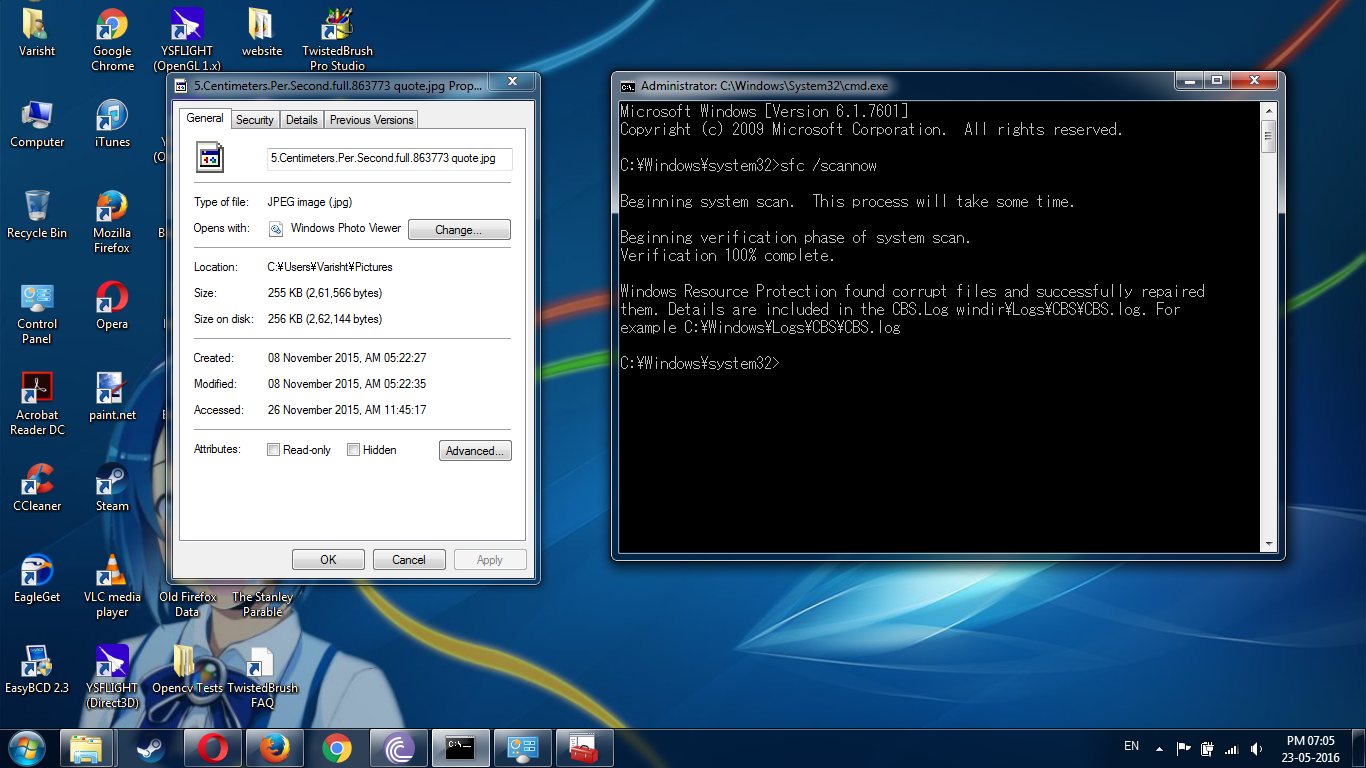
3W9gtj4r.png


The thumbnails look alright. I have also tried resetting the iconcache but still the icons don't change.

Any solutions. I don't want to do a repair install. And I have no system restore points as I have an SSD and space is at premium.
 

My Computer My Computer

At a glance

Windows 7 Pro SP1 x64 Dual Boot with Ubuntu 1...Core i3 380M1x 2GB DDR3 1333Mhz + 1x 4GB DDR3 1600MHzIntel HD
Computer type
Laptop
Computer Manufacturer/Model Number
Lenovo B560
OS
Windows 7 Pro SP1 x64 Dual Boot with Ubuntu 14.04.4 LTS x64
CPU
Core i3 380M
Motherboard
Lenovo Moutcook
Memory
1x 2GB DDR3 1333Mhz + 1x 4GB DDR3 1600MHz
Graphics Card(s)
Intel HD
Sound Card
Realtek HD Audio
Screen Resolution
1366x768
Hard Drives
Samsung PM830 MZ7PC256HAFU - solid state drive - 256 GB - SATA 6Gb/s
Mouse
Logitech MX310
Internet Speed
Less than 250kbytes/s
Antivirus
Symantec Endpoint Protection
Browser
Firefox;Chrome;Opera
Other Info
Never gonna upgrade to 10. Rolled back from it after 6 months.

My Computer My Computer

At a glance

Win-7-Pro64bit 7-H-Prem-64biti7-5930K 2nd i9-9940x both water blocked VRM'...Trident-z 3200C14 2nd Trident-z 3600C16EVGA 1080ti ftw3 2nd Titan Xp both water blocked
Computer type
PC/Desktop
Computer Manufacturer/Model Number
Custom assembled by me :}
OS
Win-7-Pro64bit 7-H-Prem-64bit
CPU
i7-5930K 2nd i9-9940x both water blocked VRM's too
Motherboard
ASUS SABERTOOTH X99 2nd ASUS x299 Apex
Memory
Trident-z 3200C14 2nd Trident-z 3600C16
Graphics Card(s)
EVGA 1080ti ftw3 2nd Titan Xp both water blocked
Sound Card
Built-in Realtek
Monitor(s) Displays
1-AOC G2460PG 24"G-Sync 144Hz/ 2nd 1-ASUS VG248QE 24" 144Hz
Screen Resolution
1920 x 1080 144Hz
Hard Drives
2-Samsung M.2 Evo & Evo Plus
2-Samsung 850 EVO 500GB SSD's/ 3-2.5 W.D. Black 1tb-&3-1tb/3-3.5 WD Black 1tb hdd's
PSU
EVGA SuperNOVA 1000-P2 2nd 1200-P2
Case
2-Corsair Obsidian Series 450D Black ATX Mid Tower
Cooling
Custom water loops
Keyboard
Logitech G710+/ 2nd Logitech G910
Mouse
2-RedDragon M901 Perdition 16400 dpi Gaming mouse = wired
Internet Speed
Comcast Ping 19ms 89.31mbps download speed 6.12mbps upload
Antivirus
Malwarebytes Pro/ Superantispyware Pro
Browser
FireFox & Pale moon
Other Info
2nd ASUS X299 Apex/Intel i9-9940x with Custom water loop/7H-Prem-x64/Corsair 450D case/Ram Trident-z 3600C16 4x8gb / Samsung970Evo plus 500gb SSD/Dual ssd EZ swap evo/PSU EVGA SuperNova 1200w-P2 80+Platinum/GPU Titan Xp /8-ML-140 on push-pull on 2-280GTX rads
Yes the images open fine. And I have tried the above mentioned methods too. I think probably reset windows icon cache or something option in CCleaner has caused this issue. I do a weekly cleanup. My icons were fine till last week. Did a cleanup on Sunday and started facing this issue.
 

My Computer My Computer

At a glance

Windows 7 Pro SP1 x64 Dual Boot with Ubuntu 1...Core i3 380M1x 2GB DDR3 1333Mhz + 1x 4GB DDR3 1600MHzIntel HD
Computer type
Laptop
Computer Manufacturer/Model Number
Lenovo B560
OS
Windows 7 Pro SP1 x64 Dual Boot with Ubuntu 14.04.4 LTS x64
CPU
Core i3 380M
Motherboard
Lenovo Moutcook
Memory
1x 2GB DDR3 1333Mhz + 1x 4GB DDR3 1600MHz
Graphics Card(s)
Intel HD
Sound Card
Realtek HD Audio
Screen Resolution
1366x768
Hard Drives
Samsung PM830 MZ7PC256HAFU - solid state drive - 256 GB - SATA 6Gb/s
Mouse
Logitech MX310
Internet Speed
Less than 250kbytes/s
Antivirus
Symantec Endpoint Protection
Browser
Firefox;Chrome;Opera
Other Info
Never gonna upgrade to 10. Rolled back from it after 6 months.
Hi,
Is it just desktop icons or is your pictures library doing the same thing ?
 

My Computer My Computer

At a glance

Win-7-Pro64bit 7-H-Prem-64biti7-5930K 2nd i9-9940x both water blocked VRM'...Trident-z 3200C14 2nd Trident-z 3600C16EVGA 1080ti ftw3 2nd Titan Xp both water blocked
Computer type
PC/Desktop
Computer Manufacturer/Model Number
Custom assembled by me :}
OS
Win-7-Pro64bit 7-H-Prem-64bit
CPU
i7-5930K 2nd i9-9940x both water blocked VRM's too
Motherboard
ASUS SABERTOOTH X99 2nd ASUS x299 Apex
Memory
Trident-z 3200C14 2nd Trident-z 3600C16
Graphics Card(s)
EVGA 1080ti ftw3 2nd Titan Xp both water blocked
Sound Card
Built-in Realtek
Monitor(s) Displays
1-AOC G2460PG 24"G-Sync 144Hz/ 2nd 1-ASUS VG248QE 24" 144Hz
Screen Resolution
1920 x 1080 144Hz
Hard Drives
2-Samsung M.2 Evo & Evo Plus
2-Samsung 850 EVO 500GB SSD's/ 3-2.5 W.D. Black 1tb-&3-1tb/3-3.5 WD Black 1tb hdd's
PSU
EVGA SuperNOVA 1000-P2 2nd 1200-P2
Case
2-Corsair Obsidian Series 450D Black ATX Mid Tower
Cooling
Custom water loops
Keyboard
Logitech G710+/ 2nd Logitech G910
Mouse
2-RedDragon M901 Perdition 16400 dpi Gaming mouse = wired
Internet Speed
Comcast Ping 19ms 89.31mbps download speed 6.12mbps upload
Antivirus
Malwarebytes Pro/ Superantispyware Pro
Browser
FireFox & Pale moon
Other Info
2nd ASUS X299 Apex/Intel i9-9940x with Custom water loop/7H-Prem-x64/Corsair 450D case/Ram Trident-z 3600C16 4x8gb / Samsung970Evo plus 500gb SSD/Dual ssd EZ swap evo/PSU EVGA SuperNova 1200w-P2 80+Platinum/GPU Titan Xp /8-ML-140 on push-pull on 2-280GTX rads
Any JPEG / JPG file on my entire system. The rest of the icons are fine for now.
 

My Computer My Computer

At a glance

Windows 7 Pro SP1 x64 Dual Boot with Ubuntu 1...Core i3 380M1x 2GB DDR3 1333Mhz + 1x 4GB DDR3 1600MHzIntel HD
Computer type
Laptop
Computer Manufacturer/Model Number
Lenovo B560
OS
Windows 7 Pro SP1 x64 Dual Boot with Ubuntu 14.04.4 LTS x64
CPU
Core i3 380M
Motherboard
Lenovo Moutcook
Memory
1x 2GB DDR3 1333Mhz + 1x 4GB DDR3 1600MHz
Graphics Card(s)
Intel HD
Sound Card
Realtek HD Audio
Screen Resolution
1366x768
Hard Drives
Samsung PM830 MZ7PC256HAFU - solid state drive - 256 GB - SATA 6Gb/s
Mouse
Logitech MX310
Internet Speed
Less than 250kbytes/s
Antivirus
Symantec Endpoint Protection
Browser
Firefox;Chrome;Opera
Other Info
Never gonna upgrade to 10. Rolled back from it after 6 months.
Back
Top