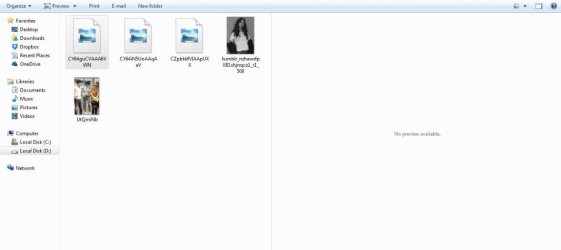
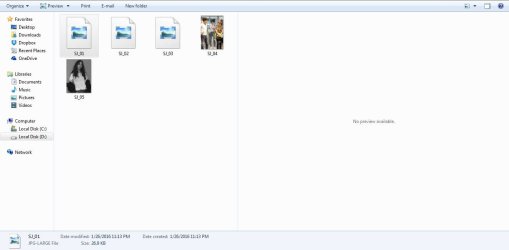
I've been saving a lot of photos recently and I've noticed that certain filetypes (.jpg-large and .png-large, specifically) are not showing thumbnails of the photos and previews. I've tried changing folder, view options but none worked . I'd be really grateful if anyone could help me solve this.
Hi and welcome to SevenForums,
Go to Organize and Layout and click on Details pane and take a screen shot make sure we can see the bottom of the page where the selected file is showing the information of it
No preview sort of can be a weird or incorrect file type entry like "name_png" instead of "name.png"
My Computer
At a glance
Win-7-Pro64bit 7-H-Prem-64biti7-5930K 2nd i9-9940x both water blocked VRM'...Trident-z 3200C14 2nd Trident-z 3600C16EVGA 1080ti ftw3 2nd Titan Xp both water blocked
Computer type
PC/Desktop
Computer Manufacturer/Model Number
Custom assembled by me :}
OS
Win-7-Pro64bit 7-H-Prem-64bit
CPU
i7-5930K 2nd i9-9940x both water blocked VRM's too
2nd ASUS X299 Apex/Intel i9-9940x with Custom water loop/7H-Prem-x64/Corsair 450D case/Ram Trident-z 3600C16 4x8gb / Samsung970Evo plus 500gb SSD/Dual ssd EZ swap evo/PSU EVGA SuperNova 1200w-P2 80+Platinum/GPU Titan Xp /8-ML-140 on push-pull on 2-280GTX rads
Rename the file and remove the -Large file ending
If the shown name is SJ_01
Make it SJ_01-large file.jpeg
My Computer
At a glance
Win-7-Pro64bit 7-H-Prem-64biti7-5930K 2nd i9-9940x both water blocked VRM'...Trident-z 3200C14 2nd Trident-z 3600C16EVGA 1080ti ftw3 2nd Titan Xp both water blocked
Computer type
PC/Desktop
Computer Manufacturer/Model Number
Custom assembled by me :}
OS
Win-7-Pro64bit 7-H-Prem-64bit
CPU
i7-5930K 2nd i9-9940x both water blocked VRM's too
2nd ASUS X299 Apex/Intel i9-9940x with Custom water loop/7H-Prem-x64/Corsair 450D case/Ram Trident-z 3600C16 4x8gb / Samsung970Evo plus 500gb SSD/Dual ssd EZ swap evo/PSU EVGA SuperNova 1200w-P2 80+Platinum/GPU Titan Xp /8-ML-140 on push-pull on 2-280GTX rads


 . I'd be really grateful if anyone could help me solve this.