Solved Thumbnails and previews for .jpg shortcuts missing

DrCheis

New member
Local time
10:20 PM
Messages
5
Hello, I'm new to Windows 7, and a Google search lead me to this site, as you had apparently helped somebody with a similar problem as mine.

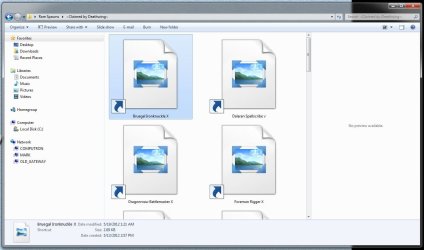
I have a folder full of shortcuts to .jpg files, and I am trying to view that folder as "extra large icons." However, I am unable to see the thumbnails for these shortcuts, and the "preview" section of my window tells me "No preview available."

The thumbnails and previews for the .jpgs themselves load fine, but the shortcuts just give me generic .jpg icons. I was able to create a folder of shortcuts on Windows XP and view the thumbnails there, and I'm attempting to recreate this folder on my new Windows 7 computer (though I do miss filmstrip view).
 

Attachments

  • Capture.JPG
    Capture.JPG
    78.4 KB · Views: 16

My Computer My Computer

At a glance

Windows 7 Home edition 32 bit
Computer Manufacturer/Model Number
Custom
OS
Windows 7 Home edition 32 bit
Screen Resolution
1920x1080

My Computer My Computer

At a glance

Microsoft Windows 10 Pro Insider Preview 64-bitIntel(R) Core(TM) i3-4130 CPU @ 3.40GHzCorsair Vengence 4GB x2 (8.00GB Dual-Channel ...2047MB GeForce GTS 450 (ZOTAC International)
Computer type
PC/Desktop
Computer Manufacturer/Model Number
Self Assembled
OS
Microsoft Windows 10 Pro Insider Preview 64-bit
CPU
Intel(R) Core(TM) i3-4130 CPU @ 3.40GHz
Motherboard
Gigabyte Technology Co., Ltd. B85M-D3H
Memory
Corsair Vengence 4GB x2 (8.00GB Dual-Channel DDR3 @ 798MHz)
Graphics Card(s)
2047MB GeForce GTS 450 (ZOTAC International)
Sound Card
Onboard (Realtek High Definition Audio)
Monitor(s) Displays
LG Flatron E2040T
Screen Resolution
1600x900
Hard Drives
Western Digital 1 TB
Seagate 500 GB
PSU
Corsair VS550
Case
Cooler Master K380
Cooling
Cooler Master Seidon 120V Plus
Keyboard
Logitech MK260r
Mouse
Logitech MK260r
Internet Speed
PMPL Broadband
Antivirus
Windows Defender + MBAM
Browser
Firefox
Other Info
Dell Studio 15" Laptop
Hello, Arc.

I tried the first two solutions, but they had no effect. Running the third option, I was given the following error:
Unhandled exception has occurred in your application. If you click Continue, the application wil ignore this error and attempt to continue. If you click Quit, the application will close immediately.

The system cannot find the file specified.

Details:
See the end of this message for details on invoking
just-in-time (JIT) debugging instead of this dialog box.

************** Exception Text **************
System.ComponentModel.Win32Exception: The system cannot find the file specified
at System.Diagnostics.Process.StartWithCreateProcess(ProcessStartInfo startInfo)
at System.Diagnostics.Process.Start()
at VistaArrowGone.Form1.btApply_Click(Object sender, EventArgs e)
at System.Windows.Forms.Control.OnClick(EventArgs e)
at System.Windows.Forms.Button.OnClick(EventArgs e)
at System.Windows.Forms.Button.OnMouseUp(MouseEventArgs mevent)
at System.Windows.Forms.Control.WmMouseUp(Message& m, MouseButtons button, Int32 clicks)
at System.Windows.Forms.Control.WndProc(Message& m)
at System.Windows.Forms.ButtonBase.WndProc(Message& m)
at System.Windows.Forms.Button.WndProc(Message& m)
at System.Windows.Forms.Control.ControlNativeWindow.OnMessage(Message& m)
at System.Windows.Forms.Control.ControlNativeWindow.WndProc(Message& m)
at System.Windows.Forms.NativeWindow.Callback(IntPtr hWnd, Int32 msg, IntPtr wparam, IntPtr lparam)


************** Loaded Assemblies **************
mscorlib
Assembly Version: 2.0.0.0
Win32 Version: 2.0.50727.5456 (Win7SP1GDR.050727-5400)
CodeBase: file:///C:/Windows/Microsoft.NET/Framework/v2.0.50727/mscorlib.dll
----------------------------------------
FxVisor
Assembly Version: 2.0.0.0
Win32 Version: 2.0.0.0
CodeBase: file:///C:/Program%20Files/Frameworkx/Vista%20Shortcut%20Manager/FxVisor.exe
----------------------------------------
System.Windows.Forms
Assembly Version: 2.0.0.0
Win32 Version: 2.0.50727.5456 (Win7SP1GDR.050727-5400)
CodeBase: file:///C:/Windows/assembly/GAC_MSIL/System.Windows.Forms/2.0.0.0__b77a5c561934e089/System.Windows.Forms.dll
----------------------------------------
System
Assembly Version: 2.0.0.0
Win32 Version: 2.0.50727.5456 (Win7SP1GDR.050727-5400)
CodeBase: file:///C:/Windows/assembly/GAC_MSIL/System/2.0.0.0__b77a5c561934e089/System.dll
----------------------------------------
System.Drawing
Assembly Version: 2.0.0.0
Win32 Version: 2.0.50727.5458 (Win7SP1GDR.050727-5400)
CodeBase: file:///C:/Windows/assembly/GAC_MSIL/System.Drawing/2.0.0.0__b03f5f7f11d50a3a/System.Drawing.dll
----------------------------------------
System.Configuration
Assembly Version: 2.0.0.0
Win32 Version: 2.0.50727.5420 (Win7SP1.050727-5400)
CodeBase: file:///C:/Windows/assembly/GAC_MSIL/System.Configuration/2.0.0.0__b03f5f7f11d50a3a/System.Configuration.dll
----------------------------------------
System.Xml
Assembly Version: 2.0.0.0
Win32 Version: 2.0.50727.5420 (Win7SP1.050727-5400)
CodeBase: file:///C:/Windows/assembly/GAC_MSIL/System.Xml/2.0.0.0__b77a5c561934e089/System.Xml.dll
----------------------------------------

************** JIT Debugging **************
To enable just-in-time (JIT) debugging, the .config file for this
application or computer (machine.config) must have the
jitDebugging value set in the system.windows.forms section.
The application must also be compiled with debugging
enabled.

For example:

<configuration>
<system.windows.forms jitDebugging="true" />
</configuration>

When JIT debugging is enabled, any unhandled exception
will be sent to the JIT debugger registered on the computer
rather than be handled by this dialog box.

Hitting Continue and logging off and back on did not have any effect on the thumbnails or previews, but did make the arrows appear and disappear.

By the way, is the behavior I'm trying to achieve (shortcuts having their thumbnails and previews display in Windows Explorer) even possible in Windows 7? This is my first time using it and I'd feel silly if it was like this for everybody, but it does seem like a feature you'd really expect it has.


[Update]
Option 3 still functions despite the error, but has no impact on the thumbnails.
 
Last edited:

My Computer My Computer

At a glance

Windows 7 Home edition 32 bit
Computer Manufacturer/Model Number
Custom
OS
Windows 7 Home edition 32 bit
Screen Resolution
1920x1080
I just realized in my original screencapture, I did not have a shortcut selected, and thus the preview pane could be expected to be blank. This new screenshot shows that despite having a my shortcut selected, there is still no preview generated.
 

Attachments

  • Capture.JPG
    Capture.JPG
    84.4 KB · Views: 14

My Computer My Computer

At a glance

Windows 7 Home edition 32 bit
Computer Manufacturer/Model Number
Custom
OS
Windows 7 Home edition 32 bit
Screen Resolution
1920x1080
Welcome to Seven Forums DrCheis. Do you have an application associated with .jpg files?

Start> In search box type Default programs> Enter> Click on associate a file type or protocol with a program> Scroll down to .jpg

What is the program associated with .jpg? I believe you will want Windows Photo Viewer associated unless you use a 3rd party image program.

Also make sure you have Thumbnails turned on.

A Guy
 

My Computer My Computer

At a glance

Windows 10 Home x64INTEL Core i5-750 Quad-Core 3.37GHzHyperX Fury Black Series 8GB (2 x 4GB) 1866MhzEVGA GeForce GTX 750 Superclocked 1GB 128-Bit...
Computer type
PC/Desktop
OS
Windows 10 Home x64
CPU
INTEL Core i5-750 Quad-Core 3.37GHz
Motherboard
ASUS P7P55D
Memory
HyperX Fury Black Series 8GB (2 x 4GB) 1866Mhz
Graphics Card(s)
EVGA GeForce GTX 750 Superclocked 1GB 128-Bit GDDR5
Monitor(s) Displays
LG 32MA68HY 32" IPS
Screen Resolution
1920 x 1080
Hard Drives
Samsung 840 Evo 120GB, SEAGATE 500GB Barracuda® 7200.12, SATA 3 Gb/s, 7200 RPM, 16MB cache
PSU
ANTEC TruePower New TP-550, 80 PLUS, 550W
Case
ANTEC Three Hundred Illusion
Cooling
COOLER MASTER Hyper 212 Plus, 4 x 120mm 1 x 140mm Noctua's
Internet Speed
85 + Mbps
Antivirus
Avast
Browser
Vivaldi

My Computer My Computer

At a glance

Microsoft Windows 7 Home Premium 64-bit Servi...Intel(R) Core(TM) i3 CPU M 330 @ 2.13GHz8 GB DDR3Intel(R) HD Graphics
Computer type
Laptop
Computer Manufacturer/Model Number
Hewlett-Packard/G62-107SA Notebook
OS
Microsoft Windows 7 Home Premium 64-bit Service Pack 1
CPU
Intel(R) Core(TM) i3 CPU M 330 @ 2.13GHz
Motherboard
Hewlett-Packard 1425
Memory
8 GB DDR3
Graphics Card(s)
Intel(R) HD Graphics
Sound Card
Realtek High Definition Audio
Monitor(s) Displays
Builtin
Screen Resolution
1366 x 768 x 32 bits (4294967296 colors) @ 60 Hz
Hard Drives
250 GB SATA Hard Disk Drive 7200 rpm
2TB Seagate GoFlex USB 2 Drive
1TB Iomega Prestige USB 2 Drive
1.5TB Iomega Prestige USB 2 Drive (Samsung)
2TB WD MyBook Live NAS.
Mouse
Logitech Anywhere MX
Internet Speed
152 Mbs download 10 Mbs upload
Antivirus
Norton 360
Browser
Chrome
Thanks, A Guy, and Kado 879. I tried both of your solutions, and restarted my computer and now I have thumbnails for my shortcuts! I just wish I had tried them one at a time so I knew which one had fixed the problem.

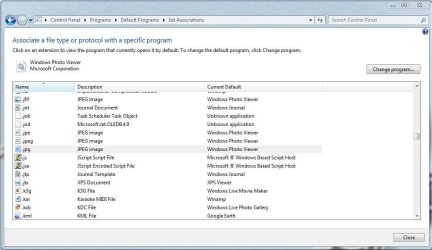
An interesting observation though, when using the Set Associations option, the icon displayed for Windows Photo Viewer is a "set of gears" rather than an icon that I would have expected to belong to that application. (See screenshot). The default was already set to Windows Photo viewer when I opened up Set Associations. I wonder if that was related to my problem?

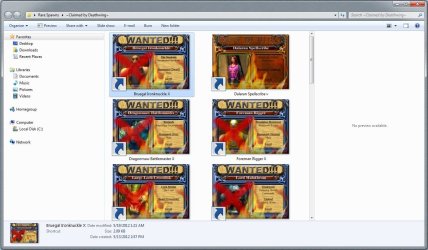
I'm just about to mark the thread as solved, but I do notice that although thumbnails are working again, the "preview" pane does not display a preview for my shortcuts (it works normally for the actual .jpeg files). (See the other screenshot.) Is there any way to show previews of shortcuts, or is Windows 7 unable to do this? I'm happy with the thumbnails, but the preview pane would be nice too.
 

Attachments

  • Set Association.JPG
    Set Association.JPG
    73.7 KB · Views: 19
  • Capture.JPG
    Capture.JPG
    132.6 KB · Views: 21

My Computer My Computer

At a glance

Windows 7 Home edition 32 bit
Computer Manufacturer/Model Number
Custom
OS
Windows 7 Home edition 32 bit
Screen Resolution
1920x1080
Glad its sorted DrCheis. I don't get previews for shortcuts either.

By the way I wonder why you have a folder of shortcuts. If you are just trying to collect them together from different locations a library would be better.
 

My Computer My Computer

At a glance

Microsoft Windows 7 Home Premium 64-bit Servi...Intel(R) Core(TM) i3 CPU M 330 @ 2.13GHz8 GB DDR3Intel(R) HD Graphics
Computer type
Laptop
Computer Manufacturer/Model Number
Hewlett-Packard/G62-107SA Notebook
OS
Microsoft Windows 7 Home Premium 64-bit Service Pack 1
CPU
Intel(R) Core(TM) i3 CPU M 330 @ 2.13GHz
Motherboard
Hewlett-Packard 1425
Memory
8 GB DDR3
Graphics Card(s)
Intel(R) HD Graphics
Sound Card
Realtek High Definition Audio
Monitor(s) Displays
Builtin
Screen Resolution
1366 x 768 x 32 bits (4294967296 colors) @ 60 Hz
Hard Drives
250 GB SATA Hard Disk Drive 7200 rpm
2TB Seagate GoFlex USB 2 Drive
1TB Iomega Prestige USB 2 Drive
1.5TB Iomega Prestige USB 2 Drive (Samsung)
2TB WD MyBook Live NAS.
Mouse
Logitech Anywhere MX
Internet Speed
152 Mbs download 10 Mbs upload
Antivirus
Norton 360
Browser
Chrome
The reason I have a folder of shortcuts is because the project I've been working on, creating pictures of rare monsters from the game World of Warcraft, sorts the pictures by the geographical regions within the game that they can be found in. There are probably hundreds of pictures categorized through maybe 50 or so folders. The shortcuts folder points directly to small number of those with certain traits in common (in this case, monsters that have been removed from the game) and groups them together without removing them from the directories corresponding to where they could be found.

I started the project on my old computer, which ran Windows XP and moved it to my new computer on Windows 7. I like being able to view the pictures as large thumbnails (I used to use filmstrip view for that, but oh well) rather than navigate to them through a menu, but I'll admit that being new to Windows 7 I don't have much experience with what Libraries are or how they work, beyond the default Libraries Windows provides for you.

Thanks to everybody in the thread for their assistance!
 

My Computer My Computer

At a glance

Windows 7 Home edition 32 bit
Computer Manufacturer/Model Number
Custom
OS
Windows 7 Home edition 32 bit
Screen Resolution
1920x1080
It sounds like you have a good solution for your situation. Libraries are intended for collecting together from disparate locations not for extracting subsets.
 

My Computer My Computer

At a glance

Microsoft Windows 7 Home Premium 64-bit Servi...Intel(R) Core(TM) i3 CPU M 330 @ 2.13GHz8 GB DDR3Intel(R) HD Graphics
Computer type
Laptop
Computer Manufacturer/Model Number
Hewlett-Packard/G62-107SA Notebook
OS
Microsoft Windows 7 Home Premium 64-bit Service Pack 1
CPU
Intel(R) Core(TM) i3 CPU M 330 @ 2.13GHz
Motherboard
Hewlett-Packard 1425
Memory
8 GB DDR3
Graphics Card(s)
Intel(R) HD Graphics
Sound Card
Realtek High Definition Audio
Monitor(s) Displays
Builtin
Screen Resolution
1366 x 768 x 32 bits (4294967296 colors) @ 60 Hz
Hard Drives
250 GB SATA Hard Disk Drive 7200 rpm
2TB Seagate GoFlex USB 2 Drive
1TB Iomega Prestige USB 2 Drive
1.5TB Iomega Prestige USB 2 Drive (Samsung)
2TB WD MyBook Live NAS.
Mouse
Logitech Anywhere MX
Internet Speed
152 Mbs download 10 Mbs upload
Antivirus
Norton 360
Browser
Chrome
Glad you got it sorted. I think it was likely kado897's suggestion that did it. I forget about those association .reg even though I dealt with them only last weekend :o

A Guy
 

My Computer My Computer

At a glance

Windows 10 Home x64INTEL Core i5-750 Quad-Core 3.37GHzHyperX Fury Black Series 8GB (2 x 4GB) 1866MhzEVGA GeForce GTX 750 Superclocked 1GB 128-Bit...
Computer type
PC/Desktop
OS
Windows 10 Home x64
CPU
INTEL Core i5-750 Quad-Core 3.37GHz
Motherboard
ASUS P7P55D
Memory
HyperX Fury Black Series 8GB (2 x 4GB) 1866Mhz
Graphics Card(s)
EVGA GeForce GTX 750 Superclocked 1GB 128-Bit GDDR5
Monitor(s) Displays
LG 32MA68HY 32" IPS
Screen Resolution
1920 x 1080
Hard Drives
Samsung 840 Evo 120GB, SEAGATE 500GB Barracuda® 7200.12, SATA 3 Gb/s, 7200 RPM, 16MB cache
PSU
ANTEC TruePower New TP-550, 80 PLUS, 550W
Case
ANTEC Three Hundred Illusion
Cooling
COOLER MASTER Hyper 212 Plus, 4 x 120mm 1 x 140mm Noctua's
Internet Speed
85 + Mbps
Antivirus
Avast
Browser
Vivaldi
Back
Top