just installed norton. any good?

irbullet

BulletsModz
Member
VIP
Local time
5:45 PM
Messages
202
I recently installed Norton security suite (got it for free from comcast) as I just installed a clean windows ( I do it every year or so)
Comcast says its a $160 value.. is Norton security suite good?
It cleans temp files automatically. Fixes registry errors automatically. Improves startup time automatically. Fixes errors that slows down computer. Checks for viruses. Id protection. Some kind of firewall. And has a few more features.
Is it good? I want my Pc safe :)
 

My Computer My Computer

Computer type
PC/Desktop
Computer Manufacturer/Model Number
Custom
OS
Windows 7 Ultimate x64
CPU
Intel i7 3770K 4.5GHz
Motherboard
MSI Z77A-GD65
Memory
8GB DDR3
Graphics Card(s)
MSI Twin Frozr 7950 (x2) crossfire
Monitor(s) Displays
AOC I2421VWH, LG 27EA63, ASUS VE247H
Screen Resolution
1920x1080 1920x1080 1920x1080
Hard Drives
Intel 330 60GB SSD, Western Digital 1TB, Seagate 1TB
PSU
Rosewill Capstone 750w
Case
Phantom 410
Cooling
IBP-Z001 for CPU and case fans
Keyboard
CM Storm Quickfire Pro
Mouse
Razer Naga 2012
Internet Speed
50 Mbps down, 20 Mbps upload
Antivirus
Microsoft Security Essentials
Browser
Google Chrome
Don't use the registry cleaner portion.

The most recent versions of Norton have a pretty good reputation for anti-virus protection.

You should avoid all registry cleaners if you can stand it. If you just can't help yourself and HAVE to do something about your registry, use CCleaner, but say "yes" when it asks you if you want to back up the registry before it cleans.

You can improve your startup times manually and should probably know how to do that anyway.
 

My Computer My Computer

Computer type
PC/Desktop
Computer Manufacturer/Model Number
Ignatz Special; 4 speed manual gearbox; factory air conditioning; one of one
OS
Windows 7 Home Premium SP1, 64-bit
CPU
Intel Skylake i5-6600K, not overclocked
Motherboard
AsRock Z170M Extreme 4, micro ATX
Memory
8 GB HyperX DDR4-2666 (2 x 4 GB)
Graphics Card(s)
none; graphics are integrated on CPU
Sound Card
onboard: Realtek ALC1150; external: USB Behringer UF0-202
Monitor(s) Displays
Dell S2340M 23 inch IPS
Screen Resolution
1600 x 900
Hard Drives
System: Crucial MX100 series SSD, 128 GB;
Data: Samsung Spinpoint 103SJ, 1 TB;
Backup: WD Caviar Green WD30EZRX-00D8PB0, 3 TB
PSU
Rosewill SilentNight 500 watt fanless, semi-modular
Case
Antec Solo II
Cooling
Noctua NH-U12S; Noctua F12 intake, Noctua S12A exhaust
Keyboard
Microsoft 200 6JH-00001 USB
Mouse
Dell or Microsoft optical wired; USB
Antivirus
Microsoft Security Essentials and Malwarebytes Premium
Browser
Pale Moon
Other Info
All fans PWM; speeds at idle: CPU circa 500 rpm; intake circa 600 rpm; exhaust circa 600 rpm; CPU temps 27 idle and 47 C load in a warm room (27 C/81 F) when running Intel Extreme Tuning Utility stress test.

My Computer My Computer

Computer type
PC/Desktop
Computer Manufacturer/Model Number
Self Assembled
OS
Microsoft Windows 10 Pro Insider Preview 64-bit
CPU
Intel(R) Core(TM) i3-4130 CPU @ 3.40GHz
Motherboard
Gigabyte Technology Co., Ltd. B85M-D3H
Memory
Corsair Vengence 4GB x2 (8.00GB Dual-Channel DDR3 @ 798MHz)
Graphics Card(s)
2047MB GeForce GTS 450 (ZOTAC International)
Sound Card
Onboard (Realtek High Definition Audio)
Monitor(s) Displays
LG Flatron E2040T
Screen Resolution
1600x900
Hard Drives
Western Digital 1 TB
Seagate 500 GB
PSU
Corsair VS550
Case
Cooler Master K380
Cooling
Cooler Master Seidon 120V Plus
Keyboard
Logitech MK260r
Mouse
Logitech MK260r
Internet Speed
PMPL Broadband
Antivirus
Windows Defender + MBAM
Browser
Firefox
Other Info
Dell Studio 15" Laptop
Don't use the registry cleaner portion.

The most recent versions of Norton have a pretty good reputation for anti-virus protection.

You should avoid all registry cleaners if you can stand it. If you just can't help yourself and HAVE to do something about your registry, use CCleaner, but say "yes" when it asks you if you want to back up the registry before it cleans.

You can improve your startup times manually and should probably know how to do that anyway.
I cant seem to figure out how to disable the cleaner. Dont make fun of me :(
 

My Computer My Computer

Computer type
PC/Desktop
Computer Manufacturer/Model Number
Custom
OS
Windows 7 Ultimate x64
CPU
Intel i7 3770K 4.5GHz
Motherboard
MSI Z77A-GD65
Memory
8GB DDR3
Graphics Card(s)
MSI Twin Frozr 7950 (x2) crossfire
Monitor(s) Displays
AOC I2421VWH, LG 27EA63, ASUS VE247H
Screen Resolution
1920x1080 1920x1080 1920x1080
Hard Drives
Intel 330 60GB SSD, Western Digital 1TB, Seagate 1TB
PSU
Rosewill Capstone 750w
Case
Phantom 410
Cooling
IBP-Z001 for CPU and case fans
Keyboard
CM Storm Quickfire Pro
Mouse
Razer Naga 2012
Internet Speed
50 Mbps down, 20 Mbps upload
Antivirus
Microsoft Security Essentials
Browser
Google Chrome
Don't use the registry cleaner portion.

The most recent versions of Norton have a pretty good reputation for anti-virus protection.

You should avoid all registry cleaners if you can stand it. If you just can't help yourself and HAVE to do something about your registry, use CCleaner, but say "yes" when it asks you if you want to back up the registry before it cleans.

You can improve your startup times manually and should probably know how to do that anyway.

I second that. The registry cleaner caused me problems but everything else works ok.
 

My Computer My Computer

Computer type
Laptop
Computer Manufacturer/Model Number
Hewlett-Packard/G62-107SA Notebook
OS
Microsoft Windows 7 Home Premium 64-bit Service Pack 1
CPU
Intel(R) Core(TM) i3 CPU M 330 @ 2.13GHz
Motherboard
Hewlett-Packard 1425
Memory
8 GB DDR3
Graphics Card(s)
Intel(R) HD Graphics
Sound Card
Realtek High Definition Audio
Monitor(s) Displays
Builtin
Screen Resolution
1366 x 768 x 32 bits (4294967296 colors) @ 60 Hz
Hard Drives
250 GB SATA Hard Disk Drive 7200 rpm
2TB Seagate GoFlex USB 2 Drive
1TB Iomega Prestige USB 2 Drive
1.5TB Iomega Prestige USB 2 Drive (Samsung)
2TB WD MyBook Live NAS.
Mouse
Logitech Anywhere MX
Internet Speed
152 Mbs download 10 Mbs upload
Antivirus
Norton 360
Browser
Chrome
i dunno about recent versions of norton but its not been very good in the past. its a resource hog, it gives plenty of false positives. if u want a free one try avast or if u want to pay there are plenty of good av's about. i use nod32 and malwarebytes but as a rule dont use 2 anti virus progs. malwarebytes is an exception as it is made to run alongside ur main av.
it all depends on what u use ur pc for :D
 

My Computer My Computer

Computer type
PC/Desktop
Computer Manufacturer/Model Number
Custom build
OS
Win7 Home Premium x64 SP1
CPU
i7 4770k
Motherboard
Asus maximus VI Hero
Memory
8Gb Kingston HyperX Beast 2400MHz @2133MHz 11-12-11-30
Graphics Card(s)
MSI GTX 780ti Gaming Oc x2
Sound Card
Onboard ROG SupremeFX
Monitor(s) Displays
Asus VG248QE
Screen Resolution
3840X1080 144Hz
Hard Drives
Samung Evo 256Gb, OCZ Agility4 128Gb
1x1TB hitachi storage
PSU
EVGA Supernova 1000w Platinum
Case
Corsair Air 540
Cooling
Corsair H100i
Keyboard
Coolermaster Quickfire Pro
Mouse
Corsair M65 RGB
Internet Speed
74mb dwn/16up
Antivirus
MSE,Malwarebytes
Browser
Chrome
"Comcast says its a $160 value."

Isn't that what they all say! :-)

From reading posts at community.norton.com, I get the idea Comcast's version and Norton's are always slightly out-of-sync. You'll get your anti-malware updates, but engine upgrades would rest on Comcast catching up. Protection is still there, mind you. But any bug fixes may take a little longer.
 

My Computer My Computer

OS
Windows 7 Home Premium x64
As the others have mentioned before, do not use any kind of registry cleaner unless you know exactly what you are doing and are completely familiar with your computer's intestines :-)
Norton used to have a reputation for blue-screening and software which was very heavy on the computer until the 2009 products, which were rebuilt from scratch and made to run silently and light-footedly in the background. Unfortunately, its reputation for being a "resource hog" is still lingering around - although this is actually no longer the case at all. Reading around, every antivirus software -regardless of vendor - seems to have had this reputation at one time or the other.
Example: Norton product versions till and including 2008 had a separate LiveUpdate module. During LiveUpdates, it was common for the computer to slow down or freeze, and if you removed the program, the module had to be uninstalled separately. This is no longer the case, and everything is bundled together very neatly; and as of today, Norton has its own task scheduler (meaning that tasks will no longer get stuck in Windows Task Scheduler). I could write a lot more...but...
...in the end, you will find that choosing your antivirus program is a rather complex business. You will discover people arguing for and against this and that antivirus software ad infinitum et ad nauseam.
For this reason, most antivirus software vendors provide trial versions (but you have to deinstall them thoroughly with the vendor's removal tool if you're dissatisfied and do not want to keep the trial version).
Back to the Comcast version of Norton: you can find a comparison chart between the normal Norton Premier edition and the Comcast edition over here:
Constant Guard - products - constant guard protection suite

By the way, the only difference between the normal Norton Premier and Standard versions is the size of the online backup storage.
 

My Computer My Computer

OS
-
Norton is a resource hog. As some of the others have said, it wrecks havoc on your system. Use the free Microsoft Security Essentials:Microsoft Security Essentials - Free Antivirus for Windows
Also, run Malwarebytes once a month. Link to download Malwarebytes:Malwarebytes Anti-Malware - Download.com
Also, never EVER use a registry cleaner unless you want problems that are usually caused by those programs. You could render Windows 7 unbootable or make some of your programds refuse to run.
 

My Computer My Computer

Computer type
PC/Desktop
Computer Manufacturer/Model Number
HP Pavilion P7-1010
OS
Windows 7 Professional x64 Service Pack 1
CPU
AMD Athlon X4 645
Motherboard
Foxxcon N-Alvorix RS880
Memory
6GB DDR3 1066
Graphics Card(s)
Sapphire Radeon HD 5670 512MB GDDR5
Sound Card
Realtek Integrated Audio
Monitor(s) Displays
HP 2011x
Screen Resolution
1600x900
Hard Drives
1. Crucial M4 128GB SSD
2. 1TB Seagate Barracuda 7200.12 RPM
3. 1TB Western Digital Caviar Green 5400RPM
PSU
Seasonic S12 II Bronze 380 Watt
Case
HP OEM
Cooling
Coolermaster Heatsink, AVC Case Fan
Keyboard
HP OEM- Made by Chicony
Mouse
HP OEM- Made by Logitech
Internet Speed
20MBit Down/4 Up
Antivirus
Microsoft Security Essentials
Browser
Internet Explorer 10
irbullet
Re Norton.

1. Is it good?
2. I want my Pc safe

1.The first answer depends on whose opinion you seek at any given time.
As with any AntiVirus program there will be supporters & detractors.

2. From a BSOD perspective Norton is often implicated.
Thus I would be hesitant to recommend it.

To keep you PC safe from the evils of the internet your basic protection should include

*Anti Virus Program [ MSE is popular & is used by many people here]
*Anti Malware Program
*Firewall
*Router / firewall
& most importantly
*A hand on your mouse that can control what it clicks on.

It is important to update programs & scan regularly.
 

My Computer My Computer

Computer Manufacturer/Model Number
LAPTOP. HP Pavilion dv7-4010TX .
OS
Win 7 Ultimate 64-bit. SP1.
CPU
Intel i7 -720QM.[1.6GHz Turbo Boost 2.8GHz. 6MB Cache.]
Memory
8 DDR 3 RAM. 1066MHZ
Graphics Card(s)
ATI 1024 MB. DDR3. Radeon HD5650
Monitor(s) Displays
17.3" High Definition Brightview LCD. LED Backlit.
Screen Resolution
1600 x 900.
Hard Drives
640GB
Case
Laptop / notebook.
Mouse
Logitech Anywhere mouse. MX.
Internet Speed
ADSL [ but too slow ]
irbullet
Re Norton.

1. Is it good?
2. I want my Pc safe

1.The first answer depends on whose opinion you seek at any given time.
As with any AntiVirus program there will be supporters & detractors.

2. From a BSOD perspective Norton is often implicated.
Thus I would be hesitant to recommend it.

To keep you PC safe from the evils of the internet your basic protection should include

*Anti Virus Program [ MSE is popular & is used by many people here]
*Anti Malware Program
*Firewall
*Router / firewall
& most importantly
*A hand on your mouse that can control what it clicks on.

It is important to update programs & scan regularly.
All the reviews on this particular one is good
Ill stick until I have problems :P as it has everything I need to keep my computer fast and clean. I disabled registry cleaner tho.. I use ccleaner for that
 

My Computer My Computer

Computer type
PC/Desktop
Computer Manufacturer/Model Number
Custom
OS
Windows 7 Ultimate x64
CPU
Intel i7 3770K 4.5GHz
Motherboard
MSI Z77A-GD65
Memory
8GB DDR3
Graphics Card(s)
MSI Twin Frozr 7950 (x2) crossfire
Monitor(s) Displays
AOC I2421VWH, LG 27EA63, ASUS VE247H
Screen Resolution
1920x1080 1920x1080 1920x1080
Hard Drives
Intel 330 60GB SSD, Western Digital 1TB, Seagate 1TB
PSU
Rosewill Capstone 750w
Case
Phantom 410
Cooling
IBP-Z001 for CPU and case fans
Keyboard
CM Storm Quickfire Pro
Mouse
Razer Naga 2012
Internet Speed
50 Mbps down, 20 Mbps upload
Antivirus
Microsoft Security Essentials
Browser
Google Chrome

My Computer My Computer

Computer type
PC/Desktop
Computer Manufacturer/Model Number
Self Assembled
OS
Microsoft Windows 10 Pro Insider Preview 64-bit
CPU
Intel(R) Core(TM) i3-4130 CPU @ 3.40GHz
Motherboard
Gigabyte Technology Co., Ltd. B85M-D3H
Memory
Corsair Vengence 4GB x2 (8.00GB Dual-Channel DDR3 @ 798MHz)
Graphics Card(s)
2047MB GeForce GTS 450 (ZOTAC International)
Sound Card
Onboard (Realtek High Definition Audio)
Monitor(s) Displays
LG Flatron E2040T
Screen Resolution
1600x900
Hard Drives
Western Digital 1 TB
Seagate 500 GB
PSU
Corsair VS550
Case
Cooler Master K380
Cooling
Cooler Master Seidon 120V Plus
Keyboard
Logitech MK260r
Mouse
Logitech MK260r
Internet Speed
PMPL Broadband
Antivirus
Windows Defender + MBAM
Browser
Firefox
Other Info
Dell Studio 15" Laptop

& most importantly
*A hand on your mouse that can control what it clicks on.
:thumbsup:
Yeah I remember a few years ago and I had no experience with viruses
I got a virus and I ran a program.. and it corrupted my files...
I had to buy vista (LOL) and reinstall it was a terrible experience.
I have learned a lot since then :D I'm only 14 and working on computers and other techy stuff. I was on my local magazine in the tech section :)
also back on topic I noticed everytime I open something Norton scans it. I like that..
and it cleans up temp files and cleans up my disks :)
 

My Computer My Computer

Computer type
PC/Desktop
Computer Manufacturer/Model Number
Custom
OS
Windows 7 Ultimate x64
CPU
Intel i7 3770K 4.5GHz
Motherboard
MSI Z77A-GD65
Memory
8GB DDR3
Graphics Card(s)
MSI Twin Frozr 7950 (x2) crossfire
Monitor(s) Displays
AOC I2421VWH, LG 27EA63, ASUS VE247H
Screen Resolution
1920x1080 1920x1080 1920x1080
Hard Drives
Intel 330 60GB SSD, Western Digital 1TB, Seagate 1TB
PSU
Rosewill Capstone 750w
Case
Phantom 410
Cooling
IBP-Z001 for CPU and case fans
Keyboard
CM Storm Quickfire Pro
Mouse
Razer Naga 2012
Internet Speed
50 Mbps down, 20 Mbps upload
Antivirus
Microsoft Security Essentials
Browser
Google Chrome
also back on topic I noticed everytime I open something Norton scans it. I like that..
and it cleans up temp files and cleans up my disks :)
If you like your files to be scanned everytime it is opened, it is ok . But dont allow Norton to clean disk. It might clean something that is actually needed.

For cleaning up HDD, use either the disk cleanup tool provided in the Start > All Programs > Accessories > System Tools; or use CCleaner.

Everything else fail to clean a windows 7 computer properly .
 

My Computer My Computer

Computer type
PC/Desktop
Computer Manufacturer/Model Number
Self Assembled
OS
Microsoft Windows 10 Pro Insider Preview 64-bit
CPU
Intel(R) Core(TM) i3-4130 CPU @ 3.40GHz
Motherboard
Gigabyte Technology Co., Ltd. B85M-D3H
Memory
Corsair Vengence 4GB x2 (8.00GB Dual-Channel DDR3 @ 798MHz)
Graphics Card(s)
2047MB GeForce GTS 450 (ZOTAC International)
Sound Card
Onboard (Realtek High Definition Audio)
Monitor(s) Displays
LG Flatron E2040T
Screen Resolution
1600x900
Hard Drives
Western Digital 1 TB
Seagate 500 GB
PSU
Corsair VS550
Case
Cooler Master K380
Cooling
Cooler Master Seidon 120V Plus
Keyboard
Logitech MK260r
Mouse
Logitech MK260r
Internet Speed
PMPL Broadband
Antivirus
Windows Defender + MBAM
Browser
Firefox
Other Info
Dell Studio 15" Laptop
also back on topic I noticed everytime I open something Norton scans it. I like that..
and it cleans up temp files and cleans up my disks :)
If you like your files to be scanned everytime it is opened, it is ok . But dont allow Norton to clean disk. It might clean something that is actually needed.

For cleaning up HDD, use either the disk cleanup tool provided in the Start > All Programs > Accessories > System Tools; or use CCleaner.

Everything else fail to clean a windows 7 computer properly .


Ok :) thanks for the tip. Ill disable it now
 

My Computer My Computer

Computer type
PC/Desktop
Computer Manufacturer/Model Number
Custom
OS
Windows 7 Ultimate x64
CPU
Intel i7 3770K 4.5GHz
Motherboard
MSI Z77A-GD65
Memory
8GB DDR3
Graphics Card(s)
MSI Twin Frozr 7950 (x2) crossfire
Monitor(s) Displays
AOC I2421VWH, LG 27EA63, ASUS VE247H
Screen Resolution
1920x1080 1920x1080 1920x1080
Hard Drives
Intel 330 60GB SSD, Western Digital 1TB, Seagate 1TB
PSU
Rosewill Capstone 750w
Case
Phantom 410
Cooling
IBP-Z001 for CPU and case fans
Keyboard
CM Storm Quickfire Pro
Mouse
Razer Naga 2012
Internet Speed
50 Mbps down, 20 Mbps upload
Antivirus
Microsoft Security Essentials
Browser
Google Chrome
I use NIS. Never had a problem. It is efficient, non-invasive and uses little resources. But a Reg cleaner I would not use either.
 

My Computer My Computer

Computer Manufacturer/Model Number
HP, Dell, Gateway, Toshiba - 4 laptops and 2 desktops
OS
Vista, Windows7, Mint Mate, Zorin, Windows 8
CPU
from 1.6GHz Duo to i7
Monitor(s) Displays
2x HP w2207
Hard Drives
5x HDD, 7x SSD, 12x Externals
Keyboard
with trackball - no mices
Mouse
Trackball mice
Internet Speed
DSL 6000
the only thing the Norton cleaner removed that I needed was a visual Studio file which VS should not have placed in a temp folder. I blame MS not Norton for that. Still I also turned it off and rely on CCleaner where you have good control over what you delete.
 

My Computer My Computer

Computer type
Laptop
Computer Manufacturer/Model Number
Hewlett-Packard/G62-107SA Notebook
OS
Microsoft Windows 7 Home Premium 64-bit Service Pack 1
CPU
Intel(R) Core(TM) i3 CPU M 330 @ 2.13GHz
Motherboard
Hewlett-Packard 1425
Memory
8 GB DDR3
Graphics Card(s)
Intel(R) HD Graphics
Sound Card
Realtek High Definition Audio
Monitor(s) Displays
Builtin
Screen Resolution
1366 x 768 x 32 bits (4294967296 colors) @ 60 Hz
Hard Drives
250 GB SATA Hard Disk Drive 7200 rpm
2TB Seagate GoFlex USB 2 Drive
1TB Iomega Prestige USB 2 Drive
1.5TB Iomega Prestige USB 2 Drive (Samsung)
2TB WD MyBook Live NAS.
Mouse
Logitech Anywhere MX
Internet Speed
152 Mbs download 10 Mbs upload
Antivirus
Norton 360
Browser
Chrome
Norton is a resource hog. As some of the others have said, it wrecks havoc on your system.
Previous versions had issues, but the last 2-3 versions of Norton have been pretty solid. Certainly not resource hogs.
 

My Computer My Computer

Computer Manufacturer/Model Number
Self-Built in July 2009
OS
Windows 7 Ultimate x64
CPU
Intel Q9550 2.83Ghz OC'd to 3.40Ghz
Motherboard
Gigabyte GA-EP45-UD3R rev. 1.1, F12 BIOS
Memory
8GB G.Skill PI DDR2-800, 4-4-4-12 timings
Graphics Card(s)
EVGA 1280MB Nvidia GeForce GTX570
Sound Card
Realtek ALC899A 8 channel onboard audio
Monitor(s) Displays
23" Acer x233H
Screen Resolution
1920x1080
Hard Drives
Intel X25-M 80GB Gen 2 SSD
Western Digital 1TB Caviar Black, 32MB cache. WD1001FALS
PSU
Corsair 620HX modular
Case
Antec P182
Cooling
stock
Keyboard
ABS M1 Mechanical
Mouse
Logitech G9 Laser Mouse
Internet Speed
15/2 cable modem
Other Info
Windows and Linux enthusiast. Logitech G35 Headset.
Norton is a resource hog. As some of the others have said, it wrecks havoc on
your system

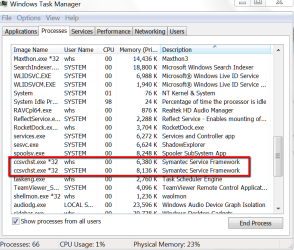
If you make statements like this, you should back it up with numbers. Here is the Ram usage of Norton. Now show me e.g. the MSE numbers.

Even my music (last entry) takes a lot more RAM.
 

Attachments

  • 2012-04-22_2208.png
    2012-04-22_2208.png
    32.7 KB · Views: 15

My Computer My Computer

Computer Manufacturer/Model Number
HP, Dell, Gateway, Toshiba - 4 laptops and 2 desktops
OS
Vista, Windows7, Mint Mate, Zorin, Windows 8
CPU
from 1.6GHz Duo to i7
Monitor(s) Displays
2x HP w2207
Hard Drives
5x HDD, 7x SSD, 12x Externals
Keyboard
with trackball - no mices
Mouse
Trackball mice
Internet Speed
DSL 6000
These days, apart from the real time protection, everything is done when the machine is idle.
 

My Computer My Computer

Computer type
Laptop
Computer Manufacturer/Model Number
Hewlett-Packard/G62-107SA Notebook
OS
Microsoft Windows 7 Home Premium 64-bit Service Pack 1
CPU
Intel(R) Core(TM) i3 CPU M 330 @ 2.13GHz
Motherboard
Hewlett-Packard 1425
Memory
8 GB DDR3
Graphics Card(s)
Intel(R) HD Graphics
Sound Card
Realtek High Definition Audio
Monitor(s) Displays
Builtin
Screen Resolution
1366 x 768 x 32 bits (4294967296 colors) @ 60 Hz
Hard Drives
250 GB SATA Hard Disk Drive 7200 rpm
2TB Seagate GoFlex USB 2 Drive
1TB Iomega Prestige USB 2 Drive
1.5TB Iomega Prestige USB 2 Drive (Samsung)
2TB WD MyBook Live NAS.
Mouse
Logitech Anywhere MX
Internet Speed
152 Mbs download 10 Mbs upload
Antivirus
Norton 360
Browser
Chrome
Back
Top