Just Installed Windows 7 Build 7264, Resolution Messy

blampert

New member
Local time
8:39 PM
Messages
5
Just installed Windows 7 Build 7264. I have a ASUS VW223B Black 22" 5ms Widescreen LCD Monitor And a XFX Geforce 8600GT Video Card. When I installed the lastest Drivers for the Windows 7 (32 bit) and look in the Nvidia control panel, it see it as a "Generic non-pnp" When its suppose to actually state the kind of monitor I have. This monitors recommended resolution is 1680x1050 and I can get as high as 1680x1024 with out it going out of range. the 1680x1024 is the right size it looks like but everythings grainy (If you know what I mean) Am I doing something wrong? Thanks guys

-Bill
 

My Computer My Computer

At a glance

Windows 7 Build 7264
OS
Windows 7 Build 7264
Hi blampert and welcome to the Se7enforums!

Well you have the video card drivers on and those seem to be working. Now how about checking for updates in general which would likely include a driver for the monitor itself as well as board drivers if you don't already have those on at this time.

Generally the Windows Updates will often pick up on the items you miss whenever seeing a fresh install of actually any recent version of Windows past the 9x family for sure(2000, XP, Vista mainly).

The question now is also what the refresh rate is set to as well as seeing all that taken care of? Generally I run the lcd here at 75hz.
 

My Computers My Computers

  • At a glance

    W7 Ultimate x64/W10 Pro x64/W11 Pro Triple Bo...AMD Phenom II X4 975 Deneb 3.6ghz - 965 2nd r...Kingston Hyper X DDR3 1600 1.5v 16gb - Hyper ...MSI HD Radeon 5750 1gb - MSI HD Radeon 6450 o...
    Computer type
    PC/Desktop
    Computer Manufacturer/Model Number
    Custom builds = 2
    OS
    W7 Ultimate x64/W10 Pro x64/W11 Pro Triple Boot - Main PC W7 Remote PC Micro ATX W7 Pro x64/W11 Pro
    CPU
    AMD Phenom II X4 975 Deneb 3.6ghz - 965 2nd remote pc
    Motherboard
    Gigabyte GA-790XTA-UD4-Gigabyte GA-880GM-D2H remote pc
    Memory
    Kingston Hyper X DDR3 1600 1.5v 16gb - Hyper X Fury 8gb 2nd
    Graphics Card(s)
    MSI HD Radeon 5750 1gb - MSI HD Radeon 6450 on mini tower
    Sound Card
    Creative Labs X-Fi Xtreme Audio P - Realtek onooard 2nd case
    Monitor(s) Displays
    ASUS VW199T-P 19" HP 2082a Main-HP 2082a 20" remote pc
    Screen Resolution
    Asus 1440x900 - HP 1600x900
    Hard Drives
    WD Black 1TB HD per OS W7, W10, and pending W11 presently on 500gb OS Drive - Pending Triple 1TB HDs for Spanned Storage/backup volume
    Single 2TB external USB enclosure, single 1TB System 7 Host/Boot drive, Pending 8TB external HD for system image b
    PSU
    Corsair 750TX - primary / Corsair CX600 - second
    Case
    Antec 900-2 - SSD compatible / NZXT Vulcan mini tower
    Cooling
    Zalman CNPS9900A
    Keyboard
    AZIO L70 Backlit Letters Gaming - ONN Cordless/USB
    Mouse
    MSI DS200 Programmable, Logitech Cordless
    Internet Speed
    30mbps upgrade - primary hard wired - mini tower usb WiFi
    Antivirus
    GFI VIPRE Internet Security 2014 on W7 2016 beta on W10,
    Browser
    Cyberfox, WaterFox 64bit FF variants, FireFox x64, Pale Moon
    Other Info
    Accomdata fan cooled usb 2.0 PIDE/Sata II, III external enclosure.
    Sambient usb/eSata PATA/Sata II, III external enclosure.
  • At a glance

    W7 Pro x64/W11 ProAMD Deneb 3.6ghz - 965Kingston Hyper X Fury 8gbMSI HD Radeon 6450 DVI Output
    Computer type
    PC/Desktop
    System Manufacturer/Model Number
    CUSTOM ASSEMBLY
    OS
    W7 Pro x64/W11 Pro
    CPU
    AMD Deneb 3.6ghz - 965
    Motherboard
    Gigabyte GA-880GM-D2H remote pc
    Memory
    Kingston Hyper X Fury 8gb
    Graphics Card(s)
    MSI HD Radeon 6450 DVI Output
    Sound Card
    Realtek onooard Creative or Other separate PENDING
    Monitor(s) Displays
    VIZIO 32" LCD TV Separate LCD Pending
    Screen Resolution
    1600x1080
    Hard Drives
    WD 500GB OS Host/Boot WD Green 1TB Storage/Backup
    PSU
    Corsair 600W - THERMALTAKE 600W spare case
    Case
    NZXT Vulcan mini tower
    Cooling
    Twin 120mm Top Fans - 240mm Side Cover
    Keyboard
    ONN Cordless/USB Logitech Cordless
    Mouse
    ONN USB/Cordless - Logitech Cordless
    Internet Speed
    DSL 5G
    Browser
    MS Edge, FireFox, WaterFox x64, FireFox Nightly
    Other Info
    OS Testing-Remote Access to Main TeamViewer
If you mean when you open a program the graphics are a bit fuzzy. I brought all my programs from Vista and I had to do the following to every program .exe file I installed.
Right click on the .exe file and go to 'Properties/Compatibility' tab and check 'Disable display scaling on high DPI settings.'
This brought me back to how these programs looked in Vista.

Hope this helps.
 
Last edited:

My Computer My Computer

At a glance

Windows 7 x64Intel Q9400 @ 3.4GHz2x2GB Mushkin Redline PC2-8000MSI RX3650 512MB CF
OS
Windows 7 x64
CPU
Intel Q9400 @ 3.4GHz
Motherboard
Asus P5Q Deluxe (Bios P5QD1406)
Memory
2x2GB Mushkin Redline PC2-8000
Graphics Card(s)
MSI RX3650 512MB CF
Sound Card
Sound Blaster Audigy SE
Monitor(s) Displays
Dell 3007WFP & Dell 2001FP
Screen Resolution
2560 x 1600 & 1600 x 1200
Hard Drives
Intel X25-M 80GB SSD
PSU
Zalman ZM-850 HP
Case
Antec P182
Keyboard
Logitech MX 3200 Cordless
Mouse
Logitech Laser
Nighthawk: I did check for updates but there was only one (for my razer mouse) and that was it. When I installed Win7, I didn't have to install any drivers accept for video. Pretty much all ethernet, audio etc... was installed. (motherboard is a Asus P5K Pro) Now when I go to set the resolution, The display catagory is "(Default Monitor) on. Isn't it suppose to say my monitor? I looked and didn't see any software/drivers for my monitor. I've also tried all refresh rates and really no difference.

Doakh: Thats strange that you had to do that but its not really fuzzy. The size of icons and generally the whole screen is right its just the windows, fonts are a little grainy (like it would when you don't have the exact resolution)

Is it just that the drivers Nvidia is offering for Win7 32bit not that great? how can I get a step down driver from Nvidia? Thanks for the replys

-Bill
 

My Computer My Computer

At a glance

Windows 7 Build 7264
OS
Windows 7 Build 7264
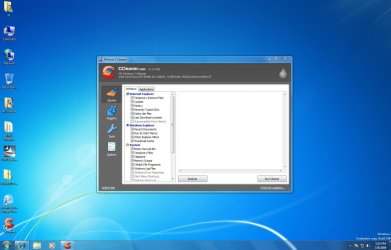
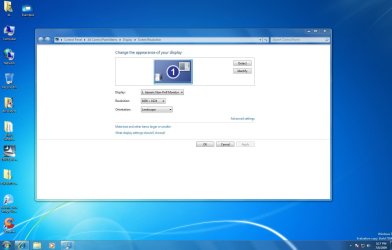
Heres some examples of what I mean
 

Attachments

  • Example1.JPG
    Example1.JPG
    112 KB · Views: 111
  • example 2.JPG
    example 2.JPG
    95.2 KB · Views: 142

My Computer My Computer

At a glance

Windows 7 Build 7264
OS
Windows 7 Build 7264
Your pics appear to represent the same problem I had.
 

My Computer My Computer

At a glance

Windows 7 x64Intel Q9400 @ 3.4GHz2x2GB Mushkin Redline PC2-8000MSI RX3650 512MB CF
OS
Windows 7 x64
CPU
Intel Q9400 @ 3.4GHz
Motherboard
Asus P5Q Deluxe (Bios P5QD1406)
Memory
2x2GB Mushkin Redline PC2-8000
Graphics Card(s)
MSI RX3650 512MB CF
Sound Card
Sound Blaster Audigy SE
Monitor(s) Displays
Dell 3007WFP & Dell 2001FP
Screen Resolution
2560 x 1600 & 1600 x 1200
Hard Drives
Intel X25-M 80GB SSD
PSU
Zalman ZM-850 HP
Case
Antec P182
Keyboard
Logitech MX 3200 Cordless
Mouse
Logitech Laser
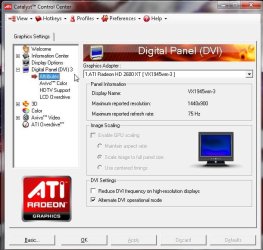
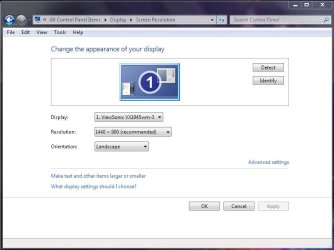
With the latest ATI Catalyst 9.6 on this is what I see. In the device manager you can right click on the generic monitor item there and allow Windows to perform an automatic search online while that may not even be needed.

The screens here however show how the Windows updates put on the driver for the monitor itself without a need for the driver disk.
 

Attachments

  • ATI PANEL ADVANCED.jpg
    ATI PANEL ADVANCED.jpg
    59.8 KB · Views: 52
  • Display Appearance.jpg
    Display Appearance.jpg
    43.6 KB · Views: 72
  • Device Manager Monitor.jpg
    Device Manager Monitor.jpg
    36.2 KB · Views: 27

My Computers My Computers

  • At a glance

    W7 Ultimate x64/W10 Pro x64/W11 Pro Triple Bo...AMD Phenom II X4 975 Deneb 3.6ghz - 965 2nd r...Kingston Hyper X DDR3 1600 1.5v 16gb - Hyper ...MSI HD Radeon 5750 1gb - MSI HD Radeon 6450 o...
    Computer type
    PC/Desktop
    Computer Manufacturer/Model Number
    Custom builds = 2
    OS
    W7 Ultimate x64/W10 Pro x64/W11 Pro Triple Boot - Main PC W7 Remote PC Micro ATX W7 Pro x64/W11 Pro
    CPU
    AMD Phenom II X4 975 Deneb 3.6ghz - 965 2nd remote pc
    Motherboard
    Gigabyte GA-790XTA-UD4-Gigabyte GA-880GM-D2H remote pc
    Memory
    Kingston Hyper X DDR3 1600 1.5v 16gb - Hyper X Fury 8gb 2nd
    Graphics Card(s)
    MSI HD Radeon 5750 1gb - MSI HD Radeon 6450 on mini tower
    Sound Card
    Creative Labs X-Fi Xtreme Audio P - Realtek onooard 2nd case
    Monitor(s) Displays
    ASUS VW199T-P 19" HP 2082a Main-HP 2082a 20" remote pc
    Screen Resolution
    Asus 1440x900 - HP 1600x900
    Hard Drives
    WD Black 1TB HD per OS W7, W10, and pending W11 presently on 500gb OS Drive - Pending Triple 1TB HDs for Spanned Storage/backup volume
    Single 2TB external USB enclosure, single 1TB System 7 Host/Boot drive, Pending 8TB external HD for system image b
    PSU
    Corsair 750TX - primary / Corsair CX600 - second
    Case
    Antec 900-2 - SSD compatible / NZXT Vulcan mini tower
    Cooling
    Zalman CNPS9900A
    Keyboard
    AZIO L70 Backlit Letters Gaming - ONN Cordless/USB
    Mouse
    MSI DS200 Programmable, Logitech Cordless
    Internet Speed
    30mbps upgrade - primary hard wired - mini tower usb WiFi
    Antivirus
    GFI VIPRE Internet Security 2014 on W7 2016 beta on W10,
    Browser
    Cyberfox, WaterFox 64bit FF variants, FireFox x64, Pale Moon
    Other Info
    Accomdata fan cooled usb 2.0 PIDE/Sata II, III external enclosure.
    Sambient usb/eSata PATA/Sata II, III external enclosure.
  • At a glance

    W7 Pro x64/W11 ProAMD Deneb 3.6ghz - 965Kingston Hyper X Fury 8gbMSI HD Radeon 6450 DVI Output
    Computer type
    PC/Desktop
    System Manufacturer/Model Number
    CUSTOM ASSEMBLY
    OS
    W7 Pro x64/W11 Pro
    CPU
    AMD Deneb 3.6ghz - 965
    Motherboard
    Gigabyte GA-880GM-D2H remote pc
    Memory
    Kingston Hyper X Fury 8gb
    Graphics Card(s)
    MSI HD Radeon 6450 DVI Output
    Sound Card
    Realtek onooard Creative or Other separate PENDING
    Monitor(s) Displays
    VIZIO 32" LCD TV Separate LCD Pending
    Screen Resolution
    1600x1080
    Hard Drives
    WD 500GB OS Host/Boot WD Green 1TB Storage/Backup
    PSU
    Corsair 600W - THERMALTAKE 600W spare case
    Case
    NZXT Vulcan mini tower
    Cooling
    Twin 120mm Top Fans - 240mm Side Cover
    Keyboard
    ONN Cordless/USB Logitech Cordless
    Mouse
    ONN USB/Cordless - Logitech Cordless
    Internet Speed
    DSL 5G
    Browser
    MS Edge, FireFox, WaterFox x64, FireFox Nightly
    Other Info
    OS Testing-Remote Access to Main TeamViewer
So Night Hawk: Since I don't use ATI, what does this mean for me? I don't understand
 

My Computer My Computer

At a glance

Windows 7 Build 7264
OS
Windows 7 Build 7264
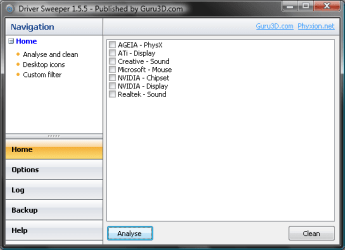
Get Driver Sweeper (free) or Driver Cleaner ($10).

If you examine driver details in Device Manager, I am betting that you will see the Windows drivers exclusively, or a mix of ATI and MS.

Run Driver Sweeper. Boot. Cancel/bypass any Windows prompts to install anything. Run your NVidia install. I would personally just extract the NVidia drivers and install them manually from Device Manager.

ALSO - are you connected via DVI VGA or USB. If USB, use DVI instead
 
The monitor only has VGA but my card has 2 DVI so i'm using an adapter.

I do have the drive sweeper installed but wasn't sure if i was doing it correct. Tell me again step by step what to do? Thanks, I really appreciate it.

-Bill
 

My Computer My Computer

At a glance

Windows 7 Build 7264
OS
Windows 7 Build 7264
Odd. Asus specs show 3 inputs, NewEgg shows only VGA. Nonetheless...

Select the one that says NVIDIA DISPLAY.

Not to repeat myself, but...

Run Driver Sweeper. Boot. Cancel/bypass any Windows prompts to install anything. Run your NVidia install.

I would personally just extract the NVidia drivers and install them manually from Device Manager.

Select display adapter. Update or Install driver. Navigate to folder (that contains INF or SYS files, should be labeled DRIVER. If this is confusing, just use NVidia install. I do it this way because I want to make sure that I do not install things I do not need or want.
 

Attachments

  • imageview.png
    imageview.png
    9.4 KB · Views: 14
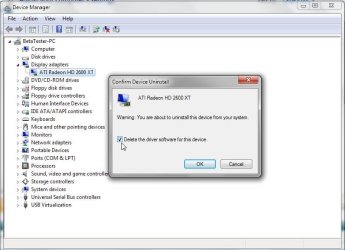
The NVidia installer usually has it's own uninstaller for both drivers and the application. For stubborn drivers without the application on you can also go right into the device manager and right click on the card listed under display adapters and check off the delete drivers option when choosing the right click uninstall option.
 

Attachments

  • Driver Removal in DM.jpg
    Driver Removal in DM.jpg
    56.3 KB · Views: 29

My Computers My Computers

  • At a glance

    W7 Ultimate x64/W10 Pro x64/W11 Pro Triple Bo...AMD Phenom II X4 975 Deneb 3.6ghz - 965 2nd r...Kingston Hyper X DDR3 1600 1.5v 16gb - Hyper ...MSI HD Radeon 5750 1gb - MSI HD Radeon 6450 o...
    Computer type
    PC/Desktop
    Computer Manufacturer/Model Number
    Custom builds = 2
    OS
    W7 Ultimate x64/W10 Pro x64/W11 Pro Triple Boot - Main PC W7 Remote PC Micro ATX W7 Pro x64/W11 Pro
    CPU
    AMD Phenom II X4 975 Deneb 3.6ghz - 965 2nd remote pc
    Motherboard
    Gigabyte GA-790XTA-UD4-Gigabyte GA-880GM-D2H remote pc
    Memory
    Kingston Hyper X DDR3 1600 1.5v 16gb - Hyper X Fury 8gb 2nd
    Graphics Card(s)
    MSI HD Radeon 5750 1gb - MSI HD Radeon 6450 on mini tower
    Sound Card
    Creative Labs X-Fi Xtreme Audio P - Realtek onooard 2nd case
    Monitor(s) Displays
    ASUS VW199T-P 19" HP 2082a Main-HP 2082a 20" remote pc
    Screen Resolution
    Asus 1440x900 - HP 1600x900
    Hard Drives
    WD Black 1TB HD per OS W7, W10, and pending W11 presently on 500gb OS Drive - Pending Triple 1TB HDs for Spanned Storage/backup volume
    Single 2TB external USB enclosure, single 1TB System 7 Host/Boot drive, Pending 8TB external HD for system image b
    PSU
    Corsair 750TX - primary / Corsair CX600 - second
    Case
    Antec 900-2 - SSD compatible / NZXT Vulcan mini tower
    Cooling
    Zalman CNPS9900A
    Keyboard
    AZIO L70 Backlit Letters Gaming - ONN Cordless/USB
    Mouse
    MSI DS200 Programmable, Logitech Cordless
    Internet Speed
    30mbps upgrade - primary hard wired - mini tower usb WiFi
    Antivirus
    GFI VIPRE Internet Security 2014 on W7 2016 beta on W10,
    Browser
    Cyberfox, WaterFox 64bit FF variants, FireFox x64, Pale Moon
    Other Info
    Accomdata fan cooled usb 2.0 PIDE/Sata II, III external enclosure.
    Sambient usb/eSata PATA/Sata II, III external enclosure.
  • At a glance

    W7 Pro x64/W11 ProAMD Deneb 3.6ghz - 965Kingston Hyper X Fury 8gbMSI HD Radeon 6450 DVI Output
    Computer type
    PC/Desktop
    System Manufacturer/Model Number
    CUSTOM ASSEMBLY
    OS
    W7 Pro x64/W11 Pro
    CPU
    AMD Deneb 3.6ghz - 965
    Motherboard
    Gigabyte GA-880GM-D2H remote pc
    Memory
    Kingston Hyper X Fury 8gb
    Graphics Card(s)
    MSI HD Radeon 6450 DVI Output
    Sound Card
    Realtek onooard Creative or Other separate PENDING
    Monitor(s) Displays
    VIZIO 32" LCD TV Separate LCD Pending
    Screen Resolution
    1600x1080
    Hard Drives
    WD 500GB OS Host/Boot WD Green 1TB Storage/Backup
    PSU
    Corsair 600W - THERMALTAKE 600W spare case
    Case
    NZXT Vulcan mini tower
    Cooling
    Twin 120mm Top Fans - 240mm Side Cover
    Keyboard
    ONN Cordless/USB Logitech Cordless
    Mouse
    ONN USB/Cordless - Logitech Cordless
    Internet Speed
    DSL 5G
    Browser
    MS Edge, FireFox, WaterFox x64, FireFox Nightly
    Other Info
    OS Testing-Remote Access to Main TeamViewer
Back
Top