Just looking before I leap...new PC final thoughts.

My Computer My Computer

At a glance

Windows 7 64-bitIntel Core i5-2500K 3300 Mhz16Gb Patriot PC3-12800 1600 MhzEVGA GeForce GTX 560 Ti (Fermi)
Computer type
PC/Desktop
Computer Manufacturer/Model Number
Custom built 2011
OS
Windows 7 64-bit
CPU
Intel Core i5-2500K 3300 Mhz
Motherboard
Gigabyte P67A-UD3-B3
Memory
16Gb Patriot PC3-12800 1600 Mhz
Graphics Card(s)
EVGA GeForce GTX 560 Ti (Fermi)
Sound Card
On Motherboard
Monitor(s) Displays
Dell U2412M & NEC EA232WMi
Screen Resolution
DELL 1920x1200 - NEC 1920x1080
Hard Drives
Crucial 128 Gb SSD
Hitachi Deskstar 2Tb 7200 RPM 32MB Cache
Seagate Barracuda 500Gb 7200 RPM
Hitachi GST Deskstar 1.5TB 7200 RPM 64MB Cache
PSU
Seasonic M1211-620 Bronze
Case
Antec Solo
Cooling
Tuniq Tower 120 Extreme Rev 1
Keyboard
Apple
Mouse
Microsoft
Internet Speed
5mbs
Other Info
Sunbeam PL-RS-3 Rheosmart 3 Fan Controller 3.5" Bay 3 Channel 30W Fan Controller Panel
Your welcome, glad it worked.
 

My Computer My Computer

At a glance

Windows 7 Ult x64 - SP1/ Windows 8 Pro x64Intel Core i5-3570K 4.6GHz8GB (2X4GB) DDR3 1600 Corsair Vengeance CL8 1.5vSapphire HD 7770 Vapor-X OC 1GB DDR5
Computer type
PC/Desktop
Computer Manufacturer/Model Number
76~2.0
OS
Windows 7 Ult x64 - SP1/ Windows 8 Pro x64
CPU
Intel Core i5-3570K 4.6GHz
Motherboard
Gigabyte GA-Z77X UD3H, f18
Memory
8GB (2X4GB) DDR3 1600 Corsair Vengeance CL8 1.5v
Graphics Card(s)
Sapphire HD 7770 Vapor-X OC 1GB DDR5
Sound Card
Onboard VIA VT2021
Monitor(s) Displays
22" LCD Dell
Screen Resolution
1680x1050
Hard Drives
Samsung 840Pro 128GB SSD,
Seagate Barracuda 500GB SATA2 7200rpm 32MB cache, Seagate Barracuda 1TB SATA2 7200rpm 32MB cache,
PSU
Corsair HX650W
Case
Cooler Master Storm Scout
Cooling
Corsair H80 2x12cm Noctua NF P12 , 2x14cm case fans
Keyboard
Logitech Wave
Mouse
CM Sentinel
Internet Speed
Dismal
Antivirus
Avast
Browser
Opera Next
Other Info
Haswell laptop: HP Envy 17t-j, i7-4700MQ, GeForce 740M 2GB DDR3, 17.3" Full HD 1920x1080, 16GB RAM, Samsung 840 Pro 128GB, 1TB Hitachi 7200 HDD,
Desktop: eSATA ports,
External eSATA Seagate 500GB SATA2 7200rpm,
External WD USB 500GB
Have you checked your boot time using the tool on this site? Probably down under 30 seconds somewhere? I am fighting the urge to get an SSD, although my boot times are quick for a spinning drive (47 seconds).

I haven't played with BIOS setting so I don't know if there's something that could help optomize boot time but I do have some results for you. I no longer need a password to log in; time from pressing power button from a cold start to desktop with was about 45 seconds. While booting, it seems to hang at the "Starting Windows" screen with dots ............. , perhaps some 20 seconds or more.

You were expecting closer to 30 seconds with SSD. Is there something in BIOS I need to set?
 

My Computer My Computer

At a glance

Windows 7 64-bitIntel Core i5-2500K 3300 Mhz16Gb Patriot PC3-12800 1600 MhzEVGA GeForce GTX 560 Ti (Fermi)
Computer type
PC/Desktop
Computer Manufacturer/Model Number
Custom built 2011
OS
Windows 7 64-bit
CPU
Intel Core i5-2500K 3300 Mhz
Motherboard
Gigabyte P67A-UD3-B3
Memory
16Gb Patriot PC3-12800 1600 Mhz
Graphics Card(s)
EVGA GeForce GTX 560 Ti (Fermi)
Sound Card
On Motherboard
Monitor(s) Displays
Dell U2412M & NEC EA232WMi
Screen Resolution
DELL 1920x1200 - NEC 1920x1080
Hard Drives
Crucial 128 Gb SSD
Hitachi Deskstar 2Tb 7200 RPM 32MB Cache
Seagate Barracuda 500Gb 7200 RPM
Hitachi GST Deskstar 1.5TB 7200 RPM 64MB Cache
PSU
Seasonic M1211-620 Bronze
Case
Antec Solo
Cooling
Tuniq Tower 120 Extreme Rev 1
Keyboard
Apple
Mouse
Microsoft
Internet Speed
5mbs
Other Info
Sunbeam PL-RS-3 Rheosmart 3 Fan Controller 3.5" Bay 3 Channel 30W Fan Controller Panel
Just did a video render test & cores ran @ 100% capacity, temps were 52-57 degrees C.

All seemed OK.:)
 

My Computer My Computer

At a glance

Windows 7 64-bitIntel Core i5-2500K 3300 Mhz16Gb Patriot PC3-12800 1600 MhzEVGA GeForce GTX 560 Ti (Fermi)
Computer type
PC/Desktop
Computer Manufacturer/Model Number
Custom built 2011
OS
Windows 7 64-bit
CPU
Intel Core i5-2500K 3300 Mhz
Motherboard
Gigabyte P67A-UD3-B3
Memory
16Gb Patriot PC3-12800 1600 Mhz
Graphics Card(s)
EVGA GeForce GTX 560 Ti (Fermi)
Sound Card
On Motherboard
Monitor(s) Displays
Dell U2412M & NEC EA232WMi
Screen Resolution
DELL 1920x1200 - NEC 1920x1080
Hard Drives
Crucial 128 Gb SSD
Hitachi Deskstar 2Tb 7200 RPM 32MB Cache
Seagate Barracuda 500Gb 7200 RPM
Hitachi GST Deskstar 1.5TB 7200 RPM 64MB Cache
PSU
Seasonic M1211-620 Bronze
Case
Antec Solo
Cooling
Tuniq Tower 120 Extreme Rev 1
Keyboard
Apple
Mouse
Microsoft
Internet Speed
5mbs
Other Info
Sunbeam PL-RS-3 Rheosmart 3 Fan Controller 3.5" Bay 3 Channel 30W Fan Controller Panel
Have you checked your boot time using the tool on this site? Probably down under 30 seconds somewhere? I am fighting the urge to get an SSD, although my boot times are quick for a spinning drive (47 seconds).

I haven't played with BIOS setting so I don't know if there's something that could help optomize boot time but I do have some results for you. I no longer need a password to log in; time from pressing power button from a cold start to desktop with was about 45 seconds. While booting, it seems to hang at the "Starting Windows" screen with dots ............. , perhaps some 20 seconds or more.

You were expecting closer to 30 seconds with SSD. Is there something in BIOS I need to set?

The dreaded dots. I had them at one time. Exactly 20--one per second.

To possibly get rid of dots:

Go into bios and be SURE you are set to boot from your SSD first, not a DVD drive. I think the dots are a 20 second countdown while it searches for a disk in your DVD drive, which is empty of course. That should save you 20 seconds.

Then you can go to msconfig and look at the boot tab. Put a checkmark in "no GUI boot" or whatever that box is. That will save you a bit.

If you want an accurate boot time, go to Performance and Maintenance section of this forum and look at the reboot time sticky at the top. In the first post you will find a script that you can run that gives exact time.

Earlier today, I installed an Intel 320 series 80 GB SSD. My boot time with it is 29 seconds (without dots). I'd think you should get in that ballpark. I got 47 seconds with the script on a WD Black spinning drive.

I'm still firmly in configuration/tuning hell, so I don't know if I can do better than 29 after I get this Windows rebuild finished. It may get quicker as I think Windows has some self-tuning capabilities that take effect over time. I hear talk of sub 15 seconds, but I haven't seen official confirmation of anything that fast.

Incidentally---I had to do the registry hack to activate Windows--even though I did not have to in all other clean installs with the same disk and product key. Strange.

Your video rendering temps look fine to me, but I'm no expert on how much of a stress that is. I got into the high 60s running Prime 95---compared to mid 70s with the stock cooler.

Was it significantly faster on rendering than your previous PC?

 
Last edited:

My Computer My Computer

At a glance

Windows 7 Home Premium SP1, 64-bitIntel Skylake i5-6600K, not overclocked8 GB HyperX DDR4-2666 (2 x 4 GB)none; graphics are integrated on CPU
Computer type
PC/Desktop
Computer Manufacturer/Model Number
Ignatz Special; 4 speed manual gearbox; factory air conditioning; one of one
OS
Windows 7 Home Premium SP1, 64-bit
CPU
Intel Skylake i5-6600K, not overclocked
Motherboard
AsRock Z170M Extreme 4, micro ATX
Memory
8 GB HyperX DDR4-2666 (2 x 4 GB)
Graphics Card(s)
none; graphics are integrated on CPU
Sound Card
onboard: Realtek ALC1150; external: USB Behringer UF0-202
Monitor(s) Displays
Dell S2340M 23 inch IPS
Screen Resolution
1600 x 900
Hard Drives
System: Crucial MX100 series SSD, 128 GB;
Data: Samsung Spinpoint 103SJ, 1 TB;
Backup: WD Caviar Green WD30EZRX-00D8PB0, 3 TB
PSU
Rosewill SilentNight 500 watt fanless, semi-modular
Case
Antec Solo II
Cooling
Noctua NH-U12S; Noctua F12 intake, Noctua S12A exhaust
Keyboard
Microsoft 200 6JH-00001 USB
Mouse
Dell or Microsoft optical wired; USB
Antivirus
Microsoft Security Essentials and Malwarebytes Premium
Browser
Pale Moon
Other Info
All fans PWM; speeds at idle: CPU circa 500 rpm; intake circa 600 rpm; exhaust circa 600 rpm; CPU temps 27 idle and 47 C load in a warm room (27 C/81 F) when running Intel Extreme Tuning Utility stress test.
That is a nice SSD ignatzatsonic, have you ran the Intel SSD Tool Box?

It will do the SSD tweaks for you, then you can look the others if you want to tweak further.

Make sure defrag is turned off for the SSD, the Tool Box will do that for you.

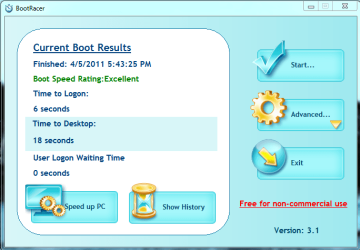
Here is my boot time:
BootRacer new X25M 120GB  5Apr11.PNG

Minimal tweaks ;)
 

My Computer My Computer

At a glance

Windows 7 Ult x64 - SP1/ Windows 8 Pro x64Intel Core i5-3570K 4.6GHz8GB (2X4GB) DDR3 1600 Corsair Vengeance CL8 1.5vSapphire HD 7770 Vapor-X OC 1GB DDR5
Computer type
PC/Desktop
Computer Manufacturer/Model Number
76~2.0
OS
Windows 7 Ult x64 - SP1/ Windows 8 Pro x64
CPU
Intel Core i5-3570K 4.6GHz
Motherboard
Gigabyte GA-Z77X UD3H, f18
Memory
8GB (2X4GB) DDR3 1600 Corsair Vengeance CL8 1.5v
Graphics Card(s)
Sapphire HD 7770 Vapor-X OC 1GB DDR5
Sound Card
Onboard VIA VT2021
Monitor(s) Displays
22" LCD Dell
Screen Resolution
1680x1050
Hard Drives
Samsung 840Pro 128GB SSD,
Seagate Barracuda 500GB SATA2 7200rpm 32MB cache, Seagate Barracuda 1TB SATA2 7200rpm 32MB cache,
PSU
Corsair HX650W
Case
Cooler Master Storm Scout
Cooling
Corsair H80 2x12cm Noctua NF P12 , 2x14cm case fans
Keyboard
Logitech Wave
Mouse
CM Sentinel
Internet Speed
Dismal
Antivirus
Avast
Browser
Opera Next
Other Info
Haswell laptop: HP Envy 17t-j, i7-4700MQ, GeForce 740M 2GB DDR3, 17.3" Full HD 1920x1080, 16GB RAM, Samsung 840 Pro 128GB, 1TB Hitachi 7200 HDD,
Desktop: eSATA ports,
External eSATA Seagate 500GB SATA2 7200rpm,
External WD USB 500GB
Dave:

Yeah, I did run the toolbox. I have defrag, pre fetch, superfetch turned off.

What other tuning have you done or any other suggestions on boot time?

I guess my 320 is the replacement for your x25m. Not supposed to be much different.

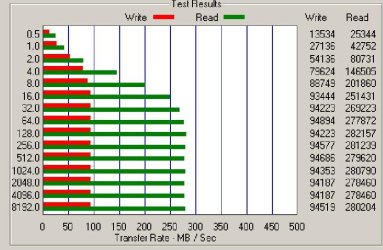
Here is a benchmark I just completed. Not sure if it's good, bad, or indifferent.

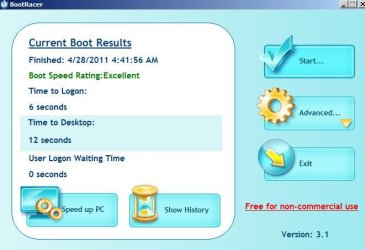
Also Bootracer. It gives odd figures considering the script on this site shows 29. Obviously measures something different.

Do you let the toolbox run the optimizer weekly on a schedule as recommended by Intel?
 

Attachments

  • UNTITLED.jpg
    UNTITLED.jpg
    60.1 KB · Views: 5
  • UNTITLEDa.jpg
    UNTITLEDa.jpg
    33.6 KB · Views: 5
Last edited:

My Computer My Computer

At a glance

Windows 7 Home Premium SP1, 64-bitIntel Skylake i5-6600K, not overclocked8 GB HyperX DDR4-2666 (2 x 4 GB)none; graphics are integrated on CPU
Computer type
PC/Desktop
Computer Manufacturer/Model Number
Ignatz Special; 4 speed manual gearbox; factory air conditioning; one of one
OS
Windows 7 Home Premium SP1, 64-bit
CPU
Intel Skylake i5-6600K, not overclocked
Motherboard
AsRock Z170M Extreme 4, micro ATX
Memory
8 GB HyperX DDR4-2666 (2 x 4 GB)
Graphics Card(s)
none; graphics are integrated on CPU
Sound Card
onboard: Realtek ALC1150; external: USB Behringer UF0-202
Monitor(s) Displays
Dell S2340M 23 inch IPS
Screen Resolution
1600 x 900
Hard Drives
System: Crucial MX100 series SSD, 128 GB;
Data: Samsung Spinpoint 103SJ, 1 TB;
Backup: WD Caviar Green WD30EZRX-00D8PB0, 3 TB
PSU
Rosewill SilentNight 500 watt fanless, semi-modular
Case
Antec Solo II
Cooling
Noctua NH-U12S; Noctua F12 intake, Noctua S12A exhaust
Keyboard
Microsoft 200 6JH-00001 USB
Mouse
Dell or Microsoft optical wired; USB
Antivirus
Microsoft Security Essentials and Malwarebytes Premium
Browser
Pale Moon
Other Info
All fans PWM; speeds at idle: CPU circa 500 rpm; intake circa 600 rpm; exhaust circa 600 rpm; CPU temps 27 idle and 47 C load in a warm room (27 C/81 F) when running Intel Extreme Tuning Utility stress test.
Edit: Nice Boot times.

I run the optimizer manually every week or two.

Like you mentioned, 'No GUI Boot'.

Enable Write-caching - Device Manager - Disk Drives, right click your SSD - Policies tab - tic 'Enable write caching on the device'.

If you have A UPS, Check the box on 'Turn off Windows write-cache buffer flushing on the device'

Leave the Pagefile on the SSD, you can reduce the size since you have 4GB RAM, min I've seen recommended is 400 MB, I set mine to 1024 - 2048 MB. The amount of page file will depend on your usage. There is a lot of differing opinions on this, as usual, the idea is to reduce the amount of writes to the SSD. Windows will increase the size if it's needed.

Check your startup programs, I only took out a couple, left most of them there.

Put the default download folders on the HDD.
 

My Computer My Computer

At a glance

Windows 7 Ult x64 - SP1/ Windows 8 Pro x64Intel Core i5-3570K 4.6GHz8GB (2X4GB) DDR3 1600 Corsair Vengeance CL8 1.5vSapphire HD 7770 Vapor-X OC 1GB DDR5
Computer type
PC/Desktop
Computer Manufacturer/Model Number
76~2.0
OS
Windows 7 Ult x64 - SP1/ Windows 8 Pro x64
CPU
Intel Core i5-3570K 4.6GHz
Motherboard
Gigabyte GA-Z77X UD3H, f18
Memory
8GB (2X4GB) DDR3 1600 Corsair Vengeance CL8 1.5v
Graphics Card(s)
Sapphire HD 7770 Vapor-X OC 1GB DDR5
Sound Card
Onboard VIA VT2021
Monitor(s) Displays
22" LCD Dell
Screen Resolution
1680x1050
Hard Drives
Samsung 840Pro 128GB SSD,
Seagate Barracuda 500GB SATA2 7200rpm 32MB cache, Seagate Barracuda 1TB SATA2 7200rpm 32MB cache,
PSU
Corsair HX650W
Case
Cooler Master Storm Scout
Cooling
Corsair H80 2x12cm Noctua NF P12 , 2x14cm case fans
Keyboard
Logitech Wave
Mouse
CM Sentinel
Internet Speed
Dismal
Antivirus
Avast
Browser
Opera Next
Other Info
Haswell laptop: HP Envy 17t-j, i7-4700MQ, GeForce 740M 2GB DDR3, 17.3" Full HD 1920x1080, 16GB RAM, Samsung 840 Pro 128GB, 1TB Hitachi 7200 HDD,
Desktop: eSATA ports,
External eSATA Seagate 500GB SATA2 7200rpm,
External WD USB 500GB
OK; Thanks for the tips. I will try them out.
 

My Computer My Computer

At a glance

Windows 7 Home Premium SP1, 64-bitIntel Skylake i5-6600K, not overclocked8 GB HyperX DDR4-2666 (2 x 4 GB)none; graphics are integrated on CPU
Computer type
PC/Desktop
Computer Manufacturer/Model Number
Ignatz Special; 4 speed manual gearbox; factory air conditioning; one of one
OS
Windows 7 Home Premium SP1, 64-bit
CPU
Intel Skylake i5-6600K, not overclocked
Motherboard
AsRock Z170M Extreme 4, micro ATX
Memory
8 GB HyperX DDR4-2666 (2 x 4 GB)
Graphics Card(s)
none; graphics are integrated on CPU
Sound Card
onboard: Realtek ALC1150; external: USB Behringer UF0-202
Monitor(s) Displays
Dell S2340M 23 inch IPS
Screen Resolution
1600 x 900
Hard Drives
System: Crucial MX100 series SSD, 128 GB;
Data: Samsung Spinpoint 103SJ, 1 TB;
Backup: WD Caviar Green WD30EZRX-00D8PB0, 3 TB
PSU
Rosewill SilentNight 500 watt fanless, semi-modular
Case
Antec Solo II
Cooling
Noctua NH-U12S; Noctua F12 intake, Noctua S12A exhaust
Keyboard
Microsoft 200 6JH-00001 USB
Mouse
Dell or Microsoft optical wired; USB
Antivirus
Microsoft Security Essentials and Malwarebytes Premium
Browser
Pale Moon
Other Info
All fans PWM; speeds at idle: CPU circa 500 rpm; intake circa 600 rpm; exhaust circa 600 rpm; CPU temps 27 idle and 47 C load in a warm room (27 C/81 F) when running Intel Extreme Tuning Utility stress test.
Was it significantly faster on rendering than your previous PC?

Yes, faster. But, even faster (30 seconds) now that I've changed boot order per your suggestion.:)

And, my experience with MS was over an hour on the phone & talked to 6 different people. They were very patient, professional & knew how to fix the problem. All in all I gave them a very positive review.

Now on to Dave76's suggestions for faster boots!
 

My Computer My Computer

At a glance

Windows 7 64-bitIntel Core i5-2500K 3300 Mhz16Gb Patriot PC3-12800 1600 MhzEVGA GeForce GTX 560 Ti (Fermi)
Computer type
PC/Desktop
Computer Manufacturer/Model Number
Custom built 2011
OS
Windows 7 64-bit
CPU
Intel Core i5-2500K 3300 Mhz
Motherboard
Gigabyte P67A-UD3-B3
Memory
16Gb Patriot PC3-12800 1600 Mhz
Graphics Card(s)
EVGA GeForce GTX 560 Ti (Fermi)
Sound Card
On Motherboard
Monitor(s) Displays
Dell U2412M & NEC EA232WMi
Screen Resolution
DELL 1920x1200 - NEC 1920x1080
Hard Drives
Crucial 128 Gb SSD
Hitachi Deskstar 2Tb 7200 RPM 32MB Cache
Seagate Barracuda 500Gb 7200 RPM
Hitachi GST Deskstar 1.5TB 7200 RPM 64MB Cache
PSU
Seasonic M1211-620 Bronze
Case
Antec Solo
Cooling
Tuniq Tower 120 Extreme Rev 1
Keyboard
Apple
Mouse
Microsoft
Internet Speed
5mbs
Other Info
Sunbeam PL-RS-3 Rheosmart 3 Fan Controller 3.5" Bay 3 Channel 30W Fan Controller Panel
That is a nice SSD ignatzatsonic, have you ran the Intel SSD Tool Box?

It will do the SSD tweaks for you, then you can look the others if you want to tweak further.

Make sure defrag is turned off for the SSD, the Tool Box will do that for you.

Here is my boot time:
View attachment 151667

Minimal tweaks ;)

I didn't understand that this was Intel only software. :( According to Crucial their SSDs don't need this, that it's built-in. Is that possible? Toolbox/optimizer for C300? - Crucial Community
 

My Computer My Computer

At a glance

Windows 7 64-bitIntel Core i5-2500K 3300 Mhz16Gb Patriot PC3-12800 1600 MhzEVGA GeForce GTX 560 Ti (Fermi)
Computer type
PC/Desktop
Computer Manufacturer/Model Number
Custom built 2011
OS
Windows 7 64-bit
CPU
Intel Core i5-2500K 3300 Mhz
Motherboard
Gigabyte P67A-UD3-B3
Memory
16Gb Patriot PC3-12800 1600 Mhz
Graphics Card(s)
EVGA GeForce GTX 560 Ti (Fermi)
Sound Card
On Motherboard
Monitor(s) Displays
Dell U2412M & NEC EA232WMi
Screen Resolution
DELL 1920x1200 - NEC 1920x1080
Hard Drives
Crucial 128 Gb SSD
Hitachi Deskstar 2Tb 7200 RPM 32MB Cache
Seagate Barracuda 500Gb 7200 RPM
Hitachi GST Deskstar 1.5TB 7200 RPM 64MB Cache
PSU
Seasonic M1211-620 Bronze
Case
Antec Solo
Cooling
Tuniq Tower 120 Extreme Rev 1
Keyboard
Apple
Mouse
Microsoft
Internet Speed
5mbs
Other Info
Sunbeam PL-RS-3 Rheosmart 3 Fan Controller 3.5" Bay 3 Channel 30W Fan Controller Panel
Incidentally---I had to do the registry hack to activate Windows--even though I did not have to in all other clean installs with the same disk and product key. Strange.
I've used the registry hack before but prefer the built in Software License Manager.

Elevated command prompt:
slmgr -ipk product key
enter
slmgr -ato
enter
 

My Computer My Computer

At a glance

Windows 10 Pro 64 bitCore i7 6700K Skylake 4.0GHzCorsair Vengeance LPX DDR4 32GB 3000MHzAsus Radeon RX480 Strix 8GB
Computer type
PC/Desktop
Computer Manufacturer/Model Number
Wordsworth 5000
OS
Windows 10 Pro 64 bit
CPU
Core i7 6700K Skylake 4.0GHz
Motherboard
Asus Z170 Pro
Memory
Corsair Vengeance LPX DDR4 32GB 3000MHz
Graphics Card(s)
Asus Radeon RX480 Strix 8GB
Sound Card
Asus Xonar DSX
Monitor(s) Displays
HP 2709m
Screen Resolution
1920x1080
Hard Drives
Intel 600p M.2 PCIe NVMe SSD 512GB; Intel 335 SSD 240GB ;Western Digital Caviar Black 1TB
PSU
Thermaltake Toughpower Grand Platinum 850W
Case
Lian Li PC-B70
Cooling
CPU-Noctua NH D15, GPU-Stock, Case-Noctua 2x140, 2x120
Keyboard
Microsoft Natural Ergo 4000
Mouse
Microsoft Wireless Optical 1000
Internet Speed
Cable
Other Info
HP bd 340,
HP bd 240,
Klipsch Promedia 5.1 THX
That is a nice SSD ignatzatsonic, have you ran the Intel SSD Tool Box?

It will do the SSD tweaks for you, then you can look the others if you want to tweak further.

Make sure defrag is turned off for the SSD, the Tool Box will do that for you.

Here is my boot time:
View attachment 151667

Minimal tweaks ;)

I didn't understand that this was Intel only software. :( According to Crucial their SSDs don't need this, that it's built-in. Is that possible? Toolbox/optimizer for C300? - Crucial Community

Most of the anxiety about SSDs is "wearing them out" over time since the memory cells have a finite number of writes they can tolerate.

But everything I read says that the anxiety is over-rated and that any of the respected brands will last more than long enough in any typical situation. I think there is a lot of marketing mumbo-jumbo in there too in an attempt to gain market share.

The only negative I have heard about Crucial drives is that there is a phenomenon referred to as "stuttering" on some examples. I don't know how widespread it is or if it is a major issue. I just read about it in the last week. As far as I know, the 300 models have a good rep overall.
 

My Computer My Computer

At a glance

Windows 7 Home Premium SP1, 64-bitIntel Skylake i5-6600K, not overclocked8 GB HyperX DDR4-2666 (2 x 4 GB)none; graphics are integrated on CPU
Computer type
PC/Desktop
Computer Manufacturer/Model Number
Ignatz Special; 4 speed manual gearbox; factory air conditioning; one of one
OS
Windows 7 Home Premium SP1, 64-bit
CPU
Intel Skylake i5-6600K, not overclocked
Motherboard
AsRock Z170M Extreme 4, micro ATX
Memory
8 GB HyperX DDR4-2666 (2 x 4 GB)
Graphics Card(s)
none; graphics are integrated on CPU
Sound Card
onboard: Realtek ALC1150; external: USB Behringer UF0-202
Monitor(s) Displays
Dell S2340M 23 inch IPS
Screen Resolution
1600 x 900
Hard Drives
System: Crucial MX100 series SSD, 128 GB;
Data: Samsung Spinpoint 103SJ, 1 TB;
Backup: WD Caviar Green WD30EZRX-00D8PB0, 3 TB
PSU
Rosewill SilentNight 500 watt fanless, semi-modular
Case
Antec Solo II
Cooling
Noctua NH-U12S; Noctua F12 intake, Noctua S12A exhaust
Keyboard
Microsoft 200 6JH-00001 USB
Mouse
Dell or Microsoft optical wired; USB
Antivirus
Microsoft Security Essentials and Malwarebytes Premium
Browser
Pale Moon
Other Info
All fans PWM; speeds at idle: CPU circa 500 rpm; intake circa 600 rpm; exhaust circa 600 rpm; CPU temps 27 idle and 47 C load in a warm room (27 C/81 F) when running Intel Extreme Tuning Utility stress test.
The Intel Tool Box is mentioned in many SSD reviews as being a very useful tool, afaik other SSD companies don't have a SSD tool.

A tool like this would benefit all SSDs, but they don't have one as of yet. What else can they say besides you don't need one, although I would say not having a SSD tool is not a deal breaker, it's nice to have but not a requirement.

When you install Win7 to a SSD it will do all the basic SSD settings, the others you might want are the ones I listed previously.
The Gen1 SSDs needed a lot of tweaks to optimize them, but after Gen2 not much is needed.

The Crucial had a FW stumble when they were first released but that was quickly fixed and they have been very good since then. They rate very high in the various show us your benchmark threads.
 

My Computer My Computer

At a glance

Windows 7 Ult x64 - SP1/ Windows 8 Pro x64Intel Core i5-3570K 4.6GHz8GB (2X4GB) DDR3 1600 Corsair Vengeance CL8 1.5vSapphire HD 7770 Vapor-X OC 1GB DDR5
Computer type
PC/Desktop
Computer Manufacturer/Model Number
76~2.0
OS
Windows 7 Ult x64 - SP1/ Windows 8 Pro x64
CPU
Intel Core i5-3570K 4.6GHz
Motherboard
Gigabyte GA-Z77X UD3H, f18
Memory
8GB (2X4GB) DDR3 1600 Corsair Vengeance CL8 1.5v
Graphics Card(s)
Sapphire HD 7770 Vapor-X OC 1GB DDR5
Sound Card
Onboard VIA VT2021
Monitor(s) Displays
22" LCD Dell
Screen Resolution
1680x1050
Hard Drives
Samsung 840Pro 128GB SSD,
Seagate Barracuda 500GB SATA2 7200rpm 32MB cache, Seagate Barracuda 1TB SATA2 7200rpm 32MB cache,
PSU
Corsair HX650W
Case
Cooler Master Storm Scout
Cooling
Corsair H80 2x12cm Noctua NF P12 , 2x14cm case fans
Keyboard
Logitech Wave
Mouse
CM Sentinel
Internet Speed
Dismal
Antivirus
Avast
Browser
Opera Next
Other Info
Haswell laptop: HP Envy 17t-j, i7-4700MQ, GeForce 740M 2GB DDR3, 17.3" Full HD 1920x1080, 16GB RAM, Samsung 840 Pro 128GB, 1TB Hitachi 7200 HDD,
Desktop: eSATA ports,
External eSATA Seagate 500GB SATA2 7200rpm,
External WD USB 500GB

My Computer My Computer

At a glance

Windows 7 64-bitIntel Core i5-2500K 3300 Mhz16Gb Patriot PC3-12800 1600 MhzEVGA GeForce GTX 560 Ti (Fermi)
Computer type
PC/Desktop
Computer Manufacturer/Model Number
Custom built 2011
OS
Windows 7 64-bit
CPU
Intel Core i5-2500K 3300 Mhz
Motherboard
Gigabyte P67A-UD3-B3
Memory
16Gb Patriot PC3-12800 1600 Mhz
Graphics Card(s)
EVGA GeForce GTX 560 Ti (Fermi)
Sound Card
On Motherboard
Monitor(s) Displays
Dell U2412M & NEC EA232WMi
Screen Resolution
DELL 1920x1200 - NEC 1920x1080
Hard Drives
Crucial 128 Gb SSD
Hitachi Deskstar 2Tb 7200 RPM 32MB Cache
Seagate Barracuda 500Gb 7200 RPM
Hitachi GST Deskstar 1.5TB 7200 RPM 64MB Cache
PSU
Seasonic M1211-620 Bronze
Case
Antec Solo
Cooling
Tuniq Tower 120 Extreme Rev 1
Keyboard
Apple
Mouse
Microsoft
Internet Speed
5mbs
Other Info
Sunbeam PL-RS-3 Rheosmart 3 Fan Controller 3.5" Bay 3 Channel 30W Fan Controller Panel

My Computer My Computer

At a glance

Window's 7 Ultimate 64bitE8400 LappedKingston 4 gig2=ATI 5670Video Crossfire / HVR2250 TV Tuner ...
Computer Manufacturer/Model Number
Custom Build
OS
Window's 7 Ultimate 64bit
CPU
E8400 Lapped
Motherboard
P5Q Pro Turbo Asus
Memory
Kingston 4 gig
Graphics Card(s)
2=ATI 5670Video Crossfire / HVR2250 TV Tuner Card
Sound Card
HDMI sound
Monitor(s) Displays
Sony 46"
Screen Resolution
1280x720
Hard Drives
1 WD 160gig YS, 1 Black Edition 320gig and one 250gig WD YS Model plus external Caviar Black 640gig Drives
PSU
Antec 550 Modular
Case
Antec Custom 180B
Cooling
X-1283 Lapped Artic Silver 5
Keyboard
Wave Combo Logitech
Mouse
Logitech LX-8
Internet Speed
5mb down 768 up
Other Info
Custom side fan in case, plus moved middle lower fan to the front of hard drives , also installed a second intake fan in lower two optical drive slots. Rear fans are controlled by Fan mate controllers. temps inside case are monitored by probe and temps coming out the top exhaust are also monitored, temps as of right now 20c inside and 22.7 out the exhaust. Front intake fans are controlled by Asu
Very good info about fans and wiring enjoy. I good hooked on Noctua and Scythe for my cases.
Recommended Fans | silentpcreview.com

Good read, thanks.

I'm wondering; is there a recommended max CPU temperature? I have BIOS setup to sound a warning if temp exceeds 60 degrees C. The highest I've monitored was 57C during a video render.
 

My Computer My Computer

At a glance

Windows 7 64-bitIntel Core i5-2500K 3300 Mhz16Gb Patriot PC3-12800 1600 MhzEVGA GeForce GTX 560 Ti (Fermi)
Computer type
PC/Desktop
Computer Manufacturer/Model Number
Custom built 2011
OS
Windows 7 64-bit
CPU
Intel Core i5-2500K 3300 Mhz
Motherboard
Gigabyte P67A-UD3-B3
Memory
16Gb Patriot PC3-12800 1600 Mhz
Graphics Card(s)
EVGA GeForce GTX 560 Ti (Fermi)
Sound Card
On Motherboard
Monitor(s) Displays
Dell U2412M & NEC EA232WMi
Screen Resolution
DELL 1920x1200 - NEC 1920x1080
Hard Drives
Crucial 128 Gb SSD
Hitachi Deskstar 2Tb 7200 RPM 32MB Cache
Seagate Barracuda 500Gb 7200 RPM
Hitachi GST Deskstar 1.5TB 7200 RPM 64MB Cache
PSU
Seasonic M1211-620 Bronze
Case
Antec Solo
Cooling
Tuniq Tower 120 Extreme Rev 1
Keyboard
Apple
Mouse
Microsoft
Internet Speed
5mbs
Other Info
Sunbeam PL-RS-3 Rheosmart 3 Fan Controller 3.5" Bay 3 Channel 30W Fan Controller Panel
You ought to run Prime 95 or some load test program to see how hot your CPU might get in extreme circumstances as a test of your cooling setup. I get temps in the upper 60s with Prime 95. With the stock Intel heat sink, my temps were in the mid 70s. The CPU will deliberately throttle back if temps get too high to avoid damaging itself.

I'd guess your Prime 95 temps would be lower than mine because your ambient temp is around 70, maybe 5 degrees cooler than mine.

I've got my CPU warning set to sound off at 70. I'm not sure of the temp at which throttling occurs, but the processor is rated at 95 watts TDP.
 
Last edited:

My Computer My Computer

At a glance

Windows 7 Home Premium SP1, 64-bitIntel Skylake i5-6600K, not overclocked8 GB HyperX DDR4-2666 (2 x 4 GB)none; graphics are integrated on CPU
Computer type
PC/Desktop
Computer Manufacturer/Model Number
Ignatz Special; 4 speed manual gearbox; factory air conditioning; one of one
OS
Windows 7 Home Premium SP1, 64-bit
CPU
Intel Skylake i5-6600K, not overclocked
Motherboard
AsRock Z170M Extreme 4, micro ATX
Memory
8 GB HyperX DDR4-2666 (2 x 4 GB)
Graphics Card(s)
none; graphics are integrated on CPU
Sound Card
onboard: Realtek ALC1150; external: USB Behringer UF0-202
Monitor(s) Displays
Dell S2340M 23 inch IPS
Screen Resolution
1600 x 900
Hard Drives
System: Crucial MX100 series SSD, 128 GB;
Data: Samsung Spinpoint 103SJ, 1 TB;
Backup: WD Caviar Green WD30EZRX-00D8PB0, 3 TB
PSU
Rosewill SilentNight 500 watt fanless, semi-modular
Case
Antec Solo II
Cooling
Noctua NH-U12S; Noctua F12 intake, Noctua S12A exhaust
Keyboard
Microsoft 200 6JH-00001 USB
Mouse
Dell or Microsoft optical wired; USB
Antivirus
Microsoft Security Essentials and Malwarebytes Premium
Browser
Pale Moon
Other Info
All fans PWM; speeds at idle: CPU circa 500 rpm; intake circa 600 rpm; exhaust circa 600 rpm; CPU temps 27 idle and 47 C load in a warm room (27 C/81 F) when running Intel Extreme Tuning Utility stress test.
So far, so good with my new PC. Although the temps seem good, I decided to add 2 more fans. What attracted me to the Cool Master was the fact that it will fit properly into the PWR_FAN2 connector. Sound levels my be higher than the quietest fans but better than the included case fan. The other Nexus fan matches the front fan.

Newegg.com - COOLER MASTER R4-BMBS-20PK-R0 Blade Master 120mm Case Fan

Newegg.com - Nexus DF1209SL-3 92mm Case Fan

As expected, the Cooler Master R4 plugged into the PWR_FAN2 connector & seems at least as quiet as the Antec 3 speed set to low. I do, however, have a gripe. The wires are way too short. The only way I could install without the wires interfering with the Creative Audio board connected to PCI-1 was to rotate the fan counter clockwise 90 degrees & route the cable along the MB side near the PCI 1 & 2 connectors. The cables are not resting on any electronics or anything sharp. Another inch or two longer would of been perfect, IMHO.

I plugged the Nexus 92mm to the other, original Nexus 92mm fan's Molex connector. Hope that's alright.
 

My Computer My Computer

At a glance

Windows 7 64-bitIntel Core i5-2500K 3300 Mhz16Gb Patriot PC3-12800 1600 MhzEVGA GeForce GTX 560 Ti (Fermi)
Computer type
PC/Desktop
Computer Manufacturer/Model Number
Custom built 2011
OS
Windows 7 64-bit
CPU
Intel Core i5-2500K 3300 Mhz
Motherboard
Gigabyte P67A-UD3-B3
Memory
16Gb Patriot PC3-12800 1600 Mhz
Graphics Card(s)
EVGA GeForce GTX 560 Ti (Fermi)
Sound Card
On Motherboard
Monitor(s) Displays
Dell U2412M & NEC EA232WMi
Screen Resolution
DELL 1920x1200 - NEC 1920x1080
Hard Drives
Crucial 128 Gb SSD
Hitachi Deskstar 2Tb 7200 RPM 32MB Cache
Seagate Barracuda 500Gb 7200 RPM
Hitachi GST Deskstar 1.5TB 7200 RPM 64MB Cache
PSU
Seasonic M1211-620 Bronze
Case
Antec Solo
Cooling
Tuniq Tower 120 Extreme Rev 1
Keyboard
Apple
Mouse
Microsoft
Internet Speed
5mbs
Other Info
Sunbeam PL-RS-3 Rheosmart 3 Fan Controller 3.5" Bay 3 Channel 30W Fan Controller Panel
You ought to run Prime 95 or some load test program to see how hot your CPU might get in extreme circumstances as a test of your cooling setup. I get temps in the upper 60s with Prime 95. With the stock Intel heat sink, my temps were in the mid 70s. The CPU will deliberately throttle back if temps get too high to avoid damaging itself.

I'd guess your Prime 95 temps would be lower than mine because your ambient temp is around 70, maybe 5 degrees cooler than mine.

I've got my CPU warning set to sound off at 70. I'm not sure of the temp at which throttling occurs, but the processor is rated at 95 watts TDP.

I don't have time today to run anything other than the Blend test. Because of time, I ran the test until it got to the 6th level. At that time the temperature was 59-62 degrees C max. I have changed BIOS to sound off at 70 C, not knowing what setting is best but it would seem about right.
 

My Computer My Computer

At a glance

Windows 7 64-bitIntel Core i5-2500K 3300 Mhz16Gb Patriot PC3-12800 1600 MhzEVGA GeForce GTX 560 Ti (Fermi)
Computer type
PC/Desktop
Computer Manufacturer/Model Number
Custom built 2011
OS
Windows 7 64-bit
CPU
Intel Core i5-2500K 3300 Mhz
Motherboard
Gigabyte P67A-UD3-B3
Memory
16Gb Patriot PC3-12800 1600 Mhz
Graphics Card(s)
EVGA GeForce GTX 560 Ti (Fermi)
Sound Card
On Motherboard
Monitor(s) Displays
Dell U2412M & NEC EA232WMi
Screen Resolution
DELL 1920x1200 - NEC 1920x1080
Hard Drives
Crucial 128 Gb SSD
Hitachi Deskstar 2Tb 7200 RPM 32MB Cache
Seagate Barracuda 500Gb 7200 RPM
Hitachi GST Deskstar 1.5TB 7200 RPM 64MB Cache
PSU
Seasonic M1211-620 Bronze
Case
Antec Solo
Cooling
Tuniq Tower 120 Extreme Rev 1
Keyboard
Apple
Mouse
Microsoft
Internet Speed
5mbs
Other Info
Sunbeam PL-RS-3 Rheosmart 3 Fan Controller 3.5" Bay 3 Channel 30W Fan Controller Panel
Back
Top