
Solved KB 3197868 Rool Up

Layback Bear

3 Brain Cells
Guru
Gold Member
VIP
Local time
6:59 AM
Messages
24,243
Location
Northern Ohio
Last months roll up would not install so I just hid it.


For sure I need some help.


This months also will not install (KB 3197868).
Tried many things still no good.
SFC /SCANNOW finds NO problems.
I did find this using Reliabilty Monitor.

Installation Failure: Windows failed to install the following update with error 0x8007054f: November, 2016 Security Monthly Quality Rollup for Windows 7 for x64-based Systems ( (KB3197868).
When I reboot I get.

Failure to configure Windows Updates, Reverting Changes.
Waiting for completing of reboot.
Check for updates many times and it will fail to install.
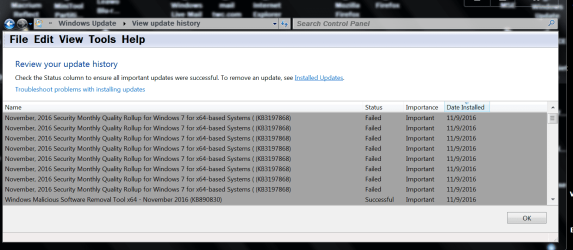

Update problem.PNG
 

My Computer My Computer

At a glance

Windows 10 Pro. 64/ version 1709 Windows 7 Pr...Intel i7-6800K @ 4.3Corsair Platinum 16 gig @2400EVGA GTX 1070 OC
Computer type
PC/Desktop
Computer Manufacturer/Model Number
Home made Desktop
OS
Windows 10 Pro. 64/ version 1709 Windows 7 Pro/64
CPU
Intel i7-6800K @ 4.3
Motherboard
ASUS X-99 Deluxe II
Memory
Corsair Platinum 16 gig @2400
Graphics Card(s)
EVGA GTX 1070 OC
Monitor(s) Displays
Asus 27" LED LCD/VE278Q
Screen Resolution
1920-1080 or 1280-720 HDMI
Hard Drives
INTEL SSD 730-240 Gb Sata 3.0/
PSU
EVGA Platium 1200W
Case
Phanteks Luxe Tempered Glass 8 fans/ one radiator
Cooling
XSPC/ Water Cooled CPU
Keyboard
Das 4 Professional
Mouse
Logitech M705/MX Anywhere 2-S
Internet Speed
100 mbits
Antivirus
Microsoft Security Essentials/ Malwarebytes Premium 3.0/ SAS
Browser
I.E. 11 default/Firefox/ ISP Time Warner Cable/Spectrum
Other Info
LG BluRay Burner/
Sound system-KLipsch-THX/
Icy Dock ssd Hot Swap bays.
Hi LBB,
as thats the roll-up, it covers a lot of a myriad of progs/features any of which might be corrupt:rolleyes:, therfore stopping the update.
Need to see the CBSlog, and todays WindowsUpdatelog.

Roy
 

My Computer My Computer

At a glance

W7 home premium 32bit/W7HP 64bit/w10 tp insid...E5300 dual core3gbNvidia Geforce 7100 Nforce 630i
Computer type
PC/Desktop
Computer Manufacturer/Model Number
medionl/Aspire 6930G/acer x55a
OS
W7 home premium 32bit/W7HP 64bit/w10 tp insider ring
CPU
E5300 dual core
Motherboard
medion MS7366
Memory
3gb
Graphics Card(s)
Nvidia Geforce 7100 Nforce 630i
Monitor(s) Displays
avixc
Internet Speed
n (isp resticted to 72)
Antivirus
mse/pands
Browser
palemoon
Other Info
Belkin Fd7050 n USB using Railink RT2870 drivers, more upto date
Thanks for the quick reply.

I have done so many things I will see if I can find the logs.
 

My Computer My Computer

At a glance

Windows 10 Pro. 64/ version 1709 Windows 7 Pr...Intel i7-6800K @ 4.3Corsair Platinum 16 gig @2400EVGA GTX 1070 OC
Computer type
PC/Desktop
Computer Manufacturer/Model Number
Home made Desktop
OS
Windows 10 Pro. 64/ version 1709 Windows 7 Pro/64
CPU
Intel i7-6800K @ 4.3
Motherboard
ASUS X-99 Deluxe II
Memory
Corsair Platinum 16 gig @2400
Graphics Card(s)
EVGA GTX 1070 OC
Monitor(s) Displays
Asus 27" LED LCD/VE278Q
Screen Resolution
1920-1080 or 1280-720 HDMI
Hard Drives
INTEL SSD 730-240 Gb Sata 3.0/
PSU
EVGA Platium 1200W
Case
Phanteks Luxe Tempered Glass 8 fans/ one radiator
Cooling
XSPC/ Water Cooled CPU
Keyboard
Das 4 Professional
Mouse
Logitech M705/MX Anywhere 2-S
Internet Speed
100 mbits
Antivirus
Microsoft Security Essentials/ Malwarebytes Premium 3.0/ SAS
Browser
I.E. 11 default/Firefox/ ISP Time Warner Cable/Spectrum
Other Info
LG BluRay Burner/
Sound system-KLipsch-THX/
Icy Dock ssd Hot Swap bays.
Well I found the CBS Log and have it zipped and on my desktop. I don't know how to get it in my post so you can open it. I need a little guidance.


The picture in post #1 picture is all the updates for today except MSE updates.
 

My Computer My Computer

At a glance

Windows 10 Pro. 64/ version 1709 Windows 7 Pr...Intel i7-6800K @ 4.3Corsair Platinum 16 gig @2400EVGA GTX 1070 OC
Computer type
PC/Desktop
Computer Manufacturer/Model Number
Home made Desktop
OS
Windows 10 Pro. 64/ version 1709 Windows 7 Pro/64
CPU
Intel i7-6800K @ 4.3
Motherboard
ASUS X-99 Deluxe II
Memory
Corsair Platinum 16 gig @2400
Graphics Card(s)
EVGA GTX 1070 OC
Monitor(s) Displays
Asus 27" LED LCD/VE278Q
Screen Resolution
1920-1080 or 1280-720 HDMI
Hard Drives
INTEL SSD 730-240 Gb Sata 3.0/
PSU
EVGA Platium 1200W
Case
Phanteks Luxe Tempered Glass 8 fans/ one radiator
Cooling
XSPC/ Water Cooled CPU
Keyboard
Das 4 Professional
Mouse
Logitech M705/MX Anywhere 2-S
Internet Speed
100 mbits
Antivirus
Microsoft Security Essentials/ Malwarebytes Premium 3.0/ SAS
Browser
I.E. 11 default/Firefox/ ISP Time Warner Cable/Spectrum
Other Info
LG BluRay Burner/
Sound system-KLipsch-THX/
Icy Dock ssd Hot Swap bays.
Just attach it like any other file.

Roy
 

My Computer My Computer

At a glance

W7 home premium 32bit/W7HP 64bit/w10 tp insid...E5300 dual core3gbNvidia Geforce 7100 Nforce 630i
Computer type
PC/Desktop
Computer Manufacturer/Model Number
medionl/Aspire 6930G/acer x55a
OS
W7 home premium 32bit/W7HP 64bit/w10 tp insider ring
CPU
E5300 dual core
Motherboard
medion MS7366
Memory
3gb
Graphics Card(s)
Nvidia Geforce 7100 Nforce 630i
Monitor(s) Displays
avixc
Internet Speed
n (isp resticted to 72)
Antivirus
mse/pands
Browser
palemoon
Other Info
Belkin Fd7050 n USB using Railink RT2870 drivers, more upto date
OH silly me i'tll probobly be to big to upload. send it to your file sharing site post the link.

Roy
 

My Computer My Computer

At a glance

W7 home premium 32bit/W7HP 64bit/w10 tp insid...E5300 dual core3gbNvidia Geforce 7100 Nforce 630i
Computer type
PC/Desktop
Computer Manufacturer/Model Number
medionl/Aspire 6930G/acer x55a
OS
W7 home premium 32bit/W7HP 64bit/w10 tp insider ring
CPU
E5300 dual core
Motherboard
medion MS7366
Memory
3gb
Graphics Card(s)
Nvidia Geforce 7100 Nforce 630i
Monitor(s) Displays
avixc
Internet Speed
n (isp resticted to 72)
Antivirus
mse/pands
Browser
palemoon
Other Info
Belkin Fd7050 n USB using Railink RT2870 drivers, more upto date
Hi LBB,
to make life easier.
open the log on your destop
right click >> select file >> select find >> error then copy/paste the lines, same for warning.

Roy
 

My Computer My Computer

At a glance

W7 home premium 32bit/W7HP 64bit/w10 tp insid...E5300 dual core3gbNvidia Geforce 7100 Nforce 630i
Computer type
PC/Desktop
Computer Manufacturer/Model Number
medionl/Aspire 6930G/acer x55a
OS
W7 home premium 32bit/W7HP 64bit/w10 tp insider ring
CPU
E5300 dual core
Motherboard
medion MS7366
Memory
3gb
Graphics Card(s)
Nvidia Geforce 7100 Nforce 630i
Monitor(s) Displays
avixc
Internet Speed
n (isp resticted to 72)
Antivirus
mse/pands
Browser
palemoon
Other Info
Belkin Fd7050 n USB using Railink RT2870 drivers, more upto date
Hi LBB,
the logs are only showing info lines, no errors/warning.
can i see the windowsupdatelog (c>windows>windowsupdate)
can you also run this (SURT equivalent) copy/paste the output.

http://www.sysnative.com/niemiro/apps/SFCFix.exe
Roy
 

My Computer My Computer

At a glance

W7 home premium 32bit/W7HP 64bit/w10 tp insid...E5300 dual core3gbNvidia Geforce 7100 Nforce 630i
Computer type
PC/Desktop
Computer Manufacturer/Model Number
medionl/Aspire 6930G/acer x55a
OS
W7 home premium 32bit/W7HP 64bit/w10 tp insider ring
CPU
E5300 dual core
Motherboard
medion MS7366
Memory
3gb
Graphics Card(s)
Nvidia Geforce 7100 Nforce 630i
Monitor(s) Displays
avixc
Internet Speed
n (isp resticted to 72)
Antivirus
mse/pands
Browser
palemoon
Other Info
Belkin Fd7050 n USB using Railink RT2870 drivers, more upto date
You can try the one (security updates only) listed from that member post#5 ignatzatsonic
 

My Computer My Computer

At a glance

Windows 7 Professional SP1 - x64 [Non-UEFI Boot]Ivy Bridge Core i5 3570K (Delidded)G.Skill "Ares" DDR3 PC3-12800 - 1600MHz (16Gb)Asus Dual-RX480-O4G
Computer type
PC/Desktop
Computer Manufacturer/Model Number
Custom Build
OS
Windows 7 Professional SP1 - x64 [Non-UEFI Boot]
CPU
Ivy Bridge Core i5 3570K (Delidded)
Motherboard
Asus P8Z77-V LE PLUS
Memory
G.Skill "Ares" DDR3 PC3-12800 - 1600MHz (16Gb)
Graphics Card(s)
Asus Dual-RX480-O4G
Sound Card
Creative Sound Blaster Z w/5.1 sound system
Monitor(s) Displays
Asus IPS 23"
Screen Resolution
16/9
Hard Drives
Internal:
500Go Sata 6Gb/s (x2)
500Go Sata 3Gb/s (x2)
SSD 60Go Sata 6Gb/s
PSU
In Win C 900W Series 80+ Platinum
Case
Thermaltake Chaser A71
Cooling
Custom Water Cooling Loop
Keyboard
Cooler Master QuickFire XTi
Mouse
Razer Imperator 2012 (4G)
Antivirus
MSE
Browser
IE 11.0.xxx Rtm
Other Info
"Raid0" with Intel Smart Response Technology (HDD/SSD)
I had similar problem, but in my case SFC stated there were some problems and it managed to fix it. I run SFC once again and now it said it couldn't fix errors, hmmm, OK, I checked CBS.log and found no errors but I had some files in C:\Windows\winsxs\temp\PendingRenames which should be empty I suppose.

Then I found one weird trick to fix Windows Update ;).

Start > search for "Turn Windows features on or off" > Telnet client - turn it on (maybe turning off if you already have it will work too). It will ask for a restart, do this. Now magic will begin, it may take some time. After restart mentioned folder was empty and I was able to install KB 3197868 using Windows Update.
It has something to do with TrustedInstaller service which is invoked when adding Windows features.
 

My Computer My Computer

At a glance

Windows 7 Home Premium x64
Computer type
PC/Desktop
OS
Windows 7 Home Premium x64
Today I finally found a workaround for this problem, which already felt like being around forever. Ironic how this is supposed to be a Quality Rollup... :/
It took its sweet time to finish (around 15 minutes), BUT it did the job.

1.
Download the standalone update from HERE and make sure to pick the right one for you:
Microsoft Update Catalog

2.
To be on the safe side, I suggest you also Take Ownership of the file

3.
You can now start the update with Open and let it do its job. Please be patient.

4.
You will probably be invited to restart the system, please do so. Both shutdown and startup will take longer than usual, for obvious reasons. Again, please be patient.

5. (just an observation)
The annoying Update icon will still popup in the Taskbar, regardless of the update having successfully being installed. Restore the window, Check for Updates, be patient for a last time and you should get your reward: it now sez No important updates available.

6.
DONE!


All together now: Thank you, Microsoft!!


Valentin
 

My Computer My Computer

At a glance

Windows 7 Ultimate x64
Computer type
PC/Desktop
Computer Manufacturer/Model Number
custom build
OS
Windows 7 Ultimate x64
Thank you NoN for the link.
Good news, KB3197876 installed with ZERO problems
Sfc /scannow finds NO problems.
My main concern is Security Updates.

A BIG thank you to all that came to my aid!!

Jack.
 

My Computer My Computer

At a glance

Windows 10 Pro. 64/ version 1709 Windows 7 Pr...Intel i7-6800K @ 4.3Corsair Platinum 16 gig @2400EVGA GTX 1070 OC
Computer type
PC/Desktop
Computer Manufacturer/Model Number
Home made Desktop
OS
Windows 10 Pro. 64/ version 1709 Windows 7 Pro/64
CPU
Intel i7-6800K @ 4.3
Motherboard
ASUS X-99 Deluxe II
Memory
Corsair Platinum 16 gig @2400
Graphics Card(s)
EVGA GTX 1070 OC
Monitor(s) Displays
Asus 27" LED LCD/VE278Q
Screen Resolution
1920-1080 or 1280-720 HDMI
Hard Drives
INTEL SSD 730-240 Gb Sata 3.0/
PSU
EVGA Platium 1200W
Case
Phanteks Luxe Tempered Glass 8 fans/ one radiator
Cooling
XSPC/ Water Cooled CPU
Keyboard
Das 4 Professional
Mouse
Logitech M705/MX Anywhere 2-S
Internet Speed
100 mbits
Antivirus
Microsoft Security Essentials/ Malwarebytes Premium 3.0/ SAS
Browser
I.E. 11 default/Firefox/ ISP Time Warner Cable/Spectrum
Other Info
LG BluRay Burner/
Sound system-KLipsch-THX/
Icy Dock ssd Hot Swap bays.
As requested by torchwood

SFCFix version 3.0.0.0 by niemiro.
Start time: 2016-11-11 08:50:41.644
Microsoft Windows 7 Service Pack 1 - amd64
Not using a script file.


AutoAnalysis::
SUMMARY: No corruptions were detected.
AutoAnalysis:: directive completed successfully.


Successfully processed all directives.
SFCFix version 3.0.0.0 by niemiro has completed.
Currently storing 0 datablocks.
Finish time: 2016-11-11 08:51:32.542
----------------------EOF-----------------------

Could the RollUp problem be because their is no (GWX) on my system?
 

My Computer My Computer

At a glance

Windows 10 Pro. 64/ version 1709 Windows 7 Pr...Intel i7-6800K @ 4.3Corsair Platinum 16 gig @2400EVGA GTX 1070 OC
Computer type
PC/Desktop
Computer Manufacturer/Model Number
Home made Desktop
OS
Windows 10 Pro. 64/ version 1709 Windows 7 Pro/64
CPU
Intel i7-6800K @ 4.3
Motherboard
ASUS X-99 Deluxe II
Memory
Corsair Platinum 16 gig @2400
Graphics Card(s)
EVGA GTX 1070 OC
Monitor(s) Displays
Asus 27" LED LCD/VE278Q
Screen Resolution
1920-1080 or 1280-720 HDMI
Hard Drives
INTEL SSD 730-240 Gb Sata 3.0/
PSU
EVGA Platium 1200W
Case
Phanteks Luxe Tempered Glass 8 fans/ one radiator
Cooling
XSPC/ Water Cooled CPU
Keyboard
Das 4 Professional
Mouse
Logitech M705/MX Anywhere 2-S
Internet Speed
100 mbits
Antivirus
Microsoft Security Essentials/ Malwarebytes Premium 3.0/ SAS
Browser
I.E. 11 default/Firefox/ ISP Time Warner Cable/Spectrum
Other Info
LG BluRay Burner/
Sound system-KLipsch-THX/
Icy Dock ssd Hot Swap bays.
Here is included all my updates.


Host Name: JACK-PC
OS Name: Microsoft Windows 7 Professional
OS Version: 6.1.7601 Service Pack 1 Build 7601
OS Manufacturer: Microsoft Corporation
OS Configuration: Standalone Workstation
OS Build Type: Multiprocessor Free
Registered Owner: Jack
Registered Organization:
Product ID: 00371-OEM-9045505-46287
Original Install Date: 8/27/2015, 9:38:54 PM
System Boot Time: 11/11/2016, 9:12:53 AM
System Manufacturer: System manufacturer
System Model: System Product Name
System Type: x64-based PC
Processor(s): 1 Processor(s) Installed.
[01]: Intel64 Family 6 Model 62 Stepping 4 GenuineIntel ~3700 Mhz
BIOS Version: American Megatrends Inc. 4502, 10/15/2013
Windows Directory: C:\Windows
System Directory: C:\Windows\system32
Boot Device: \Device\HarddiskVolume1
System Locale: en-us;English (United States)
Input Locale: en-us;English (United States)
Time Zone: (UTC-05:00) Eastern Time (US & Canada)
Total Physical Memory: 16,323 MB
Available Physical Memory: 14,440 MB
Virtual Memory: Max Size: 32,644 MB
Virtual Memory: Available: 30,720 MB
Virtual Memory: In Use: 1,924 MB
Page File Location(s): C:\pagefile.sys
Domain: WORKGROUP
Logon Server: \\JACK-PC
Hotfix(s): 216 Hotfix(s) Installed.
[01]: KB2849697
[02]: KB2849696
[03]: KB2841134
[04]: KB2670838
[05]: KB971033
[06]: KB958559
[07]: KB3134760
[08]: KB2479943
[09]: KB2491683
[10]: KB2505454
[11]: KB2506014
[12]: KB2506212
[13]: KB2506928
[14]: KB2509553
[15]: KB2532531
[16]: KB2533552
[17]: KB2534111
[18]: KB2545698
[19]: KB2547666
[20]: KB2552343
[21]: KB2560656
[22]: KB2563227
[23]: KB2564958
[24]: KB2579686
[25]: KB2603229
[26]: KB2604115
[27]: KB2620704
[28]: KB2621440
[29]: KB2631813
[30]: KB2639308
[31]: KB2640148
[32]: KB2647753
[33]: KB2654428
[34]: KB2667402
[35]: KB2676562
[36]: KB2685811
[37]: KB2685813
[38]: KB2690533
[39]: KB2698365
[40]: KB2705219
[41]: KB2719857
[42]: KB2727528
[43]: KB2729094
[44]: KB2732059
[45]: KB2736422
[46]: KB2742599
[47]: KB2750841
[48]: KB2758857
[49]: KB2761217
[50]: KB2763523
[51]: KB2770660
[52]: KB2773072
[53]: KB2786081
[54]: KB2791765
[55]: KB2799926
[56]: KB2800095
[57]: KB2807986
[58]: KB2808679
[59]: KB2813347
[60]: KB2813430
[61]: KB2834140
[62]: KB2840631
[63]: KB2843630
[64]: KB2847927
[65]: KB2852386
[66]: KB2853952
[67]: KB2861698
[68]: KB2862152
[69]: KB2862330
[70]: KB2862335
[71]: KB2862973
[72]: KB2864202
[73]: KB2868038
[74]: KB2868116
[75]: KB2871997
[76]: KB2882822
[77]: KB2884256
[78]: KB2891804
[79]: KB2892074
[80]: KB2893294
[81]: KB2893519
[82]: KB2894844
[83]: KB2900986
[84]: KB2908783
[85]: KB2911501
[86]: KB2912390
[87]: KB2918077
[88]: KB2919469
[89]: KB2929733
[90]: KB2931356
[91]: KB2937610
[92]: KB2943357
[93]: KB2957189
[94]: KB2966583
[95]: KB2968294
[96]: KB2972100
[97]: KB2972211
[98]: KB2973112
[99]: KB2973201
[100]: KB2973351
[101]: KB2977292
[102]: KB2978120
[103]: KB2978742
[104]: KB2984972
[105]: KB2985461
[106]: KB2991963
[107]: KB2992611
[108]: KB3003743
[109]: KB3004361
[110]: KB3004375
[111]: KB3006121
[112]: KB3006137
[113]: KB3010788
[114]: KB3011780
[115]: KB3013531
[116]: KB3019978
[117]: KB3020369
[118]: KB3020370
[119]: KB3021674
[120]: KB3021917
[121]: KB3022777
[122]: KB3023215
[123]: KB3030377
[124]: KB3035126
[125]: KB3037574
[126]: KB3042553
[127]: KB3045685
[128]: KB3046017
[129]: KB3046269
[130]: KB3054476
[131]: KB3055642
[132]: KB3059317
[133]: KB3060716
[134]: KB3067903
[135]: KB3071756
[136]: KB3072305
[137]: KB3074543
[138]: KB3075851
[139]: KB3078071
[140]: KB3078601
[141]: KB3078667
[142]: KB3080079
[143]: KB3083710
[144]: KB3084135
[145]: KB3086255
[146]: KB3087038
[147]: KB3087985
[148]: KB3092601
[149]: KB3092627
[150]: KB3093513
[151]: KB3093983
[152]: KB3097989
[153]: KB3100773
[154]: KB3101722
[155]: KB3104002
[156]: KB3107998
[157]: KB3108371
[158]: KB3108381
[159]: KB3108664
[160]: KB3108670
[161]: KB3109103
[162]: KB3109560
[163]: KB3110329
[164]: KB3118401
[165]: KB3121255
[166]: KB3121461
[167]: KB3122648
[168]: KB3123479
[169]: KB3124275
[170]: KB3126587
[171]: KB3127220
[172]: KB3134814
[173]: KB3135983
[174]: KB3138378
[175]: KB3138612
[176]: KB3138901
[177]: KB3138910
[178]: KB3139398
[179]: KB3139914
[180]: KB3139929
[181]: KB3140245
[182]: KB3141092
[183]: KB3142024
[184]: KB3142042
[185]: KB3145739
[186]: KB3146706
[187]: KB3146963
[188]: KB3148198
[189]: KB3149090
[190]: KB3150220
[191]: KB3154070
[192]: KB3156016
[193]: KB3156017
[194]: KB3156019
[195]: KB3160005
[196]: KB3161102
[197]: KB3161949
[198]: KB3161958
[199]: KB3163245
[200]: KB3164035
[201]: KB3170106
[202]: KB3170455
[203]: KB3172605
[204]: KB3175443
[205]: KB3177186
[206]: KB3177467
[207]: KB3181988
[208]: KB3182203
[209]: KB3184143
[210]: KB3185319
[211]: KB3185911
[212]: KB3188740
[213]: KB3197867
[214]: KB976902
[215]: KB982018
[216]: KB3185330
Network Card(s): 1 NIC(s) Installed.
[01]: Intel(R) 82579V Gigabit Network Connection
Connection Name: Local Area Connection
DHCP Enabled: Yes
DHCP Server: 192.168.0.1
IP address(es)
[01]: 192.168.0.3
[02]: fe80::2946:93cc:5110:c89c
[03]: 2605:a000:e941:e100:c5eb:7979:2b00:e6e4
[04]: 2605:a000:e941:e100:2946:93cc:5110:c89c
[05]: 2605:a000:e941:e100::1
 

My Computer My Computer

At a glance

Windows 10 Pro. 64/ version 1709 Windows 7 Pr...Intel i7-6800K @ 4.3Corsair Platinum 16 gig @2400EVGA GTX 1070 OC
Computer type
PC/Desktop
Computer Manufacturer/Model Number
Home made Desktop
OS
Windows 10 Pro. 64/ version 1709 Windows 7 Pro/64
CPU
Intel i7-6800K @ 4.3
Motherboard
ASUS X-99 Deluxe II
Memory
Corsair Platinum 16 gig @2400
Graphics Card(s)
EVGA GTX 1070 OC
Monitor(s) Displays
Asus 27" LED LCD/VE278Q
Screen Resolution
1920-1080 or 1280-720 HDMI
Hard Drives
INTEL SSD 730-240 Gb Sata 3.0/
PSU
EVGA Platium 1200W
Case
Phanteks Luxe Tempered Glass 8 fans/ one radiator
Cooling
XSPC/ Water Cooled CPU
Keyboard
Das 4 Professional
Mouse
Logitech M705/MX Anywhere 2-S
Internet Speed
100 mbits
Antivirus
Microsoft Security Essentials/ Malwarebytes Premium 3.0/ SAS
Browser
I.E. 11 default/Firefox/ ISP Time Warner Cable/Spectrum
Other Info
LG BluRay Burner/
Sound system-KLipsch-THX/
Icy Dock ssd Hot Swap bays.
Hi:

Just popping in to mention that even if you have 3185330 & 3197867 installed, WU will still offer 3197868.

I did not have any problem with 3197868 on my W7 laptop.
But, after seeing this thread, I decided proactively to go with 3197867 on my W7 desktop, because I already had the "performance" bits installed from last month with 3185330.
Everything went just fine.
But I was surprised when I was all done to be offered 3187868, even though both 3185330 and 3197867 are successfully installed.
So I am hiding 3197868 -- I am too squeamish to let WU try to install it on top of those other patches.

YMMV, but I thought someone might be interested to know,

MM
 

My Computer My Computer

At a glance

OEM Windows 7 Ult (x64) SP1Intel Core-i7 3770 @ 3.4 GHz16 GB DDR3 SDRAM @ 1333 MHzNVidia GeForce GT620 1 GB
Computer type
PC/Desktop
Computer Manufacturer/Model Number
Dell Studio XPS 8500
OS
OEM Windows 7 Ult (x64) SP1
CPU
Intel Core-i7 3770 @ 3.4 GHz
Motherboard
"Dell" branded
Memory
16 GB DDR3 SDRAM @ 1333 MHz
Graphics Card(s)
NVidia GeForce GT620 1 GB
Sound Card
THX TruStudio PC
Monitor(s) Displays
Dell U2410 Full HD
Hard Drives
2.0 TB SATA2 @ 7200 RPM
PSU
350W
Keyboard
MS 4000 Ergon - Wired
Mouse
Logitech Anywhere MX
Internet Speed
Cable HSI w/Turbo (router)
Antivirus
KIS-MBAM Premium-MBAE Premium
Browser
Fx (current version); IE
Other Info
And a Win7/64 Pro laptop; And a Win10/64 Pro desktop.
As requested by torchwood

SFCFix version 3.0.0.0 by niemiro.
Start time: 2016-11-11 08:50:41.644
Microsoft Windows 7 Service Pack 1 - amd64
Not using a script file.


AutoAnalysis::
SUMMARY: No corruptions were detected.
AutoAnalysis:: directive completed successfully.


Successfully processed all directives.
SFCFix version 3.0.0.0 by niemiro has completed.
Currently storing 0 datablocks.
Finish time: 2016-11-11 08:51:32.542
----------------------EOF-----------------------

Could the RollUp problem be because their is no (GWX) on my system?


I don't think having no GWX on your system is the problem as I don't have any GWX on mine either & the Nov KB3197876 installed without a problem.
 

My Computer My Computer

At a glance

Windows 7 Home Premium 64 bit sp1Intel i5 3570 3.4Ghz Ivy Bridge SKT 1155 quad...G-Skill Rip Jaws 16Gb (8x2) DDR3 -1600 PC3 12...Gigabyte NVIDIA GT610 1Gb DDR3 810/1200 PCI-E...
Computer type
PC/Desktop
Computer Manufacturer/Model Number
Self built using existing case
OS
Windows 7 Home Premium 64 bit sp1
CPU
Intel i5 3570 3.4Ghz Ivy Bridge SKT 1155 quad core
Motherboard
Gigabyte Z77-HD3 SKT 1155 2xSata 3, 4x USB 3.0
Memory
G-Skill Rip Jaws 16Gb (8x2) DDR3 -1600 PC3 12800 CL 10 red
Graphics Card(s)
Gigabyte NVIDIA GT610 1Gb DDR3 810/1200 PCI-E 2.0 Silent
Sound Card
NVIDIA High Definition & Realtech High Definition Audio
Monitor(s) Displays
2 x Philips 226V4L 16:9 aspect ratio
Screen Resolution
1920 x 1080 HD
Hard Drives
Samsung 840 Pro 256gb SSD, SATA 3.
Hitachi Touro Portable 1tb, USB 3.0 HDD used for image b/ups.
PSU
Corsair VS450
Case
Codeng
Cooling
PSU fan & CPU fan
Keyboard
Logitech
Mouse
Logitech Wireless trackball M570
Internet Speed
Wireless 3G. 3mg down & 550kb up.
Antivirus
Bitdefender Internet Security 2020
Browser
Opera (Current Version) & Firefox
Other Info
MS Office 2013 Pro. Davis weather station software. MGE Nova 600 avr UPS.
KB3197868 failed with 80004005

Hi folks, any help with this would be greatly appreciated...

My updates stopped working on Sept.13th,2016. I found a fix online did the following.
Microsoft Update Catalog
search and download these 2 updates, choose a location to download to.
install KB3020369 and reboot
then install KB3172605 and reboot
open windows update in Control Panel
Search for updates, download all and install, reboot

downloaded 16 updates, 6 failed, 10 installed. then searched again and downloaded and installed the 6 and 1 failed (KB3197868).
I manually downloaded KB3197868 and installed but it failed with error 80004005

Attached are the latest contents from the CBS log....
 

Attachments

My Computer My Computer

At a glance

Windows 7 Pro 64-bit
Computer type
Laptop
Computer Manufacturer/Model Number
lenovo
OS
Windows 7 Pro 64-bit
Back
Top