- Local time
- 7:11 PM
- Messages
- 373
For those who don't mind sending telemetry to MS, skip this post. For all others...
I happened to be in Task Scheduler for something completely unrelated, and noticed MS had setup tasks to send telemetry about my computer to MS, even though I had opted out of doing so when I installed W7. These tasks were located in the "Customer Experience Improvement Program" folder under Microsoft/Windows branch in the Task Scheduler Library tree. Digging into this, it turns out a KB update issued 4th quarter 2015 ignores your privacy settings and sets up tasks to send telemetry anyway. (See Forbes article link below.)
Forbes Welcome
To check this on my machines, I went to the original setting for CEIP and saw it was indeed set to NOT participate... you can see by going to Control Panel -> Action Center -> click hyperlink at left to "Change Action Center settings", then in the new window, look at the bottom for the hyperlink that says "Customer Experience Improvement Program setting" ... and see if it is set to NOT participate (as mine was).
Now go into Task Scheduler and into the folder of the same name under MS/Windows... and see if there aren't 2 or 3 enabled tasks... in the description in the lower part of the window, you will see the tasks are for CEIP and involve sending telemetry.
After disabling those tasks, I also found three other folders setup to send telemetry, apparently (as per the article above and others sources I read) from other KB updates around the same time. These additional tasks were in the "Application Experience" folder and "Autochk" folders. I also disabled those tasks.
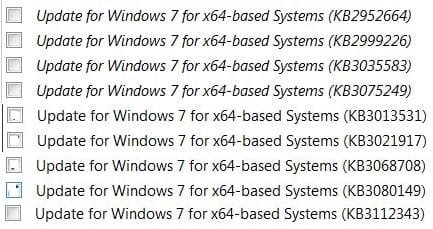
Afterward I spent 30 minutes hunting down each offending KB and uninstalling them.
I realize this is a non-issue for some people, but I don't appreciate MS going behind my back to install what is basically spyware without being transparent and offering an opt-out.
AFAIC W7 has all its major bugs worked out, and it runs fine on my hardware. I will not be updating anymore, unless I run into a specific problem in the future and download a specific patch to fix that problem. MS's "updates" at this point have essentially become the kind of exploits I update to patch!
I use Sandboxie so have no worries of viruses. And I won't waste time at every update cycle investigating each patch when they fail to describe exploits like these anyway... instead they use vague, general language b/c they don't WANT to reveal what the patch is really for.
MS has always had a horrid privacy record, but now they aren't even pretending to care about their customers' rights to opt-out of data-gathering. I guess we all shoulda seen this coming.
I happened to be in Task Scheduler for something completely unrelated, and noticed MS had setup tasks to send telemetry about my computer to MS, even though I had opted out of doing so when I installed W7. These tasks were located in the "Customer Experience Improvement Program" folder under Microsoft/Windows branch in the Task Scheduler Library tree. Digging into this, it turns out a KB update issued 4th quarter 2015 ignores your privacy settings and sets up tasks to send telemetry anyway. (See Forbes article link below.)
Forbes Welcome
To check this on my machines, I went to the original setting for CEIP and saw it was indeed set to NOT participate... you can see by going to Control Panel -> Action Center -> click hyperlink at left to "Change Action Center settings", then in the new window, look at the bottom for the hyperlink that says "Customer Experience Improvement Program setting" ... and see if it is set to NOT participate (as mine was).
Now go into Task Scheduler and into the folder of the same name under MS/Windows... and see if there aren't 2 or 3 enabled tasks... in the description in the lower part of the window, you will see the tasks are for CEIP and involve sending telemetry.
After disabling those tasks, I also found three other folders setup to send telemetry, apparently (as per the article above and others sources I read) from other KB updates around the same time. These additional tasks were in the "Application Experience" folder and "Autochk" folders. I also disabled those tasks.
Afterward I spent 30 minutes hunting down each offending KB and uninstalling them.
I realize this is a non-issue for some people, but I don't appreciate MS going behind my back to install what is basically spyware without being transparent and offering an opt-out.
AFAIC W7 has all its major bugs worked out, and it runs fine on my hardware. I will not be updating anymore, unless I run into a specific problem in the future and download a specific patch to fix that problem. MS's "updates" at this point have essentially become the kind of exploits I update to patch!
I use Sandboxie so have no worries of viruses. And I won't waste time at every update cycle investigating each patch when they fail to describe exploits like these anyway... instead they use vague, general language b/c they don't WANT to reveal what the patch is really for.
MS has always had a horrid privacy record, but now they aren't even pretending to care about their customers' rights to opt-out of data-gathering. I guess we all shoulda seen this coming.
My Computer
At a glance
Win 7 Ultimate 64-bit
- OS
- Win 7 Ultimate 64-bit