Solved (KB245826) Update Causing Major Troubles

RockStar21

New member
Local time
6:33 PM
Messages
39
The update failed and messed up my system. I'm no longer showing any installed updates and checking for updates just hangs forever. System is also very sluggish unless I disable Windows Update in services.

Ran sfc /scannow and get "windows resource could not start the repair service". To make matters totally worse... before I noticed the issues I deleted my restore points before the update.

Here are my CBS and WindowsUpdate logs.
 

Attachments

Last edited:

My Computer

Computer Manufacturer/Model Number
Asus UX50V
OS
Windows 7 Home Premium 64-bit
CPU
Intel® Core™2 Duo Processor SU9600 1.6 GHz
Motherboard
Asus 60-NVLMB1200-C14
Memory
4GB SDRAM
Graphics Card(s)
NVIDIA® GeForce® G 105M
Sound Card
Realtek High Definition Audio
Monitor(s) Displays
15.6" HD LED backlight, Color-Shine
Screen Resolution
1366x768
Hard Drives
2.5" 9.5mm SATA 500GB
Hello!

Thanks for reposting! Sadly, things are not good. In fact, your CBS.log is pretty dire. Please try a System Restore: http://www.sevenforums.com/tutorials/700-system-restore.html

However, I don't think this will work. If it doesn't, we are going to have to try to manually fix this problem. In all honesty, this is about 3,500 lines of errors.

My hope is that if we fix these:

Code:
2011-01-14 06:32:05, Error                 CSI    000000af (F) STATUS_OBJECT_NAME_NOT_FOUND #136877967# from Windows::Rtl::SystemImplementation::CKey::OpenExistingKey(f = 0, da = (KEY_READ), oa = @0xb0cdb0, key = NULL, disp = (null))[gle=0xd0000034]
2011-01-14 06:32:05, Info                  CBS    Failed to get CSI store. [HRESULT = 0x80070002 - ERROR_FILE_NOT_FOUND]
2011-01-14 06:32:05, Error                 CBS    Failed to initialize store parameters with boot drive:  and windows directory:  [HRESULT = 0x80070002 - ERROR_FILE_NOT_FOUND]
2011-01-14 06:32:21, Info                  CSI    000000b0@2011/1/14:10:02:21.046 PopulateComponentFamiliesKey - Begin
2011-01-14 06:36:12, Error                 CSI    000000b1 (F) STATUS_OBJECT_NAME_NOT_FOUND #140061177# from Windows::Rtl::SystemImplementation::DirectRegistryProvider::SysOpenKey(flg = 0, key = {provider=NULL, handle=0}, da = (KEY_READ|KEY_WOW64_64KEY), oa = @0xb0c8f0->OBJECT_ATTRIBUTES {s:48; rd:NULL; on:[169]"\Registry\Machine\Software\Microsoft\Windows\CurrentVersion\SideBySide\Winners\amd64_microsoft-windows-ehome-ehglid.resources_31bf3856ad364e35_tr-tr_22a2103b52605250\4.1"; a:(OBJ_CASE_INSENSITIVE)}, disp = Unmapped disposition: 11586744 (0x00b0ccb8))[gle=0xd0000034]
2011-01-14 06:36:12, Error                 CSI    000000b2@2011/1/14:10:06:12.550 (F) d:\w7rtm\base\wcp\sil\merged\ntu\ntsystem.cpp(3676): Error STATUS_OBJECT_NAME_NOT_FOUND originated in function Windows::Rtl::SystemImplementation::DirectRegistryProvider::SysOpenKey expression: (null)
[gle=0x80004005]
2011-01-14 06:36:12, Error                 CSI    000000b3 (F) STATUS_OBJECT_NAME_NOT_FOUND #140061176# from Windows::Rtl::SystemImplementation::CKey::OpenExistingKey(f = 0, da = (KEY_READ), oa = @0xb0cdb0, key = NULL, disp = (null))[gle=0xd0000034]
2011-01-14 06:36:12, Info                  CBS    Failed to get CSI store. [HRESULT = 0x80070002 - ERROR_FILE_NOT_FOUND]
2011-01-14 06:36:12, Error                 CBS    Failed to initialize store parameters with boot drive:  and windows directory:  [HRESULT = 0x80070002 - ERROR_FILE_NOT_FOUND]
2011-01-14 06:36:27, Info                  CSI    000000b4@2011/1/14:10:06:27.213 PopulateComponentFamiliesKey - Begin
2011-01-14 06:40:11, Error                 CSI    000000b5 (F) STATUS_OBJECT_NAME_NOT_FOUND #143244386# from Windows::Rtl::SystemImplementation::DirectRegistryProvider::SysOpenKey(flg = 0, key = {provider=NULL, handle=0}, da = (KEY_READ|KEY_WOW64_64KEY), oa = @0xb0c8f0->OBJECT_ATTRIBUTES {s:48; rd:NULL; on:[169]"\Registry\Machine\Software\Microsoft\Windows\CurrentVersion\SideBySide\Winners\amd64_microsoft-windows-ehome-ehglid.resources_31bf3856ad364e35_tr-tr_22a2103b52605250\4.1"; a:(OBJ_CASE_INSENSITIVE)}, disp = Unmapped disposition: 11586744 (0x00b0ccb8))[gle=0xd0000034]
2011-01-14 06:40:11, Error                 CSI    000000b6@2011/1/14:10:10:11.422 (F) d:\w7rtm\base\wcp\sil\merged\ntu\ntsystem.cpp(3676): Error STATUS_OBJECT_NAME_NOT_FOUND originated in function Windows::Rtl::SystemImplementation::DirectRegistryProvider::SysOpenKey expression: (null)
[gle=0x80004005]
2011-01-14 06:40:11, Error                 CSI    000000b7 (F) STATUS_OBJECT_NAME_NOT_FOUND #143244385# from Windows::Rtl::SystemImplementation::CKey::OpenExistingKey(f = 0, da = (KEY_READ), oa = @0xb0cdb0, key = NULL, disp = (null))[gle=0xd0000034]
2011-01-14 06:40:11, Info                  CBS    Failed to get CSI store. [HRESULT = 0x80070002 - ERROR_FILE_NOT_FOUND]
2011-01-14 06:40:11, Error                 CBS    Failed to initialize store parameters with boot drive:  and windows directory:  [HRESULT = 0x80070002 - ERROR_FILE_NOT_FOUND]
2011-01-14 06:40:25, Info                  CSI    000000b8@2011/1/14:10:10:25.734 PopulateComponentFamiliesKey - Begin
2011-01-14 06:44:01, Error                 CSI    000000b9 (F) STATUS_OBJECT_NAME_NOT_FOUND #146427595# from Windows::Rtl::SystemImplementation::DirectRegistryProvider::SysOpenKey(flg = 0, key = {provider=NULL, handle=0}, da = (KEY_READ|KEY_WOW64_64KEY), oa = @0xb0c8f0->OBJECT_ATTRIBUTES {s:48; rd:NULL; on:[169]"\Registry\Machine\Software\Microsoft\Windows\CurrentVersion\SideBySide\Winners\amd64_microsoft-windows-ehome-ehglid.resources_31bf3856ad364e35_tr-tr_22a2103b52605250\4.1"; a:(OBJ_CASE_INSENSITIVE)}, disp = Unmapped disposition: 11586744 (0x00b0ccb8))[gle=0xd0000034]
2011-01-14 06:44:01, Error                 CSI    000000ba@2011/1/14:10:14:01.558 (F) d:\w7rtm\base\wcp\sil\merged\ntu\ntsystem.cpp(3676): Error STATUS_OBJECT_NAME_NOT_FOUND originated in function Windows::Rtl::SystemImplementation::DirectRegistryProvider::SysOpenKey expression: (null)
[gle=0x80004005]
2011-01-14 06:44:01, Error                 CSI    000000bb (F) STATUS_OBJECT_NAME_NOT_FOUND #146427594# from Windows::Rtl::SystemImplementation::CKey::OpenExistingKey(f = 0, da = (KEY_READ), oa = @0xb0cdb0, key = NULL, disp = (null))[gle=0xd0000034]
2011-01-14 06:44:01, Info                  CBS    Failed to get CSI store. [HRESULT = 0x80070002 - ERROR_FILE_NOT_FOUND]
2011-01-14 06:44:01, Error                 CBS    Failed to initialize store parameters with boot drive:  and windows directory:  [HRESULT = 0x80070002 - ERROR_FILE_NOT_FOUND]
2011-01-14 06:44:16, Info                  CSI    000000bc@2011/1/14:10:14:16.531 PopulateComponentFamiliesKey - Begin
2011-01-14 06:48:04, Error                 CSI    000000bd (F) STATUS_OBJECT_NAME_NOT_FOUND #149610804# from Windows::Rtl::SystemImplementation::DirectRegistryProvider::SysOpenKey(flg = 0, key = {provider=NULL, handle=0}, da = (KEY_READ|KEY_WOW64_64KEY), oa = @0xb0c8f0->OBJECT_ATTRIBUTES {s:48; rd:NULL; on:[169]"\Registry\Machine\Software\Microsoft\Windows\CurrentVersion\SideBySide\Winners\amd64_microsoft-windows-ehome-ehglid.resources_31bf3856ad364e35_tr-tr_22a2103b52605250\4.1"; a:(OBJ_CASE_INSENSITIVE)}, disp = Unmapped disposition: 11586744 (0x00b0ccb8))[gle=0xd0000034]
2011-01-14 06:48:04, Error                 CSI    000000be@2011/1/14:10:18:04.175 (F) d:\w7rtm\base\wcp\sil\merged\ntu\ntsystem.cpp(3676): Error STATUS_OBJECT_NAME_NOT_FOUND originated in function Windows::Rtl::SystemImplementation::DirectRegistryProvider::SysOpenKey expression: (null)
[gle=0x80004005]
2011-01-14 06:48:04, Error                 CSI    000000bf (F) STATUS_OBJECT_NAME_NOT_FOUND #149610803# from Windows::Rtl::SystemImplementation::CKey::OpenExistingKey(f = 0, da = (KEY_READ), oa = @0xb0cdb0, key = NULL, disp = (null))[gle=0xd0000034]
2011-01-14 06:48:04, Info                  CBS    Failed to get CSI store. [HRESULT = 0x80070002 - ERROR_FILE_NOT_FOUND]
2011-01-14 06:48:04, Error                 CBS    Failed to initialize store parameters with boot drive:  and windows directory:  [HRESULT = 0x80070002 - ERROR_FILE_NOT_FOUND]
2011-01-14 06:48:20, Info                  CSI    000000c0@2011/1/14:10:18:20.696 PopulateComponentFamiliesKey - Begin
2011-01-14 06:51:40, Error                 CSI    000000c1 (F) STATUS_OBJECT_NAME_NOT_FOUND #152794013# from Windows::Rtl::SystemImplementation::DirectRegistryProvider::SysOpenKey(flg = 0, key = {provider=NULL, handle=0}, da = (KEY_READ|KEY_WOW64_64KEY), oa = @0xb0c8f0->OBJECT_ATTRIBUTES {s:48; rd:NULL; on:[169]"\Registry\Machine\Software\Microsoft\Windows\CurrentVersion\SideBySide\Winners\amd64_microsoft-windows-ehome-ehglid.resources_31bf3856ad364e35_tr-tr_22a2103b52605250\4.1"; a:(OBJ_CASE_INSENSITIVE)}, disp = Unmapped disposition: 11586744 (0x00b0ccb8))[gle=0xd0000034]
2011-01-14 06:51:40, Error                 CSI    000000c2@2011/1/14:10:21:40.748 (F) d:\w7rtm\base\wcp\sil\merged\ntu\ntsystem.cpp(3676): Error STATUS_OBJECT_NAME_NOT_FOUND originated in function Windows::Rtl::SystemImplementation::DirectRegistryProvider::SysOpenKey expression: (null)
[gle=0x80004005]
2011-01-14 06:51:41, Error                 CSI    000000c3 (F) STATUS_OBJECT_NAME_NOT_FOUND #152794012# from Windows::Rtl::SystemImplementation::CKey::OpenExistingKey(f = 0, da = (KEY_READ), oa = @0xb0cdb0, key = NULL, disp = (null))[gle=0xd0000034]
2011-01-14 06:51:41, Info                  CBS    Failed to get CSI store. [HRESULT = 0x80070002 - ERROR_FILE_NOT_FOUND]
2011-01-14 06:51:41, Error                 CBS    Failed to initialize store parameters with boot drive:  and windows directory:  [HRESULT = 0x80070002 - ERROR_FILE_NOT_FOUND]
2011-01-14 06:52:04, Info                  CSI    000000c4@2011/1/14:10:22:04.503 PopulateComponentFamiliesKey - Begin
2011-01-14 06:55:04, Error                 CSI    000000c5 (F) STATUS_OBJECT_NAME_NOT_FOUND #155977222# from Windows::Rtl::SystemImplementation::DirectRegistryProvider::SysOpenKey(flg = 0, key = {provider=NULL, handle=0}, da = (KEY_READ|KEY_WOW64_64KEY), oa = @0xb0c8f0->OBJECT_ATTRIBUTES {s:48; rd:NULL; on:[169]"\Registry\Machine\Software\Microsoft\Windows\CurrentVersion\SideBySide\Winners\amd64_microsoft-windows-ehome-ehglid.resources_31bf3856ad364e35_tr-tr_22a2103b52605250\4.1"; a:(OBJ_CASE_INSENSITIVE)}, disp = Unmapped disposition: 11586744 (0x00b0ccb8))[gle=0xd0000034]
2011-01-14 06:55:04, Error                 CSI    000000c6@2011/1/14:10:25:04.424 (F) d:\w7rtm\base\wcp\sil\merged\ntu\ntsystem.cpp(3676): Error STATUS_OBJECT_NAME_NOT_FOUND originated in function Windows::Rtl::SystemImplementation::DirectRegistryProvider::SysOpenKey expression: (null)
[gle=0x80004005]
2011-01-14 06:55:04, Error                 CSI    000000c7 (F) STATUS_OBJECT_NAME_NOT_FOUND #155977221# from Windows::Rtl::SystemImplementation::CKey::OpenExistingKey(f = 0, da = (KEY_READ), oa = @0xb0cdb0, key = NULL, disp = (null))[gle=0xd0000034]
2011-01-14 06:55:04, Info                  CBS    Failed to get CSI store. [HRESULT = 0x80070002 - ERROR_FILE_NOT_FOUND]
2011-01-14 06:55:04, Error                 CBS    Failed to initialize store parameters with boot drive:  and windows directory:  [HRESULT = 0x80070002 - ERROR_FILE_NOT_FOUND]
2011-01-14 06:55:15, Info                  CSI    000000c8@2011/1/14:10:25:15.724 PopulateComponentFamiliesKey - Begin
2011-01-14 06:57:46, Error                 CSI    000000c9 (F) STATUS_OBJECT_NAME_NOT_FOUND #159160431# from Windows::Rtl::SystemImplementation::DirectRegistryProvider::SysOpenKey(flg = 0, key = {provider=NULL, handle=0}, da = (KEY_READ|KEY_WOW64_64KEY), oa = @0xb0c8f0->OBJECT_ATTRIBUTES {s:48; rd:NULL; on:[169]"\Registry\Machine\Software\Microsoft\Windows\CurrentVersion\SideBySide\Winners\amd64_microsoft-windows-ehome-ehglid.resources_31bf3856ad364e35_tr-tr_22a2103b52605250\4.1"; a:(OBJ_CASE_INSENSITIVE)}, disp = Unmapped disposition: 11586744 (0x00b0ccb8))[gle=0xd0000034]
2011-01-14 06:57:46, Error                 CSI    000000ca@2011/1/14:10:27:46.944 (F) d:\w7rtm\base\wcp\sil\merged\ntu\ntsystem.cpp(3676): Error STATUS_OBJECT_NAME_NOT_FOUND originated in function Windows::Rtl::SystemImplementation::DirectRegistryProvider::SysOpenKey expression: (null)
[gle=0x80004005]
2011-01-14 06:57:47, Error                 CSI    000000cb (F) STATUS_OBJECT_NAME_NOT_FOUND #159160430# from Windows::Rtl::SystemImplementation::CKey::OpenExistingKey(f = 0, da = (KEY_READ), oa = @0xb0cdb0, key = NULL, disp = (null))[gle=0xd0000034]
2011-01-14 06:57:47, Info                  CBS    Failed to get CSI store. [HRESULT = 0x80070002 - ERROR_FILE_NOT_FOUND]
2011-01-14 06:57:47, Error                 CBS    Failed to initialize store parameters with boot drive:  and windows directory:  [HRESULT = 0x80070002 - ERROR_FILE_NOT_FOUND]
2011-01-14 06:57:57, Info                  CSI    000000cc@2011/1/14:10:27:57.861 PopulateComponentFamiliesKey - Begin
2011-01-14 07:00:48, Error                 CSI    000000cd (F) STATUS_OBJECT_NAME_NOT_FOUND #162343640# from Windows::Rtl::SystemImplementation::DirectRegistryProvider::SysOpenKey(flg = 0, key = {provider=NULL, handle=0}, da = (KEY_READ|KEY_WOW64_64KEY), oa = @0xb0c8f0->OBJECT_ATTRIBUTES {s:48; rd:NULL; on:[169]"\Registry\Machine\Software\Microsoft\Windows\CurrentVersion\SideBySide\Winners\amd64_microsoft-windows-ehome-ehglid.resources_31bf3856ad364e35_tr-tr_22a2103b52605250\4.1"; a:(OBJ_CASE_INSENSITIVE)}, disp = Unmapped disposition: 11586744 (0x00b0ccb8))[gle=0xd0000034]
2011-01-14 07:00:48, Error                 CSI    000000ce@2011/1/14:10:30:48.103 (F) d:\w7rtm\base\wcp\sil\merged\ntu\ntsystem.cpp(3676): Error STATUS_OBJECT_NAME_NOT_FOUND originated in function Windows::Rtl::SystemImplementation::DirectRegistryProvider::SysOpenKey expression: (null)
[gle=0x80004005]
2011-01-14 07:00:48, Error                 CSI    000000cf (F) STATUS_OBJECT_NAME_NOT_FOUND #162343639# from Windows::Rtl::SystemImplementation::CKey::OpenExistingKey(f = 0, da = (KEY_READ), oa = @0xb0cdb0, key = NULL, disp = (null))[gle=0xd0000034]
2011-01-14 07:00:48, Info                  CBS    Failed to get CSI store. [HRESULT = 0x80070002 - ERROR_FILE_NOT_FOUND]
2011-01-14 07:00:48, Error                 CBS    Failed to initialize store parameters with boot drive:  and windows directory:  [HRESULT = 0x80070002 - ERROR_FILE_NOT_FOUND]
2011-01-14 07:01:00, Info                  CSI    000000d0@2011/1/14:10:31:00.315 PopulateComponentFamiliesKey - Begin
2011-01-14 07:04:31, Error                 CSI    000000d1 (F) STATUS_OBJECT_NAME_NOT_FOUND #165526849# from Windows::Rtl::SystemImplementation::DirectRegistryProvider::SysOpenKey(flg = 0, key = {provider=NULL, handle=0}, da = (KEY_READ|KEY_WOW64_64KEY), oa = @0xb0c8f0->OBJECT_ATTRIBUTES {s:48; rd:NULL; on:[169]"\Registry\Machine\Software\Microsoft\Windows\CurrentVersion\SideBySide\Winners\amd64_microsoft-windows-ehome-ehglid.resources_31bf3856ad364e35_tr-tr_22a2103b52605250\4.1"; a:(OBJ_CASE_INSENSITIVE)}, disp = Unmapped disposition: 11586744 (0x00b0ccb8))[gle=0xd0000034]
2011-01-14 07:04:31, Error                 CSI    000000d2@2011/1/14:10:34:31.674 (F) d:\w7rtm\base\wcp\sil\merged\ntu\ntsystem.cpp(3676): Error STATUS_OBJECT_NAME_NOT_FOUND originated in function Windows::Rtl::SystemImplementation::DirectRegistryProvider::SysOpenKey expression: (null)
[gle=0x80004005]
2011-01-14 07:04:31, Error                 CSI    000000d3 (F) STATUS_OBJECT_NAME_NOT_FOUND #165526848# from Windows::Rtl::SystemImplementation::CKey::OpenExistingKey(f = 0, da = (KEY_READ), oa = @0xb0cdb0, key = NULL, disp = (null))[gle=0xd0000034]
2011-01-14 07:04:31, Info                  CBS    Failed to get CSI store. [HRESULT = 0x80070002 - ERROR_FILE_NOT_FOUND]
2011-01-14 07:04:31, Error                 CBS    Failed to initialize store parameters with boot drive:  and windows directory:  [HRESULT = 0x80070002 - ERROR_FILE_NOT_FOUND]
2011-01-14 07:04:45, Info                  CSI    000000d4@2011/1/14:10:34:45.942 PopulateComponentFamiliesKey - Begin
2011-01-14 07:09:02, Error                 CSI    000000d5 (F) STATUS_OBJECT_NAME_NOT_FOUND #168710058# from Windows::Rtl::SystemImplementation::DirectRegistryProvider::SysOpenKey(flg = 0, key = {provider=NULL, handle=0}, da = (KEY_READ|KEY_WOW64_64KEY), oa = @0xb0c8f0->OBJECT_ATTRIBUTES {s:48; rd:NULL; on:[169]"\Registry\Machine\Software\Microsoft\Windows\CurrentVersion\SideBySide\Winners\amd64_microsoft-windows-ehome-ehglid.resources_31bf3856ad364e35_tr-tr_22a2103b52605250\4.1"; a:(OBJ_CASE_INSENSITIVE)}, disp = Unmapped disposition: 11586744 (0x00b0ccb8))[gle=0xd0000034]
2011-01-14 07:09:02, Error                 CSI    000000d6@2011/1/14:10:39:02.698 (F) d:\w7rtm\base\wcp\sil\merged\ntu\ntsystem.cpp(3676): Error STATUS_OBJECT_NAME_NOT_FOUND originated in function Windows::Rtl::SystemImplementation::DirectRegistryProvider::SysOpenKey expression: (null)
[gle=0x80004005]
2011-01-14 07:09:02, Error                 CSI    000000d7 (F) STATUS_OBJECT_NAME_NOT_FOUND #168710057# from Windows::Rtl::SystemImplementation::CKey::OpenExistingKey(f = 0, da = (KEY_READ), oa = @0xb0cdb0, key = NULL, disp = (null))[gle=0xd0000034]
2011-01-14 07:09:02, Info                  CBS    Failed to get CSI store. [HRESULT = 0x80070002 - ERROR_FILE_NOT_FOUND]
2011-01-14 07:09:02, Error                 CBS    Failed to initialize store parameters with boot drive:  and windows directory:  [HRESULT = 0x80070002 - ERROR_FILE_NOT_FOUND]
2011-01-14 07:09:16, Info                  CSI    000000d8@2011/1/14:10:39:16.761 PopulateComponentFamiliesKey - Begin
2011-01-14 07:13:46, Error                 CSI    000000d9 (F) STATUS_OBJECT_NAME_NOT_FOUND #171893267# from Windows::Rtl::SystemImplementation::DirectRegistryProvider::SysOpenKey(flg = 0, key = {provider=NULL, handle=0}, da = (KEY_READ|KEY_WOW64_64KEY), oa = @0xb0c8f0->OBJECT_ATTRIBUTES {s:48; rd:NULL; on:[169]"\Registry\Machine\Software\Microsoft\Windows\CurrentVersion\SideBySide\Winners\amd64_microsoft-windows-ehome-ehglid.resources_31bf3856ad364e35_tr-tr_22a2103b52605250\4.1"; a:(OBJ_CASE_INSENSITIVE)}, disp = Unmapped disposition: 11586744 (0x00b0ccb8))[gle=0xd0000034]
2011-01-14 07:13:46, Error                 CSI    000000da@2011/1/14:10:43:46.914 (F) d:\w7rtm\base\wcp\sil\merged\ntu\ntsystem.cpp(3676): Error STATUS_OBJECT_NAME_NOT_FOUND originated in function Windows::Rtl::SystemImplementation::DirectRegistryProvider::SysOpenKey expression: (null)
[gle=0x80004005]
2011-01-14 07:13:47, Error                 CSI    000000db (F) STATUS_OBJECT_NAME_NOT_FOUND #171893266# from Windows::Rtl::SystemImplementation::CKey::OpenExistingKey(f = 0, da = (KEY_READ), oa = @0xb0cdb0, key = NULL, disp = (null))[gle=0xd0000034]
2011-01-14 07:13:47, Info                  CBS    Failed to get CSI store. [HRESULT = 0x80070002 - ERROR_FILE_NOT_FOUND]
2011-01-14 07:13:47, Error                 CBS    Failed to initialize store parameters with boot drive:  and windows directory:  [HRESULT = 0x80070002 - ERROR_FILE_NOT_FOUND]
2011-01-14 07:13:57, Info                  CSI    000000dc@2011/1/14:10:43:57.566 PopulateComponentFamiliesKey - Begin
2011-01-14 07:15:17, Info                  CBS    Trusted Installer signaled for shutdown, going to exit.
2011-01-14 07:15:18, Error                 CSI    000000dd (F) STATUS_TOO_LATE #174244934# from Windows::Rtl::SystemImplementation::DirectRegistryProvider::SysSetValueKey(key = 494 (error querying object name; ntstatus: STATUS_INSUFFICIENT_RESOURCES), vn = [ml:52{26},l:50{25}]"SomeUnparsedVersionsExist", ti = 0, t = 0, data = {l:1 b:00})[gle=0xd0000189]
2011-01-14 07:15:18, Error                 CSI    000000de@2011/1/14:10:45:18.415 (F) d:\w7rtm\base\wcp\sil\merged\ntu\ntsystem.cpp(4228): Error STATUS_TOO_LATE originated in function Windows::Rtl::SystemImplementation::DirectRegistryProvider::SysSetValueKey expression: Status
[gle=0x80004005]

things might work a bit better.

Please try a System Restore first.

Thanks!

Richard
 

My Computer

Computer Manufacturer/Model Number
Dell XPS 420
OS
Vista Home Premium x86 SP2
CPU
Intel Core 2 Quad Q9300 2.50GHz
Motherboard
Stock Dell 0TP406
Memory
4 gb (DDR2 800) 400MHz
Graphics Card(s)
ATI Radeon HD 3870 (512 MBytes)
Monitor(s) Displays
1 x Dell 2007FP and 1 x (old) Sonic flat screen
Screen Resolution
1600 x 1200 and 1280 x 1204
Hard Drives
1 x 640Gb (SATA 300) Western Digital: WDC WD6400AAKS-75A7B0 1 x 1Tb (SATA 600) Western Digital: Caviar Black, SATA 6GB/S, 64Mb cache, 8ms Western Digital: WDC WD1002FAEX-00Z3A0 ATA Device
Case
Dell XPS 420
Cooling
Stock Fan
Keyboard
Dell Bluetooth
Mouse
Advent Optical ADE-WG01 (colour change light up)
Internet Speed
Varies from 10kb/s to 170kb/s. So unreliable it is not funny
Other Info
ASUS USB 3.0 5Gbps/SATA 6Gbps - PCI-Express Combo Controller Card (U3S6)
Thanks for the response... sadly though, they are no restore points before the trouble. So where do we begin? :)
 

My Computer

Computer Manufacturer/Model Number
Asus UX50V
OS
Windows 7 Home Premium 64-bit
CPU
Intel® Core™2 Duo Processor SU9600 1.6 GHz
Motherboard
Asus 60-NVLMB1200-C14
Memory
4GB SDRAM
Graphics Card(s)
NVIDIA® GeForce® G 105M
Sound Card
Realtek High Definition Audio
Monitor(s) Displays
15.6" HD LED backlight, Color-Shine
Screen Resolution
1366x768
Hard Drives
2.5" 9.5mm SATA 500GB
Thanks for the response... sadly though, they are no restore points before the trouble.

Hello!

Nice try! I will do a bit of digging, and see what I can do about that CBS.log :)

Thanks!

Richard
 

My Computer

Computer Manufacturer/Model Number
Dell XPS 420
OS
Vista Home Premium x86 SP2
CPU
Intel Core 2 Quad Q9300 2.50GHz
Motherboard
Stock Dell 0TP406
Memory
4 gb (DDR2 800) 400MHz
Graphics Card(s)
ATI Radeon HD 3870 (512 MBytes)
Monitor(s) Displays
1 x Dell 2007FP and 1 x (old) Sonic flat screen
Screen Resolution
1600 x 1200 and 1280 x 1204
Hard Drives
1 x 640Gb (SATA 300) Western Digital: WDC WD6400AAKS-75A7B0 1 x 1Tb (SATA 600) Western Digital: Caviar Black, SATA 6GB/S, 64Mb cache, 8ms Western Digital: WDC WD1002FAEX-00Z3A0 ATA Device
Case
Dell XPS 420
Cooling
Stock Fan
Keyboard
Dell Bluetooth
Mouse
Advent Optical ADE-WG01 (colour change light up)
Internet Speed
Varies from 10kb/s to 170kb/s. So unreliable it is not funny
Other Info
ASUS USB 3.0 5Gbps/SATA 6Gbps - PCI-Express Combo Controller Card (U3S6)
Ok... much appreciated!
 

My Computer

Computer Manufacturer/Model Number
Asus UX50V
OS
Windows 7 Home Premium 64-bit
CPU
Intel® Core™2 Duo Processor SU9600 1.6 GHz
Motherboard
Asus 60-NVLMB1200-C14
Memory
4GB SDRAM
Graphics Card(s)
NVIDIA® GeForce® G 105M
Sound Card
Realtek High Definition Audio
Monitor(s) Displays
15.6" HD LED backlight, Color-Shine
Screen Resolution
1366x768
Hard Drives
2.5" 9.5mm SATA 500GB
For what it's worth, it's saying it can't open your CSI store, because the CBS engine doesn't know which drive is your boot drive, and of course where the Windows folder is. If you wanted to spend the time using procmon and a debugger to figure out what files and registry entries are corrupt and causing this, that would probably eventually work and we could get updates working again. If, however, you want to get up and running in a more stable manner, your best bet without a system restore point is to repair your Windows installation. CBS failures in CSI are quite often pretty catastrophic, and even if this install is cobbled back to being able to update it isn't likely to ever be 100% healthy again as there are other things in the OS that will eventually be impacted by a CSI store failure if it isn't restored 100% correctly).

The decision is up to you though, and running CheckSUR and gathering a log is a good first step if you don't want to repair your current installation just yet.
 

My Computer

Computer type
PC/Desktop
Computer Manufacturer/Model Number
Custom
OS
Windows 10 Pro x64
CPU
Intel Core i7 4790K @ 4.5GHz
Motherboard
Asus Maximus Hero VII
Memory
32GB DDR3
Graphics Card(s)
Nvidia GeForce GTX970
Sound Card
Realtek HD Audio
Screen Resolution
1920x1200
Hard Drives
1x Samsung 250GB SSD
4x WD RE 2TB (RAIDZ)
PSU
Corsair AX760i
Case
Fractal Design Define R4
Cooling
Noctua NH-D15
Ughhh... not the news I was hoping for. I only have a recovery disc. Is a repair installation even possible with this?

P.S. I installed the System Update Readiness Tool yesterday.
 

My Computer

Computer Manufacturer/Model Number
Asus UX50V
OS
Windows 7 Home Premium 64-bit
CPU
Intel® Core™2 Duo Processor SU9600 1.6 GHz
Motherboard
Asus 60-NVLMB1200-C14
Memory
4GB SDRAM
Graphics Card(s)
NVIDIA® GeForce® G 105M
Sound Card
Realtek High Definition Audio
Monitor(s) Displays
15.6" HD LED backlight, Color-Shine
Screen Resolution
1366x768
Hard Drives
2.5" 9.5mm SATA 500GB
Ughhh... not the news I was hoping for. I only have a recovery disc. Is a repair installation even possible with this?

P.S. I installed the System Update Readiness Tool yesterday.

Hello!

What sort of Recovery Disk is this? Do you know anything about it? It is quite likely that it can perform a Repair Install.

Just so that we can see what we are dealing with, please navigate to C:\Windows\Logs\CBS\ and copy CheckSUR.log and CheckSUR.persist.log to your Desktop. I wouldn't normally ask for this second one, but I just want to see if anything has run it before, etc. etc.

Open them both, and copy and paste the contents between CODE tags.

Then,

OTLI.gif
OTL - Download or alternative link here and here

Download OTL to your Desktop
  • Double click on the icon to run it. Make sure all other windows are closed and to let it run uninterrupted.
Under the Custom Scan box paste this in:

C:\Windows\winsxs|amd64_microsoft-windows-ehome-ehglid;true;true;true /FP


  • Click the None button, followed by the Run Scan button. Do not change any settings unless otherwise told to do so. The scan wont take long.
    • When the scan completes, it will open one notepad window. OTL.Txt These are saved in the same location as OTL.
    • Please copy (Edit->Select All, Edit->Copy) the contents of this file, and post them here.
After that, please open an Elevated Command Prompt, http://www.sevenforums.com/tutorials/783-elevated-command-prompt.html, and copy and paste in the following:

reg export HKEY_LOCAL_MACHINE\SOFTWARE\Microsoft\Windows\CurrentVersion\SideBySide\Winners %UserProfile%\Desktop\winners.txt

Then right click on winners.txt on your Desktop > Send to > Compressed (zipped) folder.

Therefore, I would like between CODE tags, CheckSUR.log, CheckSUR.persist.log, and OTL.txt. I would like uploaded, winners.zip.

Thanks, and the best of luck!

Richard
 
Last edited:

My Computer

Computer Manufacturer/Model Number
Dell XPS 420
OS
Vista Home Premium x86 SP2
CPU
Intel Core 2 Quad Q9300 2.50GHz
Motherboard
Stock Dell 0TP406
Memory
4 gb (DDR2 800) 400MHz
Graphics Card(s)
ATI Radeon HD 3870 (512 MBytes)
Monitor(s) Displays
1 x Dell 2007FP and 1 x (old) Sonic flat screen
Screen Resolution
1600 x 1200 and 1280 x 1204
Hard Drives
1 x 640Gb (SATA 300) Western Digital: WDC WD6400AAKS-75A7B0 1 x 1Tb (SATA 600) Western Digital: Caviar Black, SATA 6GB/S, 64Mb cache, 8ms Western Digital: WDC WD1002FAEX-00Z3A0 ATA Device
Case
Dell XPS 420
Cooling
Stock Fan
Keyboard
Dell Bluetooth
Mouse
Advent Optical ADE-WG01 (colour change light up)
Internet Speed
Varies from 10kb/s to 170kb/s. So unreliable it is not funny
Other Info
ASUS USB 3.0 5Gbps/SATA 6Gbps - PCI-Express Combo Controller Card (U3S6)
=================================
Checking System Update Readiness.
Binary Version 6.1.7600.20593
Package Version 7.0
2010-02-23 17:25

Checking Windows Servicing Packages

Checking Package Manifests and Catalogs

Checking Package Watchlist

Checking Component Watchlist

Checking Packages

Checking Component Store

Summary:
Seconds executed: 1056
No errors detected


=================================
Checking System Update Readiness.
Binary Version 6.1.7600.20593
Package Version 7.0
2010-04-13 17:50

Checking Windows Servicing Packages

Checking Package Manifests and Catalogs

Checking Package Watchlist

Checking Component Watchlist

Checking Packages

Checking Component Store

Summary:
Seconds executed: 942
No errors detected


=================================
Checking System Update Readiness.
Binary Version 6.1.7600.20667
Package Version 8.0
2010-05-12 21:55

Checking Windows Servicing Packages

Checking Package Manifests and Catalogs

Checking Package Watchlist

Checking Component Watchlist

Checking Packages

Checking Component Store

Summary:
Seconds executed: 1503
No errors detected


=================================
Checking System Update Readiness.
Binary Version 6.1.7600.20751
Package Version 9.0
2010-08-25 15:49

Checking Windows Servicing Packages

Checking Package Manifests and Catalogs

Checking Package Watchlist

Checking Component Watchlist

Checking Packages

Checking Component Store

Summary:
Seconds executed: 1214
No errors detected


=================================
Checking System Update Readiness.
Binary Version 6.1.7600.20822
Package Version 10.0
2011-01-14 03:27

Checking Windows Servicing Packages

Checking Package Manifests and Catalogs

Checking Package Watchlist

Checking Component Watchlist

Checking Packages

Checking Component Store

Summary:
Seconds executed: 1801
No errors detected
 

My Computer

Computer Manufacturer/Model Number
Asus UX50V
OS
Windows 7 Home Premium 64-bit
CPU
Intel® Core™2 Duo Processor SU9600 1.6 GHz
Motherboard
Asus 60-NVLMB1200-C14
Memory
4GB SDRAM
Graphics Card(s)
NVIDIA® GeForce® G 105M
Sound Card
Realtek High Definition Audio
Monitor(s) Displays
15.6" HD LED backlight, Color-Shine
Screen Resolution
1366x768
Hard Drives
2.5" 9.5mm SATA 500GB
=================================
Checking System Update Readiness.
Binary Version 6.1.7600.20822
Package Version 10.0
2011-01-14 03:27

Checking Windows Servicing Packages

Checking Package Manifests and Catalogs

Checking Package Watchlist

Checking Component Watchlist

Checking Packages

Checking Component Store

Summary:
Seconds executed: 1801
No errors detected
 

My Computer

Computer Manufacturer/Model Number
Asus UX50V
OS
Windows 7 Home Premium 64-bit
CPU
Intel® Core™2 Duo Processor SU9600 1.6 GHz
Motherboard
Asus 60-NVLMB1200-C14
Memory
4GB SDRAM
Graphics Card(s)
NVIDIA® GeForce® G 105M
Sound Card
Realtek High Definition Audio
Monitor(s) Displays
15.6" HD LED backlight, Color-Shine
Screen Resolution
1366x768
Hard Drives
2.5" 9.5mm SATA 500GB
OTL logfile created on: 1/15/2011 6:08:47 AM - Run 1
OTL by OldTimer - Version 3.2.20.2 Folder = C:\Users\**** *****\Downloads
64bit- Home Premium Edition (Version = 6.1.7600) - Type = NTWorkstation
Internet Explorer (Version = 8.0.7600.16385)
Locale: 00000409 | Country: Canada | Language: ENC | Date Format: dd/MM/yyyy

4.00 Gb Total Physical Memory | 3.00 Gb Available Physical Memory | 64.00% Memory free
8.00 Gb Paging File | 6.00 Gb Available in Paging File | 81.00% Paging File free
Paging file location(s): ?:\pagefile.sys [binary data]

%SystemDrive% = C: | %SystemRoot% = C:\Windows | %ProgramFiles% = C:\Program Files (x86)
Drive C: | 116.44 Gb Total Space | 59.59 Gb Free Space | 51.17% Space Free | Partition Type: NTFS
Drive D: | 334.67 Gb Total Space | 223.47 Gb Free Space | 66.77% Space Free | Partition Type: NTFS

Computer Name: UX50V-RXO5-PC | User Name: **** ***** | Logged in as Administrator.
Boot Mode: Normal | Scan Mode: Current user | Include 64bit Scans
Company Name Whitelist: Off | Skip Microsoft Files: Off | No Company Name Whitelist: Off | File Age = 30 Days

========== Custom Scans ==========


< C:\Windows\winsxs|amd64_microsoft-windows-ehome-ehglid;true;true;true /FP >
[2010/10/25 22:42:07 | 000,000,000 | ---D | M] -- C:\Windows\winsxs\amd64_microsoft-windows-ehome-ehglid.resources_31bf3856ad364e35_6.1.7600.16385_ar-sa_f50b5693814f1564
[2009/07/14 02:07:20 | 000,000,000 | ---D | M] -- C:\Windows\winsxs\amd64_microsoft-windows-ehome-ehglid.resources_31bf3856ad364e35_6.1.7600.16385_en-us_89aafa1346519f44
[2009/08/04 02:27:53 | 000,000,000 | ---D | M] -- C:\Windows\winsxs\amd64_microsoft-windows-ehome-ehglid.resources_31bf3856ad364e35_6.1.7600.16385_es-es_897656f7467890e9
[2009/08/04 02:34:44 | 000,000,000 | ---D | M] -- C:\Windows\winsxs\amd64_microsoft-windows-ehome-ehglid.resources_31bf3856ad364e35_6.1.7600.16385_fr-fr_2c2dccf6394aa74b
[2009/08/04 02:41:15 | 000,000,000 | ---D | M] -- C:\Windows\winsxs\amd64_microsoft-windows-ehome-ehglid.resources_31bf3856ad364e35_6.1.7600.16385_pt-br_8b473097b3059ce3
[2009/08/04 03:00:56 | 000,000,000 | ---D | M] -- C:\Windows\winsxs\amd64_microsoft-windows-ehome-ehglid.resources_31bf3856ad364e35_6.1.7600.16385_pt-pt_8c290003b2750cbf
[2009/08/04 03:17:55 | 000,000,000 | ---D | M] -- C:\Windows\winsxs\amd64_microsoft-windows-ehome-ehglid.resources_31bf3856ad364e35_6.1.7600.16385_th-th_13d11def7fc46287
[2009/08/04 02:47:21 | 000,000,000 | ---D | M] -- C:\Windows\winsxs\amd64_microsoft-windows-ehome-ehglid.resources_31bf3856ad364e35_6.1.7600.16385_tr-tr_17d446837d3ba737
[2010/10/25 22:42:07 | 000,000,000 | ---D | M] -- C:\Windows\winsxs\amd64_microsoft-windows-ehome-ehglid.resources_31bf3856ad364e35_6.1.7600.16385_zh-cn_e93164812d737956
[2009/08/04 02:54:14 | 000,000,000 | ---D | M] -- C:\Windows\winsxs\amd64_microsoft-windows-ehome-ehglid.resources_31bf3856ad364e35_6.1.7600.16385_zh-tw_ed2da1d72ae455c6
[2010/02/23 19:09:50 | 000,000,000 | ---D | M] -- C:\Windows\winsxs\amd64_microsoft-windows-ehome-ehglid_31bf3856ad364e35_6.1.7600.16385_none_8b30cc2083d3151d
[2010/06/23 03:14:27 | 000,000,000 | ---D | M] -- C:\Windows\winsxs\amd64_microsoft-windows-ehome-ehglid_31bf3856ad364e35_6.1.7600.16590_none_8b20fe8e83dfaca9
[2010/10/27 15:53:26 | 000,000,000 | ---D | M] -- C:\Windows\winsxs\amd64_microsoft-windows-ehome-ehglid_31bf3856ad364e35_6.1.7600.16648_none_8b5f126083afe8d3
[2010/06/23 03:14:27 | 000,000,000 | ---D | M] -- C:\Windows\winsxs\amd64_microsoft-windows-ehome-ehglid_31bf3856ad364e35_6.1.7600.20710_none_8c011c9f9cbc6a12
[2010/10/27 15:53:26 | 000,000,000 | ---D | M] -- C:\Windows\winsxs\amd64_microsoft-windows-ehome-ehglid_31bf3856ad364e35_6.1.7600.20771_none_8bc13d619cec2b0f
[2009/08/04 03:09:52 | 000,002,180 | ---- | M] () -- C:\Windows\winsxs\Manifests\amd64_microsoft-windows-ehome-ehglid.resources_31bf3856ad364e35_6.1.7600.16385_ar-sa_f50b5693814f1564.manifest
[2009/07/13 23:13:10 | 000,002,180 | ---- | M] () -- C:\Windows\winsxs\Manifests\amd64_microsoft-windows-ehome-ehglid.resources_31bf3856ad364e35_6.1.7600.16385_en-us_89aafa1346519f44.manifest
[2009/08/04 02:26:38 | 000,002,180 | ---- | M] () -- C:\Windows\winsxs\Manifests\amd64_microsoft-windows-ehome-ehglid.resources_31bf3856ad364e35_6.1.7600.16385_es-es_897656f7467890e9.manifest
[2009/08/04 02:33:29 | 000,002,180 | ---- | M] () -- C:\Windows\winsxs\Manifests\amd64_microsoft-windows-ehome-ehglid.resources_31bf3856ad364e35_6.1.7600.16385_fr-fr_2c2dccf6394aa74b.manifest
[2009/08/04 02:40:04 | 000,002,180 | ---- | M] () -- C:\Windows\winsxs\Manifests\amd64_microsoft-windows-ehome-ehglid.resources_31bf3856ad364e35_6.1.7600.16385_pt-br_8b473097b3059ce3.manifest
[2009/08/04 02:59:39 | 000,002,180 | ---- | M] () -- C:\Windows\winsxs\Manifests\amd64_microsoft-windows-ehome-ehglid.resources_31bf3856ad364e35_6.1.7600.16385_pt-pt_8c290003b2750cbf.manifest
[2009/08/04 03:16:48 | 000,002,180 | ---- | M] () -- C:\Windows\winsxs\Manifests\amd64_microsoft-windows-ehome-ehglid.resources_31bf3856ad364e35_6.1.7600.16385_th-th_13d11def7fc46287.manifest
[2009/08/04 02:46:11 | 000,002,180 | ---- | M] () -- C:\Windows\winsxs\Manifests\amd64_microsoft-windows-ehome-ehglid.resources_31bf3856ad364e35_6.1.7600.16385_tr-tr_17d446837d3ba737.manifest
[2009/08/04 03:23:27 | 000,002,180 | ---- | M] () -- C:\Windows\winsxs\Manifests\amd64_microsoft-windows-ehome-ehglid.resources_31bf3856ad364e35_6.1.7600.16385_zh-cn_e93164812d737956.manifest
[2009/08/04 02:52:51 | 000,002,180 | ---- | M] () -- C:\Windows\winsxs\Manifests\amd64_microsoft-windows-ehome-ehglid.resources_31bf3856ad364e35_6.1.7600.16385_zh-tw_ed2da1d72ae455c6.manifest
[2009/07/13 22:54:53 | 000,038,557 | ---- | M] () -- C:\Windows\winsxs\Manifests\amd64_microsoft-windows-ehome-ehglid_31bf3856ad364e35_6.1.7600.16385_none_8b30cc2083d3151d.manifest
[2010/05/09 08:01:26 | 000,038,557 | ---- | M] () -- C:\Windows\winsxs\Manifests\amd64_microsoft-windows-ehome-ehglid_31bf3856ad364e35_6.1.7600.16590_none_8b20fe8e83dfaca9.manifest
[2010/08/04 04:19:37 | 000,038,557 | ---- | M] () -- C:\Windows\winsxs\Manifests\amd64_microsoft-windows-ehome-ehglid_31bf3856ad364e35_6.1.7600.16648_none_8b5f126083afe8d3.manifest
[2010/05/09 07:21:50 | 000,038,557 | ---- | M] () -- C:\Windows\winsxs\Manifests\amd64_microsoft-windows-ehome-ehglid_31bf3856ad364e35_6.1.7600.20710_none_8c011c9f9cbc6a12.manifest
[2010/08/04 04:25:37 | 000,038,557 | ---- | M] () -- C:\Windows\winsxs\Manifests\amd64_microsoft-windows-ehome-ehglid_31bf3856ad364e35_6.1.7600.20771_none_8bc13d619cec2b0f.manifest

< End of report >
 
Last edited:

My Computer

Computer Manufacturer/Model Number
Asus UX50V
OS
Windows 7 Home Premium 64-bit
CPU
Intel® Core™2 Duo Processor SU9600 1.6 GHz
Motherboard
Asus 60-NVLMB1200-C14
Memory
4GB SDRAM
Graphics Card(s)
NVIDIA® GeForce® G 105M
Sound Card
Realtek High Definition Audio
Monitor(s) Displays
15.6" HD LED backlight, Color-Shine
Screen Resolution
1366x768
Hard Drives
2.5" 9.5mm SATA 500GB
Ughhh... not the news I was hoping for. I only have a recovery disc. Is a repair installation even possible with this?

P.S. I installed the System Update Readiness Tool yesterday.

Hello!

What sort of Recovery Disk is this? Do you know anything about it? It is quite likely that it can perform a Repair Install.

Just so that we can see what we are dealing with, please navigate to C:\Windows\Logs\CBS\ and copy CheckSUR.log and CheckSUR.persist.log to your Desktop. I wouldn't normally ask for this second one, but I just want to see if anything has run it before, etc. etc.

Open them both, and copy and paste the contents between CODE tags.

Then,

OTLI.gif
OTL - Download or alternative link here and here

Download OTL to your Desktop
  • Double click on the icon to run it. Make sure all other windows are closed and to let it run uninterrupted.
Under the Custom Scan box paste this in:

C:\Windows\winsxs|amd64_microsoft-windows-ehome-ehglid;true;true;true /FP


  • Click the None button, followed by the Run Scan button. Do not change any settings unless otherwise told to do so. The scan wont take long.
    • When the scan completes, it will open one notepad window. OTL.Txt These are saved in the same location as OTL.
    • Please copy (Edit->Select All, Edit->Copy) the contents of this file, and post them here.
After that, please open an Elevated Command Prompt, http://www.sevenforums.com/tutorials/783-elevated-command-prompt.html, and copy and paste in the following:

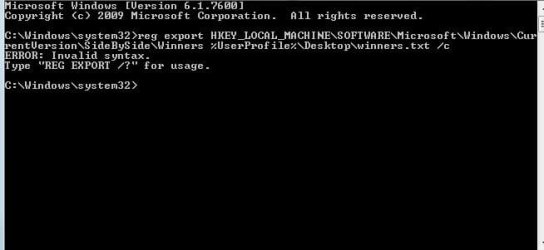
reg export HKEY_LOCAL_MACHINE\SOFTWARE\Microsoft\Windows\CurrentVersion\SideBySide\Winners %UserProfile%\Desktop\winners.txt /c

Then right click on winners.txt on your Desktop > Send to > Compressed (zipped) folder.

Therefore, I would like between CODE tags, CheckSUR.log, CheckSUR.persist.log, and OTL.txt. I would like uploaded, winners.zip.

Thanks, and the best of luck!

Richard

Getting error message with last part. Invalid syntax
 

Attachments

  • Capture.JPG
    Capture.JPG
    24.1 KB · Views: 123

My Computer

Computer Manufacturer/Model Number
Asus UX50V
OS
Windows 7 Home Premium 64-bit
CPU
Intel® Core™2 Duo Processor SU9600 1.6 GHz
Motherboard
Asus 60-NVLMB1200-C14
Memory
4GB SDRAM
Graphics Card(s)
NVIDIA® GeForce® G 105M
Sound Card
Realtek High Definition Audio
Monitor(s) Displays
15.6" HD LED backlight, Color-Shine
Screen Resolution
1366x768
Hard Drives
2.5" 9.5mm SATA 500GB
Hello!

Thanks for that! Really great work!

Right, CheckSUR.log shows no errors. This gives us no lead from that direction, but we do still have the CBS.log. Anyway, syntax error was my fault. Really sorry about that. Try this:

reg export HKEY_LOCAL_MACHINE\SOFTWARE\Microsoft\Windows\CurrentVersion\SideBySide\Winners %UserProfile%\Desktop\winners.txt

Thanks!

Richard!
 

My Computer

Computer Manufacturer/Model Number
Dell XPS 420
OS
Vista Home Premium x86 SP2
CPU
Intel Core 2 Quad Q9300 2.50GHz
Motherboard
Stock Dell 0TP406
Memory
4 gb (DDR2 800) 400MHz
Graphics Card(s)
ATI Radeon HD 3870 (512 MBytes)
Monitor(s) Displays
1 x Dell 2007FP and 1 x (old) Sonic flat screen
Screen Resolution
1600 x 1200 and 1280 x 1204
Hard Drives
1 x 640Gb (SATA 300) Western Digital: WDC WD6400AAKS-75A7B0 1 x 1Tb (SATA 600) Western Digital: Caviar Black, SATA 6GB/S, 64Mb cache, 8ms Western Digital: WDC WD1002FAEX-00Z3A0 ATA Device
Case
Dell XPS 420
Cooling
Stock Fan
Keyboard
Dell Bluetooth
Mouse
Advent Optical ADE-WG01 (colour change light up)
Internet Speed
Varies from 10kb/s to 170kb/s. So unreliable it is not funny
Other Info
ASUS USB 3.0 5Gbps/SATA 6Gbps - PCI-Express Combo Controller Card (U3S6)
Hello!

Thanks for that! Really great work!

Right, CheckSUR.log shows no errors. This gives us no lead from that direction, but we do still have the CBS.log. Anyway, syntax error was my fault. Really sorry about that. Try this:

reg export HKEY_LOCAL_MACHINE\SOFTWARE\Microsoft\Windows\CurrentVersion\SideBySide\Winners %UserProfile%\Desktop\winners.txt

Thanks!

Richard!

Still getting syntax error. :)
 

My Computer

Computer Manufacturer/Model Number
Asus UX50V
OS
Windows 7 Home Premium 64-bit
CPU
Intel® Core™2 Duo Processor SU9600 1.6 GHz
Motherboard
Asus 60-NVLMB1200-C14
Memory
4GB SDRAM
Graphics Card(s)
NVIDIA® GeForce® G 105M
Sound Card
Realtek High Definition Audio
Monitor(s) Displays
15.6" HD LED backlight, Color-Shine
Screen Resolution
1366x768
Hard Drives
2.5" 9.5mm SATA 500GB
Hello!

Thanks for that! Really great work!

Right, CheckSUR.log shows no errors. This gives us no lead from that direction, but we do still have the CBS.log. Anyway, syntax error was my fault. Really sorry about that. Try this:

reg export HKEY_LOCAL_MACHINE\SOFTWARE\Microsoft\Windows\CurrentVersion\SideBySide\Winners %UserProfile%\Desktop\winners.txt

Thanks!

Richard!

Still getting syntax error. :)

Hello!

That new one works for me. The old one was incorrect. Press and hold the Windows Key + R to open the Run dialogue. Type regedit and press enter. File > Export > Selected Branch: HKEY_LOCAL_MACHINE\SOFTWARE\Microsoft\Windows\CurrentVersion\SideBySide\Winners

Save it to your Desktop, and zip it up.

Thanks, and good luck!

Richard
 

My Computer

Computer Manufacturer/Model Number
Dell XPS 420
OS
Vista Home Premium x86 SP2
CPU
Intel Core 2 Quad Q9300 2.50GHz
Motherboard
Stock Dell 0TP406
Memory
4 gb (DDR2 800) 400MHz
Graphics Card(s)
ATI Radeon HD 3870 (512 MBytes)
Monitor(s) Displays
1 x Dell 2007FP and 1 x (old) Sonic flat screen
Screen Resolution
1600 x 1200 and 1280 x 1204
Hard Drives
1 x 640Gb (SATA 300) Western Digital: WDC WD6400AAKS-75A7B0 1 x 1Tb (SATA 600) Western Digital: Caviar Black, SATA 6GB/S, 64Mb cache, 8ms Western Digital: WDC WD1002FAEX-00Z3A0 ATA Device
Case
Dell XPS 420
Cooling
Stock Fan
Keyboard
Dell Bluetooth
Mouse
Advent Optical ADE-WG01 (colour change light up)
Internet Speed
Varies from 10kb/s to 170kb/s. So unreliable it is not funny
Other Info
ASUS USB 3.0 5Gbps/SATA 6Gbps - PCI-Express Combo Controller Card (U3S6)
Winners.zip
 

Attachments

My Computer

Computer Manufacturer/Model Number
Asus UX50V
OS
Windows 7 Home Premium 64-bit
CPU
Intel® Core™2 Duo Processor SU9600 1.6 GHz
Motherboard
Asus 60-NVLMB1200-C14
Memory
4GB SDRAM
Graphics Card(s)
NVIDIA® GeForce® G 105M
Sound Card
Realtek High Definition Audio
Monitor(s) Displays
15.6" HD LED backlight, Color-Shine
Screen Resolution
1366x768
Hard Drives
2.5" 9.5mm SATA 500GB
Hello!

Sorry about the delay. I want to get this confirmed by cluberti, because this doesn't make much sense to me. If we look at this key:

Code:
[HKEY_LOCAL_MACHINE\SOFTWARE\Microsoft\Windows\CurrentVersion\SideBySide\Winners\amd64_microsoft-windows-ehome-ehglid.resources_31bf3856ad364e35_tr-tr_22a2103b52605250]
@="6.1"

It looks damaged. This is one of the things which CBS.log was moaning about:

Code:
2011-01-14 07:09:02, Error                 CSI    000000d7 (F) STATUS_OBJECT_NAME_NOT_FOUND #168710057# from Windows::Rtl::SystemImplementation::CKey::OpenExistingKey(f = 0, da = (KEY_READ), oa = @0xb0cdb0, key = NULL, disp = (null))[gle=0xd0000034]
2011-01-14 07:09:02, Info                  CBS    Failed to get CSI store. [HRESULT = 0x80070002 - ERROR_FILE_NOT_FOUND]
2011-01-14 07:09:02, Error                 CBS    Failed to initialize store parameters with boot drive:  and windows directory:  [HRESULT = 0x80070002 - ERROR_FILE_NOT_FOUND]
2011-01-14 07:09:16, Info                  CSI    000000d8@2011/1/14:10:39:16.761 PopulateComponentFamiliesKey - Begin
2011-01-14 07:13:46, Error                 CSI    000000d9 (F) STATUS_OBJECT_NAME_NOT_FOUND #171893267# from Windows::Rtl::SystemImplementation::DirectRegistryProvider::SysOpenKey(flg = 0, key = {provider=NULL, handle=0}, da = (KEY_READ|KEY_WOW64_64KEY), oa = @0xb0c8f0->OBJECT_ATTRIBUTES {s:48; rd:NULL; on:[169]"\Registry\Machine\Software\Microsoft\Windows\CurrentVersion\SideBySide\Winners\amd64_microsoft-windows-ehome-ehglid.resources_31bf3856ad364e35_tr-tr_22a2103b52605250\4.1"; a:(OBJ_CASE_INSENSITIVE)}, disp = Unmapped disposition: 11586744 (0x00b0ccb8))[gle=0xd0000034]
2011-01-14 07:13:46, Error                 CSI    000000da@2011/1/14:10:43:46.914 (F) d:\w7rtm\base\wcp\sil\merged\ntu\ntsystem.cpp(3676): Error STATUS_OBJECT_NAME_NOT_FOUND originated in function Windows::Rtl::SystemImplementation::DirectRegistryProvider::SysOpenKey expression: (null)
[gle=0x80004005]

What I don't get is version 4.1. I feel very strongly that we should be reconstructing for version 6.1 Where on earth has this version 4.1 come from! I don't see 4.1 anywhere else, so I can't get the rest of the version to reconstruct off either. If I have my way, I would probably reconstruct for 6.1, and see what happens, but since we have someone far more senior than I on hand, we shall wait for a little :)

Thanks!

Richard
 

My Computer

Computer Manufacturer/Model Number
Dell XPS 420
OS
Vista Home Premium x86 SP2
CPU
Intel Core 2 Quad Q9300 2.50GHz
Motherboard
Stock Dell 0TP406
Memory
4 gb (DDR2 800) 400MHz
Graphics Card(s)
ATI Radeon HD 3870 (512 MBytes)
Monitor(s) Displays
1 x Dell 2007FP and 1 x (old) Sonic flat screen
Screen Resolution
1600 x 1200 and 1280 x 1204
Hard Drives
1 x 640Gb (SATA 300) Western Digital: WDC WD6400AAKS-75A7B0 1 x 1Tb (SATA 600) Western Digital: Caviar Black, SATA 6GB/S, 64Mb cache, 8ms Western Digital: WDC WD1002FAEX-00Z3A0 ATA Device
Case
Dell XPS 420
Cooling
Stock Fan
Keyboard
Dell Bluetooth
Mouse
Advent Optical ADE-WG01 (colour change light up)
Internet Speed
Varies from 10kb/s to 170kb/s. So unreliable it is not funny
Other Info
ASUS USB 3.0 5Gbps/SATA 6Gbps - PCI-Express Combo Controller Card (U3S6)
A lot of people are having trouble with this update, I would hide this update until the issue has been resolved by microsoft I wouldn't install it....
Has Microsoft actually come forward to acknowlege a problem with this update?

Regards,
Golden
 

My Computer

Computer type
PC/Desktop
Computer Manufacturer/Model Number
Golden Mk. I.4
OS
Windows 10 Pro x64 ; Xubuntu x64
CPU
Intel i7 860 @ 2.80 GHz O/C'ed to 4.0GHz
Motherboard
Gigabyte P55A-UD3R Rev.1. Award BIOS F13
Memory
16GB Corsair Vengance DDR3 @ 661 MHz Dual Channel (9-9-9-24)
Graphics Card(s)
EVGA NVidia GTX 560 1024MB
Sound Card
Realtek Integrated
Monitor(s) Displays
Dual Samsung SyncMaster 2494HS
Screen Resolution
1920*1080 and 1920*1080
Hard Drives
1*Samsung 840 EVO 120GB SSD;
1*OCZ Vertex 2 60GB SSD;
2*Samsung F3 SpinPoint 1TB in RAID0;
1*Samsung F1 SpinPoint 1TB;
2*Western Digital 1TB External USB 3.0
1*Western Digital 500GB External USB 3.0
1*Seagate 500GB External USB 2.0
PSU
Thermaltake ToughPower QFan 750W
Case
Thermaltake Element S VK60001W2Z
Cooling
Corsair H60 Water Cooling, 2*230mm and 2*80mm case fans
Keyboard
Logitech G110
Mouse
Logitech MX518
I think the last update that would have touched/updated that key was KB981078. Was this installed on that system, perhaps? Anyway, I don't have that key on my Win7 Ent machine, and I'll have to take a look at an ultimate machine later. 4.1 might be the correct version, but it is a little odd.
 

My Computer

Computer type
PC/Desktop
Computer Manufacturer/Model Number
Custom
OS
Windows 10 Pro x64
CPU
Intel Core i7 4790K @ 4.5GHz
Motherboard
Asus Maximus Hero VII
Memory
32GB DDR3
Graphics Card(s)
Nvidia GeForce GTX970
Sound Card
Realtek HD Audio
Screen Resolution
1920x1200
Hard Drives
1x Samsung 250GB SSD
4x WD RE 2TB (RAIDZ)
PSU
Corsair AX760i
Case
Fractal Design Define R4
Cooling
Noctua NH-D15
I think the last update that would have touched/updated that key was KB981078. Was this installed on that system, perhaps? Anyway, I don't have that key on my Win7 Ent machine, and I'll have to take a look at an ultimate machine later. 4.1 might be the correct version, but it is a little odd.

I'm not sure if I ever installed that update. However, I am pretty certain I haven't installed any updates relating to Windows Media Center in quite some time. It would have to have been long before the troubles began.
 

My Computer

Computer Manufacturer/Model Number
Asus UX50V
OS
Windows 7 Home Premium 64-bit
CPU
Intel® Core™2 Duo Processor SU9600 1.6 GHz
Motherboard
Asus 60-NVLMB1200-C14
Memory
4GB SDRAM
Graphics Card(s)
NVIDIA® GeForce® G 105M
Sound Card
Realtek High Definition Audio
Monitor(s) Displays
15.6" HD LED backlight, Color-Shine
Screen Resolution
1366x768
Hard Drives
2.5" 9.5mm SATA 500GB
Back
Top