Hello,
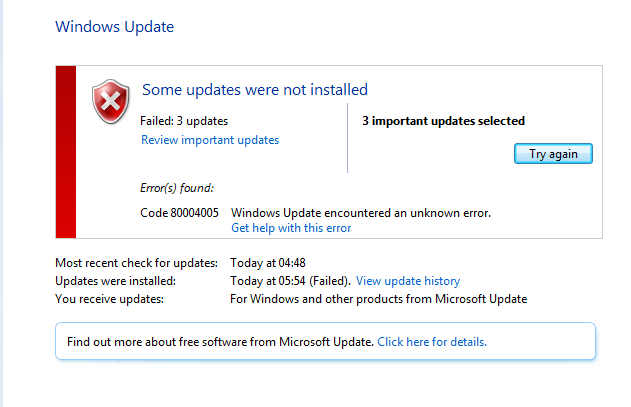
For a few months now my Windows 7 has been trying to update the same 3 updates and kept failing. I have looked around on the internet for solutions and could not find any. I have only discovered this recently which is why I didn't post sooner. I tried to attach the files but it kept failing.
My Computer
At a glance
Windows 7 Professional 64bitIntel Core i5-2500 CPU 3.3GHzG Skill 8GB (2x4GB) DDR3 1333mhz Ripjaws Memo...Asus GTX 660 Ti DirectCU II 2GB GDDR5
Computer type
PC/Desktop
Computer Manufacturer/Model Number
Custom Build
OS
Windows 7 Professional 64bit
CPU
Intel Core i5-2500 CPU 3.3GHz
Motherboard
Asus P8H77-V LE Z77 Socket 1155 8 Channel HD Audio ATX
Memory
G Skill 8GB (2x4GB) DDR3 1333mhz Ripjaws Memory Kit
Graphics Card(s)
Asus GTX 660 Ti DirectCU II 2GB GDDR5
Monitor(s) Displays
LG M2780D 27in LCD TV
Screen Resolution
1920x1080
Hard Drives
2 X Western Digital WD1001FALS 1TB Hard Drive SATAII 7200rpm 32MB Cache
try deleting the oldest CBSPersist files and posting the remainder.
The forum has a maximum filesize of 8MB, so the file you're uploading needs to be smaller than that.
My Computer
At a glance
Win 7 x64 Home Premium (and x86 VirtualBox VM...i3 370M/i7 6500U8GB - finally :)/8GBit's an i3, dude!/dual Intel&nVidia
Computer type
Laptop
Computer Manufacturer/Model Number
Asus K52F or Lenovo B51-80
OS
Win 7 x64 Home Premium (and x86 VirtualBox VM)/Win10
CPU
i3 370M/i7 6500U
Motherboard
Asus/Lenovo
Memory
8GB - finally :)/8GB
Graphics Card(s)
it's an i3, dude!/dual Intel&nVidia
Sound Card
onboard
Monitor(s) Displays
15.6" built-in
Screen Resolution
1366x768/1920x1080
Hard Drives
750GB Seagate internal
Sundry external drives attached to other computers on the local network
1TB SSD on the Lenovo
PSU
n/a
Internet Speed
as much as I can get - usually on a dongle/phone, so <1MB/s
Yikes!
The CheckSUR log is huge. Please run the tool again - and post just the CheckSUR.log file, since the earlier run seems to have overflowed the buffers
My Computer
At a glance
Win 7 x64 Home Premium (and x86 VirtualBox VM...i3 370M/i7 6500U8GB - finally :)/8GBit's an i3, dude!/dual Intel&nVidia
Computer type
Laptop
Computer Manufacturer/Model Number
Asus K52F or Lenovo B51-80
OS
Win 7 x64 Home Premium (and x86 VirtualBox VM)/Win10
CPU
i3 370M/i7 6500U
Motherboard
Asus/Lenovo
Memory
8GB - finally :)/8GB
Graphics Card(s)
it's an i3, dude!/dual Intel&nVidia
Sound Card
onboard
Monitor(s) Displays
15.6" built-in
Screen Resolution
1366x768/1920x1080
Hard Drives
750GB Seagate internal
Sundry external drives attached to other computers on the local network
1TB SSD on the Lenovo
PSU
n/a
Internet Speed
as much as I can get - usually on a dongle/phone, so <1MB/s
View attachment 284061
I'm just doing the test now however what is happening on this picture? the failing stopped and now it's just installing that update over and over
My Computer
At a glance
Windows 7 Professional 64bitIntel Core i5-2500 CPU 3.3GHzG Skill 8GB (2x4GB) DDR3 1333mhz Ripjaws Memo...Asus GTX 660 Ti DirectCU II 2GB GDDR5
Computer type
PC/Desktop
Computer Manufacturer/Model Number
Custom Build
OS
Windows 7 Professional 64bit
CPU
Intel Core i5-2500 CPU 3.3GHz
Motherboard
Asus P8H77-V LE Z77 Socket 1155 8 Channel HD Audio ATX
Memory
G Skill 8GB (2x4GB) DDR3 1333mhz Ripjaws Memory Kit
Graphics Card(s)
Asus GTX 660 Ti DirectCU II 2GB GDDR5
Monitor(s) Displays
LG M2780D 27in LCD TV
Screen Resolution
1920x1080
Hard Drives
2 X Western Digital WD1001FALS 1TB Hard Drive SATAII 7200rpm 32MB Cache
Good - that report is at least complete
However, there are a lot of bitflips present in the registry (?) - many of a kind I've not seen before.
I need to see the COMPONENTS registry hive -
Please copy the file C:\Windows\System32\config\COMPONENTS to your desktop, and then compress it - upload the compressed file to a fileshare site (ideally SkyDrive or Dropbox) and post a link.
With any luck I'll be able to fix most of the problems with that.
My Computer
At a glance
Win 7 x64 Home Premium (and x86 VirtualBox VM...i3 370M/i7 6500U8GB - finally :)/8GBit's an i3, dude!/dual Intel&nVidia
Computer type
Laptop
Computer Manufacturer/Model Number
Asus K52F or Lenovo B51-80
OS
Win 7 x64 Home Premium (and x86 VirtualBox VM)/Win10
CPU
i3 370M/i7 6500U
Motherboard
Asus/Lenovo
Memory
8GB - finally :)/8GB
Graphics Card(s)
it's an i3, dude!/dual Intel&nVidia
Sound Card
onboard
Monitor(s) Displays
15.6" built-in
Screen Resolution
1366x768/1920x1080
Hard Drives
750GB Seagate internal
Sundry external drives attached to other computers on the local network
1TB SSD on the Lenovo
PSU
n/a
Internet Speed
as much as I can get - usually on a dongle/phone, so <1MB/s
Here's some extra information if it helps
1) I Built this pc myself and I've had no problem except I was getting BSoD's which turned out to be a dodgy RAM Stick.
2) Before posting here I ran the fix it tool
3) My windows install was from a ISO from the Microsoft store (I got it because i'm a student)
4) I program games and such using visual studio if that could have screwed it up since DirectX takes control of devices
My Computer
At a glance
Windows 7 Professional 64bitIntel Core i5-2500 CPU 3.3GHzG Skill 8GB (2x4GB) DDR3 1333mhz Ripjaws Memo...Asus GTX 660 Ti DirectCU II 2GB GDDR5
Computer type
PC/Desktop
Computer Manufacturer/Model Number
Custom Build
OS
Windows 7 Professional 64bit
CPU
Intel Core i5-2500 CPU 3.3GHz
Motherboard
Asus P8H77-V LE Z77 Socket 1155 8 Channel HD Audio ATX
Memory
G Skill 8GB (2x4GB) DDR3 1333mhz Ripjaws Memory Kit
Graphics Card(s)
Asus GTX 660 Ti DirectCU II 2GB GDDR5
Monitor(s) Displays
LG M2780D 27in LCD TV
Screen Resolution
1920x1080
Hard Drives
2 X Western Digital WD1001FALS 1TB Hard Drive SATAII 7200rpm 32MB Cache
The problem was probably caused by installing updates with faulty RAM - the bits got flipped during the install.
With a but of luck, I've cured the majority of them now....
I've uploaded a file - wksaa.zip - to my SkyDrive at Noel's SkyDrive
Please download and save it to your desktop. Right-click on the file and select Extract All, and save to the default destination (which should be a folder on the desktop)
Create a new System Restore point
Open an Elevated Command Prompt, and run the following commands.
I need to have a look at your COMPONENTS registry hive
Please copy the C:\Windows\System32\config\COMPONENTS file (no extension) to your desktop and then compress it - upload the compressed file to your favoured fileshare site (preferably Dropbox or SkyDrive) and post a link.
My Computer
At a glance
Win 7 x64 Home Premium (and x86 VirtualBox VM...i3 370M/i7 6500U8GB - finally :)/8GBit's an i3, dude!/dual Intel&nVidia
Computer type
Laptop
Computer Manufacturer/Model Number
Asus K52F or Lenovo B51-80
OS
Win 7 x64 Home Premium (and x86 VirtualBox VM)/Win10
CPU
i3 370M/i7 6500U
Motherboard
Asus/Lenovo
Memory
8GB - finally :)/8GB
Graphics Card(s)
it's an i3, dude!/dual Intel&nVidia
Sound Card
onboard
Monitor(s) Displays
15.6" built-in
Screen Resolution
1366x768/1920x1080
Hard Drives
750GB Seagate internal
Sundry external drives attached to other computers on the local network
1TB SSD on the Lenovo
PSU
n/a
Internet Speed
as much as I can get - usually on a dongle/phone, so <1MB/s
I've uploaded a file - components.zip - to my SkyDrive at Noel's SkyDrive
Please download and save it to your desktop. Right-click on the file and select Extract All, and save to the default destination (which should be a folder on the desktop)
Create a new System Restore point
Open an Elevated Command Prompt, and run the following commands.
DEL C:\Windows\System32\config\COMPONENTS.OLD1 /q REN C:\Windows\System32\config\COMPONENTS COMPONENTS.OLD1 COPY %userprofile%\desktop\wfire\COMPONENTS C:\Windows\System32\config
If you get an error with any command, STOP THERE - do not reboot! - post for instructions.
Assuming both commands go OK, reboot, and run another CheckSUR scan - post the new CheckSUR.log file.
My Computer
At a glance
Win 7 x64 Home Premium (and x86 VirtualBox VM...i3 370M/i7 6500U8GB - finally :)/8GBit's an i3, dude!/dual Intel&nVidia
Computer type
Laptop
Computer Manufacturer/Model Number
Asus K52F or Lenovo B51-80
OS
Win 7 x64 Home Premium (and x86 VirtualBox VM)/Win10
CPU
i3 370M/i7 6500U
Motherboard
Asus/Lenovo
Memory
8GB - finally :)/8GB
Graphics Card(s)
it's an i3, dude!/dual Intel&nVidia
Sound Card
onboard
Monitor(s) Displays
15.6" built-in
Screen Resolution
1366x768/1920x1080
Hard Drives
750GB Seagate internal
Sundry external drives attached to other computers on the local network
1TB SSD on the Lenovo
PSU
n/a
Internet Speed
as much as I can get - usually on a dongle/phone, so <1MB/s