Solved KB3035583 Reappeared After Being Hidden

Wixi

New member
Member
VIP
Local time
6:14 PM
Messages
107
Hi,

A few months ago I ran into complications relating to windows Update trying (and failing) to upgrade to Windows 10. I didn't want to upgrade to 10 at the time and eventually uninstalled and hid update KB3035583 and have had no problems since.

Today, KB3035583 suddenly reappeared in Windows Update listed as "Important" and began downloading itself. I hid it again, but have read that even if you hide it, Windows Update will download a slightly different version of the patch. Is there any way to prevent Windows Update from downloading/installing these patches for those of us who don't want to upgrade to Windows 10?

Thanks in advance.
 

My Computer My Computer

At a glance

Windows 7 Home Premium
Computer type
Laptop
Computer Manufacturer/Model Number
Cell
OS
Windows 7 Home Premium
Antivirus
McAfee SecurityCenter 2014
Browser
Google Chrome
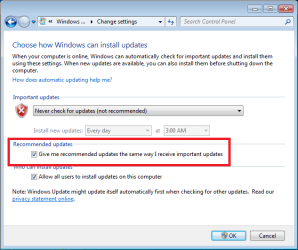
Sadly, no. We just have to keep vigilant, checking everything that comes in. I recommend you change your Windows Update Setting to "Check for updates but let me choose whether to download and install them" to prevent it from trying to sneak something in before you can check it.
 

My Computer My Computer

At a glance

Win 7 Ultimate 64 bitIntel i7-3930KKingston HyperX Genesis 32GB Kit (8x4GB Modul...MSI R7850 Twin Frozr 2GD5/OC Radeon HD 7850 2...
Computer type
PC/Desktop
Computer Manufacturer/Model Number
Custom Build
OS
Win 7 Ultimate 64 bit
CPU
Intel i7-3930K
Motherboard
ASUS P9X79 WS
Memory
Kingston HyperX Genesis 32GB Kit (8x4GB Modules) 1600MHz DDR
Graphics Card(s)
MSI R7850 Twin Frozr 2GD5/OC Radeon HD 7850 2GB 256-bit GDDR
Sound Card
Asus Xonar Essence STX
Monitor(s) Displays
3x Asus VG248QE 24", Vizio 32" TV
Screen Resolution
1920 x 1080, ?
Hard Drives
Samsung 128GB 840 Pro SSD (1),
Samsung 4TB 850 EVO SSDs (4)
Samsung 4TB 850 EVO SSDs (16) external backup drives used in 2.5" hot swap bays in the computer.
PSU
Corsair HX750w
Case
Antec Two Hundred v2 (modified)
Cooling
Cooler Master GeminII S524 120mm (fan replaced with a 140mm)
Keyboard
Logitech G510s
Mouse
Logitech M525 (two in use)
Internet Speed
=< 32Mbps down, 8Mbps up
Antivirus
AVAST!, MBAM, SAS, Spybot S&D (all but MBAM free) Glary Util
Browser
IE11
Other Info
LSI 9211-8i HBA card (8 SATA III ports), 2.5" & 3.5" Hot Swap Bays, HooToo HT-CR001 PCI-E to USB 3.0 Internal Hub + 6 Slot Card Reader, and LG Model CH12LS28 BD-ROM Optical Drive. Also, ScanSnap S1500 ADF duplexing scanner, Canon 9000F flat bed scanner, Corsair SP2500 2.1 speakers, Samsung CLP 415nw laser color printer, Cyberpower PP2200SW UPS
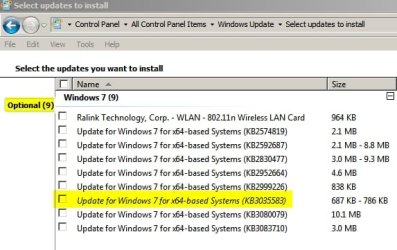
I wonder why it's an "Important" update for some users but only "Optional" for other users including myself?

Select updates to install.jpg
 

My Computer My Computer

At a glance

Microsoft Windows 7 Home Premium 64-bit 7601 ...AMD C-60 APU with Radeon(tm) HD Graphics4.00 GBAMD Radeon HD 6290 Graphics
Computer type
Laptop
Computer Manufacturer/Model Number
ASUS
OS
Microsoft Windows 7 Home Premium 64-bit 7601 Multiprocessor Free Service Pack 1
CPU
AMD C-60 APU with Radeon(tm) HD Graphics
Motherboard
ASUSTeK COMPUTER INC. X501U
Memory
4.00 GB
Graphics Card(s)
AMD Radeon HD 6290 Graphics
Sound Card
(1) AMD High Definition Audio Device (2) Realtek High Defi
Screen Resolution
1366 x 768 x 32 bits (4294967296 colors) @ 60 Hz
Hard Drives
Hitachi HTS545050A7E380 SATA Disk Device
Antivirus
Comodo CIS & FW, SecureAplus App Whitelisting, Threatfire
Browser
Cyberfox 64bit, Opera 64bit, Airfox
Other Info
Spy-The-Spy, HitmanPro.Alert, Norton Connect Safe, MJRegWatcher, BitDefender TrafficLight, Voodoo Shield, Zemana AntiMalware

My Computer My Computer

At a glance

W7 Pro SP1 64biti78GBIntel HD Graphics
Computer type
Laptop
Computer Manufacturer/Model Number
Employer provided Dell Latitude
OS
W7 Pro SP1 64bit
CPU
i7
Memory
8GB
Graphics Card(s)
Intel HD Graphics
Hard Drives
crappy SSD
Antivirus
Employer mandated Symantec Endpoint Protection
Browser
Pale Moon 64bit, IE11 64bit & Chrome 64bit
Thanks for the explanation. I really didn't know that!

:)
 

My Computer My Computer

At a glance

Microsoft Windows 7 Home Premium 64-bit 7601 ...AMD C-60 APU with Radeon(tm) HD Graphics4.00 GBAMD Radeon HD 6290 Graphics
Computer type
Laptop
Computer Manufacturer/Model Number
ASUS
OS
Microsoft Windows 7 Home Premium 64-bit 7601 Multiprocessor Free Service Pack 1
CPU
AMD C-60 APU with Radeon(tm) HD Graphics
Motherboard
ASUSTeK COMPUTER INC. X501U
Memory
4.00 GB
Graphics Card(s)
AMD Radeon HD 6290 Graphics
Sound Card
(1) AMD High Definition Audio Device (2) Realtek High Defi
Screen Resolution
1366 x 768 x 32 bits (4294967296 colors) @ 60 Hz
Hard Drives
Hitachi HTS545050A7E380 SATA Disk Device
Antivirus
Comodo CIS & FW, SecureAplus App Whitelisting, Threatfire
Browser
Cyberfox 64bit, Opera 64bit, Airfox
Other Info
Spy-The-Spy, HitmanPro.Alert, Norton Connect Safe, MJRegWatcher, BitDefender TrafficLight, Voodoo Shield, Zemana AntiMalware
No problem. I tested before I posted - just in case MS changed things on me :-)
 

My Computer My Computer

At a glance

W7 Pro SP1 64biti78GBIntel HD Graphics
Computer type
Laptop
Computer Manufacturer/Model Number
Employer provided Dell Latitude
OS
W7 Pro SP1 64bit
CPU
i7
Memory
8GB
Graphics Card(s)
Intel HD Graphics
Hard Drives
crappy SSD
Antivirus
Employer mandated Symantec Endpoint Protection
Browser
Pale Moon 64bit, IE11 64bit & Chrome 64bit
Thanks for the advice. :)

I initially had my settings set to "Download but let me choose whether to install", but have since changed it to "Choose whether to download and install them" to be on the safe side.
 

My Computer My Computer

At a glance

Windows 7 Home Premium
Computer type
Laptop
Computer Manufacturer/Model Number
Cell
OS
Windows 7 Home Premium
Antivirus
McAfee SecurityCenter 2014
Browser
Google Chrome
looks like hiding the update "again" doesnt work either, finally got back online with my PC (we just moved) so l had to catch up on 3/4 months of updates as lve been prioritising getting the house sorted (plus its not like l couldnt get online and do stuff on the laptop).

realised pretty quickly it was back :( just checked windows update again (got to be a habit on the laptop as 8.1 never notifies me about updates until l shut down so l checked daily to see if something new appeared) and lve realised hiding the update again doesnt work as it keeps on unhiding itself.. however if you keep an eye on the sizes of the updates its pretty easy to pick out which one to avoid, tho as of yet lve not noticed the same issue on win8..
 

My Computer My Computer

At a glance

Windows 7 Professional (64bit)Intel i5 4440 3.10ghzCorsair 32GB (4x8GB) DDR3 1600MHz Vengeance M...Intel Graphics 4600 (on board)
Computer type
PC/Desktop
Computer Manufacturer/Model Number
Custom build
OS
Windows 7 Professional (64bit)
CPU
Intel i5 4440 3.10ghz
Motherboard
Gigabyte GA-H97M-D3H
Memory
Corsair 32GB (4x8GB) DDR3 1600MHz Vengeance Memory Kit 1.5V
Graphics Card(s)
Intel Graphics 4600 (on board)
Sound Card
External Creative Soundblaster
Monitor(s) Displays
32" TV
Screen Resolution
1360*768
Hard Drives
Kingston SSDNow UV400 240GB 2.5inch SATAIII SSD
1 1TB WD WD10EADS
3 1TB WD WD10EZEX
PSU
Coolermaster GM-Series 550W Semi Modular
Case
Aerocool X-Predator X1 Devil Red
Cooling
5x 120mil (Arctic F12)
Keyboard
Microsoft Curve 2000 v1
Mouse
Trust MaxTrack Mini Mouse - 6 button(s) - wired - USB
Internet Speed
34Meg
Antivirus
Bitdefender 2017
Browser
Firefox
You cannot hide an update - you can only hide each version of an update.

The version of the update that you hid did not unhide itself. A new version was offered.

I realize that the end result is the same... but it might be worth knowing what really happened.
 

My Computer My Computer

At a glance

W7 Pro SP1 64biti78GBIntel HD Graphics
Computer type
Laptop
Computer Manufacturer/Model Number
Employer provided Dell Latitude
OS
W7 Pro SP1 64bit
CPU
i7
Memory
8GB
Graphics Card(s)
Intel HD Graphics
Hard Drives
crappy SSD
Antivirus
Employer mandated Symantec Endpoint Protection
Browser
Pale Moon 64bit, IE11 64bit & Chrome 64bit
Well I really don't want to wrestle with MS on this update business but I too will change my settings to Download but let me choose whether to install. With the re-issuance of KB3035583 this week (now Recommended) I believe more people are going to be caught in this circumstance. Two months ago I installed KB3035583 & modified the registry to remove the icon from the taskbar.

However now the latest KB3035583 goes right WU, did for me anyway (since I install Recommended automatically). Now I have multiple Upgrade to Windows 10 updates in WU, three so far. One yesterday & two today - they are all hidden at this point.

x3JIYhLmWXkQVxdGUNoEFQVaLCOyUVOG1SaOjTFllHq9NvmRCELW68TE9WBT0FfbxD2DSVC24IziNuhWOkuwuzdPJmWCn_hH74emK8uk2M-M-Y9X0MfDmj3bpAOAv-F6zQZu764TtvEZWG-SPTP-s63fu_kEE5MYCHN9ThNanG5IePWOWV7sS_n6l7PZVPkfyjZcEcghd88v0VPkaBxpHIja7Hj4TvfI49jBRmHiaOZKUmt2RFwlT-wAsFr-339Waq7NCjs180Zw-cgMUh5rJ7k1SbrgvRb0mBPmYtKVxHwqu55wZd1886SBx7PKxZm5ufOX0CR7jGBUUtWEWWtznX664zRB-2gMcKFtAlE0Ws_VmoWqNzByAyS72cw_QiN4hPvNJbIoCqOlr5CM2OGcGXF2g61qhZt6XIFgWyGgUPaipGBIB5j1P8C7zUoh6TQFsmN7oajDoknDt33f99up-dd5e0IiuhVtAEb3SZeXLQcwSUnqusLKtGzc65b1HYpBPMJsiNOJoK0H2oy8ftkddG_-om0CyDjx1byDh0mqM6k=w1310-h512-no


Several hours later & I think I have uninstalled all instances of KB3035583, wasn't easy. Looking at my Screen Print below - must say it is very messy, two instances of 3035583 - different sizes & three Windows 10 Upgrades also of different sizes :sarc:
Same business I went thru with KB2952664 just a few months ago.

dYNpHL-28q8c3r7_9GAZiYF4pIZPIAQgbn_Venvac5gBuxsLmrEvloz6C19FOx7K8fAEQnm1KxgPRWPAizREksdj6vpmGaw2uQyWNju9QuH_Lkt9qCvG_gRPh7nqnHSHOxs5WjTRzNqvvUh94hBoRrMnopxYjr3ygvQxfybMHa5Nhs0IE6NxH5-49DSate0TsO7Jk2pMJNF5pcvtkOpUG325bYThGVob8nED7uC6DcWcBvP0wvWVQD3kLb5kgC8WVBxN1llFEuqffWqdJ-fzrYgioPWyHjHX437rQuZA6S7FKnJHuENQW6HhCDAtqbgdYrjOhc9oPHma63y9V1ucicBVHrQ4IOf7E5TZn5wvF74_BzxFCYQSblaZu5G5fSslfje8JhyyuksoawX9skW0dy2J1PcdH_P-dVU0VZ7RQnHtq8OIYqGLa_vrqVMUTJliZNPJhvl8TrpdqFZJhHf2-3Q_da80a5VSNYi_N1FwDZrC0U6j8gg014EC6fl9nyI4wBEF986Z6QxRBKBLxV2du24uv8kkdpx-8xli-fZv4KM=w1313-h394-no


Can I please just install Windows 10 when I'm ready. :rolleyes:
 
Last edited:

My Computer My Computer

At a glance

Windows 7 Ultimate x64Intel Core i7-950Elpida DDR3 12 Gb 1066EVGA nVidia GeForce GTX 760 2GB GDDR5
Computer type
PC/Desktop
Computer Manufacturer/Model Number
Dell XPS 435MT
OS
Windows 7 Ultimate x64
CPU
Intel Core i7-950
Motherboard
Dell 0R849J
Memory
Elpida DDR3 12 Gb 1066
Graphics Card(s)
EVGA nVidia GeForce GTX 760 2GB GDDR5
Sound Card
Syba PCI-e VIA VT1723 Envy24DT
Monitor(s) Displays
Dell 3007WFP-HC, Nixeus Vue 30
Screen Resolution
1920 x 1200
Hard Drives
Crucial M500 240GB
1TB Seagate Barracuda
PSU
Corsair CX500M
Keyboard
Logitech MX 5500 combo
Mouse
Logitech MX 5500
Internet Speed
300Mbps
Antivirus
MSE
Browser
IE11 & Chrome
Other Info
MBAM Premium
Looking through the remaining optional updates, I've also got KB2952664, KB2999226, KB3080079 and KB3083710.
Are these patches "safe" to install for those of us who don't want to upgrade to Windows 10?
 

My Computer My Computer

At a glance

Windows 7 Home Premium
Computer type
Laptop
Computer Manufacturer/Model Number
Cell
OS
Windows 7 Home Premium
Antivirus
McAfee SecurityCenter 2014
Browser
Google Chrome
You cannot hide an update - you can only hide each version of an update.

The version of the update that you hid did not unhide itself. A new version was offered.

I realize that the end result is the same... but it might be worth knowing what really happened.

that would suggest they have made 4 patches so far then.. because ive hidden this update every day since my last post (lve just hidden the update yet again), lm curious as to when it will stop appearing.
 

My Computer My Computer

At a glance

Windows 7 Professional (64bit)Intel i5 4440 3.10ghzCorsair 32GB (4x8GB) DDR3 1600MHz Vengeance M...Intel Graphics 4600 (on board)
Computer type
PC/Desktop
Computer Manufacturer/Model Number
Custom build
OS
Windows 7 Professional (64bit)
CPU
Intel i5 4440 3.10ghz
Motherboard
Gigabyte GA-H97M-D3H
Memory
Corsair 32GB (4x8GB) DDR3 1600MHz Vengeance Memory Kit 1.5V
Graphics Card(s)
Intel Graphics 4600 (on board)
Sound Card
External Creative Soundblaster
Monitor(s) Displays
32" TV
Screen Resolution
1360*768
Hard Drives
Kingston SSDNow UV400 240GB 2.5inch SATAIII SSD
1 1TB WD WD10EADS
3 1TB WD WD10EZEX
PSU
Coolermaster GM-Series 550W Semi Modular
Case
Aerocool X-Predator X1 Devil Red
Cooling
5x 120mil (Arctic F12)
Keyboard
Microsoft Curve 2000 v1
Mouse
Trust MaxTrack Mini Mouse - 6 button(s) - wired - USB
Internet Speed
34Meg
Antivirus
Bitdefender 2017
Browser
Firefox
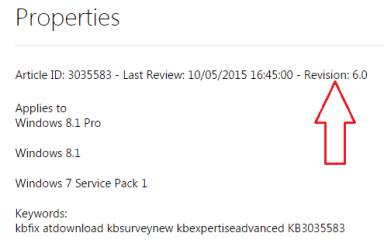
There have been 6 versions:

KB.png
Source.


If you end up hiding it more than 6 times, then you should start your own thread an see if forum members can help you figure out why.
 

My Computer My Computer

At a glance

W7 Pro SP1 64biti78GBIntel HD Graphics
Computer type
Laptop
Computer Manufacturer/Model Number
Employer provided Dell Latitude
OS
W7 Pro SP1 64bit
CPU
i7
Memory
8GB
Graphics Card(s)
Intel HD Graphics
Hard Drives
crappy SSD
Antivirus
Employer mandated Symantec Endpoint Protection
Browser
Pale Moon 64bit, IE11 64bit & Chrome 64bit
You cannot hide an update - you can only hide each version of an update.

The version of the update that you hid did not unhide itself. A new version was offered.

I realize that the end result is the same... but it might be worth knowing what really happened.

that would suggest they have made 4 patches so far then.. because ive hidden this update every day since my last post (lve just hidden the update yet again), lm curious as to when it will stop appearing.

probably 1/14/2020
 

My Computer My Computer

At a glance

Win 7 Ultimate 64 bitIntel i7-3930KKingston HyperX Genesis 32GB Kit (8x4GB Modul...MSI R7850 Twin Frozr 2GD5/OC Radeon HD 7850 2...
Computer type
PC/Desktop
Computer Manufacturer/Model Number
Custom Build
OS
Win 7 Ultimate 64 bit
CPU
Intel i7-3930K
Motherboard
ASUS P9X79 WS
Memory
Kingston HyperX Genesis 32GB Kit (8x4GB Modules) 1600MHz DDR
Graphics Card(s)
MSI R7850 Twin Frozr 2GD5/OC Radeon HD 7850 2GB 256-bit GDDR
Sound Card
Asus Xonar Essence STX
Monitor(s) Displays
3x Asus VG248QE 24", Vizio 32" TV
Screen Resolution
1920 x 1080, ?
Hard Drives
Samsung 128GB 840 Pro SSD (1),
Samsung 4TB 850 EVO SSDs (4)
Samsung 4TB 850 EVO SSDs (16) external backup drives used in 2.5" hot swap bays in the computer.
PSU
Corsair HX750w
Case
Antec Two Hundred v2 (modified)
Cooling
Cooler Master GeminII S524 120mm (fan replaced with a 140mm)
Keyboard
Logitech G510s
Mouse
Logitech M525 (two in use)
Internet Speed
=< 32Mbps down, 8Mbps up
Antivirus
AVAST!, MBAM, SAS, Spybot S&D (all but MBAM free) Glary Util
Browser
IE11
Other Info
LSI 9211-8i HBA card (8 SATA III ports), 2.5" & 3.5" Hot Swap Bays, HooToo HT-CR001 PCI-E to USB 3.0 Internal Hub + 6 Slot Card Reader, and LG Model CH12LS28 BD-ROM Optical Drive. Also, ScanSnap S1500 ADF duplexing scanner, Canon 9000F flat bed scanner, Corsair SP2500 2.1 speakers, Samsung CLP 415nw laser color printer, Cyberpower PP2200SW UPS
Wixi, timeless,

You can stop the installation of W10 via registry entries. Then you don't need to hide any updates.

If telemetry is the concern, then that should be stated and not lumped in with the recurring appearance of the main KB for the W10 offer.
 

My Computer My Computer

At a glance

W7 Pro SP1 64biti78GBIntel HD Graphics
Computer type
Laptop
Computer Manufacturer/Model Number
Employer provided Dell Latitude
OS
W7 Pro SP1 64bit
CPU
i7
Memory
8GB
Graphics Card(s)
Intel HD Graphics
Hard Drives
crappy SSD
Antivirus
Employer mandated Symantec Endpoint Protection
Browser
Pale Moon 64bit, IE11 64bit & Chrome 64bit
Thanks UsernameIssues,

A few months ago I made a small change to the Windows Update registry under the guidance of a forum admin. Since them, the "Get Windows 10" icon hasn't reappeared, so I'm hoping that means Windows 10 won't try to install in future. If KB3035583 was installed after editing the registry, would Windows 10 still try to install?
 

My Computer My Computer

At a glance

Windows 7 Home Premium
Computer type
Laptop
Computer Manufacturer/Model Number
Cell
OS
Windows 7 Home Premium
Antivirus
McAfee SecurityCenter 2014
Browser
Google Chrome
I'm not sure which changes you made to the registry - so I cannot say for sure what the result should be.

I have made these changes on a few computers:

Code:
Windows Registry Editor Version 5.00

[HKEY_LOCAL_MACHINE\SOFTWARE\Policies\Microsoft\Windows\GWX]
"DisableGWX"=dword:00000001

[HKEY_LOCAL_MACHINE\SOFTWARE\Microsoft\Windows\CurrentVersion\WindowsUpdate\OSUpgrade]
"AllowOSUpgrade"=dword:00000000
"ReservationsAllowed"=dword:00000000

[HKEY_LOCAL_MACHINE\SOFTWARE\Policies\Microsoft\Windows\WindowsUpdate]
"DisableOSUpgrade"=dword:00000001

KB3035583 is installed on those computers. There is no offer to get W10 in the notification area and no offer via Windows Update screens.

That said, I made these changes before version 6 of KB3035583 was released. The computers did not re-install KB3035583 again. If you are willing, you can make those changes to your computer, let version 6 of KB3035583 install and let us know the results.

Some policy related settings will work on all versions of Windows 7... even versions that do not have gpedit. I have not tested the settings mentioned above on all versions of Windows 7.
 

My Computer My Computer

At a glance

W7 Pro SP1 64biti78GBIntel HD Graphics
Computer type
Laptop
Computer Manufacturer/Model Number
Employer provided Dell Latitude
OS
W7 Pro SP1 64bit
CPU
i7
Memory
8GB
Graphics Card(s)
Intel HD Graphics
Hard Drives
crappy SSD
Antivirus
Employer mandated Symantec Endpoint Protection
Browser
Pale Moon 64bit, IE11 64bit & Chrome 64bit
I can no longer hide these updates on my W7 Machine. The ones I hid before no longer appear in the restore list. Now my W8.1 laptop will no longer allow me to hide them either. Wish there was an option, "Do you want to install W10 on this machine" YES/NO and be done with it.
 

My Computer My Computer

At a glance

Windows 7 Professional X64 Service Pack 1AMD Phenom II X4 955 3.20GHz8GGX550 Ti
Computer type
PC/Desktop
Computer Manufacturer/Model Number
Self Build
OS
Windows 7 Professional X64 Service Pack 1
CPU
AMD Phenom II X4 955 3.20GHz
Motherboard
Gigabyte GA-MA790X-UD4P
Memory
8G
Graphics Card(s)
GX550 Ti
Sound Card
On board
Monitor(s) Displays
Asus VW246H & Syncmaster 2243swx
Screen Resolution
1920x1080 & 1920x1080
Hard Drives
M4-CT128 SSD2, Samsung 840 256GB, 1 WDC 1TB
PSU
Corsair TX750W-V2
Case
Antec
Cooling
2 120mm fan
Keyboard
Microsoft Wireless 3050
Mouse
Microsoft Wireless 5000
Internet Speed
72/6Mbs (Cable)
Other Info
Asus AC1900 router, 8 port Trendnet Switch - Logitech Webcam Pro 9000
...Wish there was an option, "Do you want to install W10 on this machine" YES/NO and be done with it.
As far as Microsoft is concerned there is only one "right" answer.
 

My Computer My Computer

At a glance

Main - Windows 7 Pro SP1 64-Bit; 2nd - Window...Main - Core i7 2600K; 2nd - Core i7 920Main - 16GB Corsair Vengeance; 2nd - 12GB Cor...Main - XFX Radeon 6870 1GB; 2nd - XFX Radeon ...
Computer Manufacturer/Model Number
Self
OS
Main - Windows 7 Pro SP1 64-Bit; 2nd - Windows Server 2008 R2
CPU
Main - Core i7 2600K; 2nd - Core i7 920
Motherboard
Main - Asus P8Z68-V Pro/Gen3; 2nd - Gigabyte GA-EX58-UDR3
Memory
Main - 16GB Corsair Vengeance; 2nd - 12GB Corsair Vengeance
Graphics Card(s)
Main - XFX Radeon 6870 1GB; 2nd - XFX Radeon 4870 1GB
Sound Card
Both: Onboard Realtek Azalia
Monitor(s) Displays
Main - Hann 25" + I-INC 25" + Acer 23"; 2nd - Upgrading Soon
Screen Resolution
Main - 1920x1080 (All Three Monitors); 2nd - Upgrading Soon
Hard Drives
Main - (1) Crucial M4 128GB (Boot)
Main - (1) Seagate 2TB 64MB Cache (Data)
Main - (1) Seagate 2TB 64MB Cache (Data Backup)
2nd - (1) Intel X25-M SSD 80GB (Boot)
2nd - (3) Seagate 1TB 32MB Cache (Data Backup)
2nd - (1) Seagate 320GB (Because)
PSU
Main - OCZ 600W Modular; 2nd - OCZ 600W
Case
Main - Thermaltake Element G; 2nd - NZXT something or other
Cooling
Main - Corsair H80; 2nd - Prolimatech Megahalems
Keyboard
Main - Razer Reclusa; 2nd - Old MS Keyboard
Mouse
Main - Logitech MX Revolution; 2nd - Old MS Mouse
Internet Speed
20Mbps Time-Warner Cable
Back
Top