Solved KB3146706 causes additional 15 seconds to reboot process

endeavor

New member
Guru
VIP
Local time
5:27 PM
Messages
313
I'm not asking for any help rather my post is just a fyi and wanted to outline something I noticed:

Yesterday Windows Update released KB3146706, MS16-044 Security update for Windows OLE April 12, 2016
https://support.microsoft.com/en-us/kb/3146706

I have confirmed on Windows 7 that after installing this particular update my reboot times increased 50%.

Let me explain. After having an SSD with an i7 my Win7 reboot times (desktop to desktop) is just 30 seconds and so you really get used to that amazing speed, but after this update it was 45 seconds, and so in that context, coming from 30 seconds - you really notice it.

I was curious, so I proved it all out the usual ways, even tried it on two separate machines was the same thing.
I then decided not keep it for now, and so restored my main towers OS partition image and did this months important updates again except KB3146706 - and now it's back to what I call normal.

I'll decide what I want to do with KB3146706 at a later date, but just wanted to give a heads up fyi

..have a good day
 

My Computer My Computer

Computer type
PC/Desktop
Computer Manufacturer/Model Number
..all towers built from scratch
OS
Vista/Win7/8/10/11 (x86/x64)
CPU
i7
Hello mate to be honest with all the nonsense with updates right now with innocuous updates actually containing 10 material I don't update anything unless I know exactly what it is and even then the GWX Control Panel still picks up 10 related files.

I am just wondering if you just do a system restore and not wory about the update. Now if you don't use this tutorial then it might be an idea to go through it and as long as you don't mind losing some of the "bling" like transparency there are a number of tips that will make your machine faster and more efficient.
http://www.sevenforums.com/tutorials/11728-optimize-windows-7-a.html I run the tips on all my machines and thoroughly recommend it.

For example my new Asus P2520LA - i7 SSD 8 GB boots at 15 seconds to login my other machines except for an older Pentium driven tester one not far behind.

If you are not keen on updating or having anything 10 related on your machine - just ask and I will post you two links to stop the rubbish and prevent the upgrade
 

My Computer My Computer

Computer type
PC/Desktop
Computer Manufacturer/Model Number
Own build (new) Desk1 / Asus ROG Win 7 / Desk2 1st build
OS
Desk1 7 Home Prem / Desk2 10 Pro / Main lap Asus ROG 10 Pro 2 laptop Toshiba 7 Pro Asus P2520 7 & 10
CPU
Desk1 i5 3750K / Laptop i7 GTX 860M / Desk2 i5 2500
Motherboard
Desk1 Asus P877-V / Desk2 Gigabyte H67 UD3H / Laptop ?
Memory
Desk1 8GB (1866) / Desk2 16GB (1333) / Laptop 8Gb DDR3
Graphics Card(s)
Desk 1& 2NVidia GTX 650 & Laptops on board Intel
Sound Card
Desk 1 & 2 -XONAR DG Realtek High Def audio Laptop
Monitor(s) Displays
Desk 1 Benq HD 2450 / Desk2 Philips 24" / Laptop 17.5"
Screen Resolution
1920x1080 D1 & D2 & Laptop 1
Hard Drives
Desk1 Samsung 120GB 830 SSD
Asus ROG 256GB 850 Pro SSD
Desk2 Samsung 840 256 SSD
Toshiba 120GB EVO
PSU
Desk 1 Corsair HX 1050/ Laptop ? / Desk 2 Corsair HX 650
Case
Desk 1 Cooler HAF XM ? Toshiba laptop / Desk2 Coolermaster
Cooling
Fans on all Desk1 -2 Desk2 - all Coolermasters 5 Laptop ?
Keyboard
Desk 1 MS Sidewinder X6 Desk 2 MS Sidewinder X 4
Mouse
Desk 1&2 - Gigabyte MS 900 gamer - laptop - Logitec wireless
Internet Speed
ADSL2+
Other Info
One other Desktop (tester) and spare Toshba laptop both with SSD's
Running Kaspersky 2016 ISS on all machines config'd identically
Logitec audio stereo systems on each machine (x3)
Canon MG5250MFC
Router/modem TP-Link running WPA2SK
KB3146706 ... It is not ticked and it is an important security update. That makes it suspicious. I would expect it is no more than a trial balloon. That is, if there are problems MS will withdraw it toute suite. I have chosen NOT to install it.
 

My Computer My Computer

Computer type
PC/Desktop
Computer Manufacturer/Model Number
Custom build
OS
W7Pro/64
KB3146706 ... It is not ticked and it is an important security update. That makes it suspicious. I would expect it is no more than a trial balloon. That is, if there are problems MS will withdraw it toute suite. I have chosen NOT to install it.

They changed the status when patch tue happened that update WAS checked, they must have changed that a couple of days ago.
 

My Computer My Computer

Computer Manufacturer/Model Number
hp pavilion 6680t
OS
win 7 home premium 64 bit
CPU
core i5 760
Motherboard
iona (from MSI)
Memory
6 gb
Graphics Card(s)
ati 5450
Sound Card
real tek 888
Yes well like I originally stated there is so much crap going on at the moment with updates and if I understand what Painter and legacy are saying in their replies just confirms that.

Like I said if you want to keep the 10 stuff off your machine/s as best that I know how then it is only a matter of running those links I mentioned if you want to.

Upgrade to Windows 10 Update - Enable or Disable in Windows 7 or 8.1 - Windows 10 Forums < run the disable batch file
&
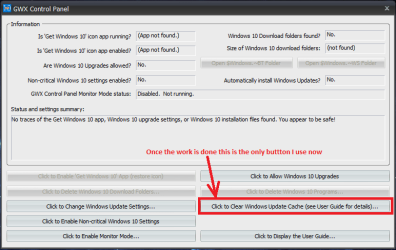
Ultimate Outsider - Software Downloads < download just the GWX softwareonce the setup is done then then all I do is check the Control Panel each day see pic
 

Attachments

  • GWX PANEL BUTTON.PNG
    GWX PANEL BUTTON.PNG
    17 KB · Views: 0

My Computer My Computer

Computer type
PC/Desktop
Computer Manufacturer/Model Number
Own build (new) Desk1 / Asus ROG Win 7 / Desk2 1st build
OS
Desk1 7 Home Prem / Desk2 10 Pro / Main lap Asus ROG 10 Pro 2 laptop Toshiba 7 Pro Asus P2520 7 & 10
CPU
Desk1 i5 3750K / Laptop i7 GTX 860M / Desk2 i5 2500
Motherboard
Desk1 Asus P877-V / Desk2 Gigabyte H67 UD3H / Laptop ?
Memory
Desk1 8GB (1866) / Desk2 16GB (1333) / Laptop 8Gb DDR3
Graphics Card(s)
Desk 1& 2NVidia GTX 650 & Laptops on board Intel
Sound Card
Desk 1 & 2 -XONAR DG Realtek High Def audio Laptop
Monitor(s) Displays
Desk 1 Benq HD 2450 / Desk2 Philips 24" / Laptop 17.5"
Screen Resolution
1920x1080 D1 & D2 & Laptop 1
Hard Drives
Desk1 Samsung 120GB 830 SSD
Asus ROG 256GB 850 Pro SSD
Desk2 Samsung 840 256 SSD
Toshiba 120GB EVO
PSU
Desk 1 Corsair HX 1050/ Laptop ? / Desk 2 Corsair HX 650
Case
Desk 1 Cooler HAF XM ? Toshiba laptop / Desk2 Coolermaster
Cooling
Fans on all Desk1 -2 Desk2 - all Coolermasters 5 Laptop ?
Keyboard
Desk 1 MS Sidewinder X6 Desk 2 MS Sidewinder X 4
Mouse
Desk 1&2 - Gigabyte MS 900 gamer - laptop - Logitec wireless
Internet Speed
ADSL2+
Other Info
One other Desktop (tester) and spare Toshba laptop both with SSD's
Running Kaspersky 2016 ISS on all machines config'd identically
Logitec audio stereo systems on each machine (x3)
Canon MG5250MFC
Router/modem TP-Link running WPA2SK
I removed KB3146706 and KB3147071. I had two BSOD's this week (on shutdown only) - the first in a long time.

According to a post here there might be a problem. (Unconfirmed)

https://social.technet.microsoft.co...after-windows-7-april-2016-updates?forum=emet

Problem with application hangs due to EMET 5.5 EAF mitigation after Windows 7 April 2016 updates.

Both KB3146706 or KB3147071 alone are sufficient to trigger the problem: Applications opted into EMET hang when EAF mitigation is enabled.

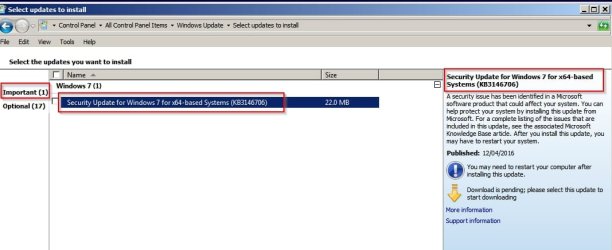
KB3146706 is still offered as important:

KB3146706.jpg

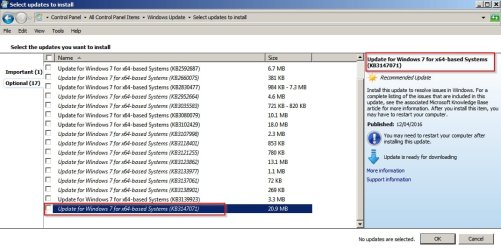
KB3147071 is optional:

KB3147071.jpg
 

My Computer My Computer

Computer type
Laptop
Computer Manufacturer/Model Number
ASUS
OS
Microsoft Windows 7 Home Premium 64-bit 7601 Multiprocessor Free Service Pack 1
CPU
AMD C-60 APU with Radeon(tm) HD Graphics
Motherboard
ASUSTeK COMPUTER INC. X501U
Memory
4.00 GB
Graphics Card(s)
AMD Radeon HD 6290 Graphics
Sound Card
(1) AMD High Definition Audio Device (2) Realtek High Defi
Screen Resolution
1366 x 768 x 32 bits (4294967296 colors) @ 60 Hz
Hard Drives
Hitachi HTS545050A7E380 SATA Disk Device
Antivirus
Comodo CIS & FW, SecureAplus App Whitelisting, Threatfire
Browser
Cyberfox 64bit, Opera 64bit, Airfox
Other Info
Spy-The-Spy, HitmanPro.Alert, Norton Connect Safe, MJRegWatcher, BitDefender TrafficLight, Voodoo Shield, Zemana AntiMalware
KB3146706 is still offered as important:

Hiyya Callender personally I am only installing things that pan out that could only be 7 related as there are so many important and optional stuff put out now, and I still pick up 10 files with that Control Panel.
 

My Computer My Computer

Computer type
PC/Desktop
Computer Manufacturer/Model Number
Own build (new) Desk1 / Asus ROG Win 7 / Desk2 1st build
OS
Desk1 7 Home Prem / Desk2 10 Pro / Main lap Asus ROG 10 Pro 2 laptop Toshiba 7 Pro Asus P2520 7 & 10
CPU
Desk1 i5 3750K / Laptop i7 GTX 860M / Desk2 i5 2500
Motherboard
Desk1 Asus P877-V / Desk2 Gigabyte H67 UD3H / Laptop ?
Memory
Desk1 8GB (1866) / Desk2 16GB (1333) / Laptop 8Gb DDR3
Graphics Card(s)
Desk 1& 2NVidia GTX 650 & Laptops on board Intel
Sound Card
Desk 1 & 2 -XONAR DG Realtek High Def audio Laptop
Monitor(s) Displays
Desk 1 Benq HD 2450 / Desk2 Philips 24" / Laptop 17.5"
Screen Resolution
1920x1080 D1 & D2 & Laptop 1
Hard Drives
Desk1 Samsung 120GB 830 SSD
Asus ROG 256GB 850 Pro SSD
Desk2 Samsung 840 256 SSD
Toshiba 120GB EVO
PSU
Desk 1 Corsair HX 1050/ Laptop ? / Desk 2 Corsair HX 650
Case
Desk 1 Cooler HAF XM ? Toshiba laptop / Desk2 Coolermaster
Cooling
Fans on all Desk1 -2 Desk2 - all Coolermasters 5 Laptop ?
Keyboard
Desk 1 MS Sidewinder X6 Desk 2 MS Sidewinder X 4
Mouse
Desk 1&2 - Gigabyte MS 900 gamer - laptop - Logitec wireless
Internet Speed
ADSL2+
Other Info
One other Desktop (tester) and spare Toshba laptop both with SSD's
Running Kaspersky 2016 ISS on all machines config'd identically
Logitec audio stereo systems on each machine (x3)
Canon MG5250MFC
Router/modem TP-Link running WPA2SK
<snip>

I am just wondering if you just do a system restore and not wory about the update

LoL ...You did not even read my post completely and yet you are replying to it - but as I said I don't even have it installed anymore. My purpose of the OP posting was just letting you guys know within hours of the KB release that there was a problem is all.
Read posts more thoroughly before replying to avoid any confusion therapist issues.. ;)
 

My Computer My Computer

Computer type
PC/Desktop
Computer Manufacturer/Model Number
..all towers built from scratch
OS
Vista/Win7/8/10/11 (x86/x64)
CPU
i7
You did not even read my post completely and yet you are replying to it
My apologies as I am on a similar sort of thread and maybe I have replied in the wrong one. I'll unsubscribe now so there is no more misunderstandings and you have things under control.
 

My Computer My Computer

Computer type
PC/Desktop
Computer Manufacturer/Model Number
Own build (new) Desk1 / Asus ROG Win 7 / Desk2 1st build
OS
Desk1 7 Home Prem / Desk2 10 Pro / Main lap Asus ROG 10 Pro 2 laptop Toshiba 7 Pro Asus P2520 7 & 10
CPU
Desk1 i5 3750K / Laptop i7 GTX 860M / Desk2 i5 2500
Motherboard
Desk1 Asus P877-V / Desk2 Gigabyte H67 UD3H / Laptop ?
Memory
Desk1 8GB (1866) / Desk2 16GB (1333) / Laptop 8Gb DDR3
Graphics Card(s)
Desk 1& 2NVidia GTX 650 & Laptops on board Intel
Sound Card
Desk 1 & 2 -XONAR DG Realtek High Def audio Laptop
Monitor(s) Displays
Desk 1 Benq HD 2450 / Desk2 Philips 24" / Laptop 17.5"
Screen Resolution
1920x1080 D1 & D2 & Laptop 1
Hard Drives
Desk1 Samsung 120GB 830 SSD
Asus ROG 256GB 850 Pro SSD
Desk2 Samsung 840 256 SSD
Toshiba 120GB EVO
PSU
Desk 1 Corsair HX 1050/ Laptop ? / Desk 2 Corsair HX 650
Case
Desk 1 Cooler HAF XM ? Toshiba laptop / Desk2 Coolermaster
Cooling
Fans on all Desk1 -2 Desk2 - all Coolermasters 5 Laptop ?
Keyboard
Desk 1 MS Sidewinder X6 Desk 2 MS Sidewinder X 4
Mouse
Desk 1&2 - Gigabyte MS 900 gamer - laptop - Logitec wireless
Internet Speed
ADSL2+
Other Info
One other Desktop (tester) and spare Toshba laptop both with SSD's
Running Kaspersky 2016 ISS on all machines config'd identically
Logitec audio stereo systems on each machine (x3)
Canon MG5250MFC
Router/modem TP-Link running WPA2SK
...an honorable person you are my friend, so no worries.

fwiw to other mentions, all Win7 computers on this network are telemetry worry free, etc, etc, and well under Admin's control <g>

On a different note though, I see you personally have made over 17 thousand posts in this forum, and that's impressive, and well done, to be a help to others.

...have a great day.

ps, I see there is a Marked Solved button on my post as OP, but the thing is again it was just a post as an fyi, and so of course it will only be solved when they reissue the KB fixed. My post never meant to ask for help as I said in my OP, and it was only a just an fyi post.

I marked it solved anyway to avoid any confusion, but again remember to everyone, we know there is a problem with this KB and it will only be solved when they re-issue it, or whatever.

In the meantime to anyone who had installed it and has a problem, then from:
Programs and Features> View Installed Updates
...simply uninstall it
 

My Computer My Computer

Computer type
PC/Desktop
Computer Manufacturer/Model Number
..all towers built from scratch
OS
Vista/Win7/8/10/11 (x86/x64)
CPU
i7
No I saw it was a FYI and was marked as solved I was just adding a little FYI myself - just in case you might be interested in stopping the 10 stuff getting through.

Agreed the update situation is out of hand at the moment and just for the record Windows in my humble opinion is nearing the end of it's days as a useful and user friendly system and did so when that awful 8 came out and now again IMHO with 10 is further self destructing.

Me personally - I shall head off to Linux when things get too ridiculous for words. Anyway I have to be grateful for the years that I was able to use first the older systems then XP and then 7 after the shambles of Vista as I consider them - especially 7 too user friendly if anything at all, and certainly not so intrusive as this new stuff, plus I do not like the bully like tactics of Microsoft and some of the hardware manufacturers that are following them down that road.
 

My Computer My Computer

Computer type
PC/Desktop
Computer Manufacturer/Model Number
Own build (new) Desk1 / Asus ROG Win 7 / Desk2 1st build
OS
Desk1 7 Home Prem / Desk2 10 Pro / Main lap Asus ROG 10 Pro 2 laptop Toshiba 7 Pro Asus P2520 7 & 10
CPU
Desk1 i5 3750K / Laptop i7 GTX 860M / Desk2 i5 2500
Motherboard
Desk1 Asus P877-V / Desk2 Gigabyte H67 UD3H / Laptop ?
Memory
Desk1 8GB (1866) / Desk2 16GB (1333) / Laptop 8Gb DDR3
Graphics Card(s)
Desk 1& 2NVidia GTX 650 & Laptops on board Intel
Sound Card
Desk 1 & 2 -XONAR DG Realtek High Def audio Laptop
Monitor(s) Displays
Desk 1 Benq HD 2450 / Desk2 Philips 24" / Laptop 17.5"
Screen Resolution
1920x1080 D1 & D2 & Laptop 1
Hard Drives
Desk1 Samsung 120GB 830 SSD
Asus ROG 256GB 850 Pro SSD
Desk2 Samsung 840 256 SSD
Toshiba 120GB EVO
PSU
Desk 1 Corsair HX 1050/ Laptop ? / Desk 2 Corsair HX 650
Case
Desk 1 Cooler HAF XM ? Toshiba laptop / Desk2 Coolermaster
Cooling
Fans on all Desk1 -2 Desk2 - all Coolermasters 5 Laptop ?
Keyboard
Desk 1 MS Sidewinder X6 Desk 2 MS Sidewinder X 4
Mouse
Desk 1&2 - Gigabyte MS 900 gamer - laptop - Logitec wireless
Internet Speed
ADSL2+
Other Info
One other Desktop (tester) and spare Toshba laptop both with SSD's
Running Kaspersky 2016 ISS on all machines config'd identically
Logitec audio stereo systems on each machine (x3)
Canon MG5250MFC
Router/modem TP-Link running WPA2SK
Hi,
Interestingly i have not noticed any startup or restart time issues :/
Are you using a Raid or something ?
 

My Computer My Computer

Computer type
PC/Desktop
Computer Manufacturer/Model Number
Custom assembled by me :}
OS
Win-7-Pro64bit 7-H-Prem-64bit
CPU
i7-5930K 2nd i9-9940x both water blocked VRM's too
Motherboard
ASUS SABERTOOTH X99 2nd ASUS x299 Apex
Memory
Trident-z 3200C14 2nd Trident-z 3600C16
Graphics Card(s)
EVGA 1080ti ftw3 2nd Titan Xp both water blocked
Sound Card
Built-in Realtek
Monitor(s) Displays
1-AOC G2460PG 24"G-Sync 144Hz/ 2nd 1-ASUS VG248QE 24" 144Hz
Screen Resolution
1920 x 1080 144Hz
Hard Drives
2-Samsung M.2 Evo & Evo Plus
2-Samsung 850 EVO 500GB SSD's/ 3-2.5 W.D. Black 1tb-&3-1tb/3-3.5 WD Black 1tb hdd's
PSU
EVGA SuperNOVA 1000-P2 2nd 1200-P2
Case
2-Corsair Obsidian Series 450D Black ATX Mid Tower
Cooling
Custom water loops
Keyboard
Logitech G710+/ 2nd Logitech G910
Mouse
2-RedDragon M901 Perdition 16400 dpi Gaming mouse = wired
Internet Speed
Comcast Ping 19ms 89.31mbps download speed 6.12mbps upload
Antivirus
Malwarebytes Pro/ Superantispyware Pro
Browser
FireFox & Pale moon
Other Info
2nd ASUS X299 Apex/Intel i9-9940x with Custom water loop/7H-Prem-x64/Corsair 450D case/Ram Trident-z 3600C16 4x8gb / Samsung970Evo plus 500gb SSD/Dual ssd EZ swap evo/PSU EVGA SuperNova 1200w-P2 80+Platinum/GPU Titan Xp /8-ML-140 on push-pull on 2-280GTX rads
@ ICIT2LOL, yes understood about your OS sentiments.
I have a boot to them all for software testing, and I don't mind them I guess and am just use to them, but yes it was awkward back when 8 came out, and now 10 yes, but nevertheless I make due and oddly am getting use to it somewhat. Of course on my own boxes I'll put Classic Start Menu, however it's interesting I do find myself most still booting into Win7 a lot more though, like right now.

@ ThrashZone, well for me as I said with my OS's running on SSD's they re-boot really fast @ 30 seconds desktop to desktop and I love that and will never except anything less, and revel in it actually, but right after I did the last round of 'Important only' WU's I immediately noticed it jumped to 50 seconds for reboot times, and so long story short isolated it down the this KB. I am doing a lot of rebooting in and out for software testing and so I depend on 30 sec! I had installed it on a few machines (all SSD OS's) and All of them exhibited the same longer round trip behaviors, and simply by uninstalling it then all were back to what their normal was, and so be it (as far as I'm concerned) ymmv of course.

fwiw, I have not tested it out on and OS still with a spinner though, the boot times are laboriously long enough with those anyway!

Have a great day...
 

My Computer My Computer

Computer type
PC/Desktop
Computer Manufacturer/Model Number
..all towers built from scratch
OS
Vista/Win7/8/10/11 (x86/x64)
CPU
i7
Hi,
I'm on ssd's and still no affects by the updates on three systems.
 

My Computer My Computer

Computer type
PC/Desktop
Computer Manufacturer/Model Number
Custom assembled by me :}
OS
Win-7-Pro64bit 7-H-Prem-64bit
CPU
i7-5930K 2nd i9-9940x both water blocked VRM's too
Motherboard
ASUS SABERTOOTH X99 2nd ASUS x299 Apex
Memory
Trident-z 3200C14 2nd Trident-z 3600C16
Graphics Card(s)
EVGA 1080ti ftw3 2nd Titan Xp both water blocked
Sound Card
Built-in Realtek
Monitor(s) Displays
1-AOC G2460PG 24"G-Sync 144Hz/ 2nd 1-ASUS VG248QE 24" 144Hz
Screen Resolution
1920 x 1080 144Hz
Hard Drives
2-Samsung M.2 Evo & Evo Plus
2-Samsung 850 EVO 500GB SSD's/ 3-2.5 W.D. Black 1tb-&3-1tb/3-3.5 WD Black 1tb hdd's
PSU
EVGA SuperNOVA 1000-P2 2nd 1200-P2
Case
2-Corsair Obsidian Series 450D Black ATX Mid Tower
Cooling
Custom water loops
Keyboard
Logitech G710+/ 2nd Logitech G910
Mouse
2-RedDragon M901 Perdition 16400 dpi Gaming mouse = wired
Internet Speed
Comcast Ping 19ms 89.31mbps download speed 6.12mbps upload
Antivirus
Malwarebytes Pro/ Superantispyware Pro
Browser
FireFox & Pale moon
Other Info
2nd ASUS X299 Apex/Intel i9-9940x with Custom water loop/7H-Prem-x64/Corsair 450D case/Ram Trident-z 3600C16 4x8gb / Samsung970Evo plus 500gb SSD/Dual ssd EZ swap evo/PSU EVGA SuperNova 1200w-P2 80+Platinum/GPU Titan Xp /8-ML-140 on push-pull on 2-280GTX rads
I see you're using a daily Win7 x64 and so, perhaps, and just maybe, it's only an x86 issue which is what I tested and reported on.

I also have Win7 x64 but have not updated it nor actually have booted it in a few months, I'll see if I get a chance to update it next week but I don't have any work slated for 7x64 to be more convenient, however I'm also fine to take your word on it. You have me curious though since I'm so detail oriented.
It was not a boot from off to Desktop fwiw, it was a boot Desktop to Desktop. I use mine so much doing that so it's right there in front for me.

I'm sure you had yours specifically timed out with a before and after right, or you just going by hunch...
20 seconds is not that long if one does not care or not even paying attention to boot times as they are doing other things in the meantime, and so can be negligible.
For me, from a known and timed 30 seconds, to a 50 seconds trip, is very obvious; but I'm not normal :p
 

My Computer My Computer

Computer type
PC/Desktop
Computer Manufacturer/Model Number
..all towers built from scratch
OS
Vista/Win7/8/10/11 (x86/x64)
CPU
i7
Hi,
Rarely normal fairly abnormal ;)

At any rate I do have both 64 and 32 bit and the last one I loaded updates on was a 32 bit

It could be related to how the install is installed meaning if you have a ntfs 100mb system reserved partition verses a efi 100mb system reserved partition
Or none of the above ?
32 bit I do have a ntfs 100mb system reserved and so does one of my 64 bit systems
The other 64 bit system only has C drive and that is it
No three of them boot increased after installing April's updates

If you go by this which I don't it's a lot higher than it actually is before getting to the desktop
I'd say 30 seconds average for all 3 from pressing the power button to desktop.
Not counting how long it takes to enter a password ;)

Oops forgot the link
http://www.sevenforums.com/performance-maintenance/294833-reboot-time-2-a.html
 

My Computer My Computer

Computer type
PC/Desktop
Computer Manufacturer/Model Number
Custom assembled by me :}
OS
Win-7-Pro64bit 7-H-Prem-64bit
CPU
i7-5930K 2nd i9-9940x both water blocked VRM's too
Motherboard
ASUS SABERTOOTH X99 2nd ASUS x299 Apex
Memory
Trident-z 3200C14 2nd Trident-z 3600C16
Graphics Card(s)
EVGA 1080ti ftw3 2nd Titan Xp both water blocked
Sound Card
Built-in Realtek
Monitor(s) Displays
1-AOC G2460PG 24"G-Sync 144Hz/ 2nd 1-ASUS VG248QE 24" 144Hz
Screen Resolution
1920 x 1080 144Hz
Hard Drives
2-Samsung M.2 Evo & Evo Plus
2-Samsung 850 EVO 500GB SSD's/ 3-2.5 W.D. Black 1tb-&3-1tb/3-3.5 WD Black 1tb hdd's
PSU
EVGA SuperNOVA 1000-P2 2nd 1200-P2
Case
2-Corsair Obsidian Series 450D Black ATX Mid Tower
Cooling
Custom water loops
Keyboard
Logitech G710+/ 2nd Logitech G910
Mouse
2-RedDragon M901 Perdition 16400 dpi Gaming mouse = wired
Internet Speed
Comcast Ping 19ms 89.31mbps download speed 6.12mbps upload
Antivirus
Malwarebytes Pro/ Superantispyware Pro
Browser
FireFox & Pale moon
Other Info
2nd ASUS X299 Apex/Intel i9-9940x with Custom water loop/7H-Prem-x64/Corsair 450D case/Ram Trident-z 3600C16 4x8gb / Samsung970Evo plus 500gb SSD/Dual ssd EZ swap evo/PSU EVGA SuperNova 1200w-P2 80+Platinum/GPU Titan Xp /8-ML-140 on push-pull on 2-280GTX rads
<....>
If you go by this which I don't it's a lot higher than it actually is before getting to the desktop
I'd say 30 seconds average for all 3 from pressing the power button to desktop.

I have no 100 MB reserved partitions here on purpose, but that's another subject.

However to your quote above, let me clarify something though.
I said reboot from Desktop to Desktop for a reason since it includes shutdown.

For me:
Right now from Off to the Desktop startup sound is 24 seconds for me.
Right now a reboot from Desktop to Desktop (which of course includes shutdown time) is only 30 seconds.

After the KB update, the Off to Desktop was about the same.
However, after the KB update, a reboot from Desktop to Desktop was 50 seconds - and therein lies the problem with over a 50% increase and why I had posted the way I did as "Desktop to Desktop"

If you have been talking about the Off to Desktop timing then you missed the point and I'm sorry if I could have been more clear.

Perhaps when I get a chance in a few days or less I'll update the KB on my Win7 x64 and test time it SideBySide since that's the only way I'll be convinced, but you know it really doesn't matter since others have reported what I have in various ways.

____________________________________

Edit:
A little while later I decided to go ahead and fire up that Win7 x64 tower and install the KB3146706 to find out for myself

Surprised I was! ..that it did not make a difference at all on x64 - I did not expect that to be honest and thought I'd be typing saying it's the same issue, but it's not; it seems to be fine.
fully Off to the Desktop startup sound - is 22 seconds
Desktop to Desktop startup sound - is 28 seconds
Before & after the update!

The only thing though, to save time since I'm pressed for time and did not want to wait the hour for WU to produce me an update list, I just decided to download the KB3146706 x64 separately and install it quickly, which I did:
https://www.microsoft.com/en-us/download/details.aspx?id=51895
..the point is in doing that, since my Win7 x64 is about 11 months behind in Windows Updates, I can't say for 100% that if any other updates on my fully updated (except Optionals) Win7 x86 matters if they are installed in the mix with that KB. (or any other factors)
I just don't have the time at the moment to wait the long WU times to find out on Win7 x64 and fully update it yet, so I just did a quickie test and a quick 'surprised I was' update to my post, to be fair.
 
Last edited:

My Computer My Computer

Computer type
PC/Desktop
Computer Manufacturer/Model Number
..all towers built from scratch
OS
Vista/Win7/8/10/11 (x86/x64)
CPU
i7
;)

To also be fair all startup and or restarts are not created equal :)

It really depends on how much junk is starting with windows
I believe my little dual core 3gb ram laptop is faster than both 64 bit systems
Mostly because it has really nothing on it besides office and panda free lol

My asus 6 core 16gb ram is bloated plus fast start is disabled in bios might be the reason ;)
My Acer quad core 8gb ram is near bloated and it shows although restart times about the same
first startup Acer wins hands down
Who would of thunk it :)
 

My Computer My Computer

Computer type
PC/Desktop
Computer Manufacturer/Model Number
Custom assembled by me :}
OS
Win-7-Pro64bit 7-H-Prem-64bit
CPU
i7-5930K 2nd i9-9940x both water blocked VRM's too
Motherboard
ASUS SABERTOOTH X99 2nd ASUS x299 Apex
Memory
Trident-z 3200C14 2nd Trident-z 3600C16
Graphics Card(s)
EVGA 1080ti ftw3 2nd Titan Xp both water blocked
Sound Card
Built-in Realtek
Monitor(s) Displays
1-AOC G2460PG 24"G-Sync 144Hz/ 2nd 1-ASUS VG248QE 24" 144Hz
Screen Resolution
1920 x 1080 144Hz
Hard Drives
2-Samsung M.2 Evo & Evo Plus
2-Samsung 850 EVO 500GB SSD's/ 3-2.5 W.D. Black 1tb-&3-1tb/3-3.5 WD Black 1tb hdd's
PSU
EVGA SuperNOVA 1000-P2 2nd 1200-P2
Case
2-Corsair Obsidian Series 450D Black ATX Mid Tower
Cooling
Custom water loops
Keyboard
Logitech G710+/ 2nd Logitech G910
Mouse
2-RedDragon M901 Perdition 16400 dpi Gaming mouse = wired
Internet Speed
Comcast Ping 19ms 89.31mbps download speed 6.12mbps upload
Antivirus
Malwarebytes Pro/ Superantispyware Pro
Browser
FireFox & Pale moon
Other Info
2nd ASUS X299 Apex/Intel i9-9940x with Custom water loop/7H-Prem-x64/Corsair 450D case/Ram Trident-z 3600C16 4x8gb / Samsung970Evo plus 500gb SSD/Dual ssd EZ swap evo/PSU EVGA SuperNova 1200w-P2 80+Platinum/GPU Titan Xp /8-ML-140 on push-pull on 2-280GTX rads
My asus 6 core 16gb ram is bloated plus fast start is disabled in bios might be the reason
My Acer quad core 8gb ram is near bloated and it shows although restart times about the same
first startup Acer wins hands down

Yes well I have a similar situation Mike the 4 core Asus ROG is slower than the dual core Asus P2520LA both with 8GB but I have to admit I did reinstall both with an ISO of 7 Pro which does away with the bloat but the dual core does boot in 15 seconds to login whereas the larger ROG takes 25 secs.

When I was running my Toshiba's which are in my mind one of the most bloated machines around I used to delete a lot of it but a lot of it crept back through updates - very strange.
 

My Computer My Computer

Computer type
PC/Desktop
Computer Manufacturer/Model Number
Own build (new) Desk1 / Asus ROG Win 7 / Desk2 1st build
OS
Desk1 7 Home Prem / Desk2 10 Pro / Main lap Asus ROG 10 Pro 2 laptop Toshiba 7 Pro Asus P2520 7 & 10
CPU
Desk1 i5 3750K / Laptop i7 GTX 860M / Desk2 i5 2500
Motherboard
Desk1 Asus P877-V / Desk2 Gigabyte H67 UD3H / Laptop ?
Memory
Desk1 8GB (1866) / Desk2 16GB (1333) / Laptop 8Gb DDR3
Graphics Card(s)
Desk 1& 2NVidia GTX 650 & Laptops on board Intel
Sound Card
Desk 1 & 2 -XONAR DG Realtek High Def audio Laptop
Monitor(s) Displays
Desk 1 Benq HD 2450 / Desk2 Philips 24" / Laptop 17.5"
Screen Resolution
1920x1080 D1 & D2 & Laptop 1
Hard Drives
Desk1 Samsung 120GB 830 SSD
Asus ROG 256GB 850 Pro SSD
Desk2 Samsung 840 256 SSD
Toshiba 120GB EVO
PSU
Desk 1 Corsair HX 1050/ Laptop ? / Desk 2 Corsair HX 650
Case
Desk 1 Cooler HAF XM ? Toshiba laptop / Desk2 Coolermaster
Cooling
Fans on all Desk1 -2 Desk2 - all Coolermasters 5 Laptop ?
Keyboard
Desk 1 MS Sidewinder X6 Desk 2 MS Sidewinder X 4
Mouse
Desk 1&2 - Gigabyte MS 900 gamer - laptop - Logitec wireless
Internet Speed
ADSL2+
Other Info
One other Desktop (tester) and spare Toshba laptop both with SSD's
Running Kaspersky 2016 ISS on all machines config'd identically
Logitec audio stereo systems on each machine (x3)
Canon MG5250MFC
Router/modem TP-Link running WPA2SK
<.....>
To also be fair all startup and or restarts are not created equal :)

It really depends on how much junk is starting with windows <.....>

I understand your valid points and you have to know that I knew that already... however what you did not know is that all the towers on my network are exact clones of each other with identical hardwares, software, multi OS boot ability ..actually the only thing difference of course is the machine ID's on each of them; and because all are clones allowed all the OS's to be rolled out and imaged into each of them (except for the identical source machine where I built them of course)
So the point I was/am speaking to is when I flip around to different x86 or x64, on any of the different OS's for comparing and testing nuisances, they are identical, and all results are being authentic to the same baseline cause of any software testings.

I have that other Win7x64 tower connected to WU at the moment waiting for the update list as I type on this one, and I'll match that list with the Win7 x86 setup with its updates ..once they appear ....zzzzzz.
However no matter the outcome on x64, the fact that KB3146706 causes a confirmed additional 20 seconds to reboot process (reboot from desktop to desktop) on Win7 x86 - stands as a problem until fixed, and this network will not install them until they are, or never. These particular updates are of no concern to me anyway really since the machines will never see the light of that source being exploited.
 

My Computer My Computer

Computer type
PC/Desktop
Computer Manufacturer/Model Number
..all towers built from scratch
OS
Vista/Win7/8/10/11 (x86/x64)
CPU
i7
Back
Top