Solved KB4019112 problem

AirPower4ever

New member
Member
VIP
Local time
6:33 AM
Messages
269
So I was installing this update on 4 Windows 7 64-bit machines (3 Pro and 1 Home). The Home one went fine, but my other systems are stuck at various levels.

Computer A - Desktop, downloaded and installed, rebooted and has been at "Configuring Windows update 61% complete. Do not turn off your computer" for 2 hours now

Computer B - Identical in hardware. Downloaded and installed, rebooted and has been at "Configuring Windows update 67% complete. Do not turn off your computer" for 2 hours now

Computer C - Laptop. Downloaded and installed, rebooted and has been at "Preparing to configure Windows. Do not turn off your computer" for 3 hours now

So what to do here? Anyone else having this issue? Another bad roll-up from Microsoft? I have 4 more systems to do and not going to even touch those or used them as "try on one of those systems" to find out what is going on.

Wrong update mentioned that is causing this: KB4019264 is the one doing this
 
Last edited:

My Computer

Computer type
PC/Desktop
Computer Manufacturer/Model Number
Home Built
OS
Windows 10 Pro 64-bit
CPU
Core I7-6700
Motherboard
Asus Maximus VIII Hero
Memory
8GB Corsair Dominator
Graphics Card(s)
Asus STRIX GTX 980Ti
Monitor(s) Displays
Asus PG278Q, Dell U2410
Screen Resolution
2560 x 1440, 1920 x 1200
Hard Drives
1 x Samsung 950 Pro 512GB
1 x 1TB HGST
PSU
750W Seasonic
Case
Antec 900 v3
Cooling
Stock
Internet Speed
Cable Internet
KB4019112 Problem

I am having a similar problem. Yours involves trying to install a downloaded file while mine is one in which the file will not download at all. This update was one of three in which the other two downloaded and installed perfectly. The downloading would fail and when I selected "Try Again" it would resume where it left off. It slowly crept up to 98% after many retries and then I got the failure message again. I clicked on "Try Again" and it showed progress as 21%. I have a download limit so I am not going to waste my time repeatedly trying to download this file.
 

My Computer

Computer type
PC/Desktop
OS
Windows 7 SP1 64 bit
Well, leaving these systems all night and they are still where they are at. A friend of mine is also having an issue, but in his case he was installing the NET framework KB4019112. All looked fine until he got to the desktop where his system froze, some icons became blank. Left system on all night as well and this morning still frozen system.
 

My Computer

Computer type
PC/Desktop
Computer Manufacturer/Model Number
Home Built
OS
Windows 10 Pro 64-bit
CPU
Core I7-6700
Motherboard
Asus Maximus VIII Hero
Memory
8GB Corsair Dominator
Graphics Card(s)
Asus STRIX GTX 980Ti
Monitor(s) Displays
Asus PG278Q, Dell U2410
Screen Resolution
2560 x 1440, 1920 x 1200
Hard Drives
1 x Samsung 950 Pro 512GB
1 x 1TB HGST
PSU
750W Seasonic
Case
Antec 900 v3
Cooling
Stock
Internet Speed
Cable Internet
Update: So I got my systems back by method of shutting service down and install manually. KB4019264 went smoothly this way; 3 for 3. Solved
 

My Computer

Computer type
PC/Desktop
Computer Manufacturer/Model Number
Home Built
OS
Windows 10 Pro 64-bit
CPU
Core I7-6700
Motherboard
Asus Maximus VIII Hero
Memory
8GB Corsair Dominator
Graphics Card(s)
Asus STRIX GTX 980Ti
Monitor(s) Displays
Asus PG278Q, Dell U2410
Screen Resolution
2560 x 1440, 1920 x 1200
Hard Drives
1 x Samsung 950 Pro 512GB
1 x 1TB HGST
PSU
750W Seasonic
Case
Antec 900 v3
Cooling
Stock
Internet Speed
Cable Internet
KB4019112 Problem

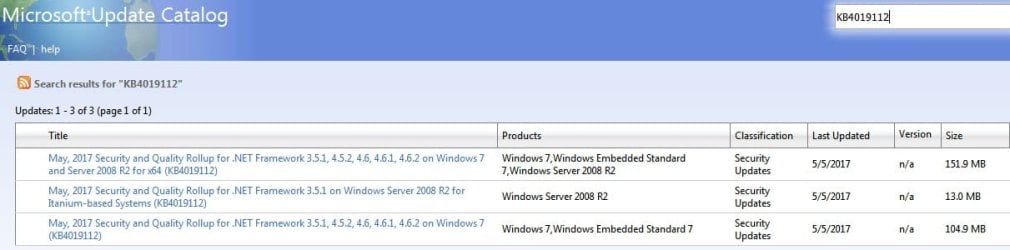
Well, I think the issue may be that the update covers many different versions of NET. When I went to Windows update catalog and entered KB4019112 there were 3 different versions. Interestingly, none were the 77 Mb that Windows Update reported. Clicking on the largest led me to a page with an error, The second largest opened a page with three 3 .exe files with different KB numbers. I had to enter each one in Windows support to determine which I needed. I selected the one appropriate for my system and did a manual install in which all went fine. Windows Update still reported KB4019112 as an important update so I had to hide it.

This was a royal pain in which the descriptions for the different files were vague or non-existent. Here are screenshots of the files I dealt with.
 

Attachments

  • SS02- 14-May-17 16.06.jpg
    SS02- 14-May-17 16.06.jpg
    42.2 KB · Views: 1
  • SS03- 14-May-17 16.09.jpg
    SS03- 14-May-17 16.09.jpg
    17.1 KB · Views: 39

My Computer

Computer type
PC/Desktop
OS
Windows 7 SP1 64 bit
Kb4019112

Same thing here after installing 70 updates on a Client's laptop. Fails only on KB4019112. It is buggy and I will wait for next month's. Only addresses NET Framework anyway. The other three installed perfectly on 4 different laptops. Only trouble with one. If I have trouble next time, I will manually install from update store.
 

My Computer

Computer type
Laptop
Computer Manufacturer/Model Number
Thinkpad Edge E545
OS
Windows 7 64-bit Professional
CPU
AMD A8 5550 2.10 GHz
Memory
2X8GB
Graphics Card(s)
Radian HD Graphics
Hard Drives
320 GB 5400rpm
Antivirus
Norton Security
Browser
IE-11 InPrivate
Well today I saw there was an optional update available (May, 2017 Preview of Quality Rollup for .NET Framework 3.5.1, 4.5.2, 4.6, 4.6.1, 4.6.2 on Windows 7 and Server 2008 R2 for x64 (KB4019288)) and discovered that this too will not install. Same problem as before; the download stalls at a certain percent. So it seems likely that future .NET Framework updates are all going to have the same problem. Good job, Microsoft. You continue to disappoint your users.
 

My Computer

Computer type
PC/Desktop
OS
Windows 7 SP1 64 bit
Thank you for this heads up...
I had downloaded the updates but
will not install them straightaway...:confused:
 

My Computer

Computer type
PC/Desktop
Computer Manufacturer/Model Number
dell
OS
Windows 7 sp1 64 bit
CPU
unknown
Motherboard
unknown
Memory
4 gb
Graphics Card(s)
onboard
Hard Drives
500 gb wd
Antivirus
malwarebytes
Browser
google chrome
Back
Top