Keep getting Default Gateway Not Available Error, Need Help!

tnichols2012

New member
Local time
11:16 PM
Messages
6
Hi all. I am having a horrible problem right now with the default gateway error in windows 7. I am on my laptop which is only 3 months old and has worked perfectly fine until about 3 days ago. I keep losing connection after several minutes, or if I try to stream something online. I am on a wireless connection, connected to the ISP provided modem/router. I have searched everywhere I can for answers on how to fix this problem as it's extremely irritating that I can't stay connected for any determinable length of time. I don't know exactly what information you guys need from me to help so if you can just tell me what you need I'll be more than happy to give it to you. Thanks so much in advance.
 

My Computer

Computer Manufacturer/Model Number
Asus Aspire 7750G-6645
OS
Windows 7 Home Premium 64 bit
CPU
Intel Core i5-2450M
Memory
8GB DDR3
Graphics Card(s)
AMD Radeon HD 7670M
Hard Drives
500GB HDD
Mouse
Logitech Anywhere MX
Hi all. I am having a horrible problem right now with the default gateway error in windows 7. I am on my laptop which is only 3 months old and has worked perfectly fine until about 3 days ago. I keep losing connection after several minutes, or if I try to stream something online. I am on a wireless connection, connected to the ISP provided modem/router. I have searched everywhere I can for answers on how to fix this problem as it's extremely irritating that I can't stay connected for any determinable length of time. I don't know exactly what information you guys need from me to help so if you can just tell me what you need I'll be more than happy to give it to you. Thanks so much in advance.

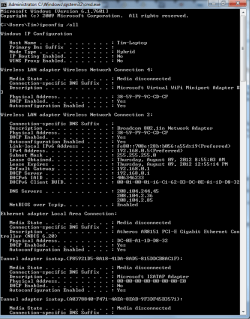
If you can post a screen shot of the ipconfig/all from this machine it would be helpful. :)

http://www.sevenforums.com/tutorials/108982-ip-address-locate-find-your-computer.html
 

My Computer

Computer type
PC/Desktop
Computer Manufacturer/Model Number
Home built
OS
Windows 7 Ult, Windows 8.1 Pro,
CPU
Q9650-4.275GHz, E8600 4.5GHz, E6750-3.8GHz
Motherboard
Evga 780i FTW
Memory
G.Skill PC2 9600 1200Mhz 5 5 5 15 2T
Graphics Card(s)
GTX480
Sound Card
Asus Xonar D2
Monitor(s) Displays
HannsG
Screen Resolution
1680X1050
Hard Drives
GSkill Phoenix Pro 120GB SSD
PSU
ThermalTake Toughpower 1000Watt modular
Case
ThermalTake XaserV
Cooling
Xigmatek S1283
Keyboard
Logitech G15
Mouse
Logitech G9
Internet Speed
T1
Here you go.
 

Attachments

  • IPconfig.PNG
    IPconfig.PNG
    96.6 KB · Views: 48

My Computer

Computer Manufacturer/Model Number
Asus Aspire 7750G-6645
OS
Windows 7 Home Premium 64 bit
CPU
Intel Core i5-2450M
Memory
8GB DDR3
Graphics Card(s)
AMD Radeon HD 7670M
Hard Drives
500GB HDD
Mouse
Logitech Anywhere MX
Well that all looks fine.

How far are you from the router? Signal strength? Could be interference from outside sources (another router in the area on the same channel etc).

I assume you have a good password and are using WPA2 to connect to your router? (Otherwise maybe someone else is using your bandwidth)

Could even be your ISP, try connecting wired and see if the problem goes away.

Finally, it could be malware or the like messing with our connection :/
 

My Computer

Computer Manufacturer/Model Number
Scratch built
OS
Windows 7 x64 Ultimate
CPU
i7 960
Motherboard
Asus P6X58D
Memory
12 Gig Corsair Dominator
Graphics Card(s)
Nvidia 480
Sound Card
Maudio Delta 44 + breakout box
Monitor(s) Displays
Dell UltraSharp U2410 24in and Samsung 21 dual monitors
Screen Resolution
1920x1200 and 1280x1024
Hard Drives
Primary: Intel X-25M G2 160G SSD
Secondary: Segate baracuda 1.0 TB
HDs in AHCI mode.
PSU
Corasair TX850
Case
Cooler Master HAF
Cooling
Corsair H50
Keyboard
Logitech G15 + N52 game pad
Mouse
Logitech MX518
Internet Speed
15kbs down 4.5kbps up
Other Info
WEI 7.6
CPU & RAM 7.6
Graphics 7.9
Hard disk 7.7
I have a full signal strength. I am only about 20 feet away from the router. There are no other routers in the area as our house is completely secluded. Yes I am using WPA2 and a good password to connect. I tried wired and it does connect fine that way. I have run several malware scans and haven't found anything at all so I don't think it's that either. The one thing that I'm thinking might be a problem is that we have a Wii on the other side of the house that up until about 3 or 4 days ago wasn't connected to the internet. We finally got it connected so the kids could watch netflix on it. Could that be the culprit of all this?
 

My Computer

Computer Manufacturer/Model Number
Asus Aspire 7750G-6645
OS
Windows 7 Home Premium 64 bit
CPU
Intel Core i5-2450M
Memory
8GB DDR3
Graphics Card(s)
AMD Radeon HD 7670M
Hard Drives
500GB HDD
Mouse
Logitech Anywhere MX
I have a full signal strength. I am only about 20 feet away from the router. There are no other routers in the area as our house is completely secluded. Yes I am using WPA2 and a good password to connect. I tried wired and it does connect fine that way. I have run several malware scans and haven't found anything at all so I don't think it's that either. The one thing that I'm thinking might be a problem is that we have a Wii on the other side of the house that up until about 3 or 4 days ago wasn't connected to the internet. We finally got it connected so the kids could watch netflix on it. Could that be the culprit of all this?

Ok, thanks for posting the ipconfig, can you please go into Device Manager, expand network and disable the Microsoft virtual WiFi miniport adaptor. After that, test out the connection and let me know if there are any changes. :)
 

My Computer

Computer type
PC/Desktop
Computer Manufacturer/Model Number
Home built
OS
Windows 7 Ult, Windows 8.1 Pro,
CPU
Q9650-4.275GHz, E8600 4.5GHz, E6750-3.8GHz
Motherboard
Evga 780i FTW
Memory
G.Skill PC2 9600 1200Mhz 5 5 5 15 2T
Graphics Card(s)
GTX480
Sound Card
Asus Xonar D2
Monitor(s) Displays
HannsG
Screen Resolution
1680X1050
Hard Drives
GSkill Phoenix Pro 120GB SSD
PSU
ThermalTake Toughpower 1000Watt modular
Case
ThermalTake XaserV
Cooling
Xigmatek S1283
Keyboard
Logitech G15
Mouse
Logitech G9
Internet Speed
T1
Ok I have the Microsoft virtual WiFi miniport adaptor disabled now. I will test things out and report back if I have any more issues.
 

My Computer

Computer Manufacturer/Model Number
Asus Aspire 7750G-6645
OS
Windows 7 Home Premium 64 bit
CPU
Intel Core i5-2450M
Memory
8GB DDR3
Graphics Card(s)
AMD Radeon HD 7670M
Hard Drives
500GB HDD
Mouse
Logitech Anywhere MX
Yup still doing the same thing. It stayed on for about 15 minutes then went right back to the same error again. I'm really getting tired of this :( Since then it's been doing the same thing every few minutes but just now the error also said Security of Firewall may be preventing connection. I don't have any anti-virus installed and Windows Firewall is also disabled because I read that they could be part of the problem. HELP!!!
 
Last edited:

My Computer

Computer Manufacturer/Model Number
Asus Aspire 7750G-6645
OS
Windows 7 Home Premium 64 bit
CPU
Intel Core i5-2450M
Memory
8GB DDR3
Graphics Card(s)
AMD Radeon HD 7670M
Hard Drives
500GB HDD
Mouse
Logitech Anywhere MX
Anyone out there that can help me with this?
 

My Computer

Computer Manufacturer/Model Number
Asus Aspire 7750G-6645
OS
Windows 7 Home Premium 64 bit
CPU
Intel Core i5-2450M
Memory
8GB DDR3
Graphics Card(s)
AMD Radeon HD 7670M
Hard Drives
500GB HDD
Mouse
Logitech Anywhere MX
Back
Top