Keep static IP for each network?

cclloyd9785

Master of Technology
Power User
Local time
6:25 PM
Messages
662
Location
Boston, MA
Is there a way I can keep a different static IP for each network I connect to?

Like on my house, I wanted 192.168.1.200 (Which worked till I connected to a different internet)
And at my friends house, when it connects, it connects with 192.168.1.150.

and as I reconnect to whichever internet, it switches to that IP.
 

My Computer

Computer Manufacturer/Model Number
Toshiba Satellite L505D-S9565
OS
Windows 7 Home Premium x64, Mac OS X 10.6.2 x64
CPU
AMD Athlon X2 Dual-Core 2.1 GHz
Motherboard
Toshiba Built-In with Insyde H20 BIOS 1.40
Memory
4 GB DDR2 800 MHz
Graphics Card(s)
ATI Radeon HD Mobility 3100 Graphics 256MB to 1468 MB Shared
Sound Card
Realtek Mobile ALC272 HD Audio
Monitor(s) Displays
15.6" TFT LCD with TruBrite, Samsung 1080p HDTV
Screen Resolution
1366x768, 1920x1080
Hard Drives
❶:Main: Toshiba 250 GB SATA 5400 RPM
PSU
N/A
Case
N/A
Cooling
Built-in/Open window in winter :P
Keyboard
Built-in
Mouse
Build-in Symantics SmartTouch Pad
Internet Speed
55 MB/sec Down, 9 MB/sec Up
Other Info
❷:Backup: Seagate FreeAgent Desk USB 2.0 5400 RPM
❸:Media: Toshiba 640 GB USB 2.0 5400 RPM Portable Edition
Yes, and it's quite easy to do. Routers and modems we normal users use to connect to Internet normally use IP addresses in series 10.0.X.X, 172.16.X.X or 192.168.X.X. So, for instance your router's IP i.e. your DHCP server address is most probably 192.168.1.1. If you now let's say visited me, you could not join my network keeping your old IP because my DHCP server address is 192.168.2.1

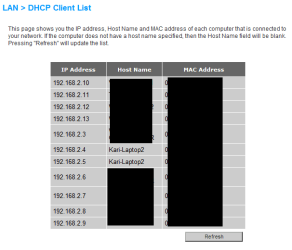
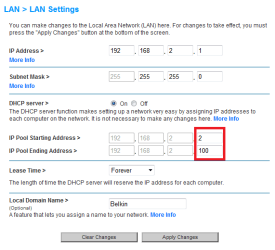
If you didn't have a static IP to connect to my router, it (DHCP server) would then assign you an IP address from my address pool, which I have limited to 99 addresses as this image shows:

LAN_1.png

If you visited me often, we could for instance agree that you can always use 192.168.2.15 when here. You can set a static IP for every network you normally use as for instance I have set this laptop to have these two addresses (WiFi & LAN) when home here in Leipzig:

LAN_2.png

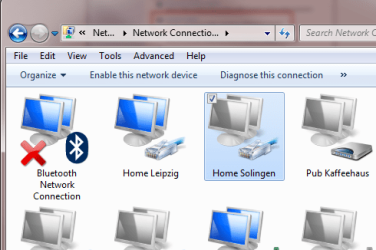
When in our other home, other side of Germany, I have two other static IP's. I also have a static IP to use in my favourite pub; the owner is a friend and let's me use his fast gigabit office network so I don't have to use the slow public WLAN when sitting there with my laptop.

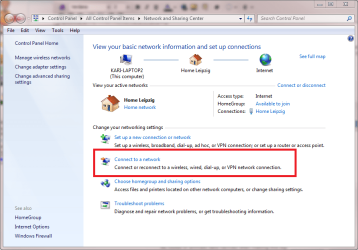
To create a connection for every network you regularly visit, open the Network and Sharing Center, click Connect to a network, and follow the instructions.

LAN_4.png

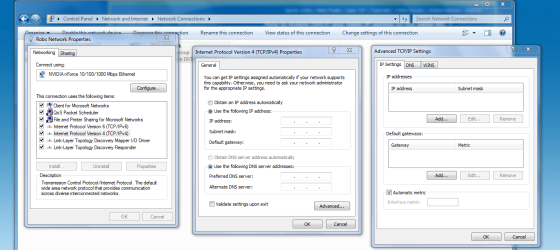
Go then to each connection's properties and set DHCP, DNS and IP info manually. Result is this:

LAN_5.PNG

Kari
 
Last edited:

My Computer

Computer type
Laptop
Computer Manufacturer/Model Number
HP ENVY 17-1150eg
OS
Windows 10 Pro x64 EN-GB
CPU
1.6 GHz Intel Core i7-720QM Processor
Memory
6 GB
Graphics Card(s)
ATI Mobility Radeon HD 5850 Graphics
Sound Card
Beats sound system with integrated subwoofer
Monitor(s) Displays
17" laptop display, 22" LED and 32" Full HD TV through HDMI
Screen Resolution
1600*900 (1), 1920*1080 (2&3)
Hard Drives
Internal: 2 x 500 GB SATA Hard Disk Drive 7200 rpm
External: 2TB for backups, 3TB USB3 network drive for media
Cooling
As Envy runs a bit warm, I have it on a Cooler Master pad
Keyboard
Logitech diNovo Media Desktop Laser (bluetooth)
Mouse
Logitech Performance Mouse MX
Internet Speed
50/10 Mbps VDSL
Antivirus
Windows Defender 4.3.9431.0
Browser
Maxthon 3.5.2., IE11
As Kari said, as long as the router you are connecting to is in the same subnet...

In a private use Class C IP address like the ones you describe are at home and your friends house. 192.168.1.0 is the subnet ID, and most home based routers use either 192.168.1.1 or 192.168.1.254 as their default IP's, and 192.168.1.255 is the broadcast ID for all of the IPs in that subnet. You should be fine setting your static IP on the lappy to say something in the range of 192.168.1.110-120. And connect to most networks fine as that is the most common out there!

If however one of the networks you wish to connect to with that NIC (network adapter) is anthing other than a 192.168.1.??? network you wont connect until you change the card back to a dynamic IP served up by the router or a static IP in that address range... 10.0.0.0 (class A private space)or a 172.16.x.x (class b private space) are typical other ranges used.

Hope that helps explain!
 

My Computer

Computer Manufacturer/Model Number
Homebrew PC - "Alpha_Dawg"
OS
Windows 7 Ultimate 64 bit Steve Ballmer Signature Edition
CPU
Intel Core 2 Quad - Q9550 - 2.83GHz stock - OC'd to 3.6GHz
Motherboard
Gigabyte EP45-UD3P
Memory
4GB DDR2 800MHz (PC6400) OCZ Reaper
Graphics Card(s)
Nvidia GE Force 8800 GTS
Sound Card
Asus Xonar DX
Monitor(s) Displays
Samsung SyncMaster 2333HD
Screen Resolution
1920 x 1080
Hard Drives
WD Caviar Black 750GB - 7200RPM - 32MB cache
WD Caviar Green 1.5TB - 5400RPM - 64MB cache
WD Caviar Green 2.0TB - 5400RPM - 64MB cache
PSU
PC Power & Cooling Silencer 750
Case
Gigabyte 3D Aurora
Cooling
Case is Air - 5ea. 120mm fans (mix of Arctic and Xigmatec)
Keyboard
MS Natural Wireless KB
Mouse
MS Wireless Mouse
Internet Speed
50 mbps down/5 mbps up
Other Info
AVerMedia - AVerTVHD G2 Dual Tuner Card
Just finished editing my previous post. This time I really noticed what can happen, how wrong info you can give, when reading the question wrong.

OK, my excuse is whisky ;) Anyway, I first read the question to be if it would be possible always, everywhere use the same static IP. Posted a reply, and then noticed that I had the question completely wrong.

This rant is meant to be a public apology; if someone read my first reply, he / she could have got completely wrong idea.

Sorry. No more whisky tonight. Maybe one or two but no more...
 

My Computer

Computer type
Laptop
Computer Manufacturer/Model Number
HP ENVY 17-1150eg
OS
Windows 10 Pro x64 EN-GB
CPU
1.6 GHz Intel Core i7-720QM Processor
Memory
6 GB
Graphics Card(s)
ATI Mobility Radeon HD 5850 Graphics
Sound Card
Beats sound system with integrated subwoofer
Monitor(s) Displays
17" laptop display, 22" LED and 32" Full HD TV through HDMI
Screen Resolution
1600*900 (1), 1920*1080 (2&3)
Hard Drives
Internal: 2 x 500 GB SATA Hard Disk Drive 7200 rpm
External: 2TB for backups, 3TB USB3 network drive for media
Cooling
As Envy runs a bit warm, I have it on a Cooler Master pad
Keyboard
Logitech diNovo Media Desktop Laser (bluetooth)
Mouse
Logitech Performance Mouse MX
Internet Speed
50/10 Mbps VDSL
Antivirus
Windows Defender 4.3.9431.0
Browser
Maxthon 3.5.2., IE11
Not trying to steal the op's thread but it's relevant but is it possible to do something similar by creating a .bat file eg. "friends connection" which contains

netsh interface ip set address name="Wireless Connection" source=static addr=192.168.0.10 mask=255.255.255.0
netsh interface ip set address name="Wireless Connection" gateway=192.168.0.1 gwmetric=0
netsh interface ip set dns name="Wireless Connection" source=static addr=192.168.0.1


And another .bat file eg. "Home connection" which contains

netsh interface ip set address name="Wireless Connection" source=static addr=192.168.1.10 mask=255.255.255.0
netsh interface ip set address name="Wireless Connection" gateway=192.168.1.1 gwmetric=0
netsh interface ip set dns name="Wireless Connection" source=static addr=192.168.1.1


I haven't played with this but in theory it should work ?
 

My Computer

Computer type
PC/Desktop
Computer Manufacturer/Model Number
Self Built
OS
Windows 7 Ultimate 64bit
CPU
AMD Phenom Quad core 9950 black edition
Motherboard
Gigabyte
Memory
16Gb
Graphics Card(s)
2x XFX Radeon 5850
Sound Card
PCI Express X-Fi Titanium / Logitech G35
Monitor(s) Displays
2x HP 2410i
Screen Resolution
1920x1080
Hard Drives
2x 500Gb Seagate
1x 300Gb Seagate
1x 1Tb Seagate
2x 1Tb Hitatchi
PSU
Jean Tech Storm 700W
Case
Cooler Master COSMOS S
Cooling
Akasa Evo Blue Pro
Keyboard
Logitech G15
Mouse
Mad Catz M.M.O. 7
Internet Speed
12mb
Is there a way I can keep a different static IP for each network I connect to?

Like on my house, I wanted 192.168.1.200 (Which worked till I connected to a different internet)
And at my friends house, when it connects, it connects with 192.168.1.150.

and as I reconnect to whichever internet, it switches to that IP.

His and his friends are on the same subnet... 192.168.1.x... a static IP in that space will work for both networks! Just set it to anything in between .2 and .253 and it should never need to be changed for most private routers.
 

My Computer

Computer Manufacturer/Model Number
Homebrew PC - "Alpha_Dawg"
OS
Windows 7 Ultimate 64 bit Steve Ballmer Signature Edition
CPU
Intel Core 2 Quad - Q9550 - 2.83GHz stock - OC'd to 3.6GHz
Motherboard
Gigabyte EP45-UD3P
Memory
4GB DDR2 800MHz (PC6400) OCZ Reaper
Graphics Card(s)
Nvidia GE Force 8800 GTS
Sound Card
Asus Xonar DX
Monitor(s) Displays
Samsung SyncMaster 2333HD
Screen Resolution
1920 x 1080
Hard Drives
WD Caviar Black 750GB - 7200RPM - 32MB cache
WD Caviar Green 1.5TB - 5400RPM - 64MB cache
WD Caviar Green 2.0TB - 5400RPM - 64MB cache
PSU
PC Power & Cooling Silencer 750
Case
Gigabyte 3D Aurora
Cooling
Case is Air - 5ea. 120mm fans (mix of Arctic and Xigmatec)
Keyboard
MS Natural Wireless KB
Mouse
MS Wireless Mouse
Internet Speed
50 mbps down/5 mbps up
Other Info
AVerMedia - AVerTVHD G2 Dual Tuner Card
Hiya Darryl

Thanks for the reply, but like I said I didn't want to steal the op's thread, I was just wanting to know that if the 2 locations were on a different subnet would a bat file like I showed work.

soz for the confussion ;)
 

My Computer

Computer type
PC/Desktop
Computer Manufacturer/Model Number
Self Built
OS
Windows 7 Ultimate 64bit
CPU
AMD Phenom Quad core 9950 black edition
Motherboard
Gigabyte
Memory
16Gb
Graphics Card(s)
2x XFX Radeon 5850
Sound Card
PCI Express X-Fi Titanium / Logitech G35
Monitor(s) Displays
2x HP 2410i
Screen Resolution
1920x1080
Hard Drives
2x 500Gb Seagate
1x 300Gb Seagate
1x 1Tb Seagate
2x 1Tb Hitatchi
PSU
Jean Tech Storm 700W
Case
Cooler Master COSMOS S
Cooling
Akasa Evo Blue Pro
Keyboard
Logitech G15
Mouse
Mad Catz M.M.O. 7
Internet Speed
12mb
Me too, I am sorry.

I tried to cover every possible DHCP and subnet, thus telling how to do it for every network which he visits separately. Of course if if it's only question of home and one other place and the subnet is the same, then it's enough to have just one static address.

I repeat my excuse: CEO of our household gave permission to leave the pills for one night and have some whisky... :o
 

My Computer

Computer type
Laptop
Computer Manufacturer/Model Number
HP ENVY 17-1150eg
OS
Windows 10 Pro x64 EN-GB
CPU
1.6 GHz Intel Core i7-720QM Processor
Memory
6 GB
Graphics Card(s)
ATI Mobility Radeon HD 5850 Graphics
Sound Card
Beats sound system with integrated subwoofer
Monitor(s) Displays
17" laptop display, 22" LED and 32" Full HD TV through HDMI
Screen Resolution
1600*900 (1), 1920*1080 (2&3)
Hard Drives
Internal: 2 x 500 GB SATA Hard Disk Drive 7200 rpm
External: 2TB for backups, 3TB USB3 network drive for media
Cooling
As Envy runs a bit warm, I have it on a Cooler Master pad
Keyboard
Logitech diNovo Media Desktop Laser (bluetooth)
Mouse
Logitech Performance Mouse MX
Internet Speed
50/10 Mbps VDSL
Antivirus
Windows Defender 4.3.9431.0
Browser
Maxthon 3.5.2., IE11
Me too, I am sorry.

I tried to cover every possible DHCP and subnet, thus telling how to do it for every network which he visits separately. Of course if if it's only question of home and one other place and the subnet is the same, then it's enough to have just one static address.

I repeat my excuse: CEO of our household gave permission to leave the pills for one night and have some whisky... :o

TUI??? Typing Under the Influence??? LOL! (d)
 

My Computer

Computer Manufacturer/Model Number
Homebrew PC - "Alpha_Dawg"
OS
Windows 7 Ultimate 64 bit Steve Ballmer Signature Edition
CPU
Intel Core 2 Quad - Q9550 - 2.83GHz stock - OC'd to 3.6GHz
Motherboard
Gigabyte EP45-UD3P
Memory
4GB DDR2 800MHz (PC6400) OCZ Reaper
Graphics Card(s)
Nvidia GE Force 8800 GTS
Sound Card
Asus Xonar DX
Monitor(s) Displays
Samsung SyncMaster 2333HD
Screen Resolution
1920 x 1080
Hard Drives
WD Caviar Black 750GB - 7200RPM - 32MB cache
WD Caviar Green 1.5TB - 5400RPM - 64MB cache
WD Caviar Green 2.0TB - 5400RPM - 64MB cache
PSU
PC Power & Cooling Silencer 750
Case
Gigabyte 3D Aurora
Cooling
Case is Air - 5ea. 120mm fans (mix of Arctic and Xigmatec)
Keyboard
MS Natural Wireless KB
Mouse
MS Wireless Mouse
Internet Speed
50 mbps down/5 mbps up
Other Info
AVerMedia - AVerTVHD G2 Dual Tuner Card
Darryl, don't tell other geeks here but it's not the first time... ;)

Seriously, once or twice I have waked up with a really bad case of hangover, read what I'd posted the night before and then deleted almost everything from past 24 hours. Happens...
 

My Computer

Computer type
Laptop
Computer Manufacturer/Model Number
HP ENVY 17-1150eg
OS
Windows 10 Pro x64 EN-GB
CPU
1.6 GHz Intel Core i7-720QM Processor
Memory
6 GB
Graphics Card(s)
ATI Mobility Radeon HD 5850 Graphics
Sound Card
Beats sound system with integrated subwoofer
Monitor(s) Displays
17" laptop display, 22" LED and 32" Full HD TV through HDMI
Screen Resolution
1600*900 (1), 1920*1080 (2&3)
Hard Drives
Internal: 2 x 500 GB SATA Hard Disk Drive 7200 rpm
External: 2TB for backups, 3TB USB3 network drive for media
Cooling
As Envy runs a bit warm, I have it on a Cooler Master pad
Keyboard
Logitech diNovo Media Desktop Laser (bluetooth)
Mouse
Logitech Performance Mouse MX
Internet Speed
50/10 Mbps VDSL
Antivirus
Windows Defender 4.3.9431.0
Browser
Maxthon 3.5.2., IE11
Hiya Darryl

Thanks for the reply, but like I said I didn't want to steal the op's thread, I was just wanting to know that if the 2 locations were on a different subnet would a bat file like I showed work.

soz for the confussion ;)

Yes, it should work!

And to the OP... a static will work as long as both your and friends routers use the same IP address because you will have to put that IP (routers) in as the Gateway and DNS server if you go static. And any other private networks that use the same IP for their router!

Personally, I love Win7 and it's location aware network settings.
Control panel-->Network and Internet-->Manage Wireless Networks--> Add.

I simply add a network into my laptop utilizing that networks SSID, encryption type, passphrase, etc. Then anytime Im in range of that network I connect and have access to its Internet, printers, shares, etc. All the WEP, WPA, and WPA2 encryption is remembered and I dont have to do anything but fire up the laptop and Im connected! Makes life a breeze when moving from network to network!
 

My Computer

Computer Manufacturer/Model Number
Homebrew PC - "Alpha_Dawg"
OS
Windows 7 Ultimate 64 bit Steve Ballmer Signature Edition
CPU
Intel Core 2 Quad - Q9550 - 2.83GHz stock - OC'd to 3.6GHz
Motherboard
Gigabyte EP45-UD3P
Memory
4GB DDR2 800MHz (PC6400) OCZ Reaper
Graphics Card(s)
Nvidia GE Force 8800 GTS
Sound Card
Asus Xonar DX
Monitor(s) Displays
Samsung SyncMaster 2333HD
Screen Resolution
1920 x 1080
Hard Drives
WD Caviar Black 750GB - 7200RPM - 32MB cache
WD Caviar Green 1.5TB - 5400RPM - 64MB cache
WD Caviar Green 2.0TB - 5400RPM - 64MB cache
PSU
PC Power & Cooling Silencer 750
Case
Gigabyte 3D Aurora
Cooling
Case is Air - 5ea. 120mm fans (mix of Arctic and Xigmatec)
Keyboard
MS Natural Wireless KB
Mouse
MS Wireless Mouse
Internet Speed
50 mbps down/5 mbps up
Other Info
AVerMedia - AVerTVHD G2 Dual Tuner Card
Is there a way I can keep a different static IP for each network I connect to?

Like on my house, I wanted 192.168.1.200 (Which worked till I connected to a different internet)
And at my friends house, when it connects, it connects with 192.168.1.150.

and as I reconnect to whichever internet, it switches to that IP.

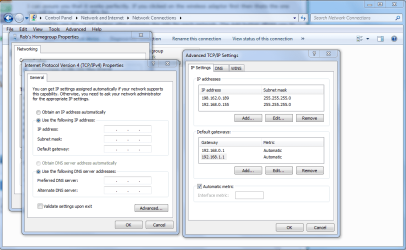
The best and easiest way to do this is to list the different connections "Ip's, DNS, subnet, gateways" in your advanced TCP/ip properties window. You can even list more than one subnet there. Using this window keeps you from having to designate new settings for each connection. You can just list them one after the other.
 

Attachments

  • Advanced TCP-IP settings.PNG
    Advanced TCP-IP settings.PNG
    238.2 KB · Views: 66

My Computer

Computer type
PC/Desktop
Computer Manufacturer/Model Number
Home built
OS
Windows 7 Ult, Windows 8.1 Pro,
CPU
Q9650-4.275GHz, E8600 4.5GHz, E6750-3.8GHz
Motherboard
Evga 780i FTW
Memory
G.Skill PC2 9600 1200Mhz 5 5 5 15 2T
Graphics Card(s)
GTX480
Sound Card
Asus Xonar D2
Monitor(s) Displays
HannsG
Screen Resolution
1680X1050
Hard Drives
GSkill Phoenix Pro 120GB SSD
PSU
ThermalTake Toughpower 1000Watt modular
Case
ThermalTake XaserV
Cooling
Xigmatek S1283
Keyboard
Logitech G15
Mouse
Logitech G9
Internet Speed
T1
The best and easiest way to do this is to list the different connections "Ip's, DNS, subnet, gateways" in your advanced TCP/ip properties window. You can even list more than one subnet there. Using this window keeps you from having to designate new settings for each connection. You can just list them one after the other.
Simple, elegant and easy. A good tip.
 

My Computer

Computer type
Laptop
Computer Manufacturer/Model Number
HP ENVY 17-1150eg
OS
Windows 10 Pro x64 EN-GB
CPU
1.6 GHz Intel Core i7-720QM Processor
Memory
6 GB
Graphics Card(s)
ATI Mobility Radeon HD 5850 Graphics
Sound Card
Beats sound system with integrated subwoofer
Monitor(s) Displays
17" laptop display, 22" LED and 32" Full HD TV through HDMI
Screen Resolution
1600*900 (1), 1920*1080 (2&3)
Hard Drives
Internal: 2 x 500 GB SATA Hard Disk Drive 7200 rpm
External: 2TB for backups, 3TB USB3 network drive for media
Cooling
As Envy runs a bit warm, I have it on a Cooler Master pad
Keyboard
Logitech diNovo Media Desktop Laser (bluetooth)
Mouse
Logitech Performance Mouse MX
Internet Speed
50/10 Mbps VDSL
Antivirus
Windows Defender 4.3.9431.0
Browser
Maxthon 3.5.2., IE11
TLDL all posts. (Also dont want to use any other software)

I sorta see what you guys are saying, but the main reason I want this is even though we both had 192.168.1.1 as the subnet mask, 192.168.1.200 didnt work on my friends internet (it said DCHP or something wasnt enabled) and 192.168.1.150 doesnt work on my internet (Because its already in use by my xbox.)

It connects to the router, but I dont get internet.


And another thing, I cant find that page that chev65 posted. Is it possible because I use wireless or something?
 

My Computer

Computer Manufacturer/Model Number
Toshiba Satellite L505D-S9565
OS
Windows 7 Home Premium x64, Mac OS X 10.6.2 x64
CPU
AMD Athlon X2 Dual-Core 2.1 GHz
Motherboard
Toshiba Built-In with Insyde H20 BIOS 1.40
Memory
4 GB DDR2 800 MHz
Graphics Card(s)
ATI Radeon HD Mobility 3100 Graphics 256MB to 1468 MB Shared
Sound Card
Realtek Mobile ALC272 HD Audio
Monitor(s) Displays
15.6" TFT LCD with TruBrite, Samsung 1080p HDTV
Screen Resolution
1366x768, 1920x1080
Hard Drives
❶:Main: Toshiba 250 GB SATA 5400 RPM
PSU
N/A
Case
N/A
Cooling
Built-in/Open window in winter :P
Keyboard
Built-in
Mouse
Build-in Symantics SmartTouch Pad
Internet Speed
55 MB/sec Down, 9 MB/sec Up
Other Info
❷:Backup: Seagate FreeAgent Desk USB 2.0 5400 RPM
❸:Media: Toshiba 640 GB USB 2.0 5400 RPM Portable Edition
TLDL all posts. (Also dont want to use any other software)

I sorta see what you guys are saying, but the main reason I want this is even though we both had 192.168.1.1 as the subnet mask, 192.168.1.200 didnt work on my friends internet (it said DCHP or something wasnt enabled) and 192.168.1.150 doesnt work on my internet (Because its already in use by my xbox.)

It connects to the router, but I dont get internet.


And another thing, I cant find that page that chev65 posted. Is it possible because I use wireless or something?

The page is there but I didn't post the exact pathway, wireless or wired it works for both.

In the first window right click the IPv4 line and choose properties, then click the setting to "use the following IP address" this will allow you to choose a static IP in the advanced TCP/IP properties. You can do the same for the DNS server although it usually works best to let the router do that part for you.

After that choose the "Advanced" setting which gets you to the TCP/ip settings window. You then choose the "Add" button to add info from the network you need to set up.

Click add again to set up the next network, you can list the networks one after the other.

It works really well and will retain your static IP's and other settings from each network. :)
 

My Computer

Computer type
PC/Desktop
Computer Manufacturer/Model Number
Home built
OS
Windows 7 Ult, Windows 8.1 Pro,
CPU
Q9650-4.275GHz, E8600 4.5GHz, E6750-3.8GHz
Motherboard
Evga 780i FTW
Memory
G.Skill PC2 9600 1200Mhz 5 5 5 15 2T
Graphics Card(s)
GTX480
Sound Card
Asus Xonar D2
Monitor(s) Displays
HannsG
Screen Resolution
1680X1050
Hard Drives
GSkill Phoenix Pro 120GB SSD
PSU
ThermalTake Toughpower 1000Watt modular
Case
ThermalTake XaserV
Cooling
Xigmatek S1283
Keyboard
Logitech G15
Mouse
Logitech G9
Internet Speed
T1
Yea but it doesnt let me do that for individule networks. It only lets me do it for my wireless adapter for all networks at once.
 

My Computer

Computer Manufacturer/Model Number
Toshiba Satellite L505D-S9565
OS
Windows 7 Home Premium x64, Mac OS X 10.6.2 x64
CPU
AMD Athlon X2 Dual-Core 2.1 GHz
Motherboard
Toshiba Built-In with Insyde H20 BIOS 1.40
Memory
4 GB DDR2 800 MHz
Graphics Card(s)
ATI Radeon HD Mobility 3100 Graphics 256MB to 1468 MB Shared
Sound Card
Realtek Mobile ALC272 HD Audio
Monitor(s) Displays
15.6" TFT LCD with TruBrite, Samsung 1080p HDTV
Screen Resolution
1366x768, 1920x1080
Hard Drives
❶:Main: Toshiba 250 GB SATA 5400 RPM
PSU
N/A
Case
N/A
Cooling
Built-in/Open window in winter :P
Keyboard
Built-in
Mouse
Build-in Symantics SmartTouch Pad
Internet Speed
55 MB/sec Down, 9 MB/sec Up
Other Info
❷:Backup: Seagate FreeAgent Desk USB 2.0 5400 RPM
❸:Media: Toshiba 640 GB USB 2.0 5400 RPM Portable Edition

My Computer

Computer type
PC/Desktop
Computer Manufacturer/Model Number
Dell OP7010
OS
Windows 7 Enterprise (x64); Windows Server 2008 R2 (x64)
Memory
16GB
Monitor(s) Displays
4 Dell 24" LCD
Screen Resolution
1280x1024
Keyboard
Dell
Mouse
Dell Optical
Internet Speed
40meg
Yea but it doesnt let me do that for individule networks. It only lets me do it for my wireless adapter for all networks at once.

I can assure you that it works absolutely perfectly.

If you clicked on the wireless adaptor first then thats the one you will be adding static IP's for. If you need to add extra static IP's for your wired eithernet adaptor then click on the IPv4 properties of your wired connection adaptor. You can add more than one static IP for each adaptor as required.

You need to use the "Add" button after entering the info for each network. The Add button allows you to enter next static IP.

To make this perfectly clear I have set up two different default gateways and IP's as an example. You would only need to enter the second default gateway if the default gateway on the other router is differerent than the first one. :D

I can't think of any other way to explain this better. Hope this helps you out cclloyd.
 

Attachments

  • Advanced TCP-ip for two addresses.PNG
    Advanced TCP-ip for two addresses.PNG
    205.7 KB · Views: 33

My Computer

Computer type
PC/Desktop
Computer Manufacturer/Model Number
Home built
OS
Windows 7 Ult, Windows 8.1 Pro,
CPU
Q9650-4.275GHz, E8600 4.5GHz, E6750-3.8GHz
Motherboard
Evga 780i FTW
Memory
G.Skill PC2 9600 1200Mhz 5 5 5 15 2T
Graphics Card(s)
GTX480
Sound Card
Asus Xonar D2
Monitor(s) Displays
HannsG
Screen Resolution
1680X1050
Hard Drives
GSkill Phoenix Pro 120GB SSD
PSU
ThermalTake Toughpower 1000Watt modular
Case
ThermalTake XaserV
Cooling
Xigmatek S1283
Keyboard
Logitech G15
Mouse
Logitech G9
Internet Speed
T1
Sorry but I forgot to add another file that goes along with my last post. If you want to resort back to a "dhcp" setting then you need to create a .bat file eg. (my dhcp) which contains the lines

netsh interface ip set address name="wireless Connection" dhcp
netsh interface ip set dns name="Wireless Connection" dhcp


* please note

"wireless connection" is only used for the wlan if you want to create .bat files for the wired connection then substitute the "wireless connection" (or what ever yours is called) with "Local Area Connection" (or what ever yours is called)
 

My Computer

Computer type
PC/Desktop
Computer Manufacturer/Model Number
Self Built
OS
Windows 7 Ultimate 64bit
CPU
AMD Phenom Quad core 9950 black edition
Motherboard
Gigabyte
Memory
16Gb
Graphics Card(s)
2x XFX Radeon 5850
Sound Card
PCI Express X-Fi Titanium / Logitech G35
Monitor(s) Displays
2x HP 2410i
Screen Resolution
1920x1080
Hard Drives
2x 500Gb Seagate
1x 300Gb Seagate
1x 1Tb Seagate
2x 1Tb Hitatchi
PSU
Jean Tech Storm 700W
Case
Cooler Master COSMOS S
Cooling
Akasa Evo Blue Pro
Keyboard
Logitech G15
Mouse
Mad Catz M.M.O. 7
Internet Speed
12mb
Back
Top