Solved Kernel-Power error ID 41 (task 63) causing total PC freeze.

pczoran

New member
Local time
10:46 AM
Messages
15
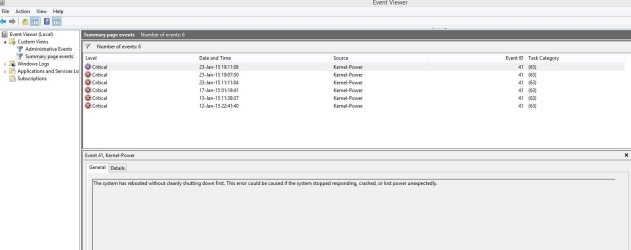
Constantly Kernel-Power error ID 41 (task 63) causing total PC freeze. I installed the new system several times with new drivers always. I changed the power supply, motherboard and still nothing ...

My PC configuration:

CPU: AMD FX 9590
GPU: SAPPHIRE VAPOR-X R9 280X
MB: GIGABYTE GA-990FXA-UD7 (rev. 3.0)
PSU: Cooler master m2 silent pro 1000w
RAM: 8GB ddr3 MUSHKIN REDLINE, 1866MHz
CPU cooler: Zalman cnps14x
HDD: 2 x 2tb
SSD: 120gb
OS: Windows 8.1 Pro

I attached below my report using DM Log Collector, please someone help me...
 

Attachments
My Computer My Computer

At a glance

Windows 8.1 Pro x64Amd FX 9590MUSHKIN REDLINE 8gb 1866MHzSAPPHIRE VAPOR-X R9 280X
Computer type
PC/Desktop
OS
Windows 8.1 Pro x64
CPU
Amd FX 9590
Motherboard
Gigabyte GA-990FXA-UD7 rev.3
Memory
MUSHKIN REDLINE 8gb 1866MHz
Graphics Card(s)
SAPPHIRE VAPOR-X R9 280X
Hard Drives
1. HDD: Hitachi HDS723020BLA642 2tb
2. HDD: WDC WD20EARS-00J99B0 2tb
3. SSD: Corsair Force 3 SSD 120gb
Antivirus
Eset Smart Security 8
Browser
Google Chrome
An event 41, Kernel Power is abnormal shutdown. It may be accompanied by a BSOD but that is not the fact all the times.

Apparently it is not a BSOD issue. Have you experienced BSODs? Let us know.
notesmall1.png
Please do not post anything other than Blue Screen Of Death problems in this section.
 

My Computer My Computer

At a glance

Microsoft Windows 10 Pro Insider Preview 64-bitIntel(R) Core(TM) i3-4130 CPU @ 3.40GHzCorsair Vengence 4GB x2 (8.00GB Dual-Channel ...2047MB GeForce GTS 450 (ZOTAC International)
Computer type
PC/Desktop
Computer Manufacturer/Model Number
Self Assembled
OS
Microsoft Windows 10 Pro Insider Preview 64-bit
CPU
Intel(R) Core(TM) i3-4130 CPU @ 3.40GHz
Motherboard
Gigabyte Technology Co., Ltd. B85M-D3H
Memory
Corsair Vengence 4GB x2 (8.00GB Dual-Channel DDR3 @ 798MHz)
Graphics Card(s)
2047MB GeForce GTS 450 (ZOTAC International)
Sound Card
Onboard (Realtek High Definition Audio)
Monitor(s) Displays
LG Flatron E2040T
Screen Resolution
1600x900
Hard Drives
Western Digital 1 TB
Seagate 500 GB
PSU
Corsair VS550
Case
Cooler Master K380
Cooling
Cooler Master Seidon 120V Plus
Keyboard
Logitech MK260r
Mouse
Logitech MK260r
Internet Speed
PMPL Broadband
Antivirus
Windows Defender + MBAM
Browser
Firefox
Other Info
Dell Studio 15" Laptop
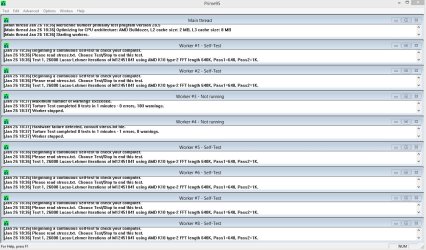
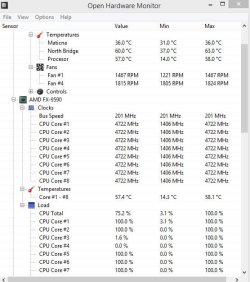
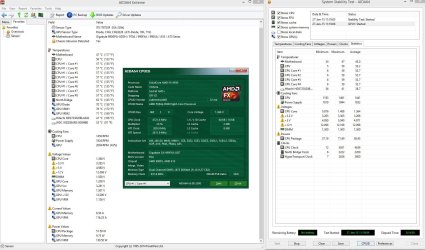
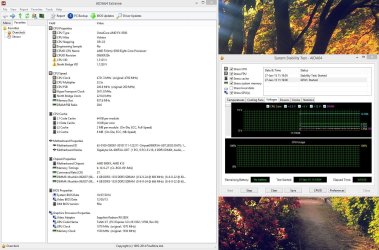
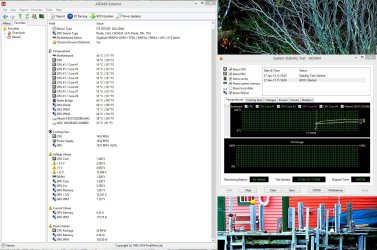
Here is some new screen capture from today. After about 30min stress test two cores stoped to work, I cleaned the ram modules and invests on the system where the modules are going with spray for electrical contacts. After 50min test system or Windows was not freeze at all. Only these two core stop working ... If you have any advice, please tell me ... Temp after 50min prime95 stress test was: cpu 57, mb 36c and north bridge 60c....
 

Attachments

  • Capture.JPG
    Capture.JPG
    181.9 KB · Views: 6
  • Capture 2.JPG
    Capture 2.JPG
    60.2 KB · Views: 59

My Computer My Computer

At a glance

Windows 8.1 Pro x64Amd FX 9590MUSHKIN REDLINE 8gb 1866MHzSAPPHIRE VAPOR-X R9 280X
Computer type
PC/Desktop
OS
Windows 8.1 Pro x64
CPU
Amd FX 9590
Motherboard
Gigabyte GA-990FXA-UD7 rev.3
Memory
MUSHKIN REDLINE 8gb 1866MHz
Graphics Card(s)
SAPPHIRE VAPOR-X R9 280X
Hard Drives
1. HDD: Hitachi HDS723020BLA642 2tb
2. HDD: WDC WD20EARS-00J99B0 2tb
3. SSD: Corsair Force 3 SSD 120gb
Antivirus
Eset Smart Security 8
Browser
Google Chrome
PCZoram mate hello and welcome now for starters I would like to see the PSU readings see this
Using HW Info
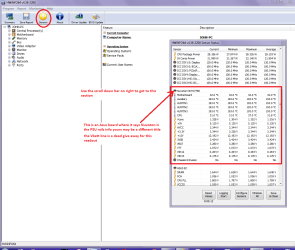
You can test the volts on the PSU with HW Info HWiNFO, HWiNFO32/64 - Download < download the right bit version and close the right hand window select Sensors and scroll down to the power section where you will see what the volts are doing see my pic.
The original right hand window shows the machine running and is handy for that but for looking at the components in some detail close it and use the main left hand side panel
FOR OTHER COMPONENTS
Open each + down into the component itself and then click on it - in the right hand side will appear all sorts of details including brands speeds and other essential info that device. See pic for example.
 

Attachments

  • HW INFO DESKTOP PSU.PNG
    HW INFO DESKTOP PSU.PNG
    49.8 KB · Views: 5

My Computer My Computer

At a glance

Desk1 7 Home Prem / Desk2 10 Pro / Main lap A...Desk1 i5 3750K / Laptop i7 GTX 860M / Desk2 i...Desk1 8GB (1866) / Desk2 16GB (1333) / Laptop...Desk 1& 2NVidia GTX 650 & Laptops on board Intel
Computer type
PC/Desktop
Computer Manufacturer/Model Number
Own build (new) Desk1 / Asus ROG Win 7 / Desk2 1st build
OS
Desk1 7 Home Prem / Desk2 10 Pro / Main lap Asus ROG 10 Pro 2 laptop Toshiba 7 Pro Asus P2520 7 & 10
CPU
Desk1 i5 3750K / Laptop i7 GTX 860M / Desk2 i5 2500
Motherboard
Desk1 Asus P877-V / Desk2 Gigabyte H67 UD3H / Laptop ?
Memory
Desk1 8GB (1866) / Desk2 16GB (1333) / Laptop 8Gb DDR3
Graphics Card(s)
Desk 1& 2NVidia GTX 650 & Laptops on board Intel
Sound Card
Desk 1 & 2 -XONAR DG Realtek High Def audio Laptop
Monitor(s) Displays
Desk 1 Benq HD 2450 / Desk2 Philips 24" / Laptop 17.5"
Screen Resolution
1920x1080 D1 & D2 & Laptop 1
Hard Drives
Desk1 Samsung 120GB 830 SSD
Asus ROG 256GB 850 Pro SSD
Desk2 Samsung 840 256 SSD
Toshiba 120GB EVO
PSU
Desk 1 Corsair HX 1050/ Laptop ? / Desk 2 Corsair HX 650
Case
Desk 1 Cooler HAF XM ? Toshiba laptop / Desk2 Coolermaster
Cooling
Fans on all Desk1 -2 Desk2 - all Coolermasters 5 Laptop ?
Keyboard
Desk 1 MS Sidewinder X6 Desk 2 MS Sidewinder X 4
Mouse
Desk 1&2 - Gigabyte MS 900 gamer - laptop - Logitec wireless
Internet Speed
ADSL2+
Other Info
One other Desktop (tester) and spare Toshba laptop both with SSD's
Running Kaspersky 2016 ISS on all machines config'd identically
Logitec audio stereo systems on each machine (x3)
Canon MG5250MFC
Router/modem TP-Link running WPA2SK
In the Prime95 folder there should be some type of report or log. If you can find it, zip it up and upload it.

Also please go into bios and see what your sata controller is set to and look at your ram timings, frequency and voltage. Then set your bios to optimized defaults. after it is at optimized defaults, set your ram as it is now, set your sata controller as it is right now, set the boot order. Do nothing else, save and exit.

In Windows, if you don't already have it, download CPUz Download CPU-Z - MajorGeeks ( watch out for the add ons they want to give you) Please run cpuz and post screenshots
of the CPU, mainboard, memory and SPD tabs, (but just the ones with ram installed.) you can select each dimm slot from the dropdown in the upper left of the SPD screen)

Also, then run Prime95 with HWMonitor as ICIT2LOL showed and cpuz open on the CPU or main page. Then post a screenshot of all of those together after about an hour.
 

My Computers My Computers

  • At a glance

    Windows 11 ProRyzen 9 5900X32GB G Skill DDR4-3600EVGA RTX 3080 FTW 3 Ultra
    Computer type
    PC/Desktop
    Computer Manufacturer/Model Number
    ALWAYS UNDER CONSTRUCTION
    OS
    Windows 11 Pro
    CPU
    Ryzen 9 5900X
    Motherboard
    Asus X570 Crosshair Viii Hero
    Memory
    32GB G Skill DDR4-3600
    Graphics Card(s)
    EVGA RTX 3080 FTW 3 Ultra
    Sound Card
    On Board/Sennheiser PC37X Headset
    Monitor(s) Displays
    3 X Asus 27"
    Screen Resolution
    2560x1440
    Hard Drives
    2 X 1 TB NVME drives
    PSU
    EVGA 850
    Case
    Phanteks Eclipse P400A
    Cooling
    EVGA 280 AIO
    Keyboard
    Logitech G510s/ Logitech G13
    Mouse
    Logitech G502
    Internet Speed
    24/1
    Antivirus
    ESET/MBAM Pro/SAS Pro
    Browser
    Chrome/ Firefox/ Edge
  • At a glance

    Windows 11 ProIntel Ultra 9 288V32 GB LPDDR5X 8533
    Computer type
    Laptop
    System Manufacturer/Model Number
    Dell 16 Plus
    OS
    Windows 11 Pro
    CPU
    Intel Ultra 9 288V
    Memory
    32 GB LPDDR5X 8533
    Monitor(s) Displays
    16" Mini-LED HDR600 Touch 90 Hz
    Screen Resolution
    2560X1600
    Hard Drives
    1 TB NVME
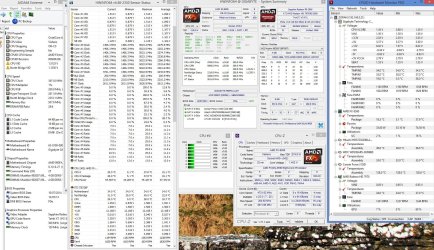
Comp hold out stress test max 20min and then restarts. Here are screenshots of the test result .. I hope that you have necessary information. Ram timings is 9-10-9-27 and in bios is like that...
 

Attachments

  • pc without test.JPG
    pc without test.JPG
    432.8 KB · Views: 9
  • pc test 3.JPG
    pc test 3.JPG
    209 KB · Views: 3
  • pc test 2.JPG
    pc test 2.JPG
    247.1 KB · Views: 0
  • pc test 1.JPG
    pc test 1.JPG
    252.1 KB · Views: 2

My Computer My Computer

At a glance

Windows 8.1 Pro x64Amd FX 9590MUSHKIN REDLINE 8gb 1866MHzSAPPHIRE VAPOR-X R9 280X
Computer type
PC/Desktop
OS
Windows 8.1 Pro x64
CPU
Amd FX 9590
Motherboard
Gigabyte GA-990FXA-UD7 rev.3
Memory
MUSHKIN REDLINE 8gb 1866MHz
Graphics Card(s)
SAPPHIRE VAPOR-X R9 280X
Hard Drives
1. HDD: Hitachi HDS723020BLA642 2tb
2. HDD: WDC WD20EARS-00J99B0 2tb
3. SSD: Corsair Force 3 SSD 120gb
Antivirus
Eset Smart Security 8
Browser
Google Chrome
I don't see the cpuz of the memory and SPD tabs, but if you look at the top of the page on your last screenshot, if those are correct, your PSU is shot. Every one of the voltages are way too low and way out of specs. Please go into bios and tell me the values of your +12V, +5V and +3.3V.
 

My Computers My Computers

  • At a glance

    Windows 11 ProRyzen 9 5900X32GB G Skill DDR4-3600EVGA RTX 3080 FTW 3 Ultra
    Computer type
    PC/Desktop
    Computer Manufacturer/Model Number
    ALWAYS UNDER CONSTRUCTION
    OS
    Windows 11 Pro
    CPU
    Ryzen 9 5900X
    Motherboard
    Asus X570 Crosshair Viii Hero
    Memory
    32GB G Skill DDR4-3600
    Graphics Card(s)
    EVGA RTX 3080 FTW 3 Ultra
    Sound Card
    On Board/Sennheiser PC37X Headset
    Monitor(s) Displays
    3 X Asus 27"
    Screen Resolution
    2560x1440
    Hard Drives
    2 X 1 TB NVME drives
    PSU
    EVGA 850
    Case
    Phanteks Eclipse P400A
    Cooling
    EVGA 280 AIO
    Keyboard
    Logitech G510s/ Logitech G13
    Mouse
    Logitech G502
    Internet Speed
    24/1
    Antivirus
    ESET/MBAM Pro/SAS Pro
    Browser
    Chrome/ Firefox/ Edge
  • At a glance

    Windows 11 ProIntel Ultra 9 288V32 GB LPDDR5X 8533
    Computer type
    Laptop
    System Manufacturer/Model Number
    Dell 16 Plus
    OS
    Windows 11 Pro
    CPU
    Intel Ultra 9 288V
    Memory
    32 GB LPDDR5X 8533
    Monitor(s) Displays
    16" Mini-LED HDR600 Touch 90 Hz
    Screen Resolution
    2560X1600
    Hard Drives
    1 TB NVME
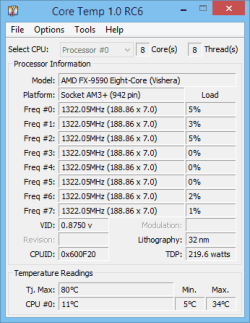
Also, please download Core Temp, Core Temp, and run it with cpuz and don't run the HWinfo and let me see what it says in Core temp.
 

My Computers My Computers

  • At a glance

    Windows 11 ProRyzen 9 5900X32GB G Skill DDR4-3600EVGA RTX 3080 FTW 3 Ultra
    Computer type
    PC/Desktop
    Computer Manufacturer/Model Number
    ALWAYS UNDER CONSTRUCTION
    OS
    Windows 11 Pro
    CPU
    Ryzen 9 5900X
    Motherboard
    Asus X570 Crosshair Viii Hero
    Memory
    32GB G Skill DDR4-3600
    Graphics Card(s)
    EVGA RTX 3080 FTW 3 Ultra
    Sound Card
    On Board/Sennheiser PC37X Headset
    Monitor(s) Displays
    3 X Asus 27"
    Screen Resolution
    2560x1440
    Hard Drives
    2 X 1 TB NVME drives
    PSU
    EVGA 850
    Case
    Phanteks Eclipse P400A
    Cooling
    EVGA 280 AIO
    Keyboard
    Logitech G510s/ Logitech G13
    Mouse
    Logitech G502
    Internet Speed
    24/1
    Antivirus
    ESET/MBAM Pro/SAS Pro
    Browser
    Chrome/ Firefox/ Edge
  • At a glance

    Windows 11 ProIntel Ultra 9 288V32 GB LPDDR5X 8533
    Computer type
    Laptop
    System Manufacturer/Model Number
    Dell 16 Plus
    OS
    Windows 11 Pro
    CPU
    Intel Ultra 9 288V
    Memory
    32 GB LPDDR5X 8533
    Monitor(s) Displays
    16" Mini-LED HDR600 Touch 90 Hz
    Screen Resolution
    2560X1600
    Hard Drives
    1 TB NVME
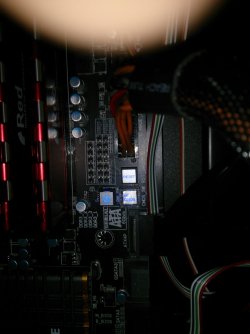
Here is screenshoot of core temp, also screenshoots of bios.. I have three buttons on motherboard (see pic) reset, shutdown and clear cmos... What about them, should I push one of them?
 

Attachments

  • CoreTemp-Scr.png
    CoreTemp-Scr.png
    7.5 KB · Views: 45
  • IMG_20150127_131240.jpg
    IMG_20150127_131240.jpg
    188 KB · Views: 2
  • IMG_20150127_131102.jpg
    IMG_20150127_131102.jpg
    292.7 KB · Views: 0
  • IMG_20150127_131011.jpg
    IMG_20150127_131011.jpg
    280.1 KB · Views: 0
  • IMG_20150127_130933.jpg
    IMG_20150127_130933.jpg
    276 KB · Views: 1

My Computer My Computer

At a glance

Windows 8.1 Pro x64Amd FX 9590MUSHKIN REDLINE 8gb 1866MHzSAPPHIRE VAPOR-X R9 280X
Computer type
PC/Desktop
OS
Windows 8.1 Pro x64
CPU
Amd FX 9590
Motherboard
Gigabyte GA-990FXA-UD7 rev.3
Memory
MUSHKIN REDLINE 8gb 1866MHz
Graphics Card(s)
SAPPHIRE VAPOR-X R9 280X
Hard Drives
1. HDD: Hitachi HDS723020BLA642 2tb
2. HDD: WDC WD20EARS-00J99B0 2tb
3. SSD: Corsair Force 3 SSD 120gb
Antivirus
Eset Smart Security 8
Browser
Google Chrome
The bottom right corner tells you what to push and for what. You can take screenshots of your bios with a flash drive attached and press F12. Set optimized defaults is F7, but be sure you know what your sata controller is set to first. Then after setting optimized defaults, you have to be sure it is set to what it is right now, or you won't be able to boot into windows. Also set your ram and timings to manufacturer's specs, and set your boot order. Then press F10 (save and exit).

Up top if you press system information, it will probably show you your voltages.
 

My Computers My Computers

  • At a glance

    Windows 11 ProRyzen 9 5900X32GB G Skill DDR4-3600EVGA RTX 3080 FTW 3 Ultra
    Computer type
    PC/Desktop
    Computer Manufacturer/Model Number
    ALWAYS UNDER CONSTRUCTION
    OS
    Windows 11 Pro
    CPU
    Ryzen 9 5900X
    Motherboard
    Asus X570 Crosshair Viii Hero
    Memory
    32GB G Skill DDR4-3600
    Graphics Card(s)
    EVGA RTX 3080 FTW 3 Ultra
    Sound Card
    On Board/Sennheiser PC37X Headset
    Monitor(s) Displays
    3 X Asus 27"
    Screen Resolution
    2560x1440
    Hard Drives
    2 X 1 TB NVME drives
    PSU
    EVGA 850
    Case
    Phanteks Eclipse P400A
    Cooling
    EVGA 280 AIO
    Keyboard
    Logitech G510s/ Logitech G13
    Mouse
    Logitech G502
    Internet Speed
    24/1
    Antivirus
    ESET/MBAM Pro/SAS Pro
    Browser
    Chrome/ Firefox/ Edge
  • At a glance

    Windows 11 ProIntel Ultra 9 288V32 GB LPDDR5X 8533
    Computer type
    Laptop
    System Manufacturer/Model Number
    Dell 16 Plus
    OS
    Windows 11 Pro
    CPU
    Intel Ultra 9 288V
    Memory
    32 GB LPDDR5X 8533
    Monitor(s) Displays
    16" Mini-LED HDR600 Touch 90 Hz
    Screen Resolution
    2560X1600
    Hard Drives
    1 TB NVME
I done all of that, I put optimized bios defaults, ram and timings is correct.. Still same problem... :/ Should I go clear cmos or not?
 

My Computer My Computer

At a glance

Windows 8.1 Pro x64Amd FX 9590MUSHKIN REDLINE 8gb 1866MHzSAPPHIRE VAPOR-X R9 280X
Computer type
PC/Desktop
OS
Windows 8.1 Pro x64
CPU
Amd FX 9590
Motherboard
Gigabyte GA-990FXA-UD7 rev.3
Memory
MUSHKIN REDLINE 8gb 1866MHz
Graphics Card(s)
SAPPHIRE VAPOR-X R9 280X
Hard Drives
1. HDD: Hitachi HDS723020BLA642 2tb
2. HDD: WDC WD20EARS-00J99B0 2tb
3. SSD: Corsair Force 3 SSD 120gb
Antivirus
Eset Smart Security 8
Browser
Google Chrome
You still have 2 cores shutting down? If so, tell me the temps from core temp just before they shut down, and what CPU cooler do you have? Also, you never gave me the values of your PSU from bios.
 

My Computers My Computers

  • At a glance

    Windows 11 ProRyzen 9 5900X32GB G Skill DDR4-3600EVGA RTX 3080 FTW 3 Ultra
    Computer type
    PC/Desktop
    Computer Manufacturer/Model Number
    ALWAYS UNDER CONSTRUCTION
    OS
    Windows 11 Pro
    CPU
    Ryzen 9 5900X
    Motherboard
    Asus X570 Crosshair Viii Hero
    Memory
    32GB G Skill DDR4-3600
    Graphics Card(s)
    EVGA RTX 3080 FTW 3 Ultra
    Sound Card
    On Board/Sennheiser PC37X Headset
    Monitor(s) Displays
    3 X Asus 27"
    Screen Resolution
    2560x1440
    Hard Drives
    2 X 1 TB NVME drives
    PSU
    EVGA 850
    Case
    Phanteks Eclipse P400A
    Cooling
    EVGA 280 AIO
    Keyboard
    Logitech G510s/ Logitech G13
    Mouse
    Logitech G502
    Internet Speed
    24/1
    Antivirus
    ESET/MBAM Pro/SAS Pro
    Browser
    Chrome/ Firefox/ Edge
  • At a glance

    Windows 11 ProIntel Ultra 9 288V32 GB LPDDR5X 8533
    Computer type
    Laptop
    System Manufacturer/Model Number
    Dell 16 Plus
    OS
    Windows 11 Pro
    CPU
    Intel Ultra 9 288V
    Memory
    32 GB LPDDR5X 8533
    Monitor(s) Displays
    16" Mini-LED HDR600 Touch 90 Hz
    Screen Resolution
    2560X1600
    Hard Drives
    1 TB NVME
Where to look for PSU values from bios? Maybe in some screenshoots before? No, sometime 2 cores shutting down sometimes just one only with prime95, with aida64 is all normal but still freezes and restart problem...
 

My Computer My Computer

At a glance

Windows 8.1 Pro x64Amd FX 9590MUSHKIN REDLINE 8gb 1866MHzSAPPHIRE VAPOR-X R9 280X
Computer type
PC/Desktop
OS
Windows 8.1 Pro x64
CPU
Amd FX 9590
Motherboard
Gigabyte GA-990FXA-UD7 rev.3
Memory
MUSHKIN REDLINE 8gb 1866MHz
Graphics Card(s)
SAPPHIRE VAPOR-X R9 280X
Hard Drives
1. HDD: Hitachi HDS723020BLA642 2tb
2. HDD: WDC WD20EARS-00J99B0 2tb
3. SSD: Corsair Force 3 SSD 120gb
Antivirus
Eset Smart Security 8
Browser
Google Chrome
That sounds like a problem of needing more voltage by the CPU. That can be a bios setting or a PSU problem. There is a page in your bios that has that information. I don't know your bios, so don't know where, but it's there.
 

My Computers My Computers

  • At a glance

    Windows 11 ProRyzen 9 5900X32GB G Skill DDR4-3600EVGA RTX 3080 FTW 3 Ultra
    Computer type
    PC/Desktop
    Computer Manufacturer/Model Number
    ALWAYS UNDER CONSTRUCTION
    OS
    Windows 11 Pro
    CPU
    Ryzen 9 5900X
    Motherboard
    Asus X570 Crosshair Viii Hero
    Memory
    32GB G Skill DDR4-3600
    Graphics Card(s)
    EVGA RTX 3080 FTW 3 Ultra
    Sound Card
    On Board/Sennheiser PC37X Headset
    Monitor(s) Displays
    3 X Asus 27"
    Screen Resolution
    2560x1440
    Hard Drives
    2 X 1 TB NVME drives
    PSU
    EVGA 850
    Case
    Phanteks Eclipse P400A
    Cooling
    EVGA 280 AIO
    Keyboard
    Logitech G510s/ Logitech G13
    Mouse
    Logitech G502
    Internet Speed
    24/1
    Antivirus
    ESET/MBAM Pro/SAS Pro
    Browser
    Chrome/ Firefox/ Edge
  • At a glance

    Windows 11 ProIntel Ultra 9 288V32 GB LPDDR5X 8533
    Computer type
    Laptop
    System Manufacturer/Model Number
    Dell 16 Plus
    OS
    Windows 11 Pro
    CPU
    Intel Ultra 9 288V
    Memory
    32 GB LPDDR5X 8533
    Monitor(s) Displays
    16" Mini-LED HDR600 Touch 90 Hz
    Screen Resolution
    2560X1600
    Hard Drives
    1 TB NVME
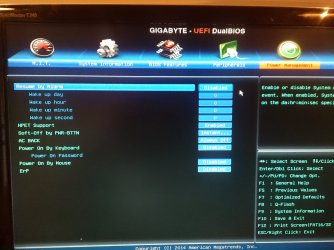
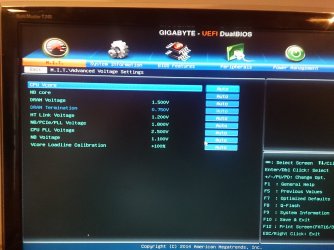
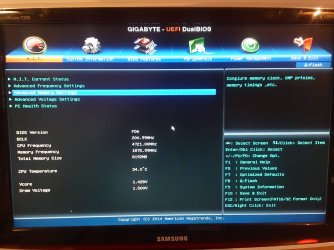
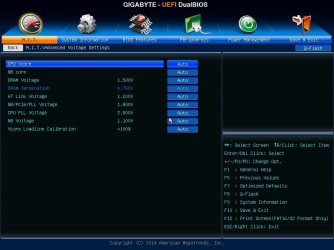
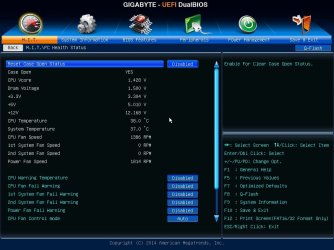
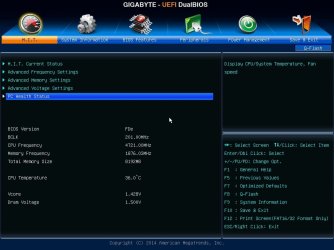
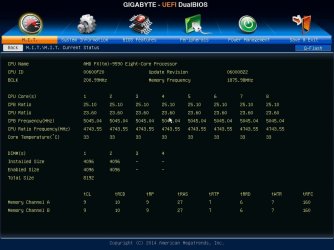
Here is reading from bios... Thank you for good instructions, hope this you to tell me more about problem...
 

Attachments

  • 150127232326.jpg
    150127232326.jpg
    69.7 KB · Views: 0
  • 150127232350.jpg
    150127232350.jpg
    83.8 KB · Views: 1
  • 150127232425.jpg
    150127232425.jpg
    70.9 KB · Views: 0
  • 150127232440.jpg
    150127232440.jpg
    72.9 KB · Views: 0

My Computer My Computer

At a glance

Windows 8.1 Pro x64Amd FX 9590MUSHKIN REDLINE 8gb 1866MHzSAPPHIRE VAPOR-X R9 280X
Computer type
PC/Desktop
OS
Windows 8.1 Pro x64
CPU
Amd FX 9590
Motherboard
Gigabyte GA-990FXA-UD7 rev.3
Memory
MUSHKIN REDLINE 8gb 1866MHz
Graphics Card(s)
SAPPHIRE VAPOR-X R9 280X
Hard Drives
1. HDD: Hitachi HDS723020BLA642 2tb
2. HDD: WDC WD20EARS-00J99B0 2tb
3. SSD: Corsair Force 3 SSD 120gb
Antivirus
Eset Smart Security 8
Browser
Google Chrome
Everything looks OK to me, except the second picture. All of the CPU temp warnings and fan warning should be on. If your CPU gets too hot it will warn you rather than burning your CPU up. Why they are disabled by default is beyond me. Enable them.

I have asked someone else more familiar with AMD to come take a look.
 

My Computers My Computers

  • At a glance

    Windows 11 ProRyzen 9 5900X32GB G Skill DDR4-3600EVGA RTX 3080 FTW 3 Ultra
    Computer type
    PC/Desktop
    Computer Manufacturer/Model Number
    ALWAYS UNDER CONSTRUCTION
    OS
    Windows 11 Pro
    CPU
    Ryzen 9 5900X
    Motherboard
    Asus X570 Crosshair Viii Hero
    Memory
    32GB G Skill DDR4-3600
    Graphics Card(s)
    EVGA RTX 3080 FTW 3 Ultra
    Sound Card
    On Board/Sennheiser PC37X Headset
    Monitor(s) Displays
    3 X Asus 27"
    Screen Resolution
    2560x1440
    Hard Drives
    2 X 1 TB NVME drives
    PSU
    EVGA 850
    Case
    Phanteks Eclipse P400A
    Cooling
    EVGA 280 AIO
    Keyboard
    Logitech G510s/ Logitech G13
    Mouse
    Logitech G502
    Internet Speed
    24/1
    Antivirus
    ESET/MBAM Pro/SAS Pro
    Browser
    Chrome/ Firefox/ Edge
  • At a glance

    Windows 11 ProIntel Ultra 9 288V32 GB LPDDR5X 8533
    Computer type
    Laptop
    System Manufacturer/Model Number
    Dell 16 Plus
    OS
    Windows 11 Pro
    CPU
    Intel Ultra 9 288V
    Memory
    32 GB LPDDR5X 8533
    Monitor(s) Displays
    16" Mini-LED HDR600 Touch 90 Hz
    Screen Resolution
    2560X1600
    Hard Drives
    1 TB NVME
This I found in post on some other forum:


"
Gigabyte GA-990FXA-UD7 and AMD FX-9590 Freezing Issue​


just built myself a new PC based on the Gigabyte GA-990FXA-UD7 and AMD FX-9590 chip.

Before I could even think about overclocking, I started getting total system freeze issues.

After a lot of troubleshooting, I found that I can avoid the freeze issues by disabling all the C-State options in the BIOS.

Just wanted to get this out there in case anybody else has a similar issue.


Enter BIOS - Press DEL to enter during boot

M.I.T. > Advanced Frequency Settings > Advanced CPU Core Features

Core Perfornace Boost - Disabled
CPU Unlock - Disabled
Cool & Quiet - Disabled
C1E Support - Disabled
Core C6 State - Disabled
HPC Mode - Disabled
APM - Disabled


You may be able to enable Core Performance Boost / CPU Unlock and a few of the others, but you would have to test.

I think the main culprits are the C1E Support and Core C6 State settings.

Good luck
"


So, I tried this. And for now is good, prime95 for about 20min and no freezing... I do some more tests tomorow.. Hope this will work :) ...
 

My Computer My Computer

At a glance

Windows 8.1 Pro x64Amd FX 9590MUSHKIN REDLINE 8gb 1866MHzSAPPHIRE VAPOR-X R9 280X
Computer type
PC/Desktop
OS
Windows 8.1 Pro x64
CPU
Amd FX 9590
Motherboard
Gigabyte GA-990FXA-UD7 rev.3
Memory
MUSHKIN REDLINE 8gb 1866MHz
Graphics Card(s)
SAPPHIRE VAPOR-X R9 280X
Hard Drives
1. HDD: Hitachi HDS723020BLA642 2tb
2. HDD: WDC WD20EARS-00J99B0 2tb
3. SSD: Corsair Force 3 SSD 120gb
Antivirus
Eset Smart Security 8
Browser
Google Chrome
I'm not that familiar with AMD chipsets, but C1e is the advanced halt state which basically allows your CPU to downclock when not being used. It also has to do with sleep. If you disable C1e, I think, you will not be able to use sleep and when you are at idle on your Desktop, say reading email, your CPU will still be running at it's higher clock rate and a higher Vcore and creating a lot of heat that is not necessary.

I am not sure if it works that way with AMD, but, personally, I am not that concerned about the power saving or sleep as I don't use it. But, I am concerned about heat. In computers, heat kills. Heat is the enemy of every component in your computer. If you can enable C1e and solve your issue, I would.

That being said, if that is the only way to solve your problem, I suggest you use it and buy some more case fans to keep the heat down.
 

My Computers My Computers

  • At a glance

    Windows 11 ProRyzen 9 5900X32GB G Skill DDR4-3600EVGA RTX 3080 FTW 3 Ultra
    Computer type
    PC/Desktop
    Computer Manufacturer/Model Number
    ALWAYS UNDER CONSTRUCTION
    OS
    Windows 11 Pro
    CPU
    Ryzen 9 5900X
    Motherboard
    Asus X570 Crosshair Viii Hero
    Memory
    32GB G Skill DDR4-3600
    Graphics Card(s)
    EVGA RTX 3080 FTW 3 Ultra
    Sound Card
    On Board/Sennheiser PC37X Headset
    Monitor(s) Displays
    3 X Asus 27"
    Screen Resolution
    2560x1440
    Hard Drives
    2 X 1 TB NVME drives
    PSU
    EVGA 850
    Case
    Phanteks Eclipse P400A
    Cooling
    EVGA 280 AIO
    Keyboard
    Logitech G510s/ Logitech G13
    Mouse
    Logitech G502
    Internet Speed
    24/1
    Antivirus
    ESET/MBAM Pro/SAS Pro
    Browser
    Chrome/ Firefox/ Edge
  • At a glance

    Windows 11 ProIntel Ultra 9 288V32 GB LPDDR5X 8533
    Computer type
    Laptop
    System Manufacturer/Model Number
    Dell 16 Plus
    OS
    Windows 11 Pro
    CPU
    Intel Ultra 9 288V
    Memory
    32 GB LPDDR5X 8533
    Monitor(s) Displays
    16" Mini-LED HDR600 Touch 90 Hz
    Screen Resolution
    2560X1600
    Hard Drives
    1 TB NVME
First off if he isn't overclocking there shouldn't be a need to bump the voltage seeing that a 9590 is already running close to 5Ghz stock but looking at his vcore it looks a little low for the speed he is running i recall my 8350 needed 147-1.48v to run at 4.8 Ghz

Now if you are running default there is no reason to disable turbo or adjust any other power settings because you are running stock and chances of overclocking that chip is slim to none anyway

I would actually look at the PSU it might be 1000Watt but they do fail too there was a time i had a AX850 and i would get random shutdowns out of nowhere and to my surprise my PSU fan was broken and wouldn't cool it down

i would test the psu because it points to it overheating especially going off with in a few minutes
Also it could be the MB is not power efficient for the Chips needs there are lots of fake FX boards out there that are actually 970 980 boards so choose wisely because i think gigabyte was one of those brands that didn't run a FX chip like it should
 

My Computer My Computer

At a glance

Windows 10 Home Premium 64bit sp1Intel I7-6700K @ 4.6 Ghz 1.344 volts everyday OC32GB G-Skill TridentZ 3200mhz 16-18-18-38 DDR4Sli Gigabyte Windforce GTX 980 G1
Computer type
PC/Desktop
Computer Manufacturer/Model Number
CoreI7-6700K MrFingerIII Special Builds
OS
Windows 10 Home Premium 64bit sp1
CPU
Intel I7-6700K @ 4.6 Ghz 1.344 volts everyday OC
Motherboard
Asrock Fatality K6 Z170 Socket 1151
Memory
32GB G-Skill TridentZ 3200mhz 16-18-18-38 DDR4
Graphics Card(s)
Sli Gigabyte Windforce GTX 980 G1
Sound Card
AC97 Creative Rage Tactic 3D Headphones Bluetooth
Monitor(s) Displays
27" Asus ROG Swift PG278Q G-Sync 48" Vizio Smart HD TV
Screen Resolution
2560x1440p 27"- 48" Currently Gaming at 2560x1440p Res 2K
Hard Drives
250GB Samsung Evo840SSD Seagate baracuda 500 GB WD Mybook 500Gb 1TB Seagate Barracuda
PSU
HX1050w Corsair Silver 80plus certified crosfire/sli
Case
Enthod Pro Full Tower
Cooling
Corsair H110i GT 280 mm High Performance WaterBlock
Keyboard
Logitech wireless keyboard
Mouse
Logitech wireless mouse
Internet Speed
Cox Cable 100+ mb
Antivirus
WebRoot Spysweeper with Antivirus
Browser
IE-10, Chrome, Opera
Other Info
My Other Rig is a AMD FX8320E @4.6Ghz 16GB Ballistic Sport Ram
Mobo Asrock Fatality 990FX 120GB OCZ SSD 1TB Seagate Barracuda Corsair H75 Cooling PSU Corsair CX750
GPU GTX Gigabyte 970G1
He's running stock. I just had him set optimized defaults.
 

My Computers My Computers

  • At a glance

    Windows 11 ProRyzen 9 5900X32GB G Skill DDR4-3600EVGA RTX 3080 FTW 3 Ultra
    Computer type
    PC/Desktop
    Computer Manufacturer/Model Number
    ALWAYS UNDER CONSTRUCTION
    OS
    Windows 11 Pro
    CPU
    Ryzen 9 5900X
    Motherboard
    Asus X570 Crosshair Viii Hero
    Memory
    32GB G Skill DDR4-3600
    Graphics Card(s)
    EVGA RTX 3080 FTW 3 Ultra
    Sound Card
    On Board/Sennheiser PC37X Headset
    Monitor(s) Displays
    3 X Asus 27"
    Screen Resolution
    2560x1440
    Hard Drives
    2 X 1 TB NVME drives
    PSU
    EVGA 850
    Case
    Phanteks Eclipse P400A
    Cooling
    EVGA 280 AIO
    Keyboard
    Logitech G510s/ Logitech G13
    Mouse
    Logitech G502
    Internet Speed
    24/1
    Antivirus
    ESET/MBAM Pro/SAS Pro
    Browser
    Chrome/ Firefox/ Edge
  • At a glance

    Windows 11 ProIntel Ultra 9 288V32 GB LPDDR5X 8533
    Computer type
    Laptop
    System Manufacturer/Model Number
    Dell 16 Plus
    OS
    Windows 11 Pro
    CPU
    Intel Ultra 9 288V
    Memory
    32 GB LPDDR5X 8533
    Monitor(s) Displays
    16" Mini-LED HDR600 Touch 90 Hz
    Screen Resolution
    2560X1600
    Hard Drives
    1 TB NVME
Back
Top