
Hello again! I don't like to bring another "help-me" thread, however this happened I'm struggling (don't know if that's the correct word) on fixing it.
Where, how and why?
I was using my w7(64-bit) in my 2nd pc which is a x79.
I noticed that someday I started my system and it was slowly than it was, for no reason.
Instantly pressed CTRL+SHIFT+ESC to see the Performance Tab and then I see one random core of my processor running at 100%. I immediately switch to process tab and saw that even when my pc was IDLE this was happening... So I started searching for it, tried so many things like running process explorer to find the problem, I see it was really the System(4) which was causing the problem so I went to Propreties > Threads and see that there's a TID which was responsible for consuming one full core of my cpu, like in the pic bellow.
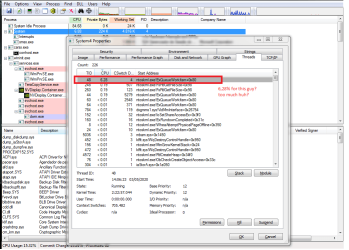

And so I tried to discover what was that thing that was consuming that much cpu in my kernel, unfortunately couldn't run a proper version of kernrate on windows 7, then I tried another method, by using that ms sdkpackage which contains the wprui.exe ran it for one minute and got the .etl file to analysis.
Opened the .ETL file and Loaded Symbols
On the Computation tab I cleaned the legends that were unuseful so we could get a clean view of the real trouble, and found this:


after I expanded the tree I've got this: (arrows indicates some dll files and things that may be causing that to occur)


So in my conclusion these 3 files are the cause of the problem:
- ntoskrnl.exe
- hal.dll
- PSHED.dll
But now, does anyone here knows how to solve it?
System Specs of the x79 if needed:
Windows 7 Ultimate 64-bit
Proc: E5 2650v2
Mobo: Klissre x79
Ram: 32GB DDR3
VGA: GTX 960
Storage: 256GB SSD (with system) / 1TB HD WD
----- EDIT
I tried to use processhacker and get the following info about that System(4) - TID
Hope SIW2 or anyone who knows about this can help. Thank you guys
[FINAL EDIT] please read, solution is here:
After some days of deep researching I discovered that my USB DRIVERS were the cause of the problem at all. So I unninstalled all of them via Device Manager (I had to add some system variable before of that)
Anyway, My solution was HERE: Click here to see the topic with the solution for USB problems.
Where, how and why?
I was using my w7(64-bit) in my 2nd pc which is a x79.
I noticed that someday I started my system and it was slowly than it was, for no reason.
Instantly pressed CTRL+SHIFT+ESC to see the Performance Tab and then I see one random core of my processor running at 100%. I immediately switch to process tab and saw that even when my pc was IDLE this was happening... So I started searching for it, tried so many things like running process explorer to find the problem, I see it was really the System(4) which was causing the problem so I went to Propreties > Threads and see that there's a TID which was responsible for consuming one full core of my cpu, like in the pic bellow.
And so I tried to discover what was that thing that was consuming that much cpu in my kernel, unfortunately couldn't run a proper version of kernrate on windows 7, then I tried another method, by using that ms sdkpackage which contains the wprui.exe ran it for one minute and got the .etl file to analysis.
Opened the .ETL file and Loaded Symbols
On the Computation tab I cleaned the legends that were unuseful so we could get a clean view of the real trouble, and found this:
after I expanded the tree I've got this: (arrows indicates some dll files and things that may be causing that to occur)
So in my conclusion these 3 files are the cause of the problem:
- ntoskrnl.exe
- hal.dll
- PSHED.dll
But now, does anyone here knows how to solve it?
System Specs of the x79 if needed:
Windows 7 Ultimate 64-bit
Proc: E5 2650v2
Mobo: Klissre x79
Ram: 32GB DDR3
VGA: GTX 960
Storage: 256GB SSD (with system) / 1TB HD WD
----- EDIT
I tried to use processhacker and get the following info about that System(4) - TID
Code:
0, ntoskrnl.exe!KeInsertQueueApc+0x5cb
1, ntoskrnl.exe!KiCpuId+0x2549
2, ntoskrnl.exe!KeReleaseSpinLock+0x2a
3, hal.dll!HalInitializeBios+0xf54
4, hal.dll!HalAssignSlotResources+0x1dcf
5, ntoskrnl.exe!ExQueueWorkItem+0x191
6, ntoskrnl.exe!SeDeassignSecurity+0x97c
7, ntoskrnl.exe!KiCpuId+0x3c16
Hope SIW2 or anyone who knows about this can help. Thank you guys
[FINAL EDIT] please read, solution is here:
After some days of deep researching I discovered that my USB DRIVERS were the cause of the problem at all. So I unninstalled all of them via Device Manager (I had to add some system variable before of that)
Anyway, My solution was HERE: Click here to see the topic with the solution for USB problems.
Last edited:
My Computer
At a glance
Windows 7 64-biti7 8700 (PC 1) | E5 2650v2 (PC 2)32 GB DDR4 (PC 1) | 32 GB DDR 3 (PC 2)GTX 1050 Ti 4GB (PC 1) | GTX 960 (PC 2)
- Computer type
- PC/Desktop
- Computer Manufacturer/Model Number
- Custom Build
- OS
- Windows 7 64-bit
- CPU
- i7 8700 (PC 1) | E5 2650v2 (PC 2)
- Motherboard
- H310M S2P (PC 1) | Klissre x78 (PC 2)
- Memory
- 32 GB DDR4 (PC 1) | 32 GB DDR 3 (PC 2)
- Graphics Card(s)
- GTX 1050 Ti 4GB (PC 1) | GTX 960 (PC 2)
- Hard Drives
- PC 1:
nvme 240GB x1; ssd 128GB x1; HD 1TB x2;
PC 2:
ssd 256GB x1; HD 1TB x1;
- Antivirus
- Kaspersky
- Browser
- Brave

