Keyboard and Mouse blocked when trying to Install win7 on New Computer

I dont want you to try them. You might want to try .

I dont know the correct entry for the inf for your id. Maybe you can get an idea by looking at the inf in the win raid modded driver. Perhaps that will give you a clue.

You could look at the iigd_dch.inf file in this windows 10 driver. That might give you an idea

PCI\VEN_8086&DEV_9BC4 download driver for Windows 10 x64

https://dl.drp.su/driverpacks/repac...RCED-10x64-18959-HD600_26.20.100.7528-drp.zip

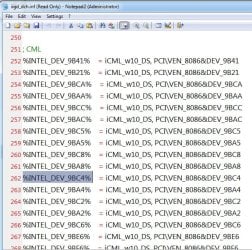
The iigd_dch.inf shows this:

iigd_dch_inf.jpg

cml.jpg

%INTEL_DEV_9BC4% .jpg


So maybe try one of the codes for 630 instead. possibly %iKBHALOGT2% or maybe %INTEL_DEV_9BC4%

It is trial and error. Win raid is the best place to ask about modding drivers.
 
Last edited:

My Computers My Computers

  • At a glance

    7 X64i5 84002x8gb 3200mhz
    Computer type
    PC/Desktop
    OS
    7 X64
    CPU
    i5 8400
    Motherboard
    gigabyte b365m ds3h
    Memory
    2x8gb 3200mhz
    Hard Drives
    various
    PSU
    pure power 11 400w cm
    Case
    Coolermaster
    Cooling
    cryorig m9i
  • At a glance

    7x64g54008gb ddr4 2400
    Computer type
    PC/Desktop
    OS
    7x64
    CPU
    g5400
    Motherboard
    ga b365m ds3h
    Memory
    8gb ddr4 2400
    PSU
    xfx pro 450w
I dont want you to try them. You might want to try .

I dont know the correct entry for the inf for your id. Maybe you can get an idea by looking at the inf in the win raid modded driver. Perhaps that will give you a clue.

You could look at the iigd_dch.inf file in this windows 10 driver. That might give you an idea

PCI\VEN_8086&DEV_9BC4 download driver for Windows 10 x64

https://dl.drp.su/driverpacks/repac...RCED-10x64-18959-HD600_26.20.100.7528-drp.zip

The iigd_dch.inf shows this:

View attachment 413324

View attachment 413325

View attachment 413326


So maybe try one of the codes for 630 instead. possibly %iKBHALOGT2% or maybe %INTEL_DEV_9BC4%

It is trial and error. Win raid is the best place to ask about modding drivers.


Hello , i tried but it didn't work .

i added a line
Code:
%INTEL_DEV_9BC4% = iSKLD_w7, PCI\VEN_8086&DEV_9BC4
in the win7_8th_i3_i5_Driver_2.0 Inf file . Didn't work and i had to go back by hitting " automatic search" for graphics which resulted to establish " STANDARD VGA GRAPHIC"

Will try this one :

Code:
My first mod for 15.45.33.5164 with support for Comet Lake, Coffee Lake, Amber Lake & Whiskey Lake in Windows 7, 8.1 and 10 (up to 1607):
1. Download official driver - https://downloadmirror.intel.com/29972/a....45.33.5164.zip
2. Unpack and replace two files with modified versions - https://drive.google.com/file/d/1WwRTk4g...Z8QfcioywLl6kw/
3. Boot in with disabled driver signature enforcement or enable test mode.
4. Install driver as usual: by exe-file or Device Manager.
5. Choose "Install this driver software anyway" when Windows ask.
6. Reboot in normal mode.

Just , how to disabled signature enforcement ? I mean i know when booting and hitting f8 , we can chose this mode , but now , i'm having windows 7 & 10 (dual boot) . If i choose Windows 7 , it will start loading files automatically ( no more F8 effect) , i assume.
 

My Computer My Computer

At a glance

Windows 7 Ultimate x64
Computer type
PC/Desktop
OS
Windows 7 Ultimate x64
i'm having windows 7 & 10 (dual boot)

Change to the proper boot menu

open admin cmd prompt and type :

bcdedit /set "{current}" bootmenupolicy legacy

(then press enter)


Reboot and highlight windows 7 on the proper boot menu , then press F8.

That should bring up an options screen . Select " Disable Driver Signature Enforcement".

advancedbootoption.jpg
 

My Computers My Computers

  • At a glance

    7 X64i5 84002x8gb 3200mhz
    Computer type
    PC/Desktop
    OS
    7 X64
    CPU
    i5 8400
    Motherboard
    gigabyte b365m ds3h
    Memory
    2x8gb 3200mhz
    Hard Drives
    various
    PSU
    pure power 11 400w cm
    Case
    Coolermaster
    Cooling
    cryorig m9i
  • At a glance

    7x64g54008gb ddr4 2400
    Computer type
    PC/Desktop
    OS
    7x64
    CPU
    g5400
    Motherboard
    ga b365m ds3h
    Memory
    8gb ddr4 2400
    PSU
    xfx pro 450w
Okay , i did the second option , it failed aswell.

What strange is that i desactivated driver signature , but when i launched setup.exe in both cases , it says with a red cross that it can't recognize the signature .
 

My Computer My Computer

At a glance

Windows 7 Ultimate x64
Computer type
PC/Desktop
OS
Windows 7 Ultimate x64
yes, you still have to ok it.

I am not aware of any entirely successful mods, so the solution is to use a graphics card.
 

My Computers My Computers

  • At a glance

    7 X64i5 84002x8gb 3200mhz
    Computer type
    PC/Desktop
    OS
    7 X64
    CPU
    i5 8400
    Motherboard
    gigabyte b365m ds3h
    Memory
    2x8gb 3200mhz
    Hard Drives
    various
    PSU
    pure power 11 400w cm
    Case
    Coolermaster
    Cooling
    cryorig m9i
  • At a glance

    7x64g54008gb ddr4 2400
    Computer type
    PC/Desktop
    OS
    7x64
    CPU
    g5400
    Motherboard
    ga b365m ds3h
    Memory
    8gb ddr4 2400
    PSU
    xfx pro 450w
When you say graphic card , you mean buying an external (if it exists idk) ?

But this is only for Audio engineering , not really using videos ( not playing games) . So i was wondering if i can manage to stay like that? I know the graphic card is important .
 

My Computer My Computer

At a glance

Windows 7 Ultimate x64
Computer type
PC/Desktop
OS
Windows 7 Ultimate x64
If you are happy using the standard vga driver that is fine. If you want more fancy graphics, you need a separate card.

Unless maybe somebody will eventually get a working driver mod.
 

My Computers My Computers

  • At a glance

    7 X64i5 84002x8gb 3200mhz
    Computer type
    PC/Desktop
    OS
    7 X64
    CPU
    i5 8400
    Motherboard
    gigabyte b365m ds3h
    Memory
    2x8gb 3200mhz
    Hard Drives
    various
    PSU
    pure power 11 400w cm
    Case
    Coolermaster
    Cooling
    cryorig m9i
  • At a glance

    7x64g54008gb ddr4 2400
    Computer type
    PC/Desktop
    OS
    7x64
    CPU
    g5400
    Motherboard
    ga b365m ds3h
    Memory
    8gb ddr4 2400
    PSU
    xfx pro 450w
Hello Siw2 .


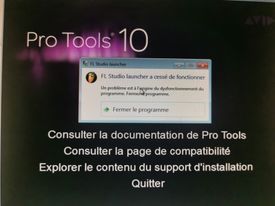
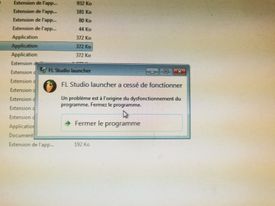
Since I managed to install win 7 ( thanks to you), I didn't really test it. So what I did is installing almost all my programs which have been on my WIN 7 HDD ( the old). But this is actually a nightmare. When I launch 90% of these programs , that say :


Code:
 " Xxx has stopped working. A problem caused the program to stop working  correctly."


What's so wrong suddenly ? i never have any problems with these programs . And i already activated Windows on line since it's an original DVD .


kmtr.jpg

4tzq.jpg
 

My Computer My Computer

At a glance

Windows 7 Ultimate x64
Computer type
PC/Desktop
OS
Windows 7 Ultimate x64
I have no idea.
 

My Computers My Computers

  • At a glance

    7 X64i5 84002x8gb 3200mhz
    Computer type
    PC/Desktop
    OS
    7 X64
    CPU
    i5 8400
    Motherboard
    gigabyte b365m ds3h
    Memory
    2x8gb 3200mhz
    Hard Drives
    various
    PSU
    pure power 11 400w cm
    Case
    Coolermaster
    Cooling
    cryorig m9i
  • At a glance

    7x64g54008gb ddr4 2400
    Computer type
    PC/Desktop
    OS
    7x64
    CPU
    g5400
    Motherboard
    ga b365m ds3h
    Memory
    8gb ddr4 2400
    PSU
    xfx pro 450w
Okay. It seems there is a problem with the system.

Some of my programs don't work. Could it be because we managed to install it by " forcing" the install with all these drivers? I don't know if I must try to repair windows. But I don't really know what to repair.
Also it could be because of graphics, even if Vga is fine. Arggg I'm so confused now. I tried removing & reinstalling programs, it makes no difference.
 

My Computer My Computer

At a glance

Windows 7 Ultimate x64
Computer type
PC/Desktop
OS
Windows 7 Ultimate x64
Did you try a system restore to a point before you tried installing the graphics drivers?


Or if you followed my advice in post #39 you could restore the image
If you are going to try modding drivers, might be sensible to make an image of the os first.
 

My Computers My Computers

  • At a glance

    7 X64i5 84002x8gb 3200mhz
    Computer type
    PC/Desktop
    OS
    7 X64
    CPU
    i5 8400
    Motherboard
    gigabyte b365m ds3h
    Memory
    2x8gb 3200mhz
    Hard Drives
    various
    PSU
    pure power 11 400w cm
    Case
    Coolermaster
    Cooling
    cryorig m9i
  • At a glance

    7x64g54008gb ddr4 2400
    Computer type
    PC/Desktop
    OS
    7x64
    CPU
    g5400
    Motherboard
    ga b365m ds3h
    Memory
    8gb ddr4 2400
    PSU
    xfx pro 450w
I tried to restore to a previous point that i created before doing anything on WIN7 . it stucks to "initializing restore" .


So tried image restore , since i did the same before doing anything . It restarted and it loaded your utilities .


I chose IMAGE SYTEM in your utilities, it didnt want to start... I choose next to this option , another one and it opened successfully my Image . Now , i 'm back to the fresh WIN 7 desktop but still ... When i try to open my programs ( not all but a lot) , it says


Code:
 " ....had stopped working ,  a problem caused the program to stop working "


I don't know what's wrong . I've noticed that some "setup.exe" in my progams dont work aswell


Here is an example of the message i found on internet ( replace PPREP.exe by the names of my programs)`


It's strange because i didn't change anything . This is the same version as i used in my old PC , same windows key , same system (win 7 x64).


i'm wondering if these programs somehow use graphics , and the fact that i got a default one cause that. I'm lost because i did all these things for 4 weeks , just to have these programs work. It's a huge fail , i'm devasted .


8tch.png
 

My Computer My Computer

At a glance

Windows 7 Ultimate x64
Computer type
PC/Desktop
OS
Windows 7 Ultimate x64
I tried to repare Win 7 with the usb disk i did with all your tools BY "UPGRADING" windows , not fresh install .


But it stops with the code
0xc0000225 .... smh :(
 

My Computer My Computer

At a glance

Windows 7 Ultimate x64
Computer type
PC/Desktop
OS
Windows 7 Ultimate x64
The message indicates you need the 64 bit version of the program.
 

My Computers My Computers

  • At a glance

    7 X64i5 84002x8gb 3200mhz
    Computer type
    PC/Desktop
    OS
    7 X64
    CPU
    i5 8400
    Motherboard
    gigabyte b365m ds3h
    Memory
    2x8gb 3200mhz
    Hard Drives
    various
    PSU
    pure power 11 400w cm
    Case
    Coolermaster
    Cooling
    cryorig m9i
  • At a glance

    7x64g54008gb ddr4 2400
    Computer type
    PC/Desktop
    OS
    7x64
    CPU
    g5400
    Motherboard
    ga b365m ds3h
    Memory
    8gb ddr4 2400
    PSU
    xfx pro 450w
I know that. It's pretty clear.

But the version of the program is already 64 bits. I think there are something happening when you
Try to make win 10 and 7 cohabite on the same disk... I'm encountering too much errors.
 

My Computer My Computer

At a glance

Windows 7 Ultimate x64
Computer type
PC/Desktop
OS
Windows 7 Ultimate x64
The message indicates you need the 64 bit version of the program.

Hello SIW2 , back to this thread nearly 3 months later.

To summarize , you helped me to make my keyboard and my mouse working in Win 7 x64 on my new computer .

Now , what i want to do , is putting my old HDD (from my old computer) into this new one . I did it but as expected , windows 7 is loading until i come to the screen . Then computer and keyboard are not working ( seems legit since we don't installed your drivers onto this disk) .

My question , how can i put your drivers ( that worked on my SSD NVME micron) in this old one ( CRUCIAL MX100) ?

Should i go to my windows 7 folder (from my new hdd) and copy all .sys files to my old ones ( i think not , it would be dangerous ) . Thank you
 

My Computer My Computer

At a glance

Windows 7 Ultimate x64
Computer type
PC/Desktop
OS
Windows 7 Ultimate x64

My Computers My Computers

  • At a glance

    7 X64i5 84002x8gb 3200mhz
    Computer type
    PC/Desktop
    OS
    7 X64
    CPU
    i5 8400
    Motherboard
    gigabyte b365m ds3h
    Memory
    2x8gb 3200mhz
    Hard Drives
    various
    PSU
    pure power 11 400w cm
    Case
    Coolermaster
    Cooling
    cryorig m9i
  • At a glance

    7x64g54008gb ddr4 2400
    Computer type
    PC/Desktop
    OS
    7x64
    CPU
    g5400
    Motherboard
    ga b365m ds3h
    Memory
    8gb ddr4 2400
    PSU
    xfx pro 450w
You can use dism++to add the usb3 update first

View attachment 413814

Then the drivers

SEE HERE

Hello , i tried your trick but it didn't work .

1° booting on my working Hard drive (dual boot win 10 /win 7) . Selected Win 10

Downloaded and opened Dism++10.1.1000.100.zip

2° Downloaded Usb3 win7x64 2021 ( your attachment) and unzipped it

2 folders appeared : XHCI and UASP . There is also a package file , but i'm on Win 10 so it gave me an error tryibg to open that .

Anyway , i followed your instructions .

Opening DSIM+++x64 , selecting the 2nd disk attached ( the old one which doesn't allow mouse and keyboard). Then going to Drivers , add and selecting the Usb3 win7x64 2021 folder .

There isn't a SAVE button or something ...so i just close after.

(Maybe i should do one of these following actions before closing ? Apply image , Mount Image , Save Image?)

Rebooting on my old HDD with win 7 x64 . Stucking on " select Users" screen .

3° booting again with my dual boot and selecting Win 7 x64 .

Trying to install the windows update , here it's working but it says that it's already installed .

Any suggestion?
 
Last edited:

My Computer My Computer

At a glance

Windows 7 Ultimate x64
Computer type
PC/Desktop
OS
Windows 7 Ultimate x64
No suggestions. Those drivers work on everything that I know of.


usb3stack.png
 

My Computers My Computers

  • At a glance

    7 X64i5 84002x8gb 3200mhz
    Computer type
    PC/Desktop
    OS
    7 X64
    CPU
    i5 8400
    Motherboard
    gigabyte b365m ds3h
    Memory
    2x8gb 3200mhz
    Hard Drives
    various
    PSU
    pure power 11 400w cm
    Case
    Coolermaster
    Cooling
    cryorig m9i
  • At a glance

    7x64g54008gb ddr4 2400
    Computer type
    PC/Desktop
    OS
    7x64
    CPU
    g5400
    Motherboard
    ga b365m ds3h
    Memory
    8gb ddr4 2400
    PSU
    xfx pro 450w
I think you did it wrong.

You need to highlight the target OS in blue in the top pane.

Then click drivers in the left pane.

Then click ADD and browse to the driver FOLDER.

Wait for it to tell you it has completed.

The driverframework update is required for the usb3 drivers to work. Possibly your win7 already has that update.

To install the driverframework update :

Click Updates in the left pane

Click ADD

Browse to the update FILE (not folder)

Wait for it to tell you it has completed. If it tells you not applicable, that probably means the update is already in your win7.
 

My Computers My Computers

  • At a glance

    7 X64i5 84002x8gb 3200mhz
    Computer type
    PC/Desktop
    OS
    7 X64
    CPU
    i5 8400
    Motherboard
    gigabyte b365m ds3h
    Memory
    2x8gb 3200mhz
    Hard Drives
    various
    PSU
    pure power 11 400w cm
    Case
    Coolermaster
    Cooling
    cryorig m9i
  • At a glance

    7x64g54008gb ddr4 2400
    Computer type
    PC/Desktop
    OS
    7x64
    CPU
    g5400
    Motherboard
    ga b365m ds3h
    Memory
    8gb ddr4 2400
    PSU
    xfx pro 450w
Back
Top