Keyboard and Mouse blocked when trying to Install win7 on New Computer

I think you did it wrong.

You need to highloght the target OS in blue in the top pane.

Then click drivers in the left pane.

The click ADD and browse to the driver folder.

Wait for it to tell it has completed.

Yes i did it correctly . It says : Operation succeeded , Success 2 , not applicable 0.

then i hit "ok" .

But what i miss maybe , is a save button or something after that. I shouldnt close it like that .

Maybe after that operation , i should do :

File > Apply Image or Save Image or Mount image >> Unmount image ?
i don't really know about the correct order .


If i dont have to do this for the progam to apply the drivers , so yes it failed . I keep rebooting and i'm not able to use keyboard , nor mouse with this Crucial SSD .
 

My Computer My Computer

At a glance

Windows 7 Ultimate x64
Computer type
PC/Desktop
OS
Windows 7 Ultimate x64
Yes i did it correctly . It says : Operation succeeded , Success 2 , not applicable 0.

then i hit "ok" .


That's it. Then just close dism++
 

My Computers My Computers

  • At a glance

    7 X64i5 84002x8gb 3200mhz
    Computer type
    PC/Desktop
    OS
    7 X64
    CPU
    i5 8400
    Motherboard
    gigabyte b365m ds3h
    Memory
    2x8gb 3200mhz
    Hard Drives
    various
    PSU
    pure power 11 400w cm
    Case
    Coolermaster
    Cooling
    cryorig m9i
  • At a glance

    7x64g54008gb ddr4 2400
    Computer type
    PC/Desktop
    OS
    7x64
    CPU
    g5400
    Motherboard
    ga b365m ds3h
    Memory
    8gb ddr4 2400
    PSU
    xfx pro 450w
Closed .

Rebooted on this target disk , windows loading correctly then stucking on my welcome screen with my user name .
No mouse , no Keyboard . It's crazy

I was thinking i should do Save image before closing , or unmount image after saving . But as you said , i have nothin else to do . So bad luck for me
 

My Computer My Computer

At a glance

Windows 7 Ultimate x64
Computer type
PC/Desktop
OS
Windows 7 Ultimate x64

My Computers My Computers

  • At a glance

    7 X64i5 84002x8gb 3200mhz
    Computer type
    PC/Desktop
    OS
    7 X64
    CPU
    i5 8400
    Motherboard
    gigabyte b365m ds3h
    Memory
    2x8gb 3200mhz
    Hard Drives
    various
    PSU
    pure power 11 400w cm
    Case
    Coolermaster
    Cooling
    cryorig m9i
  • At a glance

    7x64g54008gb ddr4 2400
    Computer type
    PC/Desktop
    OS
    7x64
    CPU
    g5400
    Motherboard
    ga b365m ds3h
    Memory
    8gb ddr4 2400
    PSU
    xfx pro 450w
Save image before closing , or unmount image after saving

Only do that if you have mounted a wim image.

Not if the target is an already installed windows.
 

My Computers My Computers

  • At a glance

    7 X64i5 84002x8gb 3200mhz
    Computer type
    PC/Desktop
    OS
    7 X64
    CPU
    i5 8400
    Motherboard
    gigabyte b365m ds3h
    Memory
    2x8gb 3200mhz
    Hard Drives
    various
    PSU
    pure power 11 400w cm
    Case
    Coolermaster
    Cooling
    cryorig m9i
  • At a glance

    7x64g54008gb ddr4 2400
    Computer type
    PC/Desktop
    OS
    7x64
    CPU
    g5400
    Motherboard
    ga b365m ds3h
    Memory
    8gb ddr4 2400
    PSU
    xfx pro 450w
See if you can use your mouse and keyboard with this:

17514x64v26.iso

Thanks , will download it .

Is there a special process with the DSIM ++ application since it's an ISO FILE ? or Should i export the content into a special folder , and have the same process ( Drivers >> add >> select folder >> see the success message >> close and reboot)
 

My Computer My Computer

At a glance

Windows 7 Ultimate x64
Computer type
PC/Desktop
OS
Windows 7 Ultimate x64
No. extract the iso to usb . boot it up. See if your usb3 works. It already contains lots of things , usb3 support, nvme support, windows explorer and plenty more.

You dont need to add anything to it with dism++
 

My Computers My Computers

  • At a glance

    7 X64i5 84002x8gb 3200mhz
    Computer type
    PC/Desktop
    OS
    7 X64
    CPU
    i5 8400
    Motherboard
    gigabyte b365m ds3h
    Memory
    2x8gb 3200mhz
    Hard Drives
    various
    PSU
    pure power 11 400w cm
    Case
    Coolermaster
    Cooling
    cryorig m9i
  • At a glance

    7x64g54008gb ddr4 2400
    Computer type
    PC/Desktop
    OS
    7x64
    CPU
    g5400
    Motherboard
    ga b365m ds3h
    Memory
    8gb ddr4 2400
    PSU
    xfx pro 450w
No. extract the iso to usb . boot it up. See if your usb3 works. It already contains lots of things , usb3 support, nvme support, windows explorer and plenty more.

You dont need to add anything to it with dism++

Okay , so back to rufus to boot on it right ? EFI and FAT32 formatting or NTFS (by disabling secure boot)


Note : If i remember , i already did that with you , last time i needed some help with this computer , in order to use Windows 7 on dual boot. Right?

I booted on a usb key and a screen appeared with SIW 2 UTILITIES , with a lot of tools , then i entered windows environment ( maybe winnt) and it worked .

Here this is the same computer , with an old disk , so it should work the same way already :=-)
 

My Computer My Computer

At a glance

Windows 7 Ultimate x64
Computer type
PC/Desktop
OS
Windows 7 Ultimate x64
No. extract the iso to usb . boot it up. See if your usb3 works. It already contains lots of things , usb3 support, nvme support, windows explorer and plenty more.

You dont need to add anything to it with dism++


As i said previously , yes it works . I'm able to access your stuff in the usb key . But i know it would work since we already done this to make the drivers work in My main SSD NVME dual boot (win 7 win 10)

I dont know why it doesnt work on my old Win 7 disk .
Still doesnt detect keyboard and mouse on it


Is there a way to verify if your drivers installed with the DISM ++ programs are really in their different folders ? As you said , you've got all the drivers so i dont understand why it's not working here. It worked with the new SSD and you were the one to solve this .... So strange
 
Last edited:

My Computer My Computer

At a glance

Windows 7 Ultimate x64
Computer type
PC/Desktop
OS
Windows 7 Ultimate x64
It is strange. Did you try uninstalling the other usb3 drivers ?


In addition, you could try an adjust to new hardware module.

You could try the giveaway O&O diskimage v15 to adjust the win7 installation

Register for free license
O&O DiskImage 15

Download the program.
Download Archive
 

My Computers My Computers

  • At a glance

    7 X64i5 84002x8gb 3200mhz
    Computer type
    PC/Desktop
    OS
    7 X64
    CPU
    i5 8400
    Motherboard
    gigabyte b365m ds3h
    Memory
    2x8gb 3200mhz
    Hard Drives
    various
    PSU
    pure power 11 400w cm
    Case
    Coolermaster
    Cooling
    cryorig m9i
  • At a glance

    7x64g54008gb ddr4 2400
    Computer type
    PC/Desktop
    OS
    7x64
    CPU
    g5400
    Motherboard
    ga b365m ds3h
    Memory
    8gb ddr4 2400
    PSU
    xfx pro 450w
It is strange. Did you try uninstalling the other usb3 drivers ?

No , i didnt want to do something wrong . So i just added the folder with the drivers onto this disk .

so , i didnt delete anything . Plus i don't want to make something that would make this Disk not working in my old computer.

I can do something , search for files : uaspstor.cat , .inf , .cat ( UASP FOLDER) and the ones from the other folder to see if these are installed in the old disk?
 

My Computer My Computer

At a glance

Windows 7 Ultimate x64
Computer type
PC/Desktop
OS
Windows 7 Ultimate x64
Found them in the folders : System32/drivers and System32/DriverStore/FileRepository

So strange ...
 

My Computer My Computer

At a glance

Windows 7 Ultimate x64
Computer type
PC/Desktop
OS
Windows 7 Ultimate x64
It is strange. Did you try uninstalling the other usb3 drivers ?


In addition, you could try an adjust to new hardware module.

You could try the giveaway O&O diskimage v15 to adjust the win7 installation

Register for free license
O&O DiskImage 15

Download the program.
Download Archive


You edited your reply , so i didn't see that . Sorry

I've downloaded the program . Waiting for the instructions .


Note : As i said , we've already managed to make my mouse and keyboard on my actual disk (dual boot win 10 & 7). It worked like a charm because we did a CLEAN INSTALL , using your method with install.wim & boot.wim command . If you remember .

Here , i want to do the same with my old disk containing already win 7x64 , but i don't want to lose anything , no clean install since i'm always using this old disk with my old computer .

Maybe , it's possible to find the boot.wim & install.wim files directly from the disk , and add the drivers ?

Or maybe using the giveaway software is better .

Thanks for all.
 

My Computer My Computer

At a glance

Windows 7 Ultimate x64
Computer type
PC/Desktop
OS
Windows 7 Ultimate x64
since i'm always using this old disk with my old computer

Make a backup image before making any changes to it.

If you run the O&O adjust to new hardware module, it will try and install the drivers relevant to the machine the disk is currently plugged into.

So it has to be done from outside - from another windows installation , or from winpe - and pointed at the target windows directory.
 

My Computers My Computers

  • At a glance

    7 X64i5 84002x8gb 3200mhz
    Computer type
    PC/Desktop
    OS
    7 X64
    CPU
    i5 8400
    Motherboard
    gigabyte b365m ds3h
    Memory
    2x8gb 3200mhz
    Hard Drives
    various
    PSU
    pure power 11 400w cm
    Case
    Coolermaster
    Cooling
    cryorig m9i
  • At a glance

    7x64g54008gb ddr4 2400
    Computer type
    PC/Desktop
    OS
    7x64
    CPU
    g5400
    Motherboard
    ga b365m ds3h
    Memory
    8gb ddr4 2400
    PSU
    xfx pro 450w
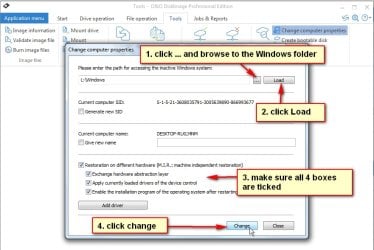
TOOLS>Change computer properties

In this screenshot, the target is L:\Windows

O&Oadjust.jpg
 

My Computers My Computers

  • At a glance

    7 X64i5 84002x8gb 3200mhz
    Computer type
    PC/Desktop
    OS
    7 X64
    CPU
    i5 8400
    Motherboard
    gigabyte b365m ds3h
    Memory
    2x8gb 3200mhz
    Hard Drives
    various
    PSU
    pure power 11 400w cm
    Case
    Coolermaster
    Cooling
    cryorig m9i
  • At a glance

    7x64g54008gb ddr4 2400
    Computer type
    PC/Desktop
    OS
    7x64
    CPU
    g5400
    Motherboard
    ga b365m ds3h
    Memory
    8gb ddr4 2400
    PSU
    xfx pro 450w
If you run the O&O adjust to new hardware module, it will try and install the drivers relevant to the machine the disk is currently plugged into.


Okay , so i should use my recent computer , reboot on my new SSD ( C: for win 10 or E: win 7) then open the software , target to my old disk (the one which doesn't allow keyboard and mouse , here F :windows)

Am i right ?
Thanks
 

My Computer My Computer

At a glance

Windows 7 Ultimate x64
Computer type
PC/Desktop
OS
Windows 7 Ultimate x64
Okay , so i should use my recent computer , reboot on my new SSD ( C: for win 10 or E: win 7) then open the software , target to my old disk (the one which doesn't allow keyboard and mouse , here F :windows)


yes
 

My Computers My Computers

  • At a glance

    7 X64i5 84002x8gb 3200mhz
    Computer type
    PC/Desktop
    OS
    7 X64
    CPU
    i5 8400
    Motherboard
    gigabyte b365m ds3h
    Memory
    2x8gb 3200mhz
    Hard Drives
    various
    PSU
    pure power 11 400w cm
    Case
    Coolermaster
    Cooling
    cryorig m9i
  • At a glance

    7x64g54008gb ddr4 2400
    Computer type
    PC/Desktop
    OS
    7x64
    CPU
    g5400
    Motherboard
    ga b365m ds3h
    Memory
    8gb ddr4 2400
    PSU
    xfx pro 450w
FYI, it is possible to use the paragon 2010 by extracting it from the iso and running it in windows 7 and pointing it at a different partition.

Probably simpler for you to try the O&O
 

My Computers My Computers

  • At a glance

    7 X64i5 84002x8gb 3200mhz
    Computer type
    PC/Desktop
    OS
    7 X64
    CPU
    i5 8400
    Motherboard
    gigabyte b365m ds3h
    Memory
    2x8gb 3200mhz
    Hard Drives
    various
    PSU
    pure power 11 400w cm
    Case
    Coolermaster
    Cooling
    cryorig m9i
  • At a glance

    7x64g54008gb ddr4 2400
    Computer type
    PC/Desktop
    OS
    7x64
    CPU
    g5400
    Motherboard
    ga b365m ds3h
    Memory
    8gb ddr4 2400
    PSU
    xfx pro 450w
FYI, it is possible to use the paragon 2010 by extracting it from the iso and running it in windows 7 and pointing it at a different partition.

Probably simpler for you to try the O&O


Ok tried O&O , i've got an error " Changing the computer properties has failed"

Error code : 0xE0040002

is Paragon 2010 available somewhere??
 

My Computer My Computer

At a glance

Windows 7 Ultimate x64
Computer type
PC/Desktop
OS
Windows 7 Ultimate x64

My Computers My Computers

  • At a glance

    7 X64i5 84002x8gb 3200mhz
    Computer type
    PC/Desktop
    OS
    7 X64
    CPU
    i5 8400
    Motherboard
    gigabyte b365m ds3h
    Memory
    2x8gb 3200mhz
    Hard Drives
    various
    PSU
    pure power 11 400w cm
    Case
    Coolermaster
    Cooling
    cryorig m9i
  • At a glance

    7x64g54008gb ddr4 2400
    Computer type
    PC/Desktop
    OS
    7x64
    CPU
    g5400
    Motherboard
    ga b365m ds3h
    Memory
    8gb ddr4 2400
    PSU
    xfx pro 450w
Back
Top