Solved Keyboard-now you see it, now you don't-ASUS P8P67

Pkiver

New member
Local time
11:36 AM
Messages
3
I've concluded there is some issue linking the PS/2 port and the BIOS..........and it needs sorting, please!

I've just put together the following: i5-2500K, Asus P8P67, 4 gb Corsair XMS RAM, Gigabyte ATI 6950 - all costing quite a bit of money and yet the whole sherbang is being let down by a keyboard issue.

The keyboard (a MS Natural Multimedia 1.0) plugged into the PS/2 port works (and has always worked) to allow access to BIOS. But once Windows 7 (Home Premium 64bit) is loaded, the device manager sees no keyboard.

So, this is what is happening. If I reboot and go back into BIOS (I have the latest ASUS BIOS for this board) and change the USB 2.0 setting, say from ENABLE to AUTO, save changes and exit, let Windows load, behold................the keyboard is there in DM and shows as a Standard PS/2 Keyboard (I have had the Intellitype drivers loaded but the DM doesn't seem to recognise the Keyboard by its MS official title, it just stayed as a Standard PS/2 Keyboard). That is how I'm typing this message now.

Now, if I shut down the computer and restart, the keyboard (after Windows is loaded) will cease to exist again until...................yes, you've guessed it, I shut down, go into BIOS, change the USB 2.0 setting (it doesn't seem to matter what to) and hey presto! A recognised and working keyboard!!!

This is a problem thousands are having and we must be talking about a component that costs pennies to add to the MB and probably to fix so come on MS and/or ASUS.... sort it please.

After some further checking, it would appear that a change to ANY setting in BIOS will cause the KB to reappear in DM; it's not specific to a change to USB settings.
 

My Computer My Computer

At a glance

Windows 7 Home Premium 64bitIntel i5-2500KCorsair 4GB (2x2GB) DDR3 1600MHz/PC3-12800 XM...Gigabyte HD 6950 2GB GDDR5 Dual DVI HDMI Dual...
OS
Windows 7 Home Premium 64bit
CPU
Intel i5-2500K
Motherboard
Asus P8P67 LE
Memory
Corsair 4GB (2x2GB) DDR3 1600MHz/PC3-12800 XMS3 i5 Memory Ki
Graphics Card(s)
Gigabyte HD 6950 2GB GDDR5 Dual DVI HDMI Dual DP Out PCI-E
Sound Card
On Board Realtek
Monitor(s) Displays
LG Flatron W2242S Analogue
Hard Drives
Samsung HD103SJ Spinpoint F3 1TB Hard Drive SATAII 7200rpm 32MB Cache
PSU
bequiet PurePower 530W
Case
Antec 300
Hi Pkiver and welcome to SF! :)
Your keyboard has a PS/2 connection, ie no connection whatsoever with changes of parameters USB in the BIOS. My guess: you have installed Intellytype Pro 8, which is support for USB keyboards, here's the problem. You must install version 7.1, which supports PS/2. ;)
Hope that helps!
 

My Computer My Computer

At a glance

Windows 7 Ultimate x64 SP1AMD PHENOM II X6 1090T 3.2GHz8GB G.SKILL RIPJAWS - F3-10666CL7DSAPPHIRE ATI RADEON HD 5870 VAPOR X OC
Computer Manufacturer/Model Number
WALLONN7 / LIN BLACK SERIES II
OS
Windows 7 Ultimate x64 SP1
CPU
AMD PHENOM II X6 1090T 3.2GHz
Motherboard
GIGABYTE GA-890FXA-UD7
Memory
8GB G.SKILL RIPJAWS - F3-10666CL7D
Graphics Card(s)
SAPPHIRE ATI RADEON HD 5870 VAPOR X OC
Sound Card
REALTEK DOLBY HOME THEATER
Monitor(s) Displays
LED LG W2486L
Screen Resolution
1080p
Hard Drives
SEAGATE 1TB -ST31000528AS - AHCI MODE - AS SATA
PSU
ZALMAN ZM1000-HP 1000W
Case
THERMALTAKE XASER VI VG4000SWA
Cooling
140MM x3 / 120MM x1 AIR COOLING - THERMALTAKE
Keyboard
MICROSOFT DIGITAL MEDIA KEYBOARD 3000 - USB
Mouse
MICROSOFT BASIC OPTICAL MOUSE 2.0 - USB
Internet Speed
600KBPS
Other Info
MICROSOFT XBOX 360 CONTROLLER
Hi Wallon 7

As I mentioned in the last bit of my post, I have found that (now) there's no link with USB per se....but if I make any alteration in BIOS, be it 'disable' 1394 or 'change' USB to 'auto', on the next boot into Windows, the KB appears in DM.

I have 7.1 and when they were loaded, Windows still saw the keyboard (after me going through the BIOS again) as a Standard PS2 Keyboard.

In (my) simple estimation, the KB is being seen through the boot but Windows isn't seeing it BUT it will when some other parameter, reset in BIOS, forces Windows to make an adjustment to facilitate that change and in doing so it then sees the KB. However, without that 'kick' once the system is running, it is being overlooked by Windows from a cold start.

Why?
 

My Computer My Computer

At a glance

Windows 7 Home Premium 64bitIntel i5-2500KCorsair 4GB (2x2GB) DDR3 1600MHz/PC3-12800 XM...Gigabyte HD 6950 2GB GDDR5 Dual DVI HDMI Dual...
OS
Windows 7 Home Premium 64bit
CPU
Intel i5-2500K
Motherboard
Asus P8P67 LE
Memory
Corsair 4GB (2x2GB) DDR3 1600MHz/PC3-12800 XMS3 i5 Memory Ki
Graphics Card(s)
Gigabyte HD 6950 2GB GDDR5 Dual DVI HDMI Dual DP Out PCI-E
Sound Card
On Board Realtek
Monitor(s) Displays
LG Flatron W2242S Analogue
Hard Drives
Samsung HD103SJ Spinpoint F3 1TB Hard Drive SATAII 7200rpm 32MB Cache
PSU
bequiet PurePower 530W
Case
Antec 300
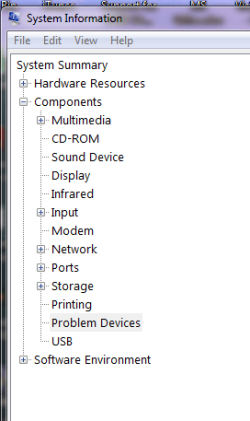
Take look in System Information for Problem Device's.

SI.PNG
 

My Computer My Computer

At a glance

ME/XP/Vista/Win7
OS
ME/XP/Vista/Win7

My Computer My Computer

At a glance

Windows 7 Ultimate x64 SP1AMD PHENOM II X6 1090T 3.2GHz8GB G.SKILL RIPJAWS - F3-10666CL7DSAPPHIRE ATI RADEON HD 5870 VAPOR X OC
Computer Manufacturer/Model Number
WALLONN7 / LIN BLACK SERIES II
OS
Windows 7 Ultimate x64 SP1
CPU
AMD PHENOM II X6 1090T 3.2GHz
Motherboard
GIGABYTE GA-890FXA-UD7
Memory
8GB G.SKILL RIPJAWS - F3-10666CL7D
Graphics Card(s)
SAPPHIRE ATI RADEON HD 5870 VAPOR X OC
Sound Card
REALTEK DOLBY HOME THEATER
Monitor(s) Displays
LED LG W2486L
Screen Resolution
1080p
Hard Drives
SEAGATE 1TB -ST31000528AS - AHCI MODE - AS SATA
PSU
ZALMAN ZM1000-HP 1000W
Case
THERMALTAKE XASER VI VG4000SWA
Cooling
140MM x3 / 120MM x1 AIR COOLING - THERMALTAKE
Keyboard
MICROSOFT DIGITAL MEDIA KEYBOARD 3000 - USB
Mouse
MICROSOFT BASIC OPTICAL MOUSE 2.0 - USB
Internet Speed
600KBPS
Other Info
MICROSOFT XBOX 360 CONTROLLER
Check to see if your BIOS settings allows a PS/2 adjustment, enable/disable, etc. As per Wallon's link, try the PS/2>USB adapter too.
 

My Computer My Computer

At a glance

Windows 7 Ultimate X64 SP1Intel i5-2550K, Differing ~4.4-4.8GHz No buil...16GB G.Skill Sniper 1866MHz @ 2133MHz 2x8GBASUS GTX650TIB-DC2OC-2GD5, (650TI Boost)
Computer type
PC/Desktop
Computer Manufacturer/Model Number
Home Built Desktop By DataTech
OS
Windows 7 Ultimate X64 SP1
CPU
Intel i5-2550K, Differing ~4.4-4.8GHz No built in GPU
Motherboard
ASUS P8Z68-V PRO/GEN3
Memory
16GB G.Skill Sniper 1866MHz @ 2133MHz 2x8GB
Graphics Card(s)
ASUS GTX650TIB-DC2OC-2GD5, (650TI Boost)
Sound Card
Onboard Realtek 5-1
Monitor(s) Displays
Samsung P2570HD
Screen Resolution
1920x1080
Hard Drives
Samsung 840 Pro 256GB SSD for OS, 500GB Seagate Constellation (Enterprise drive) for Data
PSU
Corsair HX650W
Case
Inwin Dragon Rider
Cooling
Hyper 212 EVO w/two Noctua fans, push-pull, @1300 RPM
Keyboard
E-Z Eyes, bright yellow keys with large characters
Mouse
steelseries SENSEI Laser Pro Gaming
Internet Speed
48-51Mbs Mbs down, 11 Mbs up Xfinity Cable
Antivirus
Norton Internet Security 2013
Browser
IE 10, Opera, Pale Moon if needed
Other Info
4 case fans, LG BluRay-RE, ASUS DVD-RW, Mr. Fusion power supply, 1.21 gigawatts.
... I've just put together the following: i5-2500K, Asus P8P67, 4 gb Corsair XMS RAM, Gigabyte ATI 6950 - all costing quite a bit of money and yet the whole sherbang is being let down by a keyboard issue.

The keyboard (a MS Natural Multimedia 1.0) plugged into the PS/2 port works (and has always worked) to allow access to BIOS. But once Windows 7 (Home Premium 64bit) is loaded, the device manager sees no keyboard.
Doesn't your keyboard have USB? You can access the bios no problem.
 

My Computer My Computer

At a glance

7 Ultimate x64i5-2500k8GB G.Skill Ripjaws X F3-12800CL7D-8GBXH 1866...EVGA GTX 570 SC
OS
7 Ultimate x64
CPU
i5-2500k
Motherboard
Asus P8P67 Pro
Memory
8GB G.Skill Ripjaws X F3-12800CL7D-8GBXH 1866MHz 8-9-8-24
Graphics Card(s)
EVGA GTX 570 SC
Sound Card
X-Fi Titanium Fatality
Monitor(s) Displays
Samsung S27A550H 27" LED
Screen Resolution
1920x1080
Hard Drives
OCZ Vertex 3 120GB.
1TB Samsung F3.
2TB Samsung F4.
PSU
PC Power & Cooling Silencer 760
Case
Lian Li Lancool K62
Cooling
Thermalright Venomous X Black/Scythe S-Flex/Shin-Etsu X23
Keyboard
MS Natural Elite 4000 Ergonomic
Mouse
Logitech G500
Internet Speed
6MB/768
Other Info
Logitech Z-5500 505 watts.
D-Link DGL-4500.
Tripp-Lite Smart Pro 1500.
... I've just put together the following: i5-2500K, Asus P8P67, 4 gb Corsair XMS RAM, Gigabyte ATI 6950 - all costing quite a bit of money and yet the whole sherbang is being let down by a keyboard issue.

The keyboard (a MS Natural Multimedia 1.0) plugged into the PS/2 port works (and has always worked) to allow access to BIOS. But once Windows 7 (Home Premium 64bit) is loaded, the device manager sees no keyboard.
Doesn't your keyboard have USB? You can access the bios no problem.

No, his keyboard does not have USB.

I've tried all suggestions so far and I'm in the same boat. Windows 7 64 bit ultimate needs to be in a warm boot mode to use a ps/2 keyboard.
 

My Computer My Computer

At a glance

Windows 7 Ultimate x64
OS
Windows 7 Ultimate x64
I should really have 'closed out' this thread from my perspective. No matter what, the PS2 failed to work and I bought a USB keyboard, plugged it in and it works perfectly.

I sent an email to ASUS suggesting that they might like to highlight the fact to potential purchasers that this particular keyboard doesn't seem to be compatable with their board - complete indifference was the response; just buy a USB keyboard.
 

My Computer My Computer

At a glance

Windows 7 Home Premium 64bitIntel i5-2500KCorsair 4GB (2x2GB) DDR3 1600MHz/PC3-12800 XM...Gigabyte HD 6950 2GB GDDR5 Dual DVI HDMI Dual...
OS
Windows 7 Home Premium 64bit
CPU
Intel i5-2500K
Motherboard
Asus P8P67 LE
Memory
Corsair 4GB (2x2GB) DDR3 1600MHz/PC3-12800 XMS3 i5 Memory Ki
Graphics Card(s)
Gigabyte HD 6950 2GB GDDR5 Dual DVI HDMI Dual DP Out PCI-E
Sound Card
On Board Realtek
Monitor(s) Displays
LG Flatron W2242S Analogue
Hard Drives
Samsung HD103SJ Spinpoint F3 1TB Hard Drive SATAII 7200rpm 32MB Cache
PSU
bequiet PurePower 530W
Case
Antec 300
I've heard ASUS support...isn't. Much like all makers, except for GSkill memory, I've got really good feedback from them regarding OCing.
 

My Computer My Computer

At a glance

Windows 7 Ultimate X64 SP1Intel i5-2550K, Differing ~4.4-4.8GHz No buil...16GB G.Skill Sniper 1866MHz @ 2133MHz 2x8GBASUS GTX650TIB-DC2OC-2GD5, (650TI Boost)
Computer type
PC/Desktop
Computer Manufacturer/Model Number
Home Built Desktop By DataTech
OS
Windows 7 Ultimate X64 SP1
CPU
Intel i5-2550K, Differing ~4.4-4.8GHz No built in GPU
Motherboard
ASUS P8Z68-V PRO/GEN3
Memory
16GB G.Skill Sniper 1866MHz @ 2133MHz 2x8GB
Graphics Card(s)
ASUS GTX650TIB-DC2OC-2GD5, (650TI Boost)
Sound Card
Onboard Realtek 5-1
Monitor(s) Displays
Samsung P2570HD
Screen Resolution
1920x1080
Hard Drives
Samsung 840 Pro 256GB SSD for OS, 500GB Seagate Constellation (Enterprise drive) for Data
PSU
Corsair HX650W
Case
Inwin Dragon Rider
Cooling
Hyper 212 EVO w/two Noctua fans, push-pull, @1300 RPM
Keyboard
E-Z Eyes, bright yellow keys with large characters
Mouse
steelseries SENSEI Laser Pro Gaming
Internet Speed
48-51Mbs Mbs down, 11 Mbs up Xfinity Cable
Antivirus
Norton Internet Security 2013
Browser
IE 10, Opera, Pale Moon if needed
Other Info
4 case fans, LG BluRay-RE, ASUS DVD-RW, Mr. Fusion power supply, 1.21 gigawatts.
Back
Top