Keyboard problem

bananalord

New member
Local time
12:53 PM
Messages
1
Vbn8m8d.png


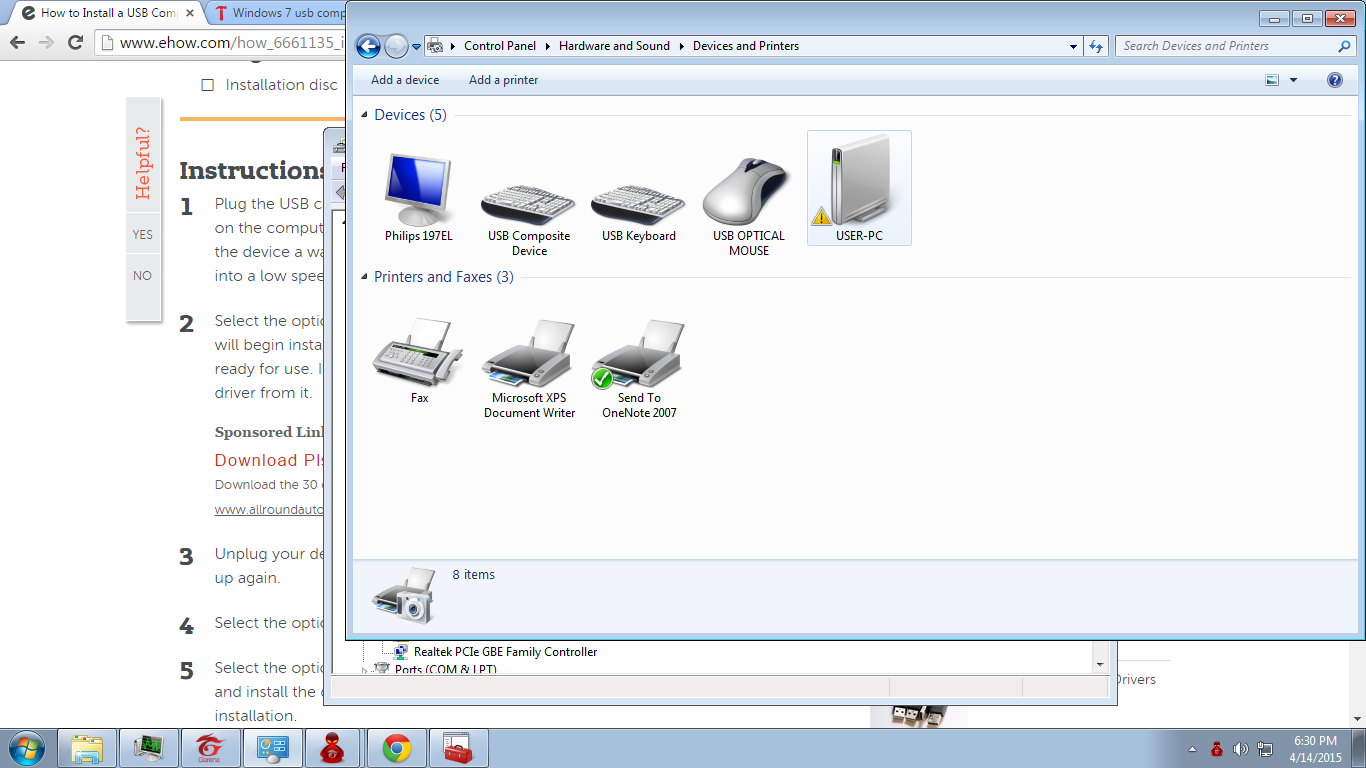
There's two keyboard installed one of them is behaving properly which is USB COMPOSITE DEVICE while thee other is behaving weird which is USB KEYBOARD

This is what it looks like when typing in the keyboard USB KEYBOARD

JHi I ¥Lik Banana witjh ice cream and jham

Please note I am not faking it, what can I do to fix this issue :(
Thank you
 

My Computer

Computer type
PC/Desktop
OS
Windows 7 Ultimate x32
What happened when you tried restarting [or coldbooting] with each keyboard being the only keyboard plugged in?
 

My Computer

Computer type
PC/Desktop
Computer Manufacturer/Model Number
Antec desktop; Acer Aspire laptops
OS
Windows 7 Professional 64-bit
CPU
Desktop i5; Acers i5 & i7
Memory
desktop 16GB; 1 Acer 8GB & 1 Acer 16GB
Hard Drives
1TB split into 2 equal partitions [OS and data] usable by RJS
Internet Speed
AT&T DSL
Browser
FF, GChrome, msIE
Other Info
Windows 7 Firewall, Emsisoft AM/AV, MSE [scan-only], SpywareBlaster, Ruiware/BillP combine
First off you don't state which keyboards you are using.
Second off just have one keyboard at a time hooked up. You can only type on one at a time.

Two keyboards at a time on the same system is just confusing Windows 7.
 

My Computer

Computer type
PC/Desktop
Computer Manufacturer/Model Number
Home made Desktop
OS
Windows 10 Pro. 64/ version 1709 Windows 7 Pro/64
CPU
Intel i7-6800K @ 4.3
Motherboard
ASUS X-99 Deluxe II
Memory
Corsair Platinum 16 gig @2400
Graphics Card(s)
EVGA GTX 1070 OC
Monitor(s) Displays
Asus 27" LED LCD/VE278Q
Screen Resolution
1920-1080 or 1280-720 HDMI
Hard Drives
INTEL SSD 730-240 Gb Sata 3.0/
PSU
EVGA Platium 1200W
Case
Phanteks Luxe Tempered Glass 8 fans/ one radiator
Cooling
XSPC/ Water Cooled CPU
Keyboard
Das 4 Professional
Mouse
Logitech M705/MX Anywhere 2-S
Internet Speed
100 mbits
Antivirus
Microsoft Security Essentials/ Malwarebytes Premium 3.0/ SAS
Browser
I.E. 11 default/Firefox/ ISP Time Warner Cable/Spectrum
Other Info
LG BluRay Burner/
Sound system-KLipsch-THX/
Icy Dock ssd Hot Swap bays.
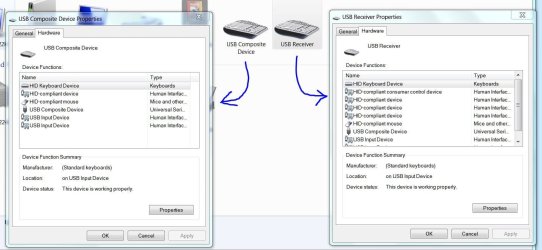
Not necessarily. I have two "Keyboards" showing on mine. Just because it depicts a keyboard doesn't mean it's really a physical keyboard. On mine, one is really a keyboard/mouse combo, the other is my IR remote control device with a pseudo keyboard, mouse and case display console . I can use my remote control (keypad) to initiate programs and move the mouse pointer, left and right click, etc. I even turn my PC on with the remote. (The case is about 6' away from my desk.)

What's the history of the machine. Did you add a new keyboard/mouse? One may be a leftover USB wireless unifying receiver, touch pad, number pad or something. Check the properties of each and see what's listed.
 

Attachments

  • Keyboard Devices.JPG
    Keyboard Devices.JPG
    106.3 KB · Views: 0

My Computer

Computer type
PC/Desktop
Computer Manufacturer/Model Number
Built 2/11/2011
OS
Windows 7 Pro-x64
CPU
i7-2600 3.4GHz - 3.8GHz Turbo
Motherboard
Intel DH67BL-B3
Memory
8Gb - 2x4GB, Muskin 991770 PC3-1333
Graphics Card(s)
Integrated Intel HD 2000
Sound Card
Integrated Intel 10.1 HD, RealTek ALC892
Monitor(s) Displays
Asus LCD VH222H, Haier HL24XSL2a
Screen Resolution
1920x1080, 1920x1080
Hard Drives
Crucial SSD C300-128Gb,
Western Digital WD5002AALX - 500Gb,
Western Digital WD7501AALS - 750Gb
PSU
Seasonic 650W 80+ Gold Modular
Case
Rosewill Defender
Cooling
Stock CPU, Four 120mm case fans, PCH fan added
Keyboard
Logitech EX100 Y-RBH94 Wireless
Mouse
Logitech EX100 M-RCE95 Wireless
Internet Speed
3.0/1.5 Mbs
Antivirus
Microsoft Security Essentials
Browser
Microsoft Internet Explorer 11
Other Info
Antec Veris Premier-Multimedia IR Station,
Cyber Accoustics-3602 Speakers,
AFT XM-5U Card Reader,
Hauppauge TV-HVR-2250,
Sony LX300 USB Turntable
Back
Top