Kworld USB capture device no longer working for some reason.

Phoenix502

New member
Local time
4:38 PM
Messages
7
Earlier in January last month, I was using this Kworld VS-USB2800D capture device to record videos for my friends, at the time, I recorded videos of great quality and while I improvised for the sound, it recorded well. Then a couple of weeks ago, I plugged it in again to do more videos and it didn't show up on my Debut video capture software anymore.

I looked all over the place for information, followed instructions to uninstall it, reboot my laptop and reinstall the drivers from the manufacturers with the disc; I looked at the manufacturer's official site and got the drivers and found the folder only had drivers for XP x32, XP x64, Vista x32, and Vista x64.

I don't get it, it worked fine last month and yet it doesn't work anymore. I looked up the drivers and I don't see any drivers exclusive to Windows 7, which completely contradicts the product's claim of being compatible with it. does anyone have any ideas I might have missed?

yeah, I'm kind of new with this... both on the forum and with windows 7 compared to XP...
 
Last edited:

My Computer My Computer

At a glance

Windows 7 Home Premium x64AMDTurion II Dual Core Mobile 520
Computer Manufacturer/Model Number
TOSHIBA
OS
Windows 7 Home Premium x64
CPU
AMDTurion II Dual Core Mobile 520
uhm... hopefully this is the right place for a question like mine... :o
 

My Computer My Computer

At a glance

Windows 7 Home Premium x64AMDTurion II Dual Core Mobile 520
Computer Manufacturer/Model Number
TOSHIBA
OS
Windows 7 Home Premium x64
CPU
AMDTurion II Dual Core Mobile 520
Try installing them in compatibility mode and see if that fixes it.
 

My Computer My Computer

At a glance

Windows 7 Home Premium 64 bitIntel Core 2 quad Extreme Q9770 @ 3.2 GHz4x2 GB Muskin 1600 MHz ramNVidia GTX 250
Computer Manufacturer/Model Number
Dell XPS 730
OS
Windows 7 Home Premium 64 bit
CPU
Intel Core 2 quad Extreme Q9770 @ 3.2 GHz
Memory
4x2 GB Muskin 1600 MHz ram
Graphics Card(s)
NVidia GTX 250
Sound Card
Soundblaster X-Fi Fatality Champion
Monitor(s) Displays
2 Dell 2007WFP Ultrascans
Screen Resolution
3360 x 1050
Hard Drives
WD Black 1TB sata, 2-WD Black 500 sata, 2-Seagate 500 Go external
PSU
1000 Watt
Cooling
air
Keyboard
MS Natrual Keyboard Pro
Mouse
Logitech Wireless Trackball
Internet Speed
DSL Elite
Try installing them in compatibility mode and see if that fixes it.

erm, I'm not sure what you mean by that in regards to hardware device drivers

as an update, though, I just finished completely uninstalling it from the system. but when I plugged it back in, it the computer was unable to install the software, I even took the installation CD and for some reason it won't install...
 

My Computer My Computer

At a glance

Windows 7 Home Premium x64AMDTurion II Dual Core Mobile 520
Computer Manufacturer/Model Number
TOSHIBA
OS
Windows 7 Home Premium x64
CPU
AMDTurion II Dual Core Mobile 520
...a-anyone?
 

My Computer My Computer

At a glance

Windows 7 Home Premium x64AMDTurion II Dual Core Mobile 520
Computer Manufacturer/Model Number
TOSHIBA
OS
Windows 7 Home Premium x64
CPU
AMDTurion II Dual Core Mobile 520
Either Win7 had the drivers already or you installed Vista drivers, a lot of Vista drivers work in 7.

If you look for a program called usbdeview you can use it to find old USB hardware registry entries, it will very likely find your K-World device which you then right click on and uninstall. Then plug it in and 7 should look for drivers without old info confusing it. Worth a try.
 

My Computer My Computer

At a glance

Windows 7
OS
Windows 7
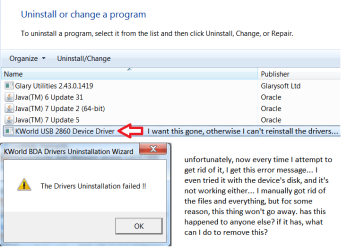
okay, I don't know if this is going to land me in trouble for bringing back this thread, but since calming down and getting back to this problem. I should be able to explain this better. I tried looking up that usbdeview and wasn't quite savvy enough to know what I was really doing, so I hope this picture can explain it better for me
 

Attachments

  • explanation.png
    explanation.png
    22.3 KB · Views: 8

My Computer My Computer

At a glance

Windows 7 Home Premium x64AMDTurion II Dual Core Mobile 520
Computer Manufacturer/Model Number
TOSHIBA
OS
Windows 7 Home Premium x64
CPU
AMDTurion II Dual Core Mobile 520
Did by any chance you happen to Delete the main folder? If not try that..
Then try to Uninstall

If not try a Re-install and see if it will Re-create the folder and drivers as well

Anything is worth a shot at this point


Also a silly question ...Do you Use the same USB Port all the time or choose Different places Somtimes a system get's iffy where you stick the stick I don't know why that happens but it does it on both of my rigs it is picky about what port you use
 

My Computer My Computer

At a glance

Windows 10 Home Premium 64bit sp1Intel I7-6700K @ 4.6 Ghz 1.344 volts everyday OC32GB G-Skill TridentZ 3200mhz 16-18-18-38 DDR4Sli Gigabyte Windforce GTX 980 G1
Computer type
PC/Desktop
Computer Manufacturer/Model Number
CoreI7-6700K MrFingerIII Special Builds
OS
Windows 10 Home Premium 64bit sp1
CPU
Intel I7-6700K @ 4.6 Ghz 1.344 volts everyday OC
Motherboard
Asrock Fatality K6 Z170 Socket 1151
Memory
32GB G-Skill TridentZ 3200mhz 16-18-18-38 DDR4
Graphics Card(s)
Sli Gigabyte Windforce GTX 980 G1
Sound Card
AC97 Creative Rage Tactic 3D Headphones Bluetooth
Monitor(s) Displays
27" Asus ROG Swift PG278Q G-Sync 48" Vizio Smart HD TV
Screen Resolution
2560x1440p 27"- 48" Currently Gaming at 2560x1440p Res 2K
Hard Drives
250GB Samsung Evo840SSD Seagate baracuda 500 GB WD Mybook 500Gb 1TB Seagate Barracuda
PSU
HX1050w Corsair Silver 80plus certified crosfire/sli
Case
Enthod Pro Full Tower
Cooling
Corsair H110i GT 280 mm High Performance WaterBlock
Keyboard
Logitech wireless keyboard
Mouse
Logitech wireless mouse
Internet Speed
Cox Cable 100+ mb
Antivirus
WebRoot Spysweeper with Antivirus
Browser
IE-10, Chrome, Opera
Other Info
My Other Rig is a AMD FX8320E @4.6Ghz 16GB Ballistic Sport Ram
Mobo Asrock Fatality 990FX 120GB OCZ SSD 1TB Seagate Barracuda Corsair H75 Cooling PSU Corsair CX750
GPU GTX Gigabyte 970G1
Did by any chance you happen to Delete the main folder? If not try that..
Then try to Uninstall

If not try a Re-install and see if it will Re-create the folder and drivers as well

Anything is worth a shot at this point


Also a silly question ...Do you Use the same USB Port all the time or choose Different places Somtimes a system get's iffy where you stick the stick I don't know why that happens but it does it on both of my rigs it is picky about what port you use

in order:

1) yes I did, multiple times, after manually replacing the files to see if it would register "this time"
2) yes, also multiple times. but for some reason, before it started failing, it says it was complete, but the icon didn't disappear.
3) also tried many times, when the second method's result depicted in the picture began it got most of the way finished before outright saying it failed.

and for the last one: no, I used a different port depending on what's more convenient for space. in fact, the problem started when I put off the main intent on using it and plugged it in again a few weeks later, I quickly knew there was something wrong because my laptop began installing drivers for a device it didn't completely recognize (despite it being a device it should already have drivers for)... I checked over it and all it told me was that its a recording device, but the drivers used to run it were completely pointless, because the capture software would not recognize it...
 
Last edited:

My Computer My Computer

At a glance

Windows 7 Home Premium x64AMDTurion II Dual Core Mobile 520
Computer Manufacturer/Model Number
TOSHIBA
OS
Windows 7 Home Premium x64
CPU
AMDTurion II Dual Core Mobile 520
Did by any chance you happen to Delete the main folder? If not try that..
Then try to Uninstall

If not try a Re-install and see if it will Re-create the folder and drivers as well

Anything is worth a shot at this point


Also a silly question ...Do you Use the same USB Port all the time or choose Different places Somtimes a system get's iffy where you stick the stick I don't know why that happens but it does it on both of my rigs it is picky about what port you use

in order:

1) yes I did, multiple times, after manually replacing the files to see if it would register "this time"
2) yes, also multiple times. but for some reason, before it started failing, it says it was complete, but the icon didn't disappear.
3) also tried many times, when the second method's result depicted in the picture began it got most of the way finished before outright saying it failed.

and for the last one: no, I used a different port depending on what's more convenient for space. in fact, the problem started when I put off the main intent on using it and plugged it in again a few weeks later, I quickly knew there was something wrong because my laptop began installing drivers for a device it didn't completely recognize (despite it being a device it should already have drivers for)... I checked over it and all it told me was that its a recording device, but the drivers used to run it were completely pointless, because the capture software would not recognize it...


With that being said the port may be the issue
You can see if there is a updated driver for your USB through Mb Maker or drivers from the Laptop site
 

My Computer My Computer

At a glance

Windows 10 Home Premium 64bit sp1Intel I7-6700K @ 4.6 Ghz 1.344 volts everyday OC32GB G-Skill TridentZ 3200mhz 16-18-18-38 DDR4Sli Gigabyte Windforce GTX 980 G1
Computer type
PC/Desktop
Computer Manufacturer/Model Number
CoreI7-6700K MrFingerIII Special Builds
OS
Windows 10 Home Premium 64bit sp1
CPU
Intel I7-6700K @ 4.6 Ghz 1.344 volts everyday OC
Motherboard
Asrock Fatality K6 Z170 Socket 1151
Memory
32GB G-Skill TridentZ 3200mhz 16-18-18-38 DDR4
Graphics Card(s)
Sli Gigabyte Windforce GTX 980 G1
Sound Card
AC97 Creative Rage Tactic 3D Headphones Bluetooth
Monitor(s) Displays
27" Asus ROG Swift PG278Q G-Sync 48" Vizio Smart HD TV
Screen Resolution
2560x1440p 27"- 48" Currently Gaming at 2560x1440p Res 2K
Hard Drives
250GB Samsung Evo840SSD Seagate baracuda 500 GB WD Mybook 500Gb 1TB Seagate Barracuda
PSU
HX1050w Corsair Silver 80plus certified crosfire/sli
Case
Enthod Pro Full Tower
Cooling
Corsair H110i GT 280 mm High Performance WaterBlock
Keyboard
Logitech wireless keyboard
Mouse
Logitech wireless mouse
Internet Speed
Cox Cable 100+ mb
Antivirus
WebRoot Spysweeper with Antivirus
Browser
IE-10, Chrome, Opera
Other Info
My Other Rig is a AMD FX8320E @4.6Ghz 16GB Ballistic Sport Ram
Mobo Asrock Fatality 990FX 120GB OCZ SSD 1TB Seagate Barracuda Corsair H75 Cooling PSU Corsair CX750
GPU GTX Gigabyte 970G1
so you mean to say something's wrong with the USB ports... so what kind of options do I have, then?
 

My Computer My Computer

At a glance

Windows 7 Home Premium x64AMDTurion II Dual Core Mobile 520
Computer Manufacturer/Model Number
TOSHIBA
OS
Windows 7 Home Premium x64
CPU
AMDTurion II Dual Core Mobile 520
see if you can update a driver or roll back the driver see if anything changes when you revert back a driver it ussually fixes issues you have

But you would have to do it manualy from the hardware and devices page USB check if you can roll it back you can also try system restore to a date it was working

I suggested that before
 

My Computer My Computer

At a glance

Windows 10 Home Premium 64bit sp1Intel I7-6700K @ 4.6 Ghz 1.344 volts everyday OC32GB G-Skill TridentZ 3200mhz 16-18-18-38 DDR4Sli Gigabyte Windforce GTX 980 G1
Computer type
PC/Desktop
Computer Manufacturer/Model Number
CoreI7-6700K MrFingerIII Special Builds
OS
Windows 10 Home Premium 64bit sp1
CPU
Intel I7-6700K @ 4.6 Ghz 1.344 volts everyday OC
Motherboard
Asrock Fatality K6 Z170 Socket 1151
Memory
32GB G-Skill TridentZ 3200mhz 16-18-18-38 DDR4
Graphics Card(s)
Sli Gigabyte Windforce GTX 980 G1
Sound Card
AC97 Creative Rage Tactic 3D Headphones Bluetooth
Monitor(s) Displays
27" Asus ROG Swift PG278Q G-Sync 48" Vizio Smart HD TV
Screen Resolution
2560x1440p 27"- 48" Currently Gaming at 2560x1440p Res 2K
Hard Drives
250GB Samsung Evo840SSD Seagate baracuda 500 GB WD Mybook 500Gb 1TB Seagate Barracuda
PSU
HX1050w Corsair Silver 80plus certified crosfire/sli
Case
Enthod Pro Full Tower
Cooling
Corsair H110i GT 280 mm High Performance WaterBlock
Keyboard
Logitech wireless keyboard
Mouse
Logitech wireless mouse
Internet Speed
Cox Cable 100+ mb
Antivirus
WebRoot Spysweeper with Antivirus
Browser
IE-10, Chrome, Opera
Other Info
My Other Rig is a AMD FX8320E @4.6Ghz 16GB Ballistic Sport Ram
Mobo Asrock Fatality 990FX 120GB OCZ SSD 1TB Seagate Barracuda Corsair H75 Cooling PSU Corsair CX750
GPU GTX Gigabyte 970G1
Back
Top