Lag/Laggy animations with multiple displays (Extend desktop)

Your PSU should be okay, have you tried using one monitor or two?
 

My Computer My Computer

Computer type
Laptop
Your PSU should be okay, have you tried using one monitor or two?
One monitor is completely lag free (with Aero on). Adding a secondary monitor with Aero transparency enabled starts the lag.
 

My Computer My Computer

At a glance

Windows 7 Ultimate x64i7 3770k16GBGTX 680
Computer type
PC/Desktop
OS
Windows 7 Ultimate x64
CPU
i7 3770k
Memory
16GB
Graphics Card(s)
GTX 680
Screen Resolution
5760x1080
You'll probably going to need a dual card set-up in my opinion.
 

My Computer My Computer

Computer type
Laptop
Try this:

Download Process Explorer.

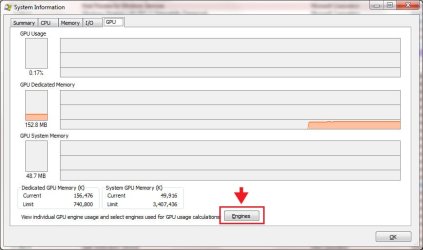
  • Go to View> System Information (Ctrl+I) and select the GPU tab.
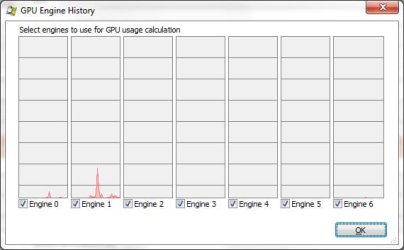
  • Select all the Engines by checking the check-box next to each one and confirm.
1eng.jpg

2eng.jpg

Now you can tell whether it's a GPU memory constraint or a software constraint
by comparing the GPU Dedicated Memory Usage in each configuration.

Tip.

  • You can also arrange the processes running on you system by GPU Usage.
if.jpg
 

My Computer My Computer

At a glance

Windows 10Intel Core i5 3570K16GB 1600Mhz G.SkillGigabyte GTX 970 G1-Gaming
Computer type
PC/Desktop
OS
Windows 10
CPU
Intel Core i5 3570K
Motherboard
Asus P8Z77V-PRO
Memory
16GB 1600Mhz G.Skill
Graphics Card(s)
Gigabyte GTX 970 G1-Gaming
PSU
Seasonic 1000W Platinum
Case
Fractal Design Define R4
Cooling
Noctua NH-D14
Try this:

Download Process Explorer.

  • Go to View> System Information (Ctrl+I) and select the GPU tab.
  • Select all the Engines by checking the check-box next to each one and confirm.
View attachment 281237

View attachment 281238

Now you can tell whether it's a GPU memory constraint or a software constraint
by comparing the GPU Dedicated Memory Usage in each configuration.
Tip.

  • You can also arrange the processes running on you system by GPU Usage.
View attachment 281240
-With 3 Aurora tabs open, Skype and Process Explorer, GPU usage is usually under 2%, GPU Dedicated Memory is at 225MB and GPU System Memory is at 40MB.
-dwm.exe/Desktop Window Manager uses about 0.9-1.1 GPU
-firefox.exe/Aurora uses about 0.6-0.8 GPU
-csrss.exe/Client Server Runtime Process uses about 0.2-0.3 GPU.
 

My Computer My Computer

At a glance

Windows 7 Ultimate x64i7 3770k16GBGTX 680
Computer type
PC/Desktop
OS
Windows 7 Ultimate x64
CPU
i7 3770k
Memory
16GB
Graphics Card(s)
GTX 680
Screen Resolution
5760x1080
So its not a GPU hardware issue.
Its a software issue, where it may lay is a different story.

I guess you'll have to wait for nVidia to update the program and hopefully fix it :/ .
 

My Computer My Computer

At a glance

Windows 10Intel Core i5 3570K16GB 1600Mhz G.SkillGigabyte GTX 970 G1-Gaming
Computer type
PC/Desktop
OS
Windows 10
CPU
Intel Core i5 3570K
Motherboard
Asus P8Z77V-PRO
Memory
16GB 1600Mhz G.Skill
Graphics Card(s)
Gigabyte GTX 970 G1-Gaming
PSU
Seasonic 1000W Platinum
Case
Fractal Design Define R4
Cooling
Noctua NH-D14
Just read this thread although it's very old , i thought i would comment as i have a similar issue, i have a to end 980ti GPU and a 6700K CPU on a Z170 main board with 16gb of ram, and an ample Tier 1 PSU corsair AX760 This is on win7 x64 ultimate , the lag started when i started to stream video content to my TV using the extend the display option in windows, it causes both displays to run choppy /laggy though the sound is in sync and error free, i have checked the usage of the cpu cores /temp and gpu and neither are getting anywhere near stressed or overheating , if i set the display mode to Duplicate these displays, it runs perfectly , why or what is causing this i can't find a reason for, except it has to be down to Microsoft programing
 

My Computer My Computer

At a glance

Win 7 premium SP1 x86
OS
Win 7 premium SP1 x86
I had a similar problem with nvidia on my dell latitude d630 I uninstalled NVidia Graphics,Switched to High Performance/Windows Classic Mode and Now it is working great!
 

My Computer My Computer

At a glance

Windows 7 Professional 32-bit & Windows 10 Pr...Intel Pentium 4,Intel Core Duo,AMD Radeon,and...1/2 GBNVIDIA GEFORCE,AMD Radeon, and Intel Intergrated
Computer type
PC/Desktop
Computer Manufacturer/Model Number
Dell,HP,and Gateway
OS
Windows 7 Professional 32-bit & Windows 10 Professional 32-bit
CPU
Intel Pentium 4,Intel Core Duo,AMD Radeon,and Intel Atom
Memory
1/2 GB
Graphics Card(s)
NVIDIA GEFORCE,AMD Radeon, and Intel Intergrated
Antivirus
Avast! For Business
Browser
FireFox/Chrome
Hi, I would like to comment because I stumbled upon the same issue and seems my experience could be usefull to narrow it down.
I was using a Phenom II 945 with radeon 7870 on my 144hz monitor and added another 1080, extended desktop and only in a few games windows asked to change color scheme. The second monitor was for speedfan and afterburner. Everything else was smooth as it could with that specs.
I made a portable rig with the specs below, using the same gpu, (waiting for the new ones) and when I extended, got the same, point by point as toby45. Cloned works just fine.
One thing I noticed with afterburner (extended) is that core1 usage gets betwen 70 and 90%, as if some program was running, the other 3 are about 20%. Cloned/single, writting this, 5/9%.
Reading toby45´s I was thinking in the asus mobo, or bios, but empire software´s posts makes me wonder again. Maybe dell uses asus mobo? Win 7 couldn´t be as I´m using the same sp1 in both.
So Intel or Asus are the only variables I can come up with..
(Edit): I don´t know why I read toby had a asus, is it, by any chance? Anyway, motherboard or cpu are my bets.
 

My Computer My Computer

At a glance

Windows 7 Ultimate x64I5 6600K16gbRadeon 7870 OC 2gb
Computer type
PC/Desktop
Computer Manufacturer/Model Number
Custom
OS
Windows 7 Ultimate x64
CPU
I5 6600K
Motherboard
Asus Maximus VIII Gene
Memory
16gb
Graphics Card(s)
Radeon 7870 OC 2gb
Hard Drives
Samnsung Evo 500
PSU
corsair rm 650
Cooling
Custom loop
I was taking a look through this thread and I think I've discovered a possible solution; let me know if it works for anyone. Here is my system information:

I'm running an Asus STRIX GeForce GTX 970 4GB with two Asus 21.5" monitors, 1920x1080p each, on a 750W Corsair power supply. One display is connected by an HDMI cable while the other is connected by a DVI cable. The display is extended, and I've investigated previous solutions listed by users on this thread and everything appeared nominal. Voltages were within spec in BIOS, NVIDIA control panel indicates that performance is optimized for multiple windows, power usage is set to Performance and all available Windows Updates have been installed. Drivers are all updated to the latest stable non-beta version.

As for the solution, try disabling the "transparent glass" associated with Aero without disabling Aero entirely. It completely abolished the laggy/jerky scrolling I was getting in the most updated version of Google Chrome without disabling the window snapping and continuity features. I have no idea how that might work for Internet Explorer of Firefox though.
 

My Computer My Computer

At a glance

Windows 7 Professional x64Intel i5-4590 3.3GHzG.Skill Ripjaws X Series 16GB (4 x 4GB) DDR3-...Asus Strix GeForce GTX 970
Computer type
PC/Desktop
OS
Windows 7 Professional x64
CPU
Intel i5-4590 3.3GHz
Motherboard
MSI Z97 Gaming 5 ATX LGA1150
Memory
G.Skill Ripjaws X Series 16GB (4 x 4GB) DDR3-1600
Graphics Card(s)
Asus Strix GeForce GTX 970
Hard Drives
WD Blue 1TB Hard Drive
Samsung 850 EVO 250GB SSD
Antivirus
Malwarebytes
Browser
Google Chrome
Well, I know this is an old topic but it's still relevant today.

I have fix for this specific issue. This problem can be solved by resetting the refresh on your monitor in the windows display settings. Problem is caused by the monitors refresh rate becoming desyncronized and the information that the cpu/gpu is processing is not being displayed on your screen.
 

My Computer My Computer

At a glance

Windows 7 home premium 64bit
Computer type
PC/Desktop
OS
Windows 7 home premium 64bit
this is STILL relevant

I have a gtx 970m 4gb, 16gb ddr4 ram, i7 6700hq processor

I got a 1ms asus display, both my laptop and the asus are running at 1920x1280 resolution, on extended,

AERO TRANSPARENCY is DISABLED
NVIDIA 3D dual monitor setting is enabled (not single monitor)
LATEST drivers for nvidia every single day pretty much
no spyware that I know of
norton antivirus always paid and up to date

My mouse starts lagging horribly... sometimes it corrects itself then it happens again, its so random, I have no idea how to fix it and through reading these 4 pages, no real solutions have come about in the many years this has been a problem :cry:
 

My Computer My Computer

At a glance

Windows 10, 64 biti7 6700hq16 gb ddr4GTX 970M
Computer type
PC/Desktop
Computer Manufacturer/Model Number
MSI
OS
Windows 10, 64 bit
CPU
i7 6700hq
Motherboard
intel
Memory
16 gb ddr4
Graphics Card(s)
GTX 970M
Hard Drives
500gb ssd 1tb hd
Antivirus
Norton
Browser
Chrome
Window 10 Both monitor NEED to be at 60hz or 144hz
go setting display 1 monitor ->advanced display setting ->display adapter properties -> monitor -> screen refresh rate 60hz ->apply
do the same for the 2 monitor -> advanced display setting ->display adapter properties -> monitor -> screen refresh rate 60hz ->apply
 

My Computer My Computer

At a glance

Window 10 64bit
Computer type
PC/Desktop
OS
Window 10 64bit
Back
Top