LAN does not have a valid IP configuration

Ok. try pinging 127.0.0.1 (goto start, type cmd and in the box type ping 127.0.0.1)
 

My Computer My Computer

Computer Manufacturer/Model Number
home made
OS
windows 7 32 and 64 home premium/ultimate
CPU
3.0GHz core 2
ok done. Do u need the screnshot?

Here is itUntitled.jpg
 

My Computer My Computer

Computer Manufacturer/Model Number
Dell Inspiron N5010
OS
Windows 7 Ultimate x64 SP1
CPU
Intel Core i3
Memory
4 GB DDR3
Screen Resolution
1366 X 768
Hard Drives
Seagate 500 GB
Internet Speed
4 MBPS
yeah - rather than typin it all in!
 

My Computer My Computer

Computer Manufacturer/Model Number
home made
OS
windows 7 32 and 64 home premium/ultimate
CPU
3.0GHz core 2
I have posted above
 

My Computer My Computer

Computer Manufacturer/Model Number
Dell Inspiron N5010
OS
Windows 7 Ultimate x64 SP1
CPU
Intel Core i3
Memory
4 GB DDR3
Screen Resolution
1366 X 768
Hard Drives
Seagate 500 GB
Internet Speed
4 MBPS
I have to thank you very much for the help and your long time effort to help me :)
 

My Computer My Computer

Computer Manufacturer/Model Number
Dell Inspiron N5010
OS
Windows 7 Ultimate x64 SP1
CPU
Intel Core i3
Memory
4 GB DDR3
Screen Resolution
1366 X 768
Hard Drives
Seagate 500 GB
Internet Speed
4 MBPS
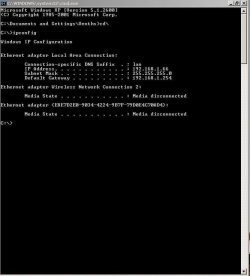
Ok - lopback test was ok (basic test of your network card) - can you put laptop on and do an ipconfig and post results?
 

My Computer My Computer

Computer Manufacturer/Model Number
home made
OS
windows 7 32 and 64 home premium/ultimate
CPU
3.0GHz core 2
No problem with helping you - it's my job and my passion...
 

My Computer My Computer

Computer Manufacturer/Model Number
home made
OS
windows 7 32 and 64 home premium/ultimate
CPU
3.0GHz core 2
Am replying you from my Laptop only using another Wifi. Should I connect that LAN to this and check IPCONFIG?
 

My Computer My Computer

Computer Manufacturer/Model Number
Dell Inspiron N5010
OS
Windows 7 Ultimate x64 SP1
CPU
Intel Core i3
Memory
4 GB DDR3
Screen Resolution
1366 X 768
Hard Drives
Seagate 500 GB
Internet Speed
4 MBPS
yes please
 

My Computer My Computer

Computer Manufacturer/Model Number
home made
OS
windows 7 32 and 64 home premium/ultimate
CPU
3.0GHz core 2
Here you go:

Untitled.jpg
 

My Computer My Computer

Computer Manufacturer/Model Number
Dell Inspiron N5010
OS
Windows 7 Ultimate x64 SP1
CPU
Intel Core i3
Memory
4 GB DDR3
Screen Resolution
1366 X 768
Hard Drives
Seagate 500 GB
Internet Speed
4 MBPS
NOTE: Laptop is running on Windows XP SP 2
 

My Computer My Computer

Computer Manufacturer/Model Number
Dell Inspiron N5010
OS
Windows 7 Ultimate x64 SP1
CPU
Intel Core i3
Memory
4 GB DDR3
Screen Resolution
1366 X 768
Hard Drives
Seagate 500 GB
Internet Speed
4 MBPS
sorry for the delay with the reply-it is looking towards a corrupt/incorrect network protocol (or trojan/virus) but is it possible that you have or could get a live linux cd/dvd and run this? do you know about how to do this?
 

My Computer My Computer

Computer Manufacturer/Model Number
home made
OS
windows 7 32 and 64 home premium/ultimate
CPU
3.0GHz core 2
I dont have a Linux source now. But how will i use it in Windows 7, even if i get it??/

And what should I try?
 

My Computer My Computer

Computer Manufacturer/Model Number
Dell Inspiron N5010
OS
Windows 7 Ultimate x64 SP1
CPU
Intel Core i3
Memory
4 GB DDR3
Screen Resolution
1366 X 768
Hard Drives
Seagate 500 GB
Internet Speed
4 MBPS
I use a live ubuntu cd for testing, download the LIVE iso from ubuntu website and burn to disc. then boot your pc with the disc in and set to boot from optical drive - this will then load into memory ubuntu os (it wont alter your windows installation) you can then try connecting to the internet (it uses firefox). It is a handy 'tool' to have as if this works it will eliminate all hardware problems. BUT it will need a little bit of getting used to. A bit long winded for now but you will have it for future use.

In the meantime - have you altered any settings since your windows installation - specifically to do with communication protocols...
 

My Computer My Computer

Computer Manufacturer/Model Number
home made
OS
windows 7 32 and 64 home premium/ultimate
CPU
3.0GHz core 2
Nope, i didnt alter. The only funny thing I did was, I kicked the cable thrice to unplug it from the NIC... LOL.

After that this happened.

* What is the file size for live ubuntu?
 

My Computer My Computer

Computer Manufacturer/Model Number
Dell Inspiron N5010
OS
Windows 7 Ultimate x64 SP1
CPU
Intel Core i3
Memory
4 GB DDR3
Screen Resolution
1366 X 768
Hard Drives
Seagate 500 GB
Internet Speed
4 MBPS
whoops forgot about the basics :o - is your network adapter driver correct - try reinstalling/rollback getting the latest.....
 

My Computer My Computer

Computer Manufacturer/Model Number
home made
OS
windows 7 32 and 64 home premium/ultimate
CPU
3.0GHz core 2
Yes I have already tried resetting TCP/IP by referring to the same.

And yes the drivers are correct it was working well till last week for months.
 

My Computer My Computer

Computer Manufacturer/Model Number
Dell Inspiron N5010
OS
Windows 7 Ultimate x64 SP1
CPU
Intel Core i3
Memory
4 GB DDR3
Screen Resolution
1366 X 768
Hard Drives
Seagate 500 GB
Internet Speed
4 MBPS
Hello,

Am ready with Ubuntu. Can you advise me further?
 

My Computer My Computer

Computer Manufacturer/Model Number
Dell Inspiron N5010
OS
Windows 7 Ultimate x64 SP1
CPU
Intel Core i3
Memory
4 GB DDR3
Screen Resolution
1366 X 768
Hard Drives
Seagate 500 GB
Internet Speed
4 MBPS
Nope, i didnt alter. The only funny thing I did was, I kicked the cable thrice to unplug it from the NIC... LOL.

After that this happened.

Although your english is good, it is your second language?
So when you say you "kicked the cable thrice to unplug it", you mean that you literally kicked it with your foot? And you haven't been able to connect to the network since?

At the risk of sounding obvious, maybe you have physically damaged your NIC? Did that not occur to you when it stopped working after being kicked?
 

My Computer My Computer

OS
Win 7
Back
Top