Langauge Pack

banderz777

New member
Power User
VIP
Local time
8:28 PM
Messages
144
Location
Bellingham,MA
I DL the langauge pack from TechNet and how I would like to install it, so how is it done can some one tell me how ???
 

My Computer

Computer Manufacturer/Model Number
HP G60-230US
OS
Windows 7 Ultimate X64
CPU
Intel Pentium Dual-Core T4200 @ 2.0 GHz
Memory
4GB's
Graphics Card(s)
Mobile Intel 45 Express
Sound Card
Conexant High Definition SmartAudio 221
Monitor(s) Displays
16"
Screen Resolution
1366X768
Hard Drives
320GB
Mouse
Logitech M305
Internet Speed
Cable
Ok... did you download The ISO file right?

First of all... only the ultimate version is able to install These language packs...

Just use an archive manager like Winrar for extract the content of the ISO file. Also You can burn into a DVD or you can use a Virtual drive and mount the Image...

Go on: Control Panel/ Clock, Language and Region/Change display Language.
controlpaneloption.jpg


Click on:Install/Uninstall Languages...
installlang.jpg


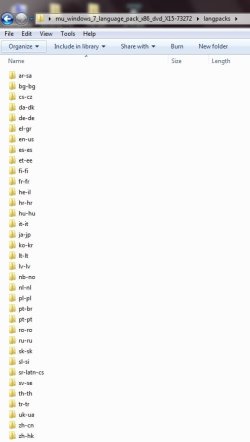
Select the 2nd option and Browse to your DVD drive or where you had previously extracted the ISO. You only need to navigate to the directory in which the language pack is in.
browse.jpg


Just choose the folder of your preferred language and install :)
Untitled.jpg
 
Last edited:

My Computer

OS
Windows7 Enterprise SP1 x64 (Technet)
Ok... did you download The ISO file right?

First of all... only the ultimate version is able to install These language packs...

Just use an archive manager like Winrar for extract the content of the ISO file. Also You can burn into a DVD or you can use a Virtual drive and mount the Image...

Go on: Control Panel/ Clock, Language and Region/Change display Language.
controlpaneloption.jpg


Click on:Install/Uninstall Languages...
installlang.jpg


Select the 2nd option and Browse to your DVD drive or where you had previously extracted the ISO. You only need to navigate to the directory in which the language pack is in.
browse.jpg


Just choose the folder of your preferred language and install :)
View attachment 23493

Thanks LFB, I am installing as I write, I looked for a tutorial on this but did not find one so I think this would make a good one.
+reps
 

My Computer

Computer Manufacturer/Model Number
HP G60-230US
OS
Windows 7 Ultimate X64
CPU
Intel Pentium Dual-Core T4200 @ 2.0 GHz
Memory
4GB's
Graphics Card(s)
Mobile Intel 45 Express
Sound Card
Conexant High Definition SmartAudio 221
Monitor(s) Displays
16"
Screen Resolution
1366X768
Hard Drives
320GB
Mouse
Logitech M305
Internet Speed
Cable
Back
Top