
You are using an out of date browser. It may not display this or other websites correctly.
You should upgrade or use an alternative browser.
You should upgrade or use an alternative browser.
Language bar color
- Thread starter Rose1
- Start date

Can you post a screenshot of the problem
http://www.sevenforums.com/tutorials/9733-screenshots-files-upload-post-seven-forums.html
Jerry
http://www.sevenforums.com/tutorials/9733-screenshots-files-upload-post-seven-forums.html
Jerry
My Computer
- Computer type
- Laptop
- Computer Manufacturer/Model Number
- Sager NP9170
- OS
- Win 7 Pro x64 / Win 10 Pro
- CPU
- Intel(R) Core(TM) i7-3630QM CPU @ 2.40GHz
- Motherboard
- CLEVO P170EM
- Memory
- 12 GB
- Graphics Card(s)
- (1) Intel(R) HD Graphics 4000 (2) NVIDIA GeForce GTX 675M
- Sound Card
- (1) Realtek High Definition Audio (2) Intel(R) Display Aud
- Monitor(s) Displays
- 17.3
- Screen Resolution
- 1920x1080
- Hard Drives
- (1) Samsung 860 EVO 500GB(OS) (1) Samsung 860 EVO 500GB(Data)
- Keyboard
- Backlite
- Antivirus
- MSE, Malwarebytes Pro
- Browser
- Firefox
- Other Info
- DESKTOP: Custom-built.
OS: Win 10 Pro x64.
CASE: Rosewill R5.
CPU: Intel I5 4670K CPU @ 3.40GHz.
CPU COOLER: Cool Master Hyper 212 EVO.
MOTHERBOARD: Asus Z87-A.
MEMORY: Kingston HyperX 2x4 GB.
GPU: Nvidia Geforce 650 TI.
PSU: Corsair TX750.
DRIVES: (1) Samsung 840 120 GB SSD (2) Western Digital blue 500 GB 7200 RPM.

- Local time
- 9:22 AM
- Messages
- 416
Its the language bar icon. It's blue. Can I change it or not?Can you post a screenshot of the problem
http://www.sevenforums.com/tutorials/9733-screenshots-files-upload-post-seven-forums.html
Jerry
My Computer
- Computer type
- Laptop
- Computer Manufacturer/Model Number
- compaq
- OS
- windows Ultimate
Its the language bar icon. It's blue. Can I change it or not?Can you post a screenshot of the problem
http://www.sevenforums.com/tutorials/9733-screenshots-files-upload-post-seven-forums.html
Jerry
With out seeing it I don't know, if it's what I think it is my version does not have it
Jerry
My Computer
- Computer type
- Laptop
- Computer Manufacturer/Model Number
- Sager NP9170
- OS
- Win 7 Pro x64 / Win 10 Pro
- CPU
- Intel(R) Core(TM) i7-3630QM CPU @ 2.40GHz
- Motherboard
- CLEVO P170EM
- Memory
- 12 GB
- Graphics Card(s)
- (1) Intel(R) HD Graphics 4000 (2) NVIDIA GeForce GTX 675M
- Sound Card
- (1) Realtek High Definition Audio (2) Intel(R) Display Aud
- Monitor(s) Displays
- 17.3
- Screen Resolution
- 1920x1080
- Hard Drives
- (1) Samsung 860 EVO 500GB(OS) (1) Samsung 860 EVO 500GB(Data)
- Keyboard
- Backlite
- Antivirus
- MSE, Malwarebytes Pro
- Browser
- Firefox
- Other Info
- DESKTOP: Custom-built.
OS: Win 10 Pro x64.
CASE: Rosewill R5.
CPU: Intel I5 4670K CPU @ 3.40GHz.
CPU COOLER: Cool Master Hyper 212 EVO.
MOTHERBOARD: Asus Z87-A.
MEMORY: Kingston HyperX 2x4 GB.
GPU: Nvidia Geforce 650 TI.
PSU: Corsair TX750.
DRIVES: (1) Samsung 840 120 GB SSD (2) Western Digital blue 500 GB 7200 RPM.
Just a guess but I would think the language bar color is set to default to the color of a specific theme. Similar to a default task bar, status bar, menu bar color, etc. To change the color might require changing themes or using a 3rd party custom skin.
Windows 7 themes - Microsoft Windows
21 Best Windows 7 Skins You Can Use for Free | Best Design Options
Windows 7 themes - Microsoft Windows
21 Best Windows 7 Skins You Can Use for Free | Best Design Options
My Computer
- Computer type
- Laptop
- Computer Manufacturer/Model Number
- Sony Vaio VPCEB47GM Laptop
- OS
- Win 7 Pro 64-bit
- CPU
- Intel i5 2.4 Ghz
- Memory
- 8GB DDR3
- Graphics Card(s)
- Intel HD 3000
- Sound Card
- IDT High Definition
- Monitor(s) Displays
- 15.6 WGXA Anti-Glare LED
- Screen Resolution
- 1280x800
- Hard Drives
- 640Gb 7200rpm
- Antivirus
- MSE
- Browser
- Opera (primary) with IE9 backup

My Computer
- Computer type
- Laptop
- Computer Manufacturer/Model Number
- Sager NP9170
- OS
- Win 7 Pro x64 / Win 10 Pro
- CPU
- Intel(R) Core(TM) i7-3630QM CPU @ 2.40GHz
- Motherboard
- CLEVO P170EM
- Memory
- 12 GB
- Graphics Card(s)
- (1) Intel(R) HD Graphics 4000 (2) NVIDIA GeForce GTX 675M
- Sound Card
- (1) Realtek High Definition Audio (2) Intel(R) Display Aud
- Monitor(s) Displays
- 17.3
- Screen Resolution
- 1920x1080
- Hard Drives
- (1) Samsung 860 EVO 500GB(OS) (1) Samsung 860 EVO 500GB(Data)
- Keyboard
- Backlite
- Antivirus
- MSE, Malwarebytes Pro
- Browser
- Firefox
- Other Info
- DESKTOP: Custom-built.
OS: Win 10 Pro x64.
CASE: Rosewill R5.
CPU: Intel I5 4670K CPU @ 3.40GHz.
CPU COOLER: Cool Master Hyper 212 EVO.
MOTHERBOARD: Asus Z87-A.
MEMORY: Kingston HyperX 2x4 GB.
GPU: Nvidia Geforce 650 TI.
PSU: Corsair TX750.
DRIVES: (1) Samsung 840 120 GB SSD (2) Western Digital blue 500 GB 7200 RPM.
- Local time
- 9:22 AM
- Messages
- 416
Here's what the language bar looks like in blue:Is it the red box with black text EN ? If so yes it can be changed in the .msstyle of the theme.
Pictures by rose294 - Photobucket
My Computer
- Computer type
- Laptop
- Computer Manufacturer/Model Number
- compaq
- OS
- windows Ultimate
Is it on the right side of the taskbar?Here's what the language bar looks like in blue:Is it the red box with black text EN ? If so yes it can be changed in the .msstyle of the theme.
Pictures by rose294 - Photobucket
A bigger picture on where it is would be great.
Jerry
My Computer
- Computer type
- Laptop
- Computer Manufacturer/Model Number
- Sager NP9170
- OS
- Win 7 Pro x64 / Win 10 Pro
- CPU
- Intel(R) Core(TM) i7-3630QM CPU @ 2.40GHz
- Motherboard
- CLEVO P170EM
- Memory
- 12 GB
- Graphics Card(s)
- (1) Intel(R) HD Graphics 4000 (2) NVIDIA GeForce GTX 675M
- Sound Card
- (1) Realtek High Definition Audio (2) Intel(R) Display Aud
- Monitor(s) Displays
- 17.3
- Screen Resolution
- 1920x1080
- Hard Drives
- (1) Samsung 860 EVO 500GB(OS) (1) Samsung 860 EVO 500GB(Data)
- Keyboard
- Backlite
- Antivirus
- MSE, Malwarebytes Pro
- Browser
- Firefox
- Other Info
- DESKTOP: Custom-built.
OS: Win 10 Pro x64.
CASE: Rosewill R5.
CPU: Intel I5 4670K CPU @ 3.40GHz.
CPU COOLER: Cool Master Hyper 212 EVO.
MOTHERBOARD: Asus Z87-A.
MEMORY: Kingston HyperX 2x4 GB.
GPU: Nvidia Geforce 650 TI.
PSU: Corsair TX750.
DRIVES: (1) Samsung 840 120 GB SSD (2) Western Digital blue 500 GB 7200 RPM.
- Local time
- 9:22 AM
- Messages
- 416
Yes, its on the right side of the taskbar.Is it on the right side of the taskbar?Here's what the language bar looks like in blue:Is it the red box with black text EN ? If so yes it can be changed in the .msstyle of the theme.
Pictures by rose294 - Photobucket
A bigger picture on where it is would be great.
Jerry
My Computer
- Computer type
- Laptop
- Computer Manufacturer/Model Number
- compaq
- OS
- windows Ultimate
It can be changed but like I said in the other 2 posts it's in the aero.msstyle it well need edited. I can edit it & post it for you to install it.Yes, its on the right side of the taskbar.Is it on the right side of the taskbar?Here's what the language bar looks like in blue:
Pictures by rose294 - Photobucket
A bigger picture on where it is would be great.
Jerry
Jerry
My Computer
- Computer type
- Laptop
- Computer Manufacturer/Model Number
- Sager NP9170
- OS
- Win 7 Pro x64 / Win 10 Pro
- CPU
- Intel(R) Core(TM) i7-3630QM CPU @ 2.40GHz
- Motherboard
- CLEVO P170EM
- Memory
- 12 GB
- Graphics Card(s)
- (1) Intel(R) HD Graphics 4000 (2) NVIDIA GeForce GTX 675M
- Sound Card
- (1) Realtek High Definition Audio (2) Intel(R) Display Aud
- Monitor(s) Displays
- 17.3
- Screen Resolution
- 1920x1080
- Hard Drives
- (1) Samsung 860 EVO 500GB(OS) (1) Samsung 860 EVO 500GB(Data)
- Keyboard
- Backlite
- Antivirus
- MSE, Malwarebytes Pro
- Browser
- Firefox
- Other Info
- DESKTOP: Custom-built.
OS: Win 10 Pro x64.
CASE: Rosewill R5.
CPU: Intel I5 4670K CPU @ 3.40GHz.
CPU COOLER: Cool Master Hyper 212 EVO.
MOTHERBOARD: Asus Z87-A.
MEMORY: Kingston HyperX 2x4 GB.
GPU: Nvidia Geforce 650 TI.
PSU: Corsair TX750.
DRIVES: (1) Samsung 840 120 GB SSD (2) Western Digital blue 500 GB 7200 RPM.
- Local time
- 9:22 AM
- Messages
- 416
Ok, that would be fine. I can look at it and see.It can be changed but like I said in the other 2 posts it's in the aero.msstyle it well need edited. I can edit it & post it for you to install it.Yes, its on the right side of the taskbar.Is it on the right side of the taskbar?
A bigger picture on where it is would be great.
Jerry
Jerry
My Computer
- Computer type
- Laptop
- Computer Manufacturer/Model Number
- compaq
- OS
- windows Ultimate
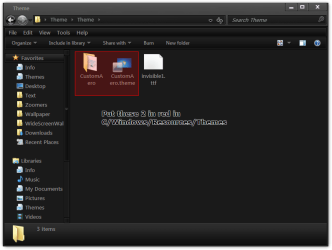
OK check it out. Open the Theme Zip, Open the Theme folder inside of it put the 2 CustomAero (1 a CustomAero folder & 1 a CustomAero.theme) in C:\Windows\Resources\Themes then it will be in Personalization as CustomAero I changed the blue highlights on the buttons & the scrollbar , removed the blue highlights from the language bar if you want the text gone install the invisible font in the folder.
Jerry
Jerry
Last edited:
My Computer
- Computer type
- Laptop
- Computer Manufacturer/Model Number
- Sager NP9170
- OS
- Win 7 Pro x64 / Win 10 Pro
- CPU
- Intel(R) Core(TM) i7-3630QM CPU @ 2.40GHz
- Motherboard
- CLEVO P170EM
- Memory
- 12 GB
- Graphics Card(s)
- (1) Intel(R) HD Graphics 4000 (2) NVIDIA GeForce GTX 675M
- Sound Card
- (1) Realtek High Definition Audio (2) Intel(R) Display Aud
- Monitor(s) Displays
- 17.3
- Screen Resolution
- 1920x1080
- Hard Drives
- (1) Samsung 860 EVO 500GB(OS) (1) Samsung 860 EVO 500GB(Data)
- Keyboard
- Backlite
- Antivirus
- MSE, Malwarebytes Pro
- Browser
- Firefox
- Other Info
- DESKTOP: Custom-built.
OS: Win 10 Pro x64.
CASE: Rosewill R5.
CPU: Intel I5 4670K CPU @ 3.40GHz.
CPU COOLER: Cool Master Hyper 212 EVO.
MOTHERBOARD: Asus Z87-A.
MEMORY: Kingston HyperX 2x4 GB.
GPU: Nvidia Geforce 650 TI.
PSU: Corsair TX750.
DRIVES: (1) Samsung 840 120 GB SSD (2) Western Digital blue 500 GB 7200 RPM.
- Local time
- 9:22 AM
- Messages
- 416
I understand everything, untill I get to the 2 CustomAero (1 a CustomAero folder & 1 a CustomAero.theme). Can you show me a screenshot or something please?OK check it out. Open the Theme Zip, Open the Theme folder inside of it put the 2 CustomAero (1 a CustomAero folder & 1 a CustomAero.theme) in C:\Windows\Resources\Themes then it will be in Personalization as CustomAero I changed the blue highlights on the buttons & the scrollbar , removed the blue highlights from the language bar if you want the text gone install the invisible font in the folder.
Jerry
I just change my themes to windows classic. The menubar color is not doing it like windows classic should be.
Last edited:
My Computer
- Computer type
- Laptop
- Computer Manufacturer/Model Number
- compaq
- OS
- windows Ultimate
My Computer
- Computer type
- Laptop
- Computer Manufacturer/Model Number
- Sager NP9170
- OS
- Win 7 Pro x64 / Win 10 Pro
- CPU
- Intel(R) Core(TM) i7-3630QM CPU @ 2.40GHz
- Motherboard
- CLEVO P170EM
- Memory
- 12 GB
- Graphics Card(s)
- (1) Intel(R) HD Graphics 4000 (2) NVIDIA GeForce GTX 675M
- Sound Card
- (1) Realtek High Definition Audio (2) Intel(R) Display Aud
- Monitor(s) Displays
- 17.3
- Screen Resolution
- 1920x1080
- Hard Drives
- (1) Samsung 860 EVO 500GB(OS) (1) Samsung 860 EVO 500GB(Data)
- Keyboard
- Backlite
- Antivirus
- MSE, Malwarebytes Pro
- Browser
- Firefox
- Other Info
- DESKTOP: Custom-built.
OS: Win 10 Pro x64.
CASE: Rosewill R5.
CPU: Intel I5 4670K CPU @ 3.40GHz.
CPU COOLER: Cool Master Hyper 212 EVO.
MOTHERBOARD: Asus Z87-A.
MEMORY: Kingston HyperX 2x4 GB.
GPU: Nvidia Geforce 650 TI.
PSU: Corsair TX750.
DRIVES: (1) Samsung 840 120 GB SSD (2) Western Digital blue 500 GB 7200 RPM.
- Local time
- 9:22 AM
- Messages
- 416
I don't see anything about removing the blue shadows on this for firefox 3. I also don't see the invisible font.Put the 2 highlighted in red in C:\Windows\Resources\Themes then it will be in Personalization as CustomAero
Jerry
My Computer
- Computer type
- Laptop
- Computer Manufacturer/Model Number
- compaq
- OS
- windows Ultimate
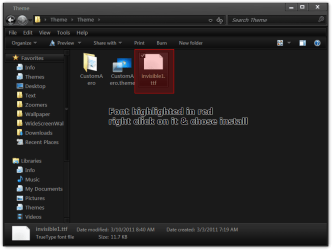
I don't see anything about removing the blue shadows on this for firefox 3. I also don't see the invisible font.
I do not understand the firefox ? Post a screenshot to show what you are talking about.
The font is in the folder right click on it & chose install
Jerry
Attachments
My Computer
- Computer type
- Laptop
- Computer Manufacturer/Model Number
- Sager NP9170
- OS
- Win 7 Pro x64 / Win 10 Pro
- CPU
- Intel(R) Core(TM) i7-3630QM CPU @ 2.40GHz
- Motherboard
- CLEVO P170EM
- Memory
- 12 GB
- Graphics Card(s)
- (1) Intel(R) HD Graphics 4000 (2) NVIDIA GeForce GTX 675M
- Sound Card
- (1) Realtek High Definition Audio (2) Intel(R) Display Aud
- Monitor(s) Displays
- 17.3
- Screen Resolution
- 1920x1080
- Hard Drives
- (1) Samsung 860 EVO 500GB(OS) (1) Samsung 860 EVO 500GB(Data)
- Keyboard
- Backlite
- Antivirus
- MSE, Malwarebytes Pro
- Browser
- Firefox
- Other Info
- DESKTOP: Custom-built.
OS: Win 10 Pro x64.
CASE: Rosewill R5.
CPU: Intel I5 4670K CPU @ 3.40GHz.
CPU COOLER: Cool Master Hyper 212 EVO.
MOTHERBOARD: Asus Z87-A.
MEMORY: Kingston HyperX 2x4 GB.
GPU: Nvidia Geforce 650 TI.
PSU: Corsair TX750.
DRIVES: (1) Samsung 840 120 GB SSD (2) Western Digital blue 500 GB 7200 RPM.
I install the invisible folder, but language bar color is still blue shaded when putting the mouseover.
Please post a screenshot of it with the mouseover so I can see it, make it big enough so I can see where it is on the taskbar. like in this screenshot
Jerry
Attachments

My Computer
- Computer type
- Laptop
- Computer Manufacturer/Model Number
- Sager NP9170
- OS
- Win 7 Pro x64 / Win 10 Pro
- CPU
- Intel(R) Core(TM) i7-3630QM CPU @ 2.40GHz
- Motherboard
- CLEVO P170EM
- Memory
- 12 GB
- Graphics Card(s)
- (1) Intel(R) HD Graphics 4000 (2) NVIDIA GeForce GTX 675M
- Sound Card
- (1) Realtek High Definition Audio (2) Intel(R) Display Aud
- Monitor(s) Displays
- 17.3
- Screen Resolution
- 1920x1080
- Hard Drives
- (1) Samsung 860 EVO 500GB(OS) (1) Samsung 860 EVO 500GB(Data)
- Keyboard
- Backlite
- Antivirus
- MSE, Malwarebytes Pro
- Browser
- Firefox
- Other Info
- DESKTOP: Custom-built.
OS: Win 10 Pro x64.
CASE: Rosewill R5.
CPU: Intel I5 4670K CPU @ 3.40GHz.
CPU COOLER: Cool Master Hyper 212 EVO.
MOTHERBOARD: Asus Z87-A.
MEMORY: Kingston HyperX 2x4 GB.
GPU: Nvidia Geforce 650 TI.
PSU: Corsair TX750.
DRIVES: (1) Samsung 840 120 GB SSD (2) Western Digital blue 500 GB 7200 RPM.
- Local time
- 9:22 AM
- Messages
- 416
Here is the screenshot for the language bar icon link:
Pictures by rose294 - Photobucket
Pictures by rose294 - Photobucket
My Computer
- Computer type
- Laptop
- Computer Manufacturer/Model Number
- compaq
- OS
- windows Ultimate
My Computer
- Computer type
- Laptop
- Computer Manufacturer/Model Number
- Sager NP9170
- OS
- Win 7 Pro x64 / Win 10 Pro
- CPU
- Intel(R) Core(TM) i7-3630QM CPU @ 2.40GHz
- Motherboard
- CLEVO P170EM
- Memory
- 12 GB
- Graphics Card(s)
- (1) Intel(R) HD Graphics 4000 (2) NVIDIA GeForce GTX 675M
- Sound Card
- (1) Realtek High Definition Audio (2) Intel(R) Display Aud
- Monitor(s) Displays
- 17.3
- Screen Resolution
- 1920x1080
- Hard Drives
- (1) Samsung 860 EVO 500GB(OS) (1) Samsung 860 EVO 500GB(Data)
- Keyboard
- Backlite
- Antivirus
- MSE, Malwarebytes Pro
- Browser
- Firefox
- Other Info
- DESKTOP: Custom-built.
OS: Win 10 Pro x64.
CASE: Rosewill R5.
CPU: Intel I5 4670K CPU @ 3.40GHz.
CPU COOLER: Cool Master Hyper 212 EVO.
MOTHERBOARD: Asus Z87-A.
MEMORY: Kingston HyperX 2x4 GB.
GPU: Nvidia Geforce 650 TI.
PSU: Corsair TX750.
DRIVES: (1) Samsung 840 120 GB SSD (2) Western Digital blue 500 GB 7200 RPM.
Similar threads
- Replies
- 2
- Views
- 1K

- Replies
- 1
- Views
- 547

- Replies
- 3
- Views
- 2K

