Solved Language bar error [moved]

fansgirl

New member
Member
Local time
9:01 PM
Messages
42
my language bar is missing-appear on my laptop for a few seconds, so when I type something it very difficult because when i have typing a few word then the cursor disappeared and a few second later it appeared again but my cursor not continuing from last place but back to beginning again.

it has been a few months almost year since it happened.

it happen after i installing some emulator program, before i install it i have emulator for psp ppsspp and scedriver which worked just 5 minutes before but after i installing it crashes. and when my antivirus detect virus from that program I accidentally click ignore it instead fix it.

i have try malware scanner like malwarebytes but it's not working.

i don't have restore point.

using run>ctfmon.exe not working too because after i click ok nothing appeared.

could you tell me how to fix it? if you can without formatting it because data inside that laptop is very important and I don't have external hdd.

sorry for my bad english and explanation, because I don't know how to explain it, I attache images bellow what i mean
 

Attachments

  • 391348_20160204020528.gif
    391348_20160204020528.gif
    425.1 KB · Views: 44

My Computer

Computer type
Laptop
Computer Manufacturer/Model Number
Sony Vaio/ VPCEA36FG
OS
Windows 7 home premium 64bit
CPU
Intel(R) Core (TM) i5CPU M 560 @2.67GHz
Motherboard
Sony Corporation VAIO
Memory
4gb
Graphics Card(s)
ATI Mobility Radeon HD 5650
Sound Card
(1) ATI HDMI Audio(2) Bluetooth Hands-free Audio(3) Realtek
Hard Drives
Hitachi HTS545050B9SA00 (500GB)
Browser
Mozila Firefox, IE
Hello and welcome fansgirllook your system specsa re a little sketchu can you please follow thta
SYSTEM SPECS
Now before we can help we do need to know what is in your machine so please do this System Info - See Your System Specs
or either enter the specs of your system in your forum profile the specs will appear when we click on that little box bottom left of the post screen it is for me the preferable option as it is easy. As you may appreciate it is very hard when you don’t know what one is working with for example a diesel or petrol engine.
(pretyped to save time)
Now first up lets do these


[FONT=Arial, sans-serif]http://www.sevenforums.com/tutorials/1538-sfc-scannow-command-system-file-checker.html[/FONT]
[FONT=Arial, sans-serif]http://www.sevenforums.com/tutorials/433-disk-check.html < if necessary include the /f and /r in the command line as per Option2 [/FONT]


[FONT=Arial, sans-serif]if no change then try these[/FONT]

[FONT=Arial, sans-serif]http://www.superantispyware.com/ [/FONT]


[FONT=Arial, sans-serif]http://www.bleepingcomputer.com/download/adwcleaner/[/FONT]
[FONT=Arial, sans-serif]ADW download from bleeping computer delete any rubbish found with the malware scans[/FONT]
[FONT=Arial, sans-serif]NB If anyone who has Kaspersky as their security they may find it will not like ADW running and to stop the nagging just temporarily disbale the Kaspersky while one runs ADW[/FONT]
[FONT=Arial, sans-serif]
[/FONT]

[FONT=Arial, sans-serif]I have to say personally I do not like those add on software programs that do stuff that is quite easily done using for example the tutorials in this forum it is up to you but please remove them - having said that it is your choice of course.[/FONT]
[FONT=Arial, sans-serif]
[/FONT]

[FONT=Arial, sans-serif]The ctfmon you need to type it in and then right click it and run as admin. If you need it you need to leave it enabled.[/FONT]
[FONT=Arial, sans-serif]
[/FONT]

[FONT=Arial, sans-serif]Let us know how those scans go and it might even come to running a non Windows AV scan ie the Kaspersky rescue disk.But lets see what comes of the scans.
[/FONT]

[FONT=Arial, sans-serif]
[/FONT]

[FONT=Arial, sans-serif]
[/FONT]
 

My Computer

Computer type
PC/Desktop
Computer Manufacturer/Model Number
Own build (new) Desk1 / Asus ROG Win 7 / Desk2 1st build
OS
Desk1 7 Home Prem / Desk2 10 Pro / Main lap Asus ROG 10 Pro 2 laptop Toshiba 7 Pro Asus P2520 7 & 10
CPU
Desk1 i5 3750K / Laptop i7 GTX 860M / Desk2 i5 2500
Motherboard
Desk1 Asus P877-V / Desk2 Gigabyte H67 UD3H / Laptop ?
Memory
Desk1 8GB (1866) / Desk2 16GB (1333) / Laptop 8Gb DDR3
Graphics Card(s)
Desk 1& 2NVidia GTX 650 & Laptops on board Intel
Sound Card
Desk 1 & 2 -XONAR DG Realtek High Def audio Laptop
Monitor(s) Displays
Desk 1 Benq HD 2450 / Desk2 Philips 24" / Laptop 17.5"
Screen Resolution
1920x1080 D1 & D2 & Laptop 1
Hard Drives
Desk1 Samsung 120GB 830 SSD
Asus ROG 256GB 850 Pro SSD
Desk2 Samsung 840 256 SSD
Toshiba 120GB EVO
PSU
Desk 1 Corsair HX 1050/ Laptop ? / Desk 2 Corsair HX 650
Case
Desk 1 Cooler HAF XM ? Toshiba laptop / Desk2 Coolermaster
Cooling
Fans on all Desk1 -2 Desk2 - all Coolermasters 5 Laptop ?
Keyboard
Desk 1 MS Sidewinder X6 Desk 2 MS Sidewinder X 4
Mouse
Desk 1&2 - Gigabyte MS 900 gamer - laptop - Logitec wireless
Internet Speed
ADSL2+
Other Info
One other Desktop (tester) and spare Toshba laptop both with SSD's
Running Kaspersky 2016 ISS on all machines config'd identically
Logitec audio stereo systems on each machine (x3)
Canon MG5250MFC
Router/modem TP-Link running WPA2SK
ICIT2LOL thanks for replying, sorry about my specs.

Well I have tried to scan with malwarebytes, superantispyware, and adwcleaner before and it's always have some malware scanned and I don't understand which one is the problem, and sometimes after I finish scan it my laptop normal again, but a one or few days later the problem is back again.

For chkdsk there no bad sector in it

Oh yeah sometimes when I'm not connected to internet language bar not disappear constanly, but other times I'm not connected language bar disappearing constanly (like yesterday it normal, today the problem back again)
 

My Computer

Computer type
Laptop
Computer Manufacturer/Model Number
Sony Vaio/ VPCEA36FG
OS
Windows 7 home premium 64bit
CPU
Intel(R) Core (TM) i5CPU M 560 @2.67GHz
Motherboard
Sony Corporation VAIO
Memory
4gb
Graphics Card(s)
ATI Mobility Radeon HD 5650
Sound Card
(1) ATI HDMI Audio(2) Bluetooth Hands-free Audio(3) Realtek
Hard Drives
Hitachi HTS545050B9SA00 (500GB)
Browser
Mozila Firefox, IE
Ok my friend now thanks for the specs ad don't be sorry it happens all the time and soem give just to OS which is oretty lazy really.

Anyway what AV are you using and I think it might be worth running a test on that hard drive with this
http://www.seagate.com/au/en/support/downloads/seatools/seatools-win-master/ < the short genric one will do.

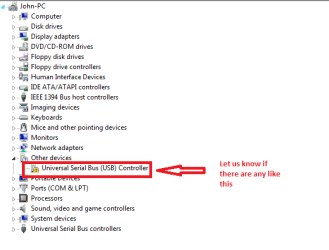
Now can you also look in Device manager (control Panel) and see if there are nay devices that have a yellow triangle alongside them please a screen shot would be good I like snip picture as it is quick an easy to use
How to Use the Snipping Tool in Vista

See the pic of my computer the yellow is showing a fault but I know what that is
 

Attachments

  • YELLOW.PNG
    YELLOW.PNG
    10.4 KB · Views: 32

My Computer

Computer type
PC/Desktop
Computer Manufacturer/Model Number
Own build (new) Desk1 / Asus ROG Win 7 / Desk2 1st build
OS
Desk1 7 Home Prem / Desk2 10 Pro / Main lap Asus ROG 10 Pro 2 laptop Toshiba 7 Pro Asus P2520 7 & 10
CPU
Desk1 i5 3750K / Laptop i7 GTX 860M / Desk2 i5 2500
Motherboard
Desk1 Asus P877-V / Desk2 Gigabyte H67 UD3H / Laptop ?
Memory
Desk1 8GB (1866) / Desk2 16GB (1333) / Laptop 8Gb DDR3
Graphics Card(s)
Desk 1& 2NVidia GTX 650 & Laptops on board Intel
Sound Card
Desk 1 & 2 -XONAR DG Realtek High Def audio Laptop
Monitor(s) Displays
Desk 1 Benq HD 2450 / Desk2 Philips 24" / Laptop 17.5"
Screen Resolution
1920x1080 D1 & D2 & Laptop 1
Hard Drives
Desk1 Samsung 120GB 830 SSD
Asus ROG 256GB 850 Pro SSD
Desk2 Samsung 840 256 SSD
Toshiba 120GB EVO
PSU
Desk 1 Corsair HX 1050/ Laptop ? / Desk 2 Corsair HX 650
Case
Desk 1 Cooler HAF XM ? Toshiba laptop / Desk2 Coolermaster
Cooling
Fans on all Desk1 -2 Desk2 - all Coolermasters 5 Laptop ?
Keyboard
Desk 1 MS Sidewinder X6 Desk 2 MS Sidewinder X 4
Mouse
Desk 1&2 - Gigabyte MS 900 gamer - laptop - Logitec wireless
Internet Speed
ADSL2+
Other Info
One other Desktop (tester) and spare Toshba laptop both with SSD's
Running Kaspersky 2016 ISS on all machines config'd identically
Logitec audio stereo systems on each machine (x3)
Canon MG5250MFC
Router/modem TP-Link running WPA2SK
1. what do you mean with AV? and for seatools after it finish scanning nothing detected in there my hdd not appearing.

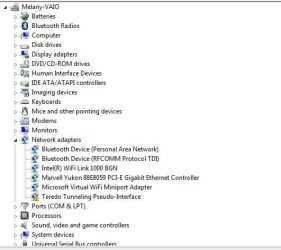
this is my device manager and today result from malwarebytes.
 

Attachments

My Computer

Computer type
Laptop
Computer Manufacturer/Model Number
Sony Vaio/ VPCEA36FG
OS
Windows 7 home premium 64bit
CPU
Intel(R) Core (TM) i5CPU M 560 @2.67GHz
Motherboard
Sony Corporation VAIO
Memory
4gb
Graphics Card(s)
ATI Mobility Radeon HD 5650
Sound Card
(1) ATI HDMI Audio(2) Bluetooth Hands-free Audio(3) Realtek
Hard Drives
Hitachi HTS545050B9SA00 (500GB)
Browser
Mozila Firefox, IE
Sorry fangirl AV just refers to your antivirus program one get so used to just using such abbreviations that we take it for granted that most would know what one is talking about please accept my apologies.

Thew Malwarebytes scan has quarantined something to do a a Sony feature why I have no idea. The Teredo tunneling well to put it simply is that it has to do with network traffic and I am not really sure of what the problem with that is if there is one.

I might just ask for some help on that one but while I do can you right click on the feature and if there is a choice to update the driver please do so.
 

My Computer

Computer type
PC/Desktop
Computer Manufacturer/Model Number
Own build (new) Desk1 / Asus ROG Win 7 / Desk2 1st build
OS
Desk1 7 Home Prem / Desk2 10 Pro / Main lap Asus ROG 10 Pro 2 laptop Toshiba 7 Pro Asus P2520 7 & 10
CPU
Desk1 i5 3750K / Laptop i7 GTX 860M / Desk2 i5 2500
Motherboard
Desk1 Asus P877-V / Desk2 Gigabyte H67 UD3H / Laptop ?
Memory
Desk1 8GB (1866) / Desk2 16GB (1333) / Laptop 8Gb DDR3
Graphics Card(s)
Desk 1& 2NVidia GTX 650 & Laptops on board Intel
Sound Card
Desk 1 & 2 -XONAR DG Realtek High Def audio Laptop
Monitor(s) Displays
Desk 1 Benq HD 2450 / Desk2 Philips 24" / Laptop 17.5"
Screen Resolution
1920x1080 D1 & D2 & Laptop 1
Hard Drives
Desk1 Samsung 120GB 830 SSD
Asus ROG 256GB 850 Pro SSD
Desk2 Samsung 840 256 SSD
Toshiba 120GB EVO
PSU
Desk 1 Corsair HX 1050/ Laptop ? / Desk 2 Corsair HX 650
Case
Desk 1 Cooler HAF XM ? Toshiba laptop / Desk2 Coolermaster
Cooling
Fans on all Desk1 -2 Desk2 - all Coolermasters 5 Laptop ?
Keyboard
Desk 1 MS Sidewinder X6 Desk 2 MS Sidewinder X 4
Mouse
Desk 1&2 - Gigabyte MS 900 gamer - laptop - Logitec wireless
Internet Speed
ADSL2+
Other Info
One other Desktop (tester) and spare Toshba laptop both with SSD's
Running Kaspersky 2016 ISS on all machines config'd identically
Logitec audio stereo systems on each machine (x3)
Canon MG5250MFC
Router/modem TP-Link running WPA2SK
two result come out when I'm update the driver, one is I'm up to date, two is the device cannot start (code 10) error. sorry I can't provide you with picture, my laptop caught virus/malware making my browser pop up multiple times directing to bigpicturepop.com it's always pop out no matter how many I close it.

my Av, malwarebytes, adwcleaner got blocked by administrator which is weird since I'm the administrator, and I can't uninstall or install other AV or malware scanner. the one still work is superantispyware and I have scan it three times in span of 2 hour and still get many malware.

could you tell me topic/web I should go to fix it? I can't fix my language bar if this keep going, and I'm a bit trauma to searching by myself because I don't know which one I should trusted.

oh yeah for Listener.exe after I scan it with superantispyware and delete it my language bar back to normal,but I'm certain it will back to wacky again in few days because it happen before, but I don't know if listener.exe what makes my language bar disappear constantly because before that listener.exe detected I get 3++ malware scanned day before and turn off my laptop and scanning again when I turn on my laptop so I not checking it. is listener.exe that dangerous?
 

My Computer

Computer type
Laptop
Computer Manufacturer/Model Number
Sony Vaio/ VPCEA36FG
OS
Windows 7 home premium 64bit
CPU
Intel(R) Core (TM) i5CPU M 560 @2.67GHz
Motherboard
Sony Corporation VAIO
Memory
4gb
Graphics Card(s)
ATI Mobility Radeon HD 5650
Sound Card
(1) ATI HDMI Audio(2) Bluetooth Hands-free Audio(3) Realtek
Hard Drives
Hitachi HTS545050B9SA00 (500GB)
Browser
Mozila Firefox, IE
Ok well I found this re listener listener.exe Windows process - What is it? as it is a part of some Sony bloatware I don't see why it should be so dodgy to have on the machine although it does mention some malware does masquerade as this Sony feature but you can go ahead and delete it in Programs and Features and see what happens unless you are into some fancy photo stuff which I am assuming is what it is for??

The other thing you can do is run this as it runs in a non Windows environment and will scan the machine thoroughly for you. You will see that you have to make a bootable disk or stick in which case you will have to change the first boot device in your BIOS and make it for the optical drive or USB drive.
Kaspersky Rescue Disk 10

If you are not sure of those processes post back and we can guide you through them.
 

My Computer

Computer type
PC/Desktop
Computer Manufacturer/Model Number
Own build (new) Desk1 / Asus ROG Win 7 / Desk2 1st build
OS
Desk1 7 Home Prem / Desk2 10 Pro / Main lap Asus ROG 10 Pro 2 laptop Toshiba 7 Pro Asus P2520 7 & 10
CPU
Desk1 i5 3750K / Laptop i7 GTX 860M / Desk2 i5 2500
Motherboard
Desk1 Asus P877-V / Desk2 Gigabyte H67 UD3H / Laptop ?
Memory
Desk1 8GB (1866) / Desk2 16GB (1333) / Laptop 8Gb DDR3
Graphics Card(s)
Desk 1& 2NVidia GTX 650 & Laptops on board Intel
Sound Card
Desk 1 & 2 -XONAR DG Realtek High Def audio Laptop
Monitor(s) Displays
Desk 1 Benq HD 2450 / Desk2 Philips 24" / Laptop 17.5"
Screen Resolution
1920x1080 D1 & D2 & Laptop 1
Hard Drives
Desk1 Samsung 120GB 830 SSD
Asus ROG 256GB 850 Pro SSD
Desk2 Samsung 840 256 SSD
Toshiba 120GB EVO
PSU
Desk 1 Corsair HX 1050/ Laptop ? / Desk 2 Corsair HX 650
Case
Desk 1 Cooler HAF XM ? Toshiba laptop / Desk2 Coolermaster
Cooling
Fans on all Desk1 -2 Desk2 - all Coolermasters 5 Laptop ?
Keyboard
Desk 1 MS Sidewinder X6 Desk 2 MS Sidewinder X 4
Mouse
Desk 1&2 - Gigabyte MS 900 gamer - laptop - Logitec wireless
Internet Speed
ADSL2+
Other Info
One other Desktop (tester) and spare Toshba laptop both with SSD's
Running Kaspersky 2016 ISS on all machines config'd identically
Logitec audio stereo systems on each machine (x3)
Canon MG5250MFC
Router/modem TP-Link running WPA2SK
I have deleted listener.exe, now I'm going to look for a few days if it temporary fix or permanent. For now my laptop back to normal althought my language bar disappear after restarting and only appear after use ctfmon.exe.

I'm try to use kapersky rescue tonight
 

My Computer

Computer type
Laptop
Computer Manufacturer/Model Number
Sony Vaio/ VPCEA36FG
OS
Windows 7 home premium 64bit
CPU
Intel(R) Core (TM) i5CPU M 560 @2.67GHz
Motherboard
Sony Corporation VAIO
Memory
4gb
Graphics Card(s)
ATI Mobility Radeon HD 5650
Sound Card
(1) ATI HDMI Audio(2) Bluetooth Hands-free Audio(3) Realtek
Hard Drives
Hitachi HTS545050B9SA00 (500GB)
Browser
Mozila Firefox, IE
Ok it takes a while so let us know how that goes.
 

My Computer

Computer type
PC/Desktop
Computer Manufacturer/Model Number
Own build (new) Desk1 / Asus ROG Win 7 / Desk2 1st build
OS
Desk1 7 Home Prem / Desk2 10 Pro / Main lap Asus ROG 10 Pro 2 laptop Toshiba 7 Pro Asus P2520 7 & 10
CPU
Desk1 i5 3750K / Laptop i7 GTX 860M / Desk2 i5 2500
Motherboard
Desk1 Asus P877-V / Desk2 Gigabyte H67 UD3H / Laptop ?
Memory
Desk1 8GB (1866) / Desk2 16GB (1333) / Laptop 8Gb DDR3
Graphics Card(s)
Desk 1& 2NVidia GTX 650 & Laptops on board Intel
Sound Card
Desk 1 & 2 -XONAR DG Realtek High Def audio Laptop
Monitor(s) Displays
Desk 1 Benq HD 2450 / Desk2 Philips 24" / Laptop 17.5"
Screen Resolution
1920x1080 D1 & D2 & Laptop 1
Hard Drives
Desk1 Samsung 120GB 830 SSD
Asus ROG 256GB 850 Pro SSD
Desk2 Samsung 840 256 SSD
Toshiba 120GB EVO
PSU
Desk 1 Corsair HX 1050/ Laptop ? / Desk 2 Corsair HX 650
Case
Desk 1 Cooler HAF XM ? Toshiba laptop / Desk2 Coolermaster
Cooling
Fans on all Desk1 -2 Desk2 - all Coolermasters 5 Laptop ?
Keyboard
Desk 1 MS Sidewinder X6 Desk 2 MS Sidewinder X 4
Mouse
Desk 1&2 - Gigabyte MS 900 gamer - laptop - Logitec wireless
Internet Speed
ADSL2+
Other Info
One other Desktop (tester) and spare Toshba laptop both with SSD's
Running Kaspersky 2016 ISS on all machines config'd identically
Logitec audio stereo systems on each machine (x3)
Canon MG5250MFC
Router/modem TP-Link running WPA2SK
Hello ICIT2LOL, my Laptop is fixed, thank you very much for your help ^o^
 

My Computer

Computer type
Laptop
Computer Manufacturer/Model Number
Sony Vaio/ VPCEA36FG
OS
Windows 7 home premium 64bit
CPU
Intel(R) Core (TM) i5CPU M 560 @2.67GHz
Motherboard
Sony Corporation VAIO
Memory
4gb
Graphics Card(s)
ATI Mobility Radeon HD 5650
Sound Card
(1) ATI HDMI Audio(2) Bluetooth Hands-free Audio(3) Realtek
Hard Drives
Hitachi HTS545050B9SA00 (500GB)
Browser
Mozila Firefox, IE
Well done just what was the problem always good to know so it can be used for others with a similar problem.
:)
 

My Computer

Computer type
PC/Desktop
Computer Manufacturer/Model Number
Own build (new) Desk1 / Asus ROG Win 7 / Desk2 1st build
OS
Desk1 7 Home Prem / Desk2 10 Pro / Main lap Asus ROG 10 Pro 2 laptop Toshiba 7 Pro Asus P2520 7 & 10
CPU
Desk1 i5 3750K / Laptop i7 GTX 860M / Desk2 i5 2500
Motherboard
Desk1 Asus P877-V / Desk2 Gigabyte H67 UD3H / Laptop ?
Memory
Desk1 8GB (1866) / Desk2 16GB (1333) / Laptop 8Gb DDR3
Graphics Card(s)
Desk 1& 2NVidia GTX 650 & Laptops on board Intel
Sound Card
Desk 1 & 2 -XONAR DG Realtek High Def audio Laptop
Monitor(s) Displays
Desk 1 Benq HD 2450 / Desk2 Philips 24" / Laptop 17.5"
Screen Resolution
1920x1080 D1 & D2 & Laptop 1
Hard Drives
Desk1 Samsung 120GB 830 SSD
Asus ROG 256GB 850 Pro SSD
Desk2 Samsung 840 256 SSD
Toshiba 120GB EVO
PSU
Desk 1 Corsair HX 1050/ Laptop ? / Desk 2 Corsair HX 650
Case
Desk 1 Cooler HAF XM ? Toshiba laptop / Desk2 Coolermaster
Cooling
Fans on all Desk1 -2 Desk2 - all Coolermasters 5 Laptop ?
Keyboard
Desk 1 MS Sidewinder X6 Desk 2 MS Sidewinder X 4
Mouse
Desk 1&2 - Gigabyte MS 900 gamer - laptop - Logitec wireless
Internet Speed
ADSL2+
Other Info
One other Desktop (tester) and spare Toshba laptop both with SSD's
Running Kaspersky 2016 ISS on all machines config'd identically
Logitec audio stereo systems on each machine (x3)
Canon MG5250MFC
Router/modem TP-Link running WPA2SK
Back
Top