Solved Language bar in Windows 7 problem

emilyan2010

New member
Member
VIP
Local time
10:54 AM
Messages
123
Location
Romania
Hello. I have installed not long ago a romanian interface pack for my windows 7, then I installed office 2007 with romanian language pack. In my language bar appeared 4 languages: romanian, chinese, korean and japanese. I removed the final 3, because I wanted only to remain with romanian language. After a while, I closed my computer. When I started the computer, I had the surprise to discover that those 4 languages appeared again, and my keyboard was set on chinese(and my keyboard even wrote chinese letters). The problem occurs everytime I reboot/open my PC, even if I delete those languages. What can I do? Thank you for your answer.


Yours, Emilyan
 

My Computer

OS
Windows 7 Ultimate 32 bit
CPU
Intel dual core 3.00 Ghz
Motherboard
Gigabyte series
Memory
2*2 GB RAM DDR2
Graphics Card(s)
ATI RADEON 4650 SERIES
Sound Card
HD
Monitor(s) Displays
CY199D
Screen Resolution
1280*1024
Hard Drives
1 Hard of 750 GB
Keyboard
RPC Standard Keyboard
Mouse
A4Tech Optical Mouse
Internet Speed
12 Mb/s
Browser
Firefox
I am not entirely sure of this as I only use English so I don't have much experience in it. This might be worth a go anyway.
To uninstall a language pack, follow these steps:
  1. Click Start, and then type Uninstall display language in the Start Search box.
  2. Click Install or uninstall display languages.
  3. Click Uninstall display languages.
  4. Select the language or the languages that you want to uninstall, and then click Next.
  5. Follow the rest of the steps to uninstall this language or these languages.

As seen here

Just see if there are any other languages listed there.

I hope that does it.
 

My Computer

Computer Manufacturer/Model Number
Toshiba
OS
Windows 7 Home Premium x64
CPU
Celeron
Other Info
I will Fill in my Specs soon
I am not entirely sure of this as I only use English so I don't have much experience in it. This might be worth a go anyway.
To uninstall a language pack, follow these steps:
  1. Click Start, and then type Uninstall display language in the Start Search box.
  2. Click Install or uninstall display languages.
  3. Click Uninstall display languages.
  4. Select the language or the languages that you want to uninstall, and then click Next.
  5. Follow the rest of the steps to uninstall this language or these languages.
As seen here

Just see if there are any other languages listed there.

I hope that does it.
It didn't solve my problem...still I get those languages in language bar when I start my PC.
 

My Computer

OS
Windows 7 Ultimate 32 bit
CPU
Intel dual core 3.00 Ghz
Motherboard
Gigabyte series
Memory
2*2 GB RAM DDR2
Graphics Card(s)
ATI RADEON 4650 SERIES
Sound Card
HD
Monitor(s) Displays
CY199D
Screen Resolution
1280*1024
Hard Drives
1 Hard of 750 GB
Keyboard
RPC Standard Keyboard
Mouse
A4Tech Optical Mouse
Internet Speed
12 Mb/s
Browser
Firefox
Hey emilyan2010

I don't know what is your problem exactly, can you give us picture for problem ?
 

My Computer

OS
windows 7

My Computer

Computer type
PC/Desktop
Computer Manufacturer/Model Number
Self Built
OS
Win 10 Pro x64
CPU
Intel I5-2500K @3.3GHz
Motherboard
Asrock P67 Extreme4
Memory
16GB G.Skill Ripjaws X (4x4GB)
Graphics Card(s)
EVGA GeForce 750 Ti SC 2GB
Sound Card
ASUS Xonar DG 5.1 Channels 24-bit 96KHz PCI Interface Sound
Monitor(s) Displays
auria eq2367
Screen Resolution
1920 x 1080
Hard Drives
250GB Samsung 850 EVO SSD
1TB WD Blue
1TB Hitachi
PSU
SeaSonic X 650W 80 Plus Gold
Case
Corsair Obsidian 750D
Cooling
Corsair H60, Three 140mm case fans
Keyboard
Logitech Wireless Keyboard K520
Mouse
Logitech Wireless Mouse M310
Internet Speed
Wave Broadband ~ 100 dn 5 up
Antivirus
Windows Defender, Malwarebytes Premium
Browser
Edge, IE11, Chrome
Other Info
Laptop specs: HP g7-1365dx /
CPU: AMD A6-3420M APU with Radeon(tm) HD Graphics /
RAM: Crucial 8Gb (2x4Gb) /
SSD: Crucial M4-CT128M4SSD2 ATA Device/ FW 000F /
GFX: AMD Radeon HD 6520G /
OS: Windows 10 Pro x64
How about if you uninstall the language from windows update as well as uninstalling

like in the method above, and before you reboot check your updates and hide the

ones you just uninstalled, then maybe a http://www.sevenforums.com/tutorials/818-disk-cleanup-open-use.html

Just some suggestions you could try.
I was going to mention removing it from windows update and then I came across the other method.:p
A screenshot would be helpful too thanks.
Maybe it is decided to reinstall on restart because it thinks that the updates are important.
 

My Computer

Computer Manufacturer/Model Number
Toshiba
OS
Windows 7 Home Premium x64
CPU
Celeron
Other Info
I will Fill in my Specs soon
How about if you uninstall the language from windows update as well as uninstalling

like in the method above, and before you reboot check your updates and hide the

ones you just uninstalled, then maybe a http://www.sevenforums.com/tutorials/818-disk-cleanup-open-use.html

Just some suggestions you could try.
I was going to mention removing it from windows update and then I came across the other method.:p
A screenshot would be helpful too thanks.
Maybe it is decided to reinstall on restart because it thinks that the updates are important.

That's what I was thinking too. ;)

Should have known Brink would have a couple tutorials on the subject,

http://www.sevenforums.com/tutorials/87313-display-language-packs-install-uninstall.html

http://www.sevenforums.com/tutorials/86204-keyboard-input-language-add-remove.html
 
Last edited:

My Computer

Computer type
PC/Desktop
Computer Manufacturer/Model Number
Self Built
OS
Win 10 Pro x64
CPU
Intel I5-2500K @3.3GHz
Motherboard
Asrock P67 Extreme4
Memory
16GB G.Skill Ripjaws X (4x4GB)
Graphics Card(s)
EVGA GeForce 750 Ti SC 2GB
Sound Card
ASUS Xonar DG 5.1 Channels 24-bit 96KHz PCI Interface Sound
Monitor(s) Displays
auria eq2367
Screen Resolution
1920 x 1080
Hard Drives
250GB Samsung 850 EVO SSD
1TB WD Blue
1TB Hitachi
PSU
SeaSonic X 650W 80 Plus Gold
Case
Corsair Obsidian 750D
Cooling
Corsair H60, Three 140mm case fans
Keyboard
Logitech Wireless Keyboard K520
Mouse
Logitech Wireless Mouse M310
Internet Speed
Wave Broadband ~ 100 dn 5 up
Antivirus
Windows Defender, Malwarebytes Premium
Browser
Edge, IE11, Chrome
Other Info
Laptop specs: HP g7-1365dx /
CPU: AMD A6-3420M APU with Radeon(tm) HD Graphics /
RAM: Crucial 8Gb (2x4Gb) /
SSD: Crucial M4-CT128M4SSD2 ATA Device/ FW 000F /
GFX: AMD Radeon HD 6520G /
OS: Windows 10 Pro x64
Hey emilyan2010

I don't know what is your problem exactly, can you give us picture for problem ?
Here. Each time I open my computer, i get those 3 languages there, and the default is japanese. I unistalled those languages, but still I get them. I removed them from language bar (right click, settings, deleted them), but I still get them when i reopen my computer.
 

Attachments

  • Fără titlu.png
    Fără titlu.png
    23.1 KB · Views: 5

My Computer

OS
Windows 7 Ultimate 32 bit
CPU
Intel dual core 3.00 Ghz
Motherboard
Gigabyte series
Memory
2*2 GB RAM DDR2
Graphics Card(s)
ATI RADEON 4650 SERIES
Sound Card
HD
Monitor(s) Displays
CY199D
Screen Resolution
1280*1024
Hard Drives
1 Hard of 750 GB
Keyboard
RPC Standard Keyboard
Mouse
A4Tech Optical Mouse
Internet Speed
12 Mb/s
Browser
Firefox
Hey emilyan2010

I don't know what is your problem exactly, can you give us picture for problem ?
Here. Each time I open my computer, i get those 3 languages there, and the default is japanese. I unistalled those languages, but still I get them. I removed them from language bar (right click, settings, deleted them), but I still get them when i reopen my computer.

Have you tried the other methods mentioned above?

There's a couple tutorials in my last post (#7) that explain it very well.
 

My Computer

Computer type
PC/Desktop
Computer Manufacturer/Model Number
Self Built
OS
Win 10 Pro x64
CPU
Intel I5-2500K @3.3GHz
Motherboard
Asrock P67 Extreme4
Memory
16GB G.Skill Ripjaws X (4x4GB)
Graphics Card(s)
EVGA GeForce 750 Ti SC 2GB
Sound Card
ASUS Xonar DG 5.1 Channels 24-bit 96KHz PCI Interface Sound
Monitor(s) Displays
auria eq2367
Screen Resolution
1920 x 1080
Hard Drives
250GB Samsung 850 EVO SSD
1TB WD Blue
1TB Hitachi
PSU
SeaSonic X 650W 80 Plus Gold
Case
Corsair Obsidian 750D
Cooling
Corsair H60, Three 140mm case fans
Keyboard
Logitech Wireless Keyboard K520
Mouse
Logitech Wireless Mouse M310
Internet Speed
Wave Broadband ~ 100 dn 5 up
Antivirus
Windows Defender, Malwarebytes Premium
Browser
Edge, IE11, Chrome
Other Info
Laptop specs: HP g7-1365dx /
CPU: AMD A6-3420M APU with Radeon(tm) HD Graphics /
RAM: Crucial 8Gb (2x4Gb) /
SSD: Crucial M4-CT128M4SSD2 ATA Device/ FW 000F /
GFX: AMD Radeon HD 6520G /
OS: Windows 10 Pro x64
Hey emilyan2010

I don't know what is your problem exactly, can you give us picture for problem ?
Here. Each time I open my computer, i get those 3 languages there, and the default is japanese. I unistalled those languages, but still I get them. I removed them from language bar (right click, settings, deleted them), but I still get them when i reopen my computer.

Have you tried the other methods mentioned above?

There's a couple tutorials in my last post (#7) that explain it very well.
Yes, I have tried them both, without success, though...
 

My Computer

OS
Windows 7 Ultimate 32 bit
CPU
Intel dual core 3.00 Ghz
Motherboard
Gigabyte series
Memory
2*2 GB RAM DDR2
Graphics Card(s)
ATI RADEON 4650 SERIES
Sound Card
HD
Monitor(s) Displays
CY199D
Screen Resolution
1280*1024
Hard Drives
1 Hard of 750 GB
Keyboard
RPC Standard Keyboard
Mouse
A4Tech Optical Mouse
Internet Speed
12 Mb/s
Browser
Firefox
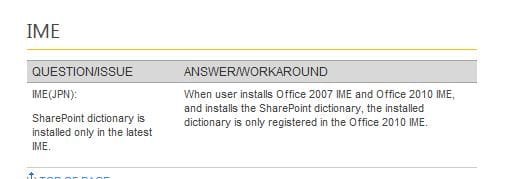
I think I figured out how to solve this problem. Now I don't have problems anymore(for the moment, even if I reset my PC). All what I have done was entering in MSCONFIG, there at startup I saw a lots of processes(about 4) called Microsoft Office IME 2010. I unchecked them, applied, rebooted my computer, and now everything is fine. What is it this IME?
 

My Computer

OS
Windows 7 Ultimate 32 bit
CPU
Intel dual core 3.00 Ghz
Motherboard
Gigabyte series
Memory
2*2 GB RAM DDR2
Graphics Card(s)
ATI RADEON 4650 SERIES
Sound Card
HD
Monitor(s) Displays
CY199D
Screen Resolution
1280*1024
Hard Drives
1 Hard of 750 GB
Keyboard
RPC Standard Keyboard
Mouse
A4Tech Optical Mouse
Internet Speed
12 Mb/s
Browser
Firefox

Attachments

  • IME.JPG
    IME.JPG
    17.8 KB · Views: 153

My Computer

Computer type
PC/Desktop
Computer Manufacturer/Model Number
Self Built
OS
Win 10 Pro x64
CPU
Intel I5-2500K @3.3GHz
Motherboard
Asrock P67 Extreme4
Memory
16GB G.Skill Ripjaws X (4x4GB)
Graphics Card(s)
EVGA GeForce 750 Ti SC 2GB
Sound Card
ASUS Xonar DG 5.1 Channels 24-bit 96KHz PCI Interface Sound
Monitor(s) Displays
auria eq2367
Screen Resolution
1920 x 1080
Hard Drives
250GB Samsung 850 EVO SSD
1TB WD Blue
1TB Hitachi
PSU
SeaSonic X 650W 80 Plus Gold
Case
Corsair Obsidian 750D
Cooling
Corsair H60, Three 140mm case fans
Keyboard
Logitech Wireless Keyboard K520
Mouse
Logitech Wireless Mouse M310
Internet Speed
Wave Broadband ~ 100 dn 5 up
Antivirus
Windows Defender, Malwarebytes Premium
Browser
Edge, IE11, Chrome
Other Info
Laptop specs: HP g7-1365dx /
CPU: AMD A6-3420M APU with Radeon(tm) HD Graphics /
RAM: Crucial 8Gb (2x4Gb) /
SSD: Crucial M4-CT128M4SSD2 ATA Device/ FW 000F /
GFX: AMD Radeon HD 6520G /
OS: Windows 10 Pro x64
Back
Top