Solved Language displays as squares/weird characters

lastvelocirapto

New member
Local time
10:24 AM
Messages
22
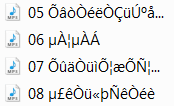
My files in different languages (chinese/japanese/etc) are showing up as:
ÕâòÒéëÒÇüÚºåÒüæÞíîÒüÅþ®¦Òü©
µ£êÒü«þÑêÒéè
or just squares

The characters work when I browse on the internet, but not when they are file names
I do not want to change my language for the system, I just simply want to be able to read the file names

I have windows 7 ult 64bit

Thanks
 

Attachments
  • Untitled.png
    Untitled.png
    2.1 KB · Views: 39

My Computer My Computer

OS
Windows 7 Ultimate x64
What anti-virus are your running?
Have you run a full scan?
Do you share your computer with other people?
Are you running any P2P file sharing software?
 

My Computer My Computer

Computer type
PC/Desktop
Computer Manufacturer/Model Number
Bruce ... somewhere in his 40's
OS
Windows 7 Ultimate 32bit SP1
CPU
Intel(R) Core(TM)2 Quad CPU @ 2.40GHz, 2400 MHz
Motherboard
INTEL/D975XBX2
Memory
4 GB
Graphics Card(s)
ATI Radeon HD 2600 Pro
Monitor(s) Displays
Samsung SyncMaster 914v
Screen Resolution
1280 x 1024
Hard Drives
2/500GB each ... ST3500630AS ATA Device.
One is not connected
PSU
Rocketfish 700 W
Case
G.Skill Gigabyte Chassis
Keyboard
Standard PS/2 Keyboard
Mouse
Microsoft PS/2 Mouse
Internet Speed
DSL
Antivirus
Avira Internet Security
Browser
IE 11
Other Info
ATI HDMI Audio
I use microsoft security essentials, and I ran multiply full scans before
No I do not share the computer nor running any P2P file sharing software
This has been happening to my laptop since the day I bought it
 

My Computer My Computer

OS
Windows 7 Ultimate x64
Hello Lastvelocirapto,

Do you have the East Asian language pack installed and enabled?
Navigate to the control panel, then click on clock, language and region. Now click on region and language and then go to the keyboards and languages tab. Under the installed services tab, click on add.
If everything is correct the languages you mean should be listed there (or in the previous tab, if you've already used them). If so, simply click them and hit apply.
If they are not listed there, you can find all language packs here. The download instructions are on that page, provided by Microsoft.

Good luck and keep us posted!
Nommy
 

My Computer My Computer

Computer type
Laptop
Computer Manufacturer/Model Number
Dell Inspiron 5547
OS
Microsoft Windows 8.1 64-bit Professional
CPU
Intel(R) Core(TM) i7-4510U CPU @ 2.00GHz
Motherboard
Dell Inc. 08KNCD
Memory
8.00 GB (2 x 4.00 GB)
Graphics Card(s)
AMD Radeon R7 M265
Screen Resolution
1366 x 768 x 4294967296 colors
Hard Drives
(1) 1TB ST1000LM024 HN-M101MBB (2) 2TB Western Digital external hard drive (3) 500GB Packard Bell external hard drive
Mouse
Corsair Vengeance M60
Antivirus
Windows Defender & Malwarebytes
Browser
Firefox, Chromium
Other Info
+ Acer TravelMate 7730G with 32bit Ubuntu 14.04 LTS Trusty Tahr.
nommy, thanks for your advice.
That seems to solve the squares, I am able to see the characters now
But the weird characters are not still fixed
 

My Computer My Computer

OS
Windows 7 Ultimate x64
What do you exactly mean?
If I get it correct, the squares are gone, but instead of, say, Kanji characters you see things like ÄÇÕê and such?


Nommy
 

My Computer My Computer

Computer type
Laptop
Computer Manufacturer/Model Number
Dell Inspiron 5547
OS
Microsoft Windows 8.1 64-bit Professional
CPU
Intel(R) Core(TM) i7-4510U CPU @ 2.00GHz
Motherboard
Dell Inc. 08KNCD
Memory
8.00 GB (2 x 4.00 GB)
Graphics Card(s)
AMD Radeon R7 M265
Screen Resolution
1366 x 768 x 4294967296 colors
Hard Drives
(1) 1TB ST1000LM024 HN-M101MBB (2) 2TB Western Digital external hard drive (3) 500GB Packard Bell external hard drive
Mouse
Corsair Vengeance M60
Antivirus
Windows Defender & Malwarebytes
Browser
Firefox, Chromium
Other Info
+ Acer TravelMate 7730G with 32bit Ubuntu 14.04 LTS Trusty Tahr.
nonono, I was still seeing squares in my itunes and folder names. But once I restarted my laptop its fine now

Thanks :)
 

My Computer My Computer

OS
Windows 7 Ultimate x64
You're more than welcome:)


Nommy
 

My Computer My Computer

Computer type
Laptop
Computer Manufacturer/Model Number
Dell Inspiron 5547
OS
Microsoft Windows 8.1 64-bit Professional
CPU
Intel(R) Core(TM) i7-4510U CPU @ 2.00GHz
Motherboard
Dell Inc. 08KNCD
Memory
8.00 GB (2 x 4.00 GB)
Graphics Card(s)
AMD Radeon R7 M265
Screen Resolution
1366 x 768 x 4294967296 colors
Hard Drives
(1) 1TB ST1000LM024 HN-M101MBB (2) 2TB Western Digital external hard drive (3) 500GB Packard Bell external hard drive
Mouse
Corsair Vengeance M60
Antivirus
Windows Defender & Malwarebytes
Browser
Firefox, Chromium
Other Info
+ Acer TravelMate 7730G with 32bit Ubuntu 14.04 LTS Trusty Tahr.
Oh wait, sorry to bother you again. I see that the squares are gone, but the "Kanji characters" are still showing up as those weird character for my chinese and japanese files...
is it possible to get those working as well??
 

My Computer My Computer

OS
Windows 7 Ultimate x64
Do they look like this: カタカナ, or like this: ÄûõË ?
I'm not entirely sure, but I think that file names don't change when you apply a new language pack, so you'd have to change them by hand. But again, I'm not entirely sure there.


Nommy
 

My Computer My Computer

Computer type
Laptop
Computer Manufacturer/Model Number
Dell Inspiron 5547
OS
Microsoft Windows 8.1 64-bit Professional
CPU
Intel(R) Core(TM) i7-4510U CPU @ 2.00GHz
Motherboard
Dell Inc. 08KNCD
Memory
8.00 GB (2 x 4.00 GB)
Graphics Card(s)
AMD Radeon R7 M265
Screen Resolution
1366 x 768 x 4294967296 colors
Hard Drives
(1) 1TB ST1000LM024 HN-M101MBB (2) 2TB Western Digital external hard drive (3) 500GB Packard Bell external hard drive
Mouse
Corsair Vengeance M60
Antivirus
Windows Defender & Malwarebytes
Browser
Firefox, Chromium
Other Info
+ Acer TravelMate 7730G with 32bit Ubuntu 14.04 LTS Trusty Tahr.
the illegible one
hmm yeah that's what I thought, oh well, I guess I can't be lazy anymore :|

Well thanks again :)
 

My Computer My Computer

OS
Windows 7 Ultimate x64
Uhm, the Chinese and Japanese characters are supposed to look like my first example eh. That's what the language pack changes them to..

Anyway, glad I was of assistance!
Nommy
 

My Computer My Computer

Computer type
Laptop
Computer Manufacturer/Model Number
Dell Inspiron 5547
OS
Microsoft Windows 8.1 64-bit Professional
CPU
Intel(R) Core(TM) i7-4510U CPU @ 2.00GHz
Motherboard
Dell Inc. 08KNCD
Memory
8.00 GB (2 x 4.00 GB)
Graphics Card(s)
AMD Radeon R7 M265
Screen Resolution
1366 x 768 x 4294967296 colors
Hard Drives
(1) 1TB ST1000LM024 HN-M101MBB (2) 2TB Western Digital external hard drive (3) 500GB Packard Bell external hard drive
Mouse
Corsair Vengeance M60
Antivirus
Windows Defender & Malwarebytes
Browser
Firefox, Chromium
Other Info
+ Acer TravelMate 7730G with 32bit Ubuntu 14.04 LTS Trusty Tahr.
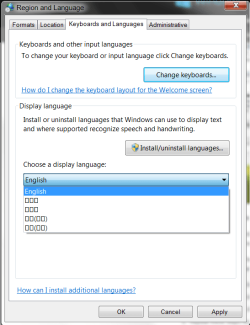
After a windows update, the chinese, japanese characters went back to squares again.
But apparently I still have the language packs installed (look at the screenshot below)
What am I suppose to do now D:
 

Attachments

  • Untitled3.png
    Untitled3.png
    20.7 KB · Views: 6

My Computer My Computer

OS
Windows 7 Ultimate x64
I assume that you have tried switching to them, and then restarting to see if anything changed?
If not, please do so.

Good luck and keep us posted,
Nommy
 

My Computer My Computer

Computer type
Laptop
Computer Manufacturer/Model Number
Dell Inspiron 5547
OS
Microsoft Windows 8.1 64-bit Professional
CPU
Intel(R) Core(TM) i7-4510U CPU @ 2.00GHz
Motherboard
Dell Inc. 08KNCD
Memory
8.00 GB (2 x 4.00 GB)
Graphics Card(s)
AMD Radeon R7 M265
Screen Resolution
1366 x 768 x 4294967296 colors
Hard Drives
(1) 1TB ST1000LM024 HN-M101MBB (2) 2TB Western Digital external hard drive (3) 500GB Packard Bell external hard drive
Mouse
Corsair Vengeance M60
Antivirus
Windows Defender & Malwarebytes
Browser
Firefox, Chromium
Other Info
+ Acer TravelMate 7730G with 32bit Ubuntu 14.04 LTS Trusty Tahr.
Haha, I should have tried that. It works perfectly now
Thanks again
 

My Computer My Computer

OS
Windows 7 Ultimate x64
You're welcome, I'm glad I helped you solve your problem:)


Nommy
 

My Computer My Computer

Computer type
Laptop
Computer Manufacturer/Model Number
Dell Inspiron 5547
OS
Microsoft Windows 8.1 64-bit Professional
CPU
Intel(R) Core(TM) i7-4510U CPU @ 2.00GHz
Motherboard
Dell Inc. 08KNCD
Memory
8.00 GB (2 x 4.00 GB)
Graphics Card(s)
AMD Radeon R7 M265
Screen Resolution
1366 x 768 x 4294967296 colors
Hard Drives
(1) 1TB ST1000LM024 HN-M101MBB (2) 2TB Western Digital external hard drive (3) 500GB Packard Bell external hard drive
Mouse
Corsair Vengeance M60
Antivirus
Windows Defender & Malwarebytes
Browser
Firefox, Chromium
Other Info
+ Acer TravelMate 7730G with 32bit Ubuntu 14.04 LTS Trusty Tahr.
Back
Top