Language packs

otuatail

New member
Member
VIP
Local time
3:18 PM
Messages
102
How do I download ONLY a Spanish pack. The MS website states that I go to windows updates and check for updates. Having done that (1 hour later) I click on the optional updates and pick the language pack for Spanish. This makes me believe that is all I am going to download. NO WAY. It has found over a gigabite of downloads that I am told that I need. Like it or not it is going to download them regardless of my wanting to only get one. I could have got the other updates when I went home at night. This has cost me the best part of a day wasted.
Surely MS the packs could be downloaded as a file and installed separately. If my PC crashes next time I will be looking at another days work wasted.
Having installed the language pack for Spanish and Added Spanish in the Office tools, It states limited support.
I create a new word document and add the following "Cómo estás".
This is how are you but I see red squiggles under the words. Not very good for basic Spanish spell checking is it?

I will still have to find a way of keying in accented letters.
 

My Computer

OS
Windows 7 32
I think I might have to buy this. Is there a UK phone number to speak to a human?
 

My Computer

OS
Windows 7 32
You post makes me quite confused. Seems to be more a user issue than Windows issue. Here some facts and tutorials for you:
Kari
 

My Computer

Computer type
Laptop
Computer Manufacturer/Model Number
HP ENVY 17-1150eg
OS
Windows 10 Pro x64 EN-GB
CPU
1.6 GHz Intel Core i7-720QM Processor
Memory
6 GB
Graphics Card(s)
ATI Mobility Radeon HD 5850 Graphics
Sound Card
Beats sound system with integrated subwoofer
Monitor(s) Displays
17" laptop display, 22" LED and 32" Full HD TV through HDMI
Screen Resolution
1600*900 (1), 1920*1080 (2&3)
Hard Drives
Internal: 2 x 500 GB SATA Hard Disk Drive 7200 rpm
External: 2TB for backups, 3TB USB3 network drive for media
Cooling
As Envy runs a bit warm, I have it on a Cooler Master pad
Keyboard
Logitech diNovo Media Desktop Laser (bluetooth)
Mouse
Logitech Performance Mouse MX
Internet Speed
50/10 Mbps VDSL
Antivirus
Windows Defender 4.3.9431.0
Browser
Maxthon 3.5.2., IE11
Thanks for your help. What I wanted is to spell check Spanish I used your link and it took me to a Spanish MS website
Download Herramientas de corrección de Microsoft Office 2013 (español) from Official Microsoft Download Center
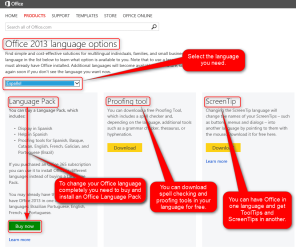
There is an option to buy for £19.99 which I have done. I noticed AFTER that there was a proofing tool next to it FREE. When I click on this link...
Everything is in Spanish here so I assume MS thinks I am a citizen of Spain. I then get this
Herramientas de corrección de Microsoft Office 2013 (español)
Translation: Microsoft Office 2013 correction tools
Does the paid for pack have this as I downloaded the free version and it didn’t work. I realise you are a smart cookie in this so any help and advice much appreciated.
 

My Computer

OS
Windows 7 32
Office Language Pack for Spanish, which you tell you have bought, includes Spanish Proofing Tools so no additional downloads are needed.

For your other issue, typing Spanish accented characters, I repeat that Windows Spanish Language Pack and Office Spanish Language Pack, both installed and used, does not mean you automatically have the Spanish Input Language enabled and selected. For that, see my previous post (last list item) for information on how to to add or remove keyboard input languages and how to change between them.


When I click on this link...
Everything is in Spanish here so I assume MS thinks I am a citizen of Spain. I then get this

To get almost any Microsoft webpage in English or any other language (subject to page you are looking for existing in that language) instead of for example Spanish, change the language and country definition in URL to either en-gb (English - Great Britain / United Kingdom) or en-us (English - USA) or any valid Microsoft language - country combination (highlighted part below, in this example Spanish - Spain):
Code:
[PLAIN]http://office.microsoft.com[/PLAIN]/[hl]es-es[/hl]/language-packs/?LpArch=x86:
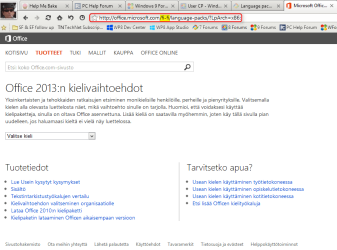
For instance if I would like to have this Office Language Options page in my native Finnish, I would edit the URL as follows:
Code:
[PLAIN]http://office.microsoft.com[/PLAIN]/[hl]fi-fi[/hl]/language-packs/?LpArch=x86:
The language and country in URL for all Microsoft localized pages is told as xx-yy where xx = two character code for language and yy = two character code for country. Spanish (Español) in Spain (España) would for instance be es-es or French in Belgium would be fr-be.

This simple manual edit takes me to the page in language I want to, as here in Finnish:

2014-05-15_14h44_28.png
 
Last edited:

My Computer

Computer type
Laptop
Computer Manufacturer/Model Number
HP ENVY 17-1150eg
OS
Windows 10 Pro x64 EN-GB
CPU
1.6 GHz Intel Core i7-720QM Processor
Memory
6 GB
Graphics Card(s)
ATI Mobility Radeon HD 5850 Graphics
Sound Card
Beats sound system with integrated subwoofer
Monitor(s) Displays
17" laptop display, 22" LED and 32" Full HD TV through HDMI
Screen Resolution
1600*900 (1), 1920*1080 (2&3)
Hard Drives
Internal: 2 x 500 GB SATA Hard Disk Drive 7200 rpm
External: 2TB for backups, 3TB USB3 network drive for media
Cooling
As Envy runs a bit warm, I have it on a Cooler Master pad
Keyboard
Logitech diNovo Media Desktop Laser (bluetooth)
Mouse
Logitech Performance Mouse MX
Internet Speed
50/10 Mbps VDSL
Antivirus
Windows Defender 4.3.9431.0
Browser
Maxthon 3.5.2., IE11
Back
Top