Laptop disk drive running slow

bertie11

New member
Member
VIP
Local time
8:14 AM
Messages
254
As above. I had a serious crash recently where the system failed to get beyond the HP logo and Press ESC to enter BIOS. I eventually got it sorted by reinstalling an Acronis image but since then it has been running slow. It also meant that several partitions were zapped but I got them back with Easeus Partition Recovery. Has the disk geometry altered perhaps?

I just checked my disk properties in Device Manager and I'm not seeing the 'use UDMA if available.' The only tabs I get after R clicking on properties on my HDD are General, Policies, Volumes, Driver and Details. I may be wrong but I thought there was another tab or am I mistaken?

I'm running Win7 HP 64 bit on an HP Pavilion DV6-2113SA AMD Turion 2.5 dual core, 4GB RAM,.

I've done MBAM scans in safe mode and Win mode and found nothing, chkdsk nothing, cleaned up unwanted files and programs and all the usual stuff. I don't think turning off services will help as the laptop used to run a lot quicker than this. It takes about 4 minutes before I can use it from boot.

My feeling is that it is the disk but I don't know how to prove/disprove it!
 

My Computer

Computer type
Laptop
Computer Manufacturer/Model Number
HP Envy 15
OS
Windows 8.1.1
CPU
AMD A10-5750M APU with Radeon(tm) HD Graphics
Memory
8gb
Hard Drives
1TB Serial ATA 16mb buffer
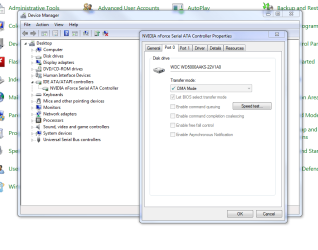
Go to the properties for the IDE or SATA controller entry in device Manager and you should see DMA Mode listed under the Port tab.

EDIT: If you go to the drive manufacturers web site you should be able to find a free utility to test it for errors etc.
 

My Computer

Computer type
PC/Desktop
Computer Manufacturer/Model Number
Home Built
OS
Windows 10 Education 64 bit
CPU
AMD Phenom II X4 980 Black Edition Deneb 3.7GHz
Motherboard
Asus M4N68T-M V2 µATX Motherboard
Memory
8GB 4GBx2 Kingston PC10600 DDR3 1333 Memory
Graphics Card(s)
Zotac NVIDIA Geforce GT640 2 Gig DDR3 PCIe
Sound Card
VIA VT1708s High Definition Audio 8-channel Onboard
Monitor(s) Displays
22" LG E2242 1080p and 2 19" I-INC AG191D
Screen Resolution
1280x1024 - 1920x1080 - 1280x1024
Hard Drives
Crucial M100 256 GB SSD and 500 GB WD Blue SATA
PSU
Thermaltake TR 620
Case
Power Up Black ATX Mid-Tower Case
Cooling
Stock heatsink and fan
Keyboard
Logitech Wireless K350 Wave
Mouse
Logitech Wireless M570 Trackman Wheel
Internet Speed
80 Mbps Down 30 Mbps Up
Antivirus
Windows Defender
Browser
Internet Explorer 11
Other Info
HP DVD1040e Lightscribe - External USB2
I don't have a Port tab! Under IDE ATA/ATAPI controller I have AMD SATA controller but there is no Port tab. I'll have alook for the makers test utility, I think I already have it, so I'll run it.
 

My Computer

Computer type
Laptop
Computer Manufacturer/Model Number
HP Envy 15
OS
Windows 8.1.1
CPU
AMD A10-5750M APU with Radeon(tm) HD Graphics
Memory
8gb
Hard Drives
1TB Serial ATA 16mb buffer
Ops, sorry, go to the properties for the device listed under the IDE ATA/ATAPI controllers entry. In your case that would be the AMD SATA controller. Mine is listed as NVIDIA nForce Serial ATA Controller.
 

My Computer

Computer type
PC/Desktop
Computer Manufacturer/Model Number
Home Built
OS
Windows 10 Education 64 bit
CPU
AMD Phenom II X4 980 Black Edition Deneb 3.7GHz
Motherboard
Asus M4N68T-M V2 µATX Motherboard
Memory
8GB 4GBx2 Kingston PC10600 DDR3 1333 Memory
Graphics Card(s)
Zotac NVIDIA Geforce GT640 2 Gig DDR3 PCIe
Sound Card
VIA VT1708s High Definition Audio 8-channel Onboard
Monitor(s) Displays
22" LG E2242 1080p and 2 19" I-INC AG191D
Screen Resolution
1280x1024 - 1920x1080 - 1280x1024
Hard Drives
Crucial M100 256 GB SSD and 500 GB WD Blue SATA
PSU
Thermaltake TR 620
Case
Power Up Black ATX Mid-Tower Case
Cooling
Stock heatsink and fan
Keyboard
Logitech Wireless K350 Wave
Mouse
Logitech Wireless M570 Trackman Wheel
Internet Speed
80 Mbps Down 30 Mbps Up
Antivirus
Windows Defender
Browser
Internet Explorer 11
Other Info
HP DVD1040e Lightscribe - External USB2
Nope, like I said, no Port tab. I've got (under AMD SATA) General, Driver, Details and Resources tabs. I'm beginning to wonder if I imagined seeing anything else.:confused:
 

My Computer

Computer type
Laptop
Computer Manufacturer/Model Number
HP Envy 15
OS
Windows 8.1.1
CPU
AMD A10-5750M APU with Radeon(tm) HD Graphics
Memory
8gb
Hard Drives
1TB Serial ATA 16mb buffer
Ok, maybe its because I have a nVidia chip-set. I'm told other brands don't have the speed test button either?

DMACapture.PNG
 

My Computer

Computer type
PC/Desktop
Computer Manufacturer/Model Number
Home Built
OS
Windows 10 Education 64 bit
CPU
AMD Phenom II X4 980 Black Edition Deneb 3.7GHz
Motherboard
Asus M4N68T-M V2 µATX Motherboard
Memory
8GB 4GBx2 Kingston PC10600 DDR3 1333 Memory
Graphics Card(s)
Zotac NVIDIA Geforce GT640 2 Gig DDR3 PCIe
Sound Card
VIA VT1708s High Definition Audio 8-channel Onboard
Monitor(s) Displays
22" LG E2242 1080p and 2 19" I-INC AG191D
Screen Resolution
1280x1024 - 1920x1080 - 1280x1024
Hard Drives
Crucial M100 256 GB SSD and 500 GB WD Blue SATA
PSU
Thermaltake TR 620
Case
Power Up Black ATX Mid-Tower Case
Cooling
Stock heatsink and fan
Keyboard
Logitech Wireless K350 Wave
Mouse
Logitech Wireless M570 Trackman Wheel
Internet Speed
80 Mbps Down 30 Mbps Up
Antivirus
Windows Defender
Browser
Internet Explorer 11
Other Info
HP DVD1040e Lightscribe - External USB2
There are some checks & scans you can do with HD-Tune.
 

My Computer

Computer type
PC/Desktop
Computer Manufacturer/Model Number
Self - Build | Asus K53e Laptop
OS
10 x64 | 7 x64
CPU
AMD FX-9590 Vishera 4.7 | i5 Sandy Bridge
Motherboard
MSI 990 FXA | K53e
Memory
16 gigs Crucial Ballistix | 8 gigs Adata ddr3 1600
Graphics Card(s)
RX-570 4gd5 | Intel HD 3000
Sound Card
Realtek HD OnBoard Audio
Monitor(s) Displays
Samsung 22" & 37" Toshiba | 15.6
Hard Drives
ADATA 240 ssd & 750 Caviar Black 7200 sata | 250 840 EVO ssd & samsung ssd
PSU
Thermaltake 700 | 65w
Case
CoolMaster Centurion 534+
Cooling
Corsair H60
Keyboard
Rosewill RK-800G PS/2 Gaming Keyboard | Asus Chiclet
Mouse
Ventus | MS w/side buttons
Internet Speed
RoadRunner
Other Info
I hate the smell of friggin corn chip butt breath snacks.
Hi alphanumeric

Definitely not got any tab that will let me set UDMA, PIO or anything else.

I left Seatools for DOS running overnight on a 'long' test and got a NFF, so that is encouraging.

Thanks Fantail, I had forgotten about HDTune, I'll give that a whirl.
 

My Computer

Computer type
Laptop
Computer Manufacturer/Model Number
HP Envy 15
OS
Windows 8.1.1
CPU
AMD A10-5750M APU with Radeon(tm) HD Graphics
Memory
8gb
Hard Drives
1TB Serial ATA 16mb buffer
HDTune didn't pick up anything, so I reckon my disk is OK, so I might have a software problem/clash.

When I looked in msconfig, and looked at the Boot tab\Advanced I saw an option to set the number of processors, mine is set at 1. I have not set it to 1 though. I have an AMD Turion 2.5 dual core, so should it be set to 1, or is that only for Boot, and then both cores kick in?
 

My Computer

Computer type
Laptop
Computer Manufacturer/Model Number
HP Envy 15
OS
Windows 8.1.1
CPU
AMD A10-5750M APU with Radeon(tm) HD Graphics
Memory
8gb
Hard Drives
1TB Serial ATA 16mb buffer
Mine is set to 1 too but unless there is a check mark in the little box next to Number of processors, its grayed out and ignored. If yours is checked remove the check mark and reboot.

EDIT: No its not just for boot up, as far as I know that option is for use as a diagnostic mode.
 

My Computer

Computer type
PC/Desktop
Computer Manufacturer/Model Number
Home Built
OS
Windows 10 Education 64 bit
CPU
AMD Phenom II X4 980 Black Edition Deneb 3.7GHz
Motherboard
Asus M4N68T-M V2 µATX Motherboard
Memory
8GB 4GBx2 Kingston PC10600 DDR3 1333 Memory
Graphics Card(s)
Zotac NVIDIA Geforce GT640 2 Gig DDR3 PCIe
Sound Card
VIA VT1708s High Definition Audio 8-channel Onboard
Monitor(s) Displays
22" LG E2242 1080p and 2 19" I-INC AG191D
Screen Resolution
1280x1024 - 1920x1080 - 1280x1024
Hard Drives
Crucial M100 256 GB SSD and 500 GB WD Blue SATA
PSU
Thermaltake TR 620
Case
Power Up Black ATX Mid-Tower Case
Cooling
Stock heatsink and fan
Keyboard
Logitech Wireless K350 Wave
Mouse
Logitech Wireless M570 Trackman Wheel
Internet Speed
80 Mbps Down 30 Mbps Up
Antivirus
Windows Defender
Browser
Internet Explorer 11
Other Info
HP DVD1040e Lightscribe - External USB2
Mine wa unchecked and I've left it like that. I assumed that as it was on the boot tab it was perhaps to do with diags.
 

My Computer

Computer type
Laptop
Computer Manufacturer/Model Number
HP Envy 15
OS
Windows 8.1.1
CPU
AMD A10-5750M APU with Radeon(tm) HD Graphics
Memory
8gb
Hard Drives
1TB Serial ATA 16mb buffer
Other than running the drive manufacturers diagnostic on your drive, or maybe memetest on your RAM, a clean install might be the way to go. I know it seems like giving in but sometimes its just quicker and easier to just start over than keep screwing around with a poorly running system. Me I can do a clean install in a couple of hours and be back online with my major programs installed. If you want to keep trying though I'll try to give what help I can.
 

My Computer

Computer type
PC/Desktop
Computer Manufacturer/Model Number
Home Built
OS
Windows 10 Education 64 bit
CPU
AMD Phenom II X4 980 Black Edition Deneb 3.7GHz
Motherboard
Asus M4N68T-M V2 µATX Motherboard
Memory
8GB 4GBx2 Kingston PC10600 DDR3 1333 Memory
Graphics Card(s)
Zotac NVIDIA Geforce GT640 2 Gig DDR3 PCIe
Sound Card
VIA VT1708s High Definition Audio 8-channel Onboard
Monitor(s) Displays
22" LG E2242 1080p and 2 19" I-INC AG191D
Screen Resolution
1280x1024 - 1920x1080 - 1280x1024
Hard Drives
Crucial M100 256 GB SSD and 500 GB WD Blue SATA
PSU
Thermaltake TR 620
Case
Power Up Black ATX Mid-Tower Case
Cooling
Stock heatsink and fan
Keyboard
Logitech Wireless K350 Wave
Mouse
Logitech Wireless M570 Trackman Wheel
Internet Speed
80 Mbps Down 30 Mbps Up
Antivirus
Windows Defender
Browser
Internet Explorer 11
Other Info
HP DVD1040e Lightscribe - External USB2
You must have read my mind! Last night I started writing out a check list of what I plan to do, programs to instal, in what order, serial numbers etc. Its all the settings and fiddly bits that I've forgotten about that are the problem, but it will give me something to do!

Thanks for your help. I will post back if/when I 'go for it'.
 

My Computer

Computer type
Laptop
Computer Manufacturer/Model Number
HP Envy 15
OS
Windows 8.1.1
CPU
AMD A10-5750M APU with Radeon(tm) HD Graphics
Memory
8gb
Hard Drives
1TB Serial ATA 16mb buffer
Actually, there is a question you could probably help with. This HP Pavilion note book arrived already configured. In the 2 years I've had it, I've removed the Recovery partition as it didn't work when I needed it, but more to the point, I have never liked the MS way of installing programs into Program Files and Program Files(86) on C:\. To my mind, that makes the Acronis image of c:\over 30gigs which takes a fair while to image and also, I do prefer my data to be 'away' from C:\.

What I have done for years was to keep the OS on C:\ and put all my programs on D:\ and my data on another partition. As this is a 64 bit notebook, is there likely to be a problem installing all programs under D:\ instead of the two Program Files folders? Should I create those two folders, or is it possible to move them from D:\ to D:\

Any thoughts please?
 

My Computer

Computer type
Laptop
Computer Manufacturer/Model Number
HP Envy 15
OS
Windows 8.1.1
CPU
AMD A10-5750M APU with Radeon(tm) HD Graphics
Memory
8gb
Hard Drives
1TB Serial ATA 16mb buffer
I only move my Documents, Pictures, Music, Videos, and Downloads folders to D:\. 500 Gig drive slit almost down the middle. When I do a clean install I just erase C:\ and leave D:\ alone. Then when I move the folders all my stuff is already there.
I do everything from thumb drives including installing windows. I have one for drivers, one for windows updates, and one with my programs on it. And thats the order I do things, Drivers, windows updates, programs, then the online windows update. For windows updates on the thumbdrive I have stuff like DirectX, Dot Net Framework, Internet Explorer, Silverlight, and Microsoft Security Essentials. My install media includes SP1. If yours doesn't having the full stand alone installer will save you a lot of time online doing Windows Updates. Especially if you have a slow connection. I like to have the latest drivers on hand. If you end up with your NIC missing a driver, and no Internet connection to download the correct driver, you're in a bind if you don't have another working PC. Most of the time just about everything works with the stock windows drivers, but I like to have the manufactures drivers. In my case they are newer versions and some offer functions the stock windows drivers don't. I have a checklist saved to a text document that I reference. For me its more a list of tweaks than a must do of how to. I've almost got it memorized by now. :)
 

My Computer

Computer type
PC/Desktop
Computer Manufacturer/Model Number
Home Built
OS
Windows 10 Education 64 bit
CPU
AMD Phenom II X4 980 Black Edition Deneb 3.7GHz
Motherboard
Asus M4N68T-M V2 µATX Motherboard
Memory
8GB 4GBx2 Kingston PC10600 DDR3 1333 Memory
Graphics Card(s)
Zotac NVIDIA Geforce GT640 2 Gig DDR3 PCIe
Sound Card
VIA VT1708s High Definition Audio 8-channel Onboard
Monitor(s) Displays
22" LG E2242 1080p and 2 19" I-INC AG191D
Screen Resolution
1280x1024 - 1920x1080 - 1280x1024
Hard Drives
Crucial M100 256 GB SSD and 500 GB WD Blue SATA
PSU
Thermaltake TR 620
Case
Power Up Black ATX Mid-Tower Case
Cooling
Stock heatsink and fan
Keyboard
Logitech Wireless K350 Wave
Mouse
Logitech Wireless M570 Trackman Wheel
Internet Speed
80 Mbps Down 30 Mbps Up
Antivirus
Windows Defender
Browser
Internet Explorer 11
Other Info
HP DVD1040e Lightscribe - External USB2
More food for thought there! An approach I hadn't considered at all. I already have SP1 so that is OK.

A question about drivers. This is an HP Pavilion DV6 and whenever I go onto the HP site to check for updated drivers there never are any after two years, yet if I run say DriverMAX I'm told ten of my drivers are ancient! Do makers like HP tailor the drivers to suit a particular model or is it OK to use the latest version from the individual driver makers site? I've always been reluctant to do that in case I foul things up. If I do do a re-install I could use the latest and if they don't work then go back to the current ones.

Why do makers do this, I've had it before with other boxes from other makers.
 

My Computer

Computer type
Laptop
Computer Manufacturer/Model Number
HP Envy 15
OS
Windows 8.1.1
CPU
AMD A10-5750M APU with Radeon(tm) HD Graphics
Memory
8gb
Hard Drives
1TB Serial ATA 16mb buffer
Thats an age old question, especially with laptops. From what I've read, yes, manufacturers often modify and or customize driver packages to meet their requirements. I would think even more so with laptops. I personally go with the manufacturers drivers especially for my motherboard. I could get them from nVidia and they likely would work fine, the only way to know would be to try them. If the version numbers ASUS lists in the readme are correct the nVidia drivers are newer than the ASUS drivers for my M2N68 but older than the ones ASUS offers for my M4N68. :confused: I'm happy with the ASUS drivers for the most part. The sound driver ASUS supplies for my M4N68 doesn't work very well, pops and drop outs, so I went to VIA for that and it works. When I put Windows 7 on my old Acer Aspire 5920 I hit two snags. No video driver and the touch pad driver wouldn't install. I went to Intel for the video driver. The Synaptics driver from there site wasn't any better than what Acer offered but I managed to get one for the next model down laptop that worked and let me use all the buttons. Long story made short, if I can get them from the manufacturer (ASUS, Acer, etc) and they work, thats what I use.
 

My Computer

Computer type
PC/Desktop
Computer Manufacturer/Model Number
Home Built
OS
Windows 10 Education 64 bit
CPU
AMD Phenom II X4 980 Black Edition Deneb 3.7GHz
Motherboard
Asus M4N68T-M V2 µATX Motherboard
Memory
8GB 4GBx2 Kingston PC10600 DDR3 1333 Memory
Graphics Card(s)
Zotac NVIDIA Geforce GT640 2 Gig DDR3 PCIe
Sound Card
VIA VT1708s High Definition Audio 8-channel Onboard
Monitor(s) Displays
22" LG E2242 1080p and 2 19" I-INC AG191D
Screen Resolution
1280x1024 - 1920x1080 - 1280x1024
Hard Drives
Crucial M100 256 GB SSD and 500 GB WD Blue SATA
PSU
Thermaltake TR 620
Case
Power Up Black ATX Mid-Tower Case
Cooling
Stock heatsink and fan
Keyboard
Logitech Wireless K350 Wave
Mouse
Logitech Wireless M570 Trackman Wheel
Internet Speed
80 Mbps Down 30 Mbps Up
Antivirus
Windows Defender
Browser
Internet Explorer 11
Other Info
HP DVD1040e Lightscribe - External USB2
Or, if it ain't broke, don't fix it! If I have time, I could follow the same idea, try the latest and see if it works or not, leave it a week or two then try the next one if it later than the one I've got.

I posted the same query on the HP site, so I'l see what that throws up.

Thanks.
 

My Computer

Computer type
Laptop
Computer Manufacturer/Model Number
HP Envy 15
OS
Windows 8.1.1
CPU
AMD A10-5750M APU with Radeon(tm) HD Graphics
Memory
8gb
Hard Drives
1TB Serial ATA 16mb buffer
You may want to see if you can find some unbiased opinions/reviews of that driver finder program you mentioned. If i was trying to get someone to pony up for it I might tweak it so it says there are new drivers even if there really isn't, know what I mean?;)

Accidentally hit post part way though.
 

My Computer

Computer type
PC/Desktop
Computer Manufacturer/Model Number
Home Built
OS
Windows 10 Education 64 bit
CPU
AMD Phenom II X4 980 Black Edition Deneb 3.7GHz
Motherboard
Asus M4N68T-M V2 µATX Motherboard
Memory
8GB 4GBx2 Kingston PC10600 DDR3 1333 Memory
Graphics Card(s)
Zotac NVIDIA Geforce GT640 2 Gig DDR3 PCIe
Sound Card
VIA VT1708s High Definition Audio 8-channel Onboard
Monitor(s) Displays
22" LG E2242 1080p and 2 19" I-INC AG191D
Screen Resolution
1280x1024 - 1920x1080 - 1280x1024
Hard Drives
Crucial M100 256 GB SSD and 500 GB WD Blue SATA
PSU
Thermaltake TR 620
Case
Power Up Black ATX Mid-Tower Case
Cooling
Stock heatsink and fan
Keyboard
Logitech Wireless K350 Wave
Mouse
Logitech Wireless M570 Trackman Wheel
Internet Speed
80 Mbps Down 30 Mbps Up
Antivirus
Windows Defender
Browser
Internet Explorer 11
Other Info
HP DVD1040e Lightscribe - External USB2
There is only you and me at the moment!
 

My Computer

Computer type
Laptop
Computer Manufacturer/Model Number
HP Envy 15
OS
Windows 8.1.1
CPU
AMD A10-5750M APU with Radeon(tm) HD Graphics
Memory
8gb
Hard Drives
1TB Serial ATA 16mb buffer
Back
Top