Laptop fan makes high pitch noise, fan wearing out?

vStone1K

New member
Member
VIP
Local time
9:25 PM
Messages
234
Location
Australia
How to fix noisy laptop fan

Hey guys, well I've been having an annoying problem with my laptop fan. It produces a high pitched noise that is just loud enough to annoy me :/ My room is quiet, so you can very easily hear it. I'm not sure how long it's been going on for, but I've noticed it the last few months. To me it sounds like the fan is starting to wear out, from a fan bearing maybe. I've tried cleaning it by disassembling the laptop, but the noise hasn't changed. Do I need to replace the fan? :(

Thanks in advance :)
 
Last edited:

My Computer My Computer

At a glance

Windows 10 Home 64-bit
OS
Windows 10 Home 64-bit
Hmm gin mate what are the temps doing?? sounds like the thing is working overtime to me.

Try this and post back Speccy - Download < download from piriform.

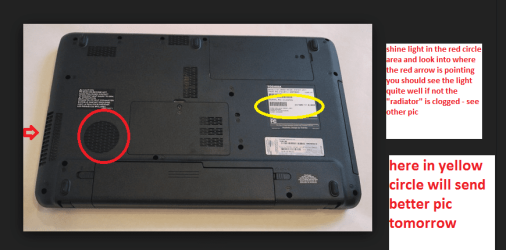
One thing you can try if the temps are up is to shine a very bright light into the fan aperture and then look into the outlet vent if you cannot see much light then the cooling rad is blocked.
The pic is of a Toshiba but the principle is the same.
 

Attachments

  • TOSH BOTTOM.PNG
    TOSH BOTTOM.PNG
    78.4 KB · Views: 1

My Computer My Computer

At a glance

Desk1 7 Home Prem / Desk2 10 Pro / Main lap A...Desk1 i5 3750K / Laptop i7 GTX 860M / Desk2 i...Desk1 8GB (1866) / Desk2 16GB (1333) / Laptop...Desk 1& 2NVidia GTX 650 & Laptops on board Intel
Computer type
PC/Desktop
Computer Manufacturer/Model Number
Own build (new) Desk1 / Asus ROG Win 7 / Desk2 1st build
OS
Desk1 7 Home Prem / Desk2 10 Pro / Main lap Asus ROG 10 Pro 2 laptop Toshiba 7 Pro Asus P2520 7 & 10
CPU
Desk1 i5 3750K / Laptop i7 GTX 860M / Desk2 i5 2500
Motherboard
Desk1 Asus P877-V / Desk2 Gigabyte H67 UD3H / Laptop ?
Memory
Desk1 8GB (1866) / Desk2 16GB (1333) / Laptop 8Gb DDR3
Graphics Card(s)
Desk 1& 2NVidia GTX 650 & Laptops on board Intel
Sound Card
Desk 1 & 2 -XONAR DG Realtek High Def audio Laptop
Monitor(s) Displays
Desk 1 Benq HD 2450 / Desk2 Philips 24" / Laptop 17.5"
Screen Resolution
1920x1080 D1 & D2 & Laptop 1
Hard Drives
Desk1 Samsung 120GB 830 SSD
Asus ROG 256GB 850 Pro SSD
Desk2 Samsung 840 256 SSD
Toshiba 120GB EVO
PSU
Desk 1 Corsair HX 1050/ Laptop ? / Desk 2 Corsair HX 650
Case
Desk 1 Cooler HAF XM ? Toshiba laptop / Desk2 Coolermaster
Cooling
Fans on all Desk1 -2 Desk2 - all Coolermasters 5 Laptop ?
Keyboard
Desk 1 MS Sidewinder X6 Desk 2 MS Sidewinder X 4
Mouse
Desk 1&2 - Gigabyte MS 900 gamer - laptop - Logitec wireless
Internet Speed
ADSL2+
Other Info
One other Desktop (tester) and spare Toshba laptop both with SSD's
Running Kaspersky 2016 ISS on all machines config'd identically
Logitec audio stereo systems on each machine (x3)
Canon MG5250MFC
Router/modem TP-Link running WPA2SK
I recorded it with my phone right up to the vent, so that's why you can hear the air blowing onto the mic :P I'll download the program in a minute and post back.
 

My Computer My Computer

At a glance

Windows 10 Home 64-bit
OS
Windows 10 Home 64-bit
Sadly i think its time for a Replacement ...
 

My Computer My Computer

At a glance

windows 7 home 64bitINTEL-CORE I716GB
Computer Manufacturer/Model Number
W530-3630QM1
OS
windows 7 home 64bit
CPU
INTEL-CORE I7
Memory
16GB
Hard Drives
750GB
Browser
Chrome
Alright here's the results:
This is with the fan running at that speed too.
@maxie You think? :(
 
Last edited:

My Computer My Computer

At a glance

Windows 10 Home 64-bit
OS
Windows 10 Home 64-bit
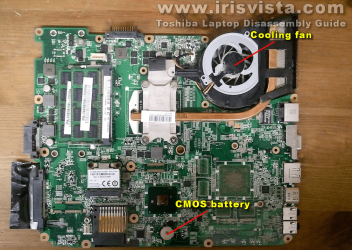
Ok mate in the meantime tis is a pic of the actual board you have in that machine.
 

Attachments

  • TOSH 650D.PNG
    TOSH 650D.PNG
    439.3 KB · Views: 3

My Computer My Computer

At a glance

Desk1 7 Home Prem / Desk2 10 Pro / Main lap A...Desk1 i5 3750K / Laptop i7 GTX 860M / Desk2 i...Desk1 8GB (1866) / Desk2 16GB (1333) / Laptop...Desk 1& 2NVidia GTX 650 & Laptops on board Intel
Computer type
PC/Desktop
Computer Manufacturer/Model Number
Own build (new) Desk1 / Asus ROG Win 7 / Desk2 1st build
OS
Desk1 7 Home Prem / Desk2 10 Pro / Main lap Asus ROG 10 Pro 2 laptop Toshiba 7 Pro Asus P2520 7 & 10
CPU
Desk1 i5 3750K / Laptop i7 GTX 860M / Desk2 i5 2500
Motherboard
Desk1 Asus P877-V / Desk2 Gigabyte H67 UD3H / Laptop ?
Memory
Desk1 8GB (1866) / Desk2 16GB (1333) / Laptop 8Gb DDR3
Graphics Card(s)
Desk 1& 2NVidia GTX 650 & Laptops on board Intel
Sound Card
Desk 1 & 2 -XONAR DG Realtek High Def audio Laptop
Monitor(s) Displays
Desk 1 Benq HD 2450 / Desk2 Philips 24" / Laptop 17.5"
Screen Resolution
1920x1080 D1 & D2 & Laptop 1
Hard Drives
Desk1 Samsung 120GB 830 SSD
Asus ROG 256GB 850 Pro SSD
Desk2 Samsung 840 256 SSD
Toshiba 120GB EVO
PSU
Desk 1 Corsair HX 1050/ Laptop ? / Desk 2 Corsair HX 650
Case
Desk 1 Cooler HAF XM ? Toshiba laptop / Desk2 Coolermaster
Cooling
Fans on all Desk1 -2 Desk2 - all Coolermasters 5 Laptop ?
Keyboard
Desk 1 MS Sidewinder X6 Desk 2 MS Sidewinder X 4
Mouse
Desk 1&2 - Gigabyte MS 900 gamer - laptop - Logitec wireless
Internet Speed
ADSL2+
Other Info
One other Desktop (tester) and spare Toshba laptop both with SSD's
Running Kaspersky 2016 ISS on all machines config'd identically
Logitec audio stereo systems on each machine (x3)
Canon MG5250MFC
Router/modem TP-Link running WPA2SK
Yes I actually got down to that yesterday, I could sort of clean out the fan but I couldn't separate it from the motherboard. :/ There was one screw holding the fan part in place so I unscrewed it, but I could only lift half of it out. Something else was holding it down...
 

My Computer My Computer

At a glance

Windows 10 Home 64-bit
OS
Windows 10 Home 64-bit
Yep mate I think Maxie is right the temps are fine to fix it if you are confident enough is here
Toshiba Satellite L655 L655D L650 L650D disassembly

Just take note of this Laptop disassembly and repair tips for newbies especially the ribbon cables they have tiny lugs on them that can be really fiddly to use taking out and inserting.

A little something for you too

TAKINGLAPTOPS APART

I always spread out a large whitebath towel on the work top and using cloth or ordinary duct tape keep to be stretchedout fixed down to the work top. This isbecause when removing the sometimes very small screws it stops the screw form beingdropped onto a hard surface where it almost always will bounce and even land onthe floor never t be seen again. Of course if that happens you can scour thefloor with a strong magnet in the case of steel screws the brass ones (thereare some that have brass screws in certain spots) unless brightly coloured youwill not find especially in carpeted floors.

I prefer to use a battery drivenslow speed screwdriver as in pic and leave the screwdriver bits stuckonto a strong magnet or stroke then longitudinally to magnetise them it makeretaining the steel screws so mucheasier especially when replacing them. (If you drop on into the machine youwill need to completely disassemble it again to remove it)

It is also advisable to keep thescrews in separate containers as they will be of different sizes and locations

&

GENERALINFO

As a general rule of thumb toreplace the thermal compound in a laptop there are two areas to be concernedwith that is the CPU and the GPU (graphics) see pics of them before and afterremoving the heatsink assembly. How you apply the compound is your choice Iprefer to use a cleaner and prepsolution as in the Arctic cleaning kit -http://www.arcticsilver.com/arcticlean.htm and the compound from Artic - http://www.arcticsilver.com/as5.htm but the choice of compound isyours.

To make the job easier because thedies are very shiny I prefer to clean with solution 1 then prep with solution 2 then use a vinylglove and spread a very thin layer / smear on the heatsink and the die – thenadd a tiny half grain of rice size dot of compound the the centre of the die/sand reattach the heatsink assembly. DO NOT apply more than that.

DO NOT over tighten the retainingscrews / bolts

Oncedone and before you reassemble now is the best time to make sure the “radiator”and fan assembly is clear of dust and crud (stuck on dirt).
TIP If you use compressed airto clean the dust from the fan DO NOTlet the fan spin it is not designed to spin at speeds exceeding what it wasmeant to and will if left spinning with the air blast will wreck the bearing.If the fan is tight to turn then it needs replacing as the bearings are usuallysealed.
 

My Computer My Computer

At a glance

Desk1 7 Home Prem / Desk2 10 Pro / Main lap A...Desk1 i5 3750K / Laptop i7 GTX 860M / Desk2 i...Desk1 8GB (1866) / Desk2 16GB (1333) / Laptop...Desk 1& 2NVidia GTX 650 & Laptops on board Intel
Computer type
PC/Desktop
Computer Manufacturer/Model Number
Own build (new) Desk1 / Asus ROG Win 7 / Desk2 1st build
OS
Desk1 7 Home Prem / Desk2 10 Pro / Main lap Asus ROG 10 Pro 2 laptop Toshiba 7 Pro Asus P2520 7 & 10
CPU
Desk1 i5 3750K / Laptop i7 GTX 860M / Desk2 i5 2500
Motherboard
Desk1 Asus P877-V / Desk2 Gigabyte H67 UD3H / Laptop ?
Memory
Desk1 8GB (1866) / Desk2 16GB (1333) / Laptop 8Gb DDR3
Graphics Card(s)
Desk 1& 2NVidia GTX 650 & Laptops on board Intel
Sound Card
Desk 1 & 2 -XONAR DG Realtek High Def audio Laptop
Monitor(s) Displays
Desk 1 Benq HD 2450 / Desk2 Philips 24" / Laptop 17.5"
Screen Resolution
1920x1080 D1 & D2 & Laptop 1
Hard Drives
Desk1 Samsung 120GB 830 SSD
Asus ROG 256GB 850 Pro SSD
Desk2 Samsung 840 256 SSD
Toshiba 120GB EVO
PSU
Desk 1 Corsair HX 1050/ Laptop ? / Desk 2 Corsair HX 650
Case
Desk 1 Cooler HAF XM ? Toshiba laptop / Desk2 Coolermaster
Cooling
Fans on all Desk1 -2 Desk2 - all Coolermasters 5 Laptop ?
Keyboard
Desk 1 MS Sidewinder X6 Desk 2 MS Sidewinder X 4
Mouse
Desk 1&2 - Gigabyte MS 900 gamer - laptop - Logitec wireless
Internet Speed
ADSL2+
Other Info
One other Desktop (tester) and spare Toshba laptop both with SSD's
Running Kaspersky 2016 ISS on all machines config'd identically
Logitec audio stereo systems on each machine (x3)
Canon MG5250MFC
Router/modem TP-Link running WPA2SK
Yes I actually got down to that yesterday, I could sort of clean out the fan but I couldn't separate it from the motherboard. :/ There was one screw holding the fan part in place so I unscrewed it, but I could only lift half of it out. Something else was holding it down...
Now you might find a screw that is not listed on the other side of the board some of the Toshibas I have worked on have a few hidden screws that are a pain to locate. You may even have to remove that whole cooler assembly, but it gives you chance to redo the thermal compounds eh?

PS Meant to say use these if you do the compounds
http://www.pccasegear.com/index.php...d=2173&zenid=50c9c7957bdb5869be0940eacb703b9f
&
http://www.pccasegear.com/index.php...d=2175&zenid=50c9c7957bdb5869be0940eacb703b9f
 

My Computer My Computer

At a glance

Desk1 7 Home Prem / Desk2 10 Pro / Main lap A...Desk1 i5 3750K / Laptop i7 GTX 860M / Desk2 i...Desk1 8GB (1866) / Desk2 16GB (1333) / Laptop...Desk 1& 2NVidia GTX 650 & Laptops on board Intel
Computer type
PC/Desktop
Computer Manufacturer/Model Number
Own build (new) Desk1 / Asus ROG Win 7 / Desk2 1st build
OS
Desk1 7 Home Prem / Desk2 10 Pro / Main lap Asus ROG 10 Pro 2 laptop Toshiba 7 Pro Asus P2520 7 & 10
CPU
Desk1 i5 3750K / Laptop i7 GTX 860M / Desk2 i5 2500
Motherboard
Desk1 Asus P877-V / Desk2 Gigabyte H67 UD3H / Laptop ?
Memory
Desk1 8GB (1866) / Desk2 16GB (1333) / Laptop 8Gb DDR3
Graphics Card(s)
Desk 1& 2NVidia GTX 650 & Laptops on board Intel
Sound Card
Desk 1 & 2 -XONAR DG Realtek High Def audio Laptop
Monitor(s) Displays
Desk 1 Benq HD 2450 / Desk2 Philips 24" / Laptop 17.5"
Screen Resolution
1920x1080 D1 & D2 & Laptop 1
Hard Drives
Desk1 Samsung 120GB 830 SSD
Asus ROG 256GB 850 Pro SSD
Desk2 Samsung 840 256 SSD
Toshiba 120GB EVO
PSU
Desk 1 Corsair HX 1050/ Laptop ? / Desk 2 Corsair HX 650
Case
Desk 1 Cooler HAF XM ? Toshiba laptop / Desk2 Coolermaster
Cooling
Fans on all Desk1 -2 Desk2 - all Coolermasters 5 Laptop ?
Keyboard
Desk 1 MS Sidewinder X6 Desk 2 MS Sidewinder X 4
Mouse
Desk 1&2 - Gigabyte MS 900 gamer - laptop - Logitec wireless
Internet Speed
ADSL2+
Other Info
One other Desktop (tester) and spare Toshba laptop both with SSD's
Running Kaspersky 2016 ISS on all machines config'd identically
Logitec audio stereo systems on each machine (x3)
Canon MG5250MFC
Router/modem TP-Link running WPA2SK
Yeah I've disassembled down to the fan, I'll just do the keyboard for now. I'll take a picture of it. I can try the full disassembly tomorrow maybe.

EDIT I'll take the keyboard out, I won't be on my computer for a few mins :)
 
Last edited:

My Computer My Computer

At a glance

Windows 10 Home 64-bit
OS
Windows 10 Home 64-bit
Ok here's a pic I'm on my phone:
EDIT: I'll put the keyboard back on so I'll switch.
The picture is rotated the wrong way, can I fix that?
 
Last edited:

My Computer My Computer

At a glance

Windows 10 Home 64-bit
OS
Windows 10 Home 64-bit
Ok I'm back on the laptop :)
I noticed some caked on dust on the fan blades... I wonder if there's any dust to be found inthe radiator next to it?
Anyway I'll disassemble tomorrow and show some pics of where I'm stuck xD
 
Last edited:

My Computer My Computer

At a glance

Windows 10 Home 64-bit
OS
Windows 10 Home 64-bit
I would expect quite a bit mate as there seems to be a fair amount on those fan blades, and if you look with the light as I said you should be able to see how much light is coming through the rad.

Now if you clean the fan with compressed air just make sure the fan is held still as the air can spin it well beyond it's operating speeds and wreck it (the bearing). The rad can be cleaned with those pipe cleaners or one of those long hogs bristle brushes (cheap painting brushes) just be very careful not to be too rough when doing it though just loosen the crud and blow it out.
 

My Computer My Computer

At a glance

Desk1 7 Home Prem / Desk2 10 Pro / Main lap A...Desk1 i5 3750K / Laptop i7 GTX 860M / Desk2 i...Desk1 8GB (1866) / Desk2 16GB (1333) / Laptop...Desk 1& 2NVidia GTX 650 & Laptops on board Intel
Computer type
PC/Desktop
Computer Manufacturer/Model Number
Own build (new) Desk1 / Asus ROG Win 7 / Desk2 1st build
OS
Desk1 7 Home Prem / Desk2 10 Pro / Main lap Asus ROG 10 Pro 2 laptop Toshiba 7 Pro Asus P2520 7 & 10
CPU
Desk1 i5 3750K / Laptop i7 GTX 860M / Desk2 i5 2500
Motherboard
Desk1 Asus P877-V / Desk2 Gigabyte H67 UD3H / Laptop ?
Memory
Desk1 8GB (1866) / Desk2 16GB (1333) / Laptop 8Gb DDR3
Graphics Card(s)
Desk 1& 2NVidia GTX 650 & Laptops on board Intel
Sound Card
Desk 1 & 2 -XONAR DG Realtek High Def audio Laptop
Monitor(s) Displays
Desk 1 Benq HD 2450 / Desk2 Philips 24" / Laptop 17.5"
Screen Resolution
1920x1080 D1 & D2 & Laptop 1
Hard Drives
Desk1 Samsung 120GB 830 SSD
Asus ROG 256GB 850 Pro SSD
Desk2 Samsung 840 256 SSD
Toshiba 120GB EVO
PSU
Desk 1 Corsair HX 1050/ Laptop ? / Desk 2 Corsair HX 650
Case
Desk 1 Cooler HAF XM ? Toshiba laptop / Desk2 Coolermaster
Cooling
Fans on all Desk1 -2 Desk2 - all Coolermasters 5 Laptop ?
Keyboard
Desk 1 MS Sidewinder X6 Desk 2 MS Sidewinder X 4
Mouse
Desk 1&2 - Gigabyte MS 900 gamer - laptop - Logitec wireless
Internet Speed
ADSL2+
Other Info
One other Desktop (tester) and spare Toshba laptop both with SSD's
Running Kaspersky 2016 ISS on all machines config'd identically
Logitec audio stereo systems on each machine (x3)
Canon MG5250MFC
Router/modem TP-Link running WPA2SK

My Computer My Computer

At a glance

Desk1 7 Home Prem / Desk2 10 Pro / Main lap A...Desk1 i5 3750K / Laptop i7 GTX 860M / Desk2 i...Desk1 8GB (1866) / Desk2 16GB (1333) / Laptop...Desk 1& 2NVidia GTX 650 & Laptops on board Intel
Computer type
PC/Desktop
Computer Manufacturer/Model Number
Own build (new) Desk1 / Asus ROG Win 7 / Desk2 1st build
OS
Desk1 7 Home Prem / Desk2 10 Pro / Main lap Asus ROG 10 Pro 2 laptop Toshiba 7 Pro Asus P2520 7 & 10
CPU
Desk1 i5 3750K / Laptop i7 GTX 860M / Desk2 i5 2500
Motherboard
Desk1 Asus P877-V / Desk2 Gigabyte H67 UD3H / Laptop ?
Memory
Desk1 8GB (1866) / Desk2 16GB (1333) / Laptop 8Gb DDR3
Graphics Card(s)
Desk 1& 2NVidia GTX 650 & Laptops on board Intel
Sound Card
Desk 1 & 2 -XONAR DG Realtek High Def audio Laptop
Monitor(s) Displays
Desk 1 Benq HD 2450 / Desk2 Philips 24" / Laptop 17.5"
Screen Resolution
1920x1080 D1 & D2 & Laptop 1
Hard Drives
Desk1 Samsung 120GB 830 SSD
Asus ROG 256GB 850 Pro SSD
Desk2 Samsung 840 256 SSD
Toshiba 120GB EVO
PSU
Desk 1 Corsair HX 1050/ Laptop ? / Desk 2 Corsair HX 650
Case
Desk 1 Cooler HAF XM ? Toshiba laptop / Desk2 Coolermaster
Cooling
Fans on all Desk1 -2 Desk2 - all Coolermasters 5 Laptop ?
Keyboard
Desk 1 MS Sidewinder X6 Desk 2 MS Sidewinder X 4
Mouse
Desk 1&2 - Gigabyte MS 900 gamer - laptop - Logitec wireless
Internet Speed
ADSL2+
Other Info
One other Desktop (tester) and spare Toshba laptop both with SSD's
Running Kaspersky 2016 ISS on all machines config'd identically
Logitec audio stereo systems on each machine (x3)
Canon MG5250MFC
Router/modem TP-Link running WPA2SK
Have never replace a Fan John .. But i have taken out the DVD drive and replaced it with a SSD ..
 

My Computer My Computer

At a glance

windows 7 home 64bitINTEL-CORE I716GB
Computer Manufacturer/Model Number
W530-3630QM1
OS
windows 7 home 64bit
CPU
INTEL-CORE I7
Memory
16GB
Hard Drives
750GB
Browser
Chrome
Depends on the brand Brian some like the Toshibas need taking it virtually apart whereas I have seen some like Asus and I think Sony where the fan is very easily accessed,

I think on the whole the manufacturers of laptops would do good to make such things as the fan more accessible like the RAM and hard drive are.
 

My Computer My Computer

At a glance

Desk1 7 Home Prem / Desk2 10 Pro / Main lap A...Desk1 i5 3750K / Laptop i7 GTX 860M / Desk2 i...Desk1 8GB (1866) / Desk2 16GB (1333) / Laptop...Desk 1& 2NVidia GTX 650 & Laptops on board Intel
Computer type
PC/Desktop
Computer Manufacturer/Model Number
Own build (new) Desk1 / Asus ROG Win 7 / Desk2 1st build
OS
Desk1 7 Home Prem / Desk2 10 Pro / Main lap Asus ROG 10 Pro 2 laptop Toshiba 7 Pro Asus P2520 7 & 10
CPU
Desk1 i5 3750K / Laptop i7 GTX 860M / Desk2 i5 2500
Motherboard
Desk1 Asus P877-V / Desk2 Gigabyte H67 UD3H / Laptop ?
Memory
Desk1 8GB (1866) / Desk2 16GB (1333) / Laptop 8Gb DDR3
Graphics Card(s)
Desk 1& 2NVidia GTX 650 & Laptops on board Intel
Sound Card
Desk 1 & 2 -XONAR DG Realtek High Def audio Laptop
Monitor(s) Displays
Desk 1 Benq HD 2450 / Desk2 Philips 24" / Laptop 17.5"
Screen Resolution
1920x1080 D1 & D2 & Laptop 1
Hard Drives
Desk1 Samsung 120GB 830 SSD
Asus ROG 256GB 850 Pro SSD
Desk2 Samsung 840 256 SSD
Toshiba 120GB EVO
PSU
Desk 1 Corsair HX 1050/ Laptop ? / Desk 2 Corsair HX 650
Case
Desk 1 Cooler HAF XM ? Toshiba laptop / Desk2 Coolermaster
Cooling
Fans on all Desk1 -2 Desk2 - all Coolermasters 5 Laptop ?
Keyboard
Desk 1 MS Sidewinder X6 Desk 2 MS Sidewinder X 4
Mouse
Desk 1&2 - Gigabyte MS 900 gamer - laptop - Logitec wireless
Internet Speed
ADSL2+
Other Info
One other Desktop (tester) and spare Toshba laptop both with SSD's
Running Kaspersky 2016 ISS on all machines config'd identically
Logitec audio stereo systems on each machine (x3)
Canon MG5250MFC
Router/modem TP-Link running WPA2SK
Yeah, it's a bit late now but I'll take apart some more tomorrow and snap some pics :)
 

My Computer My Computer

At a glance

Windows 10 Home 64-bit
OS
Windows 10 Home 64-bit
Ok, here it is
What should I do now? xD
 
Last edited:

My Computer My Computer

At a glance

Windows 10 Home 64-bit
OS
Windows 10 Home 64-bit
Actually nvm, I removed screws but still couldn't get it out. As I was reassembling I accidentally snapped off the retainer for the touchpad... Now it won't work :o That sucks.
 

My Computer My Computer

At a glance

Windows 10 Home 64-bit
OS
Windows 10 Home 64-bit
Back
Top