Laptop gets extremely hot.

beklogxd

New member
Local time
6:59 AM
Messages
8
After doing a clean install of windows 7 64 bit, laptop gets unusually extremely hot which has not happened when I am using windows 7 32 bit. The laptop became laggy and very hot and I decided to restart, then the laptop would automatically shut down and not passing the boot process. Anyone knows why? :cry: and I noticed in resource monitor that a process namend ".Net Runtime Optimization Service" takes too much cpu which makes my cpu usage at a constant 100%
 
Last edited:

My Computer

Computer Manufacturer/Model Number
ASUS
OS
Windows 7 x64
CPU
AMD Athlon™ X2 Dual-Core Processor M320 2.1GHz
Memory
DDR2 800 MHz 4 GB SDRAM
Graphics Card(s)
ATI Mobility Radeon HD 4200
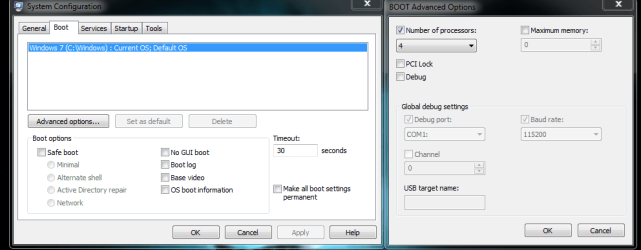
When you upgraded to the 64 bit OS, did you install all the 64 bit drivers? Have you cleaned out all the ports and intake and exhaust vents from dust? Have you gone into system configuration, boot tab, advanced options and checked the box for how many cores are to be activated...windows 7 natively sets it to 1. So if you have a multi-core that needs to change to how ever many cores you have. This could help the over heating problem.


system config.PNG
 

My Computer

Computer Manufacturer/Model Number
Custom built
OS
Windows 7 Ultimate 64 bit
CPU
AMD Phenom II X4 965 Black Edition
Motherboard
Gigabyte GA-MA790X-DS4
Memory
GSkill 4 X 2 GB PC 8500
Graphics Card(s)
XFX Radeon HD 6790 D
Sound Card
On board RealTek HD
Monitor(s) Displays
Dual monitors:Samsung SyncMaster S20B300
Screen Resolution
1600 X 900
Hard Drives
Seagate Barracuda 1TB (primary)
Seagate Barracuda 2 X 320 GB
PSU
Ultra X4 750 watt fully modular
Case
Thermaltake Overseer RX 1 full tower
Cooling
Core-Contact 92 mm CPU Cooler
Keyboard
Logitech G510
Mouse
Razor DeathAdder
Internet Speed
50/5 Mbps UL/DL
Other Info
Optical: Super Muliti DVD burner w/lightscribe, Hauppauge WinTV HVR-1800
When you upgraded to the 64 bit OS, did you install all the 64 bit drivers? Have you cleaned out all the ports and intake and exhaust vents from dust? Have you gone into system configuration, boot tab, advanced options and checked the box for how many cores are to be activated...windows 7 natively sets it to 1. So if you have a multi-core that needs to change to how ever many cores you have. This could help the over heating problem.


View attachment 197614

Yes, I think I have, I used my laptop's drive installer which I got when I bought the laptop and when installing it didn't ask whether I am using 64 or 32 bit, so I guess I did install all? Yup, I just did when I noticed the unusual heating of my laptop, I think the problem is that I didn't set for how many cores are to be activated and that I have a multi core processor. thank you sir!
 

My Computer

Computer Manufacturer/Model Number
ASUS
OS
Windows 7 x64
CPU
AMD Athlon™ X2 Dual-Core Processor M320 2.1GHz
Memory
DDR2 800 MHz 4 GB SDRAM
Graphics Card(s)
ATI Mobility Radeon HD 4200
How's the overheating doing?
 

My Computer

Computer Manufacturer/Model Number
Custom built
OS
Windows 7 Ultimate 64 bit
CPU
AMD Phenom II X4 965 Black Edition
Motherboard
Gigabyte GA-MA790X-DS4
Memory
GSkill 4 X 2 GB PC 8500
Graphics Card(s)
XFX Radeon HD 6790 D
Sound Card
On board RealTek HD
Monitor(s) Displays
Dual monitors:Samsung SyncMaster S20B300
Screen Resolution
1600 X 900
Hard Drives
Seagate Barracuda 1TB (primary)
Seagate Barracuda 2 X 320 GB
PSU
Ultra X4 750 watt fully modular
Case
Thermaltake Overseer RX 1 full tower
Cooling
Core-Contact 92 mm CPU Cooler
Keyboard
Logitech G510
Mouse
Razor DeathAdder
Internet Speed
50/5 Mbps UL/DL
Other Info
Optical: Super Muliti DVD burner w/lightscribe, Hauppauge WinTV HVR-1800
You could also try the cooling pads they sell at Walmart.
 

My Computer

OS
Windows 7 ultimate x64
CPU
Intel Core i7 3960x 3.3ghz
Motherboard
X79MA-GD45 Micro-ATX
Memory
32GB (4x8GB) 1333MHz
Graphics Card(s)
GeForce GTX 580 (3GB) x2
Sound Card
on-Board Audio
Monitor(s) Displays
27" 1920x1080
Screen Resolution
1920x1080
Hard Drives
2TB - 7200rpm X2
512GB - SSD X2
PSU
1200 watt modular
Case
FragBox - Standard
Cooling
Liquid Cooling - ECO II 80
Keyboard
Logitech G-510
Mouse
Logitech G9
Internet Speed
5mb down 3mb up
Clean the heatsink, it might be clogged with dust.
 

My Computer

Computer type
PC/Desktop
OS
Microsoft Windows 10 Professional / Windows 7 Professional
CPU
Intel i5-3570
Motherboard
Lenovo Mahobay
Memory
16GB DDR3
Graphics Card(s)
AMD Radeon HD 7850 2GB
Sound Card
(1) Realtek HD Audio (2) AMD HD Audio
Monitor(s) Displays
LG LS192WS
Screen Resolution
1440 x 900 @ 32bit color
Hard Drives
(1) SUV300S37A/120G (2) ST3500413AS SATA Disk Device AHCI mode enabled.
PSU
Corsair HX620
Case
Thermaltake V4 Black Edition
Cooling
Cooler Master Hyper 212 + Artic Silver 5 on CPU/GPU
Keyboard
Dell SK-8115
Mouse
Razer Copperhead with MAPED mat (awesome!)
Internet Speed
100 Mbps up/down
Browser
Chrome
Back
Top